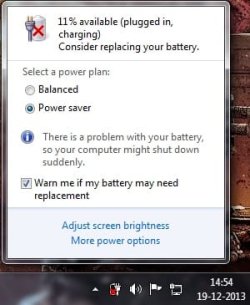
There is a problem with your battery

Mysterious

unknown
Member
VIP
Local time
1:38 PM
Messages
108
Location
India,Punjab
Hi,i'm getting this error.plz help me >>
 

Attachments

  • battery problem.jpg
    battery problem.jpg
    19.6 KB · Views: 30

My Computer My Computer

Computer type
Laptop
Computer Manufacturer/Model Number
Asus
OS
Windows 7 Ultimate x86
CPU
Intel® Pentium® Dual Core CPU B950 @ 2.10GHz
Motherboard
Asustek Computer Inc.
Memory
2GB DDR3
Graphics Card(s)
Intel® HD Graphics
Sound Card
Realtek High Definition Audio(ALC269) With Sonic Master
Screen Resolution
1366x768
Hard Drives
320GB Seagate
Keyboard
Keyboard Device Filter (Provider-ATK)
Mouse
HID-compliant mouse,Microsoft PS2/Mouse
Internet Speed
Very Slow
Antivirus
Kaspersky Internet Security 2013/Malwarebytes Anti-Malware
Browser
Goggle Chrome
Well, if you're running your laptop with the battery in AND the plug, that could've caused some issues or if you don't use the battery enough it loses its ability to keep a charge over time. Batteries wear out faster in not completely charged or drained as well if they are used in such a state. There might've also been an issue with it from the start. If the laptop is under warranty, replace the battery.

Use battery Pro to keep an eye on the battery drains.
 

My Computer My Computer

Computer type
PC/Desktop
Computer Manufacturer/Model Number
Custom Bulid/Self made
OS
Windows 11 x64
CPU
i5 2500K @ 3.3 GHz
Motherboard
ASUS P8 Z77 V pro
Memory
16 GB DDR 3 @ 1600Mhz
Graphics Card(s)
MSI 1050TI 4GB OC version
Sound Card
On Board (Realtek HD audio)
Monitor(s) Displays
Samsung 22" LCD
Screen Resolution
1920*1080
Hard Drives
Seagate 1 TB, WD 1TB, Seagate 2 TB ( I use a lot of space)
PSU
coolermaster 750 W
Case
Coolermaster HAF912
Cooling
Coolermaster hyper 212 EVO
Keyboard
Samsung
Mouse
Dell Wireless
Internet Speed
Wireless 50 Mbps
Antivirus
AVG 2016 Internet Security
Browser
Google Chrome
Well, if you're running your laptop with the battery in AND the plug, that could've caused some issues or if you don't use the battery enough it loses its ability to keep a charge over time. Batteries wear out faster in not completely charged or drained as well if they are used in such a state. There might've also been an issue with it from the start. If the laptop is under warranty, replace the battery.

Use battery Pro to keep an eye on the battery drains.

no my laptop is not under warranty,now i can't replace it :(
i think my battery seems completely ok.maybe there is virus in my laptop or some driver issue,not sure :confused:
i'm also use laptop when on battery,only plugged in when it is on low level
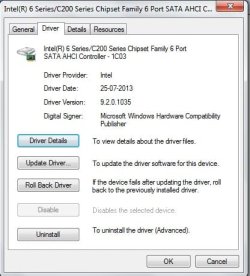
i installed intel chipset drivers recently,maybe that is the issue,i don't think so >>
 

Attachments

  • Intel chipset driver.jpg
    Intel chipset driver.jpg
    30.7 KB · Views: 30

My Computer My Computer

Computer type
Laptop
Computer Manufacturer/Model Number
Asus
OS
Windows 7 Ultimate x86
CPU
Intel® Pentium® Dual Core CPU B950 @ 2.10GHz
Motherboard
Asustek Computer Inc.
Memory
2GB DDR3
Graphics Card(s)
Intel® HD Graphics
Sound Card
Realtek High Definition Audio(ALC269) With Sonic Master
Screen Resolution
1366x768
Hard Drives
320GB Seagate
Keyboard
Keyboard Device Filter (Provider-ATK)
Mouse
HID-compliant mouse,Microsoft PS2/Mouse
Internet Speed
Very Slow
Antivirus
Kaspersky Internet Security 2013/Malwarebytes Anti-Malware
Browser
Goggle Chrome
If you get this error on your laptop it means one of two things

1. Your battery is dying, and it needs to be replaced
2. Windows 7 cannot properly detect how much power is in the battery

To determine what's wrong,
click start
In the box that says "search programs and files", Type in CMD
You should see a "cmd.exe" show up in the top of the start menu
Right click the cmd icon, run as administrator
type in powercfg -energy
This will test your battery, and produce a report in C:\Windows\System32\energy-report.html
You can open this file in a regular browser or Word
If it is able to read the battery, and produce a report, look at the line that says "design capacity" and "last full charge"
This will show how much the battery should hold, and how much it's actually holding
If you run the test over a few days or weeks, and this number is steadily decreasing over time, it means your battery is dying, and you need a new one eventually
You can always untick the "warn me if my battery needs replacing" if you just want to get rid of the annoying message

If it is unable to read the battery and produce a report, then windows is not communicating with the battery.
This is a BIOS issue, and it means that Windows 7 just isn't going to read your battery properly.
You can try updating your BIOS, but it probably won't work.
Long story short, there's nothing you can do about the warning.
in your cmd box, run powercfg -setdcvalueindex SCHEME_CURRENT SUB_BATTERY BATACTIONCRIT 0
This will just let windows run until the battery hits 0, regardless of how much power it "thinks" it has

 

My Computer My Computer

Computer type
PC/Desktop
Computer Manufacturer/Model Number
Custom Bulid/Self made
OS
Windows 11 x64
CPU
i5 2500K @ 3.3 GHz
Motherboard
ASUS P8 Z77 V pro
Memory
16 GB DDR 3 @ 1600Mhz
Graphics Card(s)
MSI 1050TI 4GB OC version
Sound Card
On Board (Realtek HD audio)
Monitor(s) Displays
Samsung 22" LCD
Screen Resolution
1920*1080
Hard Drives
Seagate 1 TB, WD 1TB, Seagate 2 TB ( I use a lot of space)
PSU
coolermaster 750 W
Case
Coolermaster HAF912
Cooling
Coolermaster hyper 212 EVO
Keyboard
Samsung
Mouse
Dell Wireless
Internet Speed
Wireless 50 Mbps
Antivirus
AVG 2016 Internet Security
Browser
Google Chrome
If you get this error on your laptop it means one of two things

1. Your battery is dying, and it needs to be replaced
2. Windows 7 cannot properly detect how much power is in the battery

To determine what's wrong,
click start
In the box that says "search programs and files", Type in CMD
You should see a "cmd.exe" show up in the top of the start menu
Right click the cmd icon, run as administrator
type in powercfg -energy
This will test your battery, and produce a report in C:\Windows\System32\energy-report.html
You can open this file in a regular browser or Word
If it is able to read the battery, and produce a report, look at the line that says "design capacity" and "last full charge"
This will show how much the battery should hold, and how much it's actually holding
If you run the test over a few days or weeks, and this number is steadily decreasing over time, it means your battery is dying, and you need a new one eventually
You can always untick the "warn me if my battery needs replacing" if you just want to get rid of the annoying message

If it is unable to read the battery and produce a report, then windows is not communicating with the battery.
This is a BIOS issue, and it means that Windows 7 just isn't going to read your battery properly.
You can try updating your BIOS, but it probably won't work.
Long story short, there's nothing you can do about the warning.
in your cmd box, run powercfg -setdcvalueindex SCHEME_CURRENT SUB_BATTERY BATACTIONCRIT 0
This will just let windows run until the battery hits 0, regardless of how much power it "thinks" it has

Hi archer,u'r battery pro messed up with my system.i can't click on anything on taskbar after installing batterybarpro,so i forcedely shut down my pc & now uninstalled it.basically i don't trust any third party programs.u told me that's why i downloaded & insatlled it.well maybe issue is in my side,can't blame you.
i ran cmd command & this is the report >>
 

Attachments

My Computer My Computer

Computer type
Laptop
Computer Manufacturer/Model Number
Asus
OS
Windows 7 Ultimate x86
CPU
Intel® Pentium® Dual Core CPU B950 @ 2.10GHz
Motherboard
Asustek Computer Inc.
Memory
2GB DDR3
Graphics Card(s)
Intel® HD Graphics
Sound Card
Realtek High Definition Audio(ALC269) With Sonic Master
Screen Resolution
1366x768
Hard Drives
320GB Seagate
Keyboard
Keyboard Device Filter (Provider-ATK)
Mouse
HID-compliant mouse,Microsoft PS2/Mouse
Internet Speed
Very Slow
Antivirus
Kaspersky Internet Security 2013/Malwarebytes Anti-Malware
Browser
Goggle Chrome
Sorry for the mess up bro. First of, It's not "My" battery pro. I did not write the codes for that.

Anyways, as per the report. The results are

Design Capacity 57200
Last Full Charge 39292

Run the diagnostic again and check, if the numbers are going down drastically. If yes, then the battery life is over.
 

My Computer My Computer

Computer type
PC/Desktop
Computer Manufacturer/Model Number
Custom Bulid/Self made
OS
Windows 11 x64
CPU
i5 2500K @ 3.3 GHz
Motherboard
ASUS P8 Z77 V pro
Memory
16 GB DDR 3 @ 1600Mhz
Graphics Card(s)
MSI 1050TI 4GB OC version
Sound Card
On Board (Realtek HD audio)
Monitor(s) Displays
Samsung 22" LCD
Screen Resolution
1920*1080
Hard Drives
Seagate 1 TB, WD 1TB, Seagate 2 TB ( I use a lot of space)
PSU
coolermaster 750 W
Case
Coolermaster HAF912
Cooling
Coolermaster hyper 212 EVO
Keyboard
Samsung
Mouse
Dell Wireless
Internet Speed
Wireless 50 Mbps
Antivirus
AVG 2016 Internet Security
Browser
Google Chrome
Yes i know it's not u'r program.but u suggested me this,that's why i said that.
Anyway yes it's saying that it can hold more power,but it holding less..& also in cmd there are 14 errors,19 warnings & i think 12 informational messages,btw did u see the report ?
And some questions from messages that i saw in report
do i really need to set automatically sleep time in all power plans ? (because i selected never) because then it will automatically sleep my pc after 15 minutes,whatever time set there ?
& some more annoying messages there.well i'm re-installing my windows now.will see how it goes & reply back !!
 

My Computer My Computer

Computer type
Laptop
Computer Manufacturer/Model Number
Asus
OS
Windows 7 Ultimate x86
CPU
Intel® Pentium® Dual Core CPU B950 @ 2.10GHz
Motherboard
Asustek Computer Inc.
Memory
2GB DDR3
Graphics Card(s)
Intel® HD Graphics
Sound Card
Realtek High Definition Audio(ALC269) With Sonic Master
Screen Resolution
1366x768
Hard Drives
320GB Seagate
Keyboard
Keyboard Device Filter (Provider-ATK)
Mouse
HID-compliant mouse,Microsoft PS2/Mouse
Internet Speed
Very Slow
Antivirus
Kaspersky Internet Security 2013/Malwarebytes Anti-Malware
Browser
Goggle Chrome
Koi naa veere! ae taa honda hi rehnda aae ;)

(translation: Don't worry bro! it happens).

Yes, change the power plan. That helps to save the battery as well.
 

My Computer My Computer

Computer type
PC/Desktop
Computer Manufacturer/Model Number
Custom Bulid/Self made
OS
Windows 11 x64
CPU
i5 2500K @ 3.3 GHz
Motherboard
ASUS P8 Z77 V pro
Memory
16 GB DDR 3 @ 1600Mhz
Graphics Card(s)
MSI 1050TI 4GB OC version
Sound Card
On Board (Realtek HD audio)
Monitor(s) Displays
Samsung 22" LCD
Screen Resolution
1920*1080
Hard Drives
Seagate 1 TB, WD 1TB, Seagate 2 TB ( I use a lot of space)
PSU
coolermaster 750 W
Case
Coolermaster HAF912
Cooling
Coolermaster hyper 212 EVO
Keyboard
Samsung
Mouse
Dell Wireless
Internet Speed
Wireless 50 Mbps
Antivirus
AVG 2016 Internet Security
Browser
Google Chrome
Koi na veere,pata aa mainu,mai eh pushda c k mai sleep time rakha ya nhi ? :)
 

My Computer My Computer

Computer type
Laptop
Computer Manufacturer/Model Number
Asus
OS
Windows 7 Ultimate x86
CPU
Intel® Pentium® Dual Core CPU B950 @ 2.10GHz
Motherboard
Asustek Computer Inc.
Memory
2GB DDR3
Graphics Card(s)
Intel® HD Graphics
Sound Card
Realtek High Definition Audio(ALC269) With Sonic Master
Screen Resolution
1366x768
Hard Drives
320GB Seagate
Keyboard
Keyboard Device Filter (Provider-ATK)
Mouse
HID-compliant mouse,Microsoft PS2/Mouse
Internet Speed
Very Slow
Antivirus
Kaspersky Internet Security 2013/Malwarebytes Anti-Malware
Browser
Goggle Chrome
Yes, please keep sleep time.
 

My Computer My Computer

Computer type
PC/Desktop
Computer Manufacturer/Model Number
Custom Bulid/Self made
OS
Windows 11 x64
CPU
i5 2500K @ 3.3 GHz
Motherboard
ASUS P8 Z77 V pro
Memory
16 GB DDR 3 @ 1600Mhz
Graphics Card(s)
MSI 1050TI 4GB OC version
Sound Card
On Board (Realtek HD audio)
Monitor(s) Displays
Samsung 22" LCD
Screen Resolution
1920*1080
Hard Drives
Seagate 1 TB, WD 1TB, Seagate 2 TB ( I use a lot of space)
PSU
coolermaster 750 W
Case
Coolermaster HAF912
Cooling
Coolermaster hyper 212 EVO
Keyboard
Samsung
Mouse
Dell Wireless
Internet Speed
Wireless 50 Mbps
Antivirus
AVG 2016 Internet Security
Browser
Google Chrome
Yes, please keep sleep time.

ok...but it automatically sleep after given time ?
Pher eh ditte hoye time to baad band ho jayoga ? Mai kinna time rakha ?
 

My Computer My Computer

Computer type
Laptop
Computer Manufacturer/Model Number
Asus
OS
Windows 7 Ultimate x86
CPU
Intel® Pentium® Dual Core CPU B950 @ 2.10GHz
Motherboard
Asustek Computer Inc.
Memory
2GB DDR3
Graphics Card(s)
Intel® HD Graphics
Sound Card
Realtek High Definition Audio(ALC269) With Sonic Master
Screen Resolution
1366x768
Hard Drives
320GB Seagate
Keyboard
Keyboard Device Filter (Provider-ATK)
Mouse
HID-compliant mouse,Microsoft PS2/Mouse
Internet Speed
Very Slow
Antivirus
Kaspersky Internet Security 2013/Malwarebytes Anti-Malware
Browser
Goggle Chrome
Yes, it will sleep after the time you select. You can select any time with which you are comfortable with.
 

My Computer My Computer

Computer type
PC/Desktop
Computer Manufacturer/Model Number
Custom Bulid/Self made
OS
Windows 11 x64
CPU
i5 2500K @ 3.3 GHz
Motherboard
ASUS P8 Z77 V pro
Memory
16 GB DDR 3 @ 1600Mhz
Graphics Card(s)
MSI 1050TI 4GB OC version
Sound Card
On Board (Realtek HD audio)
Monitor(s) Displays
Samsung 22" LCD
Screen Resolution
1920*1080
Hard Drives
Seagate 1 TB, WD 1TB, Seagate 2 TB ( I use a lot of space)
PSU
coolermaster 750 W
Case
Coolermaster HAF912
Cooling
Coolermaster hyper 212 EVO
Keyboard
Samsung
Mouse
Dell Wireless
Internet Speed
Wireless 50 Mbps
Antivirus
AVG 2016 Internet Security
Browser
Google Chrome
Yes, it will sleep after the time you select. You can select any time with which you are comfortable with.

if i select never,then ?
 

My Computer My Computer

Computer type
Laptop
Computer Manufacturer/Model Number
Asus
OS
Windows 7 Ultimate x86
CPU
Intel® Pentium® Dual Core CPU B950 @ 2.10GHz
Motherboard
Asustek Computer Inc.
Memory
2GB DDR3
Graphics Card(s)
Intel® HD Graphics
Sound Card
Realtek High Definition Audio(ALC269) With Sonic Master
Screen Resolution
1366x768
Hard Drives
320GB Seagate
Keyboard
Keyboard Device Filter (Provider-ATK)
Mouse
HID-compliant mouse,Microsoft PS2/Mouse
Internet Speed
Very Slow
Antivirus
Kaspersky Internet Security 2013/Malwarebytes Anti-Malware
Browser
Goggle Chrome
If you select "Never". Your system will not sleep at all. Display will be always on.
 

My Computer My Computer

Computer type
PC/Desktop
Computer Manufacturer/Model Number
Custom Bulid/Self made
OS
Windows 11 x64
CPU
i5 2500K @ 3.3 GHz
Motherboard
ASUS P8 Z77 V pro
Memory
16 GB DDR 3 @ 1600Mhz
Graphics Card(s)
MSI 1050TI 4GB OC version
Sound Card
On Board (Realtek HD audio)
Monitor(s) Displays
Samsung 22" LCD
Screen Resolution
1920*1080
Hard Drives
Seagate 1 TB, WD 1TB, Seagate 2 TB ( I use a lot of space)
PSU
coolermaster 750 W
Case
Coolermaster HAF912
Cooling
Coolermaster hyper 212 EVO
Keyboard
Samsung
Mouse
Dell Wireless
Internet Speed
Wireless 50 Mbps
Antivirus
AVG 2016 Internet Security
Browser
Google Chrome
If you select "Never". Your system will not sleep at all. Display will be always on.

ok...i asked it because in the battery report there were errors about sleep time.
I'm speaking in english because this is is english forum & see the rules,if u want to speak in our language,pm me ;)
 

My Computer My Computer

Computer type
Laptop
Computer Manufacturer/Model Number
Asus
OS
Windows 7 Ultimate x86
CPU
Intel® Pentium® Dual Core CPU B950 @ 2.10GHz
Motherboard
Asustek Computer Inc.
Memory
2GB DDR3
Graphics Card(s)
Intel® HD Graphics
Sound Card
Realtek High Definition Audio(ALC269) With Sonic Master
Screen Resolution
1366x768
Hard Drives
320GB Seagate
Keyboard
Keyboard Device Filter (Provider-ATK)
Mouse
HID-compliant mouse,Microsoft PS2/Mouse
Internet Speed
Very Slow
Antivirus
Kaspersky Internet Security 2013/Malwarebytes Anti-Malware
Browser
Goggle Chrome
new energy report with lots of errors & warnings.this time re-installed windows & no sign of replace battery error,but in report battery life decreased.i don't think this is because of battery dying.i think my processor @ high usage & lots of other errors & warnings causing this,plz look @ it >>
 

Attachments

My Computer My Computer

Computer type
Laptop
Computer Manufacturer/Model Number
Asus
OS
Windows 7 Ultimate x86
CPU
Intel® Pentium® Dual Core CPU B950 @ 2.10GHz
Motherboard
Asustek Computer Inc.
Memory
2GB DDR3
Graphics Card(s)
Intel® HD Graphics
Sound Card
Realtek High Definition Audio(ALC269) With Sonic Master
Screen Resolution
1366x768
Hard Drives
320GB Seagate
Keyboard
Keyboard Device Filter (Provider-ATK)
Mouse
HID-compliant mouse,Microsoft PS2/Mouse
Internet Speed
Very Slow
Antivirus
Kaspersky Internet Security 2013/Malwarebytes Anti-Malware
Browser
Goggle Chrome
OK, This time results are

Design Capacity 57200
Last Full Charge 35299

So, we can be assured that the battery is not the issue. Run Malware bytes and CCleaner to scan and clean the PC with any errors. Run SFC /SCNNOW.

Keep us posted dude.
 

My Computer My Computer

Computer type
PC/Desktop
Computer Manufacturer/Model Number
Custom Bulid/Self made
OS
Windows 11 x64
CPU
i5 2500K @ 3.3 GHz
Motherboard
ASUS P8 Z77 V pro
Memory
16 GB DDR 3 @ 1600Mhz
Graphics Card(s)
MSI 1050TI 4GB OC version
Sound Card
On Board (Realtek HD audio)
Monitor(s) Displays
Samsung 22" LCD
Screen Resolution
1920*1080
Hard Drives
Seagate 1 TB, WD 1TB, Seagate 2 TB ( I use a lot of space)
PSU
coolermaster 750 W
Case
Coolermaster HAF912
Cooling
Coolermaster hyper 212 EVO
Keyboard
Samsung
Mouse
Dell Wireless
Internet Speed
Wireless 50 Mbps
Antivirus
AVG 2016 Internet Security
Browser
Google Chrome
Archer, what do the number mean?
 

My Computer My Computer

Computer type
PC/Desktop
Computer Manufacturer/Model Number
Home Built Desktop By DataTech
OS
Windows 7 Ultimate X64 SP1
CPU
Intel i5-2550K, Differing ~4.4-4.8GHz No built in GPU
Motherboard
ASUS P8Z68-V PRO/GEN3
Memory
16GB G.Skill Sniper 1866MHz @ 2133MHz 2x8GB
Graphics Card(s)
ASUS GTX650TIB-DC2OC-2GD5, (650TI Boost)
Sound Card
Onboard Realtek 5-1
Monitor(s) Displays
Samsung P2570HD
Screen Resolution
1920x1080
Hard Drives
Samsung 840 Pro 256GB SSD for OS, 500GB Seagate Constellation (Enterprise drive) for Data
PSU
Corsair HX650W
Case
Inwin Dragon Rider
Cooling
Hyper 212 EVO w/two Noctua fans, push-pull, @1300 RPM
Keyboard
E-Z Eyes, bright yellow keys with large characters
Mouse
steelseries SENSEI Laser Pro Gaming
Internet Speed
48-51Mbs Mbs down, 11 Mbs up Xfinity Cable
Antivirus
Norton Internet Security 2013
Browser
IE 10, Opera, Pale Moon if needed
Other Info
4 case fans, LG BluRay-RE, ASUS DVD-RW, Mr. Fusion power supply, 1.21 gigawatts.
Hey Britton..numbers mean..how much the battery should hold and how much it is holding....charge
 

My Computer My Computer

Computer type
PC/Desktop
Computer Manufacturer/Model Number
Custom Bulid/Self made
OS
Windows 11 x64
CPU
i5 2500K @ 3.3 GHz
Motherboard
ASUS P8 Z77 V pro
Memory
16 GB DDR 3 @ 1600Mhz
Graphics Card(s)
MSI 1050TI 4GB OC version
Sound Card
On Board (Realtek HD audio)
Monitor(s) Displays
Samsung 22" LCD
Screen Resolution
1920*1080
Hard Drives
Seagate 1 TB, WD 1TB, Seagate 2 TB ( I use a lot of space)
PSU
coolermaster 750 W
Case
Coolermaster HAF912
Cooling
Coolermaster hyper 212 EVO
Keyboard
Samsung
Mouse
Dell Wireless
Internet Speed
Wireless 50 Mbps
Antivirus
AVG 2016 Internet Security
Browser
Google Chrome
Hi..i'll try it..btw i tried malwarebytes before.but it's not good & also ccleaner,but that's also not very useful.i'm using only windows internal programs for cleaning & i have Kaspersky internet security 2013 :)
 

My Computer My Computer

Computer type
Laptop
Computer Manufacturer/Model Number
Asus
OS
Windows 7 Ultimate x86
CPU
Intel® Pentium® Dual Core CPU B950 @ 2.10GHz
Motherboard
Asustek Computer Inc.
Memory
2GB DDR3
Graphics Card(s)
Intel® HD Graphics
Sound Card
Realtek High Definition Audio(ALC269) With Sonic Master
Screen Resolution
1366x768
Hard Drives
320GB Seagate
Keyboard
Keyboard Device Filter (Provider-ATK)
Mouse
HID-compliant mouse,Microsoft PS2/Mouse
Internet Speed
Very Slow
Antivirus
Kaspersky Internet Security 2013/Malwarebytes Anti-Malware
Browser
Goggle Chrome
Back
Top