2TB hard drive becomes inaccessible,

Jamal NUMAN

New member
Member
VIP
Local time
10:16 AM
Messages
144
2TB hard drive becomes inaccessible,

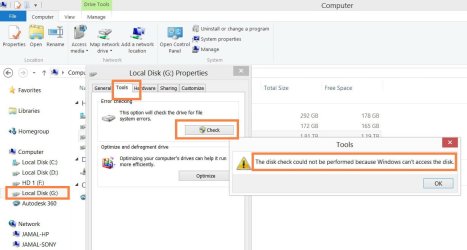
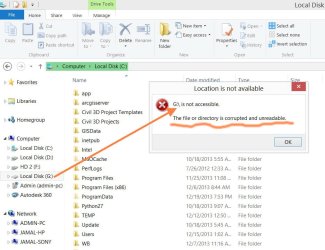
As I try to access my 2TB hard drive I got the message that says that the hard drive is inaccessible (attached). What is weird that this happens while I was accessing it and editing one of my Word files. No physical damage has occurred at all.


What might be the issue here?

Thank you

Best

Jamal
 

Attachments
  • Clip_598.jpg
    Clip_598.jpg
    74.9 KB · Views: 1

My Computer My Computer

OS
Windows 7 Ultimate x64
First if possible back up all data on the HDD.

Test the HD with maker's HD Diagnostic extended CD scan.

Then run a full Disk Check.

This will either confirm the HDD good, repair the HDD, or pronounce it dead.
 
it appears windows is trying to tell you that somehow something seems to have corrupted that local disk. One thing i might try is to go to a command prompt and do a scannow command. that should bring up the exact syntax(command) to use to scan the drive for errors and to have it try and fix the errors. If that does not do anything; You might be able to try to do a repair install by booting off the windows disk and once the install windows screen comes up; click on repair computer. Hope one of these things might help ya out.
 

My Computer My Computer

Computer type
PC/Desktop
Computer Manufacturer/Model Number
custom built
OS
Windows 7 ultimate 64-bit
CPU
Intel I7 2600K 3.4ghz
Motherboard
Asus Evo P8P67
Memory
Corsair 16gb ddr3 1600mhz
Graphics Card(s)
Nvidia Geforce gt 430
Sound Card
Sound Blaster Titanium x-fi pci express
Monitor(s) Displays
Dell E198WFP
Hard Drives
1 western digital 2TB drive.
PSU
Antec 1200 watt
Case
Inwin Dragon Rider
Cooling
6 case supplied cooling fans
Keyboard
logitech mk700
Mouse
logitech m705
Internet Speed
25-50mbps download; 10mbps upload(i think)
Antivirus
avg free 2014
Browser
mozilla firefox
Other Info
Also have a pretty bad speaker setup which is a klipsch promedia 5.1 surround speaker setup with huge subwoofer and lg blu ray player/writer. Also a hp officejet pro 8600 plus wireless all in one and a logitech s7500 webcam.
it appears windows is trying to tell you that somehow something seems to have corrupted that local disk. One thing i might try is to go to a command prompt and do a scannow command. that should bring up the exact syntax(command) to use to scan the drive for errors and to have it try and fix the errors. If that does not do anything; You might be able to try to do a repair install by booting off the windows disk and once the install windows screen comes up; click on repair computer. Hope one of these things might help ya out.

Many thanks gregrocker and matts6887 for the help,

Fortunately: I have a backup of this HD to the nearest day. My worries here about the concept and how easy it is to lose data.

The issue here is that the disk not accessible. No commands are working. Please, have a look on the attached screenshots.


One option is left (as matts6887 has already advised) booting with windows and repair


What other options can I still have?
 

Attachments

  • Clip_599.jpg
    Clip_599.jpg
    58.3 KB · Views: 0
  • Clip_600.jpg
    Clip_600.jpg
    69.3 KB · Views: 0

My Computer My Computer

OS
Windows 7 Ultimate x64
Please follow the steps in order that I gave them.

What are the results of the HD maker's HD Diagnostic extended CD scan?

If the HD will not test or run a Disk Check then try reinstalling it, replacing its cables or replacing the HD.
 
Please follow the steps in order that I gave them.

What are the results of the HD maker's HD Diagnostic extended CD scan?

If the HD will not test or run a Disk Check then try reinstalling it, replacing its cables or replacing the HD.

I agree here. It sounds like for some reason the hard drive just all the sudden went "dead"; possibly because of old age maybe? how old is the drive? Also as greg mentioned; you could try replacing the cable for the hard drive and see if that resolved the issue. If not the drive is probably as much as i may hate to say it; possibly a goner.
 

My Computer My Computer

Computer type
PC/Desktop
Computer Manufacturer/Model Number
custom built
OS
Windows 7 ultimate 64-bit
CPU
Intel I7 2600K 3.4ghz
Motherboard
Asus Evo P8P67
Memory
Corsair 16gb ddr3 1600mhz
Graphics Card(s)
Nvidia Geforce gt 430
Sound Card
Sound Blaster Titanium x-fi pci express
Monitor(s) Displays
Dell E198WFP
Hard Drives
1 western digital 2TB drive.
PSU
Antec 1200 watt
Case
Inwin Dragon Rider
Cooling
6 case supplied cooling fans
Keyboard
logitech mk700
Mouse
logitech m705
Internet Speed
25-50mbps download; 10mbps upload(i think)
Antivirus
avg free 2014
Browser
mozilla firefox
Other Info
Also have a pretty bad speaker setup which is a klipsch promedia 5.1 surround speaker setup with huge subwoofer and lg blu ray player/writer. Also a hp officejet pro 8600 plus wireless all in one and a logitech s7500 webcam.
it appears windows is trying to tell you that somehow something seems to have corrupted that local disk. One thing i might try is to go to a command prompt and do a scannow command. that should bring up the exact syntax(command) to use to scan the drive for errors and to have it try and fix the errors. If that does not do anything; You might be able to try to do a repair install by booting off the windows disk and once the install windows screen comes up; click on repair computer. Hope one of these things might help ya out.

Many thanks gregrocker and matts6887 for the help,

Fortunately: I have a backup of this HD to the nearest day. My worries here about the concept and how easy it is to lose data.

The issue here is that the disk not accessible. No commands are working. Please, have a look on the attached screenshots.


One option is left (as matts6887 has already advised) booting with windows and repair


What other options can I still have?

I would still also give the repair computer option by running the repair option off the windows disk a shot. IF that does not do anything to resolve it then the drive is probably a goner.
 

My Computer My Computer

Computer type
PC/Desktop
Computer Manufacturer/Model Number
custom built
OS
Windows 7 ultimate 64-bit
CPU
Intel I7 2600K 3.4ghz
Motherboard
Asus Evo P8P67
Memory
Corsair 16gb ddr3 1600mhz
Graphics Card(s)
Nvidia Geforce gt 430
Sound Card
Sound Blaster Titanium x-fi pci express
Monitor(s) Displays
Dell E198WFP
Hard Drives
1 western digital 2TB drive.
PSU
Antec 1200 watt
Case
Inwin Dragon Rider
Cooling
6 case supplied cooling fans
Keyboard
logitech mk700
Mouse
logitech m705
Internet Speed
25-50mbps download; 10mbps upload(i think)
Antivirus
avg free 2014
Browser
mozilla firefox
Other Info
Also have a pretty bad speaker setup which is a klipsch promedia 5.1 surround speaker setup with huge subwoofer and lg blu ray player/writer. Also a hp officejet pro 8600 plus wireless all in one and a logitech s7500 webcam.
it appears windows is trying to tell you that somehow something seems to have corrupted that local disk. One thing i might try is to go to a command prompt and do a scannow command. that should bring up the exact syntax(command) to use to scan the drive for errors and to have it try and fix the errors. If that does not do anything; You might be able to try to do a repair install by booting off the windows disk and once the install windows screen comes up; click on repair computer. Hope one of these things might help ya out.

Many thanks gregrocker and matts6887 for the help,

Fortunately: I have a backup of this HD to the nearest day. My worries here about the concept and how easy it is to lose data.

The issue here is that the disk not accessible. No commands are working. Please, have a look on the attached screenshots.


One option is left (as matts6887 has already advised) booting with windows and repair


What other options can I still have?

I would still also give the repair computer option by running the repair option off the windows disk a shot. IF that does not do anything to resolve it then the drive is probably a goner.


Many thanks guys for the help,

My 2TB drive is really new (less than one year in operation) of WD brand (my passport). Due to the fact that I have its back up with one day work loss, I preferred to format it. I did and it works fine now as if nothing happened.

My concerns here is that “data loss” is possible at any time without having simple tools for end users to get it repaired. I think that Windows should provide much more powerful tools to face this challenge. There is no value for our life if our data can be easily lost. Our data is our time and then it is part of our life.

Appreciated

Jamal
 

My Computer My Computer

OS
Windows 7 Ultimate x64
Back
Top