i think i have got virus

My Computer My Computer

At a glance

Windows 7 Ultimate X64 SP1Intel i5-2550K, Differing ~4.4-4.8GHz No buil...16GB G.Skill Sniper 1866MHz @ 2133MHz 2x8GBASUS GTX650TIB-DC2OC-2GD5, (650TI Boost)
Computer type
PC/Desktop
Computer Manufacturer/Model Number
Home Built Desktop By DataTech
OS
Windows 7 Ultimate X64 SP1
CPU
Intel i5-2550K, Differing ~4.4-4.8GHz No built in GPU
Motherboard
ASUS P8Z68-V PRO/GEN3
Memory
16GB G.Skill Sniper 1866MHz @ 2133MHz 2x8GB
Graphics Card(s)
ASUS GTX650TIB-DC2OC-2GD5, (650TI Boost)
Sound Card
Onboard Realtek 5-1
Monitor(s) Displays
Samsung P2570HD
Screen Resolution
1920x1080
Hard Drives
Samsung 840 Pro 256GB SSD for OS, 500GB Seagate Constellation (Enterprise drive) for Data
PSU
Corsair HX650W
Case
Inwin Dragon Rider
Cooling
Hyper 212 EVO w/two Noctua fans, push-pull, @1300 RPM
Keyboard
E-Z Eyes, bright yellow keys with large characters
Mouse
steelseries SENSEI Laser Pro Gaming
Internet Speed
48-51Mbs Mbs down, 11 Mbs up Xfinity Cable
Antivirus
Norton Internet Security 2013
Browser
IE 10, Opera, Pale Moon if needed
Other Info
4 case fans, LG BluRay-RE, ASUS DVD-RW, Mr. Fusion power supply, 1.21 gigawatts.
ok guys relax i'll use malwarebytes.i also think i should keep it,Thanks all ;)
 

My Computer My Computer

At a glance

Windows 7 Ultimate x86Intel® Pentium® Dual Core CPU B950 @ 2.10GHz2GB DDR3Intel® HD Graphics
Computer type
Laptop
Computer Manufacturer/Model Number
Asus
OS
Windows 7 Ultimate x86
CPU
Intel® Pentium® Dual Core CPU B950 @ 2.10GHz
Motherboard
Asustek Computer Inc.
Memory
2GB DDR3
Graphics Card(s)
Intel® HD Graphics
Sound Card
Realtek High Definition Audio(ALC269) With Sonic Master
Screen Resolution
1366x768
Hard Drives
320GB Seagate
Keyboard
Keyboard Device Filter (Provider-ATK)
Mouse
HID-compliant mouse,Microsoft PS2/Mouse
Internet Speed
Very Slow
Antivirus
Kaspersky Internet Security 2013/Malwarebytes Anti-Malware
Browser
Goggle Chrome
when i open task manager my cpu usage goes to 90% or higher..but after some seconds it goes down to normal 5-6%.why is it that ? & my laptop fan also run fast.u think virus is still in my pc ?
i ran full scan with kaspersky & removed 1 infected file.but same problem when i open task manager it goes to 90% or higher,then in some seconds to normal 5-6% & my fan not run fast all time.it also goes normal in some time & again run fast random times.i'm going to full scan with malwarebyte.but u all think it's normal,it happens with u also ?
 

My Computer My Computer

At a glance

Windows 7 Ultimate x86Intel® Pentium® Dual Core CPU B950 @ 2.10GHz2GB DDR3Intel® HD Graphics
Computer type
Laptop
Computer Manufacturer/Model Number
Asus
OS
Windows 7 Ultimate x86
CPU
Intel® Pentium® Dual Core CPU B950 @ 2.10GHz
Motherboard
Asustek Computer Inc.
Memory
2GB DDR3
Graphics Card(s)
Intel® HD Graphics
Sound Card
Realtek High Definition Audio(ALC269) With Sonic Master
Screen Resolution
1366x768
Hard Drives
320GB Seagate
Keyboard
Keyboard Device Filter (Provider-ATK)
Mouse
HID-compliant mouse,Microsoft PS2/Mouse
Internet Speed
Very Slow
Antivirus
Kaspersky Internet Security 2013/Malwarebytes Anti-Malware
Browser
Goggle Chrome
My CPU is 0% when I open Task Manager. You may have a cooling/overheating problem more than a virus. Clean your vents, use on a hard surface.
Run Malware Bytes and Super Anti Spyware.
 

My Computer My Computer

At a glance

Windows 7 Ultimate X64 SP1Intel i5-2550K, Differing ~4.4-4.8GHz No buil...16GB G.Skill Sniper 1866MHz @ 2133MHz 2x8GBASUS GTX650TIB-DC2OC-2GD5, (650TI Boost)
Computer type
PC/Desktop
Computer Manufacturer/Model Number
Home Built Desktop By DataTech
OS
Windows 7 Ultimate X64 SP1
CPU
Intel i5-2550K, Differing ~4.4-4.8GHz No built in GPU
Motherboard
ASUS P8Z68-V PRO/GEN3
Memory
16GB G.Skill Sniper 1866MHz @ 2133MHz 2x8GB
Graphics Card(s)
ASUS GTX650TIB-DC2OC-2GD5, (650TI Boost)
Sound Card
Onboard Realtek 5-1
Monitor(s) Displays
Samsung P2570HD
Screen Resolution
1920x1080
Hard Drives
Samsung 840 Pro 256GB SSD for OS, 500GB Seagate Constellation (Enterprise drive) for Data
PSU
Corsair HX650W
Case
Inwin Dragon Rider
Cooling
Hyper 212 EVO w/two Noctua fans, push-pull, @1300 RPM
Keyboard
E-Z Eyes, bright yellow keys with large characters
Mouse
steelseries SENSEI Laser Pro Gaming
Internet Speed
48-51Mbs Mbs down, 11 Mbs up Xfinity Cable
Antivirus
Norton Internet Security 2013
Browser
IE 10, Opera, Pale Moon if needed
Other Info
4 case fans, LG BluRay-RE, ASUS DVD-RW, Mr. Fusion power supply, 1.21 gigawatts.

My Computer My Computer

At a glance

Windows 10 Pro. 64/ version 1709 Windows 7 Pr...Intel i7-6800K @ 4.3Corsair Platinum 16 gig @2400EVGA GTX 1070 OC
Computer type
PC/Desktop
Computer Manufacturer/Model Number
Home made Desktop
OS
Windows 10 Pro. 64/ version 1709 Windows 7 Pro/64
CPU
Intel i7-6800K @ 4.3
Motherboard
ASUS X-99 Deluxe II
Memory
Corsair Platinum 16 gig @2400
Graphics Card(s)
EVGA GTX 1070 OC
Monitor(s) Displays
Asus 27" LED LCD/VE278Q
Screen Resolution
1920-1080 or 1280-720 HDMI
Hard Drives
INTEL SSD 730-240 Gb Sata 3.0/
PSU
EVGA Platium 1200W
Case
Phanteks Luxe Tempered Glass 8 fans/ one radiator
Cooling
XSPC/ Water Cooled CPU
Keyboard
Das 4 Professional
Mouse
Logitech M705/MX Anywhere 2-S
Internet Speed
100 mbits
Antivirus
Microsoft Security Essentials/ Malwarebytes Premium 3.0/ SAS
Browser
I.E. 11 default/Firefox/ ISP Time Warner Cable/Spectrum
Other Info
LG BluRay Burner/
Sound system-KLipsch-THX/
Icy Dock ssd Hot Swap bays.

Hi Layback bear i can't find the igfxupdate..so both links are useless for me.anyway thanks for trying to help me :)

Edit-i ran full scan with malwarebytes & also ran flash scan,but it found nothing.
note-it only goes to 90% or higher when i clicked on performance tab & it open in straight performance tab where cpu & ram usage showing.do me a favor u all click on performance tab in task manager & close it.again open task manager,it'll open straight in performance tab where cpu & ram usage showing.so tell me what u saw ?
 
Last edited:

My Computer My Computer

At a glance

Windows 7 Ultimate x86Intel® Pentium® Dual Core CPU B950 @ 2.10GHz2GB DDR3Intel® HD Graphics
Computer type
Laptop
Computer Manufacturer/Model Number
Asus
OS
Windows 7 Ultimate x86
CPU
Intel® Pentium® Dual Core CPU B950 @ 2.10GHz
Motherboard
Asustek Computer Inc.
Memory
2GB DDR3
Graphics Card(s)
Intel® HD Graphics
Sound Card
Realtek High Definition Audio(ALC269) With Sonic Master
Screen Resolution
1366x768
Hard Drives
320GB Seagate
Keyboard
Keyboard Device Filter (Provider-ATK)
Mouse
HID-compliant mouse,Microsoft PS2/Mouse
Internet Speed
Very Slow
Antivirus
Kaspersky Internet Security 2013/Malwarebytes Anti-Malware
Browser
Goggle Chrome
Task manager is resource intensive and will push your numbers higher just by launching it. 90% seems a bit high though - mine pops to 24 % and drops to zero.

Please post the following system information: Speccy snapshot


How to publish a Speccy snapshot:
Click on the Speccy file menu and select Publish Snapshot. This method removes sensitive information and provides you with a link to the report.

Copy the link returned from Publish Snapshot and paste it in a post on this thread so members have more information to better assist you.

picture.php


Published Speccy report of my machine: http://speccy.piriform.com/results/CHlegp43qppad1Ua8dOLDAj

Thanks
 

My Computer My Computer

At a glance

x64 (6.3.9600) Win8.1 Pro & soon dual boot x6...AMD A6-3420M APU with Radeon(tm) HD Graphics6.00 GBAMD Radeon(TM) HD 6520G
Computer type
Laptop
Computer Manufacturer/Model Number
HP Pavilion dv6-6c10us
OS
x64 (6.3.9600) Win8.1 Pro & soon dual boot x64 (6.1.7601) Win7_SP1 HomePrem
CPU
AMD A6-3420M APU with Radeon(tm) HD Graphics
Motherboard
Hewlett-Packard 1805
Memory
6.00 GB
Graphics Card(s)
AMD Radeon(TM) HD 6520G
Sound Card
(1) AMD High Definition Audio Device (2) IDT High Definiti
Monitor(s) Displays
HP W2072a 20" LCD (1600 x 900) @ 60 Hz
Screen Resolution
1366 x 768 x 32 bits (4294967296 colors) @ 60 Hz
Hard Drives
ST640LM0 00 HM641JI SATA Disk Device
Keyboard
Logitech k520 wireless KB
Mouse
Logitech m320 wireless mouse (bundled with KB)
Internet Speed
15/5 | 54 MB Wireless 'n'
Antivirus
Realtime: Defender or Avast | On-demand: Malwarebytes, ESET
Browser
IE 11 on Win8, IE 10 on win 7
Other Info
Media: [Gimp, Audacity, VLC] || Comm: [WEmail 2012, Skype] || Productivity: [OpenOffice,| Textpad] || Utils: [Sysinternals, cCleaner, Speccy, Defraggler]
Task manager is resource intensive and will push your numbers higher just by launching it. 90% seems a bit high though - mine pops to 24 % and drops to zero.

Please post the following system information: Speccy snapshot


How to publish a Speccy snapshot:
Click on the Speccy file menu and select Publish Snapshot. This method removes sensitive information and provides you with a link to the report.

Copy the link returned from Publish Snapshot and paste it in a post on this thread so members have more information to better assist you.

picture.php


Published Speccy report of my machine: http://speccy.piriform.com/results/CHlegp43qppad1Ua8dOLDAj

Thanks

ok sir i'll when i'll on my computer..rightnow i'm on mobile & late night here.tommorow i'll do it.Thanks for this good reply :)
 

My Computer My Computer

At a glance

Windows 7 Ultimate x86Intel® Pentium® Dual Core CPU B950 @ 2.10GHz2GB DDR3Intel® HD Graphics
Computer type
Laptop
Computer Manufacturer/Model Number
Asus
OS
Windows 7 Ultimate x86
CPU
Intel® Pentium® Dual Core CPU B950 @ 2.10GHz
Motherboard
Asustek Computer Inc.
Memory
2GB DDR3
Graphics Card(s)
Intel® HD Graphics
Sound Card
Realtek High Definition Audio(ALC269) With Sonic Master
Screen Resolution
1366x768
Hard Drives
320GB Seagate
Keyboard
Keyboard Device Filter (Provider-ATK)
Mouse
HID-compliant mouse,Microsoft PS2/Mouse
Internet Speed
Very Slow
Antivirus
Kaspersky Internet Security 2013/Malwarebytes Anti-Malware
Browser
Goggle Chrome
Task manager is resource intensive and will push your numbers higher just by launching it. 90% seems a bit high though - mine pops to 24 % and drops to zero.

Please post the following system information: Speccy snapshot


How to publish a Speccy snapshot:
Click on the Speccy file menu and select Publish Snapshot. This method removes sensitive information and provides you with a link to the report.

Copy the link returned from Publish Snapshot and paste it in a post on this thread so members have more information to better assist you.

picture.php


Published Speccy report of my machine: http://speccy.piriform.com/results/CHlegp43qppad1Ua8dOLDAj

Thanks

We also have a tutorial on that from Kari,

http://www.sevenforums.com/tutorials/311593-speccy-publish-snapshot-your-system-specs.html
 

My Computer My Computer

At a glance

Win 10 Pro x64Intel I5-2500K @3.3GHz16GB G.Skill Ripjaws X (4x4GB)EVGA GeForce 750 Ti SC 2GB
Computer type
PC/Desktop
Computer Manufacturer/Model Number
Self Built
OS
Win 10 Pro x64
CPU
Intel I5-2500K @3.3GHz
Motherboard
Asrock P67 Extreme4
Memory
16GB G.Skill Ripjaws X (4x4GB)
Graphics Card(s)
EVGA GeForce 750 Ti SC 2GB
Sound Card
ASUS Xonar DG 5.1 Channels 24-bit 96KHz PCI Interface Sound
Monitor(s) Displays
auria eq2367
Screen Resolution
1920 x 1080
Hard Drives
250GB Samsung 850 EVO SSD
1TB WD Blue
1TB Hitachi
PSU
SeaSonic X 650W 80 Plus Gold
Case
Corsair Obsidian 750D
Cooling
Corsair H60, Three 140mm case fans
Keyboard
Logitech Wireless Keyboard K520
Mouse
Logitech Wireless Mouse M310
Internet Speed
Wave Broadband ~ 100 dn 5 up
Antivirus
Windows Defender, Malwarebytes Premium
Browser
Edge, IE11, Chrome
Other Info
Laptop specs: HP g7-1365dx /
CPU: AMD A6-3420M APU with Radeon(tm) HD Graphics /
RAM: Crucial 8Gb (2x4Gb) /
SSD: Crucial M4-CT128M4SSD2 ATA Device/ FW 000F /
GFX: AMD Radeon HD 6520G /
OS: Windows 10 Pro x64
Task manager is resource intensive and will push your numbers higher just by launching it. 90% seems a bit high though - mine pops to 24 % and drops to zero.

Please post the following system information: Speccy snapshot


How to publish a Speccy snapshot:
Click on the Speccy file menu and select Publish Snapshot. This method removes sensitive information and provides you with a link to the report.

Copy the link returned from Publish Snapshot and paste it in a post on this thread so members have more information to better assist you.

picture.php


Published Speccy report of my machine: http://speccy.piriform.com/results/CHlegp43qppad1Ua8dOLDAj

Thanks

ok sir i'll when i'll on my computer..rightnow i'm on mobile & late night here.tommorow i'll do it.Thanks for this good reply :)

Hi here u go >>
http://speccy.piriform.com/results/i3BrPDEkU3v7ZcdcqCpUkK0
 

My Computer My Computer

At a glance

Windows 7 Ultimate x86Intel® Pentium® Dual Core CPU B950 @ 2.10GHz2GB DDR3Intel® HD Graphics
Computer type
Laptop
Computer Manufacturer/Model Number
Asus
OS
Windows 7 Ultimate x86
CPU
Intel® Pentium® Dual Core CPU B950 @ 2.10GHz
Motherboard
Asustek Computer Inc.
Memory
2GB DDR3
Graphics Card(s)
Intel® HD Graphics
Sound Card
Realtek High Definition Audio(ALC269) With Sonic Master
Screen Resolution
1366x768
Hard Drives
320GB Seagate
Keyboard
Keyboard Device Filter (Provider-ATK)
Mouse
HID-compliant mouse,Microsoft PS2/Mouse
Internet Speed
Very Slow
Antivirus
Kaspersky Internet Security 2013/Malwarebytes Anti-Malware
Browser
Goggle Chrome
Thanks

A few things caught my attention
Services
--> Running: PnkBstrA
--> Running: PnkBstrB
--> Stopped: Google Update Service (gupdate)--> Stopped: Google Update Service (gupdatem)

Scheduler
--> 29-12-2013 12:39;: GoogleUpdateTaskMachineUA
--> 29-12-2013 20:39;: GoogleUpdateTaskMachineCore
--> ATKOSD2

Process List
--> C:\Program Files\Google\Update\1.3.22.3\GoogleCrashHandler.exe
--> C:\Windows\system32\PnkBstrA.exe
--> C:\Windows\system32\PnkBstrB.exe


The PnkBstrX entries might be game related or they might be malware.
I would remove PunkBuster using
Control Panel -> Programs and Features. If there isn't an entry, then rename both A & B versions in C:\Windows\systems32
PnkBstrtA.exe -> PnkBstrtA_exe.rename
PnkBstrtB.exe -> PnkBstrtB_exe.rename

The Google entries also might be legitimate since you use Chrome, but often Google software on Windows causes some issues. Don't worry about anything Google at this point.

ATKOSD2 is a Asus process, you can leave it or disable it - your choice

That's about all I can glean from the Speccy publish - perhaps another member will see something I might have missed.

Bill
 

My Computer My Computer

At a glance

x64 (6.3.9600) Win8.1 Pro & soon dual boot x6...AMD A6-3420M APU with Radeon(tm) HD Graphics6.00 GBAMD Radeon(TM) HD 6520G
Computer type
Laptop
Computer Manufacturer/Model Number
HP Pavilion dv6-6c10us
OS
x64 (6.3.9600) Win8.1 Pro & soon dual boot x64 (6.1.7601) Win7_SP1 HomePrem
CPU
AMD A6-3420M APU with Radeon(tm) HD Graphics
Motherboard
Hewlett-Packard 1805
Memory
6.00 GB
Graphics Card(s)
AMD Radeon(TM) HD 6520G
Sound Card
(1) AMD High Definition Audio Device (2) IDT High Definiti
Monitor(s) Displays
HP W2072a 20" LCD (1600 x 900) @ 60 Hz
Screen Resolution
1366 x 768 x 32 bits (4294967296 colors) @ 60 Hz
Hard Drives
ST640LM0 00 HM641JI SATA Disk Device
Keyboard
Logitech k520 wireless KB
Mouse
Logitech m320 wireless mouse (bundled with KB)
Internet Speed
15/5 | 54 MB Wireless 'n'
Antivirus
Realtime: Defender or Avast | On-demand: Malwarebytes, ESET
Browser
IE 11 on Win8, IE 10 on win 7
Other Info
Media: [Gimp, Audacity, VLC] || Comm: [WEmail 2012, Skype] || Productivity: [OpenOffice,| Textpad] || Utils: [Sysinternals, cCleaner, Speccy, Defraggler]
Thanks

A few things caught my attention
Services
--> Running: PnkBstrA
--> Running: PnkBstrB
--> Stopped: Google Update Service (gupdate)--> Stopped: Google Update Service (gupdatem)

Scheduler
--> 29-12-2013 12:39;: GoogleUpdateTaskMachineUA
--> 29-12-2013 20:39;: GoogleUpdateTaskMachineCore
--> ATKOSD2

Process List
--> C:\Program Files\Google\Update\1.3.22.3\GoogleCrashHandler.exe
--> C:\Windows\system32\PnkBstrA.exe
--> C:\Windows\system32\PnkBstrB.exe


The PnkBstrX entries might be game related or they might be malware.
I would remove PunkBuster using
Control Panel -> Programs and Features. If there isn't an entry, then rename both A & B versions in C:\Windows\systems32
PnkBstrtA.exe -> PnkBstrtA_exe.rename
PnkBstrtB.exe -> PnkBstrtB_exe.rename

The Google entries also might be legitimate since you use Chrome, but often Google software on Windows causes some issues. Don't worry about anything Google at this point.

ATKOSD2 is a Asus process, you can leave it or disable it - your choice

That's about all I can glean from the Speccy publish - perhaps another member will see something I might have missed.

Bill

hello sir thanks for reply.yes pnkbstr is for call of duty 4 modern warfare game.should i uninstall it or rename it ?
I think it's for multiplayer,but i'm not playing multiplayer.as u can see in my speccy report.i'm using my Nokia mobile as modem & my net speed is very very slow.
 

My Computer My Computer

At a glance

Windows 7 Ultimate x86Intel® Pentium® Dual Core CPU B950 @ 2.10GHz2GB DDR3Intel® HD Graphics
Computer type
Laptop
Computer Manufacturer/Model Number
Asus
OS
Windows 7 Ultimate x86
CPU
Intel® Pentium® Dual Core CPU B950 @ 2.10GHz
Motherboard
Asustek Computer Inc.
Memory
2GB DDR3
Graphics Card(s)
Intel® HD Graphics
Sound Card
Realtek High Definition Audio(ALC269) With Sonic Master
Screen Resolution
1366x768
Hard Drives
320GB Seagate
Keyboard
Keyboard Device Filter (Provider-ATK)
Mouse
HID-compliant mouse,Microsoft PS2/Mouse
Internet Speed
Very Slow
Antivirus
Kaspersky Internet Security 2013/Malwarebytes Anti-Malware
Browser
Goggle Chrome
I would try to uninstall PunkBuster only, not the game. If PnkBstr is tied to the game install, then rename the two files in C:\Windows\system32.

You are correct - it is for multiuser games (supposedly keeps others from using cheats).
 

My Computer My Computer

At a glance

x64 (6.3.9600) Win8.1 Pro & soon dual boot x6...AMD A6-3420M APU with Radeon(tm) HD Graphics6.00 GBAMD Radeon(TM) HD 6520G
Computer type
Laptop
Computer Manufacturer/Model Number
HP Pavilion dv6-6c10us
OS
x64 (6.3.9600) Win8.1 Pro & soon dual boot x64 (6.1.7601) Win7_SP1 HomePrem
CPU
AMD A6-3420M APU with Radeon(tm) HD Graphics
Motherboard
Hewlett-Packard 1805
Memory
6.00 GB
Graphics Card(s)
AMD Radeon(TM) HD 6520G
Sound Card
(1) AMD High Definition Audio Device (2) IDT High Definiti
Monitor(s) Displays
HP W2072a 20" LCD (1600 x 900) @ 60 Hz
Screen Resolution
1366 x 768 x 32 bits (4294967296 colors) @ 60 Hz
Hard Drives
ST640LM0 00 HM641JI SATA Disk Device
Keyboard
Logitech k520 wireless KB
Mouse
Logitech m320 wireless mouse (bundled with KB)
Internet Speed
15/5 | 54 MB Wireless 'n'
Antivirus
Realtime: Defender or Avast | On-demand: Malwarebytes, ESET
Browser
IE 11 on Win8, IE 10 on win 7
Other Info
Media: [Gimp, Audacity, VLC] || Comm: [WEmail 2012, Skype] || Productivity: [OpenOffice,| Textpad] || Utils: [Sysinternals, cCleaner, Speccy, Defraggler]
I would try to uninstall PunkBuster only, not the game. If PnkBstr is tied to the game install, then rename the two files in C:\Windows\system32.

You are correct - it is for multiuser games (supposedly keeps others from using cheats).

yes it's tied to game install.i'll rename those files & reply back !!
 

My Computer My Computer

At a glance

Windows 7 Ultimate x86Intel® Pentium® Dual Core CPU B950 @ 2.10GHz2GB DDR3Intel® HD Graphics
Computer type
Laptop
Computer Manufacturer/Model Number
Asus
OS
Windows 7 Ultimate x86
CPU
Intel® Pentium® Dual Core CPU B950 @ 2.10GHz
Motherboard
Asustek Computer Inc.
Memory
2GB DDR3
Graphics Card(s)
Intel® HD Graphics
Sound Card
Realtek High Definition Audio(ALC269) With Sonic Master
Screen Resolution
1366x768
Hard Drives
320GB Seagate
Keyboard
Keyboard Device Filter (Provider-ATK)
Mouse
HID-compliant mouse,Microsoft PS2/Mouse
Internet Speed
Very Slow
Antivirus
Kaspersky Internet Security 2013/Malwarebytes Anti-Malware
Browser
Goggle Chrome
I would try to uninstall PunkBuster only, not the game. If PnkBstr is tied to the game install, then rename the two files in C:\Windows\system32.

You are correct - it is for multiuser games (supposedly keeps others from using cheats).

yes it's tied to game install.i'll rename those files & reply back !!

i renamed those two files & saw some imporvement.because now my cpu usage goes down to 0-1%
before it was idle 11-15-16%
will reply back if something happen.Thanks :)

Edit-i don't know what's wrong with my laptop.when i open task manger cpu usage goes higher 74-80-90%..then stay on 40-50%
i leave it opened for 1 minute..then it goes normal to 0-1-2-3% :(
 

My Computer My Computer

At a glance

Windows 7 Ultimate x86Intel® Pentium® Dual Core CPU B950 @ 2.10GHz2GB DDR3Intel® HD Graphics
Computer type
Laptop
Computer Manufacturer/Model Number
Asus
OS
Windows 7 Ultimate x86
CPU
Intel® Pentium® Dual Core CPU B950 @ 2.10GHz
Motherboard
Asustek Computer Inc.
Memory
2GB DDR3
Graphics Card(s)
Intel® HD Graphics
Sound Card
Realtek High Definition Audio(ALC269) With Sonic Master
Screen Resolution
1366x768
Hard Drives
320GB Seagate
Keyboard
Keyboard Device Filter (Provider-ATK)
Mouse
HID-compliant mouse,Microsoft PS2/Mouse
Internet Speed
Very Slow
Antivirus
Kaspersky Internet Security 2013/Malwarebytes Anti-Malware
Browser
Goggle Chrome
Good, keep an eye on things and post if you experience problems. After a week or so of stable operation, please mark this thread as closed.
 

My Computer My Computer

At a glance

x64 (6.3.9600) Win8.1 Pro & soon dual boot x6...AMD A6-3420M APU with Radeon(tm) HD Graphics6.00 GBAMD Radeon(TM) HD 6520G
Computer type
Laptop
Computer Manufacturer/Model Number
HP Pavilion dv6-6c10us
OS
x64 (6.3.9600) Win8.1 Pro & soon dual boot x64 (6.1.7601) Win7_SP1 HomePrem
CPU
AMD A6-3420M APU with Radeon(tm) HD Graphics
Motherboard
Hewlett-Packard 1805
Memory
6.00 GB
Graphics Card(s)
AMD Radeon(TM) HD 6520G
Sound Card
(1) AMD High Definition Audio Device (2) IDT High Definiti
Monitor(s) Displays
HP W2072a 20" LCD (1600 x 900) @ 60 Hz
Screen Resolution
1366 x 768 x 32 bits (4294967296 colors) @ 60 Hz
Hard Drives
ST640LM0 00 HM641JI SATA Disk Device
Keyboard
Logitech k520 wireless KB
Mouse
Logitech m320 wireless mouse (bundled with KB)
Internet Speed
15/5 | 54 MB Wireless 'n'
Antivirus
Realtime: Defender or Avast | On-demand: Malwarebytes, ESET
Browser
IE 11 on Win8, IE 10 on win 7
Other Info
Media: [Gimp, Audacity, VLC] || Comm: [WEmail 2012, Skype] || Productivity: [OpenOffice,| Textpad] || Utils: [Sysinternals, cCleaner, Speccy, Defraggler]
Good, keep an eye on things and post if you experience problems. After a week or so of stable operation, please mark this thread as closed.

see my edited post above....
 

My Computer My Computer

At a glance

Windows 7 Ultimate x86Intel® Pentium® Dual Core CPU B950 @ 2.10GHz2GB DDR3Intel® HD Graphics
Computer type
Laptop
Computer Manufacturer/Model Number
Asus
OS
Windows 7 Ultimate x86
CPU
Intel® Pentium® Dual Core CPU B950 @ 2.10GHz
Motherboard
Asustek Computer Inc.
Memory
2GB DDR3
Graphics Card(s)
Intel® HD Graphics
Sound Card
Realtek High Definition Audio(ALC269) With Sonic Master
Screen Resolution
1366x768
Hard Drives
320GB Seagate
Keyboard
Keyboard Device Filter (Provider-ATK)
Mouse
HID-compliant mouse,Microsoft PS2/Mouse
Internet Speed
Very Slow
Antivirus
Kaspersky Internet Security 2013/Malwarebytes Anti-Malware
Browser
Goggle Chrome
I think your system has been checked for viruses and is clean, but....

A full regiment is provided in this guide: How to easily clean an infected computer (Malware Removal Guide)
There are nine scanners and each one takes a while (an hour + on my machine). Some you have already run, but if you want to be as ceratian as can be (without wiping your drive and reinstalling) then this is the best route. It's up to you. If you do decide to follow the guide - you have to follow each step, in order, and to completion.

If the spike is related to system load (which I believe is teh issue) then there are two tutorials you can follow:
Follow one tutorial at a time, trying to do all things at one time makes it more difficult to isolate a problem. If at any point the symptom goes away, STOP and post

I'm going to guess that a game or associated software is launching at startup. Could post an image of your msconfig screens (examples are given in the tutorial)

Thanks
 

My Computer My Computer

At a glance

x64 (6.3.9600) Win8.1 Pro & soon dual boot x6...AMD A6-3420M APU with Radeon(tm) HD Graphics6.00 GBAMD Radeon(TM) HD 6520G
Computer type
Laptop
Computer Manufacturer/Model Number
HP Pavilion dv6-6c10us
OS
x64 (6.3.9600) Win8.1 Pro & soon dual boot x64 (6.1.7601) Win7_SP1 HomePrem
CPU
AMD A6-3420M APU with Radeon(tm) HD Graphics
Motherboard
Hewlett-Packard 1805
Memory
6.00 GB
Graphics Card(s)
AMD Radeon(TM) HD 6520G
Sound Card
(1) AMD High Definition Audio Device (2) IDT High Definiti
Monitor(s) Displays
HP W2072a 20" LCD (1600 x 900) @ 60 Hz
Screen Resolution
1366 x 768 x 32 bits (4294967296 colors) @ 60 Hz
Hard Drives
ST640LM0 00 HM641JI SATA Disk Device
Keyboard
Logitech k520 wireless KB
Mouse
Logitech m320 wireless mouse (bundled with KB)
Internet Speed
15/5 | 54 MB Wireless 'n'
Antivirus
Realtime: Defender or Avast | On-demand: Malwarebytes, ESET
Browser
IE 11 on Win8, IE 10 on win 7
Other Info
Media: [Gimp, Audacity, VLC] || Comm: [WEmail 2012, Skype] || Productivity: [OpenOffice,| Textpad] || Utils: [Sysinternals, cCleaner, Speccy, Defraggler]
I think your system has been checked for viruses and is clean, but....

A full regiment is provided in this guide: How to easily clean an infected computer (Malware Removal Guide)
There are nine scanners and each one takes a while (an hour + on my machine). Some you have already run, but if you want to be as ceratian as can be (without wiping your drive and reinstalling) then this is the best route. It's up to you. If you do decide to follow the guide - you have to follow each step, in order, and to completion.

If the spike is related to system load (which I believe is teh issue) then there are two tutorials you can follow:
Follow one tutorial at a time, trying to do all things at one time makes it more difficult to isolate a problem. If at any point the symptom goes away, STOP and post

I'm going to guess that a game or associated software is launching at startup. Could post an image of your msconfig screens (examples are given in the tutorial)

Thanks
Ok i'll try those..u're a good man.keep up the good work
just finished downloading these files because of my slow net
not downloaded eset emergency toolkit because it was 219 mb
i'll scan with these & reply back :)
 

My Computer My Computer

At a glance

Windows 7 Ultimate x86Intel® Pentium® Dual Core CPU B950 @ 2.10GHz2GB DDR3Intel® HD Graphics
Computer type
Laptop
Computer Manufacturer/Model Number
Asus
OS
Windows 7 Ultimate x86
CPU
Intel® Pentium® Dual Core CPU B950 @ 2.10GHz
Motherboard
Asustek Computer Inc.
Memory
2GB DDR3
Graphics Card(s)
Intel® HD Graphics
Sound Card
Realtek High Definition Audio(ALC269) With Sonic Master
Screen Resolution
1366x768
Hard Drives
320GB Seagate
Keyboard
Keyboard Device Filter (Provider-ATK)
Mouse
HID-compliant mouse,Microsoft PS2/Mouse
Internet Speed
Very Slow
Antivirus
Kaspersky Internet Security 2013/Malwarebytes Anti-Malware
Browser
Goggle Chrome
I think your system has been checked for viruses and is clean, but....

A full regiment is provided in this guide: How to easily clean an infected computer (Malware Removal Guide)
There are nine scanners and each one takes a while (an hour + on my machine). Some you have already run, but if you want to be as ceratian as can be (without wiping your drive and reinstalling) then this is the best route. It's up to you. If you do decide to follow the guide - you have to follow each step, in order, and to completion.

If the spike is related to system load (which I believe is teh issue) then there are two tutorials you can follow:
Follow one tutorial at a time, trying to do all things at one time makes it more difficult to isolate a problem. If at any point the symptom goes away, STOP and post

I'm going to guess that a game or associated software is launching at startup. Could post an image of your msconfig screens (examples are given in the tutorial)

Thanks
Ok i'll try those..u're a good man.keep up the good work
just finished downloading these files because of my slow net
not downloaded eset emergency toolkit because it was 219 mb
i'll scan with these & reply back :)

alright finished scanning with these...
results:
Kaspersky tddsskiller >>
RKill >>
Malwarebytes anti-malware >>
Hitman pro not even started (don't know why skipped)
RogueKiller >>
Adwcleaner >>
JRT >>
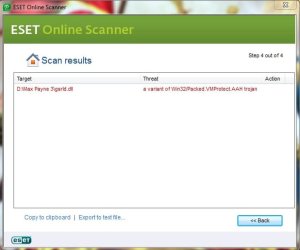
ESET Online scanner giving me trouble here (it found trojan in Max Payne 3),What should i do now ? >>

Edit-plz reply fast because i'm waiting for u'r response.what should i do for Max Payne 3 ?
 

Attachments

Last edited:

My Computer My Computer

At a glance

Windows 7 Ultimate x86Intel® Pentium® Dual Core CPU B950 @ 2.10GHz2GB DDR3Intel® HD Graphics
Computer type
Laptop
Computer Manufacturer/Model Number
Asus
OS
Windows 7 Ultimate x86
CPU
Intel® Pentium® Dual Core CPU B950 @ 2.10GHz
Motherboard
Asustek Computer Inc.
Memory
2GB DDR3
Graphics Card(s)
Intel® HD Graphics
Sound Card
Realtek High Definition Audio(ALC269) With Sonic Master
Screen Resolution
1366x768
Hard Drives
320GB Seagate
Keyboard
Keyboard Device Filter (Provider-ATK)
Mouse
HID-compliant mouse,Microsoft PS2/Mouse
Internet Speed
Very Slow
Antivirus
Kaspersky Internet Security 2013/Malwarebytes Anti-Malware
Browser
Goggle Chrome
Back
Top