Solved Reformat gone bad - please help

I'm not sure if I confused you, but my modem has a built-in router. I can try powering down both pc's and modem/router and then plugging in directly after turning everything back on to see if I get a connection, but I'm not sure there's a way for me to distinguish if the built-in router is defective. The modem obviously works though because the win8 machine is still connected.

Yes, router is provided by ISP. Okay, I'll try and give them a call then.

Change adapter settings: I only have two - wireless network and local area network.

No, all I have plugged into the pc are my mouse and keyboard.

Okay. Thanks a lot, Greg. I appreciate all your help. I'll try and call my ISP in the meantime.

Did you plug wire directly into modem? Try that now after power cycling the modem.

This will narrow it to router or modem so you know who to call.

If it connects from modem then the problem is your router. Is your router provided by your ISP? They have tech support on weekends normally.

Also look at Network and SHaring>Change Adpater Settings. How many adapters are listed there. Do you have anything else plugged into the PC. I get "Unidentified network" when I plug a crossover cable between PC's to transfer data.

I am getting ready to take my dog to the beach but will text my friend and fellow MVP Rayda to look in as she is one of the best in the world at networking and resolves these for me regularly.
 

My Computer My Computer

Computer type
PC/Desktop
Computer Manufacturer/Model Number
Acer Aspire m3202
OS
Windows 7 Home Premium 64 bit
Antivirus
not at the moment - just reinstalled
I know, I thought the same thing, but no the browser wouldn't load.

A silly question perhaps. What happens if you launch Internet Explorer?
 

My Computer My Computer

Computer type
PC/Desktop
Computer Manufacturer/Model Number
Acer Aspire m3202
OS
Windows 7 Home Premium 64 bit
Antivirus
not at the moment - just reinstalled
Now that you mention it, whenever I was plugging the ethernet directly into win7 machine I looked over at the win8 machine and it showed a 5 bar icon as though it was still connected (normally the icon is an image of a computer). Could that be because the built-in router was still broadcasting a signal to the win8 machine?

drat!
Wired
arayfo1: How does the Win8 machine connect to the Internet?
Wired or wireless?

but wait he says....

can the Win8 box connect wirelessly? I mean, does it have a wireless card in it?

and then I mean can it connect wirelessly
 

My Computer My Computer

Computer type
PC/Desktop
Computer Manufacturer/Model Number
Acer Aspire m3202
OS
Windows 7 Home Premium 64 bit
Antivirus
not at the moment - just reinstalled
So I understand this....

Are you pulling the ethernet out of the Win8 box and pluggin it into the Win7 box?

The network icon changes from computer to wireless(bars) on the Win8 machine - do I understadn it correctly?
That would indicate a ethernet card and wireless adapter - not uncommon.

but it can help having a working connection on another machine.

edit: and when you plug the ethernet into the Win7 box, you do NOT connect?
 

My Computer My Computer

Computer type
Laptop
Computer Manufacturer/Model Number
HP Pavilion dv6-6c10us
OS
x64 (6.3.9600) Win8.1 Pro & soon dual boot x64 (6.1.7601) Win7_SP1 HomePrem
CPU
AMD A6-3420M APU with Radeon(tm) HD Graphics
Motherboard
Hewlett-Packard 1805
Memory
6.00 GB
Graphics Card(s)
AMD Radeon(TM) HD 6520G
Sound Card
(1) AMD High Definition Audio Device (2) IDT High Definiti
Monitor(s) Displays
HP W2072a 20" LCD (1600 x 900) @ 60 Hz
Screen Resolution
1366 x 768 x 32 bits (4294967296 colors) @ 60 Hz
Hard Drives
ST640LM0 00 HM641JI SATA Disk Device
Keyboard
Logitech k520 wireless KB
Mouse
Logitech m320 wireless mouse (bundled with KB)
Internet Speed
15/5 | 54 MB Wireless 'n'
Antivirus
Realtime: Defender or Avast | On-demand: Malwarebytes, ESET
Browser
IE 11 on Win8, IE 10 on win 7
Other Info
Media: [Gimp, Audacity, VLC] || Comm: [WEmail 2012, Skype] || Productivity: [OpenOffice,| Textpad] || Utils: [Sysinternals, cCleaner, Speccy, Defraggler]
"Are you pulling the ethernet out of the Win8 box and pluggin it into the Win7 box?"

Correct.

I asked my mom (it's her pc) and she confirmed that it has bluetooth.

"edit: and when you plug the ethernet into the Win7 box, you do NOT connect?"

Correct.

So I understand this....

Are you pulling the ethernet out of the Win8 box and pluggin it into the Win7 box?

The network icon changes from computer to wireless(bars) on the Win8 machine - do I understadn it correctly?
That would indicate a ethernet card and wireless adapter - not uncommon.

but it can help having a working connection on another machine.

edit: and when you plug the ethernet into the Win7 box, you do NOT connect?
 

My Computer My Computer

Computer type
PC/Desktop
Computer Manufacturer/Model Number
Acer Aspire m3202
OS
Windows 7 Home Premium 64 bit
Antivirus
not at the moment - just reinstalled
I'm not overridding Greg's suggestions, I'm offering my own technical opinions.

Hold off on power cycling for now. The Win8 box seems fine with the Wireless Cable modem/router.

I probably wouldn't bother calling the provider, everything else but your box seems to be working fine.

I'm not sure if I confused you, but my modem has a built-in router. I can try powering down both pc's and modem/router and then plugging in directly after turning everything back on to see if I get a connection, but I'm not sure there's a way for me to distinguish if the built-in router is defective. The modem obviously works though because the win8 machine is still connected.

Yes, router is provided by ISP. Okay, I'll try and give them a call then.

Change adapter settings: I only have two - wireless network and local area network.

No, all I have plugged into the pc are my mouse and keyboard.

Okay. Thanks a lot, Greg. I appreciate all your help. I'll try and call my ISP in the meantime.

Did you plug wire directly into modem? Try that now after power cycling the modem.

This will narrow it to router or modem so you know who to call.

If it connects from modem then the problem is your router. Is your router provided by your ISP? They have tech support on weekends normally.

Also look at Network and SHaring>Change Adpater Settings. How many adapters are listed there. Do you have anything else plugged into the PC. I get "Unidentified network" when I plug a crossover cable between PC's to transfer data.

I am getting ready to take my dog to the beach but will text my friend and fellow MVP Rayda to look in as she is one of the best in the world at networking and resolves these for me regularly.
 

My Computer My Computer

Computer type
Laptop
Computer Manufacturer/Model Number
HP Pavilion dv6-6c10us
OS
x64 (6.3.9600) Win8.1 Pro & soon dual boot x64 (6.1.7601) Win7_SP1 HomePrem
CPU
AMD A6-3420M APU with Radeon(tm) HD Graphics
Motherboard
Hewlett-Packard 1805
Memory
6.00 GB
Graphics Card(s)
AMD Radeon(TM) HD 6520G
Sound Card
(1) AMD High Definition Audio Device (2) IDT High Definiti
Monitor(s) Displays
HP W2072a 20" LCD (1600 x 900) @ 60 Hz
Screen Resolution
1366 x 768 x 32 bits (4294967296 colors) @ 60 Hz
Hard Drives
ST640LM0 00 HM641JI SATA Disk Device
Keyboard
Logitech k520 wireless KB
Mouse
Logitech m320 wireless mouse (bundled with KB)
Internet Speed
15/5 | 54 MB Wireless 'n'
Antivirus
Realtime: Defender or Avast | On-demand: Malwarebytes, ESET
Browser
IE 11 on Win8, IE 10 on win 7
Other Info
Media: [Gimp, Audacity, VLC] || Comm: [WEmail 2012, Skype] || Productivity: [OpenOffice,| Textpad] || Utils: [Sysinternals, cCleaner, Speccy, Defraggler]
Seems like a good time to take a break. It sounds as though Rayda will make short remedy when schdule permits.

I'll check back this evening.

A thought!

If needed, you can do screenshots and use a thumb drive to move them to the Win8 machine to post.
It 's a bit of fuss on your side, nut having that will make it eaiser on this side.

Please see http://www.sevenforums.com/tutorials/9733-screenshots-files-upload-post-seven-forums.html for the preferred method of posting files and images on Sevenforums
 

My Computer My Computer

Computer type
Laptop
Computer Manufacturer/Model Number
HP Pavilion dv6-6c10us
OS
x64 (6.3.9600) Win8.1 Pro & soon dual boot x64 (6.1.7601) Win7_SP1 HomePrem
CPU
AMD A6-3420M APU with Radeon(tm) HD Graphics
Motherboard
Hewlett-Packard 1805
Memory
6.00 GB
Graphics Card(s)
AMD Radeon(TM) HD 6520G
Sound Card
(1) AMD High Definition Audio Device (2) IDT High Definiti
Monitor(s) Displays
HP W2072a 20" LCD (1600 x 900) @ 60 Hz
Screen Resolution
1366 x 768 x 32 bits (4294967296 colors) @ 60 Hz
Hard Drives
ST640LM0 00 HM641JI SATA Disk Device
Keyboard
Logitech k520 wireless KB
Mouse
Logitech m320 wireless mouse (bundled with KB)
Internet Speed
15/5 | 54 MB Wireless 'n'
Antivirus
Realtime: Defender or Avast | On-demand: Malwarebytes, ESET
Browser
IE 11 on Win8, IE 10 on win 7
Other Info
Media: [Gimp, Audacity, VLC] || Comm: [WEmail 2012, Skype] || Productivity: [OpenOffice,| Textpad] || Utils: [Sysinternals, cCleaner, Speccy, Defraggler]
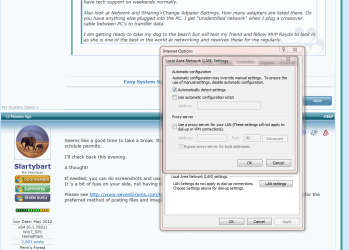
Check the LAN settings.

Internet Options>Connections>Lan settings

AACapture.PNG
 

My Computer My Computer

OS
ME/XP/Vista/Win7
:what: If Device Manager tells you a driver is the latest then you are online!

It had to connect to Window Updates to tell you that!

Open Internet Explorer to check the web.

I don't mean this rude in any way, but where do you get that idea? Disconnect from the internet and run a driver update check, it will tell you that you have the latest even if you don't. This alone does not mean they are online.
 

My Computer My Computer

Computer type
PC/Desktop
Computer Manufacturer/Model Number
Custom Built
OS
Windows 10 Pro
CPU
AMD Ryzen 5 2400G Processor with Radeon RX Vega 11 Graphics
Motherboard
ASRock X470 Master SLI/AC AM4 AMD Promontory X470 SATA 6Gb/s
Memory
G.SKILL Ripjaws V Series 16GB (2 x 8GB) 288-Pin DDR4 SDRAM D
Graphics Card(s)
2047MB NVIDIA GeForce GTX 1060 6GB (EVGA)
Sound Card
Motherboard Built in
Monitor(s) Displays
Acer R240HY bidx 23.8-Inch IPS HDMI DVI VGA (1920 x 1080) Wi
Screen Resolution
1920 x 1080
Hard Drives
1TB Sandisk SSD PLUS (Main drive)
500 GB Seagate 7200 RPM (Games)
500 GB Western Digital 7200 RPM (Virtual Machines)
PSU
CORSAIR TX Series TX650M 650W 80+ Gold Modular Power Supply
Case
CORSAIR CARBIDE SPEC-02 Mid-Tower Gaming Case, Red LED Fan
Cooling
220mm, two 120mm, and four 60mm fans
Keyboard
Wired Dell keyboard
Mouse
Wireless Logitech mouse
Internet Speed
250mb down, 30mb up
Antivirus
Panda Cloud Antivirus
Browser
Chrome-ish x64
Other Info
Your awesome for reading this.
I'd like you to reboot your machine and then I'lll ask about your wireless configuration

It sounds as though you're runnning up again Automatic private IP address isues.

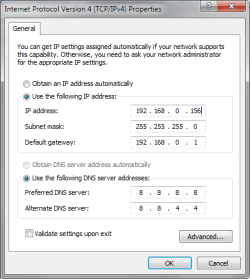
There's an easy workaround - hard code an ip address, gateway, and DNS servers. Let me gather some pictures to post.

You boot your machine.
 

My Computer My Computer

Computer type
Laptop
Computer Manufacturer/Model Number
HP Pavilion dv6-6c10us
OS
x64 (6.3.9600) Win8.1 Pro & soon dual boot x64 (6.1.7601) Win7_SP1 HomePrem
CPU
AMD A6-3420M APU with Radeon(tm) HD Graphics
Motherboard
Hewlett-Packard 1805
Memory
6.00 GB
Graphics Card(s)
AMD Radeon(TM) HD 6520G
Sound Card
(1) AMD High Definition Audio Device (2) IDT High Definiti
Monitor(s) Displays
HP W2072a 20" LCD (1600 x 900) @ 60 Hz
Screen Resolution
1366 x 768 x 32 bits (4294967296 colors) @ 60 Hz
Hard Drives
ST640LM0 00 HM641JI SATA Disk Device
Keyboard
Logitech k520 wireless KB
Mouse
Logitech m320 wireless mouse (bundled with KB)
Internet Speed
15/5 | 54 MB Wireless 'n'
Antivirus
Realtime: Defender or Avast | On-demand: Malwarebytes, ESET
Browser
IE 11 on Win8, IE 10 on win 7
Other Info
Media: [Gimp, Audacity, VLC] || Comm: [WEmail 2012, Skype] || Productivity: [OpenOffice,| Textpad] || Utils: [Sysinternals, cCleaner, Speccy, Defraggler]
The names on my images are not standard - just ignore the differences between names
Airnet -> Wireless Network

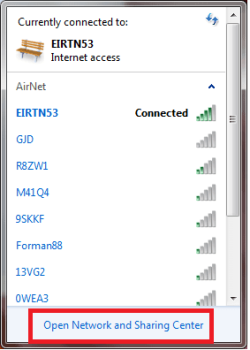
1) Left click on the wireless icon (bars) on the system tray to show all available networks

ip4-0.png


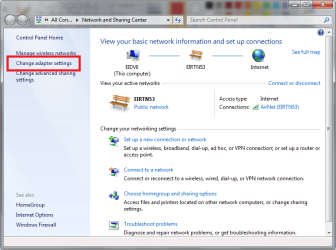
2) Left click on Open Network and Sharing Center

ip4-hardcode1.png


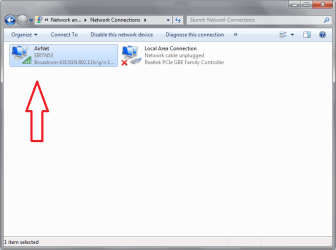
3) Left click on Change adapter settings​
ip4-hardcode0.png


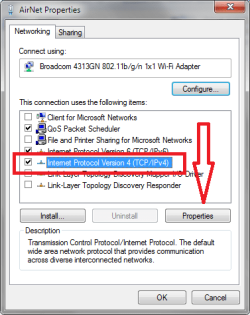
4) Right click on Wireless Network and select Properties​

ip4-hardcode2.png


5) Select IP4 and click on the Properties button​

ip4-hardcode3.png


6) Change both Radio buttons (IP address and DNS Servers) from
Obtain....automatically to Use the following....​

Then type (hardcode) the numbers shown here into the same fields for your adapter. Type the numbers exactly as they are in the picture.​

Any number with 3 characters 192.168) automatically moves to the next octet in the field
Fewer than 3 numbers (0, 1, 4, 8) requires you to manually move the caret (tab or arrow key both work)
:tip: The subnet mask is automatically filled in with correct values​


ip4-5.png
Click OK
Click OK


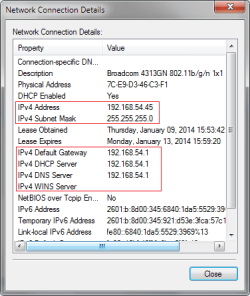
To check your work - left clcik the system tray wireless icon
Right clcik your network
Select Status
Select Details​

Are the addresses the same as step 6?​

Mine aren't because I didn't actually change my network, only typed in the numbers for the step 6 example. These are examples only - you do not want to use these numbers anywhere in your network configuration.​
 

Attachments

  • ip4-hardcode0a.png
    ip4-hardcode0a.png
    12.7 KB · Views: 31
  • ip4-hardcode0b.png
    ip4-hardcode0b.png
    12.9 KB · Views: 32
Last edited:

My Computer My Computer

Computer type
Laptop
Computer Manufacturer/Model Number
HP Pavilion dv6-6c10us
OS
x64 (6.3.9600) Win8.1 Pro & soon dual boot x64 (6.1.7601) Win7_SP1 HomePrem
CPU
AMD A6-3420M APU with Radeon(tm) HD Graphics
Motherboard
Hewlett-Packard 1805
Memory
6.00 GB
Graphics Card(s)
AMD Radeon(TM) HD 6520G
Sound Card
(1) AMD High Definition Audio Device (2) IDT High Definiti
Monitor(s) Displays
HP W2072a 20" LCD (1600 x 900) @ 60 Hz
Screen Resolution
1366 x 768 x 32 bits (4294967296 colors) @ 60 Hz
Hard Drives
ST640LM0 00 HM641JI SATA Disk Device
Keyboard
Logitech k520 wireless KB
Mouse
Logitech m320 wireless mouse (bundled with KB)
Internet Speed
15/5 | 54 MB Wireless 'n'
Antivirus
Realtime: Defender or Avast | On-demand: Malwarebytes, ESET
Browser
IE 11 on Win8, IE 10 on win 7
Other Info
Media: [Gimp, Audacity, VLC] || Comm: [WEmail 2012, Skype] || Productivity: [OpenOffice,| Textpad] || Utils: [Sysinternals, cCleaner, Speccy, Defraggler]
Update:

I talked to technical support and the man had me going into 'change adapter settings'. He asked me to left click on 'wireless connection' - he was prompting me to click on properties but nothing pulled up whenever I left clicked. So I right clicked instead and clicked properties. I should have seen three tabs - General, Network, Sharing. I was missing my general tab. He wanted me to go to the general tab and click on properties so that I could get to the IPV4 & IPV6 settings. He mentioned that my pc might be set as what they call 'Hard Coded IP configuration'. In other words, he wanted me to be sure that IPV4 and IPV6 are set to automatically configure (I'm not sure if I'm spelling all of that correctly).

So he was a bit puzzled that I couldn't access the general tab, but suggested that I look for the general tab and make sure that IP address is configured correctly (Because actually I did have an error before which read: 'wireless connection 2 doesn't have a valid IP config'). So, I got off the phone with the tech support guy and was looking for this general tab and I'm not exactly sure what I clicked, but suddenly I was prompted to choose either a home network or public network and I chose the home network. Suddenly I have internet access, so Slardybart was right. I am currently installing updates, so we won't know for sure until after I restart if the connection is actually fixed.
 

My Computer My Computer

Computer type
PC/Desktop
Computer Manufacturer/Model Number
Acer Aspire m3202
OS
Windows 7 Home Premium 64 bit
Antivirus
not at the moment - just reinstalled

My Computer My Computer

Computer type
PC/Desktop
Computer Manufacturer/Model Number
Acer Aspire m3202
OS
Windows 7 Home Premium 64 bit
Antivirus
not at the moment - just reinstalled
How do I get to network connection details in post # 271 ????

I installed updates, but then whenever the pc restarted I lost connection again. Same as before.
 

My Computer My Computer

Computer type
PC/Desktop
Computer Manufacturer/Model Number
Acer Aspire m3202
OS
Windows 7 Home Premium 64 bit
Antivirus
not at the moment - just reinstalled
Call back the tech support guy to have him finish the job. He should walk you through changing the network settings now that you can find the General tab he asked you to click which wouldn't come up. This is much better done in real time and you pay for that support anyway.

Keep us posted because Rayda (2xg) will catch up with thread at some point and may be able to spot the problem if she has all the information laid out.
 
Great going guys as it looks like he's getting closer to having his computer back again.
jonathon.jpg

THW
 

My Computer My Computer

Computer Manufacturer/Model Number
HP M9077c
OS
Windows 7 Home Premium 64bit
CPU
Intel(R)Core(TM)2 quad [email protected] 2.39GHz
Motherboard
ASUSeK
Memory
6GB DDR2 6400
Graphics Card(s)
GeForce 8500/512MB
Sound Card
Realtek High Def Audio
Monitor(s) Displays
HP w2408 LCD 24" widescreen
Screen Resolution
1920x1200
Cooling
6 pack of Bud
Keyboard
MS wireless Inteli
Mouse
MS wireless Inteli
Yeah, the problem is I still haven't found the general tab. According to the tech guy, it should be in the same place as the network and sharing tabs, but somehow it's not there in its place. I'm still looking though.

Call back the tech support guy to have him finish the job. He should walk you through changing the network settings now that you can find the General tab he asked you to click which wouldn't come up. This is much better done in real time and you pay for that support anyway.

Keep us posted because Rayda (2xg) will catch up with thread at some point and may be able to spot the problem if she has all the information laid out.
 

My Computer My Computer

Computer type
PC/Desktop
Computer Manufacturer/Model Number
Acer Aspire m3202
OS
Windows 7 Home Premium 64 bit
Antivirus
not at the moment - just reinstalled

My Computer My Computer

Computer Manufacturer/Model Number
HP, Dell, Gateway, Toshiba - 4 laptops and 2 desktops
OS
Vista, Windows7, Mint Mate, Zorin, Windows 8
CPU
from 1.6GHz Duo to i7
Monitor(s) Displays
2x HP w2207
Hard Drives
5x HDD, 7x SSD, 12x Externals
Keyboard
with trackball - no mices
Mouse
Trackball mice
Internet Speed
DSL 6000
I'm sorry, I did find it and I currently have it set to automatically configure ip address. I was gonna try what Slardybart suggested with hardcoding the ip address, but now I'm not sure if I follow. I may need him to expand on that, because whenever I checked connection details there wasn't an IP address for each IP4, there was only an IP address for the Autoconfiguration IP4 listed.

Anyways, I will give the tech guy another call now.

Yeah, the problem is I still haven't found the general tab. According to the tech guy, it should be in the same place as the network and sharing tabs, but somehow it's not there in its place. I'm still looking though.

Call back the tech support guy to have him finish the job. He should walk you through changing the network settings now that you can find the General tab he asked you to click which wouldn't come up. This is much better done in real time and you pay for that support anyway.

Keep us posted because Rayda (2xg) will catch up with thread at some point and may be able to spot the problem if she has all the information laid out.
 

My Computer My Computer

Computer type
PC/Desktop
Computer Manufacturer/Model Number
Acer Aspire m3202
OS
Windows 7 Home Premium 64 bit
Antivirus
not at the moment - just reinstalled
If I understand what the tech wanted to see was what I show in step 6 of post 271

and... what he wanted to know was are the addresses hardcoded or obtained automatically - he wants them to be automatic, which is normally the case.

If you want to set it to automatic, follow the steps in 271, when you get to the IPv4 properties window, reverse the radio button slections. You would want both to be to Obtain..... automatically
Change both Radio buttons (IP address and DNS Servers) from
Use the following.... to Obtain....automatically
 
Last edited:

My Computer My Computer

Computer type
Laptop
Computer Manufacturer/Model Number
HP Pavilion dv6-6c10us
OS
x64 (6.3.9600) Win8.1 Pro & soon dual boot x64 (6.1.7601) Win7_SP1 HomePrem
CPU
AMD A6-3420M APU with Radeon(tm) HD Graphics
Motherboard
Hewlett-Packard 1805
Memory
6.00 GB
Graphics Card(s)
AMD Radeon(TM) HD 6520G
Sound Card
(1) AMD High Definition Audio Device (2) IDT High Definiti
Monitor(s) Displays
HP W2072a 20" LCD (1600 x 900) @ 60 Hz
Screen Resolution
1366 x 768 x 32 bits (4294967296 colors) @ 60 Hz
Hard Drives
ST640LM0 00 HM641JI SATA Disk Device
Keyboard
Logitech k520 wireless KB
Mouse
Logitech m320 wireless mouse (bundled with KB)
Internet Speed
15/5 | 54 MB Wireless 'n'
Antivirus
Realtime: Defender or Avast | On-demand: Malwarebytes, ESET
Browser
IE 11 on Win8, IE 10 on win 7
Other Info
Media: [Gimp, Audacity, VLC] || Comm: [WEmail 2012, Skype] || Productivity: [OpenOffice,| Textpad] || Utils: [Sysinternals, cCleaner, Speccy, Defraggler]
  • Like
Reactions: 2xg
Back
Top