Solved Lost Dell factory recovery partition

sam49

New member
Member
VIP
Local time
12:42 PM
Messages
140
Hi Guys can I ask for a little help please
My Dell Vostro laptop was running Windows 7 (64 bit) professional but a few months ago I made a backup of the windows partition with True Image Plus 2013 as a back-up, I then upgraded to windows 8 all was working ok for a while but I decided Windows 8 was not for me and decided to use the true image backup I had made of windows 7.
I booted my computer with the true image boot cd and selected the relevant backup image file, all was ok until One second from completion and then true image said the restore had failed.
I then tried to boot my computer but the MBR was missing I then tried to use a Windows 7 system dvd to repair the MBR but it would not work.
I then found out that when the restore failed it had destroyed my windows partition and my factory recovery partition, and a partition I had my data stored on, so now I am unable to restore my computer with the factory restore option.
Fortunately I had made some rescue dvd and I have my computer working again but I would like the recovery partition back working if I can
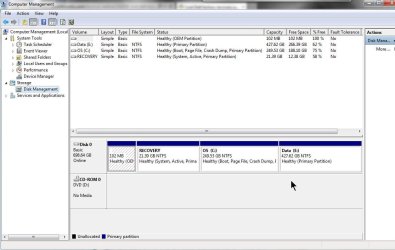
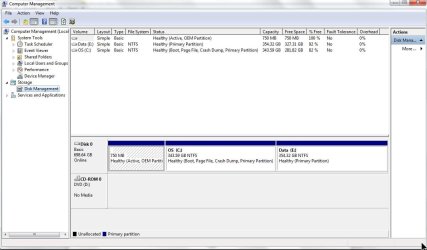
I you look at the disk management screen shot I have attached you can see that I have a partition with a size 750.0 MB and 750MB free.
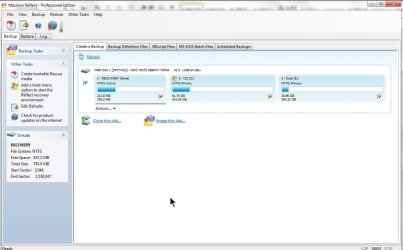
But now I am using Macrium to make my backups and when I run a back-up it reports that a partition is called Recovery and it is 750.0 MB with 212.0MB used and 537.0 MD free please see second screenshot
Can anyone tell me what’s going on and can I get the recovery partition to work again
Regard’s
 

Attachments
  • ScreenShot010.jpg
    ScreenShot010.jpg
    71.3 KB · Views: 22
  • ScreenShot011.jpg
    ScreenShot011.jpg
    65.5 KB · Views: 19

My Computer My Computer

At a glance

Windows 7 Professional 64 BitIntel Core I7 920 @ 2.6 GHz12 Meg Triple Channel DDR3Nvidia Gforce GTX 260
Computer Manufacturer/Model Number
Custom Made
OS
Windows 7 Professional 64 Bit
CPU
Intel Core I7 920 @ 2.6 GHz
Motherboard
Asus P6T SE
Memory
12 Meg Triple Channel DDR3
Graphics Card(s)
Nvidia Gforce GTX 260
Sound Card
On Board
Monitor(s) Displays
DGM
Hard Drives
500 gig Sata
PSU
Not sure
Case
Thermalite
Cooling
Standard cooling
Keyboard
Usb
Mouse
Usb
Internet Speed
7meg
The 750mb partition contains the files needed to boot windows. It is quite large because there may some oem tools on there as well.

You don't have an actual recovery partition containing the files needed to reinstall.

You can make one easily enough. It doesn't need to be a separate partition , you could use your data partition for that and still keep all your stuff on there.

I would use the latest installation media for that.

You can get it from here: Windows 7 Direct Download Links - HeiDoc.net

Or you could use what is on your recovery discs if you really want.
 

My Computers My Computers

  • At a glance

    7 X64i5 84002x8gb 3200mhz
    Computer type
    PC/Desktop
    OS
    7 X64
    CPU
    i5 8400
    Motherboard
    gigabyte b365m ds3h
    Memory
    2x8gb 3200mhz
    Hard Drives
    various
    PSU
    pure power 11 400w cm
    Case
    Coolermaster
    Cooling
    cryorig m9i
  • At a glance

    7x64g54008gb ddr4 2400
    Computer type
    PC/Desktop
    OS
    7x64
    CPU
    g5400
    Motherboard
    ga b365m ds3h
    Memory
    8gb ddr4 2400
    PSU
    xfx pro 450w
Hi SIW2
Thanks for the advice
I understand what you are saying but I am troubled and don't understand just what has gone wrong with my hard drive.

I thought the Windows 7 system reserved partition was typically around 100MB and not 750MB it was never that big before true image made a mess of my computer.

Also I think the factory recovery partition was about 750MB or somewhere around that size, and if you look at the second screenshot the one with the Macrium backup details it clearly show that 750MB partition is called Recovery and not system reserved.

So if this is a windows system partition how did it get called Recovery that's what is puzzling me

Regards

PS. Yes I know I can just use the recovery cd I have made and I have a spare unused windows 7 dvd with the serial number not used so I could just use that if needed.
 
Last edited:

My Computer My Computer

At a glance

Windows 7 Professional 64 BitIntel Core I7 920 @ 2.6 GHz12 Meg Triple Channel DDR3Nvidia Gforce GTX 260
Computer Manufacturer/Model Number
Custom Made
OS
Windows 7 Professional 64 Bit
CPU
Intel Core I7 920 @ 2.6 GHz
Motherboard
Asus P6T SE
Memory
12 Meg Triple Channel DDR3
Graphics Card(s)
Nvidia Gforce GTX 260
Sound Card
On Board
Monitor(s) Displays
DGM
Hard Drives
500 gig Sata
PSU
Not sure
Case
Thermalite
Cooling
Standard cooling
Keyboard
Usb
Mouse
Usb
Internet Speed
7meg
I was thinking the same way you are. One other thing I noticed is that not any of your partitions are marked "System" which is needed to boot. Are you able to boot OK? Everything else looks OK. The 750 MB does not look like the System Reserved. You don't need the Recovery Partition if you have a Macrium Backup. I backup my Macrium every week so it stays current. Hang in there and someone else will come along that can shed more light on this problem.
 

My Computer My Computer

At a glance

Windows 7 Home Premium 32-Bit - Build 7600 SP1Intel Core i3-2120 3.30GhzKingston 4 GB DDR3 1333 mhzAMD Radeon HD6670
Computer type
PC/Desktop
Computer Manufacturer/Model Number
Custom Build
OS
Windows 7 Home Premium 32-Bit - Build 7600 SP1
CPU
Intel Core i3-2120 3.30Ghz
Motherboard
Asus P8Z68-V LX Intel Z68 Socket H2 ATX
Memory
Kingston 4 GB DDR3 1333 mhz
Graphics Card(s)
AMD Radeon HD6670
Sound Card
Sound Blaster Audigy SE 24-Bit
Monitor(s) Displays
Asus VE228
Screen Resolution
1440 X 900
Hard Drives
OCZ Vertex 3 120 GB Sata 3 SSD ==
Kingston SH103/S3 120 G Hyper X 120 GB SSD ==
Western Digital 500 GB Caviar Green 7200 RPM ==
PSU
Corsair CX600M == 600 Watt
Case
NZXT Apollo - Silver with Clear Side Panel
Cooling
Three 120 mm Fans
Keyboard
Microsoft Natural 4000
Mouse
Microsoft Custom Optical 3000
Internet Speed
AT&T Fiber Optic Wireless Network
Antivirus
Microsoft Security Essentials
Browser
Chrome
Other Info
120 mm Blue LED Fan -- Three Blue LED Lazer Light Sticks
Hi bigmck thanks for the reply,

Yes my computer boots ok with no problems at all.

I'm not sure if there was a system reserved partition before I had this problem, but there was a hidden recovery partition and the main OS partition.

I had split that and made a data partition so if I had to reinstall windows at any time I would not loose my data.

When I decided to ditch windows 8 and return to windows 7 that my computer came with I just thought I would just restore an image of the windows 7 OS partition with true image.

All when ok until the very last second then true image reported restore failed and that also destroyed all the partitions, the only way I could get the laptop working again was to use the recovery DVFD I had made when the computer was new.

And now I have this strange partitions setup

I don't understand how according to Macrium says it is called recovery

I have tried to look at the partition with Diskpart and the recovery partition macrium shows is not showing at all

I am lost now
 

My Computer My Computer

At a glance

Windows 7 Professional 64 BitIntel Core I7 920 @ 2.6 GHz12 Meg Triple Channel DDR3Nvidia Gforce GTX 260
Computer Manufacturer/Model Number
Custom Made
OS
Windows 7 Professional 64 Bit
CPU
Intel Core I7 920 @ 2.6 GHz
Motherboard
Asus P6T SE
Memory
12 Meg Triple Channel DDR3
Graphics Card(s)
Nvidia Gforce GTX 260
Sound Card
On Board
Monitor(s) Displays
DGM
Hard Drives
500 gig Sata
PSU
Not sure
Case
Thermalite
Cooling
Standard cooling
Keyboard
Usb
Mouse
Usb
Internet Speed
7meg
"Recovery" is just the label, it could be called anything.

Some oem machines have various tools on there - possibly winre.wim as well.

The partition containing the os files needed for installing would have been much bigger.

The "recovery" partition you see there will have a special partition type to stop users messing with it. That is why it looks strange in disk mgmt, which doesn't report the used space.

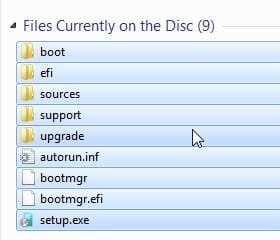
If you want to create your own recovery partition, you can. Just create a partition, copy the contents the dvd onto it. Copy the highlighted files/folders and paste onto your home made recov partition.

recov-part1.jpg

Then you register the OSIMAGE with the path to the FOLDER containing install.wim. In your case it will be driveletter:\sources

At elevated command prompt:

Microsoft Windows [Version 6.1.7601]
Copyright (c) 2009 Microsoft Corporation. All rights reserved.

C:\Users\SIW2>reagentc /setosimage /path W:\sources /target c:\windows

Directory set to: \\?\GLOBALROOT\device\harddisk0\partition8\sources
REAGENTC.EXE: Operation successful

C:\Users\SIW2>reagentc /enable

REAGENTC.EXE: Operation successful

C:\Users\SIW2>
 

My Computers My Computers

  • At a glance

    7 X64i5 84002x8gb 3200mhz
    Computer type
    PC/Desktop
    OS
    7 X64
    CPU
    i5 8400
    Motherboard
    gigabyte b365m ds3h
    Memory
    2x8gb 3200mhz
    Hard Drives
    various
    PSU
    pure power 11 400w cm
    Case
    Coolermaster
    Cooling
    cryorig m9i
  • At a glance

    7x64g54008gb ddr4 2400
    Computer type
    PC/Desktop
    OS
    7x64
    CPU
    g5400
    Motherboard
    ga b365m ds3h
    Memory
    8gb ddr4 2400
    PSU
    xfx pro 450w
Wow thank you I will have a try at that

Regards
 

My Computer My Computer

At a glance

Windows 7 Professional 64 BitIntel Core I7 920 @ 2.6 GHz12 Meg Triple Channel DDR3Nvidia Gforce GTX 260
Computer Manufacturer/Model Number
Custom Made
OS
Windows 7 Professional 64 Bit
CPU
Intel Core I7 920 @ 2.6 GHz
Motherboard
Asus P6T SE
Memory
12 Meg Triple Channel DDR3
Graphics Card(s)
Nvidia Gforce GTX 260
Sound Card
On Board
Monitor(s) Displays
DGM
Hard Drives
500 gig Sata
PSU
Not sure
Case
Thermalite
Cooling
Standard cooling
Keyboard
Usb
Mouse
Usb
Internet Speed
7meg
SIW2 -- His Disk Management in message #1, it doesn't seem to have a "System" partition. I don't see how it boots without that. Any ideas?
 

My Computer My Computer

At a glance

Windows 7 Home Premium 32-Bit - Build 7600 SP1Intel Core i3-2120 3.30GhzKingston 4 GB DDR3 1333 mhzAMD Radeon HD6670
Computer type
PC/Desktop
Computer Manufacturer/Model Number
Custom Build
OS
Windows 7 Home Premium 32-Bit - Build 7600 SP1
CPU
Intel Core i3-2120 3.30Ghz
Motherboard
Asus P8Z68-V LX Intel Z68 Socket H2 ATX
Memory
Kingston 4 GB DDR3 1333 mhz
Graphics Card(s)
AMD Radeon HD6670
Sound Card
Sound Blaster Audigy SE 24-Bit
Monitor(s) Displays
Asus VE228
Screen Resolution
1440 X 900
Hard Drives
OCZ Vertex 3 120 GB Sata 3 SSD ==
Kingston SH103/S3 120 G Hyper X 120 GB SSD ==
Western Digital 500 GB Caviar Green 7200 RPM ==
PSU
Corsair CX600M == 600 Watt
Case
NZXT Apollo - Silver with Clear Side Panel
Cooling
Three 120 mm Fans
Keyboard
Microsoft Natural 4000
Mouse
Microsoft Custom Optical 3000
Internet Speed
AT&T Fiber Optic Wireless Network
Antivirus
Microsoft Security Essentials
Browser
Chrome
Other Info
120 mm Blue LED Fan -- Three Blue LED Lazer Light Sticks
Looks like diskmgmt is not reading and labelling the oem partition type correctly. It also reports 100% free.
 

My Computers My Computers

  • At a glance

    7 X64i5 84002x8gb 3200mhz
    Computer type
    PC/Desktop
    OS
    7 X64
    CPU
    i5 8400
    Motherboard
    gigabyte b365m ds3h
    Memory
    2x8gb 3200mhz
    Hard Drives
    various
    PSU
    pure power 11 400w cm
    Case
    Coolermaster
    Cooling
    cryorig m9i
  • At a glance

    7x64g54008gb ddr4 2400
    Computer type
    PC/Desktop
    OS
    7x64
    CPU
    g5400
    Motherboard
    ga b365m ds3h
    Memory
    8gb ddr4 2400
    PSU
    xfx pro 450w
The easiest way to explore what is in your 750MB partition is with
Best Free Partition Manager Freeware and free partition magic for Windows 7, Windows 8, Windows Vista and Windows XP 32 bit & 64 bit. MiniTool Free Partition Manager Software Home Edition.
then use explore partition. You are likely to find bootmg and BCD in there which would make it the "system" partition.
I notice D: is missing which could have been your recovery partition. If you restored Windows with the Dell DVDs you may have deleted the recovery partition.
If you have the restore disks you should be fine. I would make a second copy.
Dell have a good reputation for providing restore and clean install disks if needed.
 

My Computer My Computer

At a glance

Windows 7x64 Home Premium SP1Intel i7 2600kG.Skill Ripjaws (DDR3-1600) 2x4GBNvidia GeForce GTS 450; Intel HD Graphics 300...
Computer type
PC/Desktop
Computer Manufacturer/Model Number
Own build
OS
Windows 7x64 Home Premium SP1
CPU
Intel i7 2600k
Motherboard
ASUS P8Z68 Deluxe
Memory
G.Skill Ripjaws (DDR3-1600) 2x4GB
Graphics Card(s)
Nvidia GeForce GTS 450; Intel HD Graphics 3000(GT2+)
Monitor(s) Displays
Dell Ultrasharp IPS panel U2311H, Samsung SyncMaster P2350
Screen Resolution
1920x1080
Hard Drives
Samsung 850 Pro SSD 256GB, Samsung SSD 840 120GB, Seagates 1TB Barracuda ST31000528AS x2
PSU
Seasonic M12II 520W
Case
Lian Li Lancool PC-K60
Cooling
Case: 1x120mm, 3x140mm CPU: Hyper 212+
Keyboard
Logitech MK520 (wireless)
Mouse
Logitech MK520
Internet Speed
6-7 Mbps
Antivirus
Norton Security Premium, Malwarebytes on 2 (MSE on 3rd PC)
Browser
FireFox
Other Info
Audio: Logitech Z523 2.1
Hi guys I think I may have got the problem sorted.
I said I was trying to revert back to windows 7 after trying windows 8 for a few months I was using a system image of windows 7 made with Acronis true image, all was ok until the last few seconds of the restore it then failed taking out some of the partitions.

And try as I might true image just would not restore all the partitions, I then saw in true image I could select a new disk and mark it all as unallocated I think that removed all the remaining partitions, it then restored a full image including the recovery partition.

The one partition that was missing was the first one, As you can see with the new screenshots I have posted

I now have back the dell factory recovery option

Hi mjf the D drive is my CD rom

Does it look right to you guys now

Regards

1.jpg
 

Attachments

  • 2.jpg
    2.jpg
    65.8 KB · Views: 4
Last edited:

My Computer My Computer

At a glance

Windows 7 Professional 64 BitIntel Core I7 920 @ 2.6 GHz12 Meg Triple Channel DDR3Nvidia Gforce GTX 260
Computer Manufacturer/Model Number
Custom Made
OS
Windows 7 Professional 64 Bit
CPU
Intel Core I7 920 @ 2.6 GHz
Motherboard
Asus P6T SE
Memory
12 Meg Triple Channel DDR3
Graphics Card(s)
Nvidia Gforce GTX 260
Sound Card
On Board
Monitor(s) Displays
DGM
Hard Drives
500 gig Sata
PSU
Not sure
Case
Thermalite
Cooling
Standard cooling
Keyboard
Usb
Mouse
Usb
Internet Speed
7meg
I don't use Acronis, but it seems to have a sense of humour:

I then saw in true image I could select a new di*k
 
Last edited:

My Computers My Computers

  • At a glance

    7 X64i5 84002x8gb 3200mhz
    Computer type
    PC/Desktop
    OS
    7 X64
    CPU
    i5 8400
    Motherboard
    gigabyte b365m ds3h
    Memory
    2x8gb 3200mhz
    Hard Drives
    various
    PSU
    pure power 11 400w cm
    Case
    Coolermaster
    Cooling
    cryorig m9i
  • At a glance

    7x64g54008gb ddr4 2400
    Computer type
    PC/Desktop
    OS
    7x64
    CPU
    g5400
    Motherboard
    ga b365m ds3h
    Memory
    8gb ddr4 2400
    PSU
    xfx pro 450w
Apart from the typo :D it looks ok to me. I recall Dell boot through their Recovery partition for some reason.

 

My Computer My Computer

At a glance

Windows 7x64 Home Premium SP1Intel i7 2600kG.Skill Ripjaws (DDR3-1600) 2x4GBNvidia GeForce GTS 450; Intel HD Graphics 300...
Computer type
PC/Desktop
Computer Manufacturer/Model Number
Own build
OS
Windows 7x64 Home Premium SP1
CPU
Intel i7 2600k
Motherboard
ASUS P8Z68 Deluxe
Memory
G.Skill Ripjaws (DDR3-1600) 2x4GB
Graphics Card(s)
Nvidia GeForce GTS 450; Intel HD Graphics 3000(GT2+)
Monitor(s) Displays
Dell Ultrasharp IPS panel U2311H, Samsung SyncMaster P2350
Screen Resolution
1920x1080
Hard Drives
Samsung 850 Pro SSD 256GB, Samsung SSD 840 120GB, Seagates 1TB Barracuda ST31000528AS x2
PSU
Seasonic M12II 520W
Case
Lian Li Lancool PC-K60
Cooling
Case: 1x120mm, 3x140mm CPU: Hyper 212+
Keyboard
Logitech MK520 (wireless)
Mouse
Logitech MK520
Internet Speed
6-7 Mbps
Antivirus
Norton Security Premium, Malwarebytes on 2 (MSE on 3rd PC)
Browser
FireFox
Other Info
Audio: Logitech Z523 2.1
SIW2 -- His Disk Management in message #1, it doesn't seem to have a "System" partition. I don't see how it boots without that. Any ideas?
His 700MB partition is the 'system partition' because it is the active partition. It does not really matter what it is called. He could have a look at this with this:

http://www.sevenforums.com/tutorials/150576-partitions-view-hidden-partitions.html

Update: Michael is right. Dell makes the recovery partition active. I think the main reason is to have no more than 3 primary partitions (although C could be a logical partition if they wanted).
 

My Computer My Computer

At a glance

Vista, Windows7, Mint Mate, Zorin, Windows 8from 1.6GHz Duo to i7
Computer Manufacturer/Model Number
HP, Dell, Gateway, Toshiba - 4 laptops and 2 desktops
OS
Vista, Windows7, Mint Mate, Zorin, Windows 8
CPU
from 1.6GHz Duo to i7
Monitor(s) Displays
2x HP w2207
Hard Drives
5x HDD, 7x SSD, 12x Externals
Keyboard
with trackball - no mices
Mouse
Trackball mice
Internet Speed
DSL 6000
Sorry about the typo guys I hope I have not offended anyone. I have edited it out now.
 

My Computer My Computer

At a glance

Windows 7 Professional 64 BitIntel Core I7 920 @ 2.6 GHz12 Meg Triple Channel DDR3Nvidia Gforce GTX 260
Computer Manufacturer/Model Number
Custom Made
OS
Windows 7 Professional 64 Bit
CPU
Intel Core I7 920 @ 2.6 GHz
Motherboard
Asus P6T SE
Memory
12 Meg Triple Channel DDR3
Graphics Card(s)
Nvidia Gforce GTX 260
Sound Card
On Board
Monitor(s) Displays
DGM
Hard Drives
500 gig Sata
PSU
Not sure
Case
Thermalite
Cooling
Standard cooling
Keyboard
Usb
Mouse
Usb
Internet Speed
7meg
Sorry about the typo guys I hope I have not offended anyone. I have edited it out now.
It didn't offend me and I've seen even funnier typos.
 

My Computer My Computer

At a glance

Windows 7x64 Home Premium SP1Intel i7 2600kG.Skill Ripjaws (DDR3-1600) 2x4GBNvidia GeForce GTS 450; Intel HD Graphics 300...
Computer type
PC/Desktop
Computer Manufacturer/Model Number
Own build
OS
Windows 7x64 Home Premium SP1
CPU
Intel i7 2600k
Motherboard
ASUS P8Z68 Deluxe
Memory
G.Skill Ripjaws (DDR3-1600) 2x4GB
Graphics Card(s)
Nvidia GeForce GTS 450; Intel HD Graphics 3000(GT2+)
Monitor(s) Displays
Dell Ultrasharp IPS panel U2311H, Samsung SyncMaster P2350
Screen Resolution
1920x1080
Hard Drives
Samsung 850 Pro SSD 256GB, Samsung SSD 840 120GB, Seagates 1TB Barracuda ST31000528AS x2
PSU
Seasonic M12II 520W
Case
Lian Li Lancool PC-K60
Cooling
Case: 1x120mm, 3x140mm CPU: Hyper 212+
Keyboard
Logitech MK520 (wireless)
Mouse
Logitech MK520
Internet Speed
6-7 Mbps
Antivirus
Norton Security Premium, Malwarebytes on 2 (MSE on 3rd PC)
Browser
FireFox
Other Info
Audio: Logitech Z523 2.1
I did not even notice it - but I am half blind, LOL.
 

My Computer My Computer

At a glance

Vista, Windows7, Mint Mate, Zorin, Windows 8from 1.6GHz Duo to i7
Computer Manufacturer/Model Number
HP, Dell, Gateway, Toshiba - 4 laptops and 2 desktops
OS
Vista, Windows7, Mint Mate, Zorin, Windows 8
CPU
from 1.6GHz Duo to i7
Monitor(s) Displays
2x HP w2207
Hard Drives
5x HDD, 7x SSD, 12x Externals
Keyboard
with trackball - no mices
Mouse
Trackball mice
Internet Speed
DSL 6000
In answer to one of your first questions, I recently got a laptop and was fooling around with the partitions. I also deleted my Recovery Partition. I don't consider it any great loss as I have a Macrium copy to restore my HD if ever needed. If you do that you don't the the Recovery Partition.
 

My Computer My Computer

At a glance

Windows 7 Home Premium 32-Bit - Build 7600 SP1Intel Core i3-2120 3.30GhzKingston 4 GB DDR3 1333 mhzAMD Radeon HD6670
Computer type
PC/Desktop
Computer Manufacturer/Model Number
Custom Build
OS
Windows 7 Home Premium 32-Bit - Build 7600 SP1
CPU
Intel Core i3-2120 3.30Ghz
Motherboard
Asus P8Z68-V LX Intel Z68 Socket H2 ATX
Memory
Kingston 4 GB DDR3 1333 mhz
Graphics Card(s)
AMD Radeon HD6670
Sound Card
Sound Blaster Audigy SE 24-Bit
Monitor(s) Displays
Asus VE228
Screen Resolution
1440 X 900
Hard Drives
OCZ Vertex 3 120 GB Sata 3 SSD ==
Kingston SH103/S3 120 G Hyper X 120 GB SSD ==
Western Digital 500 GB Caviar Green 7200 RPM ==
PSU
Corsair CX600M == 600 Watt
Case
NZXT Apollo - Silver with Clear Side Panel
Cooling
Three 120 mm Fans
Keyboard
Microsoft Natural 4000
Mouse
Microsoft Custom Optical 3000
Internet Speed
AT&T Fiber Optic Wireless Network
Antivirus
Microsoft Security Essentials
Browser
Chrome
Other Info
120 mm Blue LED Fan -- Three Blue LED Lazer Light Sticks
Hi guys thanks for all the help and advice.

As I think about it I started this topic with I had lost my recovery partition or the files inside the recovery partition after a failed restore, but now I have managed to get it all back working I see the partition missing was the DellUtility 16 bit Fat as in the attachment below

Another thing as you can see I have my hard drive split in two I have done it like that so if I have to reinstall windows I don't loose all my saved files.

But if I use the recovery CD's to restore the computer it deletes all the partitions and formats it all as one drive, but if I use the Dell factory restore that on the recovery partition it restores the operating system to the "C" drive only and leaves the Data partition as it is.

So yes I can use the CD's but it is better for me to use the on-board recovery and also it allows me to make a backup of the "C" drive to an external drive, the only drawback is it whatever medium you use it fills it so that's all it can be used for.

Photo 21.jpg

So it must be the first partition I had lost the (DellUtility) that must hold the details for the recovery

Thanks for all the advice

Regards
 

My Computer My Computer

At a glance

Windows 7 Professional 64 BitIntel Core I7 920 @ 2.6 GHz12 Meg Triple Channel DDR3Nvidia Gforce GTX 260
Computer Manufacturer/Model Number
Custom Made
OS
Windows 7 Professional 64 Bit
CPU
Intel Core I7 920 @ 2.6 GHz
Motherboard
Asus P6T SE
Memory
12 Meg Triple Channel DDR3
Graphics Card(s)
Nvidia Gforce GTX 260
Sound Card
On Board
Monitor(s) Displays
DGM
Hard Drives
500 gig Sata
PSU
Not sure
Case
Thermalite
Cooling
Standard cooling
Keyboard
Usb
Mouse
Usb
Internet Speed
7meg
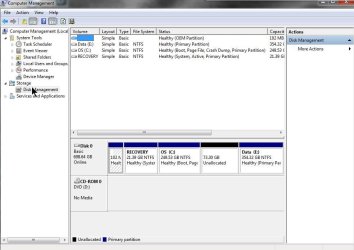
Ps I marked this topic as solved but after all the messing about I have done when I looked at the drive management screen I see I have a small unallocated partition of 73.30 GB and I don't seem to be able to allocate it or format it.

Any ideas please

ScreenShot016.jpg
 

My Computer My Computer

At a glance

Windows 7 Professional 64 BitIntel Core I7 920 @ 2.6 GHz12 Meg Triple Channel DDR3Nvidia Gforce GTX 260
Computer Manufacturer/Model Number
Custom Made
OS
Windows 7 Professional 64 Bit
CPU
Intel Core I7 920 @ 2.6 GHz
Motherboard
Asus P6T SE
Memory
12 Meg Triple Channel DDR3
Graphics Card(s)
Nvidia Gforce GTX 260
Sound Card
On Board
Monitor(s) Displays
DGM
Hard Drives
500 gig Sata
PSU
Not sure
Case
Thermalite
Cooling
Standard cooling
Keyboard
Usb
Mouse
Usb
Internet Speed
7meg
Back
Top