Hi Guys can I ask for a little help please
My Dell Vostro laptop was running Windows 7 (64 bit) professional but a few months ago I made a backup of the windows partition with True Image Plus 2013 as a back-up, I then upgraded to windows 8 all was working ok for a while but I decided Windows 8 was not for me and decided to use the true image backup I had made of windows 7.
I booted my computer with the true image boot cd and selected the relevant backup image file, all was ok until One second from completion and then true image said the restore had failed.
I then tried to boot my computer but the MBR was missing I then tried to use a Windows 7 system dvd to repair the MBR but it would not work.
I then found out that when the restore failed it had destroyed my windows partition and my factory recovery partition, and a partition I had my data stored on, so now I am unable to restore my computer with the factory restore option.
Fortunately I had made some rescue dvd and I have my computer working again but I would like the recovery partition back working if I can
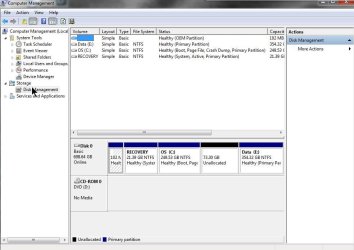
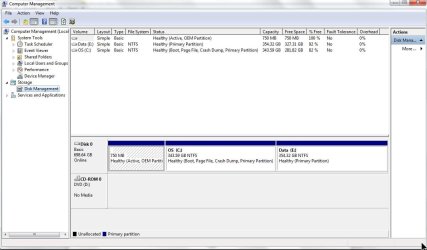
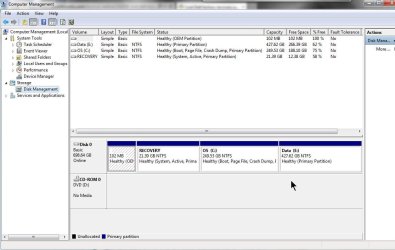
I you look at the disk management screen shot I have attached you can see that I have a partition with a size 750.0 MB and 750MB free.
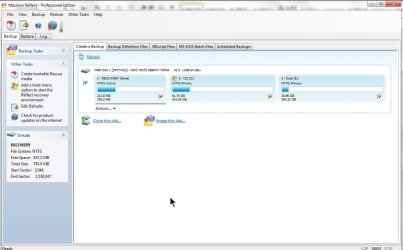
But now I am using Macrium to make my backups and when I run a back-up it reports that a partition is called Recovery and it is 750.0 MB with 212.0MB used and 537.0 MD free please see second screenshot
Can anyone tell me what’s going on and can I get the recovery partition to work again
Regard’s
My Dell Vostro laptop was running Windows 7 (64 bit) professional but a few months ago I made a backup of the windows partition with True Image Plus 2013 as a back-up, I then upgraded to windows 8 all was working ok for a while but I decided Windows 8 was not for me and decided to use the true image backup I had made of windows 7.
I booted my computer with the true image boot cd and selected the relevant backup image file, all was ok until One second from completion and then true image said the restore had failed.
I then tried to boot my computer but the MBR was missing I then tried to use a Windows 7 system dvd to repair the MBR but it would not work.
I then found out that when the restore failed it had destroyed my windows partition and my factory recovery partition, and a partition I had my data stored on, so now I am unable to restore my computer with the factory restore option.
Fortunately I had made some rescue dvd and I have my computer working again but I would like the recovery partition back working if I can
I you look at the disk management screen shot I have attached you can see that I have a partition with a size 750.0 MB and 750MB free.
But now I am using Macrium to make my backups and when I run a back-up it reports that a partition is called Recovery and it is 750.0 MB with 212.0MB used and 537.0 MD free please see second screenshot
Can anyone tell me what’s going on and can I get the recovery partition to work again
Regard’s
Attachments
My Computer
At a glance
Windows 7 Professional 64 BitIntel Core I7 920 @ 2.6 GHz12 Meg Triple Channel DDR3Nvidia Gforce GTX 260
- Computer Manufacturer/Model Number
- Custom Made
- OS
- Windows 7 Professional 64 Bit
- CPU
- Intel Core I7 920 @ 2.6 GHz
- Motherboard
- Asus P6T SE
- Memory
- 12 Meg Triple Channel DDR3
- Graphics Card(s)
- Nvidia Gforce GTX 260
- Sound Card
- On Board
- Monitor(s) Displays
- DGM
- Hard Drives
- 500 gig Sata
- PSU
- Not sure
- Case
- Thermalite
- Cooling
- Standard cooling
- Keyboard
- Usb
- Mouse
- Usb
- Internet Speed
- 7meg


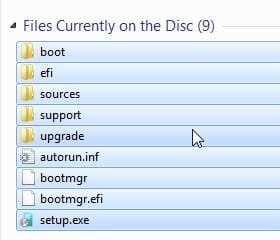

 it looks ok to me. I recall Dell boot through their Recovery partition for some reason.