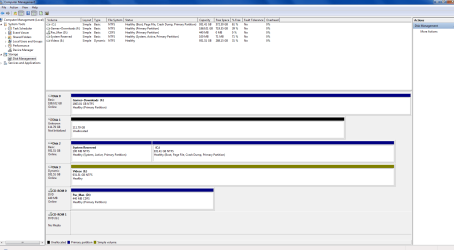
DISK1 is not even initialized yet, so you'll need to rightclick on its disk number to initialize as an MBR disk to use it, then righclick on the drive to create a partition(s) and format.
DISK3 is a Dynamic disk which is meant only to span a partition across Multiple HD's. If it's not doing that then you should
Convert a Dynamic Disk to a Basic Disk. Be sure to either move the data off first or use the non-destructive method with Partition Wizard.
I always want my System drive to be in DISK0 position to avoid the System boot files from being derailed to a prior Primary Partition during any repair or reinstall. See if you can swap the data cable between DISK2 and DISK0 or change the port on mobo. Remember to take anti-static precautions before working in the case: never work on carpet, hold case before reaching inside, never touch electronics without grounding yourself by holding case.
The error you ask about is pro forma notification that you did a hard shut down. The cause may be revealed elsewhere. Focus on the repeat errors at every reboot.