Computer locks up during certain games, event viewer included

It's one of the steps in Troubleshooting Steps for Windows 7 which by the time all are completed will normally reveal the problem. So why pick and choose?

Having half the task bar larded with startups is a Worst Practice.
Please dont tell me this will take all day lol, also wouldn't number 4 (which i have posted) help me most solve my issue? I also updated video card drivers cos i was 2 versions behind, anyways if i were to do the clean boot setup with only AV what about my sound and video card drivers?

Edit: speaking of video card drivers, i updated them, i was 2 versions behind (jeez) and i was able to play a game of company of heroes 2 successfully without a lockup, ill get back to you if the lockup happens again
 
Last edited:

My Computer My Computer

At a glance

windows 7 Ultimate Service pack 1 x64intel i5 2500k8gb RamSapphire AMD 6950 2gb
Computer type
PC/Desktop
OS
windows 7 Ultimate Service pack 1 x64
CPU
intel i5 2500k
Motherboard
Asus p8z68-v motherboard
Memory
8gb Ram
Graphics Card(s)
Sapphire AMD 6950 2gb
Screen Resolution
1920x1080
Hard Drives
2x samsung hd103SJ
1x ST2000DL003-9VT166
PSU
Silverstone silver 850watt power supply (ST85F-P)
Case
silverstone raven RV02-E
Keyboard
microsoft side winder x4
Mouse
Razer death adder v2
Ok good news and bad news.
Good news for Company of heroes seems to no longer crash, bad news is that other games are now locking up the computer. Sigh, what do i do
 

My Computer My Computer

At a glance

windows 7 Ultimate Service pack 1 x64intel i5 2500k8gb RamSapphire AMD 6950 2gb
Computer type
PC/Desktop
OS
windows 7 Ultimate Service pack 1 x64
CPU
intel i5 2500k
Motherboard
Asus p8z68-v motherboard
Memory
8gb Ram
Graphics Card(s)
Sapphire AMD 6950 2gb
Screen Resolution
1920x1080
Hard Drives
2x samsung hd103SJ
1x ST2000DL003-9VT166
PSU
Silverstone silver 850watt power supply (ST85F-P)
Case
silverstone raven RV02-E
Keyboard
microsoft side winder x4
Mouse
Razer death adder v2
anyways if i were to do the clean boot setup with only AV what about my sound and video card drivers?


The functioning of drivers has nothing whatsoever to do with freeloader crapware being allowed to start up with Windows. Most of those are updaters which are little more than spyware building a consumer profile on your web browsing habits to sell to advertisers.

You don't need anything to start with Windows except your AV which should be lean Microsoft Security Essentials to avoid problems.

If you will let us know your progress working through each step of the tutorial we may have other steps to give you. But you'll only succeed if you are willing to do the work. Othewise take it to a shop.
 
anyways if i were to do the clean boot setup with only AV what about my sound and video card drivers?


The functioning of drivers has nothing whatsoever to do with freeloader crapware being allowed to start up with Windows. Most of those are updaters which are little more than spyware building a consumer profile on your web browsing habits to sell to advertisers.

You don't need anything to start with Windows except your AV which should be lean Microsoft Security Essentials to avoid problems.

If you will let us know your progress working through each step of the tutorial we may have other steps to give you. But you'll only succeed if you are willing to do the work. Othewise take it to a shop.

I will probably be doing a clean install soon anyway, i just installed my SSD, speaking of i need to visit that thread i created about my SSD a long while back, but anyways i will probably progress through the steps before i do

By the way im up to the event viewer guide and i dont understand how to do it, a little help if you may?

I just also ran into 2 problems. MSE is finishing it's full scan to quick to be running a scan on 3 HDDS and when i get up to the HDD part, im running 2 different models for 3 HDD's. 2 Samsung Spinpoints and a seagate. I've also got an intel SSD that i just put in today but its not being used as of yet. Which HDD utility do i use when i get up to it?
Im also very reluctant to update using windows update again cos the last time it played havoc with my computer, nearly losing me everything.
 
Last edited:

My Computer My Computer

At a glance

windows 7 Ultimate Service pack 1 x64intel i5 2500k8gb RamSapphire AMD 6950 2gb
Computer type
PC/Desktop
OS
windows 7 Ultimate Service pack 1 x64
CPU
intel i5 2500k
Motherboard
Asus p8z68-v motherboard
Memory
8gb Ram
Graphics Card(s)
Sapphire AMD 6950 2gb
Screen Resolution
1920x1080
Hard Drives
2x samsung hd103SJ
1x ST2000DL003-9VT166
PSU
Silverstone silver 850watt power supply (ST85F-P)
Case
silverstone raven RV02-E
Keyboard
microsoft side winder x4
Mouse
Razer death adder v2
Bump (sorry) but im stuck in trouble shooting steps
Im getting desperate guys, i can't play any games post 2012 anymore, it keeps locking up. Im not enabling auto hardware updates either for the simple reason that it nearly killed my computer last time and since i have 3 harddrives of different manufactures how am i supposed to scan them all.

Still stuck on step 4
 

My Computer My Computer

At a glance

windows 7 Ultimate Service pack 1 x64intel i5 2500k8gb RamSapphire AMD 6950 2gb
Computer type
PC/Desktop
OS
windows 7 Ultimate Service pack 1 x64
CPU
intel i5 2500k
Motherboard
Asus p8z68-v motherboard
Memory
8gb Ram
Graphics Card(s)
Sapphire AMD 6950 2gb
Screen Resolution
1920x1080
Hard Drives
2x samsung hd103SJ
1x ST2000DL003-9VT166
PSU
Silverstone silver 850watt power supply (ST85F-P)
Case
silverstone raven RV02-E
Keyboard
microsoft side winder x4
Mouse
Razer death adder v2
Windows Update problems are one in a million. You will have other problems before that. We rely on Windows Update just like System Restore as vital functions which preserve and patch the OS reliably.

Scroll down the Administrative log as shown in the steps to see which errors repeat and then google their text and number to see how others resolve them. This is not as critical as the other steps, more housekeeping. However Critical errors should be resolved.

You should unplug all other HD's when troubleshooting long enough to see if one of them is causing the problem. If so, then plug them in one by one to see which.

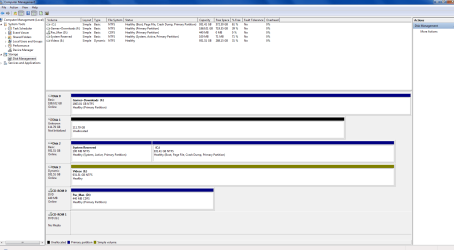
While they are still connected please post back a screenshot of Disk Management - Post a Screen Capture Image
 
Windows Update problems are one in a million. You will have other problems before that. We rely on Windows Update just like System Restore as vital functions which preserve and patch the OS reliably.

Scroll down the Administrative log as shown in the steps to see which errors repeat and then google their text and number to see how others resolve them. This is not as critical as the other steps, more housekeeping. However Critical errors should be resolved.

You should unplug all other HD's when troubleshooting long enough to see if one of them is causing the problem. If so, then plug them in one by one to see which.

While they are still connected please post back a screenshot of Disk Management - Post a Screen Capture Image

Heres a screenshot on the disk management, im sure the current unallocated disk 1 is the ssd i just put in.

Ive also found the id error, its ID error 41
"
The system has rebooted without cleanly shutting down first. This error could be caused if the system stopped responding, crashed, or lost power unexpectedly."
 

Attachments

  • my disk management.png
    my disk management.png
    38.5 KB · Views: 8

My Computer My Computer

At a glance

windows 7 Ultimate Service pack 1 x64intel i5 2500k8gb RamSapphire AMD 6950 2gb
Computer type
PC/Desktop
OS
windows 7 Ultimate Service pack 1 x64
CPU
intel i5 2500k
Motherboard
Asus p8z68-v motherboard
Memory
8gb Ram
Graphics Card(s)
Sapphire AMD 6950 2gb
Screen Resolution
1920x1080
Hard Drives
2x samsung hd103SJ
1x ST2000DL003-9VT166
PSU
Silverstone silver 850watt power supply (ST85F-P)
Case
silverstone raven RV02-E
Keyboard
microsoft side winder x4
Mouse
Razer death adder v2
DISK1 is not even initialized yet, so you'll need to rightclick on its disk number to initialize as an MBR disk to use it, then righclick on the drive to create a partition(s) and format.

DISK3 is a Dynamic disk which is meant only to span a partition across Multiple HD's. If it's not doing that then you should Convert a Dynamic Disk to a Basic Disk. Be sure to either move the data off first or use the non-destructive method with Partition Wizard.

I always want my System drive to be in DISK0 position to avoid the System boot files from being derailed to a prior Primary Partition during any repair or reinstall. See if you can swap the data cable between DISK2 and DISK0 or change the port on mobo. Remember to take anti-static precautions before working in the case: never work on carpet, hold case before reaching inside, never touch electronics without grounding yourself by holding case.

The error you ask about is pro forma notification that you did a hard shut down. The cause may be revealed elsewhere. Focus on the repeat errors at every reboot.

 
DISK1 is not even initialized yet, so you'll need to rightclick on its disk number to initialize as an MBR disk to use it, then righclick on the drive to create a partition(s) and format.

DISK3 is a Dynamic disk which is meant only to span a partition across Multiple HD's. If it's not doing that then you should Convert a Dynamic Disk to a Basic Disk. Be sure to either move the data off first or use the non-destructive method with Partition Wizard.

I always want my System drive to be in DISK0 position to avoid the System boot files from being derailed to a prior Primary Partition during any repair or reinstall. See if you can swap the data cable between DISK2 and DISK0 or change the port on mobo. Remember to take anti-static precautions before working in the case: never work on carpet, hold case before reaching inside, never touch electronics without grounding yourself by holding case.

The error you ask about is pro forma notification that you did a hard shut down. The cause may be revealed elsewhere. Focus on the repeat errors at every reboot.

Disk 1 isn't initialized cos i just put it in yesterday, its the SSD which i was going to put a fresh copy of windows 7 on it.
I don't want to swap the cables of disk 2 and 0 because that would mean putting a 3gbps cable on my 6gbps hard-drive so i don't think i want to do that.

With disk 3 being dynamic, do i need to use partition wizard or could i use something like Easeus partition master or should i be safe and just use that?

Regarding to that event viewer ID, thats what keeps coming up everytime the lockup happens
 

My Computer My Computer

At a glance

windows 7 Ultimate Service pack 1 x64intel i5 2500k8gb RamSapphire AMD 6950 2gb
Computer type
PC/Desktop
OS
windows 7 Ultimate Service pack 1 x64
CPU
intel i5 2500k
Motherboard
Asus p8z68-v motherboard
Memory
8gb Ram
Graphics Card(s)
Sapphire AMD 6950 2gb
Screen Resolution
1920x1080
Hard Drives
2x samsung hd103SJ
1x ST2000DL003-9VT166
PSU
Silverstone silver 850watt power supply (ST85F-P)
Case
silverstone raven RV02-E
Keyboard
microsoft side winder x4
Mouse
Razer death adder v2
It's up to you to use Easeus if it offers non-destructive Dynamic conversion. I stick with PW which has never had a failure from its boot disk in thousands of operations we've helped with here. All others can fail except Disk Mgmt.

Always unplug all other HD's/SSD's during any Reinstall or REpair.
 
It's up to you to use Easeus if it offers non-destructive Dynamic conversion. I stick with PW which has never had a failure from its boot disk in thousands of operations we've helped with here. All others can fail except Disk Mgmt.

Always unplug all other HD's/SSD's during any Reinstall or REpair.

Yup after converting this disk back to basic, i will be unplugging the drives and installing windows 7 on the SSD, im just trying to organise what i want backed up on my old OS HDD, if im honest its been nearly 3 or 4 years since my last reformat, this probably occurred at a good time if its not a hard ware error

Anyways if im gonna start the SSD as the first drive in bios, what will happen to my current OS drive? will it come up as another letter and let me copy things from there (like since the SSD would be the new c:\ cos it was the option to be booted would the previous partition become something like F:\?)
 

My Computer My Computer

At a glance

windows 7 Ultimate Service pack 1 x64intel i5 2500k8gb RamSapphire AMD 6950 2gb
Computer type
PC/Desktop
OS
windows 7 Ultimate Service pack 1 x64
CPU
intel i5 2500k
Motherboard
Asus p8z68-v motherboard
Memory
8gb Ram
Graphics Card(s)
Sapphire AMD 6950 2gb
Screen Resolution
1920x1080
Hard Drives
2x samsung hd103SJ
1x ST2000DL003-9VT166
PSU
Silverstone silver 850watt power supply (ST85F-P)
Case
silverstone raven RV02-E
Keyboard
microsoft side winder x4
Mouse
Razer death adder v2
Uh after selecting dynamic to basic and applying changes, i restarted my computer but now its just a black screen with a single hyphen (-) blinking on and off, is this supposed to happen?
 

My Computer My Computer

At a glance

windows 7 Ultimate Service pack 1 x64intel i5 2500k8gb RamSapphire AMD 6950 2gb
Computer type
PC/Desktop
OS
windows 7 Ultimate Service pack 1 x64
CPU
intel i5 2500k
Motherboard
Asus p8z68-v motherboard
Memory
8gb Ram
Graphics Card(s)
Sapphire AMD 6950 2gb
Screen Resolution
1920x1080
Hard Drives
2x samsung hd103SJ
1x ST2000DL003-9VT166
PSU
Silverstone silver 850watt power supply (ST85F-P)
Case
silverstone raven RV02-E
Keyboard
microsoft side winder x4
Mouse
Razer death adder v2
Check in BIOS setup that Disk2 is still set first HD to boot.

Are you sure you converted the correct disk? Was it highlighted first before selecting Convert to Basic from Partition Wizard version 4.2 Disk tab? What other method did you use?

Boot into Partition Wizard and post back a camera snap of the full drive map showing detailed listings.

Unplug all other besides Win7 HD, confirm System Reserved is Partition Marked Active, then highlight the Win7 drive to run Partition Wizard Rebuild MBR. Apply steps, reboot to see if Win7 starts.

If not then run Startup Repair - Run 3 Separate Times
 
Check in BIOS setup that Disk2 is still set first HD to boot.

Are you sure you converted the correct disk? Was it highlighted first before selecting Convert to Basic from Partition Wizard version 4.2 Disk tab? What other method did you use?

Boot into Partition Wizard and post back a camera snap of the full drive map showing detailed listings.

Unplug all other besides Win7 HD, confirm System Reserved is Partition Marked Active, then highlight the Win7 drive to run Partition Wizard Rebuild MBR. Apply steps, reboot to see if Win7 starts.

If not then run Startup Repair - Run 3 Separate Times

Sure i did, anyways i unplugged all drives except OS, partition manager came up and said it changed and cannot continue, replugged in the drives and windows started just fine, however the disk is still dynamic, and im just going to keep it that way for now, i dont want another scare like that.

However i did use the windows exe one, should i use the one that boots up from disk instead?
 

My Computer My Computer

At a glance

windows 7 Ultimate Service pack 1 x64intel i5 2500k8gb RamSapphire AMD 6950 2gb
Computer type
PC/Desktop
OS
windows 7 Ultimate Service pack 1 x64
CPU
intel i5 2500k
Motherboard
Asus p8z68-v motherboard
Memory
8gb Ram
Graphics Card(s)
Sapphire AMD 6950 2gb
Screen Resolution
1920x1080
Hard Drives
2x samsung hd103SJ
1x ST2000DL003-9VT166
PSU
Silverstone silver 850watt power supply (ST85F-P)
Case
silverstone raven RV02-E
Keyboard
microsoft side winder x4
Mouse
Razer death adder v2
Ok my SSD installed fine
Now i have a question, if i install steam on a drive that is currently the E:\ drive, but when i put in another HDD it becomes the F:\ drive will steam start giving me errors like it cant be located?

EDIT: Never mind i remembered i could assign letters to the drives which i just did, however im running into a new problem now.
The Drive that was dynamic contains all my downloads and program installs yet when i boot up windows from the SSD it doesnt show up. In disk management it comes up with one of those warning yellow signs saying its a dynamic disk and its foreign. Any ideas? Should i reload OS from other hard drive and convert to basic first?
 

My Computer My Computer

At a glance

windows 7 Ultimate Service pack 1 x64intel i5 2500k8gb RamSapphire AMD 6950 2gb
Computer type
PC/Desktop
OS
windows 7 Ultimate Service pack 1 x64
CPU
intel i5 2500k
Motherboard
Asus p8z68-v motherboard
Memory
8gb Ram
Graphics Card(s)
Sapphire AMD 6950 2gb
Screen Resolution
1920x1080
Hard Drives
2x samsung hd103SJ
1x ST2000DL003-9VT166
PSU
Silverstone silver 850watt power supply (ST85F-P)
Case
silverstone raven RV02-E
Keyboard
microsoft side winder x4
Mouse
Razer death adder v2
If you had all other drives unplugged besides OS when you ran non-destructive Convert Dynamic Disk to Basic, then it wouldn't have worked because the Dynamic Disk wasn't plugged in. It obviously must be plugged in to convert. Did you actually run something on the Win7 drive which is why it wouldn't start?

I would burn pw422.zip ISO - Windows Live. to CD using WIndows Image Burner, boot it to convert dynamic disk to basic disk with Partition Wizard which is what was to have been done first before unplugging the OS drive, which was suggested only to repair the OS you said wouldn't start.
 
If you had all other drives unplugged besides OS when you ran non-destructive Convert Dynamic Disk to Basic, then it wouldn't have worked because the Dynamic Disk wasn't plugged in. It obviously must be plugged in to convert. Did you actually run something on the Win7 drive which is why it wouldn't start?

I would burn pw422.zip ISO - Windows Live. to CD using WIndows Image Burner, boot it to convert dynamic disk to basic disk with Partition Wizard which is what was to have been done first before unplugging the OS drive, which was suggested only to repair the OS you said wouldn't start.
Used the Cd version, it converted just fine.
Apart from already using 40% of the SSD just installing drivers and updates. Everything seems fine, final tests will be done tomorrow to see if games continue to lock up
 
Last edited:

My Computer My Computer

At a glance

windows 7 Ultimate Service pack 1 x64intel i5 2500k8gb RamSapphire AMD 6950 2gb
Computer type
PC/Desktop
OS
windows 7 Ultimate Service pack 1 x64
CPU
intel i5 2500k
Motherboard
Asus p8z68-v motherboard
Memory
8gb Ram
Graphics Card(s)
Sapphire AMD 6950 2gb
Screen Resolution
1920x1080
Hard Drives
2x samsung hd103SJ
1x ST2000DL003-9VT166
PSU
Silverstone silver 850watt power supply (ST85F-P)
Case
silverstone raven RV02-E
Keyboard
microsoft side winder x4
Mouse
Razer death adder v2
Installing the SSD did not help. The lockup had occurred again and I can only think of 2 things now that can be causing this. Either A the computer is overheating or B the motherboard/videocard might be beyond saving.
 

My Computer My Computer

At a glance

windows 7 Ultimate Service pack 1 x64intel i5 2500k8gb RamSapphire AMD 6950 2gb
Computer type
PC/Desktop
OS
windows 7 Ultimate Service pack 1 x64
CPU
intel i5 2500k
Motherboard
Asus p8z68-v motherboard
Memory
8gb Ram
Graphics Card(s)
Sapphire AMD 6950 2gb
Screen Resolution
1920x1080
Hard Drives
2x samsung hd103SJ
1x ST2000DL003-9VT166
PSU
Silverstone silver 850watt power supply (ST85F-P)
Case
silverstone raven RV02-E
Keyboard
microsoft side winder x4
Mouse
Razer death adder v2
Back
Top