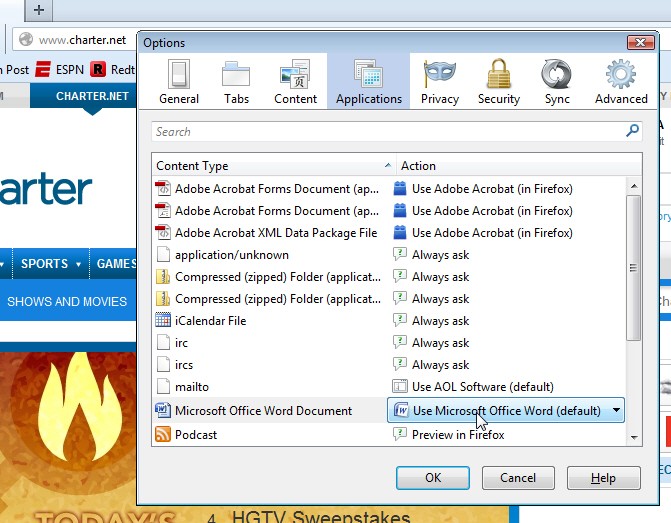
"Do this automatically for files like this from now on" NOT WORKING
Using Firefox 27, on both a Vista SP2 x86 laptop as well as a Windows7 Pro x64. Same symptom for both.
The "do this automatically for files like this from now on" checkbox does NOT seem have any effect.
Even though I have the checkbox checked, every time I open an attachment of the same type (e.g. DOCX for MS Word) Firefox still presents the same dialog box asking me if I want to use the related viewer program (e.g. MS Word, by default).
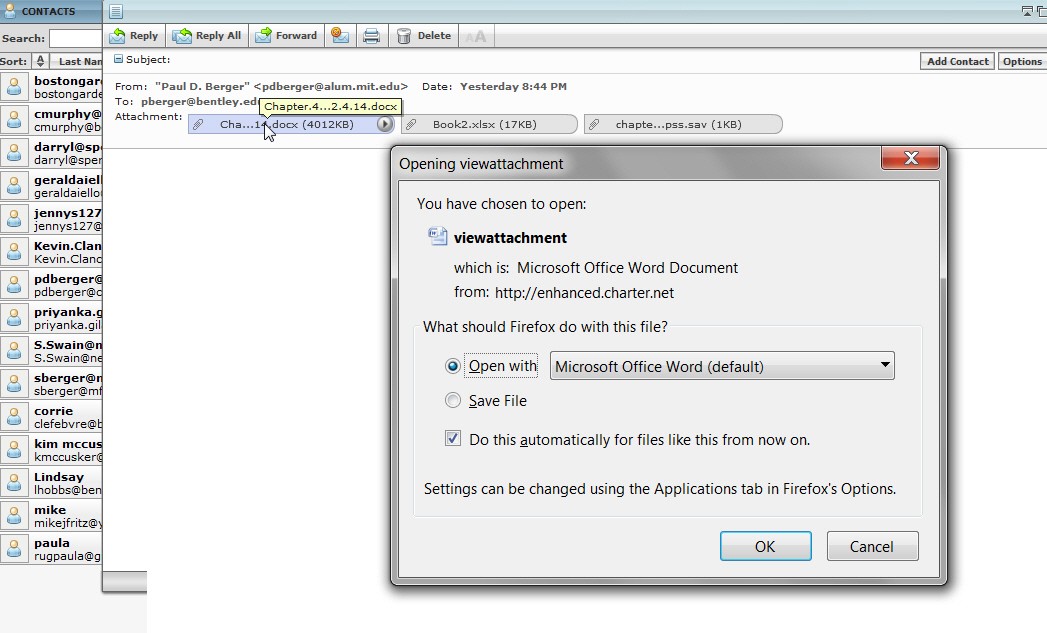
I've checked the box, because I obviously want it to simply launch MS Word whenever I click on the attachment icon in the web mail interface (from Charter.net web mail site). I don't want to have to click on the OK box in the dialog every time. But the function of that checkbox doesn't seem to be working as advertised.
Is this a known issue with Firefox (seems hard to believe)? Unique to web mail programs?? Unique specifically to the specific Charter.net web mail interface from Firefox?
Any help? thanks.
Using Firefox 27, on both a Vista SP2 x86 laptop as well as a Windows7 Pro x64. Same symptom for both.
The "do this automatically for files like this from now on" checkbox does NOT seem have any effect.
Even though I have the checkbox checked, every time I open an attachment of the same type (e.g. DOCX for MS Word) Firefox still presents the same dialog box asking me if I want to use the related viewer program (e.g. MS Word, by default).
I've checked the box, because I obviously want it to simply launch MS Word whenever I click on the attachment icon in the web mail interface (from Charter.net web mail site). I don't want to have to click on the OK box in the dialog every time. But the function of that checkbox doesn't seem to be working as advertised.
Is this a known issue with Firefox (seems hard to believe)? Unique to web mail programs?? Unique specifically to the specific Charter.net web mail interface from Firefox?
Any help? thanks.
My Computer
At a glance
Windows 7 Pro x64 (1), Win7 Pro X64 (2)i5-3350p 3.1Ghz/6MB-cache (1); E8400 3.0Ghz/6...8GB PC3-12800 DDR3 (1); 4GB PC3-10600 DDR3 (2)ATI HD7750 (1), (see TV cards); ATI R7 250 (2)
- Computer type
- PC/Desktop
- Computer Manufacturer/Model Number
- Home-built, two systems (1) and (2)
- OS
- Windows 7 Pro x64 (1), Win7 Pro X64 (2)
- CPU
- i5-3350p 3.1Ghz/6MB-cache (1); E8400 3.0Ghz/6MB-cache (2)
- Motherboard
- ASUS P8Z77-V Pro (1); ASUS P5Q3 (2)
- Memory
- 8GB PC3-12800 DDR3 (1); 4GB PC3-10600 DDR3 (2)
- Graphics Card(s)
- ATI HD7750 (1), (see TV cards); ATI R7 250 (2)
- Sound Card
- Realtek ALC892 HD Audio (1); Realtek ALC1200 HD Audio (2)
- Monitor(s) Displays
- Eizo HD2441W LCD, Eizo S2433W (1); Eizo 24" S2433W (2)
- Screen Resolution
- 1920x1200, 1920x1200 (1); 1920x1200 (2)
- Hard Drives
- (1) 1TB SATA-II (7200RPM), 2x2TB SATA-III (7200RPM), 250GB SATA-III (10000RPM) for OS; 2x2TB external USB 3.0
(2) 320GB SATA-II (7200RPM), 750GB SATA-II (7200RPM), 150GB SATA-II (10000RPM) for OS; 2TB external USB 3.0
- PSU
- Nesteq ECS-6001 600W (1); Nesteq ECS-5001 500W (2)
- Case
- Acousti-Case 360 (1) and (2)
- Cooling
- Noctua NH-U12P SE2 for CPU, 2x120mm case fans (1) and (2)
- Keyboard
- IBM PS/2 (1) and (2)
- Mouse
- Logitech MX Revolution wireless (1); Microsoft wired (2)
- Internet Speed
- 100mbps down / 10mbps up
- Antivirus
- Microsoft Security Essentials; Malwarebyte Anti-Malware Pro
- Browser
- Firefox
- Other Info
- Ceton InfiniTV 4-tuner cablecard-enabled TV card as well as Hauppauge HVR-2250 OTA/ATSC 2-tuner TV card in (1), running under Win7 WMC