As an FYI to those that (may still) need to get control of these system files...
Remember, the windows POWER SHELL is your friend. I can't emphasize enough how more useful it is. The Power Shell (PS) is to the 'elevated dos shell (Command Shell ran as Administrator) as the elevated dos shell is so the ‘Guest’ login. A little research and you can put a portable power shell right on your external drive, so it and its advanced functionality is always available.
(To get to the installed PS) [Start] -> All Programs -> Accessories -> Windows Power Shell
That being said; for what we’re trying to do here, in this thread, the Administrator level Command shell should work just fine.
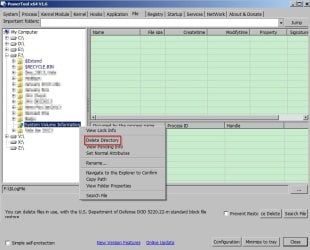
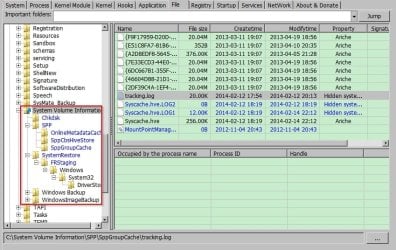
This thread asks how to delete a system folder, so ….
WARNING!!! Always be explicit when using commands like "DEL" and “RmDir” as they can and will delete everything they can that matches with your command. PAY ATTENTION WHERE YOU'RE AT AND
WHAT YOU TYPE.
Now, legs begin….
1.) Open your command shell of choice, as an Administrator.
2.) Move to the BASE FOLDER containing what you want to work on.
E.g.: You want to work on "z:\System Volume Information", then you need to get to "z:\"
** HINT ** If you're just trying this out for the first time, go INTO 'System Volume Information'
so you can see the results without risking effecting the rest of the drive's contents.
3. Learn to love the simplicity of these 3 commands, in order:
[FONT="]Attrib /S -r -a -h -s "z:\System Volume Information"[/FONT][FONT="]
[/FONT][FONT="]** NOTE: The combination of the switches "-r -a -h -s" is important, see below.[/FONT]
[FONT="]Del /S /q "z:\System Volume Information"[/FONT] <- Deletes files
[FONT="]RmDir /s /q "z:\System Volume Information"[/FONT]<-Deletes the folder
"Attrib" changes the attributes of a file.
"Del" deletes the named file. (OR EVERYTHING THAT MATCHES THE PATTERN SPECIFIED. BE SPECIFIC.)
“/S” tells the commands to progress down through all the sub-folders and files.
“/q” suppresses dialogs and confirmation queries
“-r” Removes the 'read only' attribute.
“-a” Removes 'archived' attribute
“-h” Removes 'hidden' attribute
“-s” Removes the 'system' attribute
The combination of "-r -a -h -s" in the Attrib command must be done all at the same time and in
that specific order. Normally it doesn't seem to matter what order the flags are in until you slam
head on into the system files roadblock, which is precisely when you need to remember the shell
processes the flags in reverse order. (The flags are processed Last Flag First.)
And why the inclusion of the all but superfluous archive switch? This little undocumented nightmare
is something of a trick windows used as a minor extra protection of its files from early on. I Know
I've fought this possibly accidental nightmare in a win 98 box but it may go as far back as
Win3. Thus far, as a safety precaution (accidental or not), it's proven to still work to this day.
This thread is proof of it.
In a nutshell, windows sees the 'a' flag and checks the name of the folder it's on... which happens
to be part of the 'special' folders list... so windows slaps the hidden and system files right back on it
to protect its "special folder".
An easy way to see if this little trick may be in use is to simply remember that Windows doesn't index
system or hidden files. So then why is the archive flag set? Even though the indexer does not
index system or hidden files, it is still watching drive activity for changes, and like a good little
intentional Trojan takes a look and what you did, which in turn also triggers the system validation --
which slaps the protective flags right back in place if you don't get them all at once.
What if the above didn’t work?
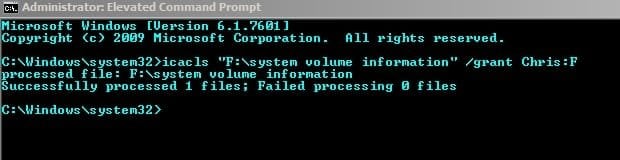
For the items that still stubbornly remain, use either "cacls", "icacls" (preferred), or "TakeOwn" (brute force) commands as follows:
THE “CACLS” METHOD :: This has been depreciated by " icacls " (which I’ll show last) ---
[FONT="]cacls "z:\system volume information" /E /G YourLoginID:F[/FONT]
/E tells the command to EDIT the current ACLs (access control lists) - not make a new one
/G (/Grant) – give YourLoginID the abilities
:F ... Specifies the ability (permission) to add. NO SPACES between this and YourLoginID
F = FULL CONTROL, R = Read, W = Write, C = Change
At this point you should be able to use the regular GUI (windows explorer) or a normal dos
prompt to do what you want with the contents. Note: If you are not removing the actual
base folder itself, then make sure you reverse this setting on what remains. Do this by
changing the /G (Grant) to /R (Remove user). If you don't, you're leaving the system open
to viri, or possibly worse.
cacls "z:\system volume information" /E /R YourLoginID
THE “TAKEOWN” METHOD (or the Brute Force method) ---
[FONT="]TakeOwn /F "z:\system volume information" /R[/FONT]
/F simply tells the command the next thing is the file/folder to work on
/R tells the command to recourse into sub directories.
Note: This command defaults to the current user, hence no ability to specify a Login ID.
As above, if you are leaving files/folders unchanged then you need to remove the access
your ID has to them to protect from viri. Simply use "/A" to specify ‘Administrators’ as the party to become the owner.
[FONT="]TakeOwn /F "z:\system volume information" /R /A[/FONT]
You may now not be the owner but if you still have access to the folder then you [or a virus pretending to be you] can make still changes, so be sure to take YourLoginID privileges off.
[FONT="]cacls "z:\system volume information" /E /R YourLoginID[/FONT]
THE “ICACLS” METHOD (Preferred) --
The nice thing about Icacls is that it blends a number of advanced commands into a single 'elevated' command. Almost all of the above can be done with "ICACLS" as long as you remember that it separates the specified folder from the contents of the specified folder. (Instead of working recursively on this folder AND everything in it, ICACLS works on either this folder OR everything in it. This separation of the tree [everything in a folder] from its root [the folder itself] is intentional.)
For easier reading here, I’m going to simply list the 2nd half of the ICACLS command (the blank). Just remember everything below starts with:
[FONT="]ICACLS "z:\system volume information" ________________________________[/FONT]
*** Normally, you shouldn't need to take ownership of the folder or its contents for what this thread is asking for. But should you need to, ICACLS can do it “nicely” rather than by the brute force method TakeOwn uses:
[FONT="] /setowner YourLoginID
/setowner YourLoginID /T[/FONT]
First we take ownership of the base folder (the root), and then we repeat the command telling it to take ownership of all items IN that folder (the rest of the tree) by appending “/T” to our command. We do these commands in this order because in order to make changes IN a folder, you have to have access to the folder.
In general, we really should not need, nor want, to take ownership of these system files if we don’t absolutely have to. The headache and responsibilities that come along with that ownership greatly outweigh the benefits in the long run. Instead, simply give yourself (YourLoginID) full access with:
[FONT="]/grant YourLoginID:F[/FONT]
[FONT="]/grant YourLoginID:F /T[/FONT]
Again, notice we first have to have permission of the root before we can give ourselves permission to work on the rest of the tree.
Note:
* Use "/grant:r" to explicitly define the exact permissions. (Entirely replace the permissions.)
e.g.: "/grant user:w" adds write ability, whereas "/grant:r user:w"
will set the user to be able to only write to the folder. (But no access to what he just put there.)
And, of course, when you’re done doing what you need to do we need to lock the file back down (if you didn’t outright delete it) to protect against viri. (We do these in the reverse order that we did above because we have to still have access to the ‘root’ before we can mess with the ‘tree’.
[FONT="]/remove YourLoginID /T[/FONT] Remove access to everything IN the folder.
[FONT="]/remove yourLoginID [/FONT] Remove access TO the specified folder itself.
( And if you took ownership: [FONT="]/setowner Administrator /T[/FONT] .. And then again without the “/T”.)
Sorry this so long, it really isn't in action. I just felt it necessary to cover the bases and explain why. My external drives (installs, OS backups, etc) that I have to swap around would get so loaded with these 'restores' that I started getting "Drive low on space" alerts just plugging it in. To resolve this "build up" and make it easy to maintain I have a batch file in the root of each drive. (z:\WipeRestores.bat) which does all of the above.
-----WipeRestores.bat -----
@echo off
color 17
cls
if {%1}=={} (
Set tmpWorkingFile=System Volume Information
) else (
Set tmpWorkingFile=%1
)
Echo -- Processing root location: %tmpWorkingFile%
echo.
set tmpTakeControl = 0
set tmpBruteForce = 0
net session >nul 2>&1
if %errorLevel% == 0 (
Set tmpUserIsAdmin=1
) else (
Set tmpUserIsAdmin=0
)
if exist "%tmpWorkingFile%" (
attrib /S -r -a -h -s "%tmpWorkingFile%"
del /S /Q "%tmpWorkingFile%"
rmdir /s /q "%tmpWorkingFile%"
)
if exist "%tmpWorkingFile%" (
attrib /S -r -a -h -s "%tmpWorkingFile%"
del /S /Q "%tmpWorkingFile%"
rmdir /s /q "%tmpWorkingFile%"
)
if exist "%tmpWorkingFile%" (
attrib /S -r -a -h -s "%tmpWorkingFile%"
del /S /Q "%tmpWorkingFile%"
rmdir /s /q "%tmpWorkingFile%"
)
if not exist "%tmpWorkingFile%" goto ProgDone
:FirstAttemptComplete
echo.
echo.
choice /m "Add full control of folder to %username% and try again?"
set tmpTakeControl=%ERRORLEVEL%
if %tmpTakeControl% equ 1 (
Echo Applying full control changes.......
ICACLS "%tmpWorkingFile%" /grant %username%:F
ICACLS "%tmpWorkingFile%" /grant %username%:F /T
echo attempting to remove folders.....
attrib /S -r -a -h -s "%tmpWorkingFile%"
del /S /Q "%tmpWorkingFile%"
rmdir /s /q "%tmpWorkingFile%"
)
If not exist "%tmpWorkingFile%" goto progDone
echo.
echo.
choice /m "Use brute force to take ownership of the folders and try again?"
set tmpBruteForce=%ERRORLEVEL%
if %tmpBruteForce% equ 1 (
Echo Taking ownership of folder and contents.....
TakeOwn /F "%tmpWorkingFile%" /R
echo attempting to remove folders.....
attrib /S -r -a -h -s "%tmpWorkingFile%"
del /S /Q "%tmpWorkingFile%"
rmdir /s /q "%tmpWorkingFile%"
)
echo.
echo.
if exist "%tmpWorkingFile%" (
echo Unfortunately I was not able to remove the folder.
echo It might be necessary to run this batch file again.
echo If this is the second time, please examine the
echo folder conditions for issues not connected to
echo folder permissions.
echo.
echo.
)
 rogDone
set tmpTakeControl =
Set tmpUserIsAdmin =
set tmpBruteForce=
set tmpWorkingFile=
echo ----- End of line. -----
Remember, the windows POWER SHELL is your friend. I can't emphasize enough how more useful it is. The Power Shell (PS) is to the 'elevated dos shell (Command Shell ran as Administrator) as the elevated dos shell is so the ‘Guest’ login. A little research and you can put a portable power shell right on your external drive, so it and its advanced functionality is always available.
(To get to the installed PS) [Start] -> All Programs -> Accessories -> Windows Power Shell
That being said; for what we’re trying to do here, in this thread, the Administrator level Command shell should work just fine.
This thread asks how to delete a system folder, so ….
WARNING!!! Always be explicit when using commands like "DEL" and “RmDir” as they can and will delete everything they can that matches with your command. PAY ATTENTION WHERE YOU'RE AT AND
WHAT YOU TYPE.
Now, legs begin….
1.) Open your command shell of choice, as an Administrator.
2.) Move to the BASE FOLDER containing what you want to work on.
E.g.: You want to work on "z:\System Volume Information", then you need to get to "z:\"
** HINT ** If you're just trying this out for the first time, go INTO 'System Volume Information'
so you can see the results without risking effecting the rest of the drive's contents.
3. Learn to love the simplicity of these 3 commands, in order:
[FONT="]Attrib /S -r -a -h -s "z:\System Volume Information"[/FONT][FONT="]
[/FONT][FONT="]** NOTE: The combination of the switches "-r -a -h -s" is important, see below.[/FONT]
[FONT="]Del /S /q "z:\System Volume Information"[/FONT] <- Deletes files
[FONT="]RmDir /s /q "z:\System Volume Information"[/FONT]<-Deletes the folder
"Attrib" changes the attributes of a file.
"Del" deletes the named file. (OR EVERYTHING THAT MATCHES THE PATTERN SPECIFIED. BE SPECIFIC.)
“/S” tells the commands to progress down through all the sub-folders and files.
“/q” suppresses dialogs and confirmation queries
“-r” Removes the 'read only' attribute.
“-a” Removes 'archived' attribute
“-h” Removes 'hidden' attribute
“-s” Removes the 'system' attribute
The combination of "-r -a -h -s" in the Attrib command must be done all at the same time and in
that specific order. Normally it doesn't seem to matter what order the flags are in until you slam
head on into the system files roadblock, which is precisely when you need to remember the shell
processes the flags in reverse order. (The flags are processed Last Flag First.)
And why the inclusion of the all but superfluous archive switch? This little undocumented nightmare
is something of a trick windows used as a minor extra protection of its files from early on. I Know
I've fought this possibly accidental nightmare in a win 98 box but it may go as far back as
Win3. Thus far, as a safety precaution (accidental or not), it's proven to still work to this day.
This thread is proof of it.
In a nutshell, windows sees the 'a' flag and checks the name of the folder it's on... which happens
to be part of the 'special' folders list... so windows slaps the hidden and system files right back on it
to protect its "special folder".
An easy way to see if this little trick may be in use is to simply remember that Windows doesn't index
system or hidden files. So then why is the archive flag set? Even though the indexer does not
index system or hidden files, it is still watching drive activity for changes, and like a good little
intentional Trojan takes a look and what you did, which in turn also triggers the system validation --
which slaps the protective flags right back in place if you don't get them all at once.
What if the above didn’t work?
For the items that still stubbornly remain, use either "cacls", "icacls" (preferred), or "TakeOwn" (brute force) commands as follows:
THE “CACLS” METHOD :: This has been depreciated by " icacls " (which I’ll show last) ---
[FONT="]cacls "z:\system volume information" /E /G YourLoginID:F[/FONT]
/E tells the command to EDIT the current ACLs (access control lists) - not make a new one
/G (/Grant) – give YourLoginID the abilities
:F ... Specifies the ability (permission) to add. NO SPACES between this and YourLoginID
F = FULL CONTROL, R = Read, W = Write, C = Change
At this point you should be able to use the regular GUI (windows explorer) or a normal dos
prompt to do what you want with the contents. Note: If you are not removing the actual
base folder itself, then make sure you reverse this setting on what remains. Do this by
changing the /G (Grant) to /R (Remove user). If you don't, you're leaving the system open
to viri, or possibly worse.
cacls "z:\system volume information" /E /R YourLoginID
THE “TAKEOWN” METHOD (or the Brute Force method) ---
[FONT="]TakeOwn /F "z:\system volume information" /R[/FONT]
/F simply tells the command the next thing is the file/folder to work on
/R tells the command to recourse into sub directories.
Note: This command defaults to the current user, hence no ability to specify a Login ID.
As above, if you are leaving files/folders unchanged then you need to remove the access
your ID has to them to protect from viri. Simply use "/A" to specify ‘Administrators’ as the party to become the owner.
[FONT="]TakeOwn /F "z:\system volume information" /R /A[/FONT]
You may now not be the owner but if you still have access to the folder then you [or a virus pretending to be you] can make still changes, so be sure to take YourLoginID privileges off.
[FONT="]cacls "z:\system volume information" /E /R YourLoginID[/FONT]
THE “ICACLS” METHOD (Preferred) --
The nice thing about Icacls is that it blends a number of advanced commands into a single 'elevated' command. Almost all of the above can be done with "ICACLS" as long as you remember that it separates the specified folder from the contents of the specified folder. (Instead of working recursively on this folder AND everything in it, ICACLS works on either this folder OR everything in it. This separation of the tree [everything in a folder] from its root [the folder itself] is intentional.)
For easier reading here, I’m going to simply list the 2nd half of the ICACLS command (the blank). Just remember everything below starts with:
[FONT="]ICACLS "z:\system volume information" ________________________________[/FONT]
*** Normally, you shouldn't need to take ownership of the folder or its contents for what this thread is asking for. But should you need to, ICACLS can do it “nicely” rather than by the brute force method TakeOwn uses:
[FONT="] /setowner YourLoginID
/setowner YourLoginID /T[/FONT]
First we take ownership of the base folder (the root), and then we repeat the command telling it to take ownership of all items IN that folder (the rest of the tree) by appending “/T” to our command. We do these commands in this order because in order to make changes IN a folder, you have to have access to the folder.
In general, we really should not need, nor want, to take ownership of these system files if we don’t absolutely have to. The headache and responsibilities that come along with that ownership greatly outweigh the benefits in the long run. Instead, simply give yourself (YourLoginID) full access with:
[FONT="]/grant YourLoginID:F[/FONT]
[FONT="]/grant YourLoginID:F /T[/FONT]
Again, notice we first have to have permission of the root before we can give ourselves permission to work on the rest of the tree.
Note:
* Use "/grant:r" to explicitly define the exact permissions. (Entirely replace the permissions.)
e.g.: "/grant user:w" adds write ability, whereas "/grant:r user:w"
will set the user to be able to only write to the folder. (But no access to what he just put there.)
And, of course, when you’re done doing what you need to do we need to lock the file back down (if you didn’t outright delete it) to protect against viri. (We do these in the reverse order that we did above because we have to still have access to the ‘root’ before we can mess with the ‘tree’.
[FONT="]/remove YourLoginID /T[/FONT] Remove access to everything IN the folder.
[FONT="]/remove yourLoginID [/FONT] Remove access TO the specified folder itself.
( And if you took ownership: [FONT="]/setowner Administrator /T[/FONT] .. And then again without the “/T”.)
Sorry this so long, it really isn't in action. I just felt it necessary to cover the bases and explain why. My external drives (installs, OS backups, etc) that I have to swap around would get so loaded with these 'restores' that I started getting "Drive low on space" alerts just plugging it in. To resolve this "build up" and make it easy to maintain I have a batch file in the root of each drive. (z:\WipeRestores.bat) which does all of the above.
-----WipeRestores.bat -----
@echo off
color 17
cls
if {%1}=={} (
Set tmpWorkingFile=System Volume Information
) else (
Set tmpWorkingFile=%1
)
Echo -- Processing root location: %tmpWorkingFile%
echo.
set tmpTakeControl = 0
set tmpBruteForce = 0
net session >nul 2>&1
if %errorLevel% == 0 (
Set tmpUserIsAdmin=1
) else (
Set tmpUserIsAdmin=0
)
if exist "%tmpWorkingFile%" (
attrib /S -r -a -h -s "%tmpWorkingFile%"
del /S /Q "%tmpWorkingFile%"
rmdir /s /q "%tmpWorkingFile%"
)
if exist "%tmpWorkingFile%" (
attrib /S -r -a -h -s "%tmpWorkingFile%"
del /S /Q "%tmpWorkingFile%"
rmdir /s /q "%tmpWorkingFile%"
)
if exist "%tmpWorkingFile%" (
attrib /S -r -a -h -s "%tmpWorkingFile%"
del /S /Q "%tmpWorkingFile%"
rmdir /s /q "%tmpWorkingFile%"
)
if not exist "%tmpWorkingFile%" goto ProgDone
:FirstAttemptComplete
echo.
echo.
choice /m "Add full control of folder to %username% and try again?"
set tmpTakeControl=%ERRORLEVEL%
if %tmpTakeControl% equ 1 (
Echo Applying full control changes.......
ICACLS "%tmpWorkingFile%" /grant %username%:F
ICACLS "%tmpWorkingFile%" /grant %username%:F /T
echo attempting to remove folders.....
attrib /S -r -a -h -s "%tmpWorkingFile%"
del /S /Q "%tmpWorkingFile%"
rmdir /s /q "%tmpWorkingFile%"
)
If not exist "%tmpWorkingFile%" goto progDone
echo.
echo.
choice /m "Use brute force to take ownership of the folders and try again?"
set tmpBruteForce=%ERRORLEVEL%
if %tmpBruteForce% equ 1 (
Echo Taking ownership of folder and contents.....
TakeOwn /F "%tmpWorkingFile%" /R
echo attempting to remove folders.....
attrib /S -r -a -h -s "%tmpWorkingFile%"
del /S /Q "%tmpWorkingFile%"
rmdir /s /q "%tmpWorkingFile%"
)
echo.
echo.
if exist "%tmpWorkingFile%" (
echo Unfortunately I was not able to remove the folder.
echo It might be necessary to run this batch file again.
echo If this is the second time, please examine the
echo folder conditions for issues not connected to
echo folder permissions.
echo.
echo.
)
rogDoneset tmpTakeControl =
Set tmpUserIsAdmin =
set tmpBruteForce=
set tmpWorkingFile=
echo ----- End of line. -----
Last edited:
My Computer
At a glance
Windows ALL
- Computer type
- PC/Desktop
- OS
- Windows ALL
 MR. SCHMIK