Solved How to delete system copies from partition?

SanderO

New member
Local time
11:07 PM
Messages
10
Hi.

I got a Fujitsu Amilo Xi 3670 laptop and i'm having some problems with it.

There are 2 partitions each worth little under 300 GB of space: 1 for normal use of the laptop (C:) and 1 to store back ups and system copies (D:).

The (D:) partition has a back up of 76,35 GB, so you'd think that it would leave me with more than enough space to use for other purposes. Regrettably, this is not the case. There appears to be a system copy stored on this partition, swallowing up a huge total of 206.70 GB of space. I've been scouring my pc for ways to delete or shrink this system copy. When that didn't work, I searched on the web and e-mailed tech support to solve this problem, but all to no avail.

To top it off, there's another 4.53 GB occupied by 'other files'.

Can someone please tell me how to delete this system copy? I thought about formatting the partition, but I fear that doing so would leave me with an empty partition that lacks an OS, requiring me to reinstal windows 7 on it. This would be a problem, because I no longer have the install CD.

Thanks in advance.
 

My Computer

Computer type
Laptop
Computer Manufacturer/Model Number
Fujitsu (Siemens)
OS
Windows 7 Home Premium 64 bit
CPU
Intel Core2 Duo CPU T6600
Memory
1.76 GB
Graphics Card(s)
NVIDIA GeForce GT 130M
Antivirus
Avast
Browser
Chrome
I'm not sure what you mean by "system copy".
For system images deleting WindowsImageBackup will delete the image. BUT there goes your system image. I recommend making only one independent system image at a time. Do it manually using "Create a system image".

To delete shadow copies:
http://www.sevenforums.com/tutorials/166102-shadow-copies-delete.html
 

My Computer

Computer type
PC/Desktop
Computer Manufacturer/Model Number
Own build
OS
Windows 7x64 Home Premium SP1
CPU
Intel i7 2600k
Motherboard
ASUS P8Z68 Deluxe
Memory
G.Skill Ripjaws (DDR3-1600) 2x4GB
Graphics Card(s)
Nvidia GeForce GTS 450; Intel HD Graphics 3000(GT2+)
Monitor(s) Displays
Dell Ultrasharp IPS panel U2311H, Samsung SyncMaster P2350
Screen Resolution
1920x1080
Hard Drives
Samsung 850 Pro SSD 256GB, Samsung SSD 840 120GB, Seagates 1TB Barracuda ST31000528AS x2
PSU
Seasonic M12II 520W
Case
Lian Li Lancool PC-K60
Cooling
Case: 1x120mm, 3x140mm CPU: Hyper 212+
Keyboard
Logitech MK520 (wireless)
Mouse
Logitech MK520
Internet Speed
6-7 Mbps
Antivirus
Norton Security Premium, Malwarebytes on 2 (MSE on 3rd PC)
Browser
FireFox
Other Info
Audio: Logitech Z523 2.1
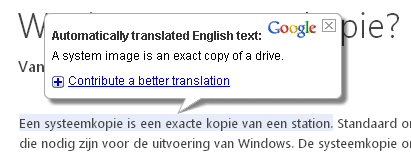
That's how it's called... system copy. Well actually it's called 'systeemkopie' in Dutch, but that litterally translates to system copy :P

I don't understand what you're saying about images.

I've allready checked for shadow copies. There apparently is one, but it's only little under 10 GB.
 

My Computer

Computer type
Laptop
Computer Manufacturer/Model Number
Fujitsu (Siemens)
OS
Windows 7 Home Premium 64 bit
CPU
Intel Core2 Duo CPU T6600
Memory
1.76 GB
Graphics Card(s)
NVIDIA GeForce GT 130M
Antivirus
Avast
Browser
Chrome

My Computer

Computer type
Laptop
Computer Manufacturer/Model Number
Employer provided Dell Latitude
OS
W7 Pro SP1 64bit
CPU
i7
Memory
8GB
Graphics Card(s)
Intel HD Graphics
Hard Drives
crappy SSD
Antivirus
Employer mandated Symantec Endpoint Protection
Browser
Pale Moon 64bit, IE11 64bit & Chrome 64bit
ok so i've located the image that's taking up all the space.

wtf do i do with it...?
 

My Computer

Computer type
Laptop
Computer Manufacturer/Model Number
Fujitsu (Siemens)
OS
Windows 7 Home Premium 64 bit
CPU
Intel Core2 Duo CPU T6600
Memory
1.76 GB
Graphics Card(s)
NVIDIA GeForce GT 130M
Antivirus
Avast
Browser
Chrome
We can both find out what you should do with it when mjf comes back :-)
 

My Computer

Computer type
Laptop
Computer Manufacturer/Model Number
Employer provided Dell Latitude
OS
W7 Pro SP1 64bit
CPU
i7
Memory
8GB
Graphics Card(s)
Intel HD Graphics
Hard Drives
crappy SSD
Antivirus
Employer mandated Symantec Endpoint Protection
Browser
Pale Moon 64bit, IE11 64bit & Chrome 64bit
It's a large system image from a partition which must have a large amount of data on it in addition to the operating system and installed programs. A system image will image everything except a few thinks like pagefile contents.
IMO:
1) It is not a good idea to store system images on another partition of the HDD containing the OS. If the HDD fails you have lost everything. It is best to invest in an external USB HDD for backups.
2) A longer term option would be to get large amounts of data (eg videos, photos, games) off the OS partition so your system images have a more manageable size (say 30-50GB). If you use a program like (free or paid) Macrium Reflect you will also get some compression when making a system image.


Finally, if you feel comfortable with repartitioning using say Partition Wizard boot CD you could break your 300GB OS partition into 100GB for the OS, 200GB for another data partition. You cannot go to more than 4 primary partitions or your HDD will become dynamic. If you want to go down this path you should clean up your data and provide a full disk management screenshot.
 

My Computer

Computer type
PC/Desktop
Computer Manufacturer/Model Number
Own build
OS
Windows 7x64 Home Premium SP1
CPU
Intel i7 2600k
Motherboard
ASUS P8Z68 Deluxe
Memory
G.Skill Ripjaws (DDR3-1600) 2x4GB
Graphics Card(s)
Nvidia GeForce GTS 450; Intel HD Graphics 3000(GT2+)
Monitor(s) Displays
Dell Ultrasharp IPS panel U2311H, Samsung SyncMaster P2350
Screen Resolution
1920x1080
Hard Drives
Samsung 850 Pro SSD 256GB, Samsung SSD 840 120GB, Seagates 1TB Barracuda ST31000528AS x2
PSU
Seasonic M12II 520W
Case
Lian Li Lancool PC-K60
Cooling
Case: 1x120mm, 3x140mm CPU: Hyper 212+
Keyboard
Logitech MK520 (wireless)
Mouse
Logitech MK520
Internet Speed
6-7 Mbps
Antivirus
Norton Security Premium, Malwarebytes on 2 (MSE on 3rd PC)
Browser
FireFox
Other Info
Audio: Logitech Z523 2.1
thanks for the reply.

I've removed some stuff from my pc, but there's still 226 GB in use on my C: partition... not sure where all this stuff comes from :-/ i've got diablo 3 and starcraft 2 installed, but together, they only take up 30 GB or something... I've checked my program files folder and it only contained 45 GB of data. Weird...

Anyway, this isn't my primary pc, so backing up data is really no priority. You think i would be safe by just deleting the back up image?
 

My Computer

Computer type
Laptop
Computer Manufacturer/Model Number
Fujitsu (Siemens)
OS
Windows 7 Home Premium 64 bit
CPU
Intel Core2 Duo CPU T6600
Memory
1.76 GB
Graphics Card(s)
NVIDIA GeForce GT 130M
Antivirus
Avast
Browser
Chrome
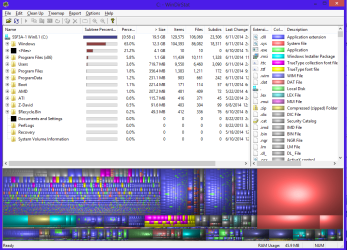
WinDirStat will show the breakdown of the data on a drive.
Deleting the system image will just mean you don't have an image to recover in the event of some problem (HDD crash, malware etc.). Your PC will still function. Use an external HDD for backups as I've suggested.
 

My Computer

Computer type
PC/Desktop
Computer Manufacturer/Model Number
Own build
OS
Windows 7x64 Home Premium SP1
CPU
Intel i7 2600k
Motherboard
ASUS P8Z68 Deluxe
Memory
G.Skill Ripjaws (DDR3-1600) 2x4GB
Graphics Card(s)
Nvidia GeForce GTS 450; Intel HD Graphics 3000(GT2+)
Monitor(s) Displays
Dell Ultrasharp IPS panel U2311H, Samsung SyncMaster P2350
Screen Resolution
1920x1080
Hard Drives
Samsung 850 Pro SSD 256GB, Samsung SSD 840 120GB, Seagates 1TB Barracuda ST31000528AS x2
PSU
Seasonic M12II 520W
Case
Lian Li Lancool PC-K60
Cooling
Case: 1x120mm, 3x140mm CPU: Hyper 212+
Keyboard
Logitech MK520 (wireless)
Mouse
Logitech MK520
Internet Speed
6-7 Mbps
Antivirus
Norton Security Premium, Malwarebytes on 2 (MSE on 3rd PC)
Browser
FireFox
Other Info
Audio: Logitech Z523 2.1
ok this looks like a fun program ^^

i've found something i don't quite get. i think i used to have TuneUp installed on this PC, but it appears to be gone. The program you mentioned in your last post, shows a huge folder with what appear to be files related to TuneUp. See image below.

apparently they're crashdumps... a lot of them... they're located in the 'Guest' folder under AppData, but when i go to this Guest folder, the AppData folder is nowhere to be found. It's probably hidden to prevent the unknowing from screwing up their pc. I also used to have AVG antivirus installed on this PC... do you think the AVG folder you can see on the image is related to this, or is this a coincidental resemblace?

As you've probably noticed, i'm new to this kind of stuff, so the questions i ask may seem kind of dumb. So here's probably another stupid question: are these crashdump files vital for my PC or can i delete them? Because, as you can see, they take up a huge portion of space on my PC... same with the Winzip files (green). These are also back up files. Safe to remove?
 

My Computer

Computer type
Laptop
Computer Manufacturer/Model Number
Fujitsu (Siemens)
OS
Windows 7 Home Premium 64 bit
CPU
Intel Core2 Duo CPU T6600
Memory
1.76 GB
Graphics Card(s)
NVIDIA GeForce GT 130M
Antivirus
Avast
Browser
Chrome
bump...?
 

My Computer

Computer type
Laptop
Computer Manufacturer/Model Number
Fujitsu (Siemens)
OS
Windows 7 Home Premium 64 bit
CPU
Intel Core2 Duo CPU T6600
Memory
1.76 GB
Graphics Card(s)
NVIDIA GeForce GT 130M
Antivirus
Avast
Browser
Chrome
I can't provide any advice on the TuneUp data. I was hoping someone else could offer a suggestion.
Your screenshots may be clearer if you upload them using the Windows snipping tool.
 

My Computer

Computer type
PC/Desktop
Computer Manufacturer/Model Number
Own build
OS
Windows 7x64 Home Premium SP1
CPU
Intel i7 2600k
Motherboard
ASUS P8Z68 Deluxe
Memory
G.Skill Ripjaws (DDR3-1600) 2x4GB
Graphics Card(s)
Nvidia GeForce GTS 450; Intel HD Graphics 3000(GT2+)
Monitor(s) Displays
Dell Ultrasharp IPS panel U2311H, Samsung SyncMaster P2350
Screen Resolution
1920x1080
Hard Drives
Samsung 850 Pro SSD 256GB, Samsung SSD 840 120GB, Seagates 1TB Barracuda ST31000528AS x2
PSU
Seasonic M12II 520W
Case
Lian Li Lancool PC-K60
Cooling
Case: 1x120mm, 3x140mm CPU: Hyper 212+
Keyboard
Logitech MK520 (wireless)
Mouse
Logitech MK520
Internet Speed
6-7 Mbps
Antivirus
Norton Security Premium, Malwarebytes on 2 (MSE on 3rd PC)
Browser
FireFox
Other Info
Audio: Logitech Z523 2.1
they're located in the 'Guest' folder under AppData, but when i go to this Guest folder, the AppData folder is nowhere to be found.
In the WinDirStat window right click on the AppData folder.
What happens when you click Explorer Here ?
 

My Computer

Computer type
PC/Desktop
Computer Manufacturer/Model Number
home built
OS
Multi-Boot W7_Pro_x64 W8.1_Pro_x64 W10_Pro_x64 +Linux_VMs +Chromium_VM
CPU
AMD Athlon II x4 620
Motherboard
Gigabyte GA-MA785G-UD3H
Memory
6GB GSkill DDR2 800
Graphics Card(s)
AMD 4670 GPU + AMD 4200 IGP
Sound Card
on board Realtek ALC889A
Monitor(s) Displays
RCA 40" LCD TV, Insignia 32" LCD TV, HP 15" LCD monitor
Screen Resolution
1680 x 1050
Hard Drives
OCZ Vertex 3 120GB,
Samsung F3 1TB (3),
Several others - WD, Seagate, Hitachi, ...
PSU
Corsair 500 W
Case
Rosewill mid tower
Cooling
CM 90mm rifle
Keyboard
Gyration wireless, Logitech wireless, Dell USB wired
Mouse
Gyration wireless, Logitech wireless, V7 USB wired
Internet Speed
Spectrum - 100Mbps D / 10Mbps U
Antivirus
Avast, MBAM3, EMET, WinPatrol
Browser
Pale Moon, Firefox, IE
Other Info
2 multi-boot PC's
Mainly HTPC/Office/Gen purpose (no gaming).
Trendnet USB KVM.
LG DVD burner/Blue Ray Player.
Tray system for removable SATA backup drives.

Not currently OCd, under-volted.
I use Hybrid sleep, rarely re-boot or shutdown.

Hauppauge HD-PVR, Avermedia PCIe TV Tuner, Hauppauge PCI TV Tuner.
I can't provide any advice on the TuneUp data. I was hoping someone else could offer a suggestion.
Your screenshots may be clearer if you upload them using the Windows snipping tool.
you can click the image and see an enlarged one on photobucket :)

they're located in the 'Guest' folder under AppData, but when i go to this Guest folder, the AppData folder is nowhere to be found.
In the WinDirStat window right click on the AppData folder.
What happens when you click Explorer Here ?
i can enter the folder ^^ thanks for the tip
 

My Computer

Computer type
Laptop
Computer Manufacturer/Model Number
Fujitsu (Siemens)
OS
Windows 7 Home Premium 64 bit
CPU
Intel Core2 Duo CPU T6600
Memory
1.76 GB
Graphics Card(s)
NVIDIA GeForce GT 130M
Antivirus
Avast
Browser
Chrome

My Computer

Computer type
PC/Desktop
Computer Manufacturer/Model Number
Home made Desktop
OS
Windows 10 Pro. 64/ version 1709 Windows 7 Pro/64
CPU
Intel i7-6800K @ 4.3
Motherboard
ASUS X-99 Deluxe II
Memory
Corsair Platinum 16 gig @2400
Graphics Card(s)
EVGA GTX 1070 OC
Monitor(s) Displays
Asus 27" LED LCD/VE278Q
Screen Resolution
1920-1080 or 1280-720 HDMI
Hard Drives
INTEL SSD 730-240 Gb Sata 3.0/
PSU
EVGA Platium 1200W
Case
Phanteks Luxe Tempered Glass 8 fans/ one radiator
Cooling
XSPC/ Water Cooled CPU
Keyboard
Das 4 Professional
Mouse
Logitech M705/MX Anywhere 2-S
Internet Speed
100 mbits
Antivirus
Microsoft Security Essentials/ Malwarebytes Premium 3.0/ SAS
Browser
I.E. 11 default/Firefox/ ISP Time Warner Cable/Spectrum
Other Info
LG BluRay Burner/
Sound system-KLipsch-THX/
Icy Dock ssd Hot Swap bays.

My Computer

Computer type
Laptop
Computer Manufacturer/Model Number
Fujitsu (Siemens)
OS
Windows 7 Home Premium 64 bit
CPU
Intel Core2 Duo CPU T6600
Memory
1.76 GB
Graphics Card(s)
NVIDIA GeForce GT 130M
Antivirus
Avast
Browser
Chrome
I can't provide any advice on the TuneUp data. I was hoping someone else could offer a suggestion.
Your screenshots may be clearer if you upload them using the Windows snipping tool.
you can click the image and see an enlarged one on photobucket :)
Yes and they are still fuzzy. Use the recommended image upload procedure if you plan sending more images.
 

My Computer

Computer type
PC/Desktop
Computer Manufacturer/Model Number
Own build
OS
Windows 7x64 Home Premium SP1
CPU
Intel i7 2600k
Motherboard
ASUS P8Z68 Deluxe
Memory
G.Skill Ripjaws (DDR3-1600) 2x4GB
Graphics Card(s)
Nvidia GeForce GTS 450; Intel HD Graphics 3000(GT2+)
Monitor(s) Displays
Dell Ultrasharp IPS panel U2311H, Samsung SyncMaster P2350
Screen Resolution
1920x1080
Hard Drives
Samsung 850 Pro SSD 256GB, Samsung SSD 840 120GB, Seagates 1TB Barracuda ST31000528AS x2
PSU
Seasonic M12II 520W
Case
Lian Li Lancool PC-K60
Cooling
Case: 1x120mm, 3x140mm CPU: Hyper 212+
Keyboard
Logitech MK520 (wireless)
Mouse
Logitech MK520
Internet Speed
6-7 Mbps
Antivirus
Norton Security Premium, Malwarebytes on 2 (MSE on 3rd PC)
Browser
FireFox
Other Info
Audio: Logitech Z523 2.1
I would at least delete all the crash dump files.
Unless you or someone is using these to determine the cause of a crash they aren't needed.

Do you have the GUEST account enabled?
To me it seemed odd that the crash dumps are in the GUEST account data.
Anyway, you can get to this folder/files from the WinDirStat window so it's not a security/permission problem...
 

My Computer

Computer type
PC/Desktop
Computer Manufacturer/Model Number
home built
OS
Multi-Boot W7_Pro_x64 W8.1_Pro_x64 W10_Pro_x64 +Linux_VMs +Chromium_VM
CPU
AMD Athlon II x4 620
Motherboard
Gigabyte GA-MA785G-UD3H
Memory
6GB GSkill DDR2 800
Graphics Card(s)
AMD 4670 GPU + AMD 4200 IGP
Sound Card
on board Realtek ALC889A
Monitor(s) Displays
RCA 40" LCD TV, Insignia 32" LCD TV, HP 15" LCD monitor
Screen Resolution
1680 x 1050
Hard Drives
OCZ Vertex 3 120GB,
Samsung F3 1TB (3),
Several others - WD, Seagate, Hitachi, ...
PSU
Corsair 500 W
Case
Rosewill mid tower
Cooling
CM 90mm rifle
Keyboard
Gyration wireless, Logitech wireless, Dell USB wired
Mouse
Gyration wireless, Logitech wireless, V7 USB wired
Internet Speed
Spectrum - 100Mbps D / 10Mbps U
Antivirus
Avast, MBAM3, EMET, WinPatrol
Browser
Pale Moon, Firefox, IE
Other Info
2 multi-boot PC's
Mainly HTPC/Office/Gen purpose (no gaming).
Trendnet USB KVM.
LG DVD burner/Blue Ray Player.
Tray system for removable SATA backup drives.

Not currently OCd, under-volted.
I use Hybrid sleep, rarely re-boot or shutdown.

Hauppauge HD-PVR, Avermedia PCIe TV Tuner, Hauppauge PCI TV Tuner.
I can't provide any advice on the TuneUp data. I was hoping someone else could offer a suggestion.
Your screenshots may be clearer if you upload them using the Windows snipping tool.
you can click the image and see an enlarged one on photobucket :)
Yes and they are still fuzzy. Use the recommended image upload procedure if you plan sending more images.
image-1.jpg Photo by da_sandman | Photobucket
in the lower right corner you can see a magnifying glass image. click that one and then click it a second time when the small pop up image comes :) but it's ok, i don't think i'll upload any more pics ^^

I would at least delete all the crash dump files.
Unless you or someone is using these to determine the cause of a crash they aren't needed.

Do you have the GUEST account enabled?
To me it seemed odd that the crash dumps are in the GUEST account data.
Anyway, you can get to this folder/files from the WinDirStat window so it's not a security/permission problem...
yes, i have it enabled. i'm gona go ahead and delete those then. i'm also going to delete the big 206 GB back up image. like i said: this is not my primary pc, so data recovery is not important.
 

My Computer

Computer type
Laptop
Computer Manufacturer/Model Number
Fujitsu (Siemens)
OS
Windows 7 Home Premium 64 bit
CPU
Intel Core2 Duo CPU T6600
Memory
1.76 GB
Graphics Card(s)
NVIDIA GeForce GT 130M
Antivirus
Avast
Browser
Chrome
OK, you can delete the backup image as you don't need it.
You would be better off using a 3rd party Imaging Utility such as Macrium (free).
It is much more reliable, configurable, and easy to use ..
http://www.sevenforums.com/tutorials/73828-imaging-free-macrium.html
For more help, re-read post #7 by mjf - http://www.sevenforums.com/backup-restore/333621-how-delete-system-copies-partition.html#post2794342

I can't comment on using the GUEST account, or Windows backup/imaging, I don't use them.
I never use a "TuneUp" program ... from what I know they can cause more problems than they solve.

Noone here is telling you not to post images, in fact quite the opposite.
Screen prints can help a lot at solving problems.
What you're being asked is to post images using the instructions you were given.
The way you posted images, we all have to go to a 3rd party website to see your image (better) and try to help you.
In your case it's photobucket site, the next person asking for help might post images on xyz-whoKnows.com.

I clicked on YOUR image and MY security blocked access.
Should I disable MY security so I can see YOUR image ?
That's not going to happen ... so i can't see more to help you more ...

I'm inserting an image in my post so you can see the difference, and what is being asked of you.
To see/open/enlarge my image, you don't have to go to some unknown/questionable site.
The image is stored in Seven Forums ...

WDSSP01.PNG

hth,
David
 

My Computer

Computer type
PC/Desktop
Computer Manufacturer/Model Number
home built
OS
Multi-Boot W7_Pro_x64 W8.1_Pro_x64 W10_Pro_x64 +Linux_VMs +Chromium_VM
CPU
AMD Athlon II x4 620
Motherboard
Gigabyte GA-MA785G-UD3H
Memory
6GB GSkill DDR2 800
Graphics Card(s)
AMD 4670 GPU + AMD 4200 IGP
Sound Card
on board Realtek ALC889A
Monitor(s) Displays
RCA 40" LCD TV, Insignia 32" LCD TV, HP 15" LCD monitor
Screen Resolution
1680 x 1050
Hard Drives
OCZ Vertex 3 120GB,
Samsung F3 1TB (3),
Several others - WD, Seagate, Hitachi, ...
PSU
Corsair 500 W
Case
Rosewill mid tower
Cooling
CM 90mm rifle
Keyboard
Gyration wireless, Logitech wireless, Dell USB wired
Mouse
Gyration wireless, Logitech wireless, V7 USB wired
Internet Speed
Spectrum - 100Mbps D / 10Mbps U
Antivirus
Avast, MBAM3, EMET, WinPatrol
Browser
Pale Moon, Firefox, IE
Other Info
2 multi-boot PC's
Mainly HTPC/Office/Gen purpose (no gaming).
Trendnet USB KVM.
LG DVD burner/Blue Ray Player.
Tray system for removable SATA backup drives.

Not currently OCd, under-volted.
I use Hybrid sleep, rarely re-boot or shutdown.

Hauppauge HD-PVR, Avermedia PCIe TV Tuner, Hauppauge PCI TV Tuner.
Back
Top