Windows has Detected your Computers Performance is slow

PersianMG

New member
Local time
9:36 PM
Messages
7
Hello,

So recently I have been having an issue on my personal computer. My Computer stalls on log off screen (stays there forever) so I decided to update everything on my system to try and fix it but I beleive this introduced other issues. I updated all my drivers including: graphics, lan, chipset as well as performed all Windows updates, updated Java/flash, a registry clean using CCleaner (.reg backup available), remove unneeded startup items using msconfig.

However recently I keep getting this message: Windows has Detected your Computers Performance is slow

My color scheme also gets automatically changed to Windows 7 basic every now and again. I never had this issue before. Some research reveals it may be running out of virtual ram?

My specs for this PC should be fine for the what I am running:
i7 3930K, nVidia Gigabyte 680SOC, 16GB corsair vengence Ram, Asrock x79 exteme6 mobo.

I notice sometime it happens when I launch my favourite game: League of Legends and other times when looking at Youtube videos or opening Chrome. In game I notice its performing slower than usual. FPS drops where I didn't get any before on the same settings. Related to graphics driver update?

I followed a bunch of steps online but it didn't help. Also I notice that 2 times by computer became all slow and all movements like mouse, application opening, closing, CONTROL ALT DELETE were also being completed very slowly (almost like a freeze but mouse would still move slowly) causing me to shutdown via power button, this once causing a BSOD (attached).

I initially thought it was a virus but a MSE and Malwarebytes Anti Malware scan did not find anything.

I'm going to clean the insides of the computer tomorrow and replug in all the wires as I read somewhere but this probably won't fix anything. What else should I do?

Any help is appreciated.
 

Attachments

My Computer My Computer

Computer type
PC/Desktop
Computer Manufacturer/Model Number
Custom Build
OS
Windows 7 Ultimate x64
CPU
i7 3930K @ 4.2Ghz
Motherboard
Asrock X79 Extreme6
Memory
16GB Corsair Vengeance Low Profile
Graphics Card(s)
nVidia Gigabyte GTX680 SOC
Sound Card
Creative Soundblaster VX
Monitor(s) Displays
ASUS
Screen Resolution
2560*1440
Hard Drives
HDD: 2TB 7200RPM Hitachi
SDD: 256GB Samsung Pro Series 4
PSU
Corsair HX-850V2
Keyboard
Ducky Shine 3
Mouse
Logitech G400
Antivirus
MSE
Browser
Chrome
It certainly cant be running out of ram; as 16gb is plenty. Did you ever try a anti spyware scan? I would download super anti spyware from the following link and install and run it to check for spyware:

SUPERAntiSpyware - Downloading File
 

My Computer My Computer

Computer type
PC/Desktop
Computer Manufacturer/Model Number
custom built
OS
Windows 7 ultimate 64-bit
CPU
Intel I7 2600K 3.4ghz
Motherboard
Asus Evo P8P67
Memory
Corsair 16gb ddr3 1600mhz
Graphics Card(s)
Nvidia Geforce gt 430
Sound Card
Sound Blaster Titanium x-fi pci express
Monitor(s) Displays
Dell E198WFP
Hard Drives
1 western digital 2TB drive.
PSU
Antec 1200 watt
Case
Inwin Dragon Rider
Cooling
6 case supplied cooling fans
Keyboard
logitech mk700
Mouse
logitech m705
Internet Speed
25-50mbps download; 10mbps upload(i think)
Antivirus
avg free 2014
Browser
mozilla firefox
Other Info
Also have a pretty bad speaker setup which is a klipsch promedia 5.1 surround speaker setup with huge subwoofer and lg blu ray player/writer. Also a hp officejet pro 8600 plus wireless all in one and a logitech s7500 webcam.
It certainly cant be running out of ram; as 16gb is plenty. Did you ever try a anti spyware scan? I would download super anti spyware from the following link and install and run it to check for spyware:

SUPERAntiSpyware - Downloading File

Okay I ran that and did a full scan. Nothing unusual, some tracking cookie and a PuP which is fine.

The color scheme changes still happen unfortunately. Any other suggestions?
 

My Computer My Computer

Computer type
PC/Desktop
Computer Manufacturer/Model Number
Custom Build
OS
Windows 7 Ultimate x64
CPU
i7 3930K @ 4.2Ghz
Motherboard
Asrock X79 Extreme6
Memory
16GB Corsair Vengeance Low Profile
Graphics Card(s)
nVidia Gigabyte GTX680 SOC
Sound Card
Creative Soundblaster VX
Monitor(s) Displays
ASUS
Screen Resolution
2560*1440
Hard Drives
HDD: 2TB 7200RPM Hitachi
SDD: 256GB Samsung Pro Series 4
PSU
Corsair HX-850V2
Keyboard
Ducky Shine 3
Mouse
Logitech G400
Antivirus
MSE
Browser
Chrome
If you could find out when this problem occured, do a system restore option.
Or at least find what programs will be affected from the date it started to happen and go from there.
 

My Computer My Computer

Computer type
PC/Desktop
Computer Manufacturer/Model Number
Zoostorm
OS
Windows 8.1
CPU
Intel Core i5 3450 @ 3.10GHz
Motherboard
Intel Core i5-33
Memory
16GB
Graphics Card(s)
NVIDIA GeForce GTX 650
Sound Card
NVIDIA High Definition Audio
Screen Resolution
1920x1080 & 1024x768
Hard Drives
WDC WD20EZRX-00D8PB0
Manufacturer Western Digital
Heads 16
Cylinders 243,201
Tracks 62,016,255
Sectors 3,907,024,065
SATA type SATA-III 6.0Gb/s
Device type Fixed
ATA Standard ACS2
Serial Number WD-WCC4M0100262
LBA Size 48-bit LBA
Internet Speed
90 Mb/s UP - 5 MB/s DOWN
Antivirus
avast!
Browser
Google Chrome
If you could find out when this problem occured, do a system restore option.
Or at least find what programs will be affected from the date it started to happen and go from there.

I'd rather not system restore as that would most likely reintroduce vulnerability as well as the shutdown stall which seems to have been fixed. I don't really know the date or programs that are causing this. When I run my favourite game it almost always changes the color scheme.
 

My Computer My Computer

Computer type
PC/Desktop
Computer Manufacturer/Model Number
Custom Build
OS
Windows 7 Ultimate x64
CPU
i7 3930K @ 4.2Ghz
Motherboard
Asrock X79 Extreme6
Memory
16GB Corsair Vengeance Low Profile
Graphics Card(s)
nVidia Gigabyte GTX680 SOC
Sound Card
Creative Soundblaster VX
Monitor(s) Displays
ASUS
Screen Resolution
2560*1440
Hard Drives
HDD: 2TB 7200RPM Hitachi
SDD: 256GB Samsung Pro Series 4
PSU
Corsair HX-850V2
Keyboard
Ducky Shine 3
Mouse
Logitech G400
Antivirus
MSE
Browser
Chrome
I would recommend a System Restore too, it shouldn't be more vulnerable than it is now. MSE is a weak security suite. Malwarebytes isn't an AV program.

What was the PUP you found? League of Legends and Steam seems to be implicated in many issues from freezing and multiple BSODs.
 

My Computer My Computer

Computer type
PC/Desktop
Computer Manufacturer/Model Number
Home Built Desktop By DataTech
OS
Windows 7 Ultimate X64 SP1
CPU
Intel i5-2550K, Differing ~4.4-4.8GHz No built in GPU
Motherboard
ASUS P8Z68-V PRO/GEN3
Memory
16GB G.Skill Sniper 1866MHz @ 2133MHz 2x8GB
Graphics Card(s)
ASUS GTX650TIB-DC2OC-2GD5, (650TI Boost)
Sound Card
Onboard Realtek 5-1
Monitor(s) Displays
Samsung P2570HD
Screen Resolution
1920x1080
Hard Drives
Samsung 840 Pro 256GB SSD for OS, 500GB Seagate Constellation (Enterprise drive) for Data
PSU
Corsair HX650W
Case
Inwin Dragon Rider
Cooling
Hyper 212 EVO w/two Noctua fans, push-pull, @1300 RPM
Keyboard
E-Z Eyes, bright yellow keys with large characters
Mouse
steelseries SENSEI Laser Pro Gaming
Internet Speed
48-51Mbs Mbs down, 11 Mbs up Xfinity Cable
Antivirus
Norton Internet Security 2013
Browser
IE 10, Opera, Pale Moon if needed
Other Info
4 case fans, LG BluRay-RE, ASUS DVD-RW, Mr. Fusion power supply, 1.21 gigawatts.
I would recommend a System Restore too, it shouldn't be more vulnerable than it is now. MSE is a weak security suite. Malwarebytes isn't an AV program.

What was the PUP you found? League of Legends and Steam seems to be implicated in many issues from freezing and multiple BSODs.

PUP was some nirsoft app for viewing your wifi passwords.

Wouldn't a system restore remove the updates I installed from Windows Update? Also after cleaning my PC and doing a power cycle I haven't had the 'lag' issue yet where everything gets slow. However the color scheme changes still happen.
 

My Computer My Computer

Computer type
PC/Desktop
Computer Manufacturer/Model Number
Custom Build
OS
Windows 7 Ultimate x64
CPU
i7 3930K @ 4.2Ghz
Motherboard
Asrock X79 Extreme6
Memory
16GB Corsair Vengeance Low Profile
Graphics Card(s)
nVidia Gigabyte GTX680 SOC
Sound Card
Creative Soundblaster VX
Monitor(s) Displays
ASUS
Screen Resolution
2560*1440
Hard Drives
HDD: 2TB 7200RPM Hitachi
SDD: 256GB Samsung Pro Series 4
PSU
Corsair HX-850V2
Keyboard
Ducky Shine 3
Mouse
Logitech G400
Antivirus
MSE
Browser
Chrome
I'd rather not system restore as that would most likely reintroduce vulnerability as well as the shutdown stall which seems to have been fixed. I don't really know the date or programs that are causing this. When I run my favourite game it almost always changes the color scheme.
When you say vulnerability, in what sense?

Also, if possible try and determine when this issue started occuring, get the rounded up date, go to System Restore, check that date and see what programs WILL be affected IF you do System Restore, you don't have to choose to do a System Restore, but it will narrow it down in program(s) respect, as a program may be making this changes happen.

Only other option is your Graphics Card or Graphics Proptiers (Desktop - Right click Graphic Properties varies on different models)
 

My Computer My Computer

Computer type
PC/Desktop
Computer Manufacturer/Model Number
Zoostorm
OS
Windows 8.1
CPU
Intel Core i5 3450 @ 3.10GHz
Motherboard
Intel Core i5-33
Memory
16GB
Graphics Card(s)
NVIDIA GeForce GTX 650
Sound Card
NVIDIA High Definition Audio
Screen Resolution
1920x1080 & 1024x768
Hard Drives
WDC WD20EZRX-00D8PB0
Manufacturer Western Digital
Heads 16
Cylinders 243,201
Tracks 62,016,255
Sectors 3,907,024,065
SATA type SATA-III 6.0Gb/s
Device type Fixed
ATA Standard ACS2
Serial Number WD-WCC4M0100262
LBA Size 48-bit LBA
Internet Speed
90 Mb/s UP - 5 MB/s DOWN
Antivirus
avast!
Browser
Google Chrome
To better help us to help you would you please add your systems specs? Here's the correct way to do it. :SystemInfo See Your System Specs Under System Manufacturer/Model Number add whether it is a desktop or laptop and whether self built. Very important

Log in to Seven Forums and you will be able to transfer the info directly to the specs page in your profile from within the System Info app.

Your System Specs here.

After doing this your specs will be available in each of your posts.
Click on My system Specs in the lower left of this post to see how it should look.:)
Full instructions are in the tutorial.
 

My Computer My Computer

Computer type
PC/Desktop
Computer Manufacturer/Model Number
Home Built Desktop By DataTech
OS
Windows 7 Ultimate X64 SP1
CPU
Intel i5-2550K, Differing ~4.4-4.8GHz No built in GPU
Motherboard
ASUS P8Z68-V PRO/GEN3
Memory
16GB G.Skill Sniper 1866MHz @ 2133MHz 2x8GB
Graphics Card(s)
ASUS GTX650TIB-DC2OC-2GD5, (650TI Boost)
Sound Card
Onboard Realtek 5-1
Monitor(s) Displays
Samsung P2570HD
Screen Resolution
1920x1080
Hard Drives
Samsung 840 Pro 256GB SSD for OS, 500GB Seagate Constellation (Enterprise drive) for Data
PSU
Corsair HX650W
Case
Inwin Dragon Rider
Cooling
Hyper 212 EVO w/two Noctua fans, push-pull, @1300 RPM
Keyboard
E-Z Eyes, bright yellow keys with large characters
Mouse
steelseries SENSEI Laser Pro Gaming
Internet Speed
48-51Mbs Mbs down, 11 Mbs up Xfinity Cable
Antivirus
Norton Internet Security 2013
Browser
IE 10, Opera, Pale Moon if needed
Other Info
4 case fans, LG BluRay-RE, ASUS DVD-RW, Mr. Fusion power supply, 1.21 gigawatts.
To better help us to help you would you please add your systems specs? Here's the correct way to do it. :SystemInfo See Your System Specs Under System Manufacturer/Model Number add whether it is a desktop or laptop and whether self built. Very important

Log in to Seven Forums and you will be able to transfer the info directly to the specs page in your profile from within the System Info app.

Your System Specs here.

After doing this your specs will be available in each of your posts.
Click on My system Specs in the lower left of this post to see how it should look.:)
Full instructions are in the tutorial.


Okay i've done this. I'll try to get the info I missed later when I get home.
 

My Computer My Computer

Computer type
PC/Desktop
Computer Manufacturer/Model Number
Custom Build
OS
Windows 7 Ultimate x64
CPU
i7 3930K @ 4.2Ghz
Motherboard
Asrock X79 Extreme6
Memory
16GB Corsair Vengeance Low Profile
Graphics Card(s)
nVidia Gigabyte GTX680 SOC
Sound Card
Creative Soundblaster VX
Monitor(s) Displays
ASUS
Screen Resolution
2560*1440
Hard Drives
HDD: 2TB 7200RPM Hitachi
SDD: 256GB Samsung Pro Series 4
PSU
Corsair HX-850V2
Keyboard
Ducky Shine 3
Mouse
Logitech G400
Antivirus
MSE
Browser
Chrome

My Computer My Computer

Computer type
PC/Desktop
Computer Manufacturer/Model Number
Home Built Desktop By DataTech
OS
Windows 7 Ultimate X64 SP1
CPU
Intel i5-2550K, Differing ~4.4-4.8GHz No built in GPU
Motherboard
ASUS P8Z68-V PRO/GEN3
Memory
16GB G.Skill Sniper 1866MHz @ 2133MHz 2x8GB
Graphics Card(s)
ASUS GTX650TIB-DC2OC-2GD5, (650TI Boost)
Sound Card
Onboard Realtek 5-1
Monitor(s) Displays
Samsung P2570HD
Screen Resolution
1920x1080
Hard Drives
Samsung 840 Pro 256GB SSD for OS, 500GB Seagate Constellation (Enterprise drive) for Data
PSU
Corsair HX650W
Case
Inwin Dragon Rider
Cooling
Hyper 212 EVO w/two Noctua fans, push-pull, @1300 RPM
Keyboard
E-Z Eyes, bright yellow keys with large characters
Mouse
steelseries SENSEI Laser Pro Gaming
Internet Speed
48-51Mbs Mbs down, 11 Mbs up Xfinity Cable
Antivirus
Norton Internet Security 2013
Browser
IE 10, Opera, Pale Moon if needed
Other Info
4 case fans, LG BluRay-RE, ASUS DVD-RW, Mr. Fusion power supply, 1.21 gigawatts.
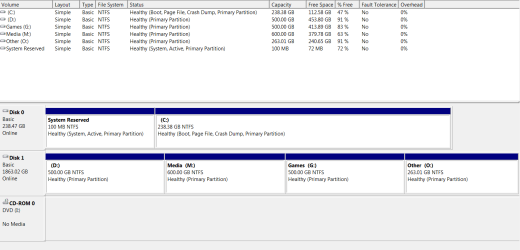
I've attached that picture. Just noticed my D drive is almost 50% fragmented. I'll defrag it to see if that helps any applications.
 

Attachments

  • diskman.png
    diskman.png
    18.4 KB · Views: 2

My Computer My Computer

Computer type
PC/Desktop
Computer Manufacturer/Model Number
Custom Build
OS
Windows 7 Ultimate x64
CPU
i7 3930K @ 4.2Ghz
Motherboard
Asrock X79 Extreme6
Memory
16GB Corsair Vengeance Low Profile
Graphics Card(s)
nVidia Gigabyte GTX680 SOC
Sound Card
Creative Soundblaster VX
Monitor(s) Displays
ASUS
Screen Resolution
2560*1440
Hard Drives
HDD: 2TB 7200RPM Hitachi
SDD: 256GB Samsung Pro Series 4
PSU
Corsair HX-850V2
Keyboard
Ducky Shine 3
Mouse
Logitech G400
Antivirus
MSE
Browser
Chrome
Thanks, I was checking to see if the boot sector was in the right place, it is fine.
w7 handles fragmentation a lot better than earlier Windows, so I doubt it will help. Let us know.
 

My Computer My Computer

Computer type
PC/Desktop
Computer Manufacturer/Model Number
Home Built Desktop By DataTech
OS
Windows 7 Ultimate X64 SP1
CPU
Intel i5-2550K, Differing ~4.4-4.8GHz No built in GPU
Motherboard
ASUS P8Z68-V PRO/GEN3
Memory
16GB G.Skill Sniper 1866MHz @ 2133MHz 2x8GB
Graphics Card(s)
ASUS GTX650TIB-DC2OC-2GD5, (650TI Boost)
Sound Card
Onboard Realtek 5-1
Monitor(s) Displays
Samsung P2570HD
Screen Resolution
1920x1080
Hard Drives
Samsung 840 Pro 256GB SSD for OS, 500GB Seagate Constellation (Enterprise drive) for Data
PSU
Corsair HX650W
Case
Inwin Dragon Rider
Cooling
Hyper 212 EVO w/two Noctua fans, push-pull, @1300 RPM
Keyboard
E-Z Eyes, bright yellow keys with large characters
Mouse
steelseries SENSEI Laser Pro Gaming
Internet Speed
48-51Mbs Mbs down, 11 Mbs up Xfinity Cable
Antivirus
Norton Internet Security 2013
Browser
IE 10, Opera, Pale Moon if needed
Other Info
4 case fans, LG BluRay-RE, ASUS DVD-RW, Mr. Fusion power supply, 1.21 gigawatts.
this always happens to me when i play games or alt tab out of games. just ignore it. you are fine.
 

My Computer My Computer

Computer type
PC/Desktop
Computer Manufacturer/Model Number
Weekend Warrior Rig
OS
Windows 10 Pro
CPU
Intel i7-3770K 4.4GHz
Motherboard
ASUS P8Z77-V Pro
Memory
8GB G.SKILL Ripjaws 1866 MHz
Graphics Card(s)
EVGA GTX 980 Classified
Monitor(s) Displays
Asus VH238H 23" 2ms
Screen Resolution
1920x1080
Hard Drives
Intel 330 120GB SSD /
WD Blue 1TB /
WD Black 500GB
PSU
Corsair CX750M
Case
NZXT H440
Cooling
Corsair H80i- CPU / Corsair H90- GPU
Keyboard
Logitech K360 LE
Mouse
Logitech G500
Antivirus
Avast
Browser
Chrome
Other Info
1200W 2.1 Surround Sound Audio
Back
Top