
no longer able to restart Windows Explorer

pikalax

New member
Member
Local time
4:56 PM
Messages
71
Following a string of updates installed this afternoon, I am no longer able to restart Windows Explorer, be it from the context menu or from Task Manager (Run explorer.exe). The old instance closes successfully, but the new instance does not run. I am no longer able to run explorer.exe from system32. C:\Windows\explorer.exe still works, but it's the explorer.exe that can't be configured to start with administrator privileges.
 

My Computer My Computer

At a glance

Windows 7 Home Premium 64-bit SP1Intel(R) Core(TM) i3-2330M CPU @ 2.20 GHz4.00 GBIntel(R) HD Graphics
Computer Manufacturer/Model Number
HP Pavilion dm4t-2100 CTO Entertainment Notebook PC
OS
Windows 7 Home Premium 64-bit SP1
CPU
Intel(R) Core(TM) i3-2330M CPU @ 2.20 GHz
Motherboard
Intel(R) 6 Series/C200 Series Chipset Family
Memory
4.00 GB
Graphics Card(s)
Intel(R) HD Graphics
Sound Card
IDT High Definition Audio CODEC
Monitor(s) Displays
9x16 HD Integrated Display
Screen Resolution
1366x768
Hard Drives
TOSHIBA MK6476GSX (C:\)
HP Portable HD BB07 USB Device (H:\)
PSU
AC adapter
Case
None
Cooling
HP CoolSmart
Keyboard
Integrated keyboard
Mouse
Logitech wireless with USB Nano receiver
Internet Speed
See Other Info
Other Info
HOME INTERNET
<6 Mbs down, <1 Mbs up
UCONN STORRS
>20 Mbs both ways
There should be a Restore Point from before the updates so you can roll it back.
 

My Computer My Computer

At a glance

Windows 7 32 bitAMD 5200+ dual core2 GBNVidia GeForce 6150SE 128 MB
Computer Manufacturer/Model Number
HP Media Center
OS
Windows 7 32 bit
CPU
AMD 5200+ dual core
Memory
2 GB
Graphics Card(s)
NVidia GeForce 6150SE 128 MB
Monitor(s) Displays
CRT
Screen Resolution
1280x1024
Hard Drives
500 GB Sata internal :

SIIG USB 3.0 docking stations w/WD Caviar Black 6 Gb/s drives
Keyboard
PS/2
Mouse
PS/2 Wheel Mouse
Other Info
SIIG USB 3.0 PCIexpress card.
I tried that and it worked, though not without some residual DLL-related crashes on boot. I backed up the system32/explorer.exe to my desktop and started the updates again. I'll report back after the reboot.

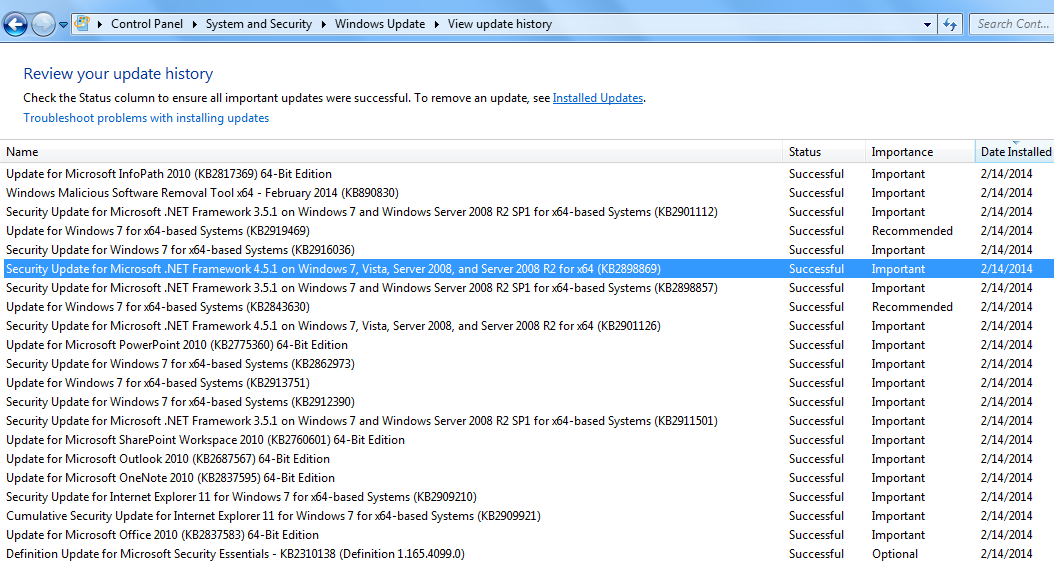
EDIT: No dice. Not even restoring the backed-up copy of Explorer.exe seems to have helped. The system32 copy of explorer.exe is still unable to run; when called, it does not appear in the process list, which means something is killing it as soon as it is launched. Here's the list of all the updates installed.

izMVWv9.png


It seems to be dependent on where explorer.exe is run from; swapping around various instances of explorer.exe seems to have no effect. To reference my earlier problem, running explorer.exe from C:\Windows causes the system tray icons (volume, network, power status) to be irrestorably missing. Running from C:\Windows\System32 formerly fixed the problem. Running from C:\Windows\SysWOW64 only brings up an Explorer window, not the desktop.
 
Last edited:

My Computer My Computer

At a glance

Windows 7 Home Premium 64-bit SP1Intel(R) Core(TM) i3-2330M CPU @ 2.20 GHz4.00 GBIntel(R) HD Graphics
Computer Manufacturer/Model Number
HP Pavilion dm4t-2100 CTO Entertainment Notebook PC
OS
Windows 7 Home Premium 64-bit SP1
CPU
Intel(R) Core(TM) i3-2330M CPU @ 2.20 GHz
Motherboard
Intel(R) 6 Series/C200 Series Chipset Family
Memory
4.00 GB
Graphics Card(s)
Intel(R) HD Graphics
Sound Card
IDT High Definition Audio CODEC
Monitor(s) Displays
9x16 HD Integrated Display
Screen Resolution
1366x768
Hard Drives
TOSHIBA MK6476GSX (C:\)
HP Portable HD BB07 USB Device (H:\)
PSU
AC adapter
Case
None
Cooling
HP CoolSmart
Keyboard
Integrated keyboard
Mouse
Logitech wireless with USB Nano receiver
Internet Speed
See Other Info
Other Info
HOME INTERNET
<6 Mbs down, <1 Mbs up
UCONN STORRS
>20 Mbs both ways
Unfortunately, unless you see a post where someone tracked down the offending update and named it, it's a process of elimination. Is there some particular update you need? My inclination would be to restore to a working state and leave it that way. Then I'd watch for indications of the cause.

But that's my modus operandi. Not everyone agrees. But I hesitate to install fixes in a bunch unless it's a formal Service Pack. Just too many variables in the equation.
 

My Computer My Computer

At a glance

Windows 7 32 bitAMD 5200+ dual core2 GBNVidia GeForce 6150SE 128 MB
Computer Manufacturer/Model Number
HP Media Center
OS
Windows 7 32 bit
CPU
AMD 5200+ dual core
Memory
2 GB
Graphics Card(s)
NVidia GeForce 6150SE 128 MB
Monitor(s) Displays
CRT
Screen Resolution
1280x1024
Hard Drives
500 GB Sata internal :

SIIG USB 3.0 docking stations w/WD Caviar Black 6 Gb/s drives
Keyboard
PS/2
Mouse
PS/2 Wheel Mouse
Other Info
SIIG USB 3.0 PCIexpress card.
I think I've solved my problem using the following two steps:
1) I went into C:\Users\[MY-USERNAME] and showed all protected hidden files. There were several files named ntuser.dat followed by a 64-bit string. I moved all but three of them to a backup folder on my desktop and restarted my computer. I was then able to restart Explorer from system32.
2) My original problem with explorer.exe was that it would launch from C:\Windows with standard privileges, causing the battery, WiFi, Volume, and Action Center system tray items to be irreversibly hidden. I solved this problem by going into regedit to the key HKEY_LOCAL_MACHINE\SOFTWARE\Microsoft\Windows NT\CurrentVersion\Winlogon\Shell and changing its value from 'explorer.exe' to 'C:\Windows\system32\explorer.exe'. After a restart, this problem was determined to be fully solved.
 

My Computer My Computer

At a glance

Windows 7 Home Premium 64-bit SP1Intel(R) Core(TM) i3-2330M CPU @ 2.20 GHz4.00 GBIntel(R) HD Graphics
Computer Manufacturer/Model Number
HP Pavilion dm4t-2100 CTO Entertainment Notebook PC
OS
Windows 7 Home Premium 64-bit SP1
CPU
Intel(R) Core(TM) i3-2330M CPU @ 2.20 GHz
Motherboard
Intel(R) 6 Series/C200 Series Chipset Family
Memory
4.00 GB
Graphics Card(s)
Intel(R) HD Graphics
Sound Card
IDT High Definition Audio CODEC
Monitor(s) Displays
9x16 HD Integrated Display
Screen Resolution
1366x768
Hard Drives
TOSHIBA MK6476GSX (C:\)
HP Portable HD BB07 USB Device (H:\)
PSU
AC adapter
Case
None
Cooling
HP CoolSmart
Keyboard
Integrated keyboard
Mouse
Logitech wireless with USB Nano receiver
Internet Speed
See Other Info
Other Info
HOME INTERNET
<6 Mbs down, <1 Mbs up
UCONN STORRS
>20 Mbs both ways
Good job. Thanks for posting the solution. :)
 

My Computer My Computer

At a glance

Windows 7 32 bitAMD 5200+ dual core2 GBNVidia GeForce 6150SE 128 MB
Computer Manufacturer/Model Number
HP Media Center
OS
Windows 7 32 bit
CPU
AMD 5200+ dual core
Memory
2 GB
Graphics Card(s)
NVidia GeForce 6150SE 128 MB
Monitor(s) Displays
CRT
Screen Resolution
1280x1024
Hard Drives
500 GB Sata internal :

SIIG USB 3.0 docking stations w/WD Caviar Black 6 Gb/s drives
Keyboard
PS/2
Mouse
PS/2 Wheel Mouse
Other Info
SIIG USB 3.0 PCIexpress card.

My Computer My Computer

At a glance

Windows 10 Pro x64Intel Core i7 6700KGSkill TridentZ RGB 16GB 3600 16-16-16-36EVGA GTX 980 Ti SC x2
Computer type
PC/Desktop
Computer Manufacturer/Model Number
Skylake Special #666
OS
Windows 10 Pro x64
CPU
Intel Core i7 6700K
Motherboard
Asus Sabertooth Z170 Mark 1
Memory
GSkill TridentZ RGB 16GB 3600 16-16-16-36
Graphics Card(s)
EVGA GTX 980 Ti SC x2
Sound Card
Realtek High Definition
Monitor(s) Displays
AOC G2460PG
Screen Resolution
1920 x 1080 144Hz
Hard Drives
Samsung 860 Pro 256GB, Seagate Barracuda 4TB x2
PSU
EVGA 1000 P2, EVGA White Custom Braided Cables
Case
Corsair Vengeance C70 Gunmetal Black
Cooling
Corsair H100i v2, Corsair ML120 x2, Thermal Grizzly Kryonaut
Keyboard
Logitech G910 Orion Spectrum
Mouse
Logitech G700s
Internet Speed
Verizon Fios Quantum Gateway 75/75
Antivirus
Windows Defender, Malwarebytes Free 3.8.3
Browser
Chrome
Other Info
Corsair SP120 x4, LG Blu-ray Drive, Durabrand HT-395 100 Watt Dolby Digital Amp, Corsair H2100 Wireless 7.1 Headset
I did run that, and it found no issues it could repair.
 

My Computer My Computer

At a glance

Windows 7 Home Premium 64-bit SP1Intel(R) Core(TM) i3-2330M CPU @ 2.20 GHz4.00 GBIntel(R) HD Graphics
Computer Manufacturer/Model Number
HP Pavilion dm4t-2100 CTO Entertainment Notebook PC
OS
Windows 7 Home Premium 64-bit SP1
CPU
Intel(R) Core(TM) i3-2330M CPU @ 2.20 GHz
Motherboard
Intel(R) 6 Series/C200 Series Chipset Family
Memory
4.00 GB
Graphics Card(s)
Intel(R) HD Graphics
Sound Card
IDT High Definition Audio CODEC
Monitor(s) Displays
9x16 HD Integrated Display
Screen Resolution
1366x768
Hard Drives
TOSHIBA MK6476GSX (C:\)
HP Portable HD BB07 USB Device (H:\)
PSU
AC adapter
Case
None
Cooling
HP CoolSmart
Keyboard
Integrated keyboard
Mouse
Logitech wireless with USB Nano receiver
Internet Speed
See Other Info
Other Info
HOME INTERNET
<6 Mbs down, <1 Mbs up
UCONN STORRS
>20 Mbs both ways
UPDATE: The problem returned following the most recent Windows update, but was resolved when I logged off and back on without a system reboot, implying the problem is potentially related to the automatic login protocol I set up on this machine. I'll try disabling that prior to my next round of updates and report back. For now, though, I am marking this as SOLVED.
 

My Computer My Computer

At a glance

Windows 7 Home Premium 64-bit SP1Intel(R) Core(TM) i3-2330M CPU @ 2.20 GHz4.00 GBIntel(R) HD Graphics
Computer Manufacturer/Model Number
HP Pavilion dm4t-2100 CTO Entertainment Notebook PC
OS
Windows 7 Home Premium 64-bit SP1
CPU
Intel(R) Core(TM) i3-2330M CPU @ 2.20 GHz
Motherboard
Intel(R) 6 Series/C200 Series Chipset Family
Memory
4.00 GB
Graphics Card(s)
Intel(R) HD Graphics
Sound Card
IDT High Definition Audio CODEC
Monitor(s) Displays
9x16 HD Integrated Display
Screen Resolution
1366x768
Hard Drives
TOSHIBA MK6476GSX (C:\)
HP Portable HD BB07 USB Device (H:\)
PSU
AC adapter
Case
None
Cooling
HP CoolSmart
Keyboard
Integrated keyboard
Mouse
Logitech wireless with USB Nano receiver
Internet Speed
See Other Info
Other Info
HOME INTERNET
<6 Mbs down, <1 Mbs up
UCONN STORRS
>20 Mbs both ways
~~~
2) My original problem with explorer.exe was that it would launch from C:\Windows with standard privileges, causing....
~~~
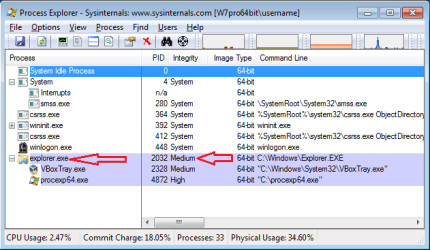
Does "standard" mean the medium integrity level?

exp.png

If so, then that is as it should be. Entire papers have been written on how Microsoft manages to force Explorer to stay at the medium integrity level for security reasons. If you manage to get around that, your system might not be as secure as it should be.


I did run that, and it found no issues it could repair.
Does that mean that there were no integrity errors?
Or
Does that mean that there were integrity errors that could not be repaired?
 

My Computer My Computer

At a glance

W7 Pro SP1 64biti78GBIntel HD Graphics
Computer type
Laptop
Computer Manufacturer/Model Number
Employer provided Dell Latitude
OS
W7 Pro SP1 64bit
CPU
i7
Memory
8GB
Graphics Card(s)
Intel HD Graphics
Hard Drives
crappy SSD
Antivirus
Employer mandated Symantec Endpoint Protection
Browser
Pale Moon 64bit, IE11 64bit & Chrome 64bit
The system did not report any errors following the execution of sfc /scannow.
 

My Computer My Computer

At a glance

Windows 7 Home Premium 64-bit SP1Intel(R) Core(TM) i3-2330M CPU @ 2.20 GHz4.00 GBIntel(R) HD Graphics
Computer Manufacturer/Model Number
HP Pavilion dm4t-2100 CTO Entertainment Notebook PC
OS
Windows 7 Home Premium 64-bit SP1
CPU
Intel(R) Core(TM) i3-2330M CPU @ 2.20 GHz
Motherboard
Intel(R) 6 Series/C200 Series Chipset Family
Memory
4.00 GB
Graphics Card(s)
Intel(R) HD Graphics
Sound Card
IDT High Definition Audio CODEC
Monitor(s) Displays
9x16 HD Integrated Display
Screen Resolution
1366x768
Hard Drives
TOSHIBA MK6476GSX (C:\)
HP Portable HD BB07 USB Device (H:\)
PSU
AC adapter
Case
None
Cooling
HP CoolSmart
Keyboard
Integrated keyboard
Mouse
Logitech wireless with USB Nano receiver
Internet Speed
See Other Info
Other Info
HOME INTERNET
<6 Mbs down, <1 Mbs up
UCONN STORRS
>20 Mbs both ways
I spoke too soon. I did another sfc /scannow and got a message that it found "corrupt files but was unable to fix some of them". Here's the log.
 

My Computer My Computer

At a glance

Windows 7 Home Premium 64-bit SP1Intel(R) Core(TM) i3-2330M CPU @ 2.20 GHz4.00 GBIntel(R) HD Graphics
Computer Manufacturer/Model Number
HP Pavilion dm4t-2100 CTO Entertainment Notebook PC
OS
Windows 7 Home Premium 64-bit SP1
CPU
Intel(R) Core(TM) i3-2330M CPU @ 2.20 GHz
Motherboard
Intel(R) 6 Series/C200 Series Chipset Family
Memory
4.00 GB
Graphics Card(s)
Intel(R) HD Graphics
Sound Card
IDT High Definition Audio CODEC
Monitor(s) Displays
9x16 HD Integrated Display
Screen Resolution
1366x768
Hard Drives
TOSHIBA MK6476GSX (C:\)
HP Portable HD BB07 USB Device (H:\)
PSU
AC adapter
Case
None
Cooling
HP CoolSmart
Keyboard
Integrated keyboard
Mouse
Logitech wireless with USB Nano receiver
Internet Speed
See Other Info
Other Info
HOME INTERNET
<6 Mbs down, <1 Mbs up
UCONN STORRS
>20 Mbs both ways
It's been 2 weeks with no response to my sfc /scannow log. The problem persists, and I am at a loss as to how to solve it. The symptoms occur every time I run a Windows update

- c:\windows\system32\explorer.exe fails to start with Windows as directed in the SHELL registry key. Attempts to start this process using conventional methods (eg. "New Task" in Task Manager) fail; the process does not appear on the list in Task Manager.
- c:\windows\explorer.exe runs "normally" - that is, it is able to start, however system tray icons such as VOLUME, POWER, and NETWORK indicators are irrestorably missing.
- When calling c:\windows\system32\explorer.exe while another instance of explorer.exe is active, the result is a window within the existing explorer.exe process.
- The problem resolves itself after 2-3 days and remains resolved until the next round of system updates.
- Windows behaves oddly when the shell does not start on logon i.e. when HKEY_LOCAL_MACHINE\SOFTWARE\WINDOWS NT\WINLOGIN\SHELL = C:\WINDOWS\SYSTEM32\EXPLORER.EXE when this process fails to launch. For instance, I am unable to load my touchpad settings during this time; the default settings load instead. I am unable to modify these settings until the symptoms clear up. This is very disorienting for me, as I tend to type while resting my palm heels on either side of the touchpad, so I frequently touch the touchpad, and the default settings interpret this as a LEFT MOUSE CLICK unlike my custom settings.
 
Last edited:

My Computer My Computer

At a glance

Windows 7 Home Premium 64-bit SP1Intel(R) Core(TM) i3-2330M CPU @ 2.20 GHz4.00 GBIntel(R) HD Graphics
Computer Manufacturer/Model Number
HP Pavilion dm4t-2100 CTO Entertainment Notebook PC
OS
Windows 7 Home Premium 64-bit SP1
CPU
Intel(R) Core(TM) i3-2330M CPU @ 2.20 GHz
Motherboard
Intel(R) 6 Series/C200 Series Chipset Family
Memory
4.00 GB
Graphics Card(s)
Intel(R) HD Graphics
Sound Card
IDT High Definition Audio CODEC
Monitor(s) Displays
9x16 HD Integrated Display
Screen Resolution
1366x768
Hard Drives
TOSHIBA MK6476GSX (C:\)
HP Portable HD BB07 USB Device (H:\)
PSU
AC adapter
Case
None
Cooling
HP CoolSmart
Keyboard
Integrated keyboard
Mouse
Logitech wireless with USB Nano receiver
Internet Speed
See Other Info
Other Info
HOME INTERNET
<6 Mbs down, <1 Mbs up
UCONN STORRS
>20 Mbs both ways
I have asked others to take a look at you SFC results. That is not an area that I can help you with.
 

My Computer My Computer

At a glance

W7 Pro SP1 64biti78GBIntel HD Graphics
Computer type
Laptop
Computer Manufacturer/Model Number
Employer provided Dell Latitude
OS
W7 Pro SP1 64bit
CPU
i7
Memory
8GB
Graphics Card(s)
Intel HD Graphics
Hard Drives
crappy SSD
Antivirus
Employer mandated Symantec Endpoint Protection
Browser
Pale Moon 64bit, IE11 64bit & Chrome 64bit
SFC /SCANNOW Command tutorial shows how to replace any named problem files. If this fails you can consider doing a Repair Install.

Have you checked thoroughly for infection using Malwarebytes and your AV as it may not repair until disinfected. If you are running a bloatware AV then uninstall it and install Microsoft Security Essentials, run a Full scan and try running with it for awhile to see the difference.

In addition work through the other Troubleshooting Steps for Windows 7 which almost always uncovers the problem.
 
Last edited:
Also; in addition to what greg mentioned; I would do a spyware scan as well using the program at the link below; even though it may not be something spyware related; its still worth doing a full scan of your system.

SUPERAntiSpyware - Downloading File
 

My Computer My Computer

At a glance

Windows 7 ultimate 64-bitIntel I7 2600K 3.4ghzCorsair 16gb ddr3 1600mhzNvidia Geforce gt 430
Computer type
PC/Desktop
Computer Manufacturer/Model Number
custom built
OS
Windows 7 ultimate 64-bit
CPU
Intel I7 2600K 3.4ghz
Motherboard
Asus Evo P8P67
Memory
Corsair 16gb ddr3 1600mhz
Graphics Card(s)
Nvidia Geforce gt 430
Sound Card
Sound Blaster Titanium x-fi pci express
Monitor(s) Displays
Dell E198WFP
Hard Drives
1 western digital 2TB drive.
PSU
Antec 1200 watt
Case
Inwin Dragon Rider
Cooling
6 case supplied cooling fans
Keyboard
logitech mk700
Mouse
logitech m705
Internet Speed
25-50mbps download; 10mbps upload(i think)
Antivirus
avg free 2014
Browser
mozilla firefox
Other Info
Also have a pretty bad speaker setup which is a klipsch promedia 5.1 surround speaker setup with huge subwoofer and lg blu ray player/writer. Also a hp officejet pro 8600 plus wireless all in one and a logitech s7500 webcam.
There is almost never any point in running an SFC scan more than once unless file changes have occured. Almost the only thing it chanes is the look of the summary report. I'lltake a look at the log when I get back to a real pc :)
 

My Computer My Computer

At a glance

Win 7 x64 Home Premium (and x86 VirtualBox VM...i3 370M/i7 6500U8GB - finally :)/8GBit's an i3, dude!/dual Intel&nVidia
Computer type
Laptop
Computer Manufacturer/Model Number
Asus K52F or Lenovo B51-80
OS
Win 7 x64 Home Premium (and x86 VirtualBox VM)/Win10
CPU
i3 370M/i7 6500U
Motherboard
Asus/Lenovo
Memory
8GB - finally :)/8GB
Graphics Card(s)
it's an i3, dude!/dual Intel&nVidia
Sound Card
onboard
Monitor(s) Displays
15.6" built-in
Screen Resolution
1366x768/1920x1080
Hard Drives
750GB Seagate internal
Sundry external drives attached to other computers on the local network
1TB SSD on the Lenovo
PSU
n/a
Internet Speed
as much as I can get - usually on a dongle/phone, so <1MB/s
Antivirus
MSE/Defender
Browser
IE11/12/Edge/Chrome/FF(if I must)
OK - back a a PC now :)

Here's the error from the SFC log...
Code:
 Line 239561: 2014-03-23 12:42:30, Info                  CSI    00000430 [SR] Repairing 1 components
 Line 239562: 2014-03-23 12:42:30, Info                  CSI    00000431 [SR] Beginning Verify and Repair transaction
 Line 239563: 2014-03-23 12:42:30, Info                  CSI    00000432 [SR] Cannot repair member file [l:40{20}]"UIAutomationCore.dll" of Microsoft-Windows-UIAutomationCore, Version = 6.1.7600.16385, pA = PROCESSOR_ARCHITECTURE_IA32_ON_WIN64 (10), Culture neutral, VersionScope = 1 nonSxS, PublicKeyToken = {l:8 b:31bf3856ad364e35}, Type neutral, TypeName neutral, PublicKey neutral in the store, file cannot be checked

There don't appear to be any other errors on the past couple of weeks, in the CBS background log.

I'll post a fix for this in a few minutes.
 

My Computer My Computer

At a glance

Win 7 x64 Home Premium (and x86 VirtualBox VM...i3 370M/i7 6500U8GB - finally :)/8GBit's an i3, dude!/dual Intel&nVidia
Computer type
Laptop
Computer Manufacturer/Model Number
Asus K52F or Lenovo B51-80
OS
Win 7 x64 Home Premium (and x86 VirtualBox VM)/Win10
CPU
i3 370M/i7 6500U
Motherboard
Asus/Lenovo
Memory
8GB - finally :)/8GB
Graphics Card(s)
it's an i3, dude!/dual Intel&nVidia
Sound Card
onboard
Monitor(s) Displays
15.6" built-in
Screen Resolution
1366x768/1920x1080
Hard Drives
750GB Seagate internal
Sundry external drives attached to other computers on the local network
1TB SSD on the Lenovo
PSU
n/a
Internet Speed
as much as I can get - usually on a dongle/phone, so <1MB/s
Antivirus
MSE/Defender
Browser
IE11/12/Edge/Chrome/FF(if I must)
I've uploaded a file - pkxaa.zip - to my OneDrive at Noel's OneDrive
Please download and save it.

Right-click on the saved file and select Extract all...
Change the target to C:\ and click on Extract
Close all windows (it would be a good idea to print these instructions!)

Now reboot to the Repair Environment - as soon as the machine restarts, start tapping F8 - this should bring up the Advanced Boot Menu, at the top of which should be the option 'Repair my Computer'
Pick that
You'll have to log in with your username and password.

Pick the option to use a Command Prompt
At the prompt type
DIR C:\pkxaa
hit the enter key - if you get a 'Not Found' error try
DIR D:\pkxaa
or
DIR E:\pkxaa


The drive letter in use when you find the folder will need to be substituted (for<drive>) into the following command...


XCOPY <drive>:\pkxaa <drive>:\windows\winsxs /y /i /s /v /h


(e.g. XCOPY P:\wfire P:\windows\winsxs /y /i /s /v /h )


run the command (it should take almost no time) and when the prompt returns, type
EXIT
and hit the Enter key to exit Command Prompt - reboot to Normal Mode Windows.

Now run SFC /SCANNOW in an Elevated Command Prompt
then reboot and upload the new CBS.log file to your reply
 

My Computer My Computer

At a glance

Win 7 x64 Home Premium (and x86 VirtualBox VM...i3 370M/i7 6500U8GB - finally :)/8GBit's an i3, dude!/dual Intel&nVidia
Computer type
Laptop
Computer Manufacturer/Model Number
Asus K52F or Lenovo B51-80
OS
Win 7 x64 Home Premium (and x86 VirtualBox VM)/Win10
CPU
i3 370M/i7 6500U
Motherboard
Asus/Lenovo
Memory
8GB - finally :)/8GB
Graphics Card(s)
it's an i3, dude!/dual Intel&nVidia
Sound Card
onboard
Monitor(s) Displays
15.6" built-in
Screen Resolution
1366x768/1920x1080
Hard Drives
750GB Seagate internal
Sundry external drives attached to other computers on the local network
1TB SSD on the Lenovo
PSU
n/a
Internet Speed
as much as I can get - usually on a dongle/phone, so <1MB/s
Antivirus
MSE/Defender
Browser
IE11/12/Edge/Chrome/FF(if I must)
If the only error is in the UIAutomationCore.dll, then I'll choose to ignore it. I have modified that file to allow FSX to run in Windows 7. The built-in version of this DLL file causes a fatal error in FSX with 100% certainty.
 

My Computer My Computer

At a glance

Windows 7 Home Premium 64-bit SP1Intel(R) Core(TM) i3-2330M CPU @ 2.20 GHz4.00 GBIntel(R) HD Graphics
Computer Manufacturer/Model Number
HP Pavilion dm4t-2100 CTO Entertainment Notebook PC
OS
Windows 7 Home Premium 64-bit SP1
CPU
Intel(R) Core(TM) i3-2330M CPU @ 2.20 GHz
Motherboard
Intel(R) 6 Series/C200 Series Chipset Family
Memory
4.00 GB
Graphics Card(s)
Intel(R) HD Graphics
Sound Card
IDT High Definition Audio CODEC
Monitor(s) Displays
9x16 HD Integrated Display
Screen Resolution
1366x768
Hard Drives
TOSHIBA MK6476GSX (C:\)
HP Portable HD BB07 USB Device (H:\)
PSU
AC adapter
Case
None
Cooling
HP CoolSmart
Keyboard
Integrated keyboard
Mouse
Logitech wireless with USB Nano receiver
Internet Speed
See Other Info
Other Info
HOME INTERNET
<6 Mbs down, <1 Mbs up
UCONN STORRS
>20 Mbs both ways
Back
Top