Internet Explorer 11 - Uninstall in Windows 7

How to Uninstall IE11 in Windows 7 to Restore Previous Version of Internet Explorer


   Information
This tutorial will show you how to uninstall Internet Explorer 11 (IE11) to return to the previously installed version of Internet Explorer for all users in Windows 7.

You must be logged in as an administrator to be able to uninstall IE11.


EXAMPLE: About Internet Explorer 11
NOTE: In Internet Explorer, click on Help (Menu bar) and About Internet Explorer to see this.
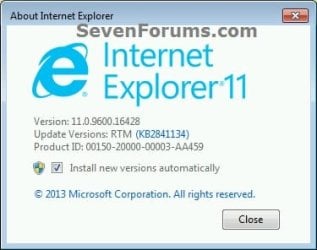
About_IE11.jpg


OPTION ONE

Uninstall IE11 in "Installed Updates" in Windows 7


1. Open the Control Panel (icons view), and click on the Programs and Features icon.

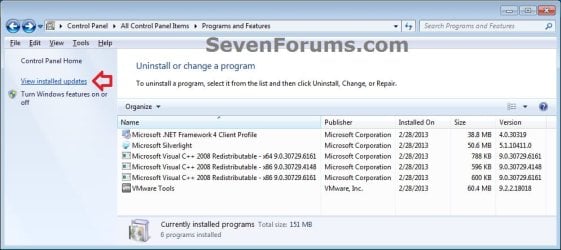
2. In Programs and Features, click on the View installed updates link on the left side. (see screenshot below)
Uninstall_IE11_from_W7_Installed_Updates-A.jpg

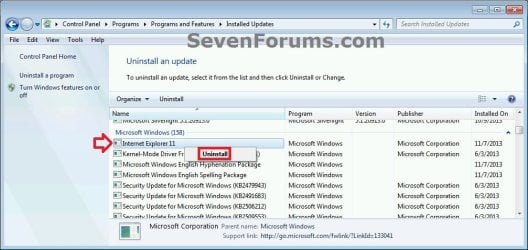
3. In Installed Updates, scroll down to find Internet Explorer 11, and do either action below. (see screenshots below)
  • Double click on Internet Explorer 11, and go to step 4 below.
  • Select Internet Explorer 11, click on Uninstall button on toolbar, and go to step 4 below.
  • Right click on Internet Explorer 11, click on Uninstall, and go to step 4 below.
Uninstall_IE11_from_W7_Installed_Updates-1.jpg

Uninstall_IE11_from_W7_Installed_Updates-2.jpg
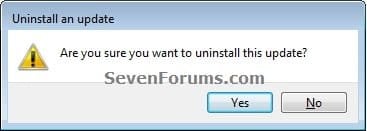
4. Click on Yes. (see screenshot below)
Uninstall_IE11_from_W7_Installed_Updates-3.jpg
5. If prompted by UAC, click on Yes.

6. When IE11 has finished being uninstalled, click on Restart Now to apply. (see screenshots below)
Uninstall_IE11_from_W7_Installed_Updates-4.jpg
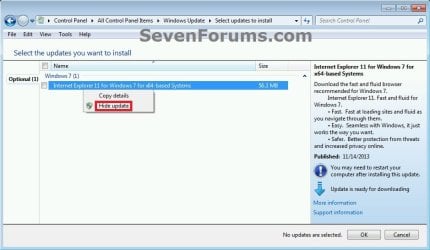
7. When the PC has restarted, you may wish to hide the Windows Update for Internet Explorer for Windows 7 for x86/x64-based Systems to prevent IE11 from being mistakenly reinstalled again. (see screenshot below)
Hide_IE11_Windows_Update.jpg


OPTION TWO

Uninstall IE11 in an Elevated Command Prompt in Windows 7


1. Open an elevated command prompt.

2. In the elevated command prompt, copy and paste the command below, and press Enter. (see screenshot below step 4)
Code:
FORFILES /P %WINDIR%\servicing\Packages /M Microsoft-Windows-InternetExplorer-*11.*.mum /c "cmd /c echo Uninstalling package @fname && start /w pkgmgr /up:@fname /norestart"
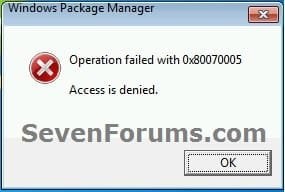
3. If you get the error message below, then click on OK to continue. You may get this error for each of the first 3 lines returned in the command prompt, but this is normal and fine. (see screenshot below)
Uninstall_IE11_CMD_error.jpg
4. When you see the C:\Windows\system32> prompt, then it means IE11 has finished uninstalling. Restart the computer to apply. (see screenshot below)
NOTE: This may take a few minutes to finish. Be sure to do step 3 as needed.
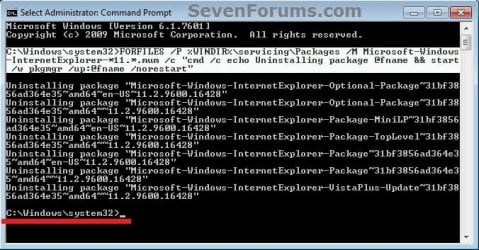
Uninstall_IE11_from_W7_Command.jpg
5. When the PC has restarted, you may wish to hide the Windows Update for Internet Explorer for Windows 7 for x86/x64-based Systems to prevent IE11 from being mistakenly reinstalled again. (see screenshot below)
Hide_IE11_Windows_Update.jpg
That's it,
Shawn


Last edited:
Very nicely done as usual Brink, :thumbsup:
You da man,
Cheers
 

My Computer My Computer

At a glance

Win-7-Pro64bit 7-H-Prem-64biti7-5930K 2nd i9-9940x both water blocked VRM'...Trident-z 3200C14 2nd Trident-z 3600C16EVGA 1080ti ftw3 2nd Titan Xp both water blocked
Computer type
PC/Desktop
Computer Manufacturer/Model Number
Custom assembled by me :}
OS
Win-7-Pro64bit 7-H-Prem-64bit
CPU
i7-5930K 2nd i9-9940x both water blocked VRM's too
Motherboard
ASUS SABERTOOTH X99 2nd ASUS x299 Apex
Memory
Trident-z 3200C14 2nd Trident-z 3600C16
Graphics Card(s)
EVGA 1080ti ftw3 2nd Titan Xp both water blocked
Sound Card
Built-in Realtek
Monitor(s) Displays
1-AOC G2460PG 24"G-Sync 144Hz/ 2nd 1-ASUS VG248QE 24" 144Hz
Screen Resolution
1920 x 1080 144Hz
Hard Drives
2-Samsung M.2 Evo & Evo Plus
2-Samsung 850 EVO 500GB SSD's/ 3-2.5 W.D. Black 1tb-&3-1tb/3-3.5 WD Black 1tb hdd's
PSU
EVGA SuperNOVA 1000-P2 2nd 1200-P2
Case
2-Corsair Obsidian Series 450D Black ATX Mid Tower
Cooling
Custom water loops
Keyboard
Logitech G710+/ 2nd Logitech G910
Mouse
2-RedDragon M901 Perdition 16400 dpi Gaming mouse = wired
Internet Speed
Comcast Ping 19ms 89.31mbps download speed 6.12mbps upload
Antivirus
Malwarebytes Pro/ Superantispyware Pro
Browser
FireFox & Pale moon
Other Info
2nd ASUS X299 Apex/Intel i9-9940x with Custom water loop/7H-Prem-x64/Corsair 450D case/Ram Trident-z 3600C16 4x8gb / Samsung970Evo plus 500gb SSD/Dual ssd EZ swap evo/PSU EVGA SuperNova 1200w-P2 80+Platinum/GPU Titan Xp /8-ML-140 on push-pull on 2-280GTX rads
Thank you Mike. :)
 

My Computer My Computer

At a glance

64-bit Windows 11 Pro for WorkstationsIntel i7-8700K OC'd to 5 GHz64 GB (4x16GB) G.SKILL TridentZ RGB DDR4 3600...ASUS ROG-STRIX-GTX1080TI-O11G-GAMING
Computer type
PC/Desktop
Computer Manufacturer/Model Number
Self built custom
OS
64-bit Windows 11 Pro for Workstations
CPU
Intel i7-8700K OC'd to 5 GHz
Motherboard
ASUS ROG Maximus XI Formula Z390
Memory
64 GB (4x16GB) G.SKILL TridentZ RGB DDR4 3600 MHz
Graphics Card(s)
ASUS ROG-STRIX-GTX1080TI-O11G-GAMING
Sound Card
Integrated
Monitor(s) Displays
2 x Samsung Odyssey G7 27"
Screen Resolution
2560x1440
Hard Drives
1TB Samsung 990 PRO M.2,
4TB Samsung 990 PRO PRO M.2,
TerraMaster F8 SSD Plus NAS
PSU
Seasonic Prime Titanium 850W
Case
Thermaltake Core P3
Cooling
Corsair Hydro H115i
Keyboard
Logitech wireless K800
Mouse
Logitech MX Master 4
Internet Speed
2 Gb/s Download and 100 Mb/s Upload
Antivirus
Malwarebyte Anti-Malware Premium
Browser
Google Chrome
Other Info
Logitech Z625 speaker system,
Logitech BRIO 4K Pro webcam,
HP Color LaserJet Pro MFP M477fdn,
APC SMART-UPS RT 1000 XL - SURT1000XLI,
Galaxy S23 Plus phone
Re:
EXAMPLE: About Internet Explorer 11
NOTE: In Internet Explorer, click on Help (Menu bar) and About Internet Explorer to see this.?

295396d1385672744-internet-explorer-11-uninstall-windows-7-about_ie11.jpg

Am I supposed to untick Install new versions automatically?:rolleyes:
 

My Computer My Computer

At a glance

Windows 7 Pro (32)i7/26004gb512mg (add on card was less buggy than Intel ...
Computer Manufacturer/Model Number
ZT Desktop
OS
Windows 7 Pro (32)
CPU
i7/2600
Motherboard
Intel
Memory
4gb
Graphics Card(s)
512mg (add on card was less buggy than Intel direct driver)
Sound Card
Internal
Monitor(s) Displays
19" DELL Ultra Sharp
Hard Drives
C:= WD Raptor Sata6 10k rpm
D:/E:= WD Black Sata 3.0
Case
ZT Full
Cooling
ZT
Internet Speed
8000kbps cable
Other Info
Free Outpost Pro Internet Security, and no other active anti-malware.
Free On-Demand- SpyWareBlaster, MBAM, Emsisoft-Kit, and Kaspersky Anti-rootkit utility TDSSKiller.
Hello Scott,

The "About IE" is just to let you know what version of Internet Explorer you currently have. You would only uncheck that box if you don't want new versions of IE to be installed automatically, and would rather do it manually in Windows Updates.

If you wanted to uninstall IE11, then you would need to do one of the options in the tutorial instead.
 
Last edited:

My Computer My Computer

At a glance

64-bit Windows 11 Pro for WorkstationsIntel i7-8700K OC'd to 5 GHz64 GB (4x16GB) G.SKILL TridentZ RGB DDR4 3600...ASUS ROG-STRIX-GTX1080TI-O11G-GAMING
Computer type
PC/Desktop
Computer Manufacturer/Model Number
Self built custom
OS
64-bit Windows 11 Pro for Workstations
CPU
Intel i7-8700K OC'd to 5 GHz
Motherboard
ASUS ROG Maximus XI Formula Z390
Memory
64 GB (4x16GB) G.SKILL TridentZ RGB DDR4 3600 MHz
Graphics Card(s)
ASUS ROG-STRIX-GTX1080TI-O11G-GAMING
Sound Card
Integrated
Monitor(s) Displays
2 x Samsung Odyssey G7 27"
Screen Resolution
2560x1440
Hard Drives
1TB Samsung 990 PRO M.2,
4TB Samsung 990 PRO PRO M.2,
TerraMaster F8 SSD Plus NAS
PSU
Seasonic Prime Titanium 850W
Case
Thermaltake Core P3
Cooling
Corsair Hydro H115i
Keyboard
Logitech wireless K800
Mouse
Logitech MX Master 4
Internet Speed
2 Gb/s Download and 100 Mb/s Upload
Antivirus
Malwarebyte Anti-Malware Premium
Browser
Google Chrome
Other Info
Logitech Z625 speaker system,
Logitech BRIO 4K Pro webcam,
HP Color LaserJet Pro MFP M477fdn,
APC SMART-UPS RT 1000 XL - SURT1000XLI,
Galaxy S23 Plus phone
Totally messed up my pc now

I followed these directions to the letter...and now I don't even have an IE explorer that works anymore. I even went and did a system restore and it did bring everything back but my IE-11 is still not working right. Now when I looked closer at your pix in the About Internet Explorer my version was not the same as yours it was updated more. And also when I looked at your pix in the control panel for uninstall a program...when I found mine after I did my restore system I looked closer and mine was actually a update not the program itself. So after having to do another system restore I'm stuck with my IE-11 that is unsecure and my PC is messed up again. Not sure what to do now.
 

My Computer My Computer

At a glance

Windows7 Home Premium 32-bit SP-1Intel(R) Celeron(R) CPU 900 @ 2.20GHz2.00 GB USABLE 1.87 GB(1) Mobile Intel(R) 4 Series Express Chipset ...
Computer type
PC/Desktop
Computer Manufacturer/Model Number
Toshiba HP
OS
Windows7 Home Premium 32-bit SP-1
CPU
Intel(R) Celeron(R) CPU 900 @ 2.20GHz
Motherboard
TOSHIBA NBWAA
Memory
2.00 GB USABLE 1.87 GB
Graphics Card(s)
(1) Mobile Intel(R) 4 Series Express Chipset Family (2) Mo
Sound Card
Realtek High Definition Audio
Hard Drives
TOSHIBA MK2555GSX
Antivirus
Panda Free Antivirus
Browser
I'm a new FireFox Browser user~
Other Info
Do Not Mess With Your Computer~
Unless You Know What You're Doing~
Unlike Me~I Had No Clue At All~I Thought I Did~
Do Not Mess With Your Computer~
Hello DoeZ,

Actually IE11 is more secure that previous versions of IE.

I'm not sure what went wrong and any possible extenuating circumstances, but you should be able to do a repair install to fix it if you like. :(
 

My Computer My Computer

At a glance

64-bit Windows 11 Pro for WorkstationsIntel i7-8700K OC'd to 5 GHz64 GB (4x16GB) G.SKILL TridentZ RGB DDR4 3600...ASUS ROG-STRIX-GTX1080TI-O11G-GAMING
Computer type
PC/Desktop
Computer Manufacturer/Model Number
Self built custom
OS
64-bit Windows 11 Pro for Workstations
CPU
Intel i7-8700K OC'd to 5 GHz
Motherboard
ASUS ROG Maximus XI Formula Z390
Memory
64 GB (4x16GB) G.SKILL TridentZ RGB DDR4 3600 MHz
Graphics Card(s)
ASUS ROG-STRIX-GTX1080TI-O11G-GAMING
Sound Card
Integrated
Monitor(s) Displays
2 x Samsung Odyssey G7 27"
Screen Resolution
2560x1440
Hard Drives
1TB Samsung 990 PRO M.2,
4TB Samsung 990 PRO PRO M.2,
TerraMaster F8 SSD Plus NAS
PSU
Seasonic Prime Titanium 850W
Case
Thermaltake Core P3
Cooling
Corsair Hydro H115i
Keyboard
Logitech wireless K800
Mouse
Logitech MX Master 4
Internet Speed
2 Gb/s Download and 100 Mb/s Upload
Antivirus
Malwarebyte Anti-Malware Premium
Browser
Google Chrome
Other Info
Logitech Z625 speaker system,
Logitech BRIO 4K Pro webcam,
HP Color LaserJet Pro MFP M477fdn,
APC SMART-UPS RT 1000 XL - SURT1000XLI,
Galaxy S23 Plus phone
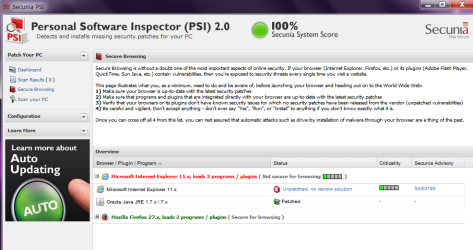
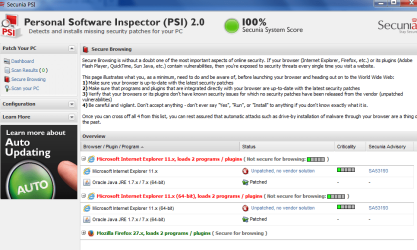
Thanks I'll try that. But I seem to be having trouble with the Adobe Flash for both IE & Firefox since all of this...pretty weird if ya ask me...I'm no where near a pc geek or anything but my FlashPlayer and my ShockWave I have to use for Firefox just stopped working. But to clerify something and hopefully you'll be able to figure this out for me on how I go about dealing with this issue...I use Secunia PSI...and I LOVE this program but on this PC particularly...after I do a system scan and get my 100% as I usually do...I like to look at my secure browsing on this PC...and just this one I always have 2 that show up as unsecure and the site doesn't have a fix and I don't know what to do with it cuz hubby uses IE-11...I've attached a screenshot of it. In the meantime I'll try your fix and wait to hear about all the Adobe stuff. I need that in order to play games on FB.

Thanks
Doreen

P.S. I sure hope I did that attachment right :o
 

Attachments

  • PSI IE-11.png
    PSI IE-11.png
    50.5 KB · Views: 2,110

My Computer My Computer

At a glance

Windows7 Home Premium 32-bit SP-1Intel(R) Celeron(R) CPU 900 @ 2.20GHz2.00 GB USABLE 1.87 GB(1) Mobile Intel(R) 4 Series Express Chipset ...
Computer type
PC/Desktop
Computer Manufacturer/Model Number
Toshiba HP
OS
Windows7 Home Premium 32-bit SP-1
CPU
Intel(R) Celeron(R) CPU 900 @ 2.20GHz
Motherboard
TOSHIBA NBWAA
Memory
2.00 GB USABLE 1.87 GB
Graphics Card(s)
(1) Mobile Intel(R) 4 Series Express Chipset Family (2) Mo
Sound Card
Realtek High Definition Audio
Hard Drives
TOSHIBA MK2555GSX
Antivirus
Panda Free Antivirus
Browser
I'm a new FireFox Browser user~
Other Info
Do Not Mess With Your Computer~
Unless You Know What You're Doing~
Unlike Me~I Had No Clue At All~I Thought I Did~
Do Not Mess With Your Computer~
I don't use Secunia, so I'm not 100%. It could be the source of your issues.
 

My Computer My Computer

At a glance

64-bit Windows 11 Pro for WorkstationsIntel i7-8700K OC'd to 5 GHz64 GB (4x16GB) G.SKILL TridentZ RGB DDR4 3600...ASUS ROG-STRIX-GTX1080TI-O11G-GAMING
Computer type
PC/Desktop
Computer Manufacturer/Model Number
Self built custom
OS
64-bit Windows 11 Pro for Workstations
CPU
Intel i7-8700K OC'd to 5 GHz
Motherboard
ASUS ROG Maximus XI Formula Z390
Memory
64 GB (4x16GB) G.SKILL TridentZ RGB DDR4 3600 MHz
Graphics Card(s)
ASUS ROG-STRIX-GTX1080TI-O11G-GAMING
Sound Card
Integrated
Monitor(s) Displays
2 x Samsung Odyssey G7 27"
Screen Resolution
2560x1440
Hard Drives
1TB Samsung 990 PRO M.2,
4TB Samsung 990 PRO PRO M.2,
TerraMaster F8 SSD Plus NAS
PSU
Seasonic Prime Titanium 850W
Case
Thermaltake Core P3
Cooling
Corsair Hydro H115i
Keyboard
Logitech wireless K800
Mouse
Logitech MX Master 4
Internet Speed
2 Gb/s Download and 100 Mb/s Upload
Antivirus
Malwarebyte Anti-Malware Premium
Browser
Google Chrome
Other Info
Logitech Z625 speaker system,
Logitech BRIO 4K Pro webcam,
HP Color LaserJet Pro MFP M477fdn,
APC SMART-UPS RT 1000 XL - SURT1000XLI,
Galaxy S23 Plus phone
Hi Brinks...

Sorry I didn't get back to you about the other desktop...I'm really nervous to do that repair fix...it looks so in depth and complicated I'm so afraid I'll totally screw that PC up.

On the other hand...I was going to do an update on my iPhone today as I have one waiting for me...and I really don't like doing it freely...I like to be able to back up everything on my iPhone and then let it run it's IOS update. If anything went wrong I'd still have everything from my backup and that just makes me feel better. But before I do all that I like to make sure that 1) my laptop is clean and 2) all programs are up-to-date and not missing anything etc. And how ironic was it that this time when I ran my Secunia on my laptop that my IE-11 on this one is unsecure for browsing just like on my desktop. But the only difference is...when I went back to look at your directions again...and I found my Microsoft IE-11...this one here on my laptop actually says "Program" unlike on the desktop where it said "update". So I'm going to follow these directions and hope that I fix this and don't screw anything up. Wish me luck:sarc:

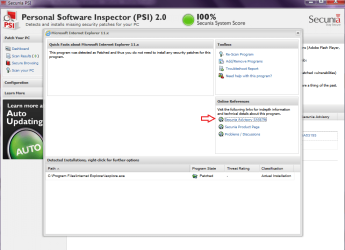
P.S. I forgot to ask you a question...While looking at the secure browsing scan in my Secunia...I clicked on Security Advisory SA56796 (I believe this is the bugger that's causing all this and there's no patch for it) looking thru there I saw Microsoft IE-11 and I clicked on it...and it brought me to a new Windows page for downloading a Fast and Furious for Windows 7 Internet Explorer 11...After I uninstall this IE-11 would it be safe for me to download this IE-11? Scrolled to bottom and said Microsoft 2014...

P.S.S Ok no problem with the uninstallation of it...when my laptop finished it's course of restarting I opened the IE that was there and went to see what version I had...OMG I've got IE-8...so I'm waiting for you to let me know if it's ok for me to download that IE-11 I have from 2014...
 
Last edited:

My Computer My Computer

At a glance

Windows7 Home Premium 32-bit SP-1Intel(R) Celeron(R) CPU 900 @ 2.20GHz2.00 GB USABLE 1.87 GB(1) Mobile Intel(R) 4 Series Express Chipset ...
Computer type
PC/Desktop
Computer Manufacturer/Model Number
Toshiba HP
OS
Windows7 Home Premium 32-bit SP-1
CPU
Intel(R) Celeron(R) CPU 900 @ 2.20GHz
Motherboard
TOSHIBA NBWAA
Memory
2.00 GB USABLE 1.87 GB
Graphics Card(s)
(1) Mobile Intel(R) 4 Series Express Chipset Family (2) Mo
Sound Card
Realtek High Definition Audio
Hard Drives
TOSHIBA MK2555GSX
Antivirus
Panda Free Antivirus
Browser
I'm a new FireFox Browser user~
Other Info
Do Not Mess With Your Computer~
Unless You Know What You're Doing~
Unlike Me~I Had No Clue At All~I Thought I Did~
Do Not Mess With Your Computer~
Just something to think about,
Never download ie11 or Internet explorer from anywhere but your Windows update system,
Secunia is okay but is also showing a 100% score so what Is really the issue ?
Just because it says ie11 is unsecure doesn't mean much because it's also showing a 100% score so no other version will do any better,
Microsoft needs to fix what ever issues exist not Secunia or from other source it will still be Unpatched,
Cheers.
 

My Computer My Computer

At a glance

Win-7-Pro64bit 7-H-Prem-64biti7-5930K 2nd i9-9940x both water blocked VRM'...Trident-z 3200C14 2nd Trident-z 3600C16EVGA 1080ti ftw3 2nd Titan Xp both water blocked
Computer type
PC/Desktop
Computer Manufacturer/Model Number
Custom assembled by me :}
OS
Win-7-Pro64bit 7-H-Prem-64bit
CPU
i7-5930K 2nd i9-9940x both water blocked VRM's too
Motherboard
ASUS SABERTOOTH X99 2nd ASUS x299 Apex
Memory
Trident-z 3200C14 2nd Trident-z 3600C16
Graphics Card(s)
EVGA 1080ti ftw3 2nd Titan Xp both water blocked
Sound Card
Built-in Realtek
Monitor(s) Displays
1-AOC G2460PG 24"G-Sync 144Hz/ 2nd 1-ASUS VG248QE 24" 144Hz
Screen Resolution
1920 x 1080 144Hz
Hard Drives
2-Samsung M.2 Evo & Evo Plus
2-Samsung 850 EVO 500GB SSD's/ 3-2.5 W.D. Black 1tb-&3-1tb/3-3.5 WD Black 1tb hdd's
PSU
EVGA SuperNOVA 1000-P2 2nd 1200-P2
Case
2-Corsair Obsidian Series 450D Black ATX Mid Tower
Cooling
Custom water loops
Keyboard
Logitech G710+/ 2nd Logitech G910
Mouse
2-RedDragon M901 Perdition 16400 dpi Gaming mouse = wired
Internet Speed
Comcast Ping 19ms 89.31mbps download speed 6.12mbps upload
Antivirus
Malwarebytes Pro/ Superantispyware Pro
Browser
FireFox & Pale moon
Other Info
2nd ASUS X299 Apex/Intel i9-9940x with Custom water loop/7H-Prem-x64/Corsair 450D case/Ram Trident-z 3600C16 4x8gb / Samsung970Evo plus 500gb SSD/Dual ssd EZ swap evo/PSU EVGA SuperNova 1200w-P2 80+Platinum/GPU Titan Xp /8-ML-140 on push-pull on 2-280GTX rads
Just something to think about,
Never download ie11 or Internet explorer from anywhere but your Windows update system,
Secunia is okay but is also showing a 100% score so what Is really the issue ?
Just because it says ie11 is unsecure doesn't mean much because it's also showing a 100% score so no other version will do any better,
Microsoft needs to fix what ever issues exist not Secunia or from other source it will still be Unpatched,
Cheers.

Hi ThrashZone...

The IE11 I would be downloading is straight from Windows Microsoft itself...posting link for you so you can look at it...

Download Internet Explorer - Browser

I completely understand that it's not Secunia's responsibility to fix this issue but to guide you to find the help you may need to get it fixed? If I explained myself right...lol

Gotta check on dinner and I'll return to see if I'm safe to download that IE11. And is it ok to download that right away (if you say ok) because I'm already getting updates to the IE8...:confused:
 

My Computer My Computer

At a glance

Windows7 Home Premium 32-bit SP-1Intel(R) Celeron(R) CPU 900 @ 2.20GHz2.00 GB USABLE 1.87 GB(1) Mobile Intel(R) 4 Series Express Chipset ...
Computer type
PC/Desktop
Computer Manufacturer/Model Number
Toshiba HP
OS
Windows7 Home Premium 32-bit SP-1
CPU
Intel(R) Celeron(R) CPU 900 @ 2.20GHz
Motherboard
TOSHIBA NBWAA
Memory
2.00 GB USABLE 1.87 GB
Graphics Card(s)
(1) Mobile Intel(R) 4 Series Express Chipset Family (2) Mo
Sound Card
Realtek High Definition Audio
Hard Drives
TOSHIBA MK2555GSX
Antivirus
Panda Free Antivirus
Browser
I'm a new FireFox Browser user~
Other Info
Do Not Mess With Your Computer~
Unless You Know What You're Doing~
Unlike Me~I Had No Clue At All~I Thought I Did~
Do Not Mess With Your Computer~
The version you posted is Optimized for Bing and MSN but yes is a valid download site,
So if you enjoy MSN as your Home page and Bing as your default search than it's perfectly fine to download this version,
Usually patches apply to all version of Internet explorer indicated by the KB# of the released windows update security patches,
Just because this Optimized version was suggested doesn't really mean it's a Patched version so Secunia will most likely show it's still insecure or still red flagging it,
Cheers.

You are always welcome to ask a new question in the Browser and Mail section :)
 

My Computer My Computer

At a glance

Win-7-Pro64bit 7-H-Prem-64biti7-5930K 2nd i9-9940x both water blocked VRM'...Trident-z 3200C14 2nd Trident-z 3600C16EVGA 1080ti ftw3 2nd Titan Xp both water blocked
Computer type
PC/Desktop
Computer Manufacturer/Model Number
Custom assembled by me :}
OS
Win-7-Pro64bit 7-H-Prem-64bit
CPU
i7-5930K 2nd i9-9940x both water blocked VRM's too
Motherboard
ASUS SABERTOOTH X99 2nd ASUS x299 Apex
Memory
Trident-z 3200C14 2nd Trident-z 3600C16
Graphics Card(s)
EVGA 1080ti ftw3 2nd Titan Xp both water blocked
Sound Card
Built-in Realtek
Monitor(s) Displays
1-AOC G2460PG 24"G-Sync 144Hz/ 2nd 1-ASUS VG248QE 24" 144Hz
Screen Resolution
1920 x 1080 144Hz
Hard Drives
2-Samsung M.2 Evo & Evo Plus
2-Samsung 850 EVO 500GB SSD's/ 3-2.5 W.D. Black 1tb-&3-1tb/3-3.5 WD Black 1tb hdd's
PSU
EVGA SuperNOVA 1000-P2 2nd 1200-P2
Case
2-Corsair Obsidian Series 450D Black ATX Mid Tower
Cooling
Custom water loops
Keyboard
Logitech G710+/ 2nd Logitech G910
Mouse
2-RedDragon M901 Perdition 16400 dpi Gaming mouse = wired
Internet Speed
Comcast Ping 19ms 89.31mbps download speed 6.12mbps upload
Antivirus
Malwarebytes Pro/ Superantispyware Pro
Browser
FireFox & Pale moon
Other Info
2nd ASUS X299 Apex/Intel i9-9940x with Custom water loop/7H-Prem-x64/Corsair 450D case/Ram Trident-z 3600C16 4x8gb / Samsung970Evo plus 500gb SSD/Dual ssd EZ swap evo/PSU EVGA SuperNova 1200w-P2 80+Platinum/GPU Titan Xp /8-ML-140 on push-pull on 2-280GTX rads
The version you posted is Optimized for Bing and MSN but yes is a valid download site,
So if you enjoy MSN as your Home page and Bing as your default search than it's perfectly fine to download this version,
Usually patches apply to all version of Internet explorer indicated by the KB# of the released windows update security patches,
Just because this Optimized version was suggested doesn't really mean it's a Patched version so Secunia will most likely show it's still insecure or still red flagging it,

Well let me explain myself a bit more clearer if I can...Secunia isn't suggesting this site for me to download as a fix or patch to my IE11 whatsoever...like I said in a prior post...
HTML:
While looking at the secure browsing scan in my Secunia...I clicked on  Security Advisory SA56796 (I believe this is the bugger that's causing  all this and there's no patch for it) looking thru there I saw Microsoft  IE-11 and I clicked on it...and it brought me to a new Windows page for  downloading a Fast and Furious for Windows 7 Internet Explorer 11.
When I look into it deeper it clearly says that there is no patch from the vendor...and this is where I thought and forgive me please I'm no pc-geek here but I do try...I thought that if I uninstalled IE11 and reinstalled a new fresh version of it maybe it would fix my problem. And I'm only thinking this because this download of the IE11 is the here and now version of 2014...Am I still off the page here? Please let me know because I really just want to fix my IE and have it up-to-date instead of IE8 that it is now. I can attach the pix or the Secunia files I was going by to maybe help you understand what I'm trying to say here...:(
 

My Computer My Computer

At a glance

Windows7 Home Premium 32-bit SP-1Intel(R) Celeron(R) CPU 900 @ 2.20GHz2.00 GB USABLE 1.87 GB(1) Mobile Intel(R) 4 Series Express Chipset ...
Computer type
PC/Desktop
Computer Manufacturer/Model Number
Toshiba HP
OS
Windows7 Home Premium 32-bit SP-1
CPU
Intel(R) Celeron(R) CPU 900 @ 2.20GHz
Motherboard
TOSHIBA NBWAA
Memory
2.00 GB USABLE 1.87 GB
Graphics Card(s)
(1) Mobile Intel(R) 4 Series Express Chipset Family (2) Mo
Sound Card
Realtek High Definition Audio
Hard Drives
TOSHIBA MK2555GSX
Antivirus
Panda Free Antivirus
Browser
I'm a new FireFox Browser user~
Other Info
Do Not Mess With Your Computer~
Unless You Know What You're Doing~
Unlike Me~I Had No Clue At All~I Thought I Did~
Do Not Mess With Your Computer~
ThrashZone I'm attaching some pics to show you how I came about all this and hopefully this will maybe explain what I'm trying to say a bit better...(I apologize I don't mean to make this out to be so difficult but my MS sometimes doesn't let my brain express what I'm trying to say...I know what I'm trying to say just not saying it right or so its more understandable I guess...I'm very sorry that)...:o

I'm also attaching the web address? so you can hopefully read thru it and at the very bottom of it all maybe you can tell me what you got out of it and hopefully it's the same as me...lol I guess it's the only way I can explain things with my stupidiness...again I apologize for my stupid brain:banghead:

Here's the link but please look at this last...Security Advisory SA56796 - Microsoft Internet Explorer Multiple Vulnerabilities - Secunia
 

Attachments

  • Secunia pix1.png
    Secunia pix1.png
    50.4 KB · Views: 634
  • Secunia pix2.png
    Secunia pix2.png
    46.2 KB · Views: 651
  • Secunia pix3.png
    Secunia pix3.png
    13.4 KB · Views: 604

My Computer My Computer

At a glance

Windows7 Home Premium 32-bit SP-1Intel(R) Celeron(R) CPU 900 @ 2.20GHz2.00 GB USABLE 1.87 GB(1) Mobile Intel(R) 4 Series Express Chipset ...
Computer type
PC/Desktop
Computer Manufacturer/Model Number
Toshiba HP
OS
Windows7 Home Premium 32-bit SP-1
CPU
Intel(R) Celeron(R) CPU 900 @ 2.20GHz
Motherboard
TOSHIBA NBWAA
Memory
2.00 GB USABLE 1.87 GB
Graphics Card(s)
(1) Mobile Intel(R) 4 Series Express Chipset Family (2) Mo
Sound Card
Realtek High Definition Audio
Hard Drives
TOSHIBA MK2555GSX
Antivirus
Panda Free Antivirus
Browser
I'm a new FireFox Browser user~
Other Info
Do Not Mess With Your Computer~
Unless You Know What You're Doing~
Unlike Me~I Had No Clue At All~I Thought I Did~
Do Not Mess With Your Computer~
Thanks for the link,
Secunia has is free version that is what you're using,
Like all free utilities they also offer a paid for version,
Which is what the link you posted is for,
Which it's up to you personally I would pass on the upgrade,

I was hoping to get this and all responses to a New question in Browsers and mail where others could chime in,
But let me just say,
GregRocker installed the "free" version of Secunia for you because it's a good Heads up utility = Free so there's no costs to you,
And it's necessary to keep mostly Java and Flash player up to date if you use these utilities as well which you do for games....
So long story short use Secunia for just that reason to keep Java and Adobe flash player up to date,
Internet explorer patches come from Microsoft and Only Microsoft,
Secunia had Nothing to do with Windows development and Design and it can not patch Internet explorer even the Paid version will not and can not patch Internet explorer or Windows in general,

Secunia will alert you when vulnerabilities may exist but Secunia can not Fix anything it will only direct you to the newer version for Java and Flash or open Windows update to download the update,

Which you can do this yourself if you knew how which I'm sure your set to automatically download and install windows updates anyway so Secunia is only giving you a "heads up" as to what is available and report flaws,
I have to say the ie11 warning is more Scareware than anything because it would be like hitting the lottery than getting exploited or corrupted by the security flaw in ie11,
So I would disregard the warning and Offer to upgrade to the Paid for version of Secunia,

If you don't have ie11 you can download it through the previous link you posted Optimize for Bing and MSN,
Download Internet Explorer - Browser
If you don't want the Optimized version Uncheck the box under Get Internet explorer 11
But by No means do you need to Upgrade to Secunia 7 or Try Secunia 7 because it is Not Free,
Cheers.
 

My Computer My Computer

At a glance

Win-7-Pro64bit 7-H-Prem-64biti7-5930K 2nd i9-9940x both water blocked VRM'...Trident-z 3200C14 2nd Trident-z 3600C16EVGA 1080ti ftw3 2nd Titan Xp both water blocked
Computer type
PC/Desktop
Computer Manufacturer/Model Number
Custom assembled by me :}
OS
Win-7-Pro64bit 7-H-Prem-64bit
CPU
i7-5930K 2nd i9-9940x both water blocked VRM's too
Motherboard
ASUS SABERTOOTH X99 2nd ASUS x299 Apex
Memory
Trident-z 3200C14 2nd Trident-z 3600C16
Graphics Card(s)
EVGA 1080ti ftw3 2nd Titan Xp both water blocked
Sound Card
Built-in Realtek
Monitor(s) Displays
1-AOC G2460PG 24"G-Sync 144Hz/ 2nd 1-ASUS VG248QE 24" 144Hz
Screen Resolution
1920 x 1080 144Hz
Hard Drives
2-Samsung M.2 Evo & Evo Plus
2-Samsung 850 EVO 500GB SSD's/ 3-2.5 W.D. Black 1tb-&3-1tb/3-3.5 WD Black 1tb hdd's
PSU
EVGA SuperNOVA 1000-P2 2nd 1200-P2
Case
2-Corsair Obsidian Series 450D Black ATX Mid Tower
Cooling
Custom water loops
Keyboard
Logitech G710+/ 2nd Logitech G910
Mouse
2-RedDragon M901 Perdition 16400 dpi Gaming mouse = wired
Internet Speed
Comcast Ping 19ms 89.31mbps download speed 6.12mbps upload
Antivirus
Malwarebytes Pro/ Superantispyware Pro
Browser
FireFox & Pale moon
Other Info
2nd ASUS X299 Apex/Intel i9-9940x with Custom water loop/7H-Prem-x64/Corsair 450D case/Ram Trident-z 3600C16 4x8gb / Samsung970Evo plus 500gb SSD/Dual ssd EZ swap evo/PSU EVGA SuperNova 1200w-P2 80+Platinum/GPU Titan Xp /8-ML-140 on push-pull on 2-280GTX rads
Not to resurrect an old thread (too late), but FYI:

The vulnerability that your software is alerting you to isn't something you need to worry about --- UNLESS you use Internet Explorer to browse the web. (Which is why it says "Not safe for browsing.")

If you don't open IE, and just use FireFox or Chrome, you don't have to worry about the security alert.

And it's definitely not worth the effort of uninstalling and reinstalling and getting flustered about it... as you can see, even the alert says it's not a critical item (one green dot).

Also -- don't take the word of only one software about the security of your system. If you're in doubt, try another one and see if it gives you the same result.

Junglefish
 

My Computer My Computer

At a glance

Win 7 Pro x64Xeon
Computer type
PC/Desktop
Computer Manufacturer/Model Number
Dell
OS
Win 7 Pro x64
CPU
Xeon
If you did a disk cleanup after installing IE11 and then you decide to want to uninstall it, it will put you back on IE8, I know this from experience even when IE9 shipped with my laptop by default so that is kind of a warning for people
 

My Computer My Computer

At a glance

Windows 7 Pro 64bitIntel(R) Core(TM) i3-2350M CPU @ 2.30 GHZ4.00 GBIntel HD Graphiics
Computer type
Laptop
Computer Manufacturer/Model Number
Toshiba Satellite C655-S5547
OS
Windows 7 Pro 64bit
CPU
Intel(R) Core(TM) i3-2350M CPU @ 2.30 GHZ
Memory
4.00 GB
Graphics Card(s)
Intel HD Graphiics
Sound Card
Conexant HD Audio
Monitor(s) Displays
Generic PnP Monitor
Screen Resolution
1366 x 768 x 32 bits (4294967296 colors) @ 60 Hz
Hard Drives
TI106321W0B(C:) 450GB
Keyboard
Standard PS/2 Keyboard
Mouse
Synaptics Pointing Device
Internet Speed
51.68 mb/s download and 12.08 mb/s upload as of 6/24/15
Antivirus
Webroot Secure Anywhere
Browser
IE11, Mozilla Firefox 41.1.01, and Google Chrome if I must
I wanted to uninstall IE from my windows. But I don't have it in "Uninstall an Update" in my control panel. I attach it. See? I have only these 3

08930695950310251416.jpg
 

My Computer My Computer

At a glance

Windows 7 Home Premium 64bit
Computer type
PC/Desktop
OS
Windows 7 Home Premium 64bit
Hello Imojen,

Did you already previously install IE11 from Windows Update?

Did you reset your Windows Update history before what is showing now?
 

My Computer My Computer

At a glance

64-bit Windows 11 Pro for WorkstationsIntel i7-8700K OC'd to 5 GHz64 GB (4x16GB) G.SKILL TridentZ RGB DDR4 3600...ASUS ROG-STRIX-GTX1080TI-O11G-GAMING
Computer type
PC/Desktop
Computer Manufacturer/Model Number
Self built custom
OS
64-bit Windows 11 Pro for Workstations
CPU
Intel i7-8700K OC'd to 5 GHz
Motherboard
ASUS ROG Maximus XI Formula Z390
Memory
64 GB (4x16GB) G.SKILL TridentZ RGB DDR4 3600 MHz
Graphics Card(s)
ASUS ROG-STRIX-GTX1080TI-O11G-GAMING
Sound Card
Integrated
Monitor(s) Displays
2 x Samsung Odyssey G7 27"
Screen Resolution
2560x1440
Hard Drives
1TB Samsung 990 PRO M.2,
4TB Samsung 990 PRO PRO M.2,
TerraMaster F8 SSD Plus NAS
PSU
Seasonic Prime Titanium 850W
Case
Thermaltake Core P3
Cooling
Corsair Hydro H115i
Keyboard
Logitech wireless K800
Mouse
Logitech MX Master 4
Internet Speed
2 Gb/s Download and 100 Mb/s Upload
Antivirus
Malwarebyte Anti-Malware Premium
Browser
Google Chrome
Other Info
Logitech Z625 speaker system,
Logitech BRIO 4K Pro webcam,
HP Color LaserJet Pro MFP M477fdn,
APC SMART-UPS RT 1000 XL - SURT1000XLI,
Galaxy S23 Plus phone
Back
Top