USB 3.0 Ports not working

b1scuits

New member
Local time
4:59 PM
Messages
17
SYSTEM SPECS:

Windows 7 64bit
Motherboard: ASUS p8p67-M PRO


Just bought a fancy new USB stick with high speed USB 3.0 transfer rates. So I decide to use it in my USB 3.0 ports on my computer, I've never used these ports before because I haven't had any USB 3.0 hardware.

So I plug it in only to find that NOTHING happens - USB stick doesn't light up - no sounds in windows - no auto play and nothing in "my computer" window where my drives are. I've also seen that none of my USB hardware works in any of the USB 3.0 ports.

So I went to my motherboards website thinking that I didn't have the drivers for USB 3.0(this website: Motherboards - P8P67-M PRO ) downloaded what looked like the USB 3.0 drivers and installed them and still nothing is happening when I plug this USB stick in.

The drivers I downloaded have an icon in my start menu now so I decided to click on that to see what happens, but it presents me with an error box saying "USB 3.0 host Controller Not Found" (I believe the name for the drivers are something like "Renesas").

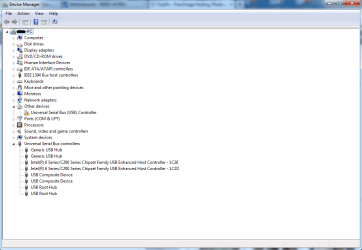
I have a look in my device manager and see this:

http://oi59.tinypic.com/91jhmp.jpg - I have attached an image to this post if you cannot click this link.

There is a warning triangle next to "other devices"

And there is no mention of USB 3.0 in the Universal Serial Bus Controllers section.

I ask if anyone could help me fix this problem so that I can start using the USB 3.0 ports on my computer,

Many thanks.
 

Attachments
  • Device Manager.png
    Device Manager.png
    26.6 KB · Views: 3

My Computer My Computer

OS
windows 7 ultimate 64 bit
Hi there ... Try Downloading the Chipset Driver and the NEC USB 3.0 Driver V2.0.4.0 it is an Update for your USB3 ...
 

My Computer My Computer

Computer Manufacturer/Model Number
W530-3630QM1
OS
windows 7 home 64bit
CPU
INTEL-CORE I7
Memory
16GB
Hard Drives
750GB
Browser
Chrome
Hi there ... Try Downloading the Chipset Driver and the NEC USB 3.0 Driver V2.0.4.0 it is an Update for your USB3 ...

I have downloaded and Installed both of those, but it still has the same problem
 

My Computer My Computer

OS
windows 7 ultimate 64 bit
What about the ASM USB 3.0 Driver V1.2.9.0 ?
 

My Computer My Computer

Computer Manufacturer/Model Number
W530-3630QM1
OS
windows 7 home 64bit
CPU
INTEL-CORE I7
Memory
16GB
Hard Drives
750GB
Browser
Chrome
What about the ASM USB 3.0 Driver V1.2.9.0 ?

Yes this works! thanks for your help. I just assumed that those were older drivers. sorted.
 

My Computer My Computer

OS
windows 7 ultimate 64 bit
Most welcome Renesas Drivers are weird
 

My Computer My Computer

Computer Manufacturer/Model Number
W530-3630QM1
OS
windows 7 home 64bit
CPU
INTEL-CORE I7
Memory
16GB
Hard Drives
750GB
Browser
Chrome
What about the ASM USB 3.0 Driver V1.2.9.0 ?

Yes this works! thanks for your help. I just assumed that those were older drivers. sorted.
Your P67 chipset on the P8P67 board DOES NOT SUPPORT USB 3.0. Newer Intel chipsets (like the Z77 on my P8Z77-V Pro board) support up to 4 USB 3.0 ports. Even newer Intel chipsets support up to 6 USB 3.0 ports.

So, to support both USB 3.0 ports on your board (since your P67 supports ZERO USB 3.0 ports) ASUS has an Asmedia controller on your motherboard. Same was done to add two more USB 3.0 ports on my board (for a total of six, four from the Intel chipset and two more from the Asmedia controller). But this Asmedia controller is its own hardware and has its own driver separate from the Intel chipset driver, and obviously must be installed to support the Asmedia hardware which is present.

If you had run the driver installs from the supplied ASUS CD that came with the motherboard, I'm sure it would have been installed. Or, if you had gone to the ASUS site to get all the latest drivers for your board, again it would have been installed. I guess you didn't realize it was mandatory.

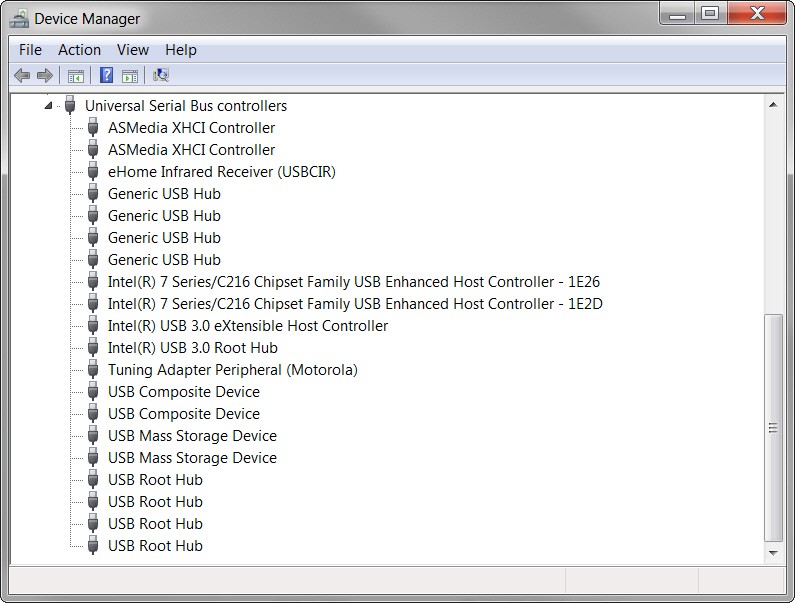
Just for example, here is the USB structure in Device Manager on my P8Z77-V Pro board. Note that there are both (a) Asmedia USB 3.0 host controller and root hub drivers for the two Asmedia USB 3.0 ports, and (b) similar Intel USB 3.0 host controller and root hub drivers for the four Intel USB 3.0 ports. These are separate from the drivers for the USB 2.0 ports.

fbis.jpg
 

My Computer My Computer

Computer type
PC/Desktop
Computer Manufacturer/Model Number
Home-built, two systems (1) and (2)
OS
Windows 7 Pro x64 (1), Win7 Pro X64 (2)
CPU
i5-3350p 3.1Ghz/6MB-cache (1); E8400 3.0Ghz/6MB-cache (2)
Motherboard
ASUS P8Z77-V Pro (1); ASUS P5Q3 (2)
Memory
8GB PC3-12800 DDR3 (1); 4GB PC3-10600 DDR3 (2)
Graphics Card(s)
ATI HD7750 (1), (see TV cards); ATI R7 250 (2)
Sound Card
Realtek ALC892 HD Audio (1); Realtek ALC1200 HD Audio (2)
Monitor(s) Displays
Eizo HD2441W LCD, Eizo S2433W (1); Eizo 24" S2433W (2)
Screen Resolution
1920x1200, 1920x1200 (1); 1920x1200 (2)
Hard Drives
(1) 1TB SATA-II (7200RPM), 2x2TB SATA-III (7200RPM), 250GB SATA-III (10000RPM) for OS; 2x2TB external USB 3.0

(2) 320GB SATA-II (7200RPM), 750GB SATA-II (7200RPM), 150GB SATA-II (10000RPM) for OS; 2TB external USB 3.0
PSU
Nesteq ECS-6001 600W (1); Nesteq ECS-5001 500W (2)
Case
Acousti-Case 360 (1) and (2)
Cooling
Noctua NH-U12P SE2 for CPU, 2x120mm case fans (1) and (2)
Keyboard
IBM PS/2 (1) and (2)
Mouse
Logitech MX Revolution wireless (1); Microsoft wired (2)
Internet Speed
100mbps down / 10mbps up
Antivirus
Microsoft Security Essentials; Malwarebyte Anti-Malware Pro
Browser
Firefox
Other Info
Ceton InfiniTV 4-tuner cablecard-enabled TV card as well as Hauppauge HVR-2250 OTA/ATSC 2-tuner TV card in (1), running under Win7 WMC
Most welcome Renesas Drivers are weird
I don't think this ASUS board has Renesas chipset present for USB 3.0 as is commonly used in 3rd-party external PCIe USB 3.0 expansion slot adapter cards (e.g. Transcend TS-PDU3/PDC3).

It uses the Asmedia controller, requiring the Asmedia driver.
 

My Computer My Computer

Computer type
PC/Desktop
Computer Manufacturer/Model Number
Home-built, two systems (1) and (2)
OS
Windows 7 Pro x64 (1), Win7 Pro X64 (2)
CPU
i5-3350p 3.1Ghz/6MB-cache (1); E8400 3.0Ghz/6MB-cache (2)
Motherboard
ASUS P8Z77-V Pro (1); ASUS P5Q3 (2)
Memory
8GB PC3-12800 DDR3 (1); 4GB PC3-10600 DDR3 (2)
Graphics Card(s)
ATI HD7750 (1), (see TV cards); ATI R7 250 (2)
Sound Card
Realtek ALC892 HD Audio (1); Realtek ALC1200 HD Audio (2)
Monitor(s) Displays
Eizo HD2441W LCD, Eizo S2433W (1); Eizo 24" S2433W (2)
Screen Resolution
1920x1200, 1920x1200 (1); 1920x1200 (2)
Hard Drives
(1) 1TB SATA-II (7200RPM), 2x2TB SATA-III (7200RPM), 250GB SATA-III (10000RPM) for OS; 2x2TB external USB 3.0

(2) 320GB SATA-II (7200RPM), 750GB SATA-II (7200RPM), 150GB SATA-II (10000RPM) for OS; 2TB external USB 3.0
PSU
Nesteq ECS-6001 600W (1); Nesteq ECS-5001 500W (2)
Case
Acousti-Case 360 (1) and (2)
Cooling
Noctua NH-U12P SE2 for CPU, 2x120mm case fans (1) and (2)
Keyboard
IBM PS/2 (1) and (2)
Mouse
Logitech MX Revolution wireless (1); Microsoft wired (2)
Internet Speed
100mbps down / 10mbps up
Antivirus
Microsoft Security Essentials; Malwarebyte Anti-Malware Pro
Browser
Firefox
Other Info
Ceton InfiniTV 4-tuner cablecard-enabled TV card as well as Hauppauge HVR-2250 OTA/ATSC 2-tuner TV card in (1), running under Win7 WMC
needs extra power

Hello

I had the same problem and tried upgrading the firmware and also tried different Windows drivers without luck.
I kept trying different things and found the problem, my USB3.0 doesn't drive enough power,
If I use an (external) Y-cable to plug the device then it works well. (with data plugged to USB3 and power to a USB2 of a different controller).

I knew that was needed for some devices that need a lot of power but my NEC/Renesas USB3.0 needs it even for a pendrive, kinda ridiculous.

That way it works faster than USB2.0 but anyway is not a good controller.
 

My Computer My Computer

Computer type
PC/Desktop
OS
Windows 7 64 bit
Back
Top