Solved why does USB3 driver need to reinstall after restart?

torshizi

New member
Local time
1:45 PM
Messages
13
Location
Mashhad
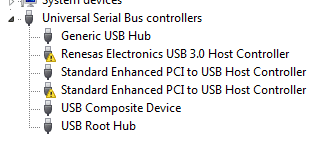
Please Pay attention to image, I got this pic from Device Manager.
usb3.PNG
Two driver is signed with yellow color and every time I install them ,after restart the problem is there and USB ports don’t work .
i have dell n5110 , I don’t remember when this is happened.
I follow 2 solutions but problem does not solve.
1-The Windows 7 SP1 USB Driver Bug (what it is and how to fix it)
2-http://www.sevenforums.com/windows-updates-activation/151740-windows-7-sp1-usb2-bug.html
I tested this tool (7601usbfix.exe) but response was
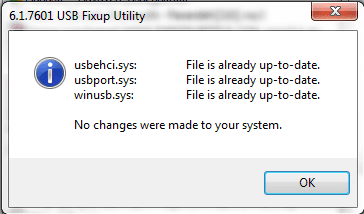
7601USBFixUp.PNG
and also downloaded update Windows6.1-KB2529073-x64.msu but response was
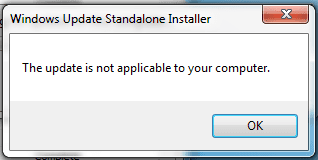
KB2529073.PNG
and downloaded this driver USB3.0_allOS_2.1.28.1_PV and install it but again after restart does not work .
Anybody can help me?
 
Last edited:

My Computer My Computer

At a glance

Windows 7 Ultimate x64Core i5 2.50 GHZ6G
Computer type
Laptop
Computer Manufacturer/Model Number
Dell n5110
OS
Windows 7 Ultimate x64
CPU
Core i5 2.50 GHZ
Memory
6G
Screen Resolution
1366x768
Antivirus
Eset Smart Security 7
Browser
google chrome
Hi there ... Have you tried updating the Intel Chipset Driver it is Intel® 6 Series Chipset ..
 

My Computer My Computer

At a glance

windows 7 home 64bitINTEL-CORE I716GB
Computer Manufacturer/Model Number
W530-3630QM1
OS
windows 7 home 64bit
CPU
INTEL-CORE I7
Memory
16GB
Hard Drives
750GB
Browser
Chrome
how can i do?
thanks.
 

My Computer My Computer

At a glance

Windows 7 Ultimate x64Core i5 2.50 GHZ6G
Computer type
Laptop
Computer Manufacturer/Model Number
Dell n5110
OS
Windows 7 Ultimate x64
CPU
Core i5 2.50 GHZ
Memory
6G
Screen Resolution
1366x768
Antivirus
Eset Smart Security 7
Browser
google chrome

My Computer My Computer

At a glance

windows 7 home 64bitINTEL-CORE I716GB
Computer Manufacturer/Model Number
W530-3630QM1
OS
windows 7 home 64bit
CPU
INTEL-CORE I7
Memory
16GB
Hard Drives
750GB
Browser
Chrome
thanks again
unfortunately, I followed the link,updated chipset ,1 of 2 solved but after restart, the problem still remains.
changes are:
afterUpdateChipset.PNG
 

My Computer My Computer

At a glance

Windows 7 Ultimate x64Core i5 2.50 GHZ6G
Computer type
Laptop
Computer Manufacturer/Model Number
Dell n5110
OS
Windows 7 Ultimate x64
CPU
Core i5 2.50 GHZ
Memory
6G
Screen Resolution
1366x768
Antivirus
Eset Smart Security 7
Browser
google chrome

My Computer My Computer

At a glance

windows 7 home 64bitINTEL-CORE I716GB
Computer Manufacturer/Model Number
W530-3630QM1
OS
windows 7 home 64bit
CPU
INTEL-CORE I7
Memory
16GB
Hard Drives
750GB
Browser
Chrome
I followed the new link but no change happend.
Reminder:
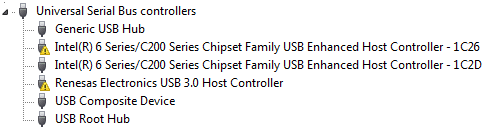
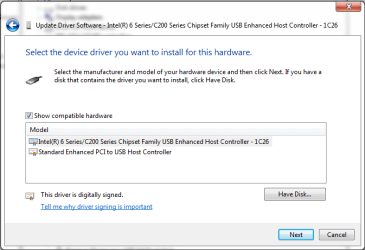
I can Install this Drivers through Update Driver Software ,Browse My Computer For Driver and then select Let me Pick from a List of device drivers on My Computer and then select driver from Show compatible hardware like
letmePick2.PNG

then

letmePick3.PNG

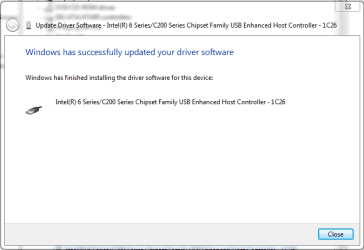
and problem is solved.

installed.PNG

But ,After Restart the prob is there again.


end of reminder.
 

Attachments

  • letmePick.PNG
    letmePick.PNG
    14.4 KB · Views: 35
Last edited:

My Computer My Computer

At a glance

Windows 7 Ultimate x64Core i5 2.50 GHZ6G
Computer type
Laptop
Computer Manufacturer/Model Number
Dell n5110
OS
Windows 7 Ultimate x64
CPU
Core i5 2.50 GHZ
Memory
6G
Screen Resolution
1366x768
Antivirus
Eset Smart Security 7
Browser
google chrome
Hi there .. It is not a Driver problem then .. I have seen so many problems with the Renesas USB 3.0 Port .. Need a cup of Coffee and time to think how we can resolve this issue ...
 

My Computer My Computer

At a glance

windows 7 home 64bitINTEL-CORE I716GB
Computer Manufacturer/Model Number
W530-3630QM1
OS
windows 7 home 64bit
CPU
INTEL-CORE I7
Memory
16GB
Hard Drives
750GB
Browser
Chrome
thanks.
i'm waiting.
note:
i do for both yellow sign.but my pictures is for one yellow sign.
 

My Computer My Computer

At a glance

Windows 7 Ultimate x64Core i5 2.50 GHZ6G
Computer type
Laptop
Computer Manufacturer/Model Number
Dell n5110
OS
Windows 7 Ultimate x64
CPU
Core i5 2.50 GHZ
Memory
6G
Screen Resolution
1366x768
Antivirus
Eset Smart Security 7
Browser
google chrome
Hi again .. You say you still have a Yellow triangle sign beside the Renesas 3.0 USB ? Is this after a Reboot and then all is well when the Driver is Installed again ? .. Is your USB 3 Port working ?
 

My Computer My Computer

At a glance

windows 7 home 64bitINTEL-CORE I716GB
Computer Manufacturer/Model Number
W530-3630QM1
OS
windows 7 home 64bit
CPU
INTEL-CORE I7
Memory
16GB
Hard Drives
750GB
Browser
Chrome
Exactly.
after restart i should install drivers(Same way as the previously mentioned) and then everything are ok.
 

My Computer My Computer

At a glance

Windows 7 Ultimate x64Core i5 2.50 GHZ6G
Computer type
Laptop
Computer Manufacturer/Model Number
Dell n5110
OS
Windows 7 Ultimate x64
CPU
Core i5 2.50 GHZ
Memory
6G
Screen Resolution
1366x768
Antivirus
Eset Smart Security 7
Browser
google chrome
After a restart, look at the two devices with those yellow icons. For each one in DevMgr: right click->Properties. On the General tab, what is the Device Status Code for each device?
 
Last edited:

My Computer My Computer

At a glance

Desk 1: Win 7 Pro x32; Desk 2: Windows 10 x64
Computer type
PC/Desktop
Computer Manufacturer/Model Number
Dell Optiplex 360 and Optiplex 755
OS
Desk 1: Win 7 Pro x32; Desk 2: Windows 10 x64
Hard Drives
500GB Crucial SSD in both Desktops
Other Info
Buffalo 6TB NAS, Raid 1
Thanks to all friends that with your knowledge can help me to solve this problem.
For both, code 10.
 

My Computer My Computer

At a glance

Windows 7 Ultimate x64Core i5 2.50 GHZ6G
Computer type
Laptop
Computer Manufacturer/Model Number
Dell n5110
OS
Windows 7 Ultimate x64
CPU
Core i5 2.50 GHZ
Memory
6G
Screen Resolution
1366x768
Antivirus
Eset Smart Security 7
Browser
google chrome
Click Start, in the search box type msinfo32. Hit Enter. Look through the information in right window pane. Are you running BIOS version A11?

Also, i saw you made a change in your post so i want to be sure and double check: Is the device status of both your devices
> Code 10 (This device can not start) or
> Code 12 (This device can not find enough free resources)??

/* EDIT */
Also, verify my understanding is correct
1. You reboot the computer. Both USB devices have the yellow icon
2. Right click the device->Uninstall. Then at top of device manager select Action->Scan for Hardware Changes. The driver is reinstalled but you still have the yellow icon

But when you do a driver update, the drivers are installed and the devices are OK
 
Last edited:

My Computer My Computer

At a glance

Desk 1: Win 7 Pro x32; Desk 2: Windows 10 x64
Computer type
PC/Desktop
Computer Manufacturer/Model Number
Dell Optiplex 360 and Optiplex 755
OS
Desk 1: Win 7 Pro x32; Desk 2: Windows 10 x64
Hard Drives
500GB Crucial SSD in both Desktops
Other Info
Buffalo 6TB NAS, Raid 1
-BIOS version A09,9/30/2011
-sorry for change,code 10 is correct.
1-I reboot the computer. Both USB devices have the yellow icon.
2-Right click the device->Uninstall. Then at top of device manager select Action->Scan for Hardware Changes. The driver is reinstalled and it is OK.
3-after Restart Both USB devices have the yellow icon.
 

My Computer My Computer

At a glance

Windows 7 Ultimate x64Core i5 2.50 GHZ6G
Computer type
Laptop
Computer Manufacturer/Model Number
Dell n5110
OS
Windows 7 Ultimate x64
CPU
Core i5 2.50 GHZ
Memory
6G
Screen Resolution
1366x768
Antivirus
Eset Smart Security 7
Browser
google chrome
-BIOS version A09,9/30/2011

You;re running an old BIOS version. Go to the Dell site for your model and update to A11. Be sure all AC cords are plugged an secure so no power loss during BIOS updates.

Hopefully, this might fix the problem. Let us know
 

My Computer My Computer

At a glance

Desk 1: Win 7 Pro x32; Desk 2: Windows 10 x64
Computer type
PC/Desktop
Computer Manufacturer/Model Number
Dell Optiplex 360 and Optiplex 755
OS
Desk 1: Win 7 Pro x32; Desk 2: Windows 10 x64
Hard Drives
500GB Crucial SSD in both Desktops
Other Info
Buffalo 6TB NAS, Raid 1
unfortunately did not work.
 

My Computer My Computer

At a glance

Windows 7 Ultimate x64Core i5 2.50 GHZ6G
Computer type
Laptop
Computer Manufacturer/Model Number
Dell n5110
OS
Windows 7 Ultimate x64
CPU
Core i5 2.50 GHZ
Memory
6G
Screen Resolution
1366x768
Antivirus
Eset Smart Security 7
Browser
google chrome
i'm sorry. Thought the BIOS might have been the answer. I'm out of ideas :(
 

My Computer My Computer

At a glance

Desk 1: Win 7 Pro x32; Desk 2: Windows 10 x64
Computer type
PC/Desktop
Computer Manufacturer/Model Number
Dell Optiplex 360 and Optiplex 755
OS
Desk 1: Win 7 Pro x32; Desk 2: Windows 10 x64
Hard Drives
500GB Crucial SSD in both Desktops
Other Info
Buffalo 6TB NAS, Raid 1

My Computer My Computer

At a glance

Windows 7 Ultimate x64Core i5 2.50 GHZ6G
Computer type
Laptop
Computer Manufacturer/Model Number
Dell n5110
OS
Windows 7 Ultimate x64
CPU
Core i5 2.50 GHZ
Memory
6G
Screen Resolution
1366x768
Antivirus
Eset Smart Security 7
Browser
google chrome
Good news glad you got the issue sorted .. And thanks for Posting back the solution
 

My Computer My Computer

At a glance

windows 7 home 64bitINTEL-CORE I716GB
Computer Manufacturer/Model Number
W530-3630QM1
OS
windows 7 home 64bit
CPU
INTEL-CORE I7
Memory
16GB
Hard Drives
750GB
Browser
Chrome
Back
Top