Printer problem needs guru. Looks like Windows not Brother problem.

Shabakthanai

New member
Local time
11:25 AM
Messages
33
Windows 7 Professional

Haven't had the need to use my printer in a couple of weeks, so I don't know when the problem started. It is a Brother HL-2270DW that has been problem free. There are tests that can be tried using the printer itself and it says it has a good connection and should be functioning.

Nevertheless, when I click on print, the available choices are Microsoft XPS Document writer and Fax; the Brother unit is not included as an option. When I enter the control panel and look at the devices, my printer is mentioned with a Troubleshooting necessary indicated, but letting the troubleshooter do its job does not provice any suitable result.

I returned to a restore point the 23 of this month, but am not wanting to go much further back, because except for the printer problem, my computer is working great, and I don't want to remove necessary updates, etc. that might create a whole new problem.

I have shut down for half minute and restarted the printer to see if it might provide a benefit, but when I restart the printer, it's self trouble shooting feature suggest that the unit is both attached and working properly. Toner is over 90% remaining. BTW it is wifi and my router seems to be working perfectly. Drivers are latest.

Thanks for any input!:confused:
 

My Computer My Computer

Computer type
PC/Desktop
Computer Manufacturer/Model Number
home built
OS
Windows 7 Professional 64bit
CPU
AMD 8 core 8350 Black Edition
Motherboard
ASUS Sabertooth 990FX R2.0
Memory
GSkill 1866 16 GB ddr3
Graphics Card(s)
XFX R7850 Double Dissipation PCI Express 2GB DDR5
Hard Drives
256GB SSD
128GB SSD
TB 6GB/s
TB 3GB/s
Antivirus
ClamAv
Browser
Firefox/Explorer
Do you have it setup as a wireless printer? If so, reinstall the printer driver but use a USB cable initially.
Once that is working then setup wireless.

If you don't have the CD or can't find it, the drive is available from the Brother web site (I have the same printer).
 

My Computer My Computer

Computer type
PC/Desktop
Computer Manufacturer/Model Number
Lenovo IdeaCenter 450
OS
Windows 10 Pro X64
CPU
Intel Quad Core i7-4770 @ 3.4Ghz
Memory
16.0GB PC3-12800 DDR3 SDRAM 1600 MHz
Graphics Card(s)
Intel Integrated HD Graphics
Sound Card
Realtek HD Audio
Monitor(s) Displays
HP 22" LCD
Screen Resolution
1680 x 1050
Hard Drives
250GB Samsung EVO SATA-3 SSD
2TB Seagate ST2000DM001 SATA-2
1.5TB Seagate ST3150041AS SATA
Keyboard
Dell USB
Mouse
Lenovo USB
Internet Speed
Cable via Road Runner 3MB Upload, 30MB Download
Antivirus
Windows Defender, MBAM Pro, MBAE
Browser
Seamonkey
Other Info
UEFI/GPT
PLDS DVD-RW DH16AERSH
In addition,

Disconnect the printer from the computer.

Uninstall the printer software.

Follow this video to install your printer.


Brother HL-2270DW

Hope this helps,
John
 
Last edited:

My Computers My Computers

System One System Two

  • Computer type
    PC/Desktop
    Computer Manufacturer/Model Number
    HP Pavilion 6751c
    OS
    Win7, Win10, Win11
    Internet Speed
    100 Mbps
    Antivirus
    Norton 360
    Browser
    IE 11
  • Computer type
    PC/Desktop
    System Manufacturer/Model Number
    HP ENVY 750-514 & Dell XPS 8960
    OS
    Win7, Win10, Win11
    Antivirus
    Norton 360
Do you have it setup as a wireless printer? If so, reinstall the printer driver but use a USB cable initially.
Once that is working then setup wireless.

If you don't have the CD or can't find it, the drive is available from the Brother web site (I have the same printer).
I will do that, because no other idea presents itself. I don't think it will work, though. The diagnostic tools provided by brother have never failed me before; they say it is connected and working properly. Economic printer, and rock solid so far. I believe it was caused by a Windows Update, judging from how the problem is acting. Thanks for the input, friend. :)
 

My Computer My Computer

Computer type
PC/Desktop
Computer Manufacturer/Model Number
home built
OS
Windows 7 Professional 64bit
CPU
AMD 8 core 8350 Black Edition
Motherboard
ASUS Sabertooth 990FX R2.0
Memory
GSkill 1866 16 GB ddr3
Graphics Card(s)
XFX R7850 Double Dissipation PCI Express 2GB DDR5
Hard Drives
256GB SSD
128GB SSD
TB 6GB/s
TB 3GB/s
Antivirus
ClamAv
Browser
Firefox/Explorer
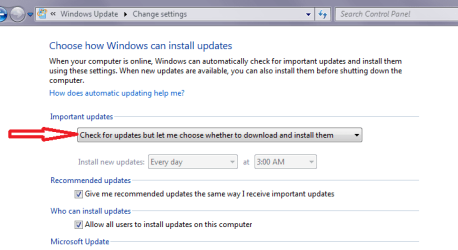
Well given you think it might be an update problem why not try a restore to before the problem and then set the updates to only install if you want them to?

I would (and usually do) pick the updates in small batches that way you can then Hide the one that is causing the problem. I know it means a bit of a fiddle around but it could work.
 

Attachments

  • UPDATE SETTING.PNG
    UPDATE SETTING.PNG
    13.8 KB · Views: 1

My Computer My Computer

Computer type
PC/Desktop
Computer Manufacturer/Model Number
Own build (new) Desk1 / Asus ROG Win 7 / Desk2 1st build
OS
Desk1 7 Home Prem / Desk2 10 Pro / Main lap Asus ROG 10 Pro 2 laptop Toshiba 7 Pro Asus P2520 7 & 10
CPU
Desk1 i5 3750K / Laptop i7 GTX 860M / Desk2 i5 2500
Motherboard
Desk1 Asus P877-V / Desk2 Gigabyte H67 UD3H / Laptop ?
Memory
Desk1 8GB (1866) / Desk2 16GB (1333) / Laptop 8Gb DDR3
Graphics Card(s)
Desk 1& 2NVidia GTX 650 & Laptops on board Intel
Sound Card
Desk 1 & 2 -XONAR DG Realtek High Def audio Laptop
Monitor(s) Displays
Desk 1 Benq HD 2450 / Desk2 Philips 24" / Laptop 17.5"
Screen Resolution
1920x1080 D1 & D2 & Laptop 1
Hard Drives
Desk1 Samsung 120GB 830 SSD
Asus ROG 256GB 850 Pro SSD
Desk2 Samsung 840 256 SSD
Toshiba 120GB EVO
PSU
Desk 1 Corsair HX 1050/ Laptop ? / Desk 2 Corsair HX 650
Case
Desk 1 Cooler HAF XM ? Toshiba laptop / Desk2 Coolermaster
Cooling
Fans on all Desk1 -2 Desk2 - all Coolermasters 5 Laptop ?
Keyboard
Desk 1 MS Sidewinder X6 Desk 2 MS Sidewinder X 4
Mouse
Desk 1&2 - Gigabyte MS 900 gamer - laptop - Logitec wireless
Internet Speed
ADSL2+
Other Info
One other Desktop (tester) and spare Toshba laptop both with SSD's
Running Kaspersky 2016 ISS on all machines config'd identically
Logitec audio stereo systems on each machine (x3)
Canon MG5250MFC
Router/modem TP-Link running WPA2SK
Well given you think it might be an update problem why not try a restore to before the problem and then set the updates to only install if you want them to?

I would (and usually do) pick the updates in small batches that way you can then Hide the one that is causing the problem. I know it means a bit of a fiddle around but it could work.
I guess I will try that. I am not very experienced with Microsoft OS's, so I am usually aprehensive when taking this tack. Thanks friend.:)
 

My Computer My Computer

Computer type
PC/Desktop
Computer Manufacturer/Model Number
home built
OS
Windows 7 Professional 64bit
CPU
AMD 8 core 8350 Black Edition
Motherboard
ASUS Sabertooth 990FX R2.0
Memory
GSkill 1866 16 GB ddr3
Graphics Card(s)
XFX R7850 Double Dissipation PCI Express 2GB DDR5
Hard Drives
256GB SSD
128GB SSD
TB 6GB/s
TB 3GB/s
Antivirus
ClamAv
Browser
Firefox/Explorer
Well given you think it might be an update problem why not try a restore to before the problem and then set the updates to only install if you want them to?

I would (and usually do) pick the updates in small batches that way you can then Hide the one that is causing the problem. I know it means a bit of a fiddle around but it could work.
I guess I will try that. I am not very experienced with Microsoft OS's, so I am usually aprehensive when taking this tack. Thanks friend.:)
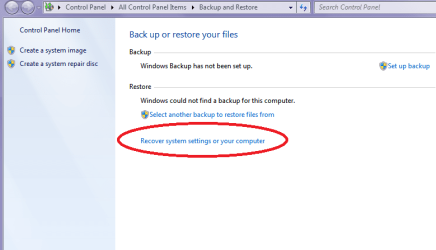
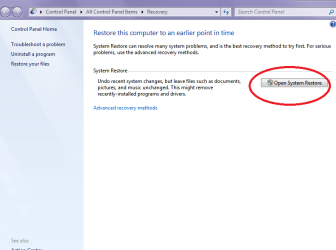
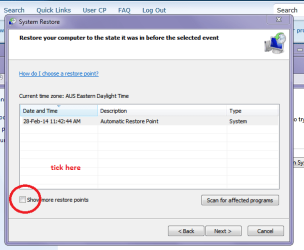
It is really quite simple and you will not lose any data - just so you know you can get restore points back further than is offered by clicking on the box marked see pics.

Now while I am on the subject it is am essential and good idea to do a regular back up image to an external using Macrium see this http://www.sevenforums.com/tutorials/73828-imaging-free-macrium.html

PS pics are not in order so go to the middle one first then follow
 

Attachments

  • BAK4.PNG
    BAK4.PNG
    20.4 KB · Views: 0
  • BAK2.PNG
    BAK2.PNG
    23 KB · Views: 0
  • BAK.PNG
    BAK.PNG
    16.9 KB · Views: 18

My Computer My Computer

Computer type
PC/Desktop
Computer Manufacturer/Model Number
Own build (new) Desk1 / Asus ROG Win 7 / Desk2 1st build
OS
Desk1 7 Home Prem / Desk2 10 Pro / Main lap Asus ROG 10 Pro 2 laptop Toshiba 7 Pro Asus P2520 7 & 10
CPU
Desk1 i5 3750K / Laptop i7 GTX 860M / Desk2 i5 2500
Motherboard
Desk1 Asus P877-V / Desk2 Gigabyte H67 UD3H / Laptop ?
Memory
Desk1 8GB (1866) / Desk2 16GB (1333) / Laptop 8Gb DDR3
Graphics Card(s)
Desk 1& 2NVidia GTX 650 & Laptops on board Intel
Sound Card
Desk 1 & 2 -XONAR DG Realtek High Def audio Laptop
Monitor(s) Displays
Desk 1 Benq HD 2450 / Desk2 Philips 24" / Laptop 17.5"
Screen Resolution
1920x1080 D1 & D2 & Laptop 1
Hard Drives
Desk1 Samsung 120GB 830 SSD
Asus ROG 256GB 850 Pro SSD
Desk2 Samsung 840 256 SSD
Toshiba 120GB EVO
PSU
Desk 1 Corsair HX 1050/ Laptop ? / Desk 2 Corsair HX 650
Case
Desk 1 Cooler HAF XM ? Toshiba laptop / Desk2 Coolermaster
Cooling
Fans on all Desk1 -2 Desk2 - all Coolermasters 5 Laptop ?
Keyboard
Desk 1 MS Sidewinder X6 Desk 2 MS Sidewinder X 4
Mouse
Desk 1&2 - Gigabyte MS 900 gamer - laptop - Logitec wireless
Internet Speed
ADSL2+
Other Info
One other Desktop (tester) and spare Toshba laptop both with SSD's
Running Kaspersky 2016 ISS on all machines config'd identically
Logitec audio stereo systems on each machine (x3)
Canon MG5250MFC
Router/modem TP-Link running WPA2SK
Back
Top