Can't Delete Old Updates (winsxs Folder)

Te3k

New member
Local time
8:10 AM
Messages
8
Hello,

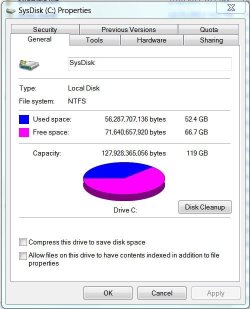
I used to be able to access an option in the Disk Cleanup tool (cleanmgr.exe) to delete old Updates files. Now, the tool merely scans for updates but does not display the appropriate checkbox. My winsxs folder is growing out of control. Installing a couple of recent updates (like 1GB of Office updates and a new 400MB driver package for my video card) is slowly eating away the remainder of my SSD.

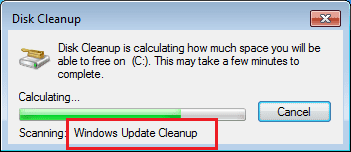
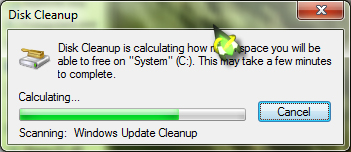
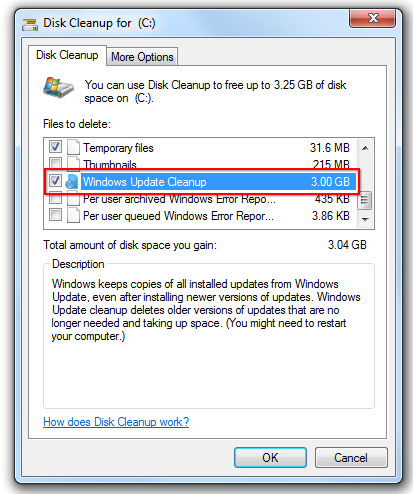
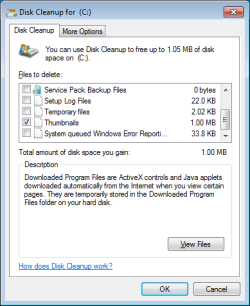
The longest scan in cleanmgr is for Windows Update Cleanup, and I know there are a lot of updates to clean, but there is no option at the end of it to do anything about that.
iH9cp67.jpg


0fGquc6.jpg


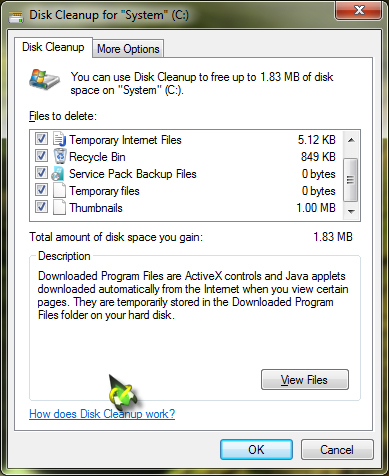
There should be a checkbox in here for the updates. I was able to do this before and save 7GB in one bang, but now there's no option anymore and I have no idea why.


Where the heck is this tickbox?
XkqC0PB.png


Thanks.
 

My Computer My Computer

OS
7 Home Premium x64
My Computer My Computer

Computer type
PC/Desktop
Computer Manufacturer/Model Number
Self built custom
OS
64-bit Windows 11 Pro for Workstations
CPU
Intel i7-8700K OC'd to 5 GHz
Motherboard
ASUS ROG Maximus XI Formula Z390
Memory
64 GB (4x16GB) G.SKILL TridentZ RGB DDR4 3600 MHz
Graphics Card(s)
ASUS ROG-STRIX-GTX1080TI-O11G-GAMING
Sound Card
Integrated
Monitor(s) Displays
2 x Samsung Odyssey G7 27"
Screen Resolution
2560x1440
Hard Drives
1TB Samsung 990 PRO M.2,
4TB Samsung 990 PRO PRO M.2,
TerraMaster F8 SSD Plus NAS
PSU
Seasonic Prime Titanium 850W
Case
Thermaltake Core P3
Cooling
Corsair Hydro H115i
Keyboard
Logitech wireless K800
Mouse
Logitech MX Master 4
Internet Speed
2 Gb/s Download and 100 Mb/s Upload
Antivirus
Malwarebyte Anti-Malware Premium
Browser
Google Chrome
Other Info
Logitech Z625 speaker system,
Logitech BRIO 4K Pro webcam,
HP Color LaserJet Pro MFP M477fdn,
APC SMART-UPS RT 1000 XL - SURT1000XLI,
Galaxy S23 Plus phone
Thanks for the link. I tried everything in that thread, with no success. The update has already been applied. Just in case, I tried to manually download and install it, but got a prompt saying it was already installed. Plus, I had run it before in the past. I was definitely running cleanmgr with administrator privileges.

The only thing I can think of is that the box isn't showing up because the scan's not detecting any available updates to remove (which is weird, because in that case it should be there anyway showing "0 bytes" like all the other ones). But this doesn't make sense to me, because it's been a few months since I've last run the cleaner and my winsxs directory has grown substantially since then (doubled). Plenty of updates have been installed.

Should it really be the case that if you're downloading a 1GB Office update that you should actually lose 1GB disk space? Shouldn't the new modules simply replace the old, resulting in a <1GB net disk-space loss? Or is a backup of the old update copied to the winsxs directory? It's starting to look frustratingly redundant.
 

My Computer My Computer

OS
7 Home Premium x64
Do you have all Windows Updates installed?

You might see if uninstalling and reinstalling this update with a restart between each may be able to fix and add it back.
 

My Computer My Computer

Computer type
PC/Desktop
Computer Manufacturer/Model Number
Self built custom
OS
64-bit Windows 11 Pro for Workstations
CPU
Intel i7-8700K OC'd to 5 GHz
Motherboard
ASUS ROG Maximus XI Formula Z390
Memory
64 GB (4x16GB) G.SKILL TridentZ RGB DDR4 3600 MHz
Graphics Card(s)
ASUS ROG-STRIX-GTX1080TI-O11G-GAMING
Sound Card
Integrated
Monitor(s) Displays
2 x Samsung Odyssey G7 27"
Screen Resolution
2560x1440
Hard Drives
1TB Samsung 990 PRO M.2,
4TB Samsung 990 PRO PRO M.2,
TerraMaster F8 SSD Plus NAS
PSU
Seasonic Prime Titanium 850W
Case
Thermaltake Core P3
Cooling
Corsair Hydro H115i
Keyboard
Logitech wireless K800
Mouse
Logitech MX Master 4
Internet Speed
2 Gb/s Download and 100 Mb/s Upload
Antivirus
Malwarebyte Anti-Malware Premium
Browser
Google Chrome
Other Info
Logitech Z625 speaker system,
Logitech BRIO 4K Pro webcam,
HP Color LaserJet Pro MFP M477fdn,
APC SMART-UPS RT 1000 XL - SURT1000XLI,
Galaxy S23 Plus phone
Yes, in most cases it stays there. The reason is that most updates have the option to uninstall so the previous version has to come from someplace. Check the size of your pagefile and consider moving temporary files off the SSD to a HDD.

Here's my C drive.
 

Attachments

  • Free Space-C.JPG
    Free Space-C.JPG
    46 KB · Views: 72

My Computer My Computer

Computer type
PC/Desktop
Computer Manufacturer/Model Number
Built 2/11/2011
OS
Windows 7 Pro-x64
CPU
i7-2600 3.4GHz - 3.8GHz Turbo
Motherboard
Intel DH67BL-B3
Memory
8Gb - 2x4GB, Muskin 991770 PC3-1333
Graphics Card(s)
Integrated Intel HD 2000
Sound Card
Integrated Intel 10.1 HD, RealTek ALC892
Monitor(s) Displays
Asus LCD VH222H, Haier HL24XSL2a
Screen Resolution
1920x1080, 1920x1080
Hard Drives
Crucial SSD C300-128Gb,
Western Digital WD5002AALX - 500Gb,
Western Digital WD7501AALS - 750Gb
PSU
Seasonic 650W 80+ Gold Modular
Case
Rosewill Defender
Cooling
Stock CPU, Four 120mm case fans, PCH fan added
Keyboard
Logitech EX100 Y-RBH94 Wireless
Mouse
Logitech EX100 M-RCE95 Wireless
Internet Speed
3.0/1.5 Mbs
Antivirus
Microsoft Security Essentials
Browser
Microsoft Internet Explorer 11
Other Info
Antec Veris Premier-Multimedia IR Station,
Cyber Accoustics-3602 Speakers,
AFT XM-5U Card Reader,
Hauppauge TV-HVR-2250,
Sony LX300 USB Turntable
Do you have all Windows Updates installed?

You might see if uninstalling and reinstalling this update with a restart between each may be able to fix and add it back.

Thanks.

I do have all updates installed. An uninstall/reinstall of that particular update (with reboots in-between) had no effect, but thanks for the suggestion.

Carwiz, my pagefile is disabled, as instructed by a SSD-optimisation guide I followed a few years ago (I've experienced no problems and I have 16GB RAM to compensate, although with just 6GB there were no problems either).

Honestly, it seems wasteful to have tens of gigabytes of data sitting on the disk "just in case I uninstall an update". I've never had reason to uninstall an update. This is something the user should have control over, not be forced to endure.

What would happen if I force-deleted the entire winsxs directory? Would that result in system crash, or would that merely preclude my ability to uninstall existing updates?
 

My Computer My Computer

OS
7 Home Premium x64
I do not recommend doing this. Let Windows 7 take care of it.


]What would happen if I force-deleted the entire winsxs directory?
whs
Senior Member​
MCC130c.png

gold.png

guru.png

SFteam.png

reputation_silverstar.gif

reputation_green.gif
reputation_greenh.gif
reputation_gold.gif
reputation_gold.gif
reputation_gold.gif
reputation_gold.gif

Join Date: Jan 2009

Vista, Windows7, Mint Mate, Zorin, Windows 8
21,207 posts
Florida in winter, Black Forest/Germany
Local Time: 01:44 AM
Germany.gif
us%20florida.gif


user_offline.gif


If you want to brick your system go ahead. But the smart man stays off winsxs which is about the most inportant folder in your system

I use Intel SSD's and this is the setting I use.
Notice I have it set to let Windows 7 take care of such thing.

Please read this Thread. It will explain better what Winxsx is and does.

http://www.sevenforums.com/general-...folder-not-actually-consuming-lots-space.html

VIRTUAL MEMORY TODAY.JPG

This is what works for me; a tutorial by Bare Foot Kid.
It includes old Windows Update cleaning.

http://www.sevenforums.com/tutorials/76383-disk-cleanup-extended.html
 
Last edited:

My Computer My Computer

Computer type
PC/Desktop
Computer Manufacturer/Model Number
Home made Desktop
OS
Windows 10 Pro. 64/ version 1709 Windows 7 Pro/64
CPU
Intel i7-6800K @ 4.3
Motherboard
ASUS X-99 Deluxe II
Memory
Corsair Platinum 16 gig @2400
Graphics Card(s)
EVGA GTX 1070 OC
Monitor(s) Displays
Asus 27" LED LCD/VE278Q
Screen Resolution
1920-1080 or 1280-720 HDMI
Hard Drives
INTEL SSD 730-240 Gb Sata 3.0/
PSU
EVGA Platium 1200W
Case
Phanteks Luxe Tempered Glass 8 fans/ one radiator
Cooling
XSPC/ Water Cooled CPU
Keyboard
Das 4 Professional
Mouse
Logitech M705/MX Anywhere 2-S
Internet Speed
100 mbits
Antivirus
Microsoft Security Essentials/ Malwarebytes Premium 3.0/ SAS
Browser
I.E. 11 default/Firefox/ ISP Time Warner Cable/Spectrum
Other Info
LG BluRay Burner/
Sound system-KLipsch-THX/
Icy Dock ssd Hot Swap bays.
Thanks. The disk cleanup extended tutorial linked above did lead to a ton of options showing up in the dialog, but in the end, it didn't clean anything. I still have a 93% full disk, just like before, after reboot.

I understand that the winsxs directory is full of hardlinked files, but my disk space has been vanishing nonetheless. I'd love it if Windows 7 took care of winsxs like you recommend, but it just isn't doing that. It's getting to the point where perhaps I just won't install giant updates anymore, because old versions of them pile up on the drive.

As mentioned, I've already disabled the paging file, therefore it is currently set to 0MB. I freed more space by deleting all Windows backups, and allocating just 1% of the drive to that (the smallest setting). I'm contemplating disabling Windows backup entirely, because I never use it.

I used to have 20GB free. I haven't installed any new programs since then, yet I'm down to my last 8GB diskspace. The only thing I've done is install every update as it rolls out. I'm confident that they are responsible for my lack of space, and there doesn't seem to be anything I can do about it. Perhaps I'll need to reformat the drive and install a version of Windows with all updates slipstreamed so that I don't have doubles of them populating my Windows directory. It really is ridiculous of the system to go, "Hey, just in case you ever want to uninstall Windows Update KB259595 from 2010, I'll just go ahead and leave the other version here... times several hundred". If I want to make a backup I'll make one, but the operating system shouldn't be forcing me to do that on its own.
 

My Computer My Computer

OS
7 Home Premium x64

I have found that Windows 7 will not do many things when a drive is that full.
To put it simple, Windows 7 need a little wiggle room to work properly.
Remove other things like programs until you get the free space back or get a bigger drive.

From post #8

I still have a 93% full disk, just like before, after reboot.
 

My Computer My Computer

Computer type
PC/Desktop
Computer Manufacturer/Model Number
Home made Desktop
OS
Windows 10 Pro. 64/ version 1709 Windows 7 Pro/64
CPU
Intel i7-6800K @ 4.3
Motherboard
ASUS X-99 Deluxe II
Memory
Corsair Platinum 16 gig @2400
Graphics Card(s)
EVGA GTX 1070 OC
Monitor(s) Displays
Asus 27" LED LCD/VE278Q
Screen Resolution
1920-1080 or 1280-720 HDMI
Hard Drives
INTEL SSD 730-240 Gb Sata 3.0/
PSU
EVGA Platium 1200W
Case
Phanteks Luxe Tempered Glass 8 fans/ one radiator
Cooling
XSPC/ Water Cooled CPU
Keyboard
Das 4 Professional
Mouse
Logitech M705/MX Anywhere 2-S
Internet Speed
100 mbits
Antivirus
Microsoft Security Essentials/ Malwarebytes Premium 3.0/ SAS
Browser
I.E. 11 default/Firefox/ ISP Time Warner Cable/Spectrum
Other Info
LG BluRay Burner/
Sound system-KLipsch-THX/
Icy Dock ssd Hot Swap bays.
Fine, I cleared it down to 82% full by reducing some things. I'm still not happy about not being able to remove old Windows Updates, which I think are hogging the drive.

Tell me, if you do the scan, will it even show up as an option for you if there are none to be removed? Will it say "Windows Update Cleanup: 0 Bytes" in the cleanmgr window after scan is complete? Or, will you just not see the checkbox? Because I'm concerned that I'm not seeing the checkbox at all (see OP), and I'd like to know if that's normal behaviour.
 

My Computer My Computer

OS
7 Home Premium x64
Fine, I cleared it down to 82% full by reducing some things. I'm still not happy about not being able to remove old Windows Updates, which I think are hogging the drive.

Tell me, if you do the scan, will it even show up as an option for you if there are none to be removed? Will it say "Windows Update Cleanup: 0 Bytes" in the cleanmgr window after scan is complete? Or, will you just not see the checkbox? Because I'm concerned that I'm not seeing the checkbox at all (see OP), and I'd like to know if that's normal behaviour.
Not for me. It always has 2 or 3 MB after a restart and rescan.

Did you ever get the Windows Update Cleanup option to show in the disk cleanup utility?

Edit: Scratch that. After several restarts, rescans and cleanups, the disk cleanup utility no longer offers an entry for Windows Update Cleanup. I can see it scan for WU files, but I guess if there are none to be cleaned, one sees what the OP sees.

1.png

2.png
 

My Computer My Computer

Computer type
Laptop
Computer Manufacturer/Model Number
Employer provided Dell Latitude
OS
W7 Pro SP1 64bit
CPU
i7
Memory
8GB
Graphics Card(s)
Intel HD Graphics
Hard Drives
crappy SSD
Antivirus
Employer mandated Symantec Endpoint Protection
Browser
Pale Moon 64bit, IE11 64bit & Chrome 64bit
If I'm not mistaken, that's not all that's in Winsxs. It's what's call your side-by-side catalog. If you ever have a write corruption (disk or memory) Windows uses it to recover drivers. I have tons of programs and development packages on my system and you can see (above) I'm at less than 50% usage on a 120GB SSD. One space hog is your browser. Move the User Temp file that it uses off the SSD. It can frequently exceed 100-200MB per day. It adds up fast if you don't keep it clean. Also, frequent cleaning is hard on your SSD anyway.

You should manage your space or get a larger drive. But for sure, I wouldn't tamper with Winsxs. As all ready mentioned, you can't rely on the size displayed by Windows.
 
Last edited:

My Computer My Computer

Computer type
PC/Desktop
Computer Manufacturer/Model Number
Built 2/11/2011
OS
Windows 7 Pro-x64
CPU
i7-2600 3.4GHz - 3.8GHz Turbo
Motherboard
Intel DH67BL-B3
Memory
8Gb - 2x4GB, Muskin 991770 PC3-1333
Graphics Card(s)
Integrated Intel HD 2000
Sound Card
Integrated Intel 10.1 HD, RealTek ALC892
Monitor(s) Displays
Asus LCD VH222H, Haier HL24XSL2a
Screen Resolution
1920x1080, 1920x1080
Hard Drives
Crucial SSD C300-128Gb,
Western Digital WD5002AALX - 500Gb,
Western Digital WD7501AALS - 750Gb
PSU
Seasonic 650W 80+ Gold Modular
Case
Rosewill Defender
Cooling
Stock CPU, Four 120mm case fans, PCH fan added
Keyboard
Logitech EX100 Y-RBH94 Wireless
Mouse
Logitech EX100 M-RCE95 Wireless
Internet Speed
3.0/1.5 Mbs
Antivirus
Microsoft Security Essentials
Browser
Microsoft Internet Explorer 11
Other Info
Antec Veris Premier-Multimedia IR Station,
Cyber Accoustics-3602 Speakers,
AFT XM-5U Card Reader,
Hauppauge TV-HVR-2250,
Sony LX300 USB Turntable
Not for me. It always has 2 or 3 MB after a restart and rescan.

Did you ever get the Windows Update Cleanup option to show in the disk cleanup utility?

Edit: Scratch that. After several restarts, rescans and cleanups, the disk cleanup utility no longer offers an entry for Windows Update Cleanup. I can see it scan for WU files, but I guess if there are none to be cleaned, one sees what the OP sees.

View attachment 308663

View attachment 308664
Ah, okay. Thanks. Yes, I see it scan for Windows Updates, but then it displays no checkbox. I suppose this is typical (if not misleading) behaviour, then.

Carwiz, I run CCleaner regularly to remove temp files. I do maintain my system well. It's just that I have a 120GB SSD (110GB usable) with many things loaded on it, as this is a media-projects and school laptop. I have a couple of ongoing projects on the drive that are 10GB each, as well as large suites like Photoshop/Flash/Audition/Fruityloops. That's why space is of such concern. I offload my media libraries and so forth to my 5TB external dock, but I need to keep some things locally so that I can work on them on-the-go. I'm not looking to expand my SSD to be quite honest, even though 256GB drives are at a great pricepoint currently. My next upgrade will be to a reasonably-priced and fast 512GB drive, whose price will drop when consumer 1TB SSDs start rolling out.

What I was looking for specifically was a way to remove needless backups. E.g., if I download a 1GB update for Office, then I'd like it to replace what's installed—not duplicate it. I.e., if Office takes up 1.5GB and then is amended with a 1.0GB update, the install should still remain at about ~1.5GB... not 2.5GB, because the old components were mirrored into another section of the harddrive in case I decide to uninstall the latest update. This is silly behaviour. Does it really do that? Am I wrong? That's what my research turned up, and what seemed to happen after I installed big updates. I was looking for a way to battle that forced redundancy "feature" of Windows.
 

My Computer My Computer

OS
7 Home Premium x64
Office doesn't have updates anywhere near 1GB in size - even the Service Packs are at most about 400MB, and almost all of those updates would have been installed already, unless the Office install was new.
Most Office updates are well under 25MB in size, and often where a number of updates are related, the total update size change is significantly less than the quoted sum of the updates, since packages are re-used, or hardlinks created instead of generating new copies.

Even Office Pro 2013 x64 full install is under 1GB - so I don't know where you're getting you numbers from.
 

My Computer My Computer

Computer type
Laptop
Computer Manufacturer/Model Number
Asus K52F or Lenovo B51-80
OS
Win 7 x64 Home Premium (and x86 VirtualBox VM)/Win10
CPU
i3 370M/i7 6500U
Motherboard
Asus/Lenovo
Memory
8GB - finally :)/8GB
Graphics Card(s)
it's an i3, dude!/dual Intel&nVidia
Sound Card
onboard
Monitor(s) Displays
15.6" built-in
Screen Resolution
1366x768/1920x1080
Hard Drives
750GB Seagate internal
Sundry external drives attached to other computers on the local network
1TB SSD on the Lenovo
PSU
n/a
Internet Speed
as much as I can get - usually on a dongle/phone, so <1MB/s
Antivirus
MSE/Defender
Browser
IE11/12/Edge/Chrome/FF(if I must)
Ok, The folder winsxs is totaly pissing me off and I am close to clueless about OS and how they work but am a logical person and know that something is wrong here. I need a tech savy person to tell me how to fix this. I have the same issue with my winsxs folder as mentioned in this thread. I wanted to DL a program and it told me that there is not enough room on my system. I have a mini laptop which doesnt have alot of room in the first place so i set out to find out whats the issue since i only have a few programs on my computer. Guess what. Winsxs is filled to the brim. Now I see that some answers are saying that there its not really using the space. Ok fine its not. Can someone tell my system that. When i look at the properties it shows that 80 percent of all my space is coming from this folder. I have update folders in there from a few years ago. Now again not being a Microsoft programer I believe that updates that were installed years ago are not needed. You would think someone at MS whould have said hey bill what do you think about deleting update folders from years ago so a persons system is not overloaded. I scroll down in the winsxs and can sit there for 20 mins as it scrolls through the updates, Are these folders really needed. I would think they arent since windows seemed to work before i updated these things. You cant delete, Move, Change the name and delete. SO is it designed that it will consume your resouses so you get mad and buy a new computer? I feel its a scam like the spyware downloaded on your system that gives you a pop up with a number to call in order to get your system cleaned for two hundred dollars. There has to be a way. Please dont tell me its not effecting my system really because it really is ...Thanks.
 

My Computer My Computer

Computer type
PC/Desktop
OS
windows
Do you have SP1 installed? Is it updated fully?
If so, then use the DiskClean utility and do a full cleanup of system files.
 

My Computer My Computer

Computer type
Laptop
Computer Manufacturer/Model Number
Asus K52F or Lenovo B51-80
OS
Win 7 x64 Home Premium (and x86 VirtualBox VM)/Win10
CPU
i3 370M/i7 6500U
Motherboard
Asus/Lenovo
Memory
8GB - finally :)/8GB
Graphics Card(s)
it's an i3, dude!/dual Intel&nVidia
Sound Card
onboard
Monitor(s) Displays
15.6" built-in
Screen Resolution
1366x768/1920x1080
Hard Drives
750GB Seagate internal
Sundry external drives attached to other computers on the local network
1TB SSD on the Lenovo
PSU
n/a
Internet Speed
as much as I can get - usually on a dongle/phone, so <1MB/s
Antivirus
MSE/Defender
Browser
IE11/12/Edge/Chrome/FF(if I must)
To answer the question of what will happen if you force remove the WinSXS folder:

Using a VMWare, Windows 8.1, and Kali linux

I created a Windows 8.1 Virtual Machine and booted into Kali Linux.

Then I brought up the filesystem and removed the WinSXS folder from Windows 8.1.

See Attached for result.

Seeing that it is a virtual machine just revert to a snapshot ;)

If anyone is still interested I will be trying to rebuild the WinSxS folder with just the bare necessities and see what happens. IF you are interested let me know and I will let you know. If enough respond I will post.

(This is my first post so if there any suggestions on how to improve my posting skills please let me know)
 

Attachments

  • deleteWinsxs.PNG
    deleteWinsxs.PNG
    8.7 KB · Views: 2

My Computer My Computer

Computer type
Laptop
Computer Manufacturer/Model Number
HP
OS
winpe - 7 Ultimate
CPU
AMD A4
Memory
12GB
Graphics Card(s)
Radeon
Hard Drives
1TB WD
500GB Seagate
Antivirus
Webroot
Browser
FireFox (YA Baby!!!)
Sorry guys i had the wrong attachment
 

My Computer My Computer

Computer type
Laptop
Computer Manufacturer/Model Number
HP
OS
winpe - 7 Ultimate
CPU
AMD A4
Memory
12GB
Graphics Card(s)
Radeon
Hard Drives
1TB WD
500GB Seagate
Antivirus
Webroot
Browser
FireFox (YA Baby!!!)
Back
Top