Recycle Bin - Fix For Custom Icons Not Refreshing

How to Fix Custom Recycle Bin Icons Not Automatically Refreshing


   Information
The Recycle Bin provides a safety net when deleting files or folders. When you delete any of these items from your hard disk, Windows places it in the Recycle Bin and the Recycle Bin icon changes from empty to full.

Sometimes, when using different custom icons for both the Full and Empty Recycle Bin, the icons will not change to the proper icon when filled or emptied, unless you manually refresh the Desktop.

This will show you how to fix the refreshing problem when you use custom icons for the Recycle Bin in Vista and Windows 7.
   Tip
To use custom icons for the Recycle Bin, see this tutorial here - Desktop Icons - Add or Remove
   Note


  • If you change one or both icons to different ones after you have applied the changes in Regedit, you will need to apply the registry changes again for the new ones
  • Removable drives do not use or have a Recycyle Bin. Files deleted from removable drives are permanently deleted instead.


Here's How:
1. Open the Registry Editor by going to the Start Menu and typing in Regedit. Click yes for UAC prompt.

2. Navigate to-
Code:
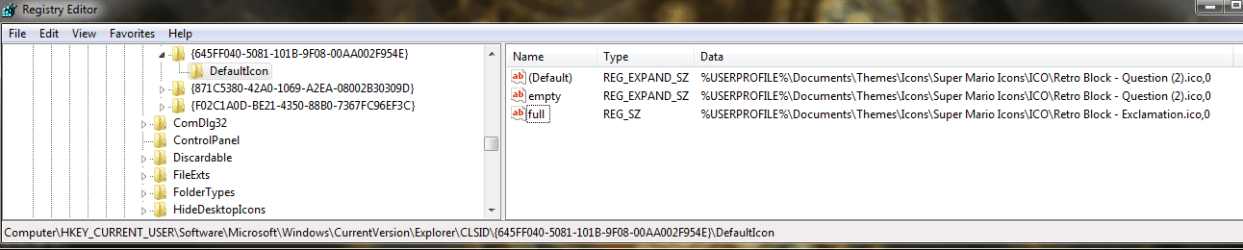
HKEY_CURRENT_USER/Software/Microsoft/Windows/CurrentVersion/Explorer/CLSID/{645FF040-5081-101B-9F08-00AA002F954E}/Default Icon
3. In the right hand pane, double click on the (Default) string, and change the entry from this - %USERPROFILE%\Icons\blackhole.ico to this %USERPROFILE%\Icons\blackhole.ico,0
NOTE: Instead of blackhole.ico, you will have your custom icon file name instead.

4. Click OK.

5. Repeat Step 3 for the empty and full string entries as well. When done, it should look like this -

2009-09-13_185526.jpg
6. Close Regedit and the changes should apply without having to log off and on or restart. You can try it out by deleting something when it's Empty, and see if it changes to the Full custom icon.


That's it.
Airbot


Last edited by a moderator:
Thank you. Great work. Not sure if I will do it, don't want to mess things up but I will look into it. If I try it and it works I will let you know.
 

My Computer

Computer type
PC/Desktop
Computer Manufacturer/Model Number
HP
OS
Windows Home Premium 64bit
Memory
6.00 GB
Browser
Chrome Version 33.0.1750.117 m
Recycle icons

Hello Miklo,

If you like, upload the icons you are using for your Recycle Bin, and I'll be happy to test them on my system to see if there may be an issue with them.

Where do you have the icons saved at on your system? This way I'll test using the same to get the best test results.
http://www.sevenforums.com/tutorials/9733-screenshots-files-upload-post-seven-forums.html
In addition, see if the tutorial below may be able to help if you have not already.
Recycle Bin
Hope this helps for now, :)
Shawn

Shawn very cool thanks so much,I have had the icons in many places Sys32,SysWOW64,also on my USB Hard drives,I put them all over the place out of frustration lol,I also used reshacker and put them in imageres.dll with no help and it seem to cause other problems.BTW thanks again its really cool of you to do this, and hopefully you see something Im doing wrong or I missed doing.I have also used other icons and same thing,even refresh doesn't always change them only a rest will work every time.
MIKLO:)
 

Attachments

  • Re Cycle 3.png
    Re Cycle 3.png
    22 KB · Views: 655
  • Re Cycle 2.png
    Re Cycle 2.png
    15.9 KB · Views: 643
Last edited:

My Computer

Computer type
PC/Desktop
Computer Manufacturer/Model Number
Dell
OS
windows 8 X64
I would need the actual .ico files themselves instead. You could place them in a ZIP file, and upload them if you like. :)
 

My Computer

Computer type
PC/Desktop
Computer Manufacturer/Model Number
Self built custom
OS
64-bit Windows 11 Pro for Workstations
CPU
Intel i7-8700K OC'd to 5 GHz
Motherboard
ASUS ROG Maximus XI Formula Z390
Memory
64 GB (4x16GB) G.SKILL TridentZ RGB DDR4 3600 MHz
Graphics Card(s)
ASUS ROG-STRIX-GTX1080TI-O11G-GAMING
Sound Card
Integrated
Monitor(s) Displays
2 x Samsung Odyssey G7 27"
Screen Resolution
2560x1440
Hard Drives
1TB Samsung 990 PRO M.2,
4TB Samsung 990 PRO PRO M.2,
TerraMaster F8 SSD Plus NAS
PSU
Seasonic Prime Titanium 850W
Case
Thermaltake Core P3
Cooling
Corsair Hydro H115i
Keyboard
Logitech wireless K800
Mouse
Logitech MX Master 4
Internet Speed
2 Gb/s Download and 100 Mb/s Upload
Antivirus
Malwarebyte Anti-Malware Premium
Browser
Google Chrome
Other Info
Logitech Z625 speaker system,
Logitech BRIO 4K Pro webcam,
HP Color LaserJet Pro MFP M477fdn,
APC SMART-UPS RT 1000 XL - SURT1000XLI,
Galaxy S23 Plus phone
I would need the actual .ico files themselves instead. You could place them in a ZIP file, and upload them if you like. :)


Ooops sorry,I saw I couldn't send .ico files so I sent as png,didn't think 2send as .zip. Thanks again,

MIKLO:)
 

Attachments

My Computer

Computer type
PC/Desktop
Computer Manufacturer/Model Number
Dell
OS
windows 8 X64
@MIKLO

The icons would look better if they were 256x256 pixel Vista style icons instead of 96x96 pixel.

The Recycle Bin didn't automatically change with your icons until I did what was in the tutorial on the first page to add ,0 at the end in the registry.

Do you have the icons saved in say your Pictures library or folder?
 

My Computer

Computer type
PC/Desktop
Computer Manufacturer/Model Number
Self built custom
OS
64-bit Windows 11 Pro for Workstations
CPU
Intel i7-8700K OC'd to 5 GHz
Motherboard
ASUS ROG Maximus XI Formula Z390
Memory
64 GB (4x16GB) G.SKILL TridentZ RGB DDR4 3600 MHz
Graphics Card(s)
ASUS ROG-STRIX-GTX1080TI-O11G-GAMING
Sound Card
Integrated
Monitor(s) Displays
2 x Samsung Odyssey G7 27"
Screen Resolution
2560x1440
Hard Drives
1TB Samsung 990 PRO M.2,
4TB Samsung 990 PRO PRO M.2,
TerraMaster F8 SSD Plus NAS
PSU
Seasonic Prime Titanium 850W
Case
Thermaltake Core P3
Cooling
Corsair Hydro H115i
Keyboard
Logitech wireless K800
Mouse
Logitech MX Master 4
Internet Speed
2 Gb/s Download and 100 Mb/s Upload
Antivirus
Malwarebyte Anti-Malware Premium
Browser
Google Chrome
Other Info
Logitech Z625 speaker system,
Logitech BRIO 4K Pro webcam,
HP Color LaserJet Pro MFP M477fdn,
APC SMART-UPS RT 1000 XL - SURT1000XLI,
Galaxy S23 Plus phone
@MIKLO

The icons would look better if they were 256x256 pixel Vista style icons instead of 96x96 pixel.

The Recycle Bin didn't automatically change with your icons until I did what was in the tutorial on the first page to add ,0 at the end in the registry.

Do you have the icons saved in say your Pictures library or folder?


Shawn,
WOW:o dude thank you so much for your hard work doing this :) How lame of me:( I really apologize, I had the "0" in the registryat one time but was changed after a restore:( but the ICON size was in fact 96 as you know. Whats really bad is when I looked in my files I had the correct size just not in correct place, I sure spent a lot of time spinning my wheels :( and then wasted your time on a simple lame mistake I should have seen. Again Im sorry to waste your valuable time but Im really happy to finally have this problem solved. Im sure to some it doesnt seem like much of a problem but it just annoyed me,
I often say Im smarter than the machine but in this case it was you that is smarter than the machine. I can't thank you enough.... very cool of you to help. Thanks again so much:)
With Respect,
MIKLO
 

My Computer

Computer type
PC/Desktop
Computer Manufacturer/Model Number
Dell
OS
windows 8 X64
You're most welcome Miklo. :)
 

My Computer

Computer type
PC/Desktop
Computer Manufacturer/Model Number
Self built custom
OS
64-bit Windows 11 Pro for Workstations
CPU
Intel i7-8700K OC'd to 5 GHz
Motherboard
ASUS ROG Maximus XI Formula Z390
Memory
64 GB (4x16GB) G.SKILL TridentZ RGB DDR4 3600 MHz
Graphics Card(s)
ASUS ROG-STRIX-GTX1080TI-O11G-GAMING
Sound Card
Integrated
Monitor(s) Displays
2 x Samsung Odyssey G7 27"
Screen Resolution
2560x1440
Hard Drives
1TB Samsung 990 PRO M.2,
4TB Samsung 990 PRO PRO M.2,
TerraMaster F8 SSD Plus NAS
PSU
Seasonic Prime Titanium 850W
Case
Thermaltake Core P3
Cooling
Corsair Hydro H115i
Keyboard
Logitech wireless K800
Mouse
Logitech MX Master 4
Internet Speed
2 Gb/s Download and 100 Mb/s Upload
Antivirus
Malwarebyte Anti-Malware Premium
Browser
Google Chrome
Other Info
Logitech Z625 speaker system,
Logitech BRIO 4K Pro webcam,
HP Color LaserJet Pro MFP M477fdn,
APC SMART-UPS RT 1000 XL - SURT1000XLI,
Galaxy S23 Plus phone
That's all following Murphy's Law: "Whatever can go wrong, will go wrong." :p

Btw, forgotton (re-) patches :

I write down every patch and every installed program with date and location
in a simple text file, not stored on the C: drive.

So in case of restoring a backup, I can look up what patches/programs I now
had to reinstall.

Regards,
Tom.
 

My Computer

Computer type
PC/Desktop
Computer Manufacturer/Model Number
Custom Build
OS
Windows 7 Ultimate x64
CPU
Intel Sandy Bridge i5 2500K
Motherboard
ASUS P8 H67-M Pro Rev. 3
Memory
16 GB
Graphics Card(s)
Intel internal HD 3000
Sound Card
Realtek internal High Def Audio
Monitor(s) Displays
ViewSonic 24"
Case
Cooler Master - HAF 932 (Big Tower)
Cooling
CPU: EKL AG "Alpenfohn Brocken"
Mouse
SteelSeries Sensei
Antivirus
Kaspersky Internet Security
Browser
Avant (Tri-Core: IE, FireFox & Chrome Engine)
That's all following Murphy's Law: "Whatever can go wrong, will go wrong." :p

Btw, forgotton (re-) patches :

I write down every patch and every installed program with date and location
in a simple text file, not stored on the C: drive.

So in case of restoring a backup, I can look up what patches/programs I now
had to reinstall.

Regards,
Tom.
:) Good point and something I have not been doing as I should, but after this I take time to do cuz is very important, and in this case embrass 4me.:o:haha: but very cool when there are people willing to take time and check work to find mistake like Brink has done 4me.
MIKLO
 

My Computer

Computer type
PC/Desktop
Computer Manufacturer/Model Number
Dell
OS
windows 8 X64
Thanks! This worked perfectly. I now have working custom icons for my Recycle Bin which I have renamed to "Emergency Inelegance Incinerator" :P
 

My Computer

OS
Windows 7 Enterprise 32 bit
Just wanted to say TY Airbot for that walkthrough. Now all i have to do is figure out why my damn pc randomly stops showing as being connected to the internet even when it is.
 

My Computer

Computer type
PC/Desktop
Computer Manufacturer/Model Number
Cyberpower PC custom built
OS
Windows 7 Home Premium 64bit
CPU
Intel I5-750 2.66GHZ 8MB LGA 1156
Motherboard
Gigabyte P55M-UD2 Crossfire DDR3 1333+ Micro ATX Intel
Memory
G.SKILL Ripjaws X Series 8GB (2 x 4GB) DDR3 1600 PC3 12800
Graphics Card(s)
Sapphire ATI Radeon 7870HD 2GB Gddr5
Hard Drives
500 GB Sata II 3.0 GB 16MB 7200RPM
Antivirus
Microsoft Security Essentials
Browser
Chrome / Firefox / Opera / IE
thank you

it work perfectly
 

My Computer

Computer type
PC/Desktop
Computer Manufacturer/Model Number
Custom - GigaByte Motherboard
OS
Windows 7 Home Premium 32bit.
CPU
amd athlon 62x2 duelcore 4200 2.2ghz
Motherboard
Gigabyte
Memory
2 gig
Graphics Card(s)
nvidia gforce 6400
Hard Drives
western digital
Antivirus
avg
Browser
mozilla
Thanks, it works on Windows 10 too :)
 

My Computer

Computer Manufacturer/Model Number
Glite Cooler Master
OS
Windows 7 Ultimate SP1 64-bit / Ubuntu 11.10 x64
CPU
AMD Athlon 64x2 Dual Core processor 5000+ 2.60 GHz
Motherboard
ASUSTeK Computer INC.
Memory
4.00GB
Graphics Card(s)
NVIDIA GeForce 7050 PV / NVIDIA nForce 630a
Sound Card
NVIDIA HDMI Audio Device
Monitor(s) Displays
ViewSonic VA926 Series
Screen Resolution
1280 x 1024
Hard Drives
SAMSUNG HD502HJ ATA Device (500GB)
Keyboard
Standard PS/2 Keyboard
Mouse
Microsoft PS/2 Mouse
After all these years and the solution still works perfectly. Thanks to Sevenforums.com.
 

My Computer

Computer type
PC/Desktop
Computer Manufacturer/Model Number
Custom
OS
Windows 7 Home Premium x64
CPU
AMD A6-6400K APU
Motherboard
Gigabyte F2A88XM-D3H
Memory
8.0GB DDR3-1600
Graphics Card(s)
Radeon Onboard Graphics
Sound Card
Realtek High Def
Monitor(s) Displays
Acer K242HQL
Screen Resolution
1920x1080
Hard Drives
Samsung 850 EVO SSD 250GB
PSU
Corsair 430W
Case
Silverstone PS-08
Cooling
Enermax fans (120mm-intake, 80mm-exhaust)
Keyboard
Logitech K360
Mouse
Logitech M305 Cordless Optical
Internet Speed
Download 60.19Mbps Upload 6.71Mbps
Antivirus
AVG
Browser
Iron Version 51.0.2700.0 (64-bit)
Does not work Win 7 PRO x64 with ,0

NEVERMIND! Fixed. The registry key needs to be EXPANDABLE STRING

Revision: When I delete, it works and changes the icon right now. When I Empty Recycle Bin, it does not work.
This does not work for me with a ,0 at the end in registry:
2015-11-17 08_23_29-Registry Editor.png
 

My Computer

Computer type
PC/Desktop
OS
Windows 7 Home Premium / Professional
Thanks BOSS, i have searched a lot of time to find this thing! Thx A Lot
 

My Computer

Computer type
PC/Desktop
Computer Manufacturer/Model Number
unknown
OS
64
CPU
unknown
Motherboard
unknown
Memory
4 gb
Graphics Card(s)
unknown
Hard Drives
unknown
Antivirus
unknown
Browser
Chrome
Back
Top