
How to Add "Empty Recycle Bin" to Desktop Context Menu in Windows 7 and Windows 8
Information
The Recycle Bin provides a safety net when deleting files or folders. When you delete any of these items from your hard disk, Windows places it in the Recycle Bin and the Recycle Bin icon changes from empty to full.
This tutorial will show you how to add or remove Empty Recycle Bin from the desktop context menu for all users on the computer in Windows 7 and Windows 8.
You must be logged in as an administrator to be able to do the steps in this tutorial, but all users will be able to use the "Empty Recycle Bin" context menu item.
This tutorial will show you how to add or remove Empty Recycle Bin from the desktop context menu for all users on the computer in Windows 7 and Windows 8.
You must be logged in as an administrator to be able to do the steps in this tutorial, but all users will be able to use the "Empty Recycle Bin" context menu item.
Here's How:
1. To Add "Empty Recycle Bin" to the Top of the Desktop Context Menu
A) Click on the Download button below to download the file below, and go to step 4 below.
Add_Empty_Recycle_Bin_top_Desktop_Context_Menu.reg
Download
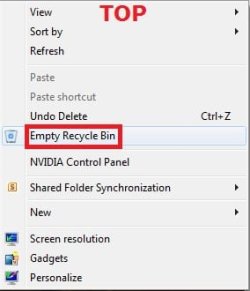
2. To Add "Empty Recycle Bin" to the Bottom of the Desktop Context Menu
A) Click/tap on the Download button below to download the file below, and go to step 4 below.
Add_Empty_Recycle_Bin_bottom_Desktop_Context_Menu.reg
Download
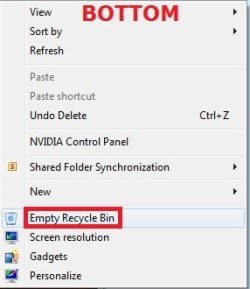
3. To Remove "Empty Recycle Bin" from the Desktop Context Menu
NOTE: This is the default setting.
A) Click/tap on the Download button below to download the file below, and go to step 4 below.
Remove_Empty_Recycle_Bin_Desktop_Context_Menu.reg
Download
4. Save the REG file to your desktop.
5. Double click/tap on the REG file to merge it,.
6. If prompted, click/tap on Run, Yes (UAC), Yes, and OK.
7. When done, you can delete the downloaded .reg file on the desktop if you like.
8. Now right click on your Desktop to see the change.
That's it,
Shawn
Related Tutorials
- How to Fix Corrupted Recycle Bin in Windows
- How to Pin the Recycle Bin to the Windows 7 Taskbar
- How to Allow or Prevent the Windows 7 Recycle Bin Icon to Display
- How to Turn the Recycle Bin Delete Confirmation On or Off
- How to Set the Windows 7 Recycle Bin to Permanently Delete Items Immediately
- How to Add or Remove Properties from Recycle Bin Context Menu
- How to Rename the "Recycle Bin" in Windows 7
- How to Add or Remove "Recycle Bin" from Desktop Context Menu
- How to Add or Remove the "Recycle Bin" from the Windows 7 Navigation Pane
- How to Change Recycle Bin Maximum Storage Size in Vista, Windows 7, and Windows 8
- How to Empty Recycle Bin in Windows 8 and 8.1
Attachments
Last edited:


