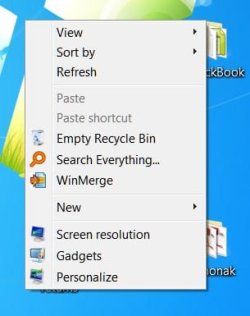
Empty Recycle Bin - Add to Desktop Context Menu

How to Add "Empty Recycle Bin" to Desktop Context Menu in Windows 7 and Windows 8

   Information
The Recycle Bin provides a safety net when deleting files or folders. When you delete any of these items from your hard disk, Windows places it in the Recycle Bin and the Recycle Bin icon changes from empty to full.

This tutorial will show you how to add or remove Empty Recycle Bin from the desktop context menu for all users on the computer in Windows 7 and Windows 8.

You must be logged in as an administrator to be able to do the steps in this tutorial, but all users will be able to use the "Empty Recycle Bin" context menu item.


Here's How:
1. To Add "Empty Recycle Bin" to the Top of the Desktop Context Menu
A) Click on the Download button below to download the file below, and go to step 4 below.
Add_Empty_Recycle_Bin_top_Desktop_Context_Menu.reg

Download
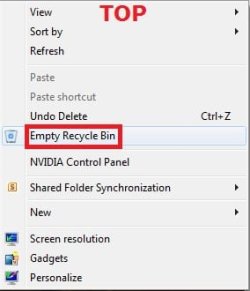


Top.jpg
2. To Add "Empty Recycle Bin" to the Bottom of the Desktop Context Menu
A) Click/tap on the Download button below to download the file below, and go to step 4 below.
Add_Empty_Recycle_Bin_bottom_Desktop_Context_Menu.reg

Download
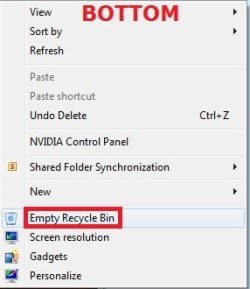


Bottom.jpg
3. To Remove "Empty Recycle Bin" from the Desktop Context Menu
NOTE: This is the default setting.
A) Click/tap on the Download button below to download the file below, and go to step 4 below.
Remove_Empty_Recycle_Bin_Desktop_Context_Menu.reg

Download


4. Save the REG file to your desktop.

5. Double click/tap on the REG file to merge it,.

6. If prompted, click/tap on Run, Yes (UAC), Yes, and OK.

7. When done, you can delete the downloaded .reg file on the desktop if you like.

8. Now right click on your Desktop to see the change.


That's it,
Shawn


Attachments

Last edited:
Thank you for this it now works well.
 

My Computer

Computer Manufacturer/Model Number
MSI 6702
OS
Windows 7 32 bit
CPU
AMD Athlon 64
Motherboard
MSI 6702
Memory
2GB
Graphics Card(s)
Nvidia 7600GT
Sound Card
Realtek Internal
Monitor(s) Displays
Dell Anologue 19" Monitor
Hard Drives
2 IDE

2 SATA

2 External Hard drives WD 2TB Iomega 1TB
PSU
600w
Case
Generic
Cooling
Standard with 2 case fans
Keyboard
HP
Mouse
Microsoft Intelimouse
Internet Speed
Crappy:( I'm from Australia:)
You're welcome Midgo. :)
 

My Computer

Computer type
PC/Desktop
Computer Manufacturer/Model Number
Self built custom
OS
64-bit Windows 11 Pro for Workstations
CPU
Intel i7-8700K OC'd to 5 GHz
Motherboard
ASUS ROG Maximus XI Formula Z390
Memory
64 GB (4x16GB) G.SKILL TridentZ RGB DDR4 3600 MHz
Graphics Card(s)
ASUS ROG-STRIX-GTX1080TI-O11G-GAMING
Sound Card
Integrated
Monitor(s) Displays
2 x Samsung Odyssey G7 27"
Screen Resolution
2560x1440
Hard Drives
1TB Samsung 990 PRO M.2,
4TB Samsung 990 PRO PRO M.2,
TerraMaster F8 SSD Plus NAS
PSU
Seasonic Prime Titanium 850W
Case
Thermaltake Core P3
Cooling
Corsair Hydro H115i
Keyboard
Logitech wireless K800
Mouse
Logitech MX Master 4
Internet Speed
2 Gb/s Download and 100 Mb/s Upload
Antivirus
Malwarebyte Anti-Malware Premium
Browser
Google Chrome
Other Info
Logitech Z625 speaker system,
Logitech BRIO 4K Pro webcam,
HP Color LaserJet Pro MFP M477fdn,
APC SMART-UPS RT 1000 XL - SURT1000XLI,
Galaxy S23 Plus phone
oh my God,,,this is really work,,,thank you very much,,,it's a GREAT job
 

My Computer

OS
windows xp, windows 7
You're most welcome Licalis, and welcome to Seven Forums. :)
 

My Computer

Computer type
PC/Desktop
Computer Manufacturer/Model Number
Self built custom
OS
64-bit Windows 11 Pro for Workstations
CPU
Intel i7-8700K OC'd to 5 GHz
Motherboard
ASUS ROG Maximus XI Formula Z390
Memory
64 GB (4x16GB) G.SKILL TridentZ RGB DDR4 3600 MHz
Graphics Card(s)
ASUS ROG-STRIX-GTX1080TI-O11G-GAMING
Sound Card
Integrated
Monitor(s) Displays
2 x Samsung Odyssey G7 27"
Screen Resolution
2560x1440
Hard Drives
1TB Samsung 990 PRO M.2,
4TB Samsung 990 PRO PRO M.2,
TerraMaster F8 SSD Plus NAS
PSU
Seasonic Prime Titanium 850W
Case
Thermaltake Core P3
Cooling
Corsair Hydro H115i
Keyboard
Logitech wireless K800
Mouse
Logitech MX Master 4
Internet Speed
2 Gb/s Download and 100 Mb/s Upload
Antivirus
Malwarebyte Anti-Malware Premium
Browser
Google Chrome
Other Info
Logitech Z625 speaker system,
Logitech BRIO 4K Pro webcam,
HP Color LaserJet Pro MFP M477fdn,
APC SMART-UPS RT 1000 XL - SURT1000XLI,
Galaxy S23 Plus phone
Great!:cool: Thx Brink!
 

My Computer

Computer Manufacturer/Model Number
Self built
OS
Win7 Professional - lited edition & Zorin OS 4 (ubuntu)
CPU
Intel C2D E6600 (2.70 GHz OC'd)
Motherboard
ASUS P5W DH Deluxe Wi-Fi
Memory
3 GB (mushkin)
Graphics Card(s)
nVidia Point of View 8800GTS OC'd by BIOS flashing
Sound Card
Realtek HD Audio Integrated
Monitor(s) Displays
Wide Q.Bell QBL.19WM
Screen Resolution
1440 x 900 (16:10)
Hard Drives
spinpoints F1
Samsung HD322HJ (System, aired with Akasa AK-HD-BL hard drive cooler)
Samsung HD501LJ (Storage)
PSU
500W CHIEFTEC GPS-500A
Case
Coolermaster ELITE 330 (3 x fan)
Cooling
by air (CPU-Intel Retail Boxed, Case-NOCTUA NF-P12)
Keyboard
oem
Mouse
Logitech MX 1000
Internet Speed
up to 6down/1up Mb/s
Other Info
--CD/DVDW: TSSTcorp SH-S223F,TSSTcorp SH-S182M
--Logitech QuickCam Communciate STX
--Creative 5.1 Speaker System
--SkyStar2 TV PCI DVB-S
--Canon MP610 All in One
--Notebook Acer Aspire 5739G / Win 7 Professional
You're most welcome sHAKaJaada, and welcome to Seven Forums.
 
Last edited:

My Computer

Computer type
PC/Desktop
Computer Manufacturer/Model Number
Self built custom
OS
64-bit Windows 11 Pro for Workstations
CPU
Intel i7-8700K OC'd to 5 GHz
Motherboard
ASUS ROG Maximus XI Formula Z390
Memory
64 GB (4x16GB) G.SKILL TridentZ RGB DDR4 3600 MHz
Graphics Card(s)
ASUS ROG-STRIX-GTX1080TI-O11G-GAMING
Sound Card
Integrated
Monitor(s) Displays
2 x Samsung Odyssey G7 27"
Screen Resolution
2560x1440
Hard Drives
1TB Samsung 990 PRO M.2,
4TB Samsung 990 PRO PRO M.2,
TerraMaster F8 SSD Plus NAS
PSU
Seasonic Prime Titanium 850W
Case
Thermaltake Core P3
Cooling
Corsair Hydro H115i
Keyboard
Logitech wireless K800
Mouse
Logitech MX Master 4
Internet Speed
2 Gb/s Download and 100 Mb/s Upload
Antivirus
Malwarebyte Anti-Malware Premium
Browser
Google Chrome
Other Info
Logitech Z625 speaker system,
Logitech BRIO 4K Pro webcam,
HP Color LaserJet Pro MFP M477fdn,
APC SMART-UPS RT 1000 XL - SURT1000XLI,
Galaxy S23 Plus phone
Old thread, but if anyone sees this, I accidentally deleted the 'empty recycle bin' option in the context menu. I added a hack so it shows in the context menu on the desktop right click, but I can't find the shell command to re-add in the registry to get it back in my Recycle Bin menu. Anyone help?
 

My Computer

OS
Windows Seven
Hello soulcoma,

Downloading and merging the .reg file I created below should restore Empty Recycle Bin back to the Recycle Bin context menu for you. :)
 

Attachments

My Computer

Computer type
PC/Desktop
Computer Manufacturer/Model Number
Self built custom
OS
64-bit Windows 11 Pro for Workstations
CPU
Intel i7-8700K OC'd to 5 GHz
Motherboard
ASUS ROG Maximus XI Formula Z390
Memory
64 GB (4x16GB) G.SKILL TridentZ RGB DDR4 3600 MHz
Graphics Card(s)
ASUS ROG-STRIX-GTX1080TI-O11G-GAMING
Sound Card
Integrated
Monitor(s) Displays
2 x Samsung Odyssey G7 27"
Screen Resolution
2560x1440
Hard Drives
1TB Samsung 990 PRO M.2,
4TB Samsung 990 PRO PRO M.2,
TerraMaster F8 SSD Plus NAS
PSU
Seasonic Prime Titanium 850W
Case
Thermaltake Core P3
Cooling
Corsair Hydro H115i
Keyboard
Logitech wireless K800
Mouse
Logitech MX Master 4
Internet Speed
2 Gb/s Download and 100 Mb/s Upload
Antivirus
Malwarebyte Anti-Malware Premium
Browser
Google Chrome
Other Info
Logitech Z625 speaker system,
Logitech BRIO 4K Pro webcam,
HP Color LaserJet Pro MFP M477fdn,
APC SMART-UPS RT 1000 XL - SURT1000XLI,
Galaxy S23 Plus phone
Thank you! You are a God! I created another post since this one was so old and someone took the time to send me a Vishal Reg File that looked like it would work. It didn't, even on reboot. Yours did. Thanks again.
 

My Computer

OS
Windows Seven
You're most welcome. Glad it could help. :)

Yeah, I've seen the other removed duplicate thread. The .reg file in it would have only added "Empty Recycle Bin" to the desktop background like in the tutorial here. It wasn't for what you wanted.
 

My Computer

Computer type
PC/Desktop
Computer Manufacturer/Model Number
Self built custom
OS
64-bit Windows 11 Pro for Workstations
CPU
Intel i7-8700K OC'd to 5 GHz
Motherboard
ASUS ROG Maximus XI Formula Z390
Memory
64 GB (4x16GB) G.SKILL TridentZ RGB DDR4 3600 MHz
Graphics Card(s)
ASUS ROG-STRIX-GTX1080TI-O11G-GAMING
Sound Card
Integrated
Monitor(s) Displays
2 x Samsung Odyssey G7 27"
Screen Resolution
2560x1440
Hard Drives
1TB Samsung 990 PRO M.2,
4TB Samsung 990 PRO PRO M.2,
TerraMaster F8 SSD Plus NAS
PSU
Seasonic Prime Titanium 850W
Case
Thermaltake Core P3
Cooling
Corsair Hydro H115i
Keyboard
Logitech wireless K800
Mouse
Logitech MX Master 4
Internet Speed
2 Gb/s Download and 100 Mb/s Upload
Antivirus
Malwarebyte Anti-Malware Premium
Browser
Google Chrome
Other Info
Logitech Z625 speaker system,
Logitech BRIO 4K Pro webcam,
HP Color LaserJet Pro MFP M477fdn,
APC SMART-UPS RT 1000 XL - SURT1000XLI,
Galaxy S23 Plus phone
Empty the Recycle Bin without Confirmation Dialog

:mad:
This dialog is really annoying me:
In 99% of all cases where I accidentally deleted something I wanted to keep,
I used [Shift+Del] from the keyboard, so the dialog is not really helpful for me,
only consuming my time.

I found a little patch to get rid of it here
How to Disable the Empty Recycle Bin Confirmation Box in Windows 7 - The Winhelponline Blog
but it only works with right-clicking the Recycle Bin, not with this nice Context Menu patch. :(

So I modified the original ".reg" file to get it work (Version with entry at bottom of context menu) :

Code:
[B]Windows Registry Editor Version 5.00[/B]

; Executed silently (No Confirmation Dialog) with NirCmd

[B][HKEY_CLASSES_ROOT\Directory\Background\shell\empty][/B]
"CommandStateHandler"="{c9298eef-69dd-4cdd-b153-bdbc38486781}"
"Description"="@shell32.dll,-31332"
"Icon"="shell32.dll,-254"
"MUIVerb"="@shell32.dll,-10564"
"Position"="Bottom"

[B][HKEY_CLASSES_ROOT\Directory\Background\shell\empty\[COLOR=Blue]command[/COLOR]][/B]
"DelegateExecute"=""
@="nircmd.exe emptybin"
Note: Only the original line below "command" is exchanged with the two new lines.

You now need the NirCmd - Windows command line tool
in your "C:\Windows\System32" folder, it's described for example here in the Forum :
http://www.sevenforums.com/tutorials/196071-eject-close-cd-dvd-tray-add-desktop-context-menu.html


Regards,
Tom
 
Last edited:

My Computer

Computer type
PC/Desktop
Computer Manufacturer/Model Number
Custom Build
OS
Windows 7 Ultimate x64
CPU
Intel Sandy Bridge i5 2500K
Motherboard
ASUS P8 H67-M Pro Rev. 3
Memory
16 GB
Graphics Card(s)
Intel internal HD 3000
Sound Card
Realtek internal High Def Audio
Monitor(s) Displays
ViewSonic 24"
Case
Cooler Master - HAF 932 (Big Tower)
Cooling
CPU: EKL AG "Alpenfohn Brocken"
Mouse
SteelSeries Sensei
Antivirus
Kaspersky Internet Security
Browser
Avant (Tri-Core: IE, FireFox & Chrome Engine)
Addition :

Strange, I did a System Recovery to a state before that patch, so I had
to re-apply it, and I only now noticed, that I can change the used icon too: :)

:warn:
As always, be careful when playing around with the Registry,
make a backup copy before applying any patches !


Start RegEdit and navigate to
[HKEY_CLASSES_ROOT\Directory\Background\shell\empty]

In the left pane click on "empty", then in the right pane
double-click (or use rigth-click > Edit) on "Icon"
and replace "shell32.dll,-254" with the path to your icon, e.g.

"C:\Users\Public\My_Icons\Trash_Context_Menu.ico"
(use quotes if you have any spaces in your path).


But now I wanted to change the original icon in the context menu
of Recycle Bin to my icon too ...

That can be done easyly if you had applied the patch from
How to Disable the Empty Recycle Bin Confirmation Box in Windows 7 - The Winhelponline Blog

Start RegEdit and navigate to
[HKEY_CURRENT_USER\Software\Classes\CLSID\
{645FF040-5081-101B-9F08-00AA002F954E}\shell\empty]


In the left pane click on "empty", then in the right pane
right-click on an empty space and select "New > String Value" (REG_SZ),
and name it "Icon". Use the path to your icon as data.


Regards,
Tom
 

My Computer

Computer type
PC/Desktop
Computer Manufacturer/Model Number
Custom Build
OS
Windows 7 Ultimate x64
CPU
Intel Sandy Bridge i5 2500K
Motherboard
ASUS P8 H67-M Pro Rev. 3
Memory
16 GB
Graphics Card(s)
Intel internal HD 3000
Sound Card
Realtek internal High Def Audio
Monitor(s) Displays
ViewSonic 24"
Case
Cooler Master - HAF 932 (Big Tower)
Cooling
CPU: EKL AG "Alpenfohn Brocken"
Mouse
SteelSeries Sensei
Antivirus
Kaspersky Internet Security
Browser
Avant (Tri-Core: IE, FireFox & Chrome Engine)
Hey Tom,

Instead of going through all that to change the Recycle Bin icon, you could just use this below to change it's icon the "Desktop Icon Settings" UI.

http://www.sevenforums.com/tutorials/920-desktop-icons-change-restore-default-icon.html


As for the context menu in this tutorial, you could edit the .reg file to change the part in red below with the full path of the .ico file you wanted instead.

Code:
Windows Registry Editor Version 5.00
 
[HKEY_CLASSES_ROOT\Directory\Background\shell\empty]
"CommandStateHandler"="{c9298eef-69dd-4cdd-b153-bdbc38486781}"
"Description"="@shell32.dll,-31332"
"Icon"="[B][COLOR=red]shell32.dll,-254[/COLOR][/B]"
"MUIVerb"="@shell32.dll,-10564"
[HKEY_CLASSES_ROOT\Directory\Background\shell\empty\command]
"DelegateExecute"="{48527bb3-e8de-450b-8910-8c4099cb8624}"
 

My Computer

Computer type
PC/Desktop
Computer Manufacturer/Model Number
Self built custom
OS
64-bit Windows 11 Pro for Workstations
CPU
Intel i7-8700K OC'd to 5 GHz
Motherboard
ASUS ROG Maximus XI Formula Z390
Memory
64 GB (4x16GB) G.SKILL TridentZ RGB DDR4 3600 MHz
Graphics Card(s)
ASUS ROG-STRIX-GTX1080TI-O11G-GAMING
Sound Card
Integrated
Monitor(s) Displays
2 x Samsung Odyssey G7 27"
Screen Resolution
2560x1440
Hard Drives
1TB Samsung 990 PRO M.2,
4TB Samsung 990 PRO PRO M.2,
TerraMaster F8 SSD Plus NAS
PSU
Seasonic Prime Titanium 850W
Case
Thermaltake Core P3
Cooling
Corsair Hydro H115i
Keyboard
Logitech wireless K800
Mouse
Logitech MX Master 4
Internet Speed
2 Gb/s Download and 100 Mb/s Upload
Antivirus
Malwarebyte Anti-Malware Premium
Browser
Google Chrome
Other Info
Logitech Z625 speaker system,
Logitech BRIO 4K Pro webcam,
HP Color LaserJet Pro MFP M477fdn,
APC SMART-UPS RT 1000 XL - SURT1000XLI,
Galaxy S23 Plus phone
Hi Shawn,

to be honest, I already patched the ".reg" file in case I had to redo it again ... :)

I only used the descriped method cause the ".reg" patch was applied and I wanted
to test, if my change would work before editing the ".reg" file.
(Uhh, it's Windows, so you never know ... :rolleyes: )


And btw, I also already changed my Recycle Bin icon to my old favorite
from Windows ME, using the "Desktop Icon Settings",
292157d1383492505-recycle-bin-fix-custom-icons-not-refreshing-winme-empty-full.png

but that didn't change the small icon in the Recycle Bin context menu.

Should it change that too, another bug in Windows, or is it again just
me experiencing strange side effects ?? :confused:

Anyway, I got what I wanted, so I'm happy again, enjoying this Forum.


Thanks for taking care,
Tom


P.S.
Still working on how to add an icon to a context menu entry made by the system,
like ""Open file location" or the "New" sub-menu here
http://www.sevenforums.com/customization/310748-add-icon-context-menu-entry-made-system.html
but that seems to be a little bit more complicated (or impossible) ...
 

My Computer

Computer type
PC/Desktop
Computer Manufacturer/Model Number
Custom Build
OS
Windows 7 Ultimate x64
CPU
Intel Sandy Bridge i5 2500K
Motherboard
ASUS P8 H67-M Pro Rev. 3
Memory
16 GB
Graphics Card(s)
Intel internal HD 3000
Sound Card
Realtek internal High Def Audio
Monitor(s) Displays
ViewSonic 24"
Case
Cooler Master - HAF 932 (Big Tower)
Cooling
CPU: EKL AG "Alpenfohn Brocken"
Mouse
SteelSeries Sensei
Antivirus
Kaspersky Internet Security
Browser
Avant (Tri-Core: IE, FireFox & Chrome Engine)
Nar, the context menu uses it's own separate icon specified by the "Icon" string value in the .reg file.

Glad you got what you wanted though. :)
 

My Computer

Computer type
PC/Desktop
Computer Manufacturer/Model Number
Self built custom
OS
64-bit Windows 11 Pro for Workstations
CPU
Intel i7-8700K OC'd to 5 GHz
Motherboard
ASUS ROG Maximus XI Formula Z390
Memory
64 GB (4x16GB) G.SKILL TridentZ RGB DDR4 3600 MHz
Graphics Card(s)
ASUS ROG-STRIX-GTX1080TI-O11G-GAMING
Sound Card
Integrated
Monitor(s) Displays
2 x Samsung Odyssey G7 27"
Screen Resolution
2560x1440
Hard Drives
1TB Samsung 990 PRO M.2,
4TB Samsung 990 PRO PRO M.2,
TerraMaster F8 SSD Plus NAS
PSU
Seasonic Prime Titanium 850W
Case
Thermaltake Core P3
Cooling
Corsair Hydro H115i
Keyboard
Logitech wireless K800
Mouse
Logitech MX Master 4
Internet Speed
2 Gb/s Download and 100 Mb/s Upload
Antivirus
Malwarebyte Anti-Malware Premium
Browser
Google Chrome
Other Info
Logitech Z625 speaker system,
Logitech BRIO 4K Pro webcam,
HP Color LaserJet Pro MFP M477fdn,
APC SMART-UPS RT 1000 XL - SURT1000XLI,
Galaxy S23 Plus phone
Yeah, it's a little bit confusing with all the icons in different .dll's.

Seems that Windows uses imageres.dll #54 and #55
for his Recycle Bin, containing the 256x256 size, while
shell32.dll #254 has only a maximum size of 32x32.
 

My Computer

Computer type
PC/Desktop
Computer Manufacturer/Model Number
Custom Build
OS
Windows 7 Ultimate x64
CPU
Intel Sandy Bridge i5 2500K
Motherboard
ASUS P8 H67-M Pro Rev. 3
Memory
16 GB
Graphics Card(s)
Intel internal HD 3000
Sound Card
Realtek internal High Def Audio
Monitor(s) Displays
ViewSonic 24"
Case
Cooler Master - HAF 932 (Big Tower)
Cooling
CPU: EKL AG "Alpenfohn Brocken"
Mouse
SteelSeries Sensei
Antivirus
Kaspersky Internet Security
Browser
Avant (Tri-Core: IE, FireFox & Chrome Engine)
Hello soulcoma,

Downloading and merging the .reg file I created below should restore Empty Recycle Bin back to the Recycle Bin context menu for you. :)
buddy thanks a lot :thumbsup:
 

My Computer

Computer type
Laptop
OS
Windows 7 Ultimate x32
You're welcome Mehdircm, and welcome to Seven Forums. :)
 

My Computer

Computer type
PC/Desktop
Computer Manufacturer/Model Number
Self built custom
OS
64-bit Windows 11 Pro for Workstations
CPU
Intel i7-8700K OC'd to 5 GHz
Motherboard
ASUS ROG Maximus XI Formula Z390
Memory
64 GB (4x16GB) G.SKILL TridentZ RGB DDR4 3600 MHz
Graphics Card(s)
ASUS ROG-STRIX-GTX1080TI-O11G-GAMING
Sound Card
Integrated
Monitor(s) Displays
2 x Samsung Odyssey G7 27"
Screen Resolution
2560x1440
Hard Drives
1TB Samsung 990 PRO M.2,
4TB Samsung 990 PRO PRO M.2,
TerraMaster F8 SSD Plus NAS
PSU
Seasonic Prime Titanium 850W
Case
Thermaltake Core P3
Cooling
Corsair Hydro H115i
Keyboard
Logitech wireless K800
Mouse
Logitech MX Master 4
Internet Speed
2 Gb/s Download and 100 Mb/s Upload
Antivirus
Malwarebyte Anti-Malware Premium
Browser
Google Chrome
Other Info
Logitech Z625 speaker system,
Logitech BRIO 4K Pro webcam,
HP Color LaserJet Pro MFP M477fdn,
APC SMART-UPS RT 1000 XL - SURT1000XLI,
Galaxy S23 Plus phone
Unfortunately did not works for me

Hello,
I have windows 7/64 ultimate.
I did everything i could , including SFC or clean registry.
When i right click on recycle bin i do not have the option to empty.
I can manually empty but it is not on the menu.
I have the option when i right click on the desktop.
It does clean it, BUT, the ICON stay the same as FULL.
If i refresh the desktop, icon does not change.
Please help as it drive me crazy
Thank you very much
 

Attachments

  • RecyleBin.jpg
    RecyleBin.jpg
    12.1 KB · Views: 156
  • DektopOption.jpg
    DektopOption.jpg
    16.2 KB · Views: 157

My Computer

OS
xp , vista
Back
Top