Recycle Bin - Add or Remove from Navigation Pane

How to Add or Remove Recycle Bin from Navigation Pane in Windows 7


   Information
The Recycle Bin provides a safety net when deleting files or folders. When you delete any of these items from your hard disk, Windows places it in the Recycle Bin and the Recycle Bin icon changes from empty to full.

This will show you how to add or remove the Recycle Bin in the Windows Explorer navigation pane in Windows 7.

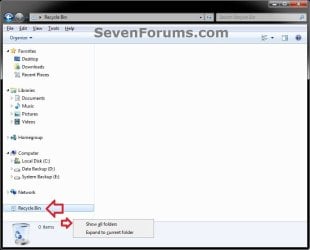
EXAMPLE: Recycle Bin Added to Navigation Pane
NOTE: This is the navigation pane with Recycle Bin added when you have the Show all folders option checked and unchecked.
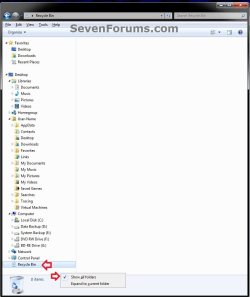
Checked.jpg

unchecked.jpg


OPTION ONE

With "Show All Folders" Checked in Navigation Pane


NOTE: This option only affects your user account and no other user accounts on the computer.
1. Open Windows Explorer, and right click on a empty area in the navigation pane.

2. To See the Recycyle Bin in "Show All Folders"
A) Click on Show all folders to check it.
3. To Not See the Recycyle Bin in "Show All Folders"
A) Click on Show all folders to uncheck it.

B) If you still see the Recycle Bin with this option unchecked, then you will need to do OPTION TWO below to remove it.


OPTION TWO

With "Show All Folders" Unchecked in Navigation Pane


NOTE: You can only do this option while logged into an administrator account. This option will affect all user accounts on the computer.
1. Open the Start Menu and type regedit.exe in the search line, then press enter.

2. If prompted by UAC, then click on Yes.

3. In Regedit, go to the location below: (See screenshot below step 4)
Code:
HKEY_CLASSES_ROOT\CLSID\{645FF040-5081-101B-9F08-00AA002F954E}\ShellFolder
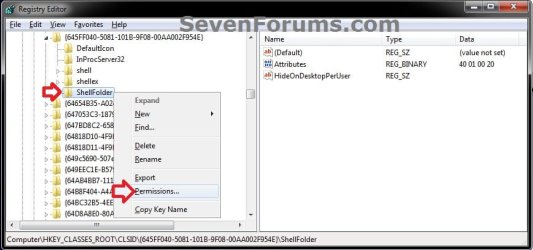
4. In the left pane of regedit, right click on the ShellFolder key and click on Permissions. (see screenshot below)
Add-1.jpg
5. At the top, select the Administrators group. At the bottom, check the Allow box to the right of Full Control and click on OK. (see screenshot below)
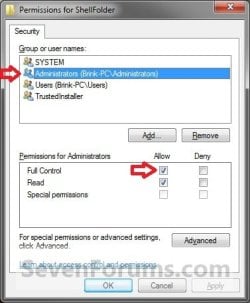
Add-2.jpg
6. Do either step 7 or 8 to add or remove your user profile folder from the navigation pane.

7. To Add the Recycle Bin to the Navigation Pane
NOTE: This is the default setting.
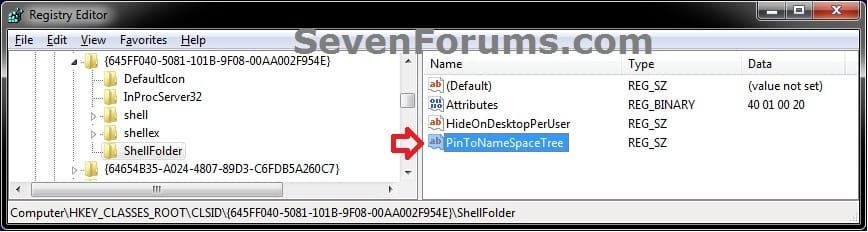
A) In the right pane of ShellFolder, right click on a empty space, click on New and String Value, copy and paste the name below, and press Enter. (see screenshot below)
NOTE: This is to have the Recycle Bin display separately in the navigation pane when you do not have Show all folders checked.
PinToNameSpaceTree
Delete-1.jpg
B) Go to step 9.
8. To Remove the Recycle Bin from the Navigation Pane
A) In the right pane of ShellFolder, right click on PinToNameSpaceTree (if there), and click on Delete. (see screenshot below)
NOTE: This is to not have the Recycle Bin display separately in the navigation pane when you do not have Show all folders checked.
Delete-1.jpg
B) Click on Yes to confirm deletion. (see screenshot below)
Delete-2.jpg
C) Continue on to step 9.
9. If you have 64-bit Windows 7 Installed
   Note

To also add or remove your User Folder from the "Open" and "Save as" type windows as well in 64-bit Windows 7, you will also need to do this step.

If you have a 32-bit Windows 7 installed, then skip this step since doing steps 1 to 7/8 will add or remove your User Folder from the "Open" and "Save as" type windows as well.

A) In Regedit, go to the location below:
Code:
HKEY_LOCAL_MACHINE\SOFTWARE\Wow6432Node\Classes\CLSID\{645FF040-5081-101B-9F08-00AA002F954E}\ShellFolder
B) Repeat steps 4 to 7/8 above for this registry location.
10. Close regedit.

11. Restart the computer to fully apply.
That's it,
Shawn


Last edited:
Another great tutorial Shawn ! ;)
 

My Computer My Computer

Computer type
PC/Desktop
Computer Manufacturer/Model Number
Custom Build
OS
Windows 10 Pro x64
CPU
Intel Core i5 4440 @Stock
Motherboard
Gigabyte Z97 D3H
Memory
4 x 4GB HyperX Fury DDR3
Graphics Card(s)
Gigabyte GTX 1050Ti O4G
Sound Card
Integrated
Monitor(s) Displays
Dell P2417H
Screen Resolution
1920 x 1080
Hard Drives
Samsung EVO 850 120GB / Toshiba DT01ACA050 1TB 7200prm 32MB
PSU
Riotoro Onyx 750W
Case
NZXT H500 Black-Red
Cooling
Stock CPU + NZXT 120mm + 2x120mm red fans
Keyboard
Modecom Volcano Lanparty
Mouse
Asus ROG Gladius / DeepCool E-Pad Plus
Internet Speed
DOCSIS 50/3 Mbit
Browser
Google Chrome
Other Info
Asus K55VJ(i5 3210M, GT635M / 2GB, 8GB DDR3, 500GB HDD)
Thank you Boshko. :)
 

My Computer My Computer

Computer type
PC/Desktop
Computer Manufacturer/Model Number
Self built custom
OS
64-bit Windows 11 Pro for Workstations
CPU
Intel i7-8700K OC'd to 5 GHz
Motherboard
ASUS ROG Maximus XI Formula Z390
Memory
64 GB (4x16GB) G.SKILL TridentZ RGB DDR4 3600 MHz
Graphics Card(s)
ASUS ROG-STRIX-GTX1080TI-O11G-GAMING
Sound Card
Integrated
Monitor(s) Displays
2 x Samsung Odyssey G7 27"
Screen Resolution
2560x1440
Hard Drives
1TB Samsung 990 PRO M.2,
4TB Samsung 990 PRO PRO M.2,
TerraMaster F8 SSD Plus NAS
PSU
Seasonic Prime Titanium 850W
Case
Thermaltake Core P3
Cooling
Corsair Hydro H115i
Keyboard
Logitech wireless K800
Mouse
Logitech MX Master 4
Internet Speed
2 Gb/s Download and 100 Mb/s Upload
Antivirus
Malwarebyte Anti-Malware Premium
Browser
Google Chrome
Other Info
Logitech Z625 speaker system,
Logitech BRIO 4K Pro webcam,
HP Color LaserJet Pro MFP M477fdn,
APC SMART-UPS RT 1000 XL - SURT1000XLI,
Galaxy S23 Plus phone
No Bin

Love the tutorials Brink! I have never posted, always just read. This worked for me on one system & on another it didn't. Problem is I have the bin in open & save but not in explorer. Also when doing the x64 part, I have no "Wow6432Node" folder. So I put it in HKEY_LOCAL_MACHINE\SOFTWARE\Classes\CLSID\{645FF040-5081-101B-9F08-00AA002F954E}\ShellFolder.........reboot & no bin..........HELP!
 

My Computer My Computer

Computer Manufacturer/Model Number
Custom
OS
Windows 7 Ultimate x64 SP1
CPU
Intel 1155 i5 2500k @ 4.85ghz
Motherboard
ASRock P67 X6 B3
Memory
Gskill Ripjaws 4x4gb=16gb (cl8,1t) @ 1884
Graphics Card(s)
MSI 1gb/gtx 560ti 448 and MSI 1gb/gtx460 for phys, both OCed
Sound Card
ASUS Xonar dx 7.1 pcix 1x
Monitor(s) Displays
ASUS vg 27in. 3D
Screen Resolution
1920x1080 120hz 3D
Hard Drives
Kingston HyperX 120gb ssd (boot)
3tb WD usb3 External (to go/backups)
2x sata3 WD Raptor 450gb (network storage raid)
2x sata3 Seagate Momentus xt 500gb (local storage raid)
PSU
1000w 80+ active PFC Kingwin
Case
Cooler Master cm690IIadv Mid
Cooling
17 total fans, all fans are on controlers...silent...
Keyboard
Logitech MX5500 Revolution Bluetooth
Mouse
Logitech 848nm Laser Bluetooth
Internet Speed
3 mbs down & 1bms up (real speeds)
Other Info
Logitech 7.1 speakers.
Old Microsoft web-cam.
Kingston usb3 multi-card reader.
Dual band Netgear router and N-wireless adapter.
Lite On blu ray burner and Lite On all-in-one optical.
Hello 88King, and welcome to Seven Forums.

It depends on if you use Windows Explorer with the Show all folders option checked or not for what option in the tutorial to use to have the Recycle Bin display.

You would only have the "Wow6432Node" key in a 64-bit Windows 7, and not in a 32-bit Windows 7.

If the other computer is a 32-bit Windows 7, then you would not do step 9, and only do the tutorial at the registry location below instead.

HKEY_CLASSES_ROOT\CLSID\{645FF040-5081-101B-9F08-00AA002F954E}\ShellFolder


You would want to remove what you added to the registry location below as well.

HKEY_LOCAL_MACHINE\SOFTWARE\Classes\CLSID\{645FF040-5081-101B-9F08-00AA002F954E}\ShellFolder

Hope this helps for now. :)
 

My Computer My Computer

Computer type
PC/Desktop
Computer Manufacturer/Model Number
Self built custom
OS
64-bit Windows 11 Pro for Workstations
CPU
Intel i7-8700K OC'd to 5 GHz
Motherboard
ASUS ROG Maximus XI Formula Z390
Memory
64 GB (4x16GB) G.SKILL TridentZ RGB DDR4 3600 MHz
Graphics Card(s)
ASUS ROG-STRIX-GTX1080TI-O11G-GAMING
Sound Card
Integrated
Monitor(s) Displays
2 x Samsung Odyssey G7 27"
Screen Resolution
2560x1440
Hard Drives
1TB Samsung 990 PRO M.2,
4TB Samsung 990 PRO PRO M.2,
TerraMaster F8 SSD Plus NAS
PSU
Seasonic Prime Titanium 850W
Case
Thermaltake Core P3
Cooling
Corsair Hydro H115i
Keyboard
Logitech wireless K800
Mouse
Logitech MX Master 4
Internet Speed
2 Gb/s Download and 100 Mb/s Upload
Antivirus
Malwarebyte Anti-Malware Premium
Browser
Google Chrome
Other Info
Logitech Z625 speaker system,
Logitech BRIO 4K Pro webcam,
HP Color LaserJet Pro MFP M477fdn,
APC SMART-UPS RT 1000 XL - SURT1000XLI,
Galaxy S23 Plus phone
windows 7, 64 bit

is there a way to delete Recycle Bin from navigation pane when 'show all folders' is ticked? i need this for regular windows explorer and the open/close dialouge box.

I also need to delete it from being shown when looking at 'desktop' folder in windows explorer (it's deleted from the actual dekstop just fine).

thanks in advance
 

My Computer My Computer

OS
Windows 7
Hello ksdixon,

Not that I'm aware of. :(
 

My Computer My Computer

Computer type
PC/Desktop
Computer Manufacturer/Model Number
Self built custom
OS
64-bit Windows 11 Pro for Workstations
CPU
Intel i7-8700K OC'd to 5 GHz
Motherboard
ASUS ROG Maximus XI Formula Z390
Memory
64 GB (4x16GB) G.SKILL TridentZ RGB DDR4 3600 MHz
Graphics Card(s)
ASUS ROG-STRIX-GTX1080TI-O11G-GAMING
Sound Card
Integrated
Monitor(s) Displays
2 x Samsung Odyssey G7 27"
Screen Resolution
2560x1440
Hard Drives
1TB Samsung 990 PRO M.2,
4TB Samsung 990 PRO PRO M.2,
TerraMaster F8 SSD Plus NAS
PSU
Seasonic Prime Titanium 850W
Case
Thermaltake Core P3
Cooling
Corsair Hydro H115i
Keyboard
Logitech wireless K800
Mouse
Logitech MX Master 4
Internet Speed
2 Gb/s Download and 100 Mb/s Upload
Antivirus
Malwarebyte Anti-Malware Premium
Browser
Google Chrome
Other Info
Logitech Z625 speaker system,
Logitech BRIO 4K Pro webcam,
HP Color LaserJet Pro MFP M477fdn,
APC SMART-UPS RT 1000 XL - SURT1000XLI,
Galaxy S23 Plus phone
Back
Top