Registry Help please!

JigsawPMB

New member
Local time
2:26 PM
Messages
31
I am new to this forum as well as new to the workings of Windows 7. I have a past degree in computers but am finding out my level of knowledge is way out of date! Thinking on what I knew of windows when I got my degree long ago tried to set user account permissions of what certain users can and can't do on a laptop I bought running Windows 7 Home Premium x64. Upon trying to access the "local security group policy editor" I found out it wasn't there. I googled some insite and from what I found out that the lower versions of windows 7 are missing key components that being one of them. Next I found out how you could add gpedit to my version of windows, this included a installer that altered the system 32 folder by adding group policy and group policy users along with the gpedit folders that the installer added files to. well in the end the "fix" didn't work, and it seems as though i'm not the only one it didn't work for. some say it worked exactly as it said it should both on the 32 and 64 bit OS. Now I am wondering if there is some way I can find out exactly what my registry should look like in these folders as it was on a fresh install. Or better yet...if anyone really knows exactly how to add gpedit and have the snap in work fully?
 

My Computer My Computer

Computer type
Laptop
Computer Manufacturer/Model Number
HP G72
OS
Windows 7 Home Premium x64, Windows Vista Home Premium x??
CPU
Pentium dual core t4500 @2.3 gigs
Motherboard
?
Memory
3.0 gb
Monitor(s) Displays
17" hdwidescreen
Hard Drives
320gb
Internet Speed
high speed frontier communications, close to 6mbps down.
As I understand it, gpedit is just a Graphic User Interface that lets the user make some changes to the registry. The "lower version" of Windows simply ignore most of these changes. However, I think that there are some registry changes that gpedit can make that all versions of Windows will honor.

So - some users will report success when they cram gpedit into "lower version" of Windows and other users will report failure. It all depends on what change they were attempting to make.

If I recall correctly, the registry change made by gpedit mentioned in this post is ignored by the "lower version" of Windows. There are things in W7 that are just broken. Those lucky enough to have purchased a "higher version" of Windows can sometimes force a work around via Group Polices (gpedit). See this post as an example: http://www.sevenforums.com/tutorial...ance-troubleshooter-turn-off.html#post2513395 Those using a "lower version" of Windows are just out of luck. W7 will delete the shortcuts once a week be default.
 

My Computer My Computer

Computer type
Laptop
Computer Manufacturer/Model Number
Employer provided Dell Latitude
OS
W7 Pro SP1 64bit
CPU
i7
Memory
8GB
Graphics Card(s)
Intel HD Graphics
Hard Drives
crappy SSD
Antivirus
Employer mandated Symantec Endpoint Protection
Browser
Pale Moon 64bit, IE11 64bit & Chrome 64bit
Group Policy Editor

This download and instructions worked for me on Windows 7 HP.

How to Enable ?Group Policy Editor? (gpedit.msc) in Windows 7 Home Premium, Home Basic and Starter Editions? - AskVG

If you'd like a handy reference tool to search Group Policy settings there's a good one here:

Group Policy Search

"Tree" can be filtered by policy view/ registry view.

"Filter" shows additional filter options that can be used depending upon your needs.

The standard advice applies: Make a system image backup before changing any settings. Just in case!
 

My Computer My Computer

Computer type
Laptop
Computer Manufacturer/Model Number
ASUS
OS
Microsoft Windows 7 Home Premium 64-bit 7601 Multiprocessor Free Service Pack 1
CPU
AMD C-60 APU with Radeon(tm) HD Graphics
Motherboard
ASUSTeK COMPUTER INC. X501U
Memory
4.00 GB
Graphics Card(s)
AMD Radeon HD 6290 Graphics
Sound Card
(1) AMD High Definition Audio Device (2) Realtek High Defi
Screen Resolution
1366 x 768 x 32 bits (4294967296 colors) @ 60 Hz
Hard Drives
Hitachi HTS545050A7E380 SATA Disk Device
Antivirus
Comodo CIS & FW, SecureAplus App Whitelisting, Threatfire
Browser
Cyberfox 64bit, Opera 64bit, Airfox
Other Info
Spy-The-Spy, HitmanPro.Alert, Norton Connect Safe, MJRegWatcher, BitDefender TrafficLight, Voodoo Shield, Zemana AntiMalware
thanks for pointing me in those directions. the group policy search link is helpful to have no matter if you need it now or not, sooner or later i'm sure we all have to look at it... however, the link you provided for the group policy editor I have already been through the ringer with, more times than I can keep track of anymore. I think now I'm at the point that I need a copy of what my original system, syswow64, and temp folders looked like before I ran the installer the first time. and who know's how many more folders. I don't understand why so many people have posted that it works wonderfully and perfectly etc...and a few of us (not counting the one's who can't find the folders mentioned in the instructions to start out with) cant make it work. I know i have done the steps! FRUSTRATED! Now...I just want to know how to work with how to be able to give or restrict user accounts from doing certain things without having to have the gui of the policy editor. thank you
 

My Computer My Computer

Computer type
Laptop
Computer Manufacturer/Model Number
HP G72
OS
Windows 7 Home Premium x64, Windows Vista Home Premium x??
CPU
Pentium dual core t4500 @2.3 gigs
Motherboard
?
Memory
3.0 gb
Monitor(s) Displays
17" hdwidescreen
Hard Drives
320gb
Internet Speed
high speed frontier communications, close to 6mbps down.
...I just want to know how to work with how to be able to give or restrict user accounts from doing certain things without having to have the gui of the policy editor. thank you
Before you remove (or try to remove) gpedit from your computer, please post a screenshot of ONE user restriction that is not working for you.

http://www.sevenforums.com/tutorials/9733-screenshots-files-upload-post-seven-forums.html

Maybe Callender can test it for you to see if that ONE restriction works on his modified W7 Home Premium system.


Also, what are the user restriction that you would like to put into place? Perhaps we can come up with a solution.
 

My Computer My Computer

Computer type
Laptop
Computer Manufacturer/Model Number
Employer provided Dell Latitude
OS
W7 Pro SP1 64bit
CPU
i7
Memory
8GB
Graphics Card(s)
Intel HD Graphics
Hard Drives
crappy SSD
Antivirus
Employer mandated Symantec Endpoint Protection
Browser
Pale Moon 64bit, IE11 64bit & Chrome 64bit
I would suggest reading carefully this Tutorial by Brink.

http://www.sevenforums.com/tutorials/3652-local-group-policy-editor-open.html

warnsmall.png
Warning

  • You will need to be an administrator to open the Local Group Policy Editor.
  • In Windows 7, the Local Group Policy Editor will only be available in the Professional, Ultimate, and Enterpise editions.
  • In Windows RT, 8, and 8.1, the Local Group Policy Editor will only be available in the Pro and Enterpise editions.

JigsawPMB system specs.

OS Windows 7 Home Premium x64, Windows Vista Home Premium x??
 

My Computer My Computer

Computer type
PC/Desktop
Computer Manufacturer/Model Number
Home made Desktop
OS
Windows 10 Pro. 64/ version 1709 Windows 7 Pro/64
CPU
Intel i7-6800K @ 4.3
Motherboard
ASUS X-99 Deluxe II
Memory
Corsair Platinum 16 gig @2400
Graphics Card(s)
EVGA GTX 1070 OC
Monitor(s) Displays
Asus 27" LED LCD/VE278Q
Screen Resolution
1920-1080 or 1280-720 HDMI
Hard Drives
INTEL SSD 730-240 Gb Sata 3.0/
PSU
EVGA Platium 1200W
Case
Phanteks Luxe Tempered Glass 8 fans/ one radiator
Cooling
XSPC/ Water Cooled CPU
Keyboard
Das 4 Professional
Mouse
Logitech M705/MX Anywhere 2-S
Internet Speed
100 mbits
Antivirus
Microsoft Security Essentials/ Malwarebytes Premium 3.0/ SAS
Browser
I.E. 11 default/Firefox/ ISP Time Warner Cable/Spectrum
Other Info
LG BluRay Burner/
Sound system-KLipsch-THX/
Icy Dock ssd Hot Swap bays.

My Computer My Computer

Computer type
Laptop
Computer Manufacturer/Model Number
ASUS
OS
Microsoft Windows 7 Home Premium 64-bit 7601 Multiprocessor Free Service Pack 1
CPU
AMD C-60 APU with Radeon(tm) HD Graphics
Motherboard
ASUSTeK COMPUTER INC. X501U
Memory
4.00 GB
Graphics Card(s)
AMD Radeon HD 6290 Graphics
Sound Card
(1) AMD High Definition Audio Device (2) Realtek High Defi
Screen Resolution
1366 x 768 x 32 bits (4294967296 colors) @ 60 Hz
Hard Drives
Hitachi HTS545050A7E380 SATA Disk Device
Antivirus
Comodo CIS & FW, SecureAplus App Whitelisting, Threatfire
Browser
Cyberfox 64bit, Opera 64bit, Airfox
Other Info
Spy-The-Spy, HitmanPro.Alert, Norton Connect Safe, MJRegWatcher, BitDefender TrafficLight, Voodoo Shield, Zemana AntiMalware
Workaround

If I recall correctly, the registry change made by gpedit mentioned in this post is ignored by the "lower version" of Windows. There are things in W7 that are just broken. Those lucky enough to have purchased a "higher version" of Windows can sometimes force a work around via Group Polices (gpedit). See this post as an example: http://www.sevenforums.com/tutorial...ance-troubleshooter-turn-off.html#post2513395 Those using a "lower version" of Windows are just out of luck. W7 will delete the shortcuts once a week be default.

Hi,

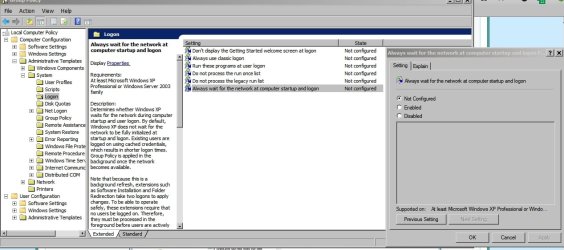
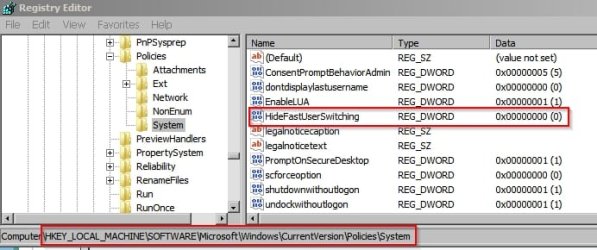
What you are saying above is correct! However on my machine a registry hack will enable the option shown in this post - it involves taking ownership of a registry key then creating a new Dword value to enable fast user switching. For some reason the option doesn't seem to exist by default.

Always Wait.jpg

Fast User Switching.jpg

As for the broken shortcuts and system maintenance troubleshooter issue - it's been solved on my machine but that was a long time ago and I don't remember exactly how. I seem to remember disabling the \Microsoft\Windows\Diagnosis task in task scheduler as well as preventing the TS_BrokenShortcuts.ps1 script from ever running along with editing a few lines in the script. Then a manual check for broken shortcuts is required.

You are also correct to say that some options in Group Policy Editor are not available in lower versions of Windows 7. The main reason that I installed gpedit in the first place was to enable windows to call antivirus programs when opening attachments. If the AV fails to scan then opening of the attachment is blocked. To me that was an additional security measure worth having!
 

My Computer My Computer

Computer type
Laptop
Computer Manufacturer/Model Number
ASUS
OS
Microsoft Windows 7 Home Premium 64-bit 7601 Multiprocessor Free Service Pack 1
CPU
AMD C-60 APU with Radeon(tm) HD Graphics
Motherboard
ASUSTeK COMPUTER INC. X501U
Memory
4.00 GB
Graphics Card(s)
AMD Radeon HD 6290 Graphics
Sound Card
(1) AMD High Definition Audio Device (2) Realtek High Defi
Screen Resolution
1366 x 768 x 32 bits (4294967296 colors) @ 60 Hz
Hard Drives
Hitachi HTS545050A7E380 SATA Disk Device
Antivirus
Comodo CIS & FW, SecureAplus App Whitelisting, Threatfire
Browser
Cyberfox 64bit, Opera 64bit, Airfox
Other Info
Spy-The-Spy, HitmanPro.Alert, Norton Connect Safe, MJRegWatcher, BitDefender TrafficLight, Voodoo Shield, Zemana AntiMalware
I have played with the files that were contained in the gpedit downloader. I changed some values that I stumbled accross from another post somewhere on a "throw away" machine running the same OS and version. Now I have a working policy editor. I haven't had the time to exactly see if what I change in the policy editor will stay in tact once I make the changes and restrictions I would like to do. I basically was after a GUI to edit what the standard account can do and see in windows 7. This is the first OS I have ever worked in that is a home level program. I have Vista Home but HATED it from the time i first fired up the machine and never bothered to learn it. I was specifically looking for a way to restrict the standard user in 7 to not be able to check "view all hidden files and folder". A simple thing that turned into this due to no GUI policy editor, and I haven't been in the programmers loop for some time so I couldn't remember my way around doing it DOS registry style.
 

My Computer My Computer

Computer type
Laptop
Computer Manufacturer/Model Number
HP G72
OS
Windows 7 Home Premium x64, Windows Vista Home Premium x??
CPU
Pentium dual core t4500 @2.3 gigs
Motherboard
?
Memory
3.0 gb
Monitor(s) Displays
17" hdwidescreen
Hard Drives
320gb
Internet Speed
high speed frontier communications, close to 6mbps down.

My Computer My Computer

Computer type
Laptop
Computer Manufacturer/Model Number
ASUS
OS
Microsoft Windows 7 Home Premium 64-bit 7601 Multiprocessor Free Service Pack 1
CPU
AMD C-60 APU with Radeon(tm) HD Graphics
Motherboard
ASUSTeK COMPUTER INC. X501U
Memory
4.00 GB
Graphics Card(s)
AMD Radeon HD 6290 Graphics
Sound Card
(1) AMD High Definition Audio Device (2) Realtek High Defi
Screen Resolution
1366 x 768 x 32 bits (4294967296 colors) @ 60 Hz
Hard Drives
Hitachi HTS545050A7E380 SATA Disk Device
Antivirus
Comodo CIS & FW, SecureAplus App Whitelisting, Threatfire
Browser
Cyberfox 64bit, Opera 64bit, Airfox
Other Info
Spy-The-Spy, HitmanPro.Alert, Norton Connect Safe, MJRegWatcher, BitDefender TrafficLight, Voodoo Shield, Zemana AntiMalware
~~~
However on my machine a registry hack will enable the option shown in this post - it involves taking ownership of a registry key then creating a new Dword value to enable fast user switching. For some reason the option doesn't seem to exist by default.
~~~
Nice work - but no way to tell if a "lower version" of Windows honors the setting.

Nice AV scan tweak :-)


Now that the OP was able to get the gpedit to work - let's see if his "lower version" of Windows honors the settings that he wants.
 

My Computer My Computer

Computer type
Laptop
Computer Manufacturer/Model Number
Employer provided Dell Latitude
OS
W7 Pro SP1 64bit
CPU
i7
Memory
8GB
Graphics Card(s)
Intel HD Graphics
Hard Drives
crappy SSD
Antivirus
Employer mandated Symantec Endpoint Protection
Browser
Pale Moon 64bit, IE11 64bit & Chrome 64bit

My Computer My Computer

Computer type
Laptop
Computer Manufacturer/Model Number
Employer provided Dell Latitude
OS
W7 Pro SP1 64bit
CPU
i7
Memory
8GB
Graphics Card(s)
Intel HD Graphics
Hard Drives
crappy SSD
Antivirus
Employer mandated Symantec Endpoint Protection
Browser
Pale Moon 64bit, IE11 64bit & Chrome 64bit
I should be able to update if the Home premium version will honor the setting as I'm going to shut down for a while today and do some errands and once I get back home I will boot up and check it out. Fingers crossed. Will check out the link before I go though. thanks
 

My Computer My Computer

Computer type
Laptop
Computer Manufacturer/Model Number
HP G72
OS
Windows 7 Home Premium x64, Windows Vista Home Premium x??
CPU
Pentium dual core t4500 @2.3 gigs
Motherboard
?
Memory
3.0 gb
Monitor(s) Displays
17" hdwidescreen
Hard Drives
320gb
Internet Speed
high speed frontier communications, close to 6mbps down.
One thing i think some of the others forgot to mention though; is BEFORE making ANY changes to the registry; ALWAYS make sure to back up your registry first!; failure to do so could result in bad things happening if you make a mistake in the registry; as the registry is one of the main "key" operating components of windows.
 

My Computer My Computer

Computer type
PC/Desktop
Computer Manufacturer/Model Number
custom built
OS
Windows 7 ultimate 64-bit
CPU
Intel I7 2600K 3.4ghz
Motherboard
Asus Evo P8P67
Memory
Corsair 16gb ddr3 1600mhz
Graphics Card(s)
Nvidia Geforce gt 430
Sound Card
Sound Blaster Titanium x-fi pci express
Monitor(s) Displays
Dell E198WFP
Hard Drives
1 western digital 2TB drive.
PSU
Antec 1200 watt
Case
Inwin Dragon Rider
Cooling
6 case supplied cooling fans
Keyboard
logitech mk700
Mouse
logitech m705
Internet Speed
25-50mbps download; 10mbps upload(i think)
Antivirus
avg free 2014
Browser
mozilla firefox
Other Info
Also have a pretty bad speaker setup which is a klipsch promedia 5.1 surround speaker setup with huge subwoofer and lg blu ray player/writer. Also a hp officejet pro 8600 plus wireless all in one and a logitech s7500 webcam.
SPR - Software Restriction Policies

As I understand it, gpedit is just a Graphic User Interface that lets the user make some changes to the registry. The "lower version" of Windows simply ignore most of these changes. However, I think that there are some registry changes that gpedit can make that all versions of Windows will honor.

So - some users will report success when they cram gpedit into "lower version" of Windows and other users will report failure. It all depends on what change they were attempting to make.

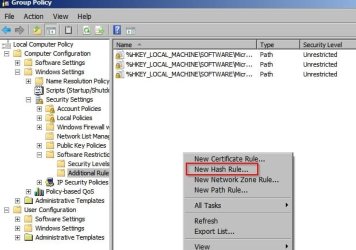
So I've attempted to create a software restriction policy to block a file by it's MD5 Hash. I see the settings are available but actually the restrictions don't work - even after several reboots. This is another example that you can add to your list!
 

Attachments

  • SRP.jpg
    SRP.jpg
    41.7 KB · Views: 13

My Computer My Computer

Computer type
Laptop
Computer Manufacturer/Model Number
ASUS
OS
Microsoft Windows 7 Home Premium 64-bit 7601 Multiprocessor Free Service Pack 1
CPU
AMD C-60 APU with Radeon(tm) HD Graphics
Motherboard
ASUSTeK COMPUTER INC. X501U
Memory
4.00 GB
Graphics Card(s)
AMD Radeon HD 6290 Graphics
Sound Card
(1) AMD High Definition Audio Device (2) Realtek High Defi
Screen Resolution
1366 x 768 x 32 bits (4294967296 colors) @ 60 Hz
Hard Drives
Hitachi HTS545050A7E380 SATA Disk Device
Antivirus
Comodo CIS & FW, SecureAplus App Whitelisting, Threatfire
Browser
Cyberfox 64bit, Opera 64bit, Airfox
Other Info
Spy-The-Spy, HitmanPro.Alert, Norton Connect Safe, MJRegWatcher, BitDefender TrafficLight, Voodoo Shield, Zemana AntiMalware
Back
Top