Questions for Samsung Magician users

TVeblen

Building Stuff
Guru
Gold Member
VIP
Local time
11:42 AM
Messages
6,239
Location
In The Woods
I just upgraded Magician to v4.3.
It's the first time I've looked at the program in many months. I made some choices when I first installed the SSD, but I'm wondering about some of these now.

Program: Do you allow Magician to run at startup? Reasons?

Over Provisioning: Do you enable this? Why?

Rapid Mode: Do you enable this? Why?

Firmware Update: Do you bother doing a full backup before updating the firmware?

Thanks for any instruction or opinions.
 

My Computer My Computer

At a glance

Windows 7 64 Bit Home Premium SP1i7-3820GSkill F3-14900CL9Q - 16GBEVGA GeForce GTX660 - Driver 352.86
Computer type
PC/Desktop
Computer Manufacturer/Model Number
Home Built - Jan 2013
OS
Windows 7 64 Bit Home Premium SP1
CPU
i7-3820
Motherboard
Asus P9X79-PRO - Bios 4608
Memory
GSkill F3-14900CL9Q - 16GB
Graphics Card(s)
EVGA GeForce GTX660 - Driver 352.86
Sound Card
On board Realtek ALC898
Monitor(s) Displays
Acer S271HL
Screen Resolution
1920 x 1080
Hard Drives
#1- Samsung 840 Pro Series
#2- Western Digital WD1002FAEX Sata3 Black
#3- Western Digital WD1002FAEX Sata3 Black
PSU
Corsair CMPSU-850TX-V2 - 850 watt (by Seasonic)
Case
Corsair Obsidian 550D
Cooling
Standard 3 120mm case fans, Cooler Master Hyper 212 EVO
Keyboard
MS KC-0405
Mouse
Intellimouse 5-button
Internet Speed
56 Mbits/Sec (on a good day)
Antivirus
Avast & Malwarebytes
Browser
Firefox
Other Info
Asus DVD - DRW-24B1ST 24X
I'm glad you asked those question.
I can't give you answers but I do have a Samsung ssd coming and that information should be handy to all Samsung ssd users.
 

My Computer My Computer

At a glance

Windows 10 Pro. 64/ version 1709 Windows 7 Pr...Intel i7-6800K @ 4.3Corsair Platinum 16 gig @2400EVGA GTX 1070 OC
Computer type
PC/Desktop
Computer Manufacturer/Model Number
Home made Desktop
OS
Windows 10 Pro. 64/ version 1709 Windows 7 Pro/64
CPU
Intel i7-6800K @ 4.3
Motherboard
ASUS X-99 Deluxe II
Memory
Corsair Platinum 16 gig @2400
Graphics Card(s)
EVGA GTX 1070 OC
Monitor(s) Displays
Asus 27" LED LCD/VE278Q
Screen Resolution
1920-1080 or 1280-720 HDMI
Hard Drives
INTEL SSD 730-240 Gb Sata 3.0/
PSU
EVGA Platium 1200W
Case
Phanteks Luxe Tempered Glass 8 fans/ one radiator
Cooling
XSPC/ Water Cooled CPU
Keyboard
Das 4 Professional
Mouse
Logitech M705/MX Anywhere 2-S
Internet Speed
100 mbits
Antivirus
Microsoft Security Essentials/ Malwarebytes Premium 3.0/ SAS
Browser
I.E. 11 default/Firefox/ ISP Time Warner Cable/Spectrum
Other Info
LG BluRay Burner/
Sound system-KLipsch-THX/
Icy Dock ssd Hot Swap bays.
Program: Do you allow Magician to run at startup? Reasons? No. Magician is useful when first setting up an SSD and occasionally optimizing it in case TRIM isn't fully doing its job.

Over Provisioning: Do you enable this? Why? No. Samsung SSDs are already over provisioned by the manufacturer and additional overprovisioning isn't really necessary. Studies have shown that Sammy SSDs will last longer than what has been projected by Samsung.

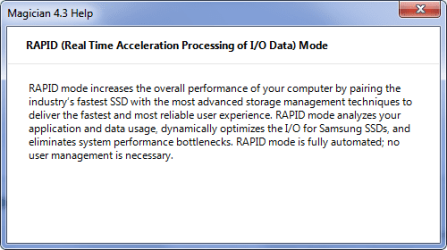
Rapid Mode: Do you enable this? Why? Yes and no. I tried to enable RAPID when it became available on the 840 Pro in my desktop machine but I couldn't see any difference in real life performance or in benches. I've since learned that I would have to update the firmware first and, being the coward I am, I would rather not do that. I've also seen posts in various forums reporting occasional problems with RAPID on the older 840 Pros like mine. The 840 EVO I put in my notebook, on the other hand, responded reasonably well to RAPID. Performance improved noticeably; the benches were much higher. Be aware that RAPID works by stealing 1-2GB from system RAM to cache the SSD. I upgraded the RAM in my notebook from 4GB to 8GB before enabling RAPID.

Firmware Update: Do you bother doing a full backup before updating the firmware? Being a confirmed coward, I've never updated the firmware of my SSDs but, if I were to, I most definitely would do a full backup first. I do make a full image of my boot drive (or partitions, in the case of my notebook's SSD) once a week and anytime I make a major change, such as install a new program. You would be very wise to make a full image before attempting to update the firmware.

Thanks for any instruction or opinions.
 

My Computer My Computer

At a glance

Win 7 Ultimate 64 bitIntel i7-3930KKingston HyperX Genesis 32GB Kit (8x4GB Modul...MSI R7850 Twin Frozr 2GD5/OC Radeon HD 7850 2...
Computer type
PC/Desktop
Computer Manufacturer/Model Number
Custom Build
OS
Win 7 Ultimate 64 bit
CPU
Intel i7-3930K
Motherboard
ASUS P9X79 WS
Memory
Kingston HyperX Genesis 32GB Kit (8x4GB Modules) 1600MHz DDR
Graphics Card(s)
MSI R7850 Twin Frozr 2GD5/OC Radeon HD 7850 2GB 256-bit GDDR
Sound Card
Asus Xonar Essence STX
Monitor(s) Displays
3x Asus VG248QE 24", Vizio 32" TV
Screen Resolution
1920 x 1080, ?
Hard Drives
Samsung 128GB 840 Pro SSD (1),
Samsung 4TB 850 EVO SSDs (4)
Samsung 4TB 850 EVO SSDs (16) external backup drives used in 2.5" hot swap bays in the computer.
PSU
Corsair HX750w
Case
Antec Two Hundred v2 (modified)
Cooling
Cooler Master GeminII S524 120mm (fan replaced with a 140mm)
Keyboard
Logitech G510s
Mouse
Logitech M525 (two in use)
Internet Speed
=< 32Mbps down, 8Mbps up
Antivirus
AVAST!, MBAM, SAS, Spybot S&D (all but MBAM free) Glary Util
Browser
IE11
Other Info
LSI 9211-8i HBA card (8 SATA III ports), 2.5" & 3.5" Hot Swap Bays, HooToo HT-CR001 PCI-E to USB 3.0 Internal Hub + 6 Slot Card Reader, and LG Model CH12LS28 BD-ROM Optical Drive. Also, ScanSnap S1500 ADF duplexing scanner, Canon 9000F flat bed scanner, Corsair SP2500 2.1 speakers, Samsung CLP 415nw laser color printer, Cyberpower PP2200SW UPS
Thanks for the input Jeannie!
 

My Computer My Computer

At a glance

Windows 7 64 Bit Home Premium SP1i7-3820GSkill F3-14900CL9Q - 16GBEVGA GeForce GTX660 - Driver 352.86
Computer type
PC/Desktop
Computer Manufacturer/Model Number
Home Built - Jan 2013
OS
Windows 7 64 Bit Home Premium SP1
CPU
i7-3820
Motherboard
Asus P9X79-PRO - Bios 4608
Memory
GSkill F3-14900CL9Q - 16GB
Graphics Card(s)
EVGA GeForce GTX660 - Driver 352.86
Sound Card
On board Realtek ALC898
Monitor(s) Displays
Acer S271HL
Screen Resolution
1920 x 1080
Hard Drives
#1- Samsung 840 Pro Series
#2- Western Digital WD1002FAEX Sata3 Black
#3- Western Digital WD1002FAEX Sata3 Black
PSU
Corsair CMPSU-850TX-V2 - 850 watt (by Seasonic)
Case
Corsair Obsidian 550D
Cooling
Standard 3 120mm case fans, Cooler Master Hyper 212 EVO
Keyboard
MS KC-0405
Mouse
Intellimouse 5-button
Internet Speed
56 Mbits/Sec (on a good day)
Antivirus
Avast & Malwarebytes
Browser
Firefox
Other Info
Asus DVD - DRW-24B1ST 24X
No problem, I'll send you a bill at the end of the month, ;)
 

My Computer My Computer

At a glance

Win 7 Ultimate 64 bitIntel i7-3930KKingston HyperX Genesis 32GB Kit (8x4GB Modul...MSI R7850 Twin Frozr 2GD5/OC Radeon HD 7850 2...
Computer type
PC/Desktop
Computer Manufacturer/Model Number
Custom Build
OS
Win 7 Ultimate 64 bit
CPU
Intel i7-3930K
Motherboard
ASUS P9X79 WS
Memory
Kingston HyperX Genesis 32GB Kit (8x4GB Modules) 1600MHz DDR
Graphics Card(s)
MSI R7850 Twin Frozr 2GD5/OC Radeon HD 7850 2GB 256-bit GDDR
Sound Card
Asus Xonar Essence STX
Monitor(s) Displays
3x Asus VG248QE 24", Vizio 32" TV
Screen Resolution
1920 x 1080, ?
Hard Drives
Samsung 128GB 840 Pro SSD (1),
Samsung 4TB 850 EVO SSDs (4)
Samsung 4TB 850 EVO SSDs (16) external backup drives used in 2.5" hot swap bays in the computer.
PSU
Corsair HX750w
Case
Antec Two Hundred v2 (modified)
Cooling
Cooler Master GeminII S524 120mm (fan replaced with a 140mm)
Keyboard
Logitech G510s
Mouse
Logitech M525 (two in use)
Internet Speed
=< 32Mbps down, 8Mbps up
Antivirus
AVAST!, MBAM, SAS, Spybot S&D (all but MBAM free) Glary Util
Browser
IE11
Other Info
LSI 9211-8i HBA card (8 SATA III ports), 2.5" & 3.5" Hot Swap Bays, HooToo HT-CR001 PCI-E to USB 3.0 Internal Hub + 6 Slot Card Reader, and LG Model CH12LS28 BD-ROM Optical Drive. Also, ScanSnap S1500 ADF duplexing scanner, Canon 9000F flat bed scanner, Corsair SP2500 2.1 speakers, Samsung CLP 415nw laser color printer, Cyberpower PP2200SW UPS
Program: Do you allow Magician to run at startup? Reasons?
Yes.

I have a 256GB 840 Pro on a Lenovo M93p desktop machine (along with a second 1TB spinner), and also have a 512GB 840 Pro on a Lenovo W530 laptop (replacing the original 512GB spinner).

Both machines have Magician installed, and both installations launch Magician at Windows startup. I assumed it was necessary to provide all the functionality (but I may be wrong). I rarely open it (from the system tray icon), but I certainly was automatically advised the other day with a popup message about a firmware update that was available.

Can't see why it should not be run at startup.


Over Provisioning: Do you enable this? Why?
Yes, on both machines.

This required leaving out just a bit under 10% of total capacity for each 840 Pro as "unallocated" to partitions. So obviously there is about twice the unallocated space on the 512GB 840 Pro than on the 256GB drive.

These two drives were my first experience with SSD, and from what I read (documentation HELP available with Magician) it seemed to be something to improve performance or longevity if you selected it. Seemed reasonable, and the 10% loss of storage capacity was not critical or objectionable to me.

So I went with it.


Rapid Mode: Do you enable this? Why?
Yes.

I have 8GB of memory on both machines. Aida64 shows memory utilization on both rarely go above 50% and quite regularly sit at 25-40% tops. So I have 4GB of main memory in the machine that's not being used, and might as well be re-purposed for use by the SSD drive if that aids SSD performance.

So why not do it? That was my reasoning. I believe SSD performance is definitely improved on both machines.


Firmware Update: Do you bother doing a full backup before updating the firmware?
I didn't, though it might have been appropriate.

But on both machines I already have regular automatic "system image" backups taken weekly to an externaal USB 3.0 drive. And I also have regular automatic monthly FULL "data" backups taken, along with regular automatic daily INCREMENTAL "data" backups taken.

I had confidence enough in Samsung (and my existing backup system) to not feel the need to do a one-off special backup before upgrading the firmware. But I suppose it wouldn't have been wrong to do so.

Now my regular "system image" backups are only of the system reserved and C-partitions, not for the other partitions I've allocated on the SSD (which are backed up as "data"). So in theory I would have needed a "system image" of the ENTIRE SSD (i.e. all of its partitions) for proper protection. Just didn't seem necessary.
 

My Computer My Computer

At a glance

Windows 7 Pro x64 (1), Win7 Pro X64 (2)i5-3350p 3.1Ghz/6MB-cache (1); E8400 3.0Ghz/6...8GB PC3-12800 DDR3 (1); 4GB PC3-10600 DDR3 (2)ATI HD7750 (1), (see TV cards); ATI R7 250 (2)
Computer type
PC/Desktop
Computer Manufacturer/Model Number
Home-built, two systems (1) and (2)
OS
Windows 7 Pro x64 (1), Win7 Pro X64 (2)
CPU
i5-3350p 3.1Ghz/6MB-cache (1); E8400 3.0Ghz/6MB-cache (2)
Motherboard
ASUS P8Z77-V Pro (1); ASUS P5Q3 (2)
Memory
8GB PC3-12800 DDR3 (1); 4GB PC3-10600 DDR3 (2)
Graphics Card(s)
ATI HD7750 (1), (see TV cards); ATI R7 250 (2)
Sound Card
Realtek ALC892 HD Audio (1); Realtek ALC1200 HD Audio (2)
Monitor(s) Displays
Eizo HD2441W LCD, Eizo S2433W (1); Eizo 24" S2433W (2)
Screen Resolution
1920x1200, 1920x1200 (1); 1920x1200 (2)
Hard Drives
(1) 1TB SATA-II (7200RPM), 2x2TB SATA-III (7200RPM), 250GB SATA-III (10000RPM) for OS; 2x2TB external USB 3.0

(2) 320GB SATA-II (7200RPM), 750GB SATA-II (7200RPM), 150GB SATA-II (10000RPM) for OS; 2TB external USB 3.0
PSU
Nesteq ECS-6001 600W (1); Nesteq ECS-5001 500W (2)
Case
Acousti-Case 360 (1) and (2)
Cooling
Noctua NH-U12P SE2 for CPU, 2x120mm case fans (1) and (2)
Keyboard
IBM PS/2 (1) and (2)
Mouse
Logitech MX Revolution wireless (1); Microsoft wired (2)
Internet Speed
100mbps down / 10mbps up
Antivirus
Microsoft Security Essentials; Malwarebyte Anti-Malware Pro
Browser
Firefox
Other Info
Ceton InfiniTV 4-tuner cablecard-enabled TV card as well as Hauppauge HVR-2250 OTA/ATSC 2-tuner TV card in (1), running under Win7 WMC
As with each person we all have opinions.
Program: Do you allow Magician to run at startup? Reasons?
No, it's not needed to startup, all settings made "keep" without it running. I like to have a very clean startup.

Over Provisioning: Do you enable this? Why?
Yes. It's used as part of the TRIM and Garbage collection features of the SSD.


Rapid Mode: Do you enable this? Why?
I do have it running, but as Jeannie said, I really don't see any performance boost.


Firmware Update: Do you bother doing a full backup before updating the firmware?
I didn't and it all went fine. The pro version had a FW update just a few days ago and I installed it successfully.

I also have let Super Fetch continue running but not indexing. With SSD speed indexing isn't a real need.
 

My Computer My Computer

At a glance

Windows 7 Ultimate X64 SP1Intel i5-2550K, Differing ~4.4-4.8GHz No buil...16GB G.Skill Sniper 1866MHz @ 2133MHz 2x8GBASUS GTX650TIB-DC2OC-2GD5, (650TI Boost)
Computer type
PC/Desktop
Computer Manufacturer/Model Number
Home Built Desktop By DataTech
OS
Windows 7 Ultimate X64 SP1
CPU
Intel i5-2550K, Differing ~4.4-4.8GHz No built in GPU
Motherboard
ASUS P8Z68-V PRO/GEN3
Memory
16GB G.Skill Sniper 1866MHz @ 2133MHz 2x8GB
Graphics Card(s)
ASUS GTX650TIB-DC2OC-2GD5, (650TI Boost)
Sound Card
Onboard Realtek 5-1
Monitor(s) Displays
Samsung P2570HD
Screen Resolution
1920x1080
Hard Drives
Samsung 840 Pro 256GB SSD for OS, 500GB Seagate Constellation (Enterprise drive) for Data
PSU
Corsair HX650W
Case
Inwin Dragon Rider
Cooling
Hyper 212 EVO w/two Noctua fans, push-pull, @1300 RPM
Keyboard
E-Z Eyes, bright yellow keys with large characters
Mouse
steelseries SENSEI Laser Pro Gaming
Internet Speed
48-51Mbs Mbs down, 11 Mbs up Xfinity Cable
Antivirus
Norton Internet Security 2013
Browser
IE 10, Opera, Pale Moon if needed
Other Info
4 case fans, LG BluRay-RE, ASUS DVD-RW, Mr. Fusion power supply, 1.21 gigawatts.
Thanks Gents!
 

My Computer My Computer

At a glance

Windows 7 64 Bit Home Premium SP1i7-3820GSkill F3-14900CL9Q - 16GBEVGA GeForce GTX660 - Driver 352.86
Computer type
PC/Desktop
Computer Manufacturer/Model Number
Home Built - Jan 2013
OS
Windows 7 64 Bit Home Premium SP1
CPU
i7-3820
Motherboard
Asus P9X79-PRO - Bios 4608
Memory
GSkill F3-14900CL9Q - 16GB
Graphics Card(s)
EVGA GeForce GTX660 - Driver 352.86
Sound Card
On board Realtek ALC898
Monitor(s) Displays
Acer S271HL
Screen Resolution
1920 x 1080
Hard Drives
#1- Samsung 840 Pro Series
#2- Western Digital WD1002FAEX Sata3 Black
#3- Western Digital WD1002FAEX Sata3 Black
PSU
Corsair CMPSU-850TX-V2 - 850 watt (by Seasonic)
Case
Corsair Obsidian 550D
Cooling
Standard 3 120mm case fans, Cooler Master Hyper 212 EVO
Keyboard
MS KC-0405
Mouse
Intellimouse 5-button
Internet Speed
56 Mbits/Sec (on a good day)
Antivirus
Avast & Malwarebytes
Browser
Firefox
Other Info
Asus DVD - DRW-24B1ST 24X

My Computer My Computer

At a glance

Windows 7 Ultimate X64 SP1Intel i5-2550K, Differing ~4.4-4.8GHz No buil...16GB G.Skill Sniper 1866MHz @ 2133MHz 2x8GBASUS GTX650TIB-DC2OC-2GD5, (650TI Boost)
Computer type
PC/Desktop
Computer Manufacturer/Model Number
Home Built Desktop By DataTech
OS
Windows 7 Ultimate X64 SP1
CPU
Intel i5-2550K, Differing ~4.4-4.8GHz No built in GPU
Motherboard
ASUS P8Z68-V PRO/GEN3
Memory
16GB G.Skill Sniper 1866MHz @ 2133MHz 2x8GB
Graphics Card(s)
ASUS GTX650TIB-DC2OC-2GD5, (650TI Boost)
Sound Card
Onboard Realtek 5-1
Monitor(s) Displays
Samsung P2570HD
Screen Resolution
1920x1080
Hard Drives
Samsung 840 Pro 256GB SSD for OS, 500GB Seagate Constellation (Enterprise drive) for Data
PSU
Corsair HX650W
Case
Inwin Dragon Rider
Cooling
Hyper 212 EVO w/two Noctua fans, push-pull, @1300 RPM
Keyboard
E-Z Eyes, bright yellow keys with large characters
Mouse
steelseries SENSEI Laser Pro Gaming
Internet Speed
48-51Mbs Mbs down, 11 Mbs up Xfinity Cable
Antivirus
Norton Internet Security 2013
Browser
IE 10, Opera, Pale Moon if needed
Other Info
4 case fans, LG BluRay-RE, ASUS DVD-RW, Mr. Fusion power supply, 1.21 gigawatts.
She got her thank you!
 

My Computer My Computer

At a glance

Windows 7 64 Bit Home Premium SP1i7-3820GSkill F3-14900CL9Q - 16GBEVGA GeForce GTX660 - Driver 352.86
Computer type
PC/Desktop
Computer Manufacturer/Model Number
Home Built - Jan 2013
OS
Windows 7 64 Bit Home Premium SP1
CPU
i7-3820
Motherboard
Asus P9X79-PRO - Bios 4608
Memory
GSkill F3-14900CL9Q - 16GB
Graphics Card(s)
EVGA GeForce GTX660 - Driver 352.86
Sound Card
On board Realtek ALC898
Monitor(s) Displays
Acer S271HL
Screen Resolution
1920 x 1080
Hard Drives
#1- Samsung 840 Pro Series
#2- Western Digital WD1002FAEX Sata3 Black
#3- Western Digital WD1002FAEX Sata3 Black
PSU
Corsair CMPSU-850TX-V2 - 850 watt (by Seasonic)
Case
Corsair Obsidian 550D
Cooling
Standard 3 120mm case fans, Cooler Master Hyper 212 EVO
Keyboard
MS KC-0405
Mouse
Intellimouse 5-button
Internet Speed
56 Mbits/Sec (on a good day)
Antivirus
Avast & Malwarebytes
Browser
Firefox
Other Info
Asus DVD - DRW-24B1ST 24X
I keep a clean start up and wanted to keep it that way. Good to have the confirmation on that.

Also keep periodic images, so I don't think I'll bother with another so soon to do firmware.

The other two I will play with. They have been disabled since new.
 

My Computer My Computer

At a glance

Windows 7 64 Bit Home Premium SP1i7-3820GSkill F3-14900CL9Q - 16GBEVGA GeForce GTX660 - Driver 352.86
Computer type
PC/Desktop
Computer Manufacturer/Model Number
Home Built - Jan 2013
OS
Windows 7 64 Bit Home Premium SP1
CPU
i7-3820
Motherboard
Asus P9X79-PRO - Bios 4608
Memory
GSkill F3-14900CL9Q - 16GB
Graphics Card(s)
EVGA GeForce GTX660 - Driver 352.86
Sound Card
On board Realtek ALC898
Monitor(s) Displays
Acer S271HL
Screen Resolution
1920 x 1080
Hard Drives
#1- Samsung 840 Pro Series
#2- Western Digital WD1002FAEX Sata3 Black
#3- Western Digital WD1002FAEX Sata3 Black
PSU
Corsair CMPSU-850TX-V2 - 850 watt (by Seasonic)
Case
Corsair Obsidian 550D
Cooling
Standard 3 120mm case fans, Cooler Master Hyper 212 EVO
Keyboard
MS KC-0405
Mouse
Intellimouse 5-button
Internet Speed
56 Mbits/Sec (on a good day)
Antivirus
Avast & Malwarebytes
Browser
Firefox
Other Info
Asus DVD - DRW-24B1ST 24X
Rapid Mode: Do you enable this? Why? Yes and no. I tried to enable RAPID when it became available on the 840 Pro in my desktop machine but I couldn't see any difference in real life performance or in benches. I've since learned that I would have to update the firmware first and, being the coward I am, I would rather not do that. I've also seen posts in various forums reporting occasional problems with RAPID on the older 840 Pros like mine. The 840 EVO I put in my notebook, on the other hand, responded reasonably well to RAPID. Performance improved noticeably; the benches were much higher.
Can't speak to the EVO, as I have a PRO. And my PRO did come with what was the most recent firmware at the time. And I also have recently updated firmware to the very latest DXM06B0Q.

And as I mentioned previously, I have 8GB memory in my Lenovo W530 laptop (i7-3740QM @2.70GHz), which is only about 34% used. So I have lots of extra unused RAM (PC3-12800 800MHz) to re-purpose for SSD use with rapid mode.

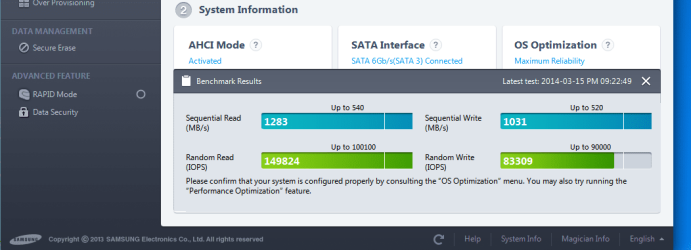
But according to the Magician performance benchmark test there is absolutely no doubt that there is VERY SIGNIFICANT performance improvement related to "rapid mode".

(1) here's performance with "rapid mode" DISABLED:

z6ri.jpg


(2) and here's performance with "rapid mode" ENABLED:

tl3s.jpg
 

My Computer My Computer

At a glance

Windows 7 Pro x64 (1), Win7 Pro X64 (2)i5-3350p 3.1Ghz/6MB-cache (1); E8400 3.0Ghz/6...8GB PC3-12800 DDR3 (1); 4GB PC3-10600 DDR3 (2)ATI HD7750 (1), (see TV cards); ATI R7 250 (2)
Computer type
PC/Desktop
Computer Manufacturer/Model Number
Home-built, two systems (1) and (2)
OS
Windows 7 Pro x64 (1), Win7 Pro X64 (2)
CPU
i5-3350p 3.1Ghz/6MB-cache (1); E8400 3.0Ghz/6MB-cache (2)
Motherboard
ASUS P8Z77-V Pro (1); ASUS P5Q3 (2)
Memory
8GB PC3-12800 DDR3 (1); 4GB PC3-10600 DDR3 (2)
Graphics Card(s)
ATI HD7750 (1), (see TV cards); ATI R7 250 (2)
Sound Card
Realtek ALC892 HD Audio (1); Realtek ALC1200 HD Audio (2)
Monitor(s) Displays
Eizo HD2441W LCD, Eizo S2433W (1); Eizo 24" S2433W (2)
Screen Resolution
1920x1200, 1920x1200 (1); 1920x1200 (2)
Hard Drives
(1) 1TB SATA-II (7200RPM), 2x2TB SATA-III (7200RPM), 250GB SATA-III (10000RPM) for OS; 2x2TB external USB 3.0

(2) 320GB SATA-II (7200RPM), 750GB SATA-II (7200RPM), 150GB SATA-II (10000RPM) for OS; 2TB external USB 3.0
PSU
Nesteq ECS-6001 600W (1); Nesteq ECS-5001 500W (2)
Case
Acousti-Case 360 (1) and (2)
Cooling
Noctua NH-U12P SE2 for CPU, 2x120mm case fans (1) and (2)
Keyboard
IBM PS/2 (1) and (2)
Mouse
Logitech MX Revolution wireless (1); Microsoft wired (2)
Internet Speed
100mbps down / 10mbps up
Antivirus
Microsoft Security Essentials; Malwarebyte Anti-Malware Pro
Browser
Firefox
Other Info
Ceton InfiniTV 4-tuner cablecard-enabled TV card as well as Hauppauge HVR-2250 OTA/ATSC 2-tuner TV card in (1), running under Win7 WMC
That is impressive.
I have 16GB RAM. Wonder if I can spare some? ;)
 

My Computer My Computer

At a glance

Windows 7 64 Bit Home Premium SP1i7-3820GSkill F3-14900CL9Q - 16GBEVGA GeForce GTX660 - Driver 352.86
Computer type
PC/Desktop
Computer Manufacturer/Model Number
Home Built - Jan 2013
OS
Windows 7 64 Bit Home Premium SP1
CPU
i7-3820
Motherboard
Asus P9X79-PRO - Bios 4608
Memory
GSkill F3-14900CL9Q - 16GB
Graphics Card(s)
EVGA GeForce GTX660 - Driver 352.86
Sound Card
On board Realtek ALC898
Monitor(s) Displays
Acer S271HL
Screen Resolution
1920 x 1080
Hard Drives
#1- Samsung 840 Pro Series
#2- Western Digital WD1002FAEX Sata3 Black
#3- Western Digital WD1002FAEX Sata3 Black
PSU
Corsair CMPSU-850TX-V2 - 850 watt (by Seasonic)
Case
Corsair Obsidian 550D
Cooling
Standard 3 120mm case fans, Cooler Master Hyper 212 EVO
Keyboard
MS KC-0405
Mouse
Intellimouse 5-button
Internet Speed
56 Mbits/Sec (on a good day)
Antivirus
Avast & Malwarebytes
Browser
Firefox
Other Info
Asus DVD - DRW-24B1ST 24X
I just upgraded Magician to v4.3.
It's the first time I've looked at the program in many months. I made some choices when I first installed the SSD, but I'm wondering about some of these now.

Program: Do you allow Magician to run at startup? Reasons?

Over Provisioning: Do you enable this? Why?

Rapid Mode: Do you enable this? Why?

Firmware Update: Do you bother doing a full backup before updating the firmware?

Thanks for any instruction or opinions.

Samsung 256Gb 840 Pro SSD
Answers to questions.
1. No, I keep start up limited to AV & Samsung Rapid Mode only.
2. Yes, recommended by Samsung
3. Yes, definitely improves speed
4. No, firmware update ran smoothly, but I do have a regular image backup

Samsung_SSD.png
Screen shot of speed with Rapid Mode on. 16Gb of RAM & running in Samsung's Reliability Mode
 

My Computer My Computer

At a glance

Windows 7 Home Premium 64 bit sp1Intel i5 3570 3.4Ghz Ivy Bridge SKT 1155 quad...G-Skill Rip Jaws 16Gb (8x2) DDR3 -1600 PC3 12...Gigabyte NVIDIA GT610 1Gb DDR3 810/1200 PCI-E...
Computer type
PC/Desktop
Computer Manufacturer/Model Number
Self built using existing case
OS
Windows 7 Home Premium 64 bit sp1
CPU
Intel i5 3570 3.4Ghz Ivy Bridge SKT 1155 quad core
Motherboard
Gigabyte Z77-HD3 SKT 1155 2xSata 3, 4x USB 3.0
Memory
G-Skill Rip Jaws 16Gb (8x2) DDR3 -1600 PC3 12800 CL 10 red
Graphics Card(s)
Gigabyte NVIDIA GT610 1Gb DDR3 810/1200 PCI-E 2.0 Silent
Sound Card
NVIDIA High Definition & Realtech High Definition Audio
Monitor(s) Displays
2 x Philips 226V4L 16:9 aspect ratio
Screen Resolution
1920 x 1080 HD
Hard Drives
Samsung 840 Pro 256gb SSD, SATA 3.
Hitachi Touro Portable 1tb, USB 3.0 HDD used for image b/ups.
PSU
Corsair VS450
Case
Codeng
Cooling
PSU fan & CPU fan
Keyboard
Logitech
Mouse
Logitech Wireless trackball M570
Internet Speed
Wireless 3G. 3mg down & 550kb up.
Antivirus
Bitdefender Internet Security 2020
Browser
Opera (Current Version) & Firefox
Other Info
MS Office 2013 Pro. Davis weather station software. MGE Nova 600 avr UPS.
Being a confirmed coward, I've never updated the firmware of my SSDs but, if I were to, I most definitely would do a full backup first. I do make a full image of my boot drive (or partitions, in the case of my notebook's SSD) once a week and anytime I make a major change, such as install a new program. You would be very wise to make a full image before attempting to update the firmware.
Coward? Naaaah....just being smart! If it ain't broke, don't fix it I always say. As far as backup images go, I clone my OS drive every ten days or so whether it needs it or not. With Acronis True Image it only takes about 12 minutes to clone a 500GB SATA Barracuda @7200 Rpm's. Time wisely spent indeed. There is no such thing as being "overly cautious" when it comes to backing up data. But you already know that. :thumbsup:
 

My Computer My Computer

At a glance

Windows 7 Enterprise SP1 x64AMD Athlon 64x2 4200+ Dual Core Windsor 2.2GHz4Gb: PNY PC2-6400 Dual Channel 2x2GbPNY NVIDIA GeForce 9800 GT
Computer type
PC/Desktop
Computer Manufacturer/Model Number
HP Pavillion
OS
Windows 7 Enterprise SP1 x64
CPU
AMD Athlon 64x2 4200+ Dual Core Windsor 2.2GHz
Motherboard
Socket AM2: ECS MCP61PM-HM
Memory
4Gb: PNY PC2-6400 Dual Channel 2x2Gb
Graphics Card(s)
PNY NVIDIA GeForce 9800 GT
Sound Card
Creative Sound Blaster Audigy 24Bit @96000Hz
Monitor(s) Displays
HP w1907 Wide LCD 19"
Screen Resolution
1440x900
Hard Drives
1.) OS Drive: 500Gb Seagate Barracuda ST35004-18AS


2.) Storage: 1Tb Seagate Barracuda ST310005-28AS
PSU
OCZ StealthXStream OCZ500SXS 500W
Case
Hp Pavillion
Cooling
Thermaltake
Keyboard
HP
Mouse
Microsoft Wireless
Internet Speed
300Mb
Antivirus
Norton Internet Security 2014
Browser
Internet Explorer 11
Other Info
Custom Build
Oh yeah, Rapid Mode make a big difference in all read/write benchmarks. I still se no difference in day-to-day usage though. I do a few graphics renders and a bit of video coding and it's no faster.

It doesn't seem to use much RAM like a RAM disk would either. Mine uses less than 1MB of RAM, the SamsungRapidApp is a notification service, while the SamsungRapidSvc is the rapid mode.
Running Magician uses a lot more RAM.

Capture.PNG

Rapid help.png
 

My Computer My Computer

At a glance

Windows 7 Ultimate X64 SP1Intel i5-2550K, Differing ~4.4-4.8GHz No buil...16GB G.Skill Sniper 1866MHz @ 2133MHz 2x8GBASUS GTX650TIB-DC2OC-2GD5, (650TI Boost)
Computer type
PC/Desktop
Computer Manufacturer/Model Number
Home Built Desktop By DataTech
OS
Windows 7 Ultimate X64 SP1
CPU
Intel i5-2550K, Differing ~4.4-4.8GHz No built in GPU
Motherboard
ASUS P8Z68-V PRO/GEN3
Memory
16GB G.Skill Sniper 1866MHz @ 2133MHz 2x8GB
Graphics Card(s)
ASUS GTX650TIB-DC2OC-2GD5, (650TI Boost)
Sound Card
Onboard Realtek 5-1
Monitor(s) Displays
Samsung P2570HD
Screen Resolution
1920x1080
Hard Drives
Samsung 840 Pro 256GB SSD for OS, 500GB Seagate Constellation (Enterprise drive) for Data
PSU
Corsair HX650W
Case
Inwin Dragon Rider
Cooling
Hyper 212 EVO w/two Noctua fans, push-pull, @1300 RPM
Keyboard
E-Z Eyes, bright yellow keys with large characters
Mouse
steelseries SENSEI Laser Pro Gaming
Internet Speed
48-51Mbs Mbs down, 11 Mbs up Xfinity Cable
Antivirus
Norton Internet Security 2013
Browser
IE 10, Opera, Pale Moon if needed
Other Info
4 case fans, LG BluRay-RE, ASUS DVD-RW, Mr. Fusion power supply, 1.21 gigawatts.
Thanks for any instruction or opinions.
This comment is off topic, so please forgive me. TVeblen, I love the fact that you have been on this forum going on five years now, have about 5,000 posts, have earned "Guru" status, and yet you are still man enough to ask for advice, rather than cling to a "know it all" persona. Outstanding! :D
 

My Computer My Computer

At a glance

Windows 7 Enterprise SP1 x64AMD Athlon 64x2 4200+ Dual Core Windsor 2.2GHz4Gb: PNY PC2-6400 Dual Channel 2x2GbPNY NVIDIA GeForce 9800 GT
Computer type
PC/Desktop
Computer Manufacturer/Model Number
HP Pavillion
OS
Windows 7 Enterprise SP1 x64
CPU
AMD Athlon 64x2 4200+ Dual Core Windsor 2.2GHz
Motherboard
Socket AM2: ECS MCP61PM-HM
Memory
4Gb: PNY PC2-6400 Dual Channel 2x2Gb
Graphics Card(s)
PNY NVIDIA GeForce 9800 GT
Sound Card
Creative Sound Blaster Audigy 24Bit @96000Hz
Monitor(s) Displays
HP w1907 Wide LCD 19"
Screen Resolution
1440x900
Hard Drives
1.) OS Drive: 500Gb Seagate Barracuda ST35004-18AS


2.) Storage: 1Tb Seagate Barracuda ST310005-28AS
PSU
OCZ StealthXStream OCZ500SXS 500W
Case
Hp Pavillion
Cooling
Thermaltake
Keyboard
HP
Mouse
Microsoft Wireless
Internet Speed
300Mb
Antivirus
Norton Internet Security 2014
Browser
Internet Explorer 11
Other Info
Custom Build
Aw shucks.
75% of what I know about PC's I learned from others in newsgroups and forums just like this one, the other 25% I learned by screwing up and needing to find a fix fast.
90% of what I know about Windows 7 I learned from this forum, the other 10% I learned by screwing around and experimenting. This also often involved screwing something up and needing to find a fix fast.

The great thing about this forum is that there are so many folks that each have a very unique set of skills and experience. Collectively it forms a fantastic body of knowledge. I would be a fool not to dip into that pool!
 

My Computer My Computer

At a glance

Windows 7 64 Bit Home Premium SP1i7-3820GSkill F3-14900CL9Q - 16GBEVGA GeForce GTX660 - Driver 352.86
Computer type
PC/Desktop
Computer Manufacturer/Model Number
Home Built - Jan 2013
OS
Windows 7 64 Bit Home Premium SP1
CPU
i7-3820
Motherboard
Asus P9X79-PRO - Bios 4608
Memory
GSkill F3-14900CL9Q - 16GB
Graphics Card(s)
EVGA GeForce GTX660 - Driver 352.86
Sound Card
On board Realtek ALC898
Monitor(s) Displays
Acer S271HL
Screen Resolution
1920 x 1080
Hard Drives
#1- Samsung 840 Pro Series
#2- Western Digital WD1002FAEX Sata3 Black
#3- Western Digital WD1002FAEX Sata3 Black
PSU
Corsair CMPSU-850TX-V2 - 850 watt (by Seasonic)
Case
Corsair Obsidian 550D
Cooling
Standard 3 120mm case fans, Cooler Master Hyper 212 EVO
Keyboard
MS KC-0405
Mouse
Intellimouse 5-button
Internet Speed
56 Mbits/Sec (on a good day)
Antivirus
Avast & Malwarebytes
Browser
Firefox
Other Info
Asus DVD - DRW-24B1ST 24X
Thanks for any instruction or opinions.
This comment is off topic, so please forgive me. TVeblen, I love the fact that you have been on this forum going on five years now, have about 5,000 posts, have earned "Guru" status, and yet you are still man enough to ask for advice, rather than cling to a "know it all" persona. Outstanding! :D
None of us here know all the answers. I've asked many questions myself, as Rob says there is a deep pool of knowledge here.
 

My Computer My Computer

At a glance

Windows 7 Ultimate X64 SP1Intel i5-2550K, Differing ~4.4-4.8GHz No buil...16GB G.Skill Sniper 1866MHz @ 2133MHz 2x8GBASUS GTX650TIB-DC2OC-2GD5, (650TI Boost)
Computer type
PC/Desktop
Computer Manufacturer/Model Number
Home Built Desktop By DataTech
OS
Windows 7 Ultimate X64 SP1
CPU
Intel i5-2550K, Differing ~4.4-4.8GHz No built in GPU
Motherboard
ASUS P8Z68-V PRO/GEN3
Memory
16GB G.Skill Sniper 1866MHz @ 2133MHz 2x8GB
Graphics Card(s)
ASUS GTX650TIB-DC2OC-2GD5, (650TI Boost)
Sound Card
Onboard Realtek 5-1
Monitor(s) Displays
Samsung P2570HD
Screen Resolution
1920x1080
Hard Drives
Samsung 840 Pro 256GB SSD for OS, 500GB Seagate Constellation (Enterprise drive) for Data
PSU
Corsair HX650W
Case
Inwin Dragon Rider
Cooling
Hyper 212 EVO w/two Noctua fans, push-pull, @1300 RPM
Keyboard
E-Z Eyes, bright yellow keys with large characters
Mouse
steelseries SENSEI Laser Pro Gaming
Internet Speed
48-51Mbs Mbs down, 11 Mbs up Xfinity Cable
Antivirus
Norton Internet Security 2013
Browser
IE 10, Opera, Pale Moon if needed
Other Info
4 case fans, LG BluRay-RE, ASUS DVD-RW, Mr. Fusion power supply, 1.21 gigawatts.
My 2 cents. There is no reason to have magician running at start up unless you have Rapid enabled. I am under the impression, and may be wrong, that with rapid mode activated magician needs to run at start up.

I have enabled Rapid mode, and like Gary said, it gives fantastic benchmarks but I saw no difference in day to day usage. Therefore, I disabled it and stopped magician from running at start up. I have too many thins that I do need to run as it is, and I call myself being very judicious about that.

Yes, I use overprovisioning. I have no shortage of space and feel that it could help longevity and perhaps the performance to be maintained. If I was running short of space, I would not enable it. Personally, I don't believe it is absolutely necessary, just one of those things you can do that may help a little but is not necessary. All SSDs that I know of, come with some over provisioning built into them in order to replace used or damaged nand cells and help maintain wear leveling. I feel sure there is enough built in to do what is necessary. But, if I can give up the space without causing myself any problem, why not. It may help but certainly won't hurt. But absolutely necessary, I doubt it seriously.
 

My Computers My Computers

  • At a glance

    Windows 11 ProRyzen 9 5900X32GB G Skill DDR4-3600EVGA RTX 3080 FTW 3 Ultra
    Computer type
    PC/Desktop
    Computer Manufacturer/Model Number
    ALWAYS UNDER CONSTRUCTION
    OS
    Windows 11 Pro
    CPU
    Ryzen 9 5900X
    Motherboard
    Asus X570 Crosshair Viii Hero
    Memory
    32GB G Skill DDR4-3600
    Graphics Card(s)
    EVGA RTX 3080 FTW 3 Ultra
    Sound Card
    On Board/Sennheiser PC37X Headset
    Monitor(s) Displays
    3 X Asus 27"
    Screen Resolution
    2560x1440
    Hard Drives
    2 X 1 TB NVME drives
    PSU
    EVGA 850
    Case
    Phanteks Eclipse P400A
    Cooling
    EVGA 280 AIO
    Keyboard
    Logitech G510s/ Logitech G13
    Mouse
    Logitech G502
    Internet Speed
    24/1
    Antivirus
    ESET/MBAM Pro/SAS Pro
    Browser
    Chrome/ Firefox/ Edge
  • At a glance

    Windows 11 ProIntel Ultra 9 288V32 GB LPDDR5X 8533
    Computer type
    Laptop
    System Manufacturer/Model Number
    Dell 16 Plus
    OS
    Windows 11 Pro
    CPU
    Intel Ultra 9 288V
    Memory
    32 GB LPDDR5X 8533
    Monitor(s) Displays
    16" Mini-LED HDR600 Touch 90 Hz
    Screen Resolution
    2560X1600
    Hard Drives
    1 TB NVME
Back
Top