Having issues with my desktop wallpaper being cut off

admiral ackbar

New member
Local time
5:16 AM
Messages
6
Location
Mon Cala
Hello my fellow Win7 users, I am in need of help!

Recently I built a kickarse rig, now I noticed something that has been bugging me and I need a fix.

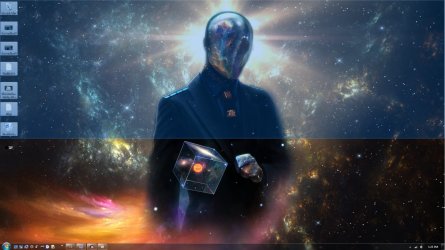
Whenever I apply a wallpaper to my desktop, after I have opened up a few programs and folders and minimized them I noticed only have my half my icons appear and selecting the whole desktop is cut off by half for some reason. However, the wallpaper is still visible. The only way this problem stops is if I change wallpapers, but happens again. Let me give you a sample. This is kind of what it looks like, I had to create the image to show you guys an example since currently it wasn't doing that since I just changed the wallpaper. Hopefully it isn't confusing? Please let me know!

Any kind of help would be very much obliged :)
 

Attachments

  • vvvv.jpg
    vvvv.jpg
    206.3 KB · Views: 3

My Computer My Computer

At a glance

Windows 7 Ultimate 64-bit SP1Intel Core i7 3820 @ 3.60GHz32.0GB DDR3 @ 667MHz4095MB NVIDIA GeForce GTX 760 (Gigabyte)
Computer type
PC/Desktop
Computer Manufacturer/Model Number
AsusXtreme
OS
Windows 7 Ultimate 64-bit SP1
CPU
Intel Core i7 3820 @ 3.60GHz
Motherboard
ASUSTeK COMPUTER INC. RAMPAGE IV EXTREME
Memory
32.0GB DDR3 @ 667MHz
Graphics Card(s)
4095MB NVIDIA GeForce GTX 760 (Gigabyte)
Sound Card
Realtek High Definition Audio
Monitor(s) Displays
E320fi-B2 @60Hz
Hard Drives
3TB
1TB
128SSD
Antivirus
Avast
Browser
Firefox
Not sure I follow your description or your picture.

I assume the picture is a simulation of what's wrong. If the wallpaper was working right, how would that picture be different? I see a guy and some icons on the left border and more icons on the taskbar at the bottom, but I have no idea what it should look like. The upper portion has a blue tint and the lower portion has an orange tint. Is that how it's supposed to look?

I use wallpaper constantly. The main things I'm concerned with is the exact size and the positioning. The positioning has several settings like stretch, fill, fit, tile, and center. Each of those 5 settings will look slightly different and you should probably use the same one--I use tile.

Are all of the problem wallpapers the exact same size in pixels as the non-problem wallpapers?

Are they all ordinary jpg files?

Are they all in the same folder?

What I don't understand is why the problem would be intermittent rather than constant. Any sizing issues I've come across have been constant for that particular wallpaper image.
 

My Computer My Computer

At a glance

Windows 7 Home Premium SP1, 64-bitIntel Skylake i5-6600K, not overclocked8 GB HyperX DDR4-2666 (2 x 4 GB)none; graphics are integrated on CPU
Computer type
PC/Desktop
Computer Manufacturer/Model Number
Ignatz Special; 4 speed manual gearbox; factory air conditioning; one of one
OS
Windows 7 Home Premium SP1, 64-bit
CPU
Intel Skylake i5-6600K, not overclocked
Motherboard
AsRock Z170M Extreme 4, micro ATX
Memory
8 GB HyperX DDR4-2666 (2 x 4 GB)
Graphics Card(s)
none; graphics are integrated on CPU
Sound Card
onboard: Realtek ALC1150; external: USB Behringer UF0-202
Monitor(s) Displays
Dell S2340M 23 inch IPS
Screen Resolution
1600 x 900
Hard Drives
System: Crucial MX100 series SSD, 128 GB;
Data: Samsung Spinpoint 103SJ, 1 TB;
Backup: WD Caviar Green WD30EZRX-00D8PB0, 3 TB
PSU
Rosewill SilentNight 500 watt fanless, semi-modular
Case
Antec Solo II
Cooling
Noctua NH-U12S; Noctua F12 intake, Noctua S12A exhaust
Keyboard
Microsoft 200 6JH-00001 USB
Mouse
Dell or Microsoft optical wired; USB
Antivirus
Microsoft Security Essentials and Malwarebytes Premium
Browser
Pale Moon
Other Info
All fans PWM; speeds at idle: CPU circa 500 rpm; intake circa 600 rpm; exhaust circa 600 rpm; CPU temps 27 idle and 47 C load in a warm room (27 C/81 F) when running Intel Extreme Tuning Utility stress test.
Welcome to Seven Forums admiral ackbar. Let me see if I have this right. After a wallpaper change, the desktop displays correctly, icons fill the full left side top to bottom. After your problem occurs, the wallpaper still looks normal, but the icons on the left, below the center of screen do not display, and you can't move the cursor below the center point as well?

This is quite odd behavior. Suggest you start with the System File Checker

http://www.sevenforums.com/tutorials/1538-sfc-scannow-command-system-file-checker.html

If no help, delete the Transcoded wallpaper in C:\Users\(User name)\AppData\Roaming\Microsoft\Windows\Themes\TranscodedWallpaper.jpg

This is a hidden file, so you will have to display hidden files and folders

http://www.sevenforums.com/tutorials/394-hidden-files-folders-show-hide.html

I don't think this is necessarily a wallpaper issue, but rather a display issue. If these suggestions don't help, next time it occurs, try changing your screen resolution and see if the problem goes away.

http://www.sevenforums.com/tutorials/255-screen-resolution-display-settings.html

A Guy
 

My Computer My Computer

At a glance

Windows 10 Home x64INTEL Core i5-750 Quad-Core 3.37GHzHyperX Fury Black Series 8GB (2 x 4GB) 1866MhzEVGA GeForce GTX 750 Superclocked 1GB 128-Bit...
Computer type
PC/Desktop
OS
Windows 10 Home x64
CPU
INTEL Core i5-750 Quad-Core 3.37GHz
Motherboard
ASUS P7P55D
Memory
HyperX Fury Black Series 8GB (2 x 4GB) 1866Mhz
Graphics Card(s)
EVGA GeForce GTX 750 Superclocked 1GB 128-Bit GDDR5
Monitor(s) Displays
LG 32MA68HY 32" IPS
Screen Resolution
1920 x 1080
Hard Drives
Samsung 840 Evo 120GB, SEAGATE 500GB Barracuda® 7200.12, SATA 3 Gb/s, 7200 RPM, 16MB cache
PSU
ANTEC TruePower New TP-550, 80 PLUS, 550W
Case
ANTEC Three Hundred Illusion
Cooling
COOLER MASTER Hyper 212 Plus, 4 x 120mm 1 x 140mm Noctua's
Internet Speed
85 + Mbps
Antivirus
Avast
Browser
Vivaldi
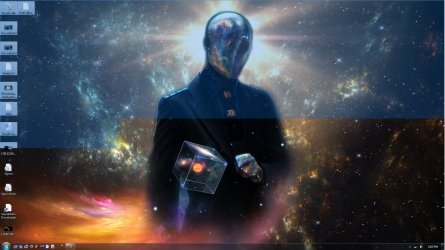
Thanks for the quick reply fellow Windows users. Since the issue actually happened here is the proper picture. Please let me know if you think you know how a solution. Thank you :)
 

Attachments

  • Untitledff.jpg
    Untitledff.jpg
    211.1 KB · Views: 5

My Computer My Computer

At a glance

Windows 7 Ultimate 64-bit SP1Intel Core i7 3820 @ 3.60GHz32.0GB DDR3 @ 667MHz4095MB NVIDIA GeForce GTX 760 (Gigabyte)
Computer type
PC/Desktop
Computer Manufacturer/Model Number
AsusXtreme
OS
Windows 7 Ultimate 64-bit SP1
CPU
Intel Core i7 3820 @ 3.60GHz
Motherboard
ASUSTeK COMPUTER INC. RAMPAGE IV EXTREME
Memory
32.0GB DDR3 @ 667MHz
Graphics Card(s)
4095MB NVIDIA GeForce GTX 760 (Gigabyte)
Sound Card
Realtek High Definition Audio
Monitor(s) Displays
E320fi-B2 @60Hz
Hard Drives
3TB
1TB
128SSD
Antivirus
Avast
Browser
Firefox
Any luck with the ideas I suggested?

It looks like what would happen if you selected an area of your desktop (left click and drag a square around several icons, etc.). Need to know if the suggestions already offered had any effect?

A Guy
 

My Computer My Computer

At a glance

Windows 10 Home x64INTEL Core i5-750 Quad-Core 3.37GHzHyperX Fury Black Series 8GB (2 x 4GB) 1866MhzEVGA GeForce GTX 750 Superclocked 1GB 128-Bit...
Computer type
PC/Desktop
OS
Windows 10 Home x64
CPU
INTEL Core i5-750 Quad-Core 3.37GHz
Motherboard
ASUS P7P55D
Memory
HyperX Fury Black Series 8GB (2 x 4GB) 1866Mhz
Graphics Card(s)
EVGA GeForce GTX 750 Superclocked 1GB 128-Bit GDDR5
Monitor(s) Displays
LG 32MA68HY 32" IPS
Screen Resolution
1920 x 1080
Hard Drives
Samsung 840 Evo 120GB, SEAGATE 500GB Barracuda® 7200.12, SATA 3 Gb/s, 7200 RPM, 16MB cache
PSU
ANTEC TruePower New TP-550, 80 PLUS, 550W
Case
ANTEC Three Hundred Illusion
Cooling
COOLER MASTER Hyper 212 Plus, 4 x 120mm 1 x 140mm Noctua's
Internet Speed
85 + Mbps
Antivirus
Avast
Browser
Vivaldi
Hey! Thanks for replying back to me. Unfortunately they didn't work :/ The sfc scan said something about CBS log being corrupt? Other then that I also deleted the transcoded wallpaper and yet nothing :(
 

My Computer My Computer

At a glance

Windows 7 Ultimate 64-bit SP1Intel Core i7 3820 @ 3.60GHz32.0GB DDR3 @ 667MHz4095MB NVIDIA GeForce GTX 760 (Gigabyte)
Computer type
PC/Desktop
Computer Manufacturer/Model Number
AsusXtreme
OS
Windows 7 Ultimate 64-bit SP1
CPU
Intel Core i7 3820 @ 3.60GHz
Motherboard
ASUSTeK COMPUTER INC. RAMPAGE IV EXTREME
Memory
32.0GB DDR3 @ 667MHz
Graphics Card(s)
4095MB NVIDIA GeForce GTX 760 (Gigabyte)
Sound Card
Realtek High Definition Audio
Monitor(s) Displays
E320fi-B2 @60Hz
Hard Drives
3TB
1TB
128SSD
Antivirus
Avast
Browser
Firefox
It is a very unusual problem. It would almost seem to be a GPU/Driver issue. It's as if you have selected a portion of your desktop, but it is not an even line across even. Were you able to try a screen resolution change? You might try uninstalling your GPU driver and install again. I'm going to put this to the Gurus and see if anyone has any ideas.

A Guy
 

My Computer My Computer

At a glance

Windows 10 Home x64INTEL Core i5-750 Quad-Core 3.37GHzHyperX Fury Black Series 8GB (2 x 4GB) 1866MhzEVGA GeForce GTX 750 Superclocked 1GB 128-Bit...
Computer type
PC/Desktop
OS
Windows 10 Home x64
CPU
INTEL Core i5-750 Quad-Core 3.37GHz
Motherboard
ASUS P7P55D
Memory
HyperX Fury Black Series 8GB (2 x 4GB) 1866Mhz
Graphics Card(s)
EVGA GeForce GTX 750 Superclocked 1GB 128-Bit GDDR5
Monitor(s) Displays
LG 32MA68HY 32" IPS
Screen Resolution
1920 x 1080
Hard Drives
Samsung 840 Evo 120GB, SEAGATE 500GB Barracuda® 7200.12, SATA 3 Gb/s, 7200 RPM, 16MB cache
PSU
ANTEC TruePower New TP-550, 80 PLUS, 550W
Case
ANTEC Three Hundred Illusion
Cooling
COOLER MASTER Hyper 212 Plus, 4 x 120mm 1 x 140mm Noctua's
Internet Speed
85 + Mbps
Antivirus
Avast
Browser
Vivaldi
Hey! Thanks for replying back to me. Unfortunately they didn't work :/ The sfc scan said something about CBS log being corrupt? Other then that I also deleted the transcoded wallpaper and yet nothing :(

Hmmmm, the System File Checker (SFC) said something about CBS log being corrupt?

In Windows Explorer, navigate to your Downloads folder
Copy C:\Windows\Logs\Cbs\Cbs.log to your Downloads folder
Right click on an open area of the explorer pane and select New -> Compressed (zipped) Folder
name the new zip folder ackbar0318_CBS.zip
Drag the Cbs.log file you copied earlier to the ackbar0318_CBS.zip folder
Attach the ackbar0318_CBS.zip folder to a new post on this thread.

Thanks
 

My Computer My Computer

At a glance

x64 (6.3.9600) Win8.1 Pro & soon dual boot x6...AMD A6-3420M APU with Radeon(tm) HD Graphics6.00 GBAMD Radeon(TM) HD 6520G
Computer type
Laptop
Computer Manufacturer/Model Number
HP Pavilion dv6-6c10us
OS
x64 (6.3.9600) Win8.1 Pro & soon dual boot x64 (6.1.7601) Win7_SP1 HomePrem
CPU
AMD A6-3420M APU with Radeon(tm) HD Graphics
Motherboard
Hewlett-Packard 1805
Memory
6.00 GB
Graphics Card(s)
AMD Radeon(TM) HD 6520G
Sound Card
(1) AMD High Definition Audio Device (2) IDT High Definiti
Monitor(s) Displays
HP W2072a 20" LCD (1600 x 900) @ 60 Hz
Screen Resolution
1366 x 768 x 32 bits (4294967296 colors) @ 60 Hz
Hard Drives
ST640LM0 00 HM641JI SATA Disk Device
Keyboard
Logitech k520 wireless KB
Mouse
Logitech m320 wireless mouse (bundled with KB)
Internet Speed
15/5 | 54 MB Wireless 'n'
Antivirus
Realtime: Defender or Avast | On-demand: Malwarebytes, ESET
Browser
IE 11 on Win8, IE 10 on win 7
Other Info
Media: [Gimp, Audacity, VLC] || Comm: [WEmail 2012, Skype] || Productivity: [OpenOffice,| Textpad] || Utils: [Sysinternals, cCleaner, Speccy, Defraggler]
Back
Top