Solved Trying to clone displays

rmike1991

New member
Local time
2:08 PM
Messages
38
Location
Los Angeles
Hello experts.
I've been searching the web to find a solution, even called ATI tech support. Spoke to different levels of reps. Nothing so far. What was so easy in Win XP seems impossible to do in Win 7. At least I couldn't find the way yet and hope you can help me to solve the problem.
I'm trying to clone my 21" monitor (connected with DVI cable) with 47" TV (connected with HDMI cable).
All images are clickable and will open in a separate window to see full size.


"Extend" feature works just fine but this is not what I want/need. Here is the way it was on XP: cloned with 1600X1200 - no problem.


After playing with different versions of drivers (the newest one is not even as advanced as the old ones IMHO) I ended up with one that is really close to what worked for me for such a long time. I thought I was there already, but when I click on clone the display refreshes and nothing changes.


Thanks in advance for your help.
 

My Computer My Computer

At a glance

Windows 7 Ultimate x64Intel Core I5 750 @ 2.67 GHzDDR3 10GBATI Radeon HD 4350
Computer type
PC/Desktop
Computer Manufacturer/Model Number
Dell Vostro 430
OS
Windows 7 Ultimate x64
CPU
Intel Core I5 750 @ 2.67 GHz
Motherboard
Dell Inc. 054KM3
Memory
DDR3 10GB
Graphics Card(s)
ATI Radeon HD 4350
Monitor(s) Displays
Dell S2740L, Vizio SV470XVT1A
Screen Resolution
1920X1080, 1920X1080
Hard Drives
Western Digital Caviar Black WD5003AZEX, Seagate Barracuda ST31500341AS
Internet Speed
50 Mbps
Antivirus
Microsoft Security Essentials
Browser
Firefox
Please provide the version of Catalyst driver and Catalyst Control Center that you're now trying to use with your HD4350. That's a very old CCC.

Anyway, here is an example of a 2-monitor setup on a Compaq computer at a bridge club, running Win7. The ATI graphics is HD3000 (also old). The Catalyst driver and CCC being used here is the latest 13.9 "legacy" version downloaded from the AMD driver download page. 8.97.100.11-130429a-158498C-ATI for the driver, 2013.0429.2313.39747 for CCC.

Nevertheless..

One monitor is on the desk (19" 4:3 running 1280x1024) and the second is a 22" 16:9 flatscreen LCD mounted on the wall of the club. In clone mode both monitors MUST run identically, i.e. at the same resolution. So that means the 16x9 22" flatscreen has to also run at 1280x1024, rather than at its true native resolution if it were being used in "extended" mode. Running the 22" flatscreen at 1280x24 is not a bad thing anyway, as everything on it is thus larger and more readable for the patrons to see their scores displayed.

Nevertheless, you need to have TWO settings done correctly to run things in "clone mode":

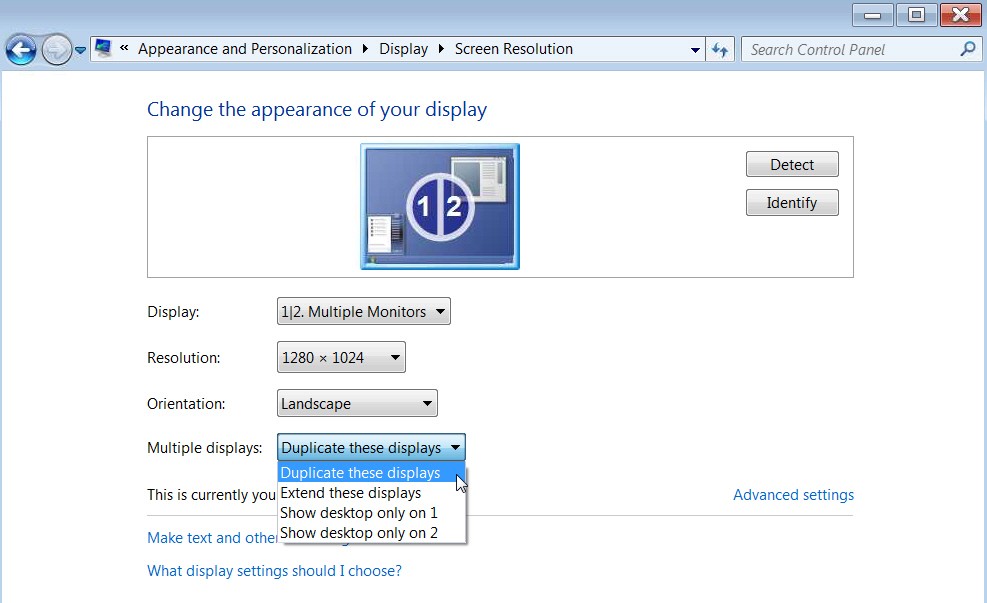
(1) Windows desktop properties (right-click on desktop, select "screen resolution"). Select "duplicate these displays" on the multiple displays dropdown list:

3sc6.jpg


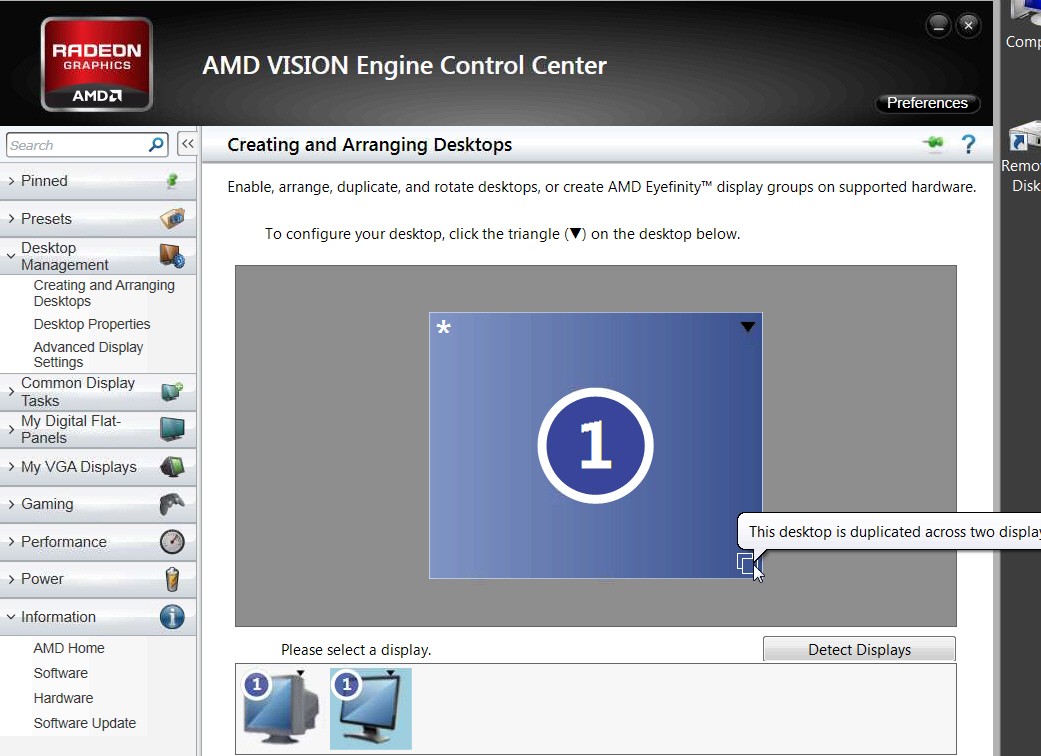
(2) In Catalyst Control Center, Desktop Management -> Creating and Arranging desktops -> it should show up as follows, with both monitors 1 and 2 identified as "1"

tqpm.jpg
 

My Computer My Computer

At a glance

Windows 7 Pro x64 (1), Win7 Pro X64 (2)i5-3350p 3.1Ghz/6MB-cache (1); E8400 3.0Ghz/6...8GB PC3-12800 DDR3 (1); 4GB PC3-10600 DDR3 (2)ATI HD7750 (1), (see TV cards); ATI R7 250 (2)
Computer type
PC/Desktop
Computer Manufacturer/Model Number
Home-built, two systems (1) and (2)
OS
Windows 7 Pro x64 (1), Win7 Pro X64 (2)
CPU
i5-3350p 3.1Ghz/6MB-cache (1); E8400 3.0Ghz/6MB-cache (2)
Motherboard
ASUS P8Z77-V Pro (1); ASUS P5Q3 (2)
Memory
8GB PC3-12800 DDR3 (1); 4GB PC3-10600 DDR3 (2)
Graphics Card(s)
ATI HD7750 (1), (see TV cards); ATI R7 250 (2)
Sound Card
Realtek ALC892 HD Audio (1); Realtek ALC1200 HD Audio (2)
Monitor(s) Displays
Eizo HD2441W LCD, Eizo S2433W (1); Eizo 24" S2433W (2)
Screen Resolution
1920x1200, 1920x1200 (1); 1920x1200 (2)
Hard Drives
(1) 1TB SATA-II (7200RPM), 2x2TB SATA-III (7200RPM), 250GB SATA-III (10000RPM) for OS; 2x2TB external USB 3.0

(2) 320GB SATA-II (7200RPM), 750GB SATA-II (7200RPM), 150GB SATA-II (10000RPM) for OS; 2TB external USB 3.0
PSU
Nesteq ECS-6001 600W (1); Nesteq ECS-5001 500W (2)
Case
Acousti-Case 360 (1) and (2)
Cooling
Noctua NH-U12P SE2 for CPU, 2x120mm case fans (1) and (2)
Keyboard
IBM PS/2 (1) and (2)
Mouse
Logitech MX Revolution wireless (1); Microsoft wired (2)
Internet Speed
100mbps down / 10mbps up
Antivirus
Microsoft Security Essentials; Malwarebyte Anti-Malware Pro
Browser
Firefox
Other Info
Ceton InfiniTV 4-tuner cablecard-enabled TV card as well as Hauppauge HVR-2250 OTA/ATSC 2-tuner TV card in (1), running under Win7 WMC
dsperber, I'm sorry it took so long for me to reply. I was out of town and just got back to LA.

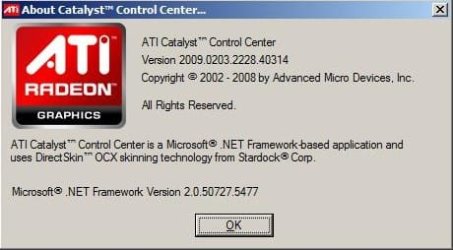
Thank you for your post. The driver version that I'm using now:

About.JPG

I know it's old but this is not the problem. The problem is that Windows 7 wants me to have both displays with the same resolution in order to do the clone. My monitor's resolution is 1600X1200 and the TV is 1920X1080. Somehow the same exact card with almost the same driver

00 About.JPG

was able to clone those two in Windows XP with no problem leaving native resolutions for both displays and the image would scale to full size on TV.

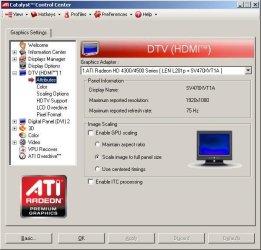
05 DTV HDMI 1_Attributes.JPG

I can clone them now with 1440X900 or with 1280x1024 just like you did yours. But then looking at the blurry monitor or TV is no fun. Right? I work on a lot of HD movies and unlike the patrons you were describing ;) I need a sharp, good quality picture on the monitor and TV as well. So my question is still open.
Thanks again.
 

My Computer My Computer

At a glance

Windows 7 Ultimate x64Intel Core I5 750 @ 2.67 GHzDDR3 10GBATI Radeon HD 4350
Computer type
PC/Desktop
Computer Manufacturer/Model Number
Dell Vostro 430
OS
Windows 7 Ultimate x64
CPU
Intel Core I5 750 @ 2.67 GHz
Motherboard
Dell Inc. 054KM3
Memory
DDR3 10GB
Graphics Card(s)
ATI Radeon HD 4350
Monitor(s) Displays
Dell S2740L, Vizio SV470XVT1A
Screen Resolution
1920X1080, 1920X1080
Hard Drives
Western Digital Caviar Black WD5003AZEX, Seagate Barracuda ST31500341AS
Internet Speed
50 Mbps
Antivirus
Microsoft Security Essentials
Browser
Firefox
Sorry. Not possible in Win7 to both (1) "duplicate/mirror/clone" the same output to two monitors, while (2) also allowing independent resolution settings for each monitor. This is only possible with "extend" mode, where each of your two monitors is dealt with separately and uniquely, and the Windows desktop spans across both.

AMD Support and Game Forums - Windows 7 Clone Mode - Limited Resolution?

Can dual monitors with different resolutions be mirrored at their native resolutions? - Displays - Linus Tech Tips

It is simply the same single Windows desktop area which is DUPLICATED/MIRRORED onto both monitors... even if that means a stretch/shrink for one of the two monitors to confirm to the size/shape of the other.

If the two monitors have different shapes and different native resolutions, it simply cannot be handled in Win7 any way other than producing the identical output at one single resolution on both displays, at whatever resolution you pick (which is acceptable to both monitors, although it might not look great on one of the two monitors).

The same issue arises in the world of HDTV, with 4:3 640x480 images displayed on 16:9 screens that support 1280x720 or 1920x1080 native displays. You can choose to display that 4:3 image in several different ways:

(1) "original aspect ratio" (OAR) centering the 4:3 image inside of the 16:9 screen (running full vertical height of the 16:9 screen), producing black bars on left and right of the screen on either side of the 4:3 image.

(2) "stretch-o-vision" pulling the 4:3 image horizontally to utilize the entire 16:9 screen but distorting the original 4:3 aspect ratio of the image to make full horizontal use of the 16:9 screen.

And you have a similar problem in reverse, if you want to display a 16:9 HDTV image (1280x720 or 1920x1080) on a 4:3 SD screen. In this case you can again manipulate the original 16:9 image to fit on the 4:3 screen, each of which will have its own look and appearance:

(1) "clip the wings" of the 16:9 image, losing image area on the far-left and far-right of the original 16:9 image so that what is left is the "center cut" 4:3 portion, sufficient to fill the entire 4:3 SD screen. All you see is the "center cut" 4:3 central area of the original 16:9 image, but it will fill the entire 4:3 TV screen.

(2) "letterbox" the 16:9 image, using the entire horizontal width of the 4:3 screen but reducing the vertical height of the original 16:9 image so as to retain the original 16:9 rectangular aspect ratio of the image as seen on the 4:3 screen. This will produce black bars on the top and bottom of the 4:3 screen, but the visible image you see on the screen will retain its original 16:9 rectangular shape.

(3) "stretch-o-vision" to use the full horizontal and vertical space available with the 4:3 "square" display screen in order to display what was originally a 16:9 "rectangular" image. This cannot be done without distorting the original image, which simply is incompatible with the shape of the display screen.


MIRROR/CLONE/DUPLICATE mode does not "center cut" the 1280x1024 portion of a 1920x1080 desktop for display on the smaller 1280x1024 monitor, while simultaneously displaying all 1920x1080 on the 1920x1080 screen. It simply presents the identical desktop area at THAT resolution (i.e. pixel dimensions) onto both displays, no matter that this resolution will clearly be "native" on only one of the two displays if they are different types/shapes.

The Bridge Club was using a WinXP computer with these same two monitors before the XP machine died and was replaced with the current Win7 machine. As far as I recall, the wall-mounted 16x9 monitor ALWAYS displayed the 1280x1024 image (which looked perfect on the desktop monitor as 1280x1024 was its "native" resolution) "stretched" to fill the 16x9 shape of the LCD screen.

The fact that the two monitors are NOT the same shape simply guarantees that the non-native monitor will not look great when DUPLICATING (i.e. at the identical resolution) the single display output image onto both monitors. Note that your CCC setup has "scale image to full panel size" checked, which is guaranteed to "stretch" as necessary from the smaller screen size/shape to fill the larger screen size/shape.


I'm certain your Win7 results with a current 2013 driver/CCC (rather than using a 4-year old 2009 version as you're doing) will make no difference.
 

My Computer My Computer

At a glance

Windows 7 Pro x64 (1), Win7 Pro X64 (2)i5-3350p 3.1Ghz/6MB-cache (1); E8400 3.0Ghz/6...8GB PC3-12800 DDR3 (1); 4GB PC3-10600 DDR3 (2)ATI HD7750 (1), (see TV cards); ATI R7 250 (2)
Computer type
PC/Desktop
Computer Manufacturer/Model Number
Home-built, two systems (1) and (2)
OS
Windows 7 Pro x64 (1), Win7 Pro X64 (2)
CPU
i5-3350p 3.1Ghz/6MB-cache (1); E8400 3.0Ghz/6MB-cache (2)
Motherboard
ASUS P8Z77-V Pro (1); ASUS P5Q3 (2)
Memory
8GB PC3-12800 DDR3 (1); 4GB PC3-10600 DDR3 (2)
Graphics Card(s)
ATI HD7750 (1), (see TV cards); ATI R7 250 (2)
Sound Card
Realtek ALC892 HD Audio (1); Realtek ALC1200 HD Audio (2)
Monitor(s) Displays
Eizo HD2441W LCD, Eizo S2433W (1); Eizo 24" S2433W (2)
Screen Resolution
1920x1200, 1920x1200 (1); 1920x1200 (2)
Hard Drives
(1) 1TB SATA-II (7200RPM), 2x2TB SATA-III (7200RPM), 250GB SATA-III (10000RPM) for OS; 2x2TB external USB 3.0

(2) 320GB SATA-II (7200RPM), 750GB SATA-II (7200RPM), 150GB SATA-II (10000RPM) for OS; 2TB external USB 3.0
PSU
Nesteq ECS-6001 600W (1); Nesteq ECS-5001 500W (2)
Case
Acousti-Case 360 (1) and (2)
Cooling
Noctua NH-U12P SE2 for CPU, 2x120mm case fans (1) and (2)
Keyboard
IBM PS/2 (1) and (2)
Mouse
Logitech MX Revolution wireless (1); Microsoft wired (2)
Internet Speed
100mbps down / 10mbps up
Antivirus
Microsoft Security Essentials; Malwarebyte Anti-Malware Pro
Browser
Firefox
Other Info
Ceton InfiniTV 4-tuner cablecard-enabled TV card as well as Hauppauge HVR-2250 OTA/ATSC 2-tuner TV card in (1), running under Win7 WMC
Sorry. Not possible in Win7
This was my biggest fear.
Logically Microsoft has to improve the features of newer OS. Unfortunately it doesn't work that way.
Thanks again for trying to help.
 

My Computer My Computer

At a glance

Windows 7 Ultimate x64Intel Core I5 750 @ 2.67 GHzDDR3 10GBATI Radeon HD 4350
Computer type
PC/Desktop
Computer Manufacturer/Model Number
Dell Vostro 430
OS
Windows 7 Ultimate x64
CPU
Intel Core I5 750 @ 2.67 GHz
Motherboard
Dell Inc. 054KM3
Memory
DDR3 10GB
Graphics Card(s)
ATI Radeon HD 4350
Monitor(s) Displays
Dell S2740L, Vizio SV470XVT1A
Screen Resolution
1920X1080, 1920X1080
Hard Drives
Western Digital Caviar Black WD5003AZEX, Seagate Barracuda ST31500341AS
Internet Speed
50 Mbps
Antivirus
Microsoft Security Essentials
Browser
Firefox
Sorry. Not possible in Win7
This was my biggest fear.
Logically Microsoft has to improve the features of newer OS. Unfortunately it doesn't work that way.
Thanks again for trying to help.
There's no logics in that statement, it's nothing Microsoft can fix. You are talking about something that is physically impossible. It depends on the hardware you are using; it should of course be clear that if you want to clone two displays using two different monitors with different specs and max resolution, the cloning is naturally only possible using the max resolution of the lesser monitor.

The word "Clone" says it already; a monitor with 1280 X 720 resolution can naturally not show 1920 X 1080 so the only option is to show 1280 X 720 on both, to clone displays is using lesser resolution. Nothing else is possible.
 

My Computer My Computer

At a glance

Windows 10 Pro x64 EN-GB1.6 GHz Intel Core i7-720QM Processor6 GBATI Mobility Radeon HD 5850 Graphics
Computer type
Laptop
Computer Manufacturer/Model Number
HP ENVY 17-1150eg
OS
Windows 10 Pro x64 EN-GB
CPU
1.6 GHz Intel Core i7-720QM Processor
Memory
6 GB
Graphics Card(s)
ATI Mobility Radeon HD 5850 Graphics
Sound Card
Beats sound system with integrated subwoofer
Monitor(s) Displays
17" laptop display, 22" LED and 32" Full HD TV through HDMI
Screen Resolution
1600*900 (1), 1920*1080 (2&3)
Hard Drives
Internal: 2 x 500 GB SATA Hard Disk Drive 7200 rpm
External: 2TB for backups, 3TB USB3 network drive for media
Cooling
As Envy runs a bit warm, I have it on a Cooler Master pad
Keyboard
Logitech diNovo Media Desktop Laser (bluetooth)
Mouse
Logitech Performance Mouse MX
Internet Speed
50/10 Mbps VDSL
Antivirus
Windows Defender 4.3.9431.0
Browser
Maxthon 3.5.2., IE11
You are talking about something that is physically impossible. It depends on the hardware you are using
You can take my word for it. It IS possible with Windows XP. Please take a look @ my first post again. The second screenshot shows that.
I still have the same computer with the same hardware that I used for last 4 years. The only thing I changed was the new HDD to install Windows 7 on it. I still have the other HDD fully operational with XP on it. My previous computer (also with XP) did not have the HD video card with HDMI but it had S-Video output and was successfully cloned to the same TV (again - different resolutions). So it IS Windows 7 limitation when cloning screens with different resolution.
 

My Computer My Computer

At a glance

Windows 7 Ultimate x64Intel Core I5 750 @ 2.67 GHzDDR3 10GBATI Radeon HD 4350
Computer type
PC/Desktop
Computer Manufacturer/Model Number
Dell Vostro 430
OS
Windows 7 Ultimate x64
CPU
Intel Core I5 750 @ 2.67 GHz
Motherboard
Dell Inc. 054KM3
Memory
DDR3 10GB
Graphics Card(s)
ATI Radeon HD 4350
Monitor(s) Displays
Dell S2740L, Vizio SV470XVT1A
Screen Resolution
1920X1080, 1920X1080
Hard Drives
Western Digital Caviar Black WD5003AZEX, Seagate Barracuda ST31500341AS
Internet Speed
50 Mbps
Antivirus
Microsoft Security Essentials
Browser
Firefox
You are talking about something that is physically impossible. It depends on the hardware you are using
You can take my word for it. It IS possible with Windows XP. Please take a look @ my first post again. The second screenshot shows that.
I don't follow how your screenshots in post #1 show that the two separate display devices are actually running at two separate resolutions or being sent two separately sized desktop areas. You've only shown things with the display adapter selected, which to me suggests that both display devices are being sent the identical 1600x1200 desktop area.

You have not shown any screenshot with monitor #2 selected, only with monitor #1 along with its 1600x1200 size (corresponding to the Windows desktop area of 1600x1200).

Where is your "proof" that each monitor (DTV via HDMI and flatpanel via DVI) are being sent unique and separate desktop portions? Yes, the two monitors are different... with the Lenovo allowing at most 1600x1200 and the Vizio allowing 1920x1080 (and of course which WOULD be supported that way in "extend" mode). But "clone" mode by definition sends EXACTLY THE SAME DESKTOP AREA (which by definition has to be acceptable to the lesser capable device, i.e. the one with the smaller resolution for H or W, scaling or stretching things as needed for display on the other device).

So 1600x1200 is also being sent to the Vizio. Why do you think it is not? Where is a screenshot that shows otherwise?

How about posting a PHOTO of both monitors being handled by your XP environment, so that we can see if the Vizio 16x9 display is "in correct 16x9 rectangular aspect ratio" (and showing MORE desktop area than 1600x1200) or whether it is "stretch-o-vision" and presenting the IDENTICAL 1600x1200 desktop space as shown in perfect 4:3 1600x1200 on your Lenovo monitor... stretched horizontally (to 1920 "16" width) and compressed vertically (to 1080 "9" height) to appear on the 16x9 screen.

I'd also like to see screenshots of the Windows "desktop properties" dialog, for both your WinXP and Win7 setups. You've only shown Catalyst Control Center (and an old version at that).
 

My Computer My Computer

At a glance

Windows 7 Pro x64 (1), Win7 Pro X64 (2)i5-3350p 3.1Ghz/6MB-cache (1); E8400 3.0Ghz/6...8GB PC3-12800 DDR3 (1); 4GB PC3-10600 DDR3 (2)ATI HD7750 (1), (see TV cards); ATI R7 250 (2)
Computer type
PC/Desktop
Computer Manufacturer/Model Number
Home-built, two systems (1) and (2)
OS
Windows 7 Pro x64 (1), Win7 Pro X64 (2)
CPU
i5-3350p 3.1Ghz/6MB-cache (1); E8400 3.0Ghz/6MB-cache (2)
Motherboard
ASUS P8Z77-V Pro (1); ASUS P5Q3 (2)
Memory
8GB PC3-12800 DDR3 (1); 4GB PC3-10600 DDR3 (2)
Graphics Card(s)
ATI HD7750 (1), (see TV cards); ATI R7 250 (2)
Sound Card
Realtek ALC892 HD Audio (1); Realtek ALC1200 HD Audio (2)
Monitor(s) Displays
Eizo HD2441W LCD, Eizo S2433W (1); Eizo 24" S2433W (2)
Screen Resolution
1920x1200, 1920x1200 (1); 1920x1200 (2)
Hard Drives
(1) 1TB SATA-II (7200RPM), 2x2TB SATA-III (7200RPM), 250GB SATA-III (10000RPM) for OS; 2x2TB external USB 3.0

(2) 320GB SATA-II (7200RPM), 750GB SATA-II (7200RPM), 150GB SATA-II (10000RPM) for OS; 2TB external USB 3.0
PSU
Nesteq ECS-6001 600W (1); Nesteq ECS-5001 500W (2)
Case
Acousti-Case 360 (1) and (2)
Cooling
Noctua NH-U12P SE2 for CPU, 2x120mm case fans (1) and (2)
Keyboard
IBM PS/2 (1) and (2)
Mouse
Logitech MX Revolution wireless (1); Microsoft wired (2)
Internet Speed
100mbps down / 10mbps up
Antivirus
Microsoft Security Essentials; Malwarebyte Anti-Malware Pro
Browser
Firefox
Other Info
Ceton InfiniTV 4-tuner cablecard-enabled TV card as well as Hauppauge HVR-2250 OTA/ATSC 2-tuner TV card in (1), running under Win7 WMC
I know it's old but this is not the problem. The problem is that Windows 7 wants me to have both displays with the same resolution in order to do the clone. My monitor's resolution is 1600X1200 and the TV is 1920X1080. Somehow the same exact card with almost the same driver was able to clone those two in Windows XP with no problem leaving native resolutions for both displays and the image would scale to full size on TV.
In my mind, "the image would scale to full size on TV" simply means that there was "stretch-o-vision" on the pixels to (a) pull the 1600 horizontal desktop area being sent wider in the horizontal direction, in order to fill the entire 1920 horizontal (i.e. "16" dimension of the 16x9 screen) native capability of the 1920x1080 TV screen, along with (b) compression of the 1200 vertical desktop area being sent shorter in the vertical direction, in order to present 1200 pixels in a vertical space only allowing 1080 pixels vertical (i.e. "9" dimension of the 16x9 screen) native.

So, in my opinion, what displays on the Vizio might actually FILL the entire screen, but it's actually a 1600x1200 area stretched horizontally and compressed vertically.

The INFORMATION shown on both the 4:3 Lenovo monitor and 16:9 Vizio TV should be identical! There should be no information lost nor gained on either screen. They are CLONES, and thus IDENTICAL and both showing a 1600x1200 desktop area... albeit presented with the constraints of the physical aspect ratio differences (as defined by 1600x1200 vs. 1920x1080 native "best presentation" resolutions) in the two screens.

Presenting 1600x1200 on a 1920x1080 screen (and "scaled to fill the entire display") should, again by definition, NOT BE "BEST PRESENTATION" and should clearly appear distorted when contrasted to the appearance of 1600x1200 desktop area on a 1600x1200 "native" screen.
 

My Computer My Computer

At a glance

Windows 7 Pro x64 (1), Win7 Pro X64 (2)i5-3350p 3.1Ghz/6MB-cache (1); E8400 3.0Ghz/6...8GB PC3-12800 DDR3 (1); 4GB PC3-10600 DDR3 (2)ATI HD7750 (1), (see TV cards); ATI R7 250 (2)
Computer type
PC/Desktop
Computer Manufacturer/Model Number
Home-built, two systems (1) and (2)
OS
Windows 7 Pro x64 (1), Win7 Pro X64 (2)
CPU
i5-3350p 3.1Ghz/6MB-cache (1); E8400 3.0Ghz/6MB-cache (2)
Motherboard
ASUS P8Z77-V Pro (1); ASUS P5Q3 (2)
Memory
8GB PC3-12800 DDR3 (1); 4GB PC3-10600 DDR3 (2)
Graphics Card(s)
ATI HD7750 (1), (see TV cards); ATI R7 250 (2)
Sound Card
Realtek ALC892 HD Audio (1); Realtek ALC1200 HD Audio (2)
Monitor(s) Displays
Eizo HD2441W LCD, Eizo S2433W (1); Eizo 24" S2433W (2)
Screen Resolution
1920x1200, 1920x1200 (1); 1920x1200 (2)
Hard Drives
(1) 1TB SATA-II (7200RPM), 2x2TB SATA-III (7200RPM), 250GB SATA-III (10000RPM) for OS; 2x2TB external USB 3.0

(2) 320GB SATA-II (7200RPM), 750GB SATA-II (7200RPM), 150GB SATA-II (10000RPM) for OS; 2TB external USB 3.0
PSU
Nesteq ECS-6001 600W (1); Nesteq ECS-5001 500W (2)
Case
Acousti-Case 360 (1) and (2)
Cooling
Noctua NH-U12P SE2 for CPU, 2x120mm case fans (1) and (2)
Keyboard
IBM PS/2 (1) and (2)
Mouse
Logitech MX Revolution wireless (1); Microsoft wired (2)
Internet Speed
100mbps down / 10mbps up
Antivirus
Microsoft Security Essentials; Malwarebyte Anti-Malware Pro
Browser
Firefox
Other Info
Ceton InfiniTV 4-tuner cablecard-enabled TV card as well as Hauppauge HVR-2250 OTA/ATSC 2-tuner TV card in (1), running under Win7 WMC
You are talking about something that is physically impossible. It depends on the hardware you are using
You can take my word for it. It IS possible with Windows XP. Please take a look @ my first post again. The second screenshot shows that.
I still have the same computer with the same hardware that I used for last 4 years. The only thing I changed was the new HDD to install Windows 7 on it. I still have the other HDD fully operational with XP on it. My previous computer (also with XP) did not have the HD video card with HDMI but it had S-Video output and was successfully cloned to the same TV (again - different resolutions). So it IS Windows 7 limitation when cloning screens with different resolution.

Excuse me? Take your word for what?

The only thing your screenshot shows is exactly what Dsperber have told you: cloning means sending the same signal using the same resolution to both displays (duplicating it pixel by pixel); the screenshot you mention shows both displays are getting the same 1600 X 1200 signal, which by the way is 4:3.

Read once again everything Dsperber has told you.
 

My Computer My Computer

At a glance

Windows 10 Pro x64 EN-GB1.6 GHz Intel Core i7-720QM Processor6 GBATI Mobility Radeon HD 5850 Graphics
Computer type
Laptop
Computer Manufacturer/Model Number
HP ENVY 17-1150eg
OS
Windows 10 Pro x64 EN-GB
CPU
1.6 GHz Intel Core i7-720QM Processor
Memory
6 GB
Graphics Card(s)
ATI Mobility Radeon HD 5850 Graphics
Sound Card
Beats sound system with integrated subwoofer
Monitor(s) Displays
17" laptop display, 22" LED and 32" Full HD TV through HDMI
Screen Resolution
1600*900 (1), 1920*1080 (2&3)
Hard Drives
Internal: 2 x 500 GB SATA Hard Disk Drive 7200 rpm
External: 2TB for backups, 3TB USB3 network drive for media
Cooling
As Envy runs a bit warm, I have it on a Cooler Master pad
Keyboard
Logitech diNovo Media Desktop Laser (bluetooth)
Mouse
Logitech Performance Mouse MX
Internet Speed
50/10 Mbps VDSL
Antivirus
Windows Defender 4.3.9431.0
Browser
Maxthon 3.5.2., IE11
I apologize if my post offended you guys in any way. I’m not as advanced in those things as you are.
To me “clone” (as it states on the Catalyst) was simply showing the desktop on my TV at the same time with the native resolution left on the desktop. To be honest with you I never looked closely on the TV to see if any part of the desktop is missing or something. As long as it was not in “extend” mode. Whatever it was/is on XP is good enough for me to edit and play the movies since it would fill up the entire TV screen. And this is what I’m shooting for in Windows 7. Now that I understand what exactly “clone” means, let me rephrase what I need. I need to be able to see my desktop on the entire TV screen at the same time with my 1600X1200 monitor resolution left as is. As long as the movie that I play on the desktop will be full screen on TV.
So how do I keep my monitor’s resolution while doing that? As soon as I click on “duplicate”, Windows changes it to 1440X900 and I can’t change it.
Here is a little video of the way it is on Windows XP. And this is what I want it to be on Windows 7.
https://www.youtube.com/watch?v=r5pAtojkSes&feature=youtu.be
 

My Computer My Computer

At a glance

Windows 7 Ultimate x64Intel Core I5 750 @ 2.67 GHzDDR3 10GBATI Radeon HD 4350
Computer type
PC/Desktop
Computer Manufacturer/Model Number
Dell Vostro 430
OS
Windows 7 Ultimate x64
CPU
Intel Core I5 750 @ 2.67 GHz
Motherboard
Dell Inc. 054KM3
Memory
DDR3 10GB
Graphics Card(s)
ATI Radeon HD 4350
Monitor(s) Displays
Dell S2740L, Vizio SV470XVT1A
Screen Resolution
1920X1080, 1920X1080
Hard Drives
Western Digital Caviar Black WD5003AZEX, Seagate Barracuda ST31500341AS
Internet Speed
50 Mbps
Antivirus
Microsoft Security Essentials
Browser
Firefox
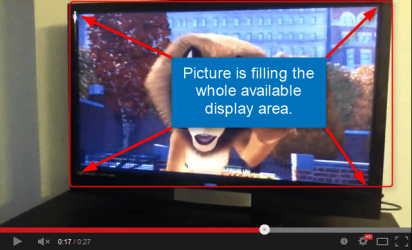
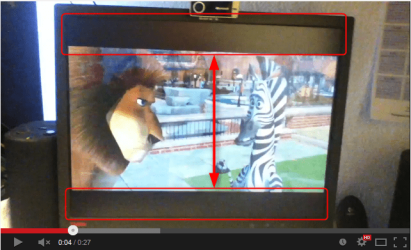
Your video finally proves what we have been telling you: the displays are using the same resolution, the 16:9 movie filling the whole 16:9 display (TV) but showing black bars on top and bottom of the movie on a 4:3 monitor:

Monitor, black bars clearly visible to show a 16:9 movie on a 4:3 aspect ratio display:

2014-03-29_00h13_28.png

TV, native 16:9 aspect ratio thus able to show movie filling the whole available area:

2014-03-29_00h16_23.png

Anything else is simply not possible using displays with different aspect ratios and maximum resolutions.

Simple rules, and believe me, really nothing Microsoft could fix for you:
  • Two or more displays cloned (duplicated):
    • All displays have to use same resolution
    • Maximum available resolution determined by the display with smallest maximum resolution, for instance a dual display setup with one display 800 X 600 max resolution and other display 1920 X 1080 resolution, resolution used when duplicated maximum 800 X 600 on each display
    • If resolution used is aspect ratio 4:3, a 16:9 display shows the signal with black bars left and right
    • If resolution used is aspect ratio 16:9, a 4:3 display shows the signal with black bars top and bottom
I do not understand why you can't use extended desktop settings? Why is it so important you must have the movie showing on both displays; judging by the video you posted both are very close in the same room so everyone is naturally watching the TV (bigger, 16:9), not the PC display?

Kari
 

My Computer My Computer

At a glance

Windows 10 Pro x64 EN-GB1.6 GHz Intel Core i7-720QM Processor6 GBATI Mobility Radeon HD 5850 Graphics
Computer type
Laptop
Computer Manufacturer/Model Number
HP ENVY 17-1150eg
OS
Windows 10 Pro x64 EN-GB
CPU
1.6 GHz Intel Core i7-720QM Processor
Memory
6 GB
Graphics Card(s)
ATI Mobility Radeon HD 5850 Graphics
Sound Card
Beats sound system with integrated subwoofer
Monitor(s) Displays
17" laptop display, 22" LED and 32" Full HD TV through HDMI
Screen Resolution
1600*900 (1), 1920*1080 (2&3)
Hard Drives
Internal: 2 x 500 GB SATA Hard Disk Drive 7200 rpm
External: 2TB for backups, 3TB USB3 network drive for media
Cooling
As Envy runs a bit warm, I have it on a Cooler Master pad
Keyboard
Logitech diNovo Media Desktop Laser (bluetooth)
Mouse
Logitech Performance Mouse MX
Internet Speed
50/10 Mbps VDSL
Antivirus
Windows Defender 4.3.9431.0
Browser
Maxthon 3.5.2., IE11
Why do you want to duplicate the displays ?

What`s the benefit of duplicating them ?

I would just extend your main display. :)
 

My Computer My Computer

At a glance

Windows 10 Pro x64Intel Core i7 6700KGSkill TridentZ RGB 16GB 3600 16-16-16-36EVGA GTX 980 Ti SC x2
Computer type
PC/Desktop
Computer Manufacturer/Model Number
Skylake Special #666
OS
Windows 10 Pro x64
CPU
Intel Core i7 6700K
Motherboard
Asus Sabertooth Z170 Mark 1
Memory
GSkill TridentZ RGB 16GB 3600 16-16-16-36
Graphics Card(s)
EVGA GTX 980 Ti SC x2
Sound Card
Realtek High Definition
Monitor(s) Displays
AOC G2460PG
Screen Resolution
1920 x 1080 144Hz
Hard Drives
Samsung 860 Pro 256GB, Seagate Barracuda 4TB x2
PSU
EVGA 1000 P2, EVGA White Custom Braided Cables
Case
Corsair Vengeance C70 Gunmetal Black
Cooling
Corsair H100i v2, Corsair ML120 x2, Thermal Grizzly Kryonaut
Keyboard
Logitech G910 Orion Spectrum
Mouse
Logitech G700s
Internet Speed
Verizon Fios Quantum Gateway 75/75
Antivirus
Windows Defender, Malwarebytes Free 3.8.3
Browser
Chrome
Other Info
Corsair SP120 x4, LG Blu-ray Drive, Durabrand HT-395 100 Watt Dolby Digital Amp, Corsair H2100 Wireless 7.1 Headset
Why is it so important you must have the movie showing on both displays
Because when I edit movies/videos I like my mouse to be on the computer desktop in front of my eyes where the editing program is and not on TV even though it's in the same room. I can always turn my head or even come closer to the TV to see how the borders etc look like on 16:9 but not going there with the mouse :)

    • Maximum available resolution determined by the display with smallest maximum resolution, for instance a dual display setup with one display 800 X 600 max resolution and other display 1920 X 1080 resolution, resolution used when duplicated maximum 800 X 600 on each display
I understand now. So if I want to do a dual display setup with one display 1600X1200 max resolution (in my case) and other display 1920X1080 max resolution, is it possible to somehow keep that 1600X1200 resolution on my monitor and have the same result you saw in the video?
 

My Computer My Computer

At a glance

Windows 7 Ultimate x64Intel Core I5 750 @ 2.67 GHzDDR3 10GBATI Radeon HD 4350
Computer type
PC/Desktop
Computer Manufacturer/Model Number
Dell Vostro 430
OS
Windows 7 Ultimate x64
CPU
Intel Core I5 750 @ 2.67 GHz
Motherboard
Dell Inc. 054KM3
Memory
DDR3 10GB
Graphics Card(s)
ATI Radeon HD 4350
Monitor(s) Displays
Dell S2740L, Vizio SV470XVT1A
Screen Resolution
1920X1080, 1920X1080
Hard Drives
Western Digital Caviar Black WD5003AZEX, Seagate Barracuda ST31500341AS
Internet Speed
50 Mbps
Antivirus
Microsoft Security Essentials
Browser
Firefox
I understand now. So if I want to do a dual display setup with one display 1600X1200 max resolution (in my case) and other display 1920X1080 max resolution, is it possible to somehow keep that 1600X1200 resolution on my monitor and have the same result you saw in the video?
When you "extend" the Windows desktop, EACH monitor is utilized at its native resolution and the Windows desktop extended horizontally across them both.

You can then pull any program window onto either screen depending on what you want or need at the time, and keep it in window mode or maximize it to full screen (on that monitor).

So when you're working on video editing you would pull the program window onto your monitor in front of you, and it would use up to the entire 1600x1200 area of the Windows desktop that is visible on that monitor. If you wanted to PLAY a movie you could drag the window over to the TV monitor, and it would play there... in true 16x9 1920x1080 resolution.

Note: since your two monitors have different vertical height, when you drag a window from one monitor to the other there might be what looks like a loss or increase of vertical window size. But this is the natural result of having two different size/shape display devices.

What's important about "extend" mode is that the two monitors are entirely independent, with each presented at its native resolution. And the entire 2-monitor space is one large consolidated Windows desktop, so that you can drag windows across both of them as you want.
 

My Computer My Computer

At a glance

Windows 7 Pro x64 (1), Win7 Pro X64 (2)i5-3350p 3.1Ghz/6MB-cache (1); E8400 3.0Ghz/6...8GB PC3-12800 DDR3 (1); 4GB PC3-10600 DDR3 (2)ATI HD7750 (1), (see TV cards); ATI R7 250 (2)
Computer type
PC/Desktop
Computer Manufacturer/Model Number
Home-built, two systems (1) and (2)
OS
Windows 7 Pro x64 (1), Win7 Pro X64 (2)
CPU
i5-3350p 3.1Ghz/6MB-cache (1); E8400 3.0Ghz/6MB-cache (2)
Motherboard
ASUS P8Z77-V Pro (1); ASUS P5Q3 (2)
Memory
8GB PC3-12800 DDR3 (1); 4GB PC3-10600 DDR3 (2)
Graphics Card(s)
ATI HD7750 (1), (see TV cards); ATI R7 250 (2)
Sound Card
Realtek ALC892 HD Audio (1); Realtek ALC1200 HD Audio (2)
Monitor(s) Displays
Eizo HD2441W LCD, Eizo S2433W (1); Eizo 24" S2433W (2)
Screen Resolution
1920x1200, 1920x1200 (1); 1920x1200 (2)
Hard Drives
(1) 1TB SATA-II (7200RPM), 2x2TB SATA-III (7200RPM), 250GB SATA-III (10000RPM) for OS; 2x2TB external USB 3.0

(2) 320GB SATA-II (7200RPM), 750GB SATA-II (7200RPM), 150GB SATA-II (10000RPM) for OS; 2TB external USB 3.0
PSU
Nesteq ECS-6001 600W (1); Nesteq ECS-5001 500W (2)
Case
Acousti-Case 360 (1) and (2)
Cooling
Noctua NH-U12P SE2 for CPU, 2x120mm case fans (1) and (2)
Keyboard
IBM PS/2 (1) and (2)
Mouse
Logitech MX Revolution wireless (1); Microsoft wired (2)
Internet Speed
100mbps down / 10mbps up
Antivirus
Microsoft Security Essentials; Malwarebyte Anti-Malware Pro
Browser
Firefox
Other Info
Ceton InfiniTV 4-tuner cablecard-enabled TV card as well as Hauppauge HVR-2250 OTA/ATSC 2-tuner TV card in (1), running under Win7 WMC
Exactly, you just drag what you want to view over to the tv.

Is your memory running in dual channel with 10 GBs ? If not I`d fix that.

8 GB in dual channel is better then 10 GB in single channel.
 

My Computer My Computer

At a glance

Windows 10 Pro x64Intel Core i7 6700KGSkill TridentZ RGB 16GB 3600 16-16-16-36EVGA GTX 980 Ti SC x2
Computer type
PC/Desktop
Computer Manufacturer/Model Number
Skylake Special #666
OS
Windows 10 Pro x64
CPU
Intel Core i7 6700K
Motherboard
Asus Sabertooth Z170 Mark 1
Memory
GSkill TridentZ RGB 16GB 3600 16-16-16-36
Graphics Card(s)
EVGA GTX 980 Ti SC x2
Sound Card
Realtek High Definition
Monitor(s) Displays
AOC G2460PG
Screen Resolution
1920 x 1080 144Hz
Hard Drives
Samsung 860 Pro 256GB, Seagate Barracuda 4TB x2
PSU
EVGA 1000 P2, EVGA White Custom Braided Cables
Case
Corsair Vengeance C70 Gunmetal Black
Cooling
Corsair H100i v2, Corsair ML120 x2, Thermal Grizzly Kryonaut
Keyboard
Logitech G910 Orion Spectrum
Mouse
Logitech G700s
Internet Speed
Verizon Fios Quantum Gateway 75/75
Antivirus
Windows Defender, Malwarebytes Free 3.8.3
Browser
Chrome
Other Info
Corsair SP120 x4, LG Blu-ray Drive, Durabrand HT-395 100 Watt Dolby Digital Amp, Corsair H2100 Wireless 7.1 Headset
Guys, thanks for your replies. I knew how to do the extended mode from the very beginning. The reason I started this thread is to find out how to do the clone or I should say duplicate the displays (you know what I mean by now). I also understand that if I do the "extend" mode I'll have the native resolution on both. But this is not what I want. I want them both running 1600X1200 with the stretch on TV to full screen. Is that possible to do?

Is your memory running in dual channel with 10 GBs ? If not I`d fix that.

8 GB in dual channel is better then 10 GB in single channel.
Could you please explain that to me. I have no idea what you're talking about. How do I check if my memory is running in dual channel or not?
 

My Computer My Computer

At a glance

Windows 7 Ultimate x64Intel Core I5 750 @ 2.67 GHzDDR3 10GBATI Radeon HD 4350
Computer type
PC/Desktop
Computer Manufacturer/Model Number
Dell Vostro 430
OS
Windows 7 Ultimate x64
CPU
Intel Core I5 750 @ 2.67 GHz
Motherboard
Dell Inc. 054KM3
Memory
DDR3 10GB
Graphics Card(s)
ATI Radeon HD 4350
Monitor(s) Displays
Dell S2740L, Vizio SV470XVT1A
Screen Resolution
1920X1080, 1920X1080
Hard Drives
Western Digital Caviar Black WD5003AZEX, Seagate Barracuda ST31500341AS
Internet Speed
50 Mbps
Antivirus
Microsoft Security Essentials
Browser
Firefox
I understand now. So if I want to do a dual display setup with one display 1600X1200 max resolution (in my case) and other display 1920X1080 max resolution, is it possible to somehow keep that 1600X1200 resolution on my monitor and have the same result you saw in the video?

No. I forgot this from my previous post:

First let's set some variables:
  • X = maximum theoretical amount of pixels horizontally and Y = maximum amount of pixels vertically on cloned dual display (both displays)
  • A1 = maximum amount of pixels horizontally and B1 = maximum amount of pixels vertically on display 1
  • A2 = maximum amount of pixels horizontally and B2 = maximum amount of pixels vertically on display 2
Then:
  • If A1 < A2 then X = A1, else X = A2
  • If B1 < B2 then Y = B1, else Y = B2
The same in plain English: the theoretical maximum horizontal amount of pixels is the smaller of two individual maximum horizontal amounts, and the theoretical maximum vertical amount of pixels is the smaller of two individual maximum vertical amounts.

Your example, a 1600 X 1200 monitor and a 1920 X 1080 TV; the smaller horizontal amount of the two is 1600, and the smaller vertical amount is 1080. Theoretical maximum resolution would be 1600 X 1080 but as Windows does not recognize it as a normal 4:3 or 16:9 resolution, one or both (the horizontal and the vertical) values must be changed to get a valid resolution which can be shown on dual display so that at least one display is showing the correct signal filling the entire screen, using correct aspect ratio.

In this case the best possible compromize would be to use 1600 * 900 resolution which your TV (1920 * 1080, aspect ratio 16:9) can show correctly, and which your monitor (1600 * 1200, aspect ratio 4:3) shows with horizontal bars top and bottom, exactly as in your video, or 1440 * 900(*) which your monitor can display correctly but your TV would show black bars left and right.

Reading this through I have difficulties to understand what I just typed :). Hopefully you get it.

Kari

(*) = In this case the smaller vertical value was 1080 which is not a valid value for a 4:3 display, meaning it is reduced to next possible valid 4:3 aspect ratio value which is 1024.
 
Last edited:

My Computer My Computer

At a glance

Windows 10 Pro x64 EN-GB1.6 GHz Intel Core i7-720QM Processor6 GBATI Mobility Radeon HD 5850 Graphics
Computer type
Laptop
Computer Manufacturer/Model Number
HP ENVY 17-1150eg
OS
Windows 10 Pro x64 EN-GB
CPU
1.6 GHz Intel Core i7-720QM Processor
Memory
6 GB
Graphics Card(s)
ATI Mobility Radeon HD 5850 Graphics
Sound Card
Beats sound system with integrated subwoofer
Monitor(s) Displays
17" laptop display, 22" LED and 32" Full HD TV through HDMI
Screen Resolution
1600*900 (1), 1920*1080 (2&3)
Hard Drives
Internal: 2 x 500 GB SATA Hard Disk Drive 7200 rpm
External: 2TB for backups, 3TB USB3 network drive for media
Cooling
As Envy runs a bit warm, I have it on a Cooler Master pad
Keyboard
Logitech diNovo Media Desktop Laser (bluetooth)
Mouse
Logitech Performance Mouse MX
Internet Speed
50/10 Mbps VDSL
Antivirus
Windows Defender 4.3.9431.0
Browser
Maxthon 3.5.2., IE11
Guys, thanks for your replies. I knew how to do the extended mode from the very beginning. The reason I started this thread is to find out how to do the clone or I should say duplicate the displays (you know what I mean by now). I also understand that if I do the "extend" mode I'll have the native resolution on both. But this is not what I want. I want them both running 1600X1200 with the stretch on TV to full screen. Is that possible to do?
We're back to the exact definition of what "clone" mode is and how it works.

Your YouTube clip shows what I had described previously, which relates to viewing what is clearly a 16x9 image on two different aspect ratio screens. When you display a 16x9 image on a 16x9 screen it fills the screen. When you display a 16x9 image on a 4:3 screen it gets "letterboxed" (i.e. black bars on top and bottom, to center the OAR 16x9 rectangular shaped image vertically while extending it the full left/right horizontal width of the screen).

However this doesn't mean you're not watching both display devices at 1600x1200. It's just that since the 16x9 TV screen is actually "less tall" than your 4:3 monitor, there are no black bars to display on the TV while still presenting the rectangular image to fill out the entire rectangular shaped screen. In contrast, that rectangular shaped image is "centered" as appropriate on the 4:3 screen, i.e. that's what is meant by "letterboxed 16:9".

Now, can you make a duplicate of that YouTube clip showing what it looks like with Win7? I'm curious to see what, if anything, is different. Again, picture = 1000 words, so this demonstration approach is perfect.
 

My Computer My Computer

At a glance

Windows 7 Pro x64 (1), Win7 Pro X64 (2)i5-3350p 3.1Ghz/6MB-cache (1); E8400 3.0Ghz/6...8GB PC3-12800 DDR3 (1); 4GB PC3-10600 DDR3 (2)ATI HD7750 (1), (see TV cards); ATI R7 250 (2)
Computer type
PC/Desktop
Computer Manufacturer/Model Number
Home-built, two systems (1) and (2)
OS
Windows 7 Pro x64 (1), Win7 Pro X64 (2)
CPU
i5-3350p 3.1Ghz/6MB-cache (1); E8400 3.0Ghz/6MB-cache (2)
Motherboard
ASUS P8Z77-V Pro (1); ASUS P5Q3 (2)
Memory
8GB PC3-12800 DDR3 (1); 4GB PC3-10600 DDR3 (2)
Graphics Card(s)
ATI HD7750 (1), (see TV cards); ATI R7 250 (2)
Sound Card
Realtek ALC892 HD Audio (1); Realtek ALC1200 HD Audio (2)
Monitor(s) Displays
Eizo HD2441W LCD, Eizo S2433W (1); Eizo 24" S2433W (2)
Screen Resolution
1920x1200, 1920x1200 (1); 1920x1200 (2)
Hard Drives
(1) 1TB SATA-II (7200RPM), 2x2TB SATA-III (7200RPM), 250GB SATA-III (10000RPM) for OS; 2x2TB external USB 3.0

(2) 320GB SATA-II (7200RPM), 750GB SATA-II (7200RPM), 150GB SATA-II (10000RPM) for OS; 2TB external USB 3.0
PSU
Nesteq ECS-6001 600W (1); Nesteq ECS-5001 500W (2)
Case
Acousti-Case 360 (1) and (2)
Cooling
Noctua NH-U12P SE2 for CPU, 2x120mm case fans (1) and (2)
Keyboard
IBM PS/2 (1) and (2)
Mouse
Logitech MX Revolution wireless (1); Microsoft wired (2)
Internet Speed
100mbps down / 10mbps up
Antivirus
Microsoft Security Essentials; Malwarebyte Anti-Malware Pro
Browser
Firefox
Other Info
Ceton InfiniTV 4-tuner cablecard-enabled TV card as well as Hauppauge HVR-2250 OTA/ATSC 2-tuner TV card in (1), running under Win7 WMC
Guys, thanks for your replies. I knew how to do the extended mode from the very beginning. The reason I started this thread is to find out how to do the clone or I should say duplicate the displays (you know what I mean by now). I also understand that if I do the "extend" mode I'll have the native resolution on both. But this is not what I want. I want them both running 1600X1200 with the stretch on TV to full screen. Is that possible to do?

Is your memory running in dual channel with 10 GBs ? If not I`d fix that.

8 GB in dual channel is better then 10 GB in single channel.
Could you please explain that to me. I have no idea what you're talking about. How do I check if my memory is running in dual channel or not?

http://en.wikipedia.org/wiki/Multi-channel_memory_architecture

Download and install CPU-z then open the memory tab to check.

CPU-Z CPUID - System & hardware benchmark, monitoring, reporting
 
Last edited:

My Computer My Computer

At a glance

Windows 10 Pro x64Intel Core i7 6700KGSkill TridentZ RGB 16GB 3600 16-16-16-36EVGA GTX 980 Ti SC x2
Computer type
PC/Desktop
Computer Manufacturer/Model Number
Skylake Special #666
OS
Windows 10 Pro x64
CPU
Intel Core i7 6700K
Motherboard
Asus Sabertooth Z170 Mark 1
Memory
GSkill TridentZ RGB 16GB 3600 16-16-16-36
Graphics Card(s)
EVGA GTX 980 Ti SC x2
Sound Card
Realtek High Definition
Monitor(s) Displays
AOC G2460PG
Screen Resolution
1920 x 1080 144Hz
Hard Drives
Samsung 860 Pro 256GB, Seagate Barracuda 4TB x2
PSU
EVGA 1000 P2, EVGA White Custom Braided Cables
Case
Corsair Vengeance C70 Gunmetal Black
Cooling
Corsair H100i v2, Corsair ML120 x2, Thermal Grizzly Kryonaut
Keyboard
Logitech G910 Orion Spectrum
Mouse
Logitech G700s
Internet Speed
Verizon Fios Quantum Gateway 75/75
Antivirus
Windows Defender, Malwarebytes Free 3.8.3
Browser
Chrome
Other Info
Corsair SP120 x4, LG Blu-ray Drive, Durabrand HT-395 100 Watt Dolby Digital Amp, Corsair H2100 Wireless 7.1 Headset
Back
Top