Solved Windows 7 appears twice on the boot menu; resets updates

tsdcs

New member
Local time
12:47 PM
Messages
7
Hello. I had some trouble a while back and ended up doing a repair install.

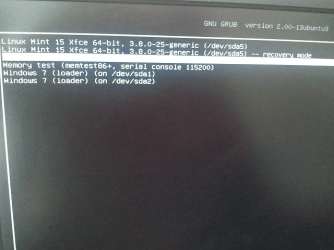
This has resulted in me having 2 options for Windows 7 on my boot menu. Near as I can tell they are the same, but Windows updates don't "take" on the first one. And if I use the second W7 option, those updates will be rolled back as soon as I boot into the first one.

Any ideas?
 

My Computer My Computer

At a glance

Windows 7 64 bit Home Premium OEMAMD Phenom II x4 840DDR3 8mb (Kingston 9905403 & Corsair cmx4gx3m...nvidia GeForce GT640
Computer type
PC/Desktop
Computer Manufacturer/Model Number
Custom
OS
Windows 7 64 bit Home Premium OEM
CPU
AMD Phenom II x4 840
Motherboard
ASUS M4a87td/USB3
Memory
DDR3 8mb (Kingston 9905403 & Corsair cmx4gx3m1a1600c9)
Graphics Card(s)
nvidia GeForce GT640
The two entries are actually usually for two different installs of Windows. It seems likely that you did a side-by-side clean install, rather than a repair install.

I believe that this is not related to updates, per se - so I'm going to ask that the thread be moved to a more appropriate forum section - Performance & Maintenance - Windows 7 Help Forums - so that you can get better assistance. I'll also flag the thread so that others know it's coming.
 

My Computer My Computer

At a glance

Win 7 x64 Home Premium (and x86 VirtualBox VM...i3 370M/i7 6500U8GB - finally :)/8GBit's an i3, dude!/dual Intel&nVidia
Computer type
Laptop
Computer Manufacturer/Model Number
Asus K52F or Lenovo B51-80
OS
Win 7 x64 Home Premium (and x86 VirtualBox VM)/Win10
CPU
i3 370M/i7 6500U
Motherboard
Asus/Lenovo
Memory
8GB - finally :)/8GB
Graphics Card(s)
it's an i3, dude!/dual Intel&nVidia
Sound Card
onboard
Monitor(s) Displays
15.6" built-in
Screen Resolution
1366x768/1920x1080
Hard Drives
750GB Seagate internal
Sundry external drives attached to other computers on the local network
1TB SSD on the Lenovo
PSU
n/a
Internet Speed
as much as I can get - usually on a dongle/phone, so <1MB/s
Antivirus
MSE/Defender
Browser
IE11/12/Edge/Chrome/FF(if I must)
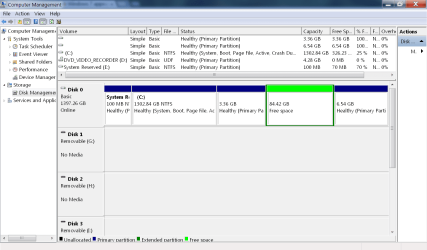
This is certainly, not my area of expertise, if I have one. I'm sure others will be along shortly much more versed in this than me, including Noel. But, I think posting a screenshot of Disk Management will help a lot. http://www.sevenforums.com/tutorials/274797-disk-management-post-screen-capture-image.html
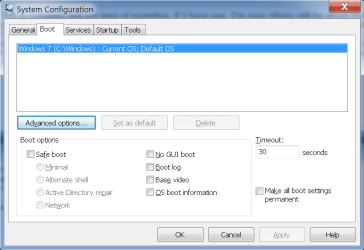
Also, could you post a screenshot (http://www.sevenforums.com/tutorials/9733-screenshots-files-upload-post-seven-forums.html) of msconfig, boot tab. Hold down the Windows key (the one with the flag on it) and press R key. Type msconfig in the search box and click on the boot tab. Please post a screenshot of that.
 

My Computers My Computers

  • At a glance

    Windows 11 ProRyzen 9 5900X32GB G Skill DDR4-3600EVGA RTX 3080 FTW 3 Ultra
    Computer type
    PC/Desktop
    Computer Manufacturer/Model Number
    ALWAYS UNDER CONSTRUCTION
    OS
    Windows 11 Pro
    CPU
    Ryzen 9 5900X
    Motherboard
    Asus X570 Crosshair Viii Hero
    Memory
    32GB G Skill DDR4-3600
    Graphics Card(s)
    EVGA RTX 3080 FTW 3 Ultra
    Sound Card
    On Board/Sennheiser PC37X Headset
    Monitor(s) Displays
    3 X Asus 27"
    Screen Resolution
    2560x1440
    Hard Drives
    2 X 1 TB NVME drives
    PSU
    EVGA 850
    Case
    Phanteks Eclipse P400A
    Cooling
    EVGA 280 AIO
    Keyboard
    Logitech G510s/ Logitech G13
    Mouse
    Logitech G502
    Internet Speed
    24/1
    Antivirus
    ESET/MBAM Pro/SAS Pro
    Browser
    Chrome/ Firefox/ Edge
  • At a glance

    Windows 11 ProIntel Ultra 9 288V32 GB LPDDR5X 8533
    Computer type
    Laptop
    System Manufacturer/Model Number
    Dell 16 Plus
    OS
    Windows 11 Pro
    CPU
    Intel Ultra 9 288V
    Memory
    32 GB LPDDR5X 8533
    Monitor(s) Displays
    16" Mini-LED HDR600 Touch 90 Hz
    Screen Resolution
    2560X1600
    Hard Drives
    1 TB NVME
Last edited:

My Computer My Computer

At a glance

Multi-Boot W7_Pro_x64 W8.1_Pro_x64 W10_Pro_x6...AMD Athlon II x4 6206GB GSkill DDR2 800AMD 4670 GPU + AMD 4200 IGP
Computer type
PC/Desktop
Computer Manufacturer/Model Number
home built
OS
Multi-Boot W7_Pro_x64 W8.1_Pro_x64 W10_Pro_x64 +Linux_VMs +Chromium_VM
CPU
AMD Athlon II x4 620
Motherboard
Gigabyte GA-MA785G-UD3H
Memory
6GB GSkill DDR2 800
Graphics Card(s)
AMD 4670 GPU + AMD 4200 IGP
Sound Card
on board Realtek ALC889A
Monitor(s) Displays
RCA 40" LCD TV, Insignia 32" LCD TV, HP 15" LCD monitor
Screen Resolution
1680 x 1050
Hard Drives
OCZ Vertex 3 120GB,
Samsung F3 1TB (3),
Several others - WD, Seagate, Hitachi, ...
PSU
Corsair 500 W
Case
Rosewill mid tower
Cooling
CM 90mm rifle
Keyboard
Gyration wireless, Logitech wireless, Dell USB wired
Mouse
Gyration wireless, Logitech wireless, V7 USB wired
Internet Speed
Spectrum - 100Mbps D / 10Mbps U
Antivirus
Avast, MBAM3, EMET, WinPatrol
Browser
Pale Moon, Firefox, IE
Other Info
2 multi-boot PC's
Mainly HTPC/Office/Gen purpose (no gaming).
Trendnet USB KVM.
LG DVD burner/Blue Ray Player.
Tray system for removable SATA backup drives.

Not currently OCd, under-volted.
I use Hybrid sleep, rarely re-boot or shutdown.

Hauppauge HD-PVR, Avermedia PCIe TV Tuner, Hauppauge PCI TV Tuner.
^ I know the feeling...

Anyway, as suspected, only one listing of W7 in the msconfig boot menu. I should perhaps mention again that both options seem to boot into Windows with the same settings etc- it's just that one doesn't allow Windows Update to work and will roll back updates made in the second, if booted into.
 

Attachments

  • win1.png
    win1.png
    15.6 KB · Views: 2
  • win2.png
    win2.png
    42.2 KB · Views: 7

My Computer My Computer

At a glance

Windows 7 64 bit Home Premium OEMAMD Phenom II x4 840DDR3 8mb (Kingston 9905403 & Corsair cmx4gx3m...nvidia GeForce GT640
Computer type
PC/Desktop
Computer Manufacturer/Model Number
Custom
OS
Windows 7 64 bit Home Premium OEM
CPU
AMD Phenom II x4 840
Motherboard
ASUS M4a87td/USB3
Memory
DDR3 8mb (Kingston 9905403 & Corsair cmx4gx3m1a1600c9)
Graphics Card(s)
nvidia GeForce GT640
You have a System Reserved partition with the drive letter [E].
Normally this partition is used for booting (with no drive letter) and is the active partition.
I don't have a System Reserved partition on my PCs.
Maybe someone here knows if that might be causing your issue.

Can you post a screen print or paste the results of running the bcdedit command from an Elevated Command prompt?
http://www.sevenforums.com/tutorials/783-elevated-command-prompt.html
http://www.sevenforums.com/tutorials/21874-command-prompt-copy-clipboard.html

Here is an example of what I see - I re-sized the CMD window so I can see everything in one "screen print".
bcdeditSP01.PNG
 

My Computer My Computer

At a glance

Multi-Boot W7_Pro_x64 W8.1_Pro_x64 W10_Pro_x6...AMD Athlon II x4 6206GB GSkill DDR2 800AMD 4670 GPU + AMD 4200 IGP
Computer type
PC/Desktop
Computer Manufacturer/Model Number
home built
OS
Multi-Boot W7_Pro_x64 W8.1_Pro_x64 W10_Pro_x64 +Linux_VMs +Chromium_VM
CPU
AMD Athlon II x4 620
Motherboard
Gigabyte GA-MA785G-UD3H
Memory
6GB GSkill DDR2 800
Graphics Card(s)
AMD 4670 GPU + AMD 4200 IGP
Sound Card
on board Realtek ALC889A
Monitor(s) Displays
RCA 40" LCD TV, Insignia 32" LCD TV, HP 15" LCD monitor
Screen Resolution
1680 x 1050
Hard Drives
OCZ Vertex 3 120GB,
Samsung F3 1TB (3),
Several others - WD, Seagate, Hitachi, ...
PSU
Corsair 500 W
Case
Rosewill mid tower
Cooling
CM 90mm rifle
Keyboard
Gyration wireless, Logitech wireless, Dell USB wired
Mouse
Gyration wireless, Logitech wireless, V7 USB wired
Internet Speed
Spectrum - 100Mbps D / 10Mbps U
Antivirus
Avast, MBAM3, EMET, WinPatrol
Browser
Pale Moon, Firefox, IE
Other Info
2 multi-boot PC's
Mainly HTPC/Office/Gen purpose (no gaming).
Trendnet USB KVM.
LG DVD burner/Blue Ray Player.
Tray system for removable SATA backup drives.

Not currently OCd, under-volted.
I use Hybrid sleep, rarely re-boot or shutdown.

Hauppauge HD-PVR, Avermedia PCIe TV Tuner, Hauppauge PCI TV Tuner.
Here you go:


Code:
Microsoft Windows [Version 6.1.7601]
Copyright (c) 2009 Microsoft Corporation.  All rights reserved.

C:\Windows\system32>bcdedit

Windows Boot Manager
--------------------
identifier              {bootmgr}
device                  partition=C:
description             Windows Boot Manager
locale                  en-US
inherit                 {globalsettings}
default                 {current}
resumeobject            {8e835845-eab8-11e2-9891-d77fab6d3645}
displayorder            {current}
toolsdisplayorder       {memdiag}
timeout                 30

Windows Boot Loader
-------------------
identifier              {current}
device                  partition=C:
path                    \Windows\system32\winload.exe
description             Windows 7
locale                  en-US
inherit                 {bootloadersettings}
recoverysequence        {8e835847-eab8-11e2-9891-d77fab6d3645}
recoveryenabled         Yes
osdevice                partition=C:
systemroot              \Windows
resumeobject            {8e835845-eab8-11e2-9891-d77fab6d3645}
nx                      OptIn

C:\Windows\system32>

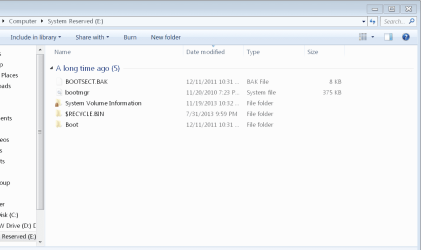
And, for whatever it's worth, attached are the contents of E:\.
 

Attachments

  • win3.png
    win3.png
    20.8 KB · Views: 1

My Computer My Computer

At a glance

Windows 7 64 bit Home Premium OEMAMD Phenom II x4 840DDR3 8mb (Kingston 9905403 & Corsair cmx4gx3m...nvidia GeForce GT640
Computer type
PC/Desktop
Computer Manufacturer/Model Number
Custom
OS
Windows 7 64 bit Home Premium OEM
CPU
AMD Phenom II x4 840
Motherboard
ASUS M4a87td/USB3
Memory
DDR3 8mb (Kingston 9905403 & Corsair cmx4gx3m1a1600c9)
Graphics Card(s)
nvidia GeForce GT640
I'm really not sure :(
I left a message for gregrocker asking him to look at this thread.
He's an installation guru and may know what's causing the issue.
 

My Computer My Computer

At a glance

Multi-Boot W7_Pro_x64 W8.1_Pro_x64 W10_Pro_x6...AMD Athlon II x4 6206GB GSkill DDR2 800AMD 4670 GPU + AMD 4200 IGP
Computer type
PC/Desktop
Computer Manufacturer/Model Number
home built
OS
Multi-Boot W7_Pro_x64 W8.1_Pro_x64 W10_Pro_x64 +Linux_VMs +Chromium_VM
CPU
AMD Athlon II x4 620
Motherboard
Gigabyte GA-MA785G-UD3H
Memory
6GB GSkill DDR2 800
Graphics Card(s)
AMD 4670 GPU + AMD 4200 IGP
Sound Card
on board Realtek ALC889A
Monitor(s) Displays
RCA 40" LCD TV, Insignia 32" LCD TV, HP 15" LCD monitor
Screen Resolution
1680 x 1050
Hard Drives
OCZ Vertex 3 120GB,
Samsung F3 1TB (3),
Several others - WD, Seagate, Hitachi, ...
PSU
Corsair 500 W
Case
Rosewill mid tower
Cooling
CM 90mm rifle
Keyboard
Gyration wireless, Logitech wireless, Dell USB wired
Mouse
Gyration wireless, Logitech wireless, V7 USB wired
Internet Speed
Spectrum - 100Mbps D / 10Mbps U
Antivirus
Avast, MBAM3, EMET, WinPatrol
Browser
Pale Moon, Firefox, IE
Other Info
2 multi-boot PC's
Mainly HTPC/Office/Gen purpose (no gaming).
Trendnet USB KVM.
LG DVD burner/Blue Ray Player.
Tray system for removable SATA backup drives.

Not currently OCd, under-volted.
I use Hybrid sleep, rarely re-boot or shutdown.

Hauppauge HD-PVR, Avermedia PCIe TV Tuner, Hauppauge PCI TV Tuner.
As David said the System Reserved partition is meant to boot Win7 but for some reason your boot files have been moved to C, which we know is now booting Win7 by the presence of the System flag. This is okay but I think I would move the boot partition back to System Reserved to see if it resolves the ghost menu listing.

To do this Create an Image Backup , Mark System Reserved Partition Active, reboot to see if Win7 will start outright. If not then boot into the Win7 installation media or System Repair Disk to run Startup Repair - Run 3 Separate Times no matter what it reports until Win7 starts and System Reserved again and correctly holds the System flag. In the rare case where System Reserved is corrupted and cannot be repaired to start Win7, just move the Active flag back to C using Partition - Mark as Active (Method Two).

You can then remove the System Reserved drive letter, ignoring the warning message: Drive Letter - Add, Change, or Remove in Windows 7 - Windows 7 Forums

You also have two stray small partitions without drive letters which are empty and a larger block of Logical Free Space all of which I would delete to create a new partition in the space, or simply extend C to the right to take up the space. Note that the Free Space must also be deleted using right-click>Delete Partition first to finally be rid of it's Logical container.
Partition or Volume - Delete
Partition or Volume - Create New
Partition or Volume - Extend
 
Last edited:
Thanks Greg!

You stated
"This is okay but I think I would move the boot partition back to Windows 7 to see if it resolves the ghost menu listing."
Is Windows 7 a "typo" and should be System Reserved?

@tsdcs
There is no label on the partition in post #5, but I'm guessing [C] is Windows 7. If it was my PC, I would add a label to that partition for clarity...
 

My Computer My Computer

At a glance

Multi-Boot W7_Pro_x64 W8.1_Pro_x64 W10_Pro_x6...AMD Athlon II x4 6206GB GSkill DDR2 800AMD 4670 GPU + AMD 4200 IGP
Computer type
PC/Desktop
Computer Manufacturer/Model Number
home built
OS
Multi-Boot W7_Pro_x64 W8.1_Pro_x64 W10_Pro_x64 +Linux_VMs +Chromium_VM
CPU
AMD Athlon II x4 620
Motherboard
Gigabyte GA-MA785G-UD3H
Memory
6GB GSkill DDR2 800
Graphics Card(s)
AMD 4670 GPU + AMD 4200 IGP
Sound Card
on board Realtek ALC889A
Monitor(s) Displays
RCA 40" LCD TV, Insignia 32" LCD TV, HP 15" LCD monitor
Screen Resolution
1680 x 1050
Hard Drives
OCZ Vertex 3 120GB,
Samsung F3 1TB (3),
Several others - WD, Seagate, Hitachi, ...
PSU
Corsair 500 W
Case
Rosewill mid tower
Cooling
CM 90mm rifle
Keyboard
Gyration wireless, Logitech wireless, Dell USB wired
Mouse
Gyration wireless, Logitech wireless, V7 USB wired
Internet Speed
Spectrum - 100Mbps D / 10Mbps U
Antivirus
Avast, MBAM3, EMET, WinPatrol
Browser
Pale Moon, Firefox, IE
Other Info
2 multi-boot PC's
Mainly HTPC/Office/Gen purpose (no gaming).
Trendnet USB KVM.
LG DVD burner/Blue Ray Player.
Tray system for removable SATA backup drives.

Not currently OCd, under-volted.
I use Hybrid sleep, rarely re-boot or shutdown.

Hauppauge HD-PVR, Avermedia PCIe TV Tuner, Hauppauge PCI TV Tuner.
Yes, thanks David. Corrected.

We also know that C is Win7 because it holds the Boot flag showing the presently booted OS.
 
As David said the System Reserved partition is meant to boot Win7 but for some reason your boot files have been moved to C, which we know is now booting Win7 by the presence of the System flag. This is okay but I think I would move the boot partition back to System Reserved to see if it resolves the ghost menu listing.

To do this Create an Image Backup , Mark System Reserved Partition Active, reboot to see if Win7 will start outright. If not then boot into the Win7 installation media or System Repair Disk to run Startup Repair - Run 3 Separate Times no matter what it reports until Win7 starts and System Reserved again and correctly holds the System flag. In the rare case where System Reserved is corrupted and cannot be repaired to start Win7, just move the Active flag back to C using Partition - Mark as Active (Method Two).

You can then remove the System Reserved drive letter, ignoring the warning message: Drive Letter - Add, Change, or Remove in Windows 7 - Windows 7 Forums

You also have two stray small partitions without drive letters which are empty and a larger block of Logical Free Space all of which I would delete to create a new partition in the space, or simply extend C to the right to take up the space. Note that the Free Space must also be deleted using right-click>Delete Partition first to finally be rid of it's Logical container.
Partition or Volume - Delete
Partition or Volume - Create New
Partition or Volume - Extend

Hello there- I apologize for my absence.

I marked the System Reserved partition as active, and upon restart, didn't have any problems getting into Windows- same as always. After restarting, I removed the drive letter, as recommended.

However, I still see two entries for Windows 7 on my boot menu, as before- Would running a Startup Repair still be advisable?

Or should I delete the boot files from the C:\ drive? If so, which files? Would be the same ones that were in the E:\ drive?


Code:
Microsoft Windows [Version 6.1.7601]
Copyright (c) 2009 Microsoft Corporation.  All rights reserved.

C:\Windows\System32>bcdedit

Windows Boot Manager
--------------------
identifier              {bootmgr}
device                  partition=\Device\HarddiskVolume1
description             Windows Boot Manager
locale                  en-US
inherit                 {globalsettings}
default                 {default}
resumeobject            {ee0819e5-248a-11e1-bafc-b762884a59b8}
displayorder            {default}
toolsdisplayorder       {memdiag}
timeout                 15

Windows Boot Loader
-------------------
identifier              {default}
device                  partition=C:
path                    \Windows\system32\winload.exe
description             Windows 7
locale                  en-US
inherit                 {bootloadersettings}
recoverysequence        {ee0819e7-248a-11e1-bafc-b762884a59b8}
recoveryenabled         Yes
testsigning             No
osdevice                partition=C:
systemroot              \Windows
resumeobject            {ee0819e5-248a-11e1-bafc-b762884a59b8}
nx                      OptIn
bootlog                 No

C:\Windows\System32>


edit: Hmmm...after restarting again, System Reserved partition is E:\ again...
edit2: shows up as E:\ in the first Windows 7 option in the boot menu (in Windows Explorer, bcdedit), but not if I boot using the second Windows 7 option listed in the boot menu.

No drive letter associated in Disk Management in both versions, and drive is marked as active in both versions.

I tried to do a boot repair with the Windows 7 disc, but I didn't proceed because the drive letters were different. It seems to want to repair C:\, which it lists as being D:\, IIRC.
 
Last edited:

My Computer My Computer

At a glance

Windows 7 64 bit Home Premium OEMAMD Phenom II x4 840DDR3 8mb (Kingston 9905403 & Corsair cmx4gx3m...nvidia GeForce GT640
Computer type
PC/Desktop
Computer Manufacturer/Model Number
Custom
OS
Windows 7 64 bit Home Premium OEM
CPU
AMD Phenom II x4 840
Motherboard
ASUS M4a87td/USB3
Memory
DDR3 8mb (Kingston 9905403 & Corsair cmx4gx3m1a1600c9)
Graphics Card(s)
nvidia GeForce GT640
What is on the other unlettered partitions strewn across the hard drive, and why are they there and unlettered? Did you have a Linux install at one point? I would back up their data and delete all of them, including the Logical partition Free Space which will require deleting again in order to make it Unallocated. Then create a data partition in the Unallocated space remaining, or extend C into it.

Remove the System Reserved drive letter, boot into http://www.sevenforums.com/tutorials/668-system-recovery-options.html on disk to run Startup Repair a few times to see if it finds anything to repair.

If Dual Boot menu remains, install EasyBCD Download - NeoSmart Technologies (no name or email required) to delete the other entry on Edit OS Menu tab.

Post back a Disk Mgmt screenshot.
 
Thanks for the quick reply!

What is on the other unlettered partitions strewn across the hard drive, and why are they there and unlettered? Did you have a Linux install at one point? I would back up their data and delete all of them, including the Logical partition Free Space which will require deleting again in order to make it Unallocated. Then create a data partition in the Unallocated space remaining, or extend C into it.
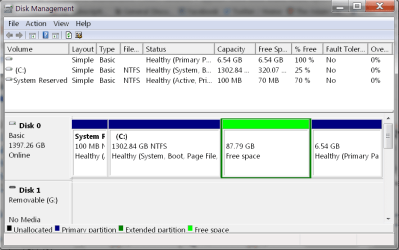
Yes, I have Linux Mint installed. As for the other unnamed partition, it has somehow resolved itself- it may have been the changing of the boot partition, or may have been something else. Either way, it's now blanks space, with the only remaining partitions being System/C drive/Linux Mint. See attached picture.

Remove the System Reserved drive letter, boot into http://www.sevenforums.com/tutorials/668-system-recovery-options.html on disk to run Startup Repair a few times to see if it finds anything to repair.
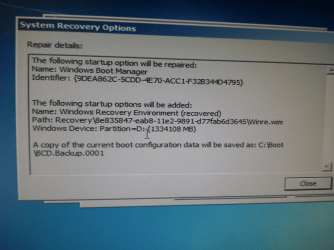
Ran Startup Repair 3 times as advised, though only the first time did anything- afterward I just got messages saying that Windows couldn't detect any startup errors. System drive letter has already been removed.

If Dual Boot menu remains, install EasyBCD Download - NeoSmart Technologies (no name or email required) to delete the other entry on Edit OS Menu tab.

Post back a Disk Mgmt screenshot.

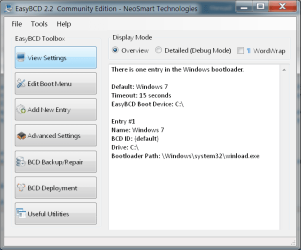
EasyBCD just shows one OS- the Windows 7 booting from the System Reserved partition. So I'll have to wade into the Linux Mint install to remove one of the Windows 7 options from the boot menu, because it's picking up both the boot options still on C:\ as well as the ones on the System Reserved partition.
 

Attachments

  • win6.png
    win6.png
    159.9 KB · Views: 0
  • win5.png
    win5.png
    114.8 KB · Views: 15
  • win7.png
    win7.png
    24.8 KB · Views: 0
  • win4.png
    win4.png
    26.9 KB · Views: 0

My Computer My Computer

At a glance

Windows 7 64 bit Home Premium OEMAMD Phenom II x4 840DDR3 8mb (Kingston 9905403 & Corsair cmx4gx3m...nvidia GeForce GT640
Computer type
PC/Desktop
Computer Manufacturer/Model Number
Custom
OS
Windows 7 64 bit Home Premium OEM
CPU
AMD Phenom II x4 840
Motherboard
ASUS M4a87td/USB3
Memory
DDR3 8mb (Kingston 9905403 & Corsair cmx4gx3m1a1600c9)
Graphics Card(s)
nvidia GeForce GT640
The System flag is still on C which means it is still booting Win7. I thought it had moved to System Reserved.

If System will not move to System Reserved as it was originally set up, after running 3 Startup Repairs with only the System Resrved partition marked Active, then the only other way to force it is to convert C to Logical so it cannot boot Win7 and then run the 3 Repairs with System Reserved marked Active. How to set partition as Primary or Logical with Partition Wizard . But due to possibility of failure I would not do this unless you are wanting to experiment and first back up a System image and your files.

So if you cannot move the System Flag to System Reserved so that it is booting Win7 again, I would Mark C Partition Active, Test if it still boots. Then you can delete System Reserved in Disk Mgmt.

Back up a System Image of C and your files first.

Your Linux install may have corrupted the Win7 bootloader on System Reserved. For future reference the best way to add Linux to Win7 Dual Boot is given here: http://www.sevenforums.com/installation-setup/83923-where-install-ubuntu-my-system.html#post733626
 
Last edited:
Thanks for your help. The Windows Update issue seems to be resolved.

I made C:\ active and restarted my PC- this upset my boot order and my HDD wasn't showing up in BIOS menu, but I was able to reset that (shut off PC, unplug HDD from motherboard, plug back in, power on). Recreated the System Reserved partition and did a couple of Startup Repairs. Now I get some sort of error message about a missing file whenever I try to boot from the first Windows 7 option listed in the boot menu, but I don't take that to be bad news.

I ended up messing with the boot menu and setting the 2nd Windows 7 option listed to being the default (the one pulling from the System Reserved partition). Hindsight being 20/20, I should have just done this from the outset- but if you want to learn about something you have to put some time in...


Anyway, thanks to you all, again, especially gregrocker.
 

My Computer My Computer

At a glance

Windows 7 64 bit Home Premium OEMAMD Phenom II x4 840DDR3 8mb (Kingston 9905403 & Corsair cmx4gx3m...nvidia GeForce GT640
Computer type
PC/Desktop
Computer Manufacturer/Model Number
Custom
OS
Windows 7 64 bit Home Premium OEM
CPU
AMD Phenom II x4 840
Motherboard
ASUS M4a87td/USB3
Memory
DDR3 8mb (Kingston 9905403 & Corsair cmx4gx3m1a1600c9)
Graphics Card(s)
nvidia GeForce GT640
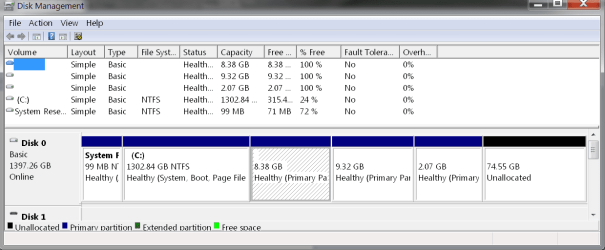
Code:
System Reserved
Healthy (Active, Primary Parition)

C: 
Healthy (System, Boot, Page File Crash Dump, Primary Partition)

*8.3gb
Healthy (Primary Parition)

*9.32gb
Healthy (Primary Parition)

*2.07
Healthy (Primary Parition)

74.55bg
Unallocated

*From Linux Mint reinstall; untitled partitions are data/home/swap partitions for Linux Mint 16.
 

Attachments

  • win8.png
    win8.png
    22.6 KB · Views: 1

My Computer My Computer

At a glance

Windows 7 64 bit Home Premium OEMAMD Phenom II x4 840DDR3 8mb (Kingston 9905403 & Corsair cmx4gx3m...nvidia GeForce GT640
Computer type
PC/Desktop
Computer Manufacturer/Model Number
Custom
OS
Windows 7 64 bit Home Premium OEM
CPU
AMD Phenom II x4 840
Motherboard
ASUS M4a87td/USB3
Memory
DDR3 8mb (Kingston 9905403 & Corsair cmx4gx3m1a1600c9)
Graphics Card(s)
nvidia GeForce GT640
C is still booting itself as signified by the System flag. It should also be marked Active. Mark Partition Active

The 100mb System Reserved is not being used. Since you are only allowed 4 Primary partitions there is something wrong with your configuration that it allows you 5. So I'd delete System Reserved to be safe.

Delete the stray OS listing if it shows up in EasyBCD, on the Edit OS Menu tab.

You can distribute that 75gb unallocated space to any of the partitions using How to extend partition easily with Partition Wizard - video help.

To create a new partition out of it you'll need to first convert the adjacent partition to Logical since you can have 3 Primary and unlimited Logical. How to set partition as Primary or Logical with Partition Wizard
 
Back
Top