AHCI : Enable in Windows 7 / Vista

AHCI : Enable in Vista and Windows 7 after OS install


   Information
AHCI Advanced Host Controller Interface makes NCQ Native Command Queing along with hot-plugging or hot swapping through SATA Serial-ATA host controllers possible; Vista was the first to offer this feature. The issue with AHCI is it needs to be enabled in the BIOS prior to OS installation; doing so after you have installed the OS will disable the PC. The reason why is Windows disables the AHCI drivers not needed durring installation.

This tutorial will show you how to enable AHCI after you have installed the OS if you didn't already have AHCI enable in the BIOS when you installed the OS.

   Warning
Changing values in the Windows registry can disable your machine; if you're not sure how to do this please post a question in this tutorial and someone will be glad to help you.
   Note
This method will also work for Windows Vista though the default DWORD string value in Vista will be "4" where it will be "3" in Windows 7.

As a precaution it would be a good idea to create a "System Restore Point" before you start this, the tutorial can be found at the link below.

System Restore Point - Create


Let's get started!
1) In the Windows start menu search box type regedit, right click the entry, click Run as Administrator, enter your user credentials for the UAC prompt, then click yes to open regedit.

Start_Regedit.jpg
UAC_Regedit.jpg

2) In regedit navigate to HKEY_LOCAL_MACHINE\SYSTEM\CurrentControlSet\services.

3) In the left pane, click on msahci, in the right pane double click on Start to modify it.
RegEdit1.jpg
RegEdit2.jpg
4) In the window that opens change the value to 0 (zero), and click OK.
RegEdit3.jpg
5) In the left pane, click on iaStorV (if there), in the right pane double click on Start to modify it. Repeat step 4, and go to step 6 below.

NOTE: From: Error message occurs after you change the SATA mode of the boot drive

6) Close Registry Editor.
7) Now you'll need to restart the PC and go into the BIOS and enable AHCI. When Windows boots up, it will finish installing the AHCI drivers.

AHCI Driver.jpg
AHCI Driver2.jpg

8) You will need one final restart to finish the process after the drivers are installed.

Restart.jpg
   Note
For those with nForce boards, have a look at the Information post below.

The method was worked out by Everlong and credit for that goes to him, thanks mate!


Enjoy! :)


Last edited by a moderator:
Hello

Quick question

I had the OS installed already, so I did the registry thing and it all worked. I had to change 2 things on my BIOs though. Had to put AHCI and enable Intel Rapid Start Technology.

I had already installed the latest Intel RST driver from my MOBO along with the other mobo drivers when I installed the OS.

My question is: Should I install that driver again now that I activated the AHCI? Because from what I see, when I did the switch, windows installed it's own AHCI drivers, did not use the one I installed before when I didn't even realized my system was installed in IDE and had no AHCI activated.
 

My Computer My Computer

At a glance

Windows 7 Ultimate 64biti5 35508GB Corsair Vengeance 1600ATI Radeon R9 280X
Computer type
PC/Desktop
OS
Windows 7 Ultimate 64bit
CPU
i5 3550
Motherboard
Gigabyte B75m D3H
Memory
8GB Corsair Vengeance 1600
Graphics Card(s)
ATI Radeon R9 280X
Hard Drives
SSD 120gb
HD 500GB
Antivirus
Avira
Browser
Google Chrome
Hello Roy,

If it's a newer driver version, it wouldn't hurt anything to reinstall it if you like. :)
 

My Computer My Computer

At a glance

64-bit Windows 11 Pro for WorkstationsIntel i7-8700K OC'd to 5 GHz64 GB (4x16GB) G.SKILL TridentZ RGB DDR4 3600...ASUS ROG-STRIX-GTX1080TI-O11G-GAMING
Computer type
PC/Desktop
Computer Manufacturer/Model Number
Self built custom
OS
64-bit Windows 11 Pro for Workstations
CPU
Intel i7-8700K OC'd to 5 GHz
Motherboard
ASUS ROG Maximus XI Formula Z390
Memory
64 GB (4x16GB) G.SKILL TridentZ RGB DDR4 3600 MHz
Graphics Card(s)
ASUS ROG-STRIX-GTX1080TI-O11G-GAMING
Sound Card
Integrated
Monitor(s) Displays
2 x Samsung Odyssey G7 27"
Screen Resolution
2560x1440
Hard Drives
1TB Samsung 990 PRO M.2,
4TB Samsung 990 PRO PRO M.2,
TerraMaster F8 SSD Plus NAS
PSU
Seasonic Prime Titanium 850W
Case
Thermaltake Core P3
Cooling
Corsair Hydro H115i
Keyboard
Logitech wireless K800
Mouse
Logitech MX Master 4
Internet Speed
2 Gb/s Download and 100 Mb/s Upload
Antivirus
Malwarebyte Anti-Malware Premium
Browser
Google Chrome
Other Info
Logitech Z625 speaker system,
Logitech BRIO 4K Pro webcam,
HP Color LaserJet Pro MFP M477fdn,
APC SMART-UPS RT 1000 XL - SURT1000XLI,
Galaxy S23 Plus phone
Hello Roy,

If it's a newer driver version, it wouldn't hurt anything to reinstall it if you like. :)

Hi Brink

Yes it is newer than windows driver for sure.
My only doubt is, I had already installed it. But I didnt have AHCI before nor did I used Intel RST, cause I installed my system in IDE.

I did that switch to AHCi today. Windows detected the AHCI and gave me a msg that it was installed and ready to use. The fact that I had already installed it before could be a problem?

System is working great and I felt a good difference from IDE.
 

My Computer My Computer

At a glance

Windows 7 Ultimate 64biti5 35508GB Corsair Vengeance 1600ATI Radeon R9 280X
Computer type
PC/Desktop
OS
Windows 7 Ultimate 64bit
CPU
i5 3550
Motherboard
Gigabyte B75m D3H
Memory
8GB Corsair Vengeance 1600
Graphics Card(s)
ATI Radeon R9 280X
Hard Drives
SSD 120gb
HD 500GB
Antivirus
Avira
Browser
Google Chrome
No worries. It won't hurt anything. :)
 

My Computer My Computer

At a glance

64-bit Windows 11 Pro for WorkstationsIntel i7-8700K OC'd to 5 GHz64 GB (4x16GB) G.SKILL TridentZ RGB DDR4 3600...ASUS ROG-STRIX-GTX1080TI-O11G-GAMING
Computer type
PC/Desktop
Computer Manufacturer/Model Number
Self built custom
OS
64-bit Windows 11 Pro for Workstations
CPU
Intel i7-8700K OC'd to 5 GHz
Motherboard
ASUS ROG Maximus XI Formula Z390
Memory
64 GB (4x16GB) G.SKILL TridentZ RGB DDR4 3600 MHz
Graphics Card(s)
ASUS ROG-STRIX-GTX1080TI-O11G-GAMING
Sound Card
Integrated
Monitor(s) Displays
2 x Samsung Odyssey G7 27"
Screen Resolution
2560x1440
Hard Drives
1TB Samsung 990 PRO M.2,
4TB Samsung 990 PRO PRO M.2,
TerraMaster F8 SSD Plus NAS
PSU
Seasonic Prime Titanium 850W
Case
Thermaltake Core P3
Cooling
Corsair Hydro H115i
Keyboard
Logitech wireless K800
Mouse
Logitech MX Master 4
Internet Speed
2 Gb/s Download and 100 Mb/s Upload
Antivirus
Malwarebyte Anti-Malware Premium
Browser
Google Chrome
Other Info
Logitech Z625 speaker system,
Logitech BRIO 4K Pro webcam,
HP Color LaserJet Pro MFP M477fdn,
APC SMART-UPS RT 1000 XL - SURT1000XLI,
Galaxy S23 Plus phone
First off, I'd like to thank BFK for saving me the hassle of having to reinstall everything. I'm posting this in case anyone runs into the scenario I just went through..

My specs: Lenovo M57 6072 SFF with dual core Intel. Sandisk 128G SSD - 4 gigs ram.
I'd like to let everyone who reads this know what I went through after making the changes, in order to get back to Windows 7 desktop. When I rebuilt this Lenovo M57, I upgraded the BIOS, which defaulted my SATA from ACHI to IDE. It was my fault for not checking, but there it was.

After making the changes per BFK's instructions, I rebooted into the BIOS and made the change. After saving and rebooting again, I kept getting an error: 1962 "BOOT FROM ACHI CD-Rom" and it went into a constant loop. I had the option of hitting F1, but that would take me right back to the error.

I went into my BIOS again and found that my boot sequence had a 'standard IDE and IDE CD-rom' .. but at the bottom of my boot list in the 'excluded' area sat my exact SSD and CD-Rom. I was able to move those up into my process list, then select them as primary and it booted to Windows, where it installed the correct drivers, so I rebooted a few times, and believe I should be good to go.

Thanks and GL
 

My Computer My Computer

At a glance

Windows 7 Ultimate X64-Professional X64-Home ...6 core - 4 core - dual coreG-Skill - PatriotGalaxy GTX 570 - Galaxy GT 610 - EVGA GTX460 ...
Computer type
PC/Desktop
Computer Manufacturer/Model Number
custom builds
OS
Windows 7 Ultimate X64-Professional X64-Home Premium 32
CPU
6 core - 4 core - dual core
Motherboard
Asus and Gigabyte
Memory
G-Skill - Patriot
Graphics Card(s)
Galaxy GTX 570 - Galaxy GT 610 - EVGA GTX460 - EVGA GT640
Hard Drives
OCZ SSD - Intel SSD - Sandisk SSD - Crucial SSD and various IDE
Antivirus
MSE
Browser
Firefox
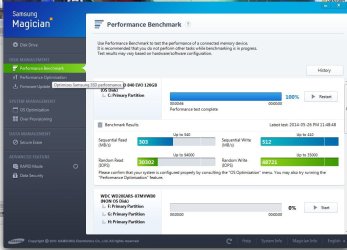
Thanks so much for the tutorial. I seem to be having an issue however. I recently upgraded my SSD drive from a tiny one to a bigger Samsung 840 EVO. After cloning the old drive over I ran the managment tool and was then informed about ahci mode. and that was why my benchmarks were so low. Sequential reads 250 writes 237mb/s random read/write 8967/20963 IOPS for reference. I followed the tutorial and switching to AHCI mode in the bios is causing windows to get to windows boot screen but then bsods. It never tries to install any other drivers. If I switch it back to IDE in the bios it boots and runs fine. I'm quite confused as I'm not sure what else to do. I really feel reinstalling windows is not an option. Is there anything else I can try? Included the BSoD reports if that might help.
 

Attachments

My Computer My Computer

At a glance

Windows 7 ultimate 64bitAMD Phenom II X4 955 Black Edition Deneb 3.2G...G.SKILL Ripjaws X Series 8GB (2 x 4GB) 240-Pi...XFX HD-577A-ZNFC Radeon HD 5770 (Juniper XT) ...
Computer type
PC/Desktop
Computer Manufacturer/Model Number
Custom
OS
Windows 7 ultimate 64bit
CPU
AMD Phenom II X4 955 Black Edition Deneb 3.2GHz Socket AM3
Motherboard
ASUS M4A78T-E AM3 AMD 790GX HDMI ATX AMD Motherboard
Memory
G.SKILL Ripjaws X Series 8GB (2 x 4GB) 240-Pin DDR3 SDRAM D
Graphics Card(s)
XFX HD-577A-ZNFC Radeon HD 5770 (Juniper XT) 1GB 128-Bit GD
Hard Drives
Western Digital WD Green WD20EARS 2TB 64MB Cache SATA 3.0Gb/s 3.5" Internal Hard Drive , SAMSUNG 840 EVO MZ-7TE120KW 2.5" TLC Internal Solid State Drive
Antivirus
Security essentials
Browser
Firefox
ghaleon636: I'm not sure what troubleshooting you have performed so far, but you do have some options. I'm going to recommend a few things, and I'll go in order that is fastest.. the last could be time consuming. I am hoping you have not deleted or already reused your 'tiny SSD', and the original OS is still intact ..X,

Not knowing the exact date you installed the new SSD, there is an EVENT LOG note from May 25th referencing the Samsung Magician software. If your old SSD was the Samsung, try to remove the software in Safe Mode. Have you checked, or updated the firmware on your new SSD?

I'm also not sure about your time factor. I'm a tinkerer, so for me, if it's not a production PC.. it's play time. Going back to the changeover to ACHI.. the 1st step I'd ask is, did you check your registry for the "iaStorv"? It's in the tutorial on page 1, and could be easily missed. If you did, then have you tried to boot into Safe Mode With Networking to see if your PC will allow you to possibly auto-update the ACHI drivers? My computer had to do that after I rebooted the 1st time.

Here is a link in the forum regarding how to get help with BSOD's. http://www.sevenforums.com/bsod-help-support/96879-blue-screen-death-bsod-posting-instructions.html

GL!
 

My Computer My Computer

At a glance

Windows 7 Ultimate X64-Professional X64-Home ...6 core - 4 core - dual coreG-Skill - PatriotGalaxy GTX 570 - Galaxy GT 610 - EVGA GTX460 ...
Computer type
PC/Desktop
Computer Manufacturer/Model Number
custom builds
OS
Windows 7 Ultimate X64-Professional X64-Home Premium 32
CPU
6 core - 4 core - dual core
Motherboard
Asus and Gigabyte
Memory
G-Skill - Patriot
Graphics Card(s)
Galaxy GTX 570 - Galaxy GT 610 - EVGA GTX460 - EVGA GT640
Hard Drives
OCZ SSD - Intel SSD - Sandisk SSD - Crucial SSD and various IDE
Antivirus
MSE
Browser
Firefox
spelingchampeon Thank you for your reply. I have found out what my issue was. Oddly turning on AHCI mode in my motherboard disables the 6th sata port entirely. I had not disconnected the "tiny" ssd and it was still trying to boot from it. I had not changed the registry which was the cause of the bsod. I just swapped out an old drive to move the new ssd to sata1 and it worked like a charm. I had actually done most of what you recommended aside from messing with the firmware on the actual SSD as it's a brand new drive and I don't know if that's a good idea. However the new drive is samsung, and that was the point of installing disk magician. It's great to know at least I was thorough and great minds think alike. :) I'm unsure if this is normal or not though benchmark wise or something else is a problem. It seems kind of on the low end.
 

Attachments

  • benchmark.jpg
    benchmark.jpg
    85.1 KB · Views: 259

My Computer My Computer

At a glance

Windows 7 ultimate 64bitAMD Phenom II X4 955 Black Edition Deneb 3.2G...G.SKILL Ripjaws X Series 8GB (2 x 4GB) 240-Pi...XFX HD-577A-ZNFC Radeon HD 5770 (Juniper XT) ...
Computer type
PC/Desktop
Computer Manufacturer/Model Number
Custom
OS
Windows 7 ultimate 64bit
CPU
AMD Phenom II X4 955 Black Edition Deneb 3.2GHz Socket AM3
Motherboard
ASUS M4A78T-E AM3 AMD 790GX HDMI ATX AMD Motherboard
Memory
G.SKILL Ripjaws X Series 8GB (2 x 4GB) 240-Pin DDR3 SDRAM D
Graphics Card(s)
XFX HD-577A-ZNFC Radeon HD 5770 (Juniper XT) 1GB 128-Bit GD
Hard Drives
Western Digital WD Green WD20EARS 2TB 64MB Cache SATA 3.0Gb/s 3.5" Internal Hard Drive , SAMSUNG 840 EVO MZ-7TE120KW 2.5" TLC Internal Solid State Drive
Antivirus
Security essentials
Browser
Firefox
Glad to see you got it running.. that's the start you needed!

Have you checked to see if your SSD is aligned (offset divisible by 4096) properly? There are a couple of ways to check to see if it's aligned, and I highly recommend checking out this page:
How to: Properly re-align your SSD/HDD partitions

I recommend the AS SSD program, it will tell you about both ACHI and Alignment. It comes recommended from many different websites (including this site :geek:).
 

My Computer My Computer

At a glance

Windows 7 Ultimate X64-Professional X64-Home ...6 core - 4 core - dual coreG-Skill - PatriotGalaxy GTX 570 - Galaxy GT 610 - EVGA GTX460 ...
Computer type
PC/Desktop
Computer Manufacturer/Model Number
custom builds
OS
Windows 7 Ultimate X64-Professional X64-Home Premium 32
CPU
6 core - 4 core - dual core
Motherboard
Asus and Gigabyte
Memory
G-Skill - Patriot
Graphics Card(s)
Galaxy GTX 570 - Galaxy GT 610 - EVGA GTX460 - EVGA GT640
Hard Drives
OCZ SSD - Intel SSD - Sandisk SSD - Crucial SSD and various IDE
Antivirus
MSE
Browser
Firefox
Hi Folks of SevenForums!
Since a few days i'm fighting with my new bought SSD. I'm not able to boot in AHCI mode if i do the windows logo is loading until a blink of a BSOD appears and the system restarts automatically.

The weird part here is that the SSD sometimes is booting if the SATA Mode in BIOS is on SATA and i can enter the Windows 7. Thats a win (although i have to restart the PC sometimes more than 5 times) and i'm so in the range of doing something in windows.
If i change the SATA Mode to AHCI i gets always recognized but i cant skip the BSOD.
So my conclusion was Windows7 has a problem with the AHCI mode so does the internet as it seems ((:
But here is the trick with the registry changes of Msahci and IastorV not working. I changed both to 0 (first only Msahci, later both) and did one restart normally but after changing next to AHCI went to the BSOD again.

I'm wondering if there is any chance of installing the AHCI driver through an other way?

Greetings
chris
 

My Computer My Computer

At a glance

Windows 7 Ultimate x64AMD Phenom X4 9550 (2.2 GHz) Sockel AM2+6GB DDR2 800MhzGeForce 9500 GT 1024MB
Computer type
PC/Desktop
Computer Manufacturer/Model Number
custom build
OS
Windows 7 Ultimate x64
CPU
AMD Phenom X4 9550 (2.2 GHz) Sockel AM2+
Motherboard
ECS GF8100VM-M3 (V1.0)
Memory
6GB DDR2 800Mhz
Graphics Card(s)
GeForce 9500 GT 1024MB
Hard Drives
OCZ Agility3 SSD SATAIII 120GB
Antivirus
Avira
Browser
Firefox
So i solved my problem easily through reinstalling the system with some motherboard specific ahci pre-install drivers. Now the disk is running superb and so is windows :)
 

My Computer My Computer

At a glance

Windows 7 Ultimate x64AMD Phenom X4 9550 (2.2 GHz) Sockel AM2+6GB DDR2 800MhzGeForce 9500 GT 1024MB
Computer type
PC/Desktop
Computer Manufacturer/Model Number
custom build
OS
Windows 7 Ultimate x64
CPU
AMD Phenom X4 9550 (2.2 GHz) Sockel AM2+
Motherboard
ECS GF8100VM-M3 (V1.0)
Memory
6GB DDR2 800Mhz
Graphics Card(s)
GeForce 9500 GT 1024MB
Hard Drives
OCZ Agility3 SSD SATAIII 120GB
Antivirus
Avira
Browser
Firefox
My AHCI was already enabled from bios but in step 5 from the first page the key "iaStorV" was set to "3".
Does that mean anything?
 

My Computer My Computer

At a glance

Windows 7 Ultimate x64Intel i5-6600K 3.50GHzCorsair DDR4 2x8GBMSI GeForce GTX1070 Gaming X
Computer type
PC/Desktop
Computer Manufacturer/Model Number
Custom build
OS
Windows 7 Ultimate x64
CPU
Intel i5-6600K 3.50GHz
Motherboard
Asus Pro Z170 Gaming
Memory
Corsair DDR4 2x8GB
Graphics Card(s)
MSI GeForce GTX1070 Gaming X
Sound Card
On board Realtek
Monitor(s) Displays
Dell SP2309W
Screen Resolution
1920x1080
Hard Drives
OS Samsung 850 EVO 500GB SATA III SSD
2x Hitachi Deskstar 1GB SATA data drives
1x Western Digital Caviar Black 1TB SATA data drive
PSU
Corsair HX650W
Case
CoolerMaster CM 690 III
Cooling
Coolermaster Hyper 212 EVO 1x200mm 1x140mm 2x120mm case fan
Keyboard
Logitech usb keyboard
Mouse
Logitech G500 $27 bargain :)
Internet Speed
ADSL2
Antivirus
Microsoft Security Essential, MalwareBytes
Browser
SRWare Iron, Internet Explorer
Other Info
Very happy with this buid.
I struggled a lot to find all compatible parts since I wanted an Intel 1151 based motherboard so to be able to install Windows 7.
I chose this case because it has amazing air flow, it's sturdy and looks good.
The case included 1x 200mm front and 1x 120mm back fans, I added 1x 200mm on the top and 1x120 bottom fans and modded the panels with black stockings for women s
Hello looked,

For me, "iaStorV" is set to 0 (zero) instead. The "Start" DWORD is for the status of the service.
 

My Computer My Computer

At a glance

64-bit Windows 11 Pro for WorkstationsIntel i7-8700K OC'd to 5 GHz64 GB (4x16GB) G.SKILL TridentZ RGB DDR4 3600...ASUS ROG-STRIX-GTX1080TI-O11G-GAMING
Computer type
PC/Desktop
Computer Manufacturer/Model Number
Self built custom
OS
64-bit Windows 11 Pro for Workstations
CPU
Intel i7-8700K OC'd to 5 GHz
Motherboard
ASUS ROG Maximus XI Formula Z390
Memory
64 GB (4x16GB) G.SKILL TridentZ RGB DDR4 3600 MHz
Graphics Card(s)
ASUS ROG-STRIX-GTX1080TI-O11G-GAMING
Sound Card
Integrated
Monitor(s) Displays
2 x Samsung Odyssey G7 27"
Screen Resolution
2560x1440
Hard Drives
1TB Samsung 990 PRO M.2,
4TB Samsung 990 PRO PRO M.2,
TerraMaster F8 SSD Plus NAS
PSU
Seasonic Prime Titanium 850W
Case
Thermaltake Core P3
Cooling
Corsair Hydro H115i
Keyboard
Logitech wireless K800
Mouse
Logitech MX Master 4
Internet Speed
2 Gb/s Download and 100 Mb/s Upload
Antivirus
Malwarebyte Anti-Malware Premium
Browser
Google Chrome
Other Info
Logitech Z625 speaker system,
Logitech BRIO 4K Pro webcam,
HP Color LaserJet Pro MFP M477fdn,
APC SMART-UPS RT 1000 XL - SURT1000XLI,
Galaxy S23 Plus phone
Hello looked,

For me, "iaStorV" is set to 0 (zero) instead. The "Start" DWORD is for the status of the service.
I'm going to put it back to "3" because my computer is already troubled and changes/attempts are making things worse than ever.

Now I can't even run the repair install "Windows could not retrieve information about the disks on this computer". LOL
Everything started by trying to upgrade from IE8 to IE9, well done M$ LOL :party:
 

My Computer My Computer

At a glance

Windows 7 Ultimate x64Intel i5-6600K 3.50GHzCorsair DDR4 2x8GBMSI GeForce GTX1070 Gaming X
Computer type
PC/Desktop
Computer Manufacturer/Model Number
Custom build
OS
Windows 7 Ultimate x64
CPU
Intel i5-6600K 3.50GHz
Motherboard
Asus Pro Z170 Gaming
Memory
Corsair DDR4 2x8GB
Graphics Card(s)
MSI GeForce GTX1070 Gaming X
Sound Card
On board Realtek
Monitor(s) Displays
Dell SP2309W
Screen Resolution
1920x1080
Hard Drives
OS Samsung 850 EVO 500GB SATA III SSD
2x Hitachi Deskstar 1GB SATA data drives
1x Western Digital Caviar Black 1TB SATA data drive
PSU
Corsair HX650W
Case
CoolerMaster CM 690 III
Cooling
Coolermaster Hyper 212 EVO 1x200mm 1x140mm 2x120mm case fan
Keyboard
Logitech usb keyboard
Mouse
Logitech G500 $27 bargain :)
Internet Speed
ADSL2
Antivirus
Microsoft Security Essential, MalwareBytes
Browser
SRWare Iron, Internet Explorer
Other Info
Very happy with this buid.
I struggled a lot to find all compatible parts since I wanted an Intel 1151 based motherboard so to be able to install Windows 7.
I chose this case because it has amazing air flow, it's sturdy and looks good.
The case included 1x 200mm front and 1x 120mm back fans, I added 1x 200mm on the top and 1x120 bottom fans and modded the panels with black stockings for women s
I followed instructions, but now after restarting it is a black screen and stuck with-

LOADING OPERATING SYSTEM...
MISSING OPERATING SYSTEM

i tried RAID and same.

I changed it back to IDE and it still shows missing operating system.

I now can't boot at all!!!

:eek:
 

My Computer My Computer

At a glance

Win 7 Ultimate 32Intel core i3-2100 310ghz 2 cores4gig RAMStandard VGA
Computer type
PC/Desktop
Computer Manufacturer/Model Number
custom
OS
Win 7 Ultimate 32
CPU
Intel core i3-2100 310ghz 2 cores
Motherboard
Gigabyte H67N-USB3-B3
Memory
4gig RAM
Graphics Card(s)
Standard VGA
Antivirus
None at moment
By pure chance I hit F12 to see if I could get SAFE MODE but it came up with option to boot from CD / HD etc.

I chose HD and then it gave me options from USB3 or something with a long sequence of numbers. I guessed that was my hard drive. It now started Windows.

I guess that is the boot sequence?
 

My Computer My Computer

At a glance

Win 7 Ultimate 32Intel core i3-2100 310ghz 2 cores4gig RAMStandard VGA
Computer type
PC/Desktop
Computer Manufacturer/Model Number
custom
OS
Win 7 Ultimate 32
CPU
Intel core i3-2100 310ghz 2 cores
Motherboard
Gigabyte H67N-USB3-B3
Memory
4gig RAM
Graphics Card(s)
Standard VGA
Antivirus
None at moment
Hello Silver,

The F12 key would be the one to press on your system for the "boot menu" to select what to boot from for that one time.

If you like, check in your BIOS settings to make sure that the same item is selected as 2nd in your boot priority list, and your CD/DVD drive is set as 1st.
 

My Computer My Computer

At a glance

64-bit Windows 11 Pro for WorkstationsIntel i7-8700K OC'd to 5 GHz64 GB (4x16GB) G.SKILL TridentZ RGB DDR4 3600...ASUS ROG-STRIX-GTX1080TI-O11G-GAMING
Computer type
PC/Desktop
Computer Manufacturer/Model Number
Self built custom
OS
64-bit Windows 11 Pro for Workstations
CPU
Intel i7-8700K OC'd to 5 GHz
Motherboard
ASUS ROG Maximus XI Formula Z390
Memory
64 GB (4x16GB) G.SKILL TridentZ RGB DDR4 3600 MHz
Graphics Card(s)
ASUS ROG-STRIX-GTX1080TI-O11G-GAMING
Sound Card
Integrated
Monitor(s) Displays
2 x Samsung Odyssey G7 27"
Screen Resolution
2560x1440
Hard Drives
1TB Samsung 990 PRO M.2,
4TB Samsung 990 PRO PRO M.2,
TerraMaster F8 SSD Plus NAS
PSU
Seasonic Prime Titanium 850W
Case
Thermaltake Core P3
Cooling
Corsair Hydro H115i
Keyboard
Logitech wireless K800
Mouse
Logitech MX Master 4
Internet Speed
2 Gb/s Download and 100 Mb/s Upload
Antivirus
Malwarebyte Anti-Malware Premium
Browser
Google Chrome
Other Info
Logitech Z625 speaker system,
Logitech BRIO 4K Pro webcam,
HP Color LaserJet Pro MFP M477fdn,
APC SMART-UPS RT 1000 XL - SURT1000XLI,
Galaxy S23 Plus phone
Great info. Thanks a lot.

I don't know if this is the right place to put this question. If not please forgive me.

I have an imac. I tried to install windows 7 from boot camp and the WEI for disk drive (SSD) was 7.9

Then I decided to remove mac OS and make it completely windows. So, again using the boot camp I re installed windows. But this time I deleted the mac OS partition. Windows installed without any problems, but the WEI score for disk drive dropped to 5.9

I tried installing the latest AHCI drivers and used the disk cleanup utility to remove 400 MB of junk. Now I run the WEI again, and the disk drive scored 6.3

I'm attaching the results of my winsat disk and as-ssd benchmark tests.

of60jc.png


5xswgx.png


Since this is an imac, I cannot access the BIOS settings. and I'm running out of options.

Any help would be appreciated.
 

My Computer My Computer

At a glance

Windows 7 Ultimate x64i7-5960x32GB corsair dominator platinum DDR4Gigabyte geforce GTX 980.
Computer type
PC/Desktop
Computer Manufacturer/Model Number
Custom Build
OS
Windows 7 Ultimate x64
CPU
i7-5960x
Motherboard
Asus Rampage extreme v
Memory
32GB corsair dominator platinum DDR4
Graphics Card(s)
Gigabyte geforce GTX 980.
Hard Drives
Crucial SSD 512GB
PSU
Rosewill Lightening 1300
Case
Obsedian 750D
Cooling
Corsair H110
I have just finished migrating my win7 o/s to a new SSD.
As a next step I wished to enable AHCI. First I check the two registry entries as described in the tutorial (page 1) and ensured that both Start entries were 0.
Rebooted and entered BIOS setup program.
Changed the SATA configuration to AHCI.
Checked the Boot order next. It absolutely refused the option to select the SSD (with O/S) as the first boot drive. In fact it does not display that drive anywhere in the boot list.
Only when I go back and change SATA configuration to IDE can I then select the proper boot drive.

Bottom line, no AHCI:cry:

Any suggestions?
 

My Computer My Computer

At a glance

Win 7 x64Intel i716GBRadeon HD4670
Computer type
PC/Desktop
Computer Manufacturer/Model Number
custom build
OS
Win 7 x64
CPU
Intel i7
Motherboard
Asus P6TD-Deluxe
Memory
16GB
Graphics Card(s)
Radeon HD4670
Monitor(s) Displays
HP LP2475w
Hard Drives
2x WDC WD7501AALD
Browser
IE
Just a bump for prior post.
Someone must have an idea.
 

My Computer My Computer

At a glance

Win 7 x64Intel i716GBRadeon HD4670
Computer type
PC/Desktop
Computer Manufacturer/Model Number
custom build
OS
Win 7 x64
CPU
Intel i7
Motherboard
Asus P6TD-Deluxe
Memory
16GB
Graphics Card(s)
Radeon HD4670
Monitor(s) Displays
HP LP2475w
Hard Drives
2x WDC WD7501AALD
Browser
IE
Back
Top