Sleep Mode Still Freeze up, Win 7 RTM

Yep - Everything seems to be working now; goes to sleep like a baby and even wakes up :D.
very good , thx for posting back
if u found me helpful u can add to my reputation
ty

Turns out we were blaming the wrong culprit in my case - it never was the video driver. I was leaving a SD card in the Fujitsu's slot permanently and as long as I let Windows 7 provide the slot driver everything was fine - when I load/update Fujitsu's O2micro SD-Card slot driver troubles begin.

Coincidentally when I updated the video driver I didn't update the card slot :D.
 

My Computer My Computer

At a glance

W7Intel Core 2 Duo2 GBMobile Intel 945 Express
Computer Manufacturer/Model Number
Fujitsu P1620
OS
W7
CPU
Intel Core 2 Duo
Memory
2 GB
Graphics Card(s)
Mobile Intel 945 Express
Hard Drives
MTRON SSD
Also,

Heads up for those that have Seagate harddrives, apparently there are various models that have issues with waking up from sleep mode, and Seagate has released a firmware update to solve the issue. I just discovered that my main HD, in which I run Win7 from, was one of these listed drives.

Seagate Knowledge Base
 

My Computer My Computer

At a glance

Win 7 Ultimate x64Intel i7 950 OC'd @ 4.0Ghz (SpeedStep ON)3x2GB Patriot Extreme Viper II Sector 7 DDR3 ...ATI MSI 5870 900mhz/1300mhz
OS
Win 7 Ultimate x64
CPU
Intel i7 950 OC'd @ 4.0Ghz (SpeedStep ON)
Motherboard
ASUS P6X58D-E BIOS 0303
Memory
3x2GB Patriot Extreme Viper II Sector 7 DDR3 @ 1600mhz
Graphics Card(s)
ATI MSI 5870 900mhz/1300mhz
Sound Card
Onboard Realtek ALC889
Monitor(s) Displays
2 X 24" BenQ G2412HD
Screen Resolution
1920x1080p
Hard Drives
Intel X25-M 80 GB (SSD)
W.D. Caviar Black 1TB (SATA)
Seagate Barricuda 1TB (SATA)
Seagate Barricuda 80GB (SATA)
PSU
Corsair AX850
Case
Antec 1200
Cooling
Lots and Lots of Air!
Keyboard
Razer Lycosa
Mouse
Microsoft Sidewinder
Internet Speed
25Mbps/1Mbps
Well sadly, the problem still exists for me. :confused: After long sleeps I have a 50/50 chance of the computer coming back alive when I go to wake it up. As said above, I thought it was one of my HD's but now I am starting to wear thin. What are the odds that maybe my 700W OCZ PSU is not strong enough or perhaps faulty? How does one check to see if his or her PSU is ample enough for what they are running?

I am starting to give up.
 

My Computer My Computer

At a glance

Win 7 Ultimate x64Intel i7 950 OC'd @ 4.0Ghz (SpeedStep ON)3x2GB Patriot Extreme Viper II Sector 7 DDR3 ...ATI MSI 5870 900mhz/1300mhz
OS
Win 7 Ultimate x64
CPU
Intel i7 950 OC'd @ 4.0Ghz (SpeedStep ON)
Motherboard
ASUS P6X58D-E BIOS 0303
Memory
3x2GB Patriot Extreme Viper II Sector 7 DDR3 @ 1600mhz
Graphics Card(s)
ATI MSI 5870 900mhz/1300mhz
Sound Card
Onboard Realtek ALC889
Monitor(s) Displays
2 X 24" BenQ G2412HD
Screen Resolution
1920x1080p
Hard Drives
Intel X25-M 80 GB (SSD)
W.D. Caviar Black 1TB (SATA)
Seagate Barricuda 1TB (SATA)
Seagate Barricuda 80GB (SATA)
PSU
Corsair AX850
Case
Antec 1200
Cooling
Lots and Lots of Air!
Keyboard
Razer Lycosa
Mouse
Microsoft Sidewinder
Internet Speed
25Mbps/1Mbps
Well, I was able to sort out my waking from sleep issue and it was partly my fault.
I had originally been advised that I should set the bios setting for the sata drives to IDE mode rather than AHCI as that was used for raid. I thought it was strange at the time but it was my first build with sata drives.
After running out of other ideas I reinstalled with it set to AHCI and it worked straight away as it should. So much for good information from another source :sarc:
Anyway, I couldn't believe that the setting would make that difference but it did so all is good from my end.
 

My Computer My Computer

At a glance

windows7AMD 5050e2gb HynixOnboard HD4200
OS
windows7
CPU
AMD 5050e
Motherboard
Gigabyte MA785GM-U2SH
Memory
2gb Hynix
Graphics Card(s)
Onboard HD4200
Sound Card
Onboard
Monitor(s) Displays
Panasonic plasma
Hard Drives
75gb + 1TB sata
PSU
corsair vx450
Case
generic
Cooling
standard
Sleep Mode Freeze situation

Hey Folks

The Windows 7 "Sleep Mode" is a mixture of the old "Stand-By" mode and "Hibernate" mode. That's why they (MS) call it "Hybrid Sleep Mode". The problen is not related to an individual hardware item. It is the driver and Operating System problems.
I have been running Debugging and testing on 6 different computers, all with different hardware and they all have different operation problems with sleep mode. AND they all have "VISTA_DRIVER_"ID" problems.

These bug issues I and many others have reported to MS. Some of us have finally seen comments from some of the Developer team members on different Blog sites of theirs that they are aware of this bug issue, and a couple comments hinted that this bug fix will be integrated/fixed in the SP1 release. (Which might make it out by the October 22nd release to the public, but no promises).
 

My Computer My Computer

At a glance

Windows 7 7600 x86 &x64, Windows XPP sp3 (x86...C2Q 6600, C2D 6420, C2D T2060, C2-ATOM N2708 Gig, 4 Gig, 2 Gig, 1.5 GignVidia 9400 GS, 7200GT, FX 5200
OS
Windows 7 7600 x86 &x64, Windows XPP sp3 (x86) & sp2 x64
CPU
C2Q 6600, C2D 6420, C2D T2060, C2-ATOM N270
Motherboard
Gigabyte GA-965P-DS3, GA-G31M-ES2L, Lenovo 3000 N100, Acer A
Memory
8 Gig, 4 Gig, 2 Gig, 1.5 Gig
Graphics Card(s)
nVidia 9400 GS, 7200GT, FX 5200
Monitor(s) Displays
2-Hanns-G HW191D, 1-Hanns-G JC199D, 1-AOC 720LM, 2-Samtron
Screen Resolution
1440x900, 1280x1024
Hard Drives
Seagate Barracuda 11 & 12 series
2-500G, 2-1Tb
WD My Book 1Tb
Samsung 3-500G
Maxtor Diamond 9 - 11 80G to 300G about 8 diff.
PSU
many from 1000w to 250w
Case
many
Cooling
Massive fans on all, and my home build AC unit
Keyboard
MS Natural Multimedia
Mouse
MS IntelliMouse 3.0
Internet Speed
10Mbs d/l 768Kbs u/l
Hey Folks

The Windows 7 "Sleep Mode" is a mixture of the old "Stand-By" mode and "Hibernate" mode. That's why they (MS) call it "Hybrid Sleep Mode". The problen is not related to an individual hardware item. It is the driver and Operating System problems.
I have been running Debugging and testing on 6 different computers, all with different hardware and they all have different operation problems with sleep mode. AND they all have "VISTA_DRIVER_"ID" problems.

These bug issues I and many others have reported to MS. Some of us have finally seen comments from some of the Developer team members on different Blog sites of theirs that they are aware of this bug issue, and a couple comments hinted that this bug fix will be integrated/fixed in the SP1 release. (Which might make it out by the October 22nd release to the public, but no promises).

I agree and am starting to think that this must be my problem as well. If you read previously, you'd note that I've pretty much tried everything in terms of hardware troubleshooting, at one point I thought it was one of my HD's but that was proven false so after exhausting all hardware possibilities I am convinced it is the OS/Drivers or possibly my PSU but I doubt the latter considering the age and quality of mine.

The only change recently is that I thought I had the latest drivers but after trying Driver Genius for the first time, I found out my chipset drivers (probably the most critical ones too!) were old even though checking my mobo manufacturers website showed I had the latest ones. I went ahead with the update it suggested and am giving things a go now but before I get excited it's only been about a day since the change. I'll give it a few more days and see if my insomnia problems have disappeared! :p
 

My Computer My Computer

At a glance

Win 7 Ultimate x64Intel i7 950 OC'd @ 4.0Ghz (SpeedStep ON)3x2GB Patriot Extreme Viper II Sector 7 DDR3 ...ATI MSI 5870 900mhz/1300mhz
OS
Win 7 Ultimate x64
CPU
Intel i7 950 OC'd @ 4.0Ghz (SpeedStep ON)
Motherboard
ASUS P6X58D-E BIOS 0303
Memory
3x2GB Patriot Extreme Viper II Sector 7 DDR3 @ 1600mhz
Graphics Card(s)
ATI MSI 5870 900mhz/1300mhz
Sound Card
Onboard Realtek ALC889
Monitor(s) Displays
2 X 24" BenQ G2412HD
Screen Resolution
1920x1080p
Hard Drives
Intel X25-M 80 GB (SSD)
W.D. Caviar Black 1TB (SATA)
Seagate Barricuda 1TB (SATA)
Seagate Barricuda 80GB (SATA)
PSU
Corsair AX850
Case
Antec 1200
Cooling
Lots and Lots of Air!
Keyboard
Razer Lycosa
Mouse
Microsoft Sidewinder
Internet Speed
25Mbps/1Mbps
I agree and am starting to think that this must be my problem as well. If you read previously, you'd note that I've pretty much tried everything in terms of hardware troubleshooting, at one point I thought it was one of my HD's but that was proven false so after exhausting all hardware possibilities I am convinced it is the OS/Drivers or possibly my PSU but I doubt the latter considering the age and quality of mine.

The only change recently is that I thought I had the latest drivers but after trying Driver Genius for the first time, I found out my chipset drivers (probably the most critical ones too!) were old even though checking my mobo manufacturers website showed I had the latest ones. I went ahead with the update it suggested and am giving things a go now but before I get excited it's only been about a day since the change. I'll give it a few more days and see if my insomnia problems have disappeared! :p

Hello "A320"

Yes, you are right, because of the testing that I have done (and continue to do) I find many issues that are mainly related to the driver controls from the Vista level operating systems (inherited in to the Windows 7 version).

From the beginning of the release of Vista there have been many driver issues, happening because the way the system manages them. Now, Windows 7 uses many of the drivers from Vista, and manages them similarly to the Vista operating system, but, there are a few changes to the way Windows 7 operates and manages the drivers than Vista did. And these changes happen to be the main bug issues, especially with older hardware.

Because of my testing with old and new systems (that I built), I am able to find many of the bug issues and some of the causes, but not all of them.

Like I commented in my earlier post, some of the members of the Windows Developer Team have commented that there will be a few bug repairs (mainly the "Sleep Mode" freezing up), that will be in the SP1 release, and it might be out by the time of the public release in October of this year.
 

My Computer My Computer

At a glance

Windows 7 7600 x86 &x64, Windows XPP sp3 (x86...C2Q 6600, C2D 6420, C2D T2060, C2-ATOM N2708 Gig, 4 Gig, 2 Gig, 1.5 GignVidia 9400 GS, 7200GT, FX 5200
OS
Windows 7 7600 x86 &x64, Windows XPP sp3 (x86) & sp2 x64
CPU
C2Q 6600, C2D 6420, C2D T2060, C2-ATOM N270
Motherboard
Gigabyte GA-965P-DS3, GA-G31M-ES2L, Lenovo 3000 N100, Acer A
Memory
8 Gig, 4 Gig, 2 Gig, 1.5 Gig
Graphics Card(s)
nVidia 9400 GS, 7200GT, FX 5200
Monitor(s) Displays
2-Hanns-G HW191D, 1-Hanns-G JC199D, 1-AOC 720LM, 2-Samtron
Screen Resolution
1440x900, 1280x1024
Hard Drives
Seagate Barracuda 11 & 12 series
2-500G, 2-1Tb
WD My Book 1Tb
Samsung 3-500G
Maxtor Diamond 9 - 11 80G to 300G about 8 diff.
PSU
many from 1000w to 250w
Case
many
Cooling
Massive fans on all, and my home build AC unit
Keyboard
MS Natural Multimedia
Mouse
MS IntelliMouse 3.0
Internet Speed
10Mbs d/l 768Kbs u/l
Well I am eagerly awaiting the SP1 release then, because as of now, even after the chipset driver update, I STILL have it. Only after lengthy sleeps but nonetheless it is still occurring. :mad:
 

My Computer My Computer

At a glance

Win 7 Ultimate x64Intel i7 950 OC'd @ 4.0Ghz (SpeedStep ON)3x2GB Patriot Extreme Viper II Sector 7 DDR3 ...ATI MSI 5870 900mhz/1300mhz
OS
Win 7 Ultimate x64
CPU
Intel i7 950 OC'd @ 4.0Ghz (SpeedStep ON)
Motherboard
ASUS P6X58D-E BIOS 0303
Memory
3x2GB Patriot Extreme Viper II Sector 7 DDR3 @ 1600mhz
Graphics Card(s)
ATI MSI 5870 900mhz/1300mhz
Sound Card
Onboard Realtek ALC889
Monitor(s) Displays
2 X 24" BenQ G2412HD
Screen Resolution
1920x1080p
Hard Drives
Intel X25-M 80 GB (SSD)
W.D. Caviar Black 1TB (SATA)
Seagate Barricuda 1TB (SATA)
Seagate Barricuda 80GB (SATA)
PSU
Corsair AX850
Case
Antec 1200
Cooling
Lots and Lots of Air!
Keyboard
Razer Lycosa
Mouse
Microsoft Sidewinder
Internet Speed
25Mbps/1Mbps
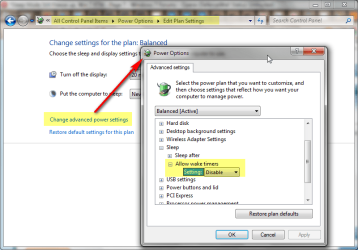
In my case, helped change "allow wake timers" from enable to disable.
No more freeze during S3 mode.
 

Attachments

  • s3.png
    s3.png
    43.5 KB · Views: 388

My Computer My Computer

At a glance

Windows 7 Home Premium x32 SP1x2 2.6 GHzA-Data 2GB DDR2-800ATI X1250
Computer type
PC/Desktop
Computer Manufacturer/Model Number
Self Built
OS
Windows 7 Home Premium x32 SP1
CPU
x2 2.6 GHz
Motherboard
Asus
Memory
A-Data 2GB DDR2-800
Graphics Card(s)
ATI X1250
Sound Card
SB 5.1 Live!
Hard Drives
WD and Seagate FAP
PSU
Tagan TG-480-U01
Keyboard
BTC 6300
Mouse
Logitech VX Nano
Antivirus
None
My problem seems more complicated...My desktop won't wake up at all,I mean I press the power button and it does nothing, n o t h i n g...!I tried unplugging the cable of power and wait 15 minutes,I tried to take out the cmos battery, then press the power button on the computer a few times to get rid of any residual charge,replace the cmos battery, plug ther power back in, and try and start the computer again.Nothing at all! I removed the RAMs and put them back in,nothing...Any help would be appreciated :huh:
 
Last edited:

My Computer My Computer

At a glance

Windows 7
OS
Windows 7
Well I am eagerly awaiting the SP1 release then, because as of now, even after the chipset driver update, I STILL have it. Only after lengthy sleeps but nonetheless it is still occurring. :mad:
Why do we have to wait for SP1 to fix this bug? MS should get off their behinds and fix it with an update. It is obvious that this problem is happening to many people, and no response from Microsoft.
 

My Computer My Computer

At a glance

Windows 7 Ultimate 64 BitIntel Core I7 286012 GBNvidia 560M
Computer Manufacturer/Model Number
MSI 782
OS
Windows 7 Ultimate 64 Bit
CPU
Intel Core I7 2860
Motherboard
Intel 67
Memory
12 GB
Graphics Card(s)
Nvidia 560M
Sound Card
Realtek HD
Monitor(s) Displays
Dell 2405
Screen Resolution
1920x1600
Hard Drives
2 120 Gb OCZ Vertex MaxOPS Raid 0, 1 256 Gb Crucial 300, 1 2000 Gb WD eSata.
Keyboard
Logitech
Mouse
MS Wireless Optical
Internet Speed
Cable
In Win 7 Beta this was a major issue. I don't have BSOD but HAL issues.

Here is A HAL issue.
."The platform firmware has corrupted memory across the previous system power transition. Please check for updated firmware for your system"

Log Name: System
Source: HAL
Event ID: 12
Level: Error

Seems that these problems are all related. Either Firmware or bios issues.

Well, Microsoft released a white paper on the HAL issue. In my case Intel won't take a stand until RTM is released.


You can Read from HERE
 

My Computer My Computer

At a glance

Windows 7 x64 Ultimate SP1I5 875K UnlockedKingston HyperX Genesis DDR3-1600MHz 9-9-9-27...EVGA GeForce GTX 570 HD 732 MHz GPU 1280 MB, ...
Computer Manufacturer/Model Number
Asus
OS
Windows 7 x64 Ultimate SP1
CPU
I5 875K Unlocked
Motherboard
P7P55D-E-PRO
Memory
Kingston HyperX Genesis DDR3-1600MHz 9-9-9-27 @ 1.65V XMP
Graphics Card(s)
EVGA GeForce GTX 570 HD 732 MHz GPU 1280 MB, 152 GB Mem
Sound Card
Onboard Via 1828S
Monitor(s) Displays
Samsung T240 HD
Screen Resolution
Dual 1920X1200 1027X768
Hard Drives
OCZ Vertex II Extended Sandforce SSD 60 Gig 2X WD Black Caviar 1 terabyte 6GBS Transer Sata 3 Marvell Chip
PSU
Corsair Gold fully Modular 80 Plus 850
Case
Coolermaster Half X Full Tower
Cooling
Noctua NH-U12P
Keyboard
MS
Mouse
MS
Internet Speed
Fast enough
Other Info
My fridge has a water tap
In my case, helped change "allow wake timers" from enable to disable.
No more freeze during S3 mode.

I'm probably jinxing myself but so far it would appear that this has made the difference for me. It's been a few days now.
 

My Computer My Computer

At a glance

Win 7 Ultimate x64Intel i7 950 OC'd @ 4.0Ghz (SpeedStep ON)3x2GB Patriot Extreme Viper II Sector 7 DDR3 ...ATI MSI 5870 900mhz/1300mhz
OS
Win 7 Ultimate x64
CPU
Intel i7 950 OC'd @ 4.0Ghz (SpeedStep ON)
Motherboard
ASUS P6X58D-E BIOS 0303
Memory
3x2GB Patriot Extreme Viper II Sector 7 DDR3 @ 1600mhz
Graphics Card(s)
ATI MSI 5870 900mhz/1300mhz
Sound Card
Onboard Realtek ALC889
Monitor(s) Displays
2 X 24" BenQ G2412HD
Screen Resolution
1920x1080p
Hard Drives
Intel X25-M 80 GB (SSD)
W.D. Caviar Black 1TB (SATA)
Seagate Barricuda 1TB (SATA)
Seagate Barricuda 80GB (SATA)
PSU
Corsair AX850
Case
Antec 1200
Cooling
Lots and Lots of Air!
Keyboard
Razer Lycosa
Mouse
Microsoft Sidewinder
Internet Speed
25Mbps/1Mbps
Well this issue is STILL going on for me unfortunately. I know we've exhausted several possibilities and we are awaiting a possible update from Microsoft that might solve this issue for us.

One thing that recently came to my mind was my PSU. From another thread I came across this site (eXtreme Power Supply Calculator Lite v2.5) which supposedly calculates your PSU requirements based on your hardware.

I am running an OCZGameXstreme 700W but according to the site, I am just short as it states I need about 740ish. Mind you, I was VERY conservative with the numbers and did add a buffer with some of the questions it asks.

Those of you that have a better handle on PSU's and hardware requirements would you say I am worrying for nothing or is it a possibility my PSU is short at times when waking up.

As described previously my issue is intermittent, usually occurs after long sleeps, go to power up, everything lights up, video card fan goes to full 100% (just like when rebooting) but instead of settling down, and windows reappearing on the screen, it just stays in this state, fan at 100, and blank screen with a solid HD light.
 

My Computer My Computer

At a glance

Win 7 Ultimate x64Intel i7 950 OC'd @ 4.0Ghz (SpeedStep ON)3x2GB Patriot Extreme Viper II Sector 7 DDR3 ...ATI MSI 5870 900mhz/1300mhz
OS
Win 7 Ultimate x64
CPU
Intel i7 950 OC'd @ 4.0Ghz (SpeedStep ON)
Motherboard
ASUS P6X58D-E BIOS 0303
Memory
3x2GB Patriot Extreme Viper II Sector 7 DDR3 @ 1600mhz
Graphics Card(s)
ATI MSI 5870 900mhz/1300mhz
Sound Card
Onboard Realtek ALC889
Monitor(s) Displays
2 X 24" BenQ G2412HD
Screen Resolution
1920x1080p
Hard Drives
Intel X25-M 80 GB (SSD)
W.D. Caviar Black 1TB (SATA)
Seagate Barricuda 1TB (SATA)
Seagate Barricuda 80GB (SATA)
PSU
Corsair AX850
Case
Antec 1200
Cooling
Lots and Lots of Air!
Keyboard
Razer Lycosa
Mouse
Microsoft Sidewinder
Internet Speed
25Mbps/1Mbps
One thing that recently came to my mind was my PSU. From another thread I came across this site (eXtreme Power Supply Calculator Lite v2.5) which supposedly calculates your PSU requirements based on your hardware.

I am running an OCZGameXstreme 700W but according to the site, I am just short as it states I need about 740ish. Mind you, I was VERY conservative with the numbers and did add a buffer with some of the questions it asks.
Hey A320
I don't buy it. I run a system management component on All my systems PSU demands, (called a UPS), mine is basically the APC (brand) 1500 RS, with a lcd display and it tells me the total power usage(I bassically have 4 desktop PC's, the net router and 1 monitor [that is in the KVM switch set for all 4]), and it tells me the power demand for each (run individually) and all (run together).

I went to the site you posted and run the online spec. test and it claimed that I needed 3 times more of the PSU than my system actually requires.
Believe me, there is no such thing as perfection on this planet, but, If you build computer systems (for your self or for companies or others), you must research the hardware parts for the necessary requirements on any and all components (including the PSU's).

To this day I have run components testing and found that the "sleep mode" form Win7 has no issue effects with the power supplies on any of my systems.

As I stated before, the main issue is the same problem related to the bugs in Vista and the Drivers related to that platform.
I still hope that MS will fix the issues, (which some of the Dev team members claimed) will be fixed in the SP1 release.
 

My Computer My Computer

At a glance

Windows 7 7600 x86 &x64, Windows XPP sp3 (x86...C2Q 6600, C2D 6420, C2D T2060, C2-ATOM N2708 Gig, 4 Gig, 2 Gig, 1.5 GignVidia 9400 GS, 7200GT, FX 5200
OS
Windows 7 7600 x86 &x64, Windows XPP sp3 (x86) & sp2 x64
CPU
C2Q 6600, C2D 6420, C2D T2060, C2-ATOM N270
Motherboard
Gigabyte GA-965P-DS3, GA-G31M-ES2L, Lenovo 3000 N100, Acer A
Memory
8 Gig, 4 Gig, 2 Gig, 1.5 Gig
Graphics Card(s)
nVidia 9400 GS, 7200GT, FX 5200
Monitor(s) Displays
2-Hanns-G HW191D, 1-Hanns-G JC199D, 1-AOC 720LM, 2-Samtron
Screen Resolution
1440x900, 1280x1024
Hard Drives
Seagate Barracuda 11 & 12 series
2-500G, 2-1Tb
WD My Book 1Tb
Samsung 3-500G
Maxtor Diamond 9 - 11 80G to 300G about 8 diff.
PSU
many from 1000w to 250w
Case
many
Cooling
Massive fans on all, and my home build AC unit
Keyboard
MS Natural Multimedia
Mouse
MS IntelliMouse 3.0
Internet Speed
10Mbs d/l 768Kbs u/l
here's hoping. I won't do anything till this update comes out, if it ever does. Thanks for the info.
 

My Computer My Computer

At a glance

Win 7 Ultimate x64Intel i7 950 OC'd @ 4.0Ghz (SpeedStep ON)3x2GB Patriot Extreme Viper II Sector 7 DDR3 ...ATI MSI 5870 900mhz/1300mhz
OS
Win 7 Ultimate x64
CPU
Intel i7 950 OC'd @ 4.0Ghz (SpeedStep ON)
Motherboard
ASUS P6X58D-E BIOS 0303
Memory
3x2GB Patriot Extreme Viper II Sector 7 DDR3 @ 1600mhz
Graphics Card(s)
ATI MSI 5870 900mhz/1300mhz
Sound Card
Onboard Realtek ALC889
Monitor(s) Displays
2 X 24" BenQ G2412HD
Screen Resolution
1920x1080p
Hard Drives
Intel X25-M 80 GB (SSD)
W.D. Caviar Black 1TB (SATA)
Seagate Barricuda 1TB (SATA)
Seagate Barricuda 80GB (SATA)
PSU
Corsair AX850
Case
Antec 1200
Cooling
Lots and Lots of Air!
Keyboard
Razer Lycosa
Mouse
Microsoft Sidewinder
Internet Speed
25Mbps/1Mbps
Still getting this problem. Have tried the solutions suggested in this thread.

Can only wake the computer from sleep using the power button. If I use the keyboard/mouse (wireless, via USB) then it will appear to wake (fans etc go on) but the monitor remains blank with no input, and the power indicator on the base unit still blinks as if it were still on standby. Only way out is to cut the power for 10 seconds and then restart.
 

My Computer My Computer

At a glance

Win7 Pro; Linux Mint 7E8500 @ 3.8GHzCorsair XMS2 2GB @800MHzNvidia 9800GT
Computer Manufacturer/Model Number
Self-built
OS
Win7 Pro; Linux Mint 7
CPU
E8500 @ 3.8GHz
Motherboard
Asus P5QL PRO
Memory
Corsair XMS2 2GB @800MHz
Graphics Card(s)
Nvidia 9800GT
Sound Card
onboard
Hard Drives
Western Digital Caviar 500GB x2
Still getting this problem. Have tried the solutions suggested in this thread.

Can only wake the computer from sleep using the power button. If I use the keyboard/mouse (wireless, via USB) then it will appear to wake (fans etc go on) but the monitor remains blank with no input, and the power indicator on the base unit still blinks as if it were still on standby. Only way out is to cut the power for 10 seconds and then restart.

Sounds just like my issue and if you've read the whole thread you'll see I've exhausted all possibilities. I am just gonna wait now for the supposed update that should come now that it's been released that will hopefully solve this issue.
 

My Computer My Computer

At a glance

Win 7 Ultimate x64Intel i7 950 OC'd @ 4.0Ghz (SpeedStep ON)3x2GB Patriot Extreme Viper II Sector 7 DDR3 ...ATI MSI 5870 900mhz/1300mhz
OS
Win 7 Ultimate x64
CPU
Intel i7 950 OC'd @ 4.0Ghz (SpeedStep ON)
Motherboard
ASUS P6X58D-E BIOS 0303
Memory
3x2GB Patriot Extreme Viper II Sector 7 DDR3 @ 1600mhz
Graphics Card(s)
ATI MSI 5870 900mhz/1300mhz
Sound Card
Onboard Realtek ALC889
Monitor(s) Displays
2 X 24" BenQ G2412HD
Screen Resolution
1920x1080p
Hard Drives
Intel X25-M 80 GB (SSD)
W.D. Caviar Black 1TB (SATA)
Seagate Barricuda 1TB (SATA)
Seagate Barricuda 80GB (SATA)
PSU
Corsair AX850
Case
Antec 1200
Cooling
Lots and Lots of Air!
Keyboard
Razer Lycosa
Mouse
Microsoft Sidewinder
Internet Speed
25Mbps/1Mbps
For those still monitoring this thread,

I upgraded my video card recently and my wakup problem has finally disappeared once and for all! I always suspected my nvidia card was buggy with my system, never did like how hot the 9800 GX2 would run, although it was considered normal.
 

My Computer My Computer

At a glance

Win 7 Ultimate x64Intel i7 950 OC'd @ 4.0Ghz (SpeedStep ON)3x2GB Patriot Extreme Viper II Sector 7 DDR3 ...ATI MSI 5870 900mhz/1300mhz
OS
Win 7 Ultimate x64
CPU
Intel i7 950 OC'd @ 4.0Ghz (SpeedStep ON)
Motherboard
ASUS P6X58D-E BIOS 0303
Memory
3x2GB Patriot Extreme Viper II Sector 7 DDR3 @ 1600mhz
Graphics Card(s)
ATI MSI 5870 900mhz/1300mhz
Sound Card
Onboard Realtek ALC889
Monitor(s) Displays
2 X 24" BenQ G2412HD
Screen Resolution
1920x1080p
Hard Drives
Intel X25-M 80 GB (SSD)
W.D. Caviar Black 1TB (SATA)
Seagate Barricuda 1TB (SATA)
Seagate Barricuda 80GB (SATA)
PSU
Corsair AX850
Case
Antec 1200
Cooling
Lots and Lots of Air!
Keyboard
Razer Lycosa
Mouse
Microsoft Sidewinder
Internet Speed
25Mbps/1Mbps
For those still monitoring this thread,

I upgraded my video card recently and my wakup problem has finally disappeared once and for all! I always suspected my nvidia card was buggy with my system, never did like how hot the 9800 GX2 would run, although it was considered normal.
I have just upgraded my card from an nVidia to an ATI, and my wakeup problem has also disappeared. Guess we were blaming microsoft when we should have been looking elsewehere.
 

My Computer My Computer

At a glance

Win7 Pro; Linux Mint 7E8500 @ 3.8GHzCorsair XMS2 2GB @800MHzNvidia 9800GT
Computer Manufacturer/Model Number
Self-built
OS
Win7 Pro; Linux Mint 7
CPU
E8500 @ 3.8GHz
Motherboard
Asus P5QL PRO
Memory
Corsair XMS2 2GB @800MHz
Graphics Card(s)
Nvidia 9800GT
Sound Card
onboard
Hard Drives
Western Digital Caviar 500GB x2
Back
Top