
Yes there is a team of several members that does product QA.
My Computer
- OS
- Windows 7 Pro x64
- CPU
- i7 2600K 4.7Ghz
- Memory
- 16GB
- Hard Drives
- OCZ Vertex 3
RAID 0 SSD
- Internet Speed
- 100Mbps


Malwarebytes Anti-Malware
[URL="http://www.malwarebytes.org/"]www.malwarebytes.org[/URL]
Scan Date: Mon  Apr 21  2014
Scan Time: 6:21:41 AM
Logfile: MBAM.txt
Administrator: Yes
Version: 2.00.1.1004
Malware Database: v2014.04.21.02
Rootkit Database: v2014.03.27.01
License: Free
Malware Protection: Disabled
Malicious Website Protection: Disabled
Chameleon: Disabled
OS: Windows 7 Service Pack 1
CPU: x64
File System: NTFS
User: Britton30
Scan Type: Custom Scan
Result: Completed
Objects Scanned: 529518
Time Elapsed: 4 hr, 9 min, 3 sec
Memory: Enabled
Startup: Enabled
Filesystem: Enabled
Archives: Enabled
Rootkits: Enabled
Shuriken: Enabled
PUP: Enabled
PUM: Enabled
Processes: 0
(No malicious items detected)
Modules: 0
(No malicious items detected)
Registry Keys: 0
(No malicious items detected)
Registry Values: 0
(No malicious items detected)
Registry Data: 0
(No malicious items detected)
Folders: 0
(No malicious items detected)
Files: 0
(No malicious items detected)
Physical Sectors: 0
(No malicious items detected)

(end)
Happy Easter to all.
Yes I read your post Layback Bear and yes there have been some reports of certain files that can cause a slowdown or freeze. Data corruption can also do this - the updated version is hopefully a little better but not sure we'll be able to completely eliminate or not but we're trying.
@Mellon Head
Agreed that the Anti-Rootkit scanner you're using is slow. The updated one I'm using is faster, but see below in that it will never be a fast scan like a Threat / Quick Scan is.
Yes, I am using an updated build that is not currently available to the public but should be soon (it is available to our Experts group) and yes there are improvements in the new Anti-Malware scan times. Most hopefully should see faster scan times with it once it is made available to the public. In fact there was another version released internally since I scanned with my version that is supposed to improve some other items in the program.
As for the Softpedia review as with most it is very lacking in detail and what was really scanned and used was not fully detailed. We do not hide the fact that we do not detect older infections, never have and probably never will. Once we stop seeing infections in the wild they are usually pulled from our database and left up to your antivirus to deal with.
I know some of you may not agree and that is certainly your prerogative however I see no technical reason for doing Anti-Rootkit scans on a routine basis and certainly not daily. I've been doing Enterprise level computer support now for well over 20 years and I play with infections and to date have only gotten infected once by accident. I've been a lead support engineer for the security of over 130,000 desktops as well as thousands of servers and in my time as a lead we never had a single break out.
Probably no harm in doing daily extensive scans for a mechanical drive as none of them seem to last the 10+ years that they used to but doing extensive daily work on most SSD drives can potentially greatly reduce their life span.
One of our Experts did post a log of multiple mechanical drives and Terabytes of data and the scan time for an Anti-Rootkit scan was nearly cut in half. It was still a long time of over 10 hours but I'm not sure what else to compare it to. I've done full scans with terabytes of data using both Symantec and Kaspersky antivirus and both products took almost 48 hours to complete the scans. I have not tried to compare similar scan time of antivirus vs Malwarebytes but again we're not the same product type and don't claim to be and I've always said that antivirus is better at flat file scanning than we are. With no load points and an old infection we certainly can miss something that your antivirus would probably pick up. We operate at our best on a live infection in Normal Windows mode. If you use Safe Mode that too is not an optimal method for our program to do it's job.
By the time the older samples are purged, they should be handled by your antivirus app*.~~~
Your response about purging older samples as they are unlikely to be active I would think may raise an eyebrow in the underworlds domain and may entice the old to resurface but I understand your situation.

Please note that we have actually just released a public beta of the build that is newer than the one I was testing with.
I would highly recommend that everyone please install this one and test it out and provide feedback on our site if possible. It should scan faster and fix a few other reported issues.
https://forums.malwarebytes.org/index.php?showtopic=147144
Thanks everyone
And does not take new users into consideration who may have "older" malware. This is nearly a deal breaker.By the time the older samples are purged, they should be handled by your antivirus app*.~~~
Your response about purging older samples as they are unlikely to be active I would think may raise an eyebrow in the underworlds domain and may entice the old to resurface but I understand your situation.
Mbam has used this "purge model" for years.
*assumes the AV product considers the file(s) worthy of flagging.

Ok, so it finished:Overall, the performance of MBAM 2.0.1.1004 is significantly worse that its predecessor with the rootkit option enabled. I haven't had the opportunity to run the full scan without the rootkit option enabled yet, but I am doing so as I write this. I'll report on the length of time it takes tomorrow.

And does not take new users into consideration who may have "older" malware. This is nearly a deal breaker.By the time the older samples are purged, they should be handled by your antivirus app*.~~~
Your response about purging older samples as they are unlikely to be active I would think may raise an eyebrow in the underworlds domain and may entice the old to resurface but I understand your situation.
Mbam has used this "purge model" for years.
*assumes the AV product considers the file(s) worthy of flagging.

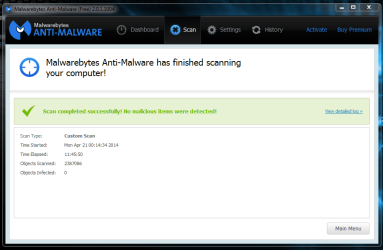
Ok, so it finished:Overall, the performance of MBAM 2.0.1.1004 is significantly worse that its predecessor with the rootkit option enabled. I haven't had the opportunity to run the full scan without the rootkit option enabled yet, but I am doing so as I write this. I'll report on the length of time it takes tomorrow.
View attachment 314727
Eleven hours and forty six minutes to do what two weeks ago took around four and a half hours. And that's without the rootkit scan enabled. Hopefully, this new version they're coming out with is going to be faster.
Note that nothing else was running during the scan.

Just an FYI another user complaining of issues that the new version was able to correct for them as well.
https://forums.malwarebytes.org/index.php?showtopic=147163
I'd like to know as well, I may go back since I installed Ver 2 something.Does anyone know for sure how long 1.75 will continue to be supported (receive updates)?


