Solved MalwareBytes 2.0.1 taking forever to scan

Yes there is a team of several members that does product QA.
 

My Computer My Computer

OS
Windows 7 Pro x64
CPU
i7 2600K 4.7Ghz
Memory
16GB
Hard Drives
OCZ Vertex 3
RAID 0 SSD
Internet Speed
100Mbps
Code:
Malwarebytes Anti-Malware
[URL="http://www.malwarebytes.org/"]www.malwarebytes.org[/URL]
Scan Date: Mon  Apr 21  2014
Scan Time: 6:21:41 AM
Logfile: MBAM.txt
Administrator: Yes
Version: 2.00.1.1004
Malware Database: v2014.04.21.02
Rootkit Database: v2014.03.27.01
License: Free
Malware Protection: Disabled
Malicious Website Protection: Disabled
Chameleon: Disabled
OS: Windows 7 Service Pack 1
CPU: x64
File System: NTFS
User: Britton30
Scan Type: Custom Scan
Result: Completed
Objects Scanned: 529518
Time Elapsed: 4 hr, 9 min, 3 sec
Memory: Enabled
Startup: Enabled
Filesystem: Enabled
Archives: Enabled
Rootkits: Enabled
Shuriken: Enabled
PUP: Enabled
PUM: Enabled
Processes: 0
(No malicious items detected)
Modules: 0
(No malicious items detected)
Registry Keys: 0
(No malicious items detected)
Registry Values: 0
(No malicious items detected)
Registry Data: 0
(No malicious items detected)
Folders: 0
(No malicious items detected)
Files: 0
(No malicious items detected)
Physical Sectors: 0
(No malicious items detected)

(end)
Over a half million files and over FOUR hours. After the Custom scan I was logged out of all of the sites I stay logged into, ex. Seven Forums. No other programs were running during the scan.

It stopped on the same image file as has been mentioned, but only for a few seconds.

MBAM Freeze.PNG
 

My Computer My Computer

Computer type
PC/Desktop
Computer Manufacturer/Model Number
Home Built Desktop By DataTech
OS
Windows 7 Ultimate X64 SP1
CPU
Intel i5-2550K, Differing ~4.4-4.8GHz No built in GPU
Motherboard
ASUS P8Z68-V PRO/GEN3
Memory
16GB G.Skill Sniper 1866MHz @ 2133MHz 2x8GB
Graphics Card(s)
ASUS GTX650TIB-DC2OC-2GD5, (650TI Boost)
Sound Card
Onboard Realtek 5-1
Monitor(s) Displays
Samsung P2570HD
Screen Resolution
1920x1080
Hard Drives
Samsung 840 Pro 256GB SSD for OS, 500GB Seagate Constellation (Enterprise drive) for Data
PSU
Corsair HX650W
Case
Inwin Dragon Rider
Cooling
Hyper 212 EVO w/two Noctua fans, push-pull, @1300 RPM
Keyboard
E-Z Eyes, bright yellow keys with large characters
Mouse
steelseries SENSEI Laser Pro Gaming
Internet Speed
48-51Mbs Mbs down, 11 Mbs up Xfinity Cable
Antivirus
Norton Internet Security 2013
Browser
IE 10, Opera, Pale Moon if needed
Other Info
4 case fans, LG BluRay-RE, ASUS DVD-RW, Mr. Fusion power supply, 1.21 gigawatts.
Please note that we have actually just released a public beta of the build that is newer than the one I was testing with.

I would highly recommend that everyone please install this one and test it out and provide feedback on our site if possible. It should scan faster and fix a few other reported issues.

https://forums.malwarebytes.org/index.php?showtopic=147144

Thanks everyone
 

My Computer My Computer

OS
Windows 7 Pro x64
CPU
i7 2600K 4.7Ghz
Memory
16GB
Hard Drives
OCZ Vertex 3
RAID 0 SSD
Internet Speed
100Mbps
Happy Easter to all.

Yes I read your post Layback Bear and yes there have been some reports of certain files that can cause a slowdown or freeze. Data corruption can also do this - the updated version is hopefully a little better but not sure we'll be able to completely eliminate or not but we're trying.

@Mellon Head
Agreed that the Anti-Rootkit scanner you're using is slow. The updated one I'm using is faster, but see below in that it will never be a fast scan like a Threat / Quick Scan is.

Yes, I am using an updated build that is not currently available to the public but should be soon (it is available to our Experts group) and yes there are improvements in the new Anti-Malware scan times. Most hopefully should see faster scan times with it once it is made available to the public. In fact there was another version released internally since I scanned with my version that is supposed to improve some other items in the program.

As for the Softpedia review as with most it is very lacking in detail and what was really scanned and used was not fully detailed. We do not hide the fact that we do not detect older infections, never have and probably never will. Once we stop seeing infections in the wild they are usually pulled from our database and left up to your antivirus to deal with.

I know some of you may not agree and that is certainly your prerogative however I see no technical reason for doing Anti-Rootkit scans on a routine basis and certainly not daily. I've been doing Enterprise level computer support now for well over 20 years and I play with infections and to date have only gotten infected once by accident. I've been a lead support engineer for the security of over 130,000 desktops as well as thousands of servers and in my time as a lead we never had a single break out.

Probably no harm in doing daily extensive scans for a mechanical drive as none of them seem to last the 10+ years that they used to but doing extensive daily work on most SSD drives can potentially greatly reduce their life span.

One of our Experts did post a log of multiple mechanical drives and Terabytes of data and the scan time for an Anti-Rootkit scan was nearly cut in half. It was still a long time of over 10 hours but I'm not sure what else to compare it to. I've done full scans with terabytes of data using both Symantec and Kaspersky antivirus and both products took almost 48 hours to complete the scans. I have not tried to compare similar scan time of antivirus vs Malwarebytes but again we're not the same product type and don't claim to be and I've always said that antivirus is better at flat file scanning than we are. With no load points and an old infection we certainly can miss something that your antivirus would probably pick up. We operate at our best on a live infection in Normal Windows mode. If you use Safe Mode that too is not an optimal method for our program to do it's job.


Thank you for your response , I look forward to reading other independent testing evaluations as they become available.

Your response about purging older samples as they are unlikely to be active I would think may raise an eyebrow in the underworlds domain and may entice the old to resurface but I understand your situation.
 

My Computer My Computer

Computer type
Laptop
Computer Manufacturer/Model Number
Asus laptop U56E
OS
Microsoft Windows 7 Home Premium 64-bit 7601 Multiprocessor Free Service Pack 1
CPU
Intel(R) Core(TM) i5-2430M CPU @ 2.40GHz
Motherboard
ASUSTeK Computer Inc. U56E
Memory
6.00 GB
Graphics Card(s)
Intel(R) HD Graphics 3000
Sound Card
(1) High Definition Audio Device (2) High Definition Audio
Screen Resolution
1366 x 768 x 32 bits (4294967296 colors) @ 60 Hz
Hard Drives
WDC WD6400BPVT-80HXZT3
~~~
Your response about purging older samples as they are unlikely to be active I would think may raise an eyebrow in the underworlds domain and may entice the old to resurface but I understand your situation.
By the time the older samples are purged, they should be handled by your antivirus app*.

Mbam has used this "purge model" for years.


*assumes the AV product considers the file(s) worthy of flagging.
 

My Computer My Computer

Computer type
Laptop
Computer Manufacturer/Model Number
Employer provided Dell Latitude
OS
W7 Pro SP1 64bit
CPU
i7
Memory
8GB
Graphics Card(s)
Intel HD Graphics
Hard Drives
crappy SSD
Antivirus
Employer mandated Symantec Endpoint Protection
Browser
Pale Moon 64bit, IE11 64bit & Chrome 64bit

My Computer My Computer

Computer type
PC/Desktop
Computer Manufacturer/Model Number
1. HP p6733w Desktop 2. HP Envy 700-515xt Desktop
OS
1. Windows 7 Home Premium sp1 - 64bit 2. Windows 7 Pro sp1 - 64bit
CPU
1. AMD Phenom II x2 511 3.4GHz 2. Intel i7-4790 Quad 4.0GHz
Motherboard
1. N-Alvorix-RS880-uATX 2. Kaili2
Memory
1. 5 GB - DDR3 2. 8GB DDR3-1600MHz
Graphics Card(s)
Integrated 1. ATI Radeon 4200 2. Intel HD Graphics 4600
Sound Card
1. Realtek High Definition Audio 2. Realtek (Neutered Beats)
Monitor(s) Displays
1. Acer V193L 2. HP 2311 Series Wide LCD
Screen Resolution
1. 1280 x 1024 2. 1920 x 1080
Hard Drives
1. 750 GB - 7200 RPM SATA 2. 1TB 7200 RPM SATA
PSU
1. 250w 2. 300w
Cooling
Stock
Keyboard
Logitech USB keyboard
Mouse
Logitech USB optical mouse
Internet Speed
1.0 - 2.0 mbps
Antivirus
Eset Smart Security v9.0.349.0
Browser
Pale Moon
~~~
Your response about purging older samples as they are unlikely to be active I would think may raise an eyebrow in the underworlds domain and may entice the old to resurface but I understand your situation.
By the time the older samples are purged, they should be handled by your antivirus app*.

Mbam has used this "purge model" for years.


*assumes the AV product considers the file(s) worthy of flagging.
And does not take new users into consideration who may have "older" malware. This is nearly a deal breaker.
 

My Computer My Computer

Computer type
PC/Desktop
Computer Manufacturer/Model Number
Home Built Desktop By DataTech
OS
Windows 7 Ultimate X64 SP1
CPU
Intel i5-2550K, Differing ~4.4-4.8GHz No built in GPU
Motherboard
ASUS P8Z68-V PRO/GEN3
Memory
16GB G.Skill Sniper 1866MHz @ 2133MHz 2x8GB
Graphics Card(s)
ASUS GTX650TIB-DC2OC-2GD5, (650TI Boost)
Sound Card
Onboard Realtek 5-1
Monitor(s) Displays
Samsung P2570HD
Screen Resolution
1920x1080
Hard Drives
Samsung 840 Pro 256GB SSD for OS, 500GB Seagate Constellation (Enterprise drive) for Data
PSU
Corsair HX650W
Case
Inwin Dragon Rider
Cooling
Hyper 212 EVO w/two Noctua fans, push-pull, @1300 RPM
Keyboard
E-Z Eyes, bright yellow keys with large characters
Mouse
steelseries SENSEI Laser Pro Gaming
Internet Speed
48-51Mbs Mbs down, 11 Mbs up Xfinity Cable
Antivirus
Norton Internet Security 2013
Browser
IE 10, Opera, Pale Moon if needed
Other Info
4 case fans, LG BluRay-RE, ASUS DVD-RW, Mr. Fusion power supply, 1.21 gigawatts.
Overall, the performance of MBAM 2.0.1.1004 is significantly worse that its predecessor with the rootkit option enabled. I haven't had the opportunity to run the full scan without the rootkit option enabled yet, but I am doing so as I write this. I'll report on the length of time it takes tomorrow.
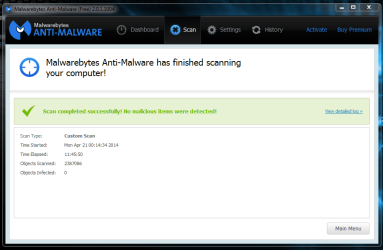
Ok, so it finished:

Capture54.PNG

Eleven hours and forty six minutes to do what two weeks ago took around four and a half hours. And that's without the rootkit scan enabled. Hopefully, this new version they're coming out with is going to be faster.

Note that nothing else was running during the scan.
 

My Computer My Computer

Computer type
PC/Desktop
Computer Manufacturer/Model Number
Mellon Labs (custom build)
OS
Win 7 Pro x64/Win 10 Pro x64 dual boot
CPU
AMD FX 8350 Vishera @ 4200
Motherboard
ASUS M5A97 R2.0
Memory
16 GB Mushkin Blackline DDR3-2400 @ 1866 (9-10-10-10-31)
Graphics Card(s)
XFX Radeon R9 280 Double D Black Edition
Sound Card
Realtek HD Audio on MB. Sounds great.
Monitor(s) Displays
Acer 24", Acer 22"
Screen Resolution
3840 x 1080
Hard Drives
1 x Mushkin Chronos 120 GB SSD (Win 10)
1 x Samsung 850 EVO 250 GB SSD (Win 7)
1 x WD 1TB SATA Blue
1 x WD 1TB SATA Green
PSU
Corsair TX-750
Case
CoolerMaster HAF 912+
Cooling
Coolermaster Seidon 240M Liquid AIO. 6 case fans
Keyboard
Logitech G710+
Mouse
Logitech G500s
Internet Speed
Much better since I got fiber, but still way overpriced.
Antivirus
MSE, Malware Bytes for scanning
Browser
Firefox
Other Info
Corsair VOID USB headphones.

A Mellon Labs X-1 - LCD Smartie driven system status display.

Brought to you by the letter E

My Computer My Computer

Computer type
Laptop
Computer Manufacturer/Model Number
Employer provided Dell Latitude
OS
W7 Pro SP1 64bit
CPU
i7
Memory
8GB
Graphics Card(s)
Intel HD Graphics
Hard Drives
crappy SSD
Antivirus
Employer mandated Symantec Endpoint Protection
Browser
Pale Moon 64bit, IE11 64bit & Chrome 64bit
That's pretty wild MellonHead :shock:
 

My Computer My Computer

Computer type
PC/Desktop
Computer Manufacturer/Model Number
Custom assembled by me :}
OS
Win-7-Pro64bit 7-H-Prem-64bit
CPU
i7-5930K 2nd i9-9940x both water blocked VRM's too
Motherboard
ASUS SABERTOOTH X99 2nd ASUS x299 Apex
Memory
Trident-z 3200C14 2nd Trident-z 3600C16
Graphics Card(s)
EVGA 1080ti ftw3 2nd Titan Xp both water blocked
Sound Card
Built-in Realtek
Monitor(s) Displays
1-AOC G2460PG 24"G-Sync 144Hz/ 2nd 1-ASUS VG248QE 24" 144Hz
Screen Resolution
1920 x 1080 144Hz
Hard Drives
2-Samsung M.2 Evo & Evo Plus
2-Samsung 850 EVO 500GB SSD's/ 3-2.5 W.D. Black 1tb-&3-1tb/3-3.5 WD Black 1tb hdd's
PSU
EVGA SuperNOVA 1000-P2 2nd 1200-P2
Case
2-Corsair Obsidian Series 450D Black ATX Mid Tower
Cooling
Custom water loops
Keyboard
Logitech G710+/ 2nd Logitech G910
Mouse
2-RedDragon M901 Perdition 16400 dpi Gaming mouse = wired
Internet Speed
Comcast Ping 19ms 89.31mbps download speed 6.12mbps upload
Antivirus
Malwarebytes Pro/ Superantispyware Pro
Browser
FireFox & Pale moon
Other Info
2nd ASUS X299 Apex/Intel i9-9940x with Custom water loop/7H-Prem-x64/Corsair 450D case/Ram Trident-z 3600C16 4x8gb / Samsung970Evo plus 500gb SSD/Dual ssd EZ swap evo/PSU EVGA SuperNova 1200w-P2 80+Platinum/GPU Titan Xp /8-ML-140 on push-pull on 2-280GTX rads
~~~
Your response about purging older samples as they are unlikely to be active I would think may raise an eyebrow in the underworlds domain and may entice the old to resurface but I understand your situation.
By the time the older samples are purged, they should be handled by your antivirus app*.

Mbam has used this "purge model" for years.


*assumes the AV product considers the file(s) worthy of flagging.
And does not take new users into consideration who may have "older" malware. This is nearly a deal breaker.


There has been no change to that policy now for at least 4 years so if you have older malware that is still there that your antivirus is not detecting or removing then you really need to take a look at using something better as every major antivirus program out there should detect anything we remove from our list.
 

My Computer My Computer

OS
Windows 7 Pro x64
CPU
i7 2600K 4.7Ghz
Memory
16GB
Hard Drives
OCZ Vertex 3
RAID 0 SSD
Internet Speed
100Mbps
I for one expect a scan for rootkits to take longer. I think we all do.
Then their is longer and waaaay to long.

My system is very fast and not much on it; so my test are short compared to many other members. (See My Specs)
I have 60 Gb's on the C drive being scanned.
As most members that read my post will know I run my computers clean, lean and mean. No garbage. Two programs at Start up, Malwarebytes and MSE. One Non Microsoft Service, Malwarebytes. Of course the Windows 7 built in firewall.
This makes me believe their isn't a bunch of trash getting in the way of the Malwarebytes scans.
Half of the scan time is hung on Windows 7 pictures. That must also be a problem with others members systems. If that could be taken care of I do believe every bodies scans would be shortened greatly. This picture problem happens on Windows 7 Home Premium/64 and Professional/64

If the new beta version address this picture problem I will gladly give it a try. If it doesn't I will wait.

I have removed some pictures and found out that sfc /scannow doesn't like that at all. I will probably have to do a repair install or a clean install to get a clean sfc /scannow.
sfc /scannow wants those pictures installed and can't put them back no mater how many times I run it.
I do not run these test on a VM. The test are done on the computers just like I run it every day.
 

My Computer My Computer

Computer type
PC/Desktop
Computer Manufacturer/Model Number
Home made Desktop
OS
Windows 10 Pro. 64/ version 1709 Windows 7 Pro/64
CPU
Intel i7-6800K @ 4.3
Motherboard
ASUS X-99 Deluxe II
Memory
Corsair Platinum 16 gig @2400
Graphics Card(s)
EVGA GTX 1070 OC
Monitor(s) Displays
Asus 27" LED LCD/VE278Q
Screen Resolution
1920-1080 or 1280-720 HDMI
Hard Drives
INTEL SSD 730-240 Gb Sata 3.0/
PSU
EVGA Platium 1200W
Case
Phanteks Luxe Tempered Glass 8 fans/ one radiator
Cooling
XSPC/ Water Cooled CPU
Keyboard
Das 4 Professional
Mouse
Logitech M705/MX Anywhere 2-S
Internet Speed
100 mbits
Antivirus
Microsoft Security Essentials/ Malwarebytes Premium 3.0/ SAS
Browser
I.E. 11 default/Firefox/ ISP Time Warner Cable/Spectrum
Other Info
LG BluRay Burner/
Sound system-KLipsch-THX/
Icy Dock ssd Hot Swap bays.
The latest v2.0.2.1007 beta shows Improvements in scanning speed, no hang ups and no ghost window at shut down.

Boot seems to be smoother.

Scanning History log readability greatly improved. I use a custom DPI of 120% and in the previous version most of the upper right side did not adjust correctly to the DPI settings.

Drive C: 51 GB used of 401 GB

Scanning comparison:

v2.0.1.1004
Scan Type: Threat Scan
Result: Completed
Objects Scanned: 259285
Time Elapsed: 10 min, 26 sec

v2.0.2.1007
Scan Type: Threat Scan
Result: Completed
Objects Scanned: 264607
Time Elapsed: 8 min, 22 sec

Same for both scans:
Memory: Enabled
Startup: Enabled
Filesystem: Enabled
Archives: Enabled
Rootkits: Enabled
Heuristics: Enabled
PUP: Warn
PUM: Warn
 

My Computer My Computer

Computer type
PC/Desktop
Computer Manufacturer/Model Number
1. HP p6733w Desktop 2. HP Envy 700-515xt Desktop
OS
1. Windows 7 Home Premium sp1 - 64bit 2. Windows 7 Pro sp1 - 64bit
CPU
1. AMD Phenom II x2 511 3.4GHz 2. Intel i7-4790 Quad 4.0GHz
Motherboard
1. N-Alvorix-RS880-uATX 2. Kaili2
Memory
1. 5 GB - DDR3 2. 8GB DDR3-1600MHz
Graphics Card(s)
Integrated 1. ATI Radeon 4200 2. Intel HD Graphics 4600
Sound Card
1. Realtek High Definition Audio 2. Realtek (Neutered Beats)
Monitor(s) Displays
1. Acer V193L 2. HP 2311 Series Wide LCD
Screen Resolution
1. 1280 x 1024 2. 1920 x 1080
Hard Drives
1. 750 GB - 7200 RPM SATA 2. 1TB 7200 RPM SATA
PSU
1. 250w 2. 300w
Cooling
Stock
Keyboard
Logitech USB keyboard
Mouse
Logitech USB optical mouse
Internet Speed
1.0 - 2.0 mbps
Antivirus
Eset Smart Security v9.0.349.0
Browser
Pale Moon
Overall, the performance of MBAM 2.0.1.1004 is significantly worse that its predecessor with the rootkit option enabled. I haven't had the opportunity to run the full scan without the rootkit option enabled yet, but I am doing so as I write this. I'll report on the length of time it takes tomorrow.
Ok, so it finished:

View attachment 314727

Eleven hours and forty six minutes to do what two weeks ago took around four and a half hours. And that's without the rootkit scan enabled. Hopefully, this new version they're coming out with is going to be faster.

Note that nothing else was running during the scan.

By 2 weeks ago I assume you mean using version 1.75 which did not have a text parser engine, did not have an Anti-Rootkit scanner, did not scan for or remove variants of redirects due to configuration file changes in other browsers.

Please note as reported on the site here and by UsernameIssues there is a new beta that was released this morning that corrects many previously reported issues. I would certainly recommend trying it out and providing feedback on our site. Upper management and Developers are reading that stuff daily but most of them do not visit other forums with any regularity.

https://forums.malwarebytes.org/index.php?showforum=145


Thanks again
 

My Computer My Computer

OS
Windows 7 Pro x64
CPU
i7 2600K 4.7Ghz
Memory
16GB
Hard Drives
OCZ Vertex 3
RAID 0 SSD
Internet Speed
100Mbps
I updated a Win 7 x64 system to the new beta.
No problems here.
For me the Threat Scan time is about the same as the previous version.
That's about 2 minutes more than the 1.75 Quick Scan.
I haven't had the long scan times, or hanging on files that I see other people do have.
I've been using MBAM 2 since the pre-beta release...
For anyone having issues with long scan times, I just saw this post on the MBAM forum.
Dramatic reduction in scan time with new Beta
 

My Computer My Computer

Computer type
PC/Desktop
Computer Manufacturer/Model Number
home built
OS
Multi-Boot W7_Pro_x64 W8.1_Pro_x64 W10_Pro_x64 +Linux_VMs +Chromium_VM
CPU
AMD Athlon II x4 620
Motherboard
Gigabyte GA-MA785G-UD3H
Memory
6GB GSkill DDR2 800
Graphics Card(s)
AMD 4670 GPU + AMD 4200 IGP
Sound Card
on board Realtek ALC889A
Monitor(s) Displays
RCA 40" LCD TV, Insignia 32" LCD TV, HP 15" LCD monitor
Screen Resolution
1680 x 1050
Hard Drives
OCZ Vertex 3 120GB,
Samsung F3 1TB (3),
Several others - WD, Seagate, Hitachi, ...
PSU
Corsair 500 W
Case
Rosewill mid tower
Cooling
CM 90mm rifle
Keyboard
Gyration wireless, Logitech wireless, Dell USB wired
Mouse
Gyration wireless, Logitech wireless, V7 USB wired
Internet Speed
Spectrum - 100Mbps D / 10Mbps U
Antivirus
Avast, MBAM3, EMET, WinPatrol
Browser
Pale Moon, Firefox, IE
Other Info
2 multi-boot PC's
Mainly HTPC/Office/Gen purpose (no gaming).
Trendnet USB KVM.
LG DVD burner/Blue Ray Player.
Tray system for removable SATA backup drives.

Not currently OCd, under-volted.
I use Hybrid sleep, rarely re-boot or shutdown.

Hauppauge HD-PVR, Avermedia PCIe TV Tuner, Hauppauge PCI TV Tuner.
Just as I thought. Malwarebytes is going to get it fixed and it will not take long. Keep the faith; I will.
 

My Computer My Computer

Computer type
PC/Desktop
Computer Manufacturer/Model Number
Home made Desktop
OS
Windows 10 Pro. 64/ version 1709 Windows 7 Pro/64
CPU
Intel i7-6800K @ 4.3
Motherboard
ASUS X-99 Deluxe II
Memory
Corsair Platinum 16 gig @2400
Graphics Card(s)
EVGA GTX 1070 OC
Monitor(s) Displays
Asus 27" LED LCD/VE278Q
Screen Resolution
1920-1080 or 1280-720 HDMI
Hard Drives
INTEL SSD 730-240 Gb Sata 3.0/
PSU
EVGA Platium 1200W
Case
Phanteks Luxe Tempered Glass 8 fans/ one radiator
Cooling
XSPC/ Water Cooled CPU
Keyboard
Das 4 Professional
Mouse
Logitech M705/MX Anywhere 2-S
Internet Speed
100 mbits
Antivirus
Microsoft Security Essentials/ Malwarebytes Premium 3.0/ SAS
Browser
I.E. 11 default/Firefox/ ISP Time Warner Cable/Spectrum
Other Info
LG BluRay Burner/
Sound system-KLipsch-THX/
Icy Dock ssd Hot Swap bays.
Thanks for the information AdvancedSetup.
 

My Computer My Computer

Computer type
PC/Desktop
Computer Manufacturer/Model Number
Home made Desktop
OS
Windows 10 Pro. 64/ version 1709 Windows 7 Pro/64
CPU
Intel i7-6800K @ 4.3
Motherboard
ASUS X-99 Deluxe II
Memory
Corsair Platinum 16 gig @2400
Graphics Card(s)
EVGA GTX 1070 OC
Monitor(s) Displays
Asus 27" LED LCD/VE278Q
Screen Resolution
1920-1080 or 1280-720 HDMI
Hard Drives
INTEL SSD 730-240 Gb Sata 3.0/
PSU
EVGA Platium 1200W
Case
Phanteks Luxe Tempered Glass 8 fans/ one radiator
Cooling
XSPC/ Water Cooled CPU
Keyboard
Das 4 Professional
Mouse
Logitech M705/MX Anywhere 2-S
Internet Speed
100 mbits
Antivirus
Microsoft Security Essentials/ Malwarebytes Premium 3.0/ SAS
Browser
I.E. 11 default/Firefox/ ISP Time Warner Cable/Spectrum
Other Info
LG BluRay Burner/
Sound system-KLipsch-THX/
Icy Dock ssd Hot Swap bays.
Does anyone know for sure how long 1.75 will continue to be supported (receive updates)?
 

My Computer My Computer

Computer type
PC/Desktop
Computer Manufacturer/Model Number
Golden Mk. I.4
OS
Windows 10 Pro x64 ; Xubuntu x64
CPU
Intel i7 860 @ 2.80 GHz O/C'ed to 4.0GHz
Motherboard
Gigabyte P55A-UD3R Rev.1. Award BIOS F13
Memory
16GB Corsair Vengance DDR3 @ 661 MHz Dual Channel (9-9-9-24)
Graphics Card(s)
EVGA NVidia GTX 560 1024MB
Sound Card
Realtek Integrated
Monitor(s) Displays
Dual Samsung SyncMaster 2494HS
Screen Resolution
1920*1080 and 1920*1080
Hard Drives
1*Samsung 840 EVO 120GB SSD;
1*OCZ Vertex 2 60GB SSD;
2*Samsung F3 SpinPoint 1TB in RAID0;
1*Samsung F1 SpinPoint 1TB;
2*Western Digital 1TB External USB 3.0
1*Western Digital 500GB External USB 3.0
1*Seagate 500GB External USB 2.0
PSU
Thermaltake ToughPower QFan 750W
Case
Thermaltake Element S VK60001W2Z
Cooling
Corsair H60 Water Cooling, 2*230mm and 2*80mm case fans
Keyboard
Logitech G110
Mouse
Logitech MX518

My Computer My Computer

Computer type
PC/Desktop
Computer Manufacturer/Model Number
Home Built Desktop By DataTech
OS
Windows 7 Ultimate X64 SP1
CPU
Intel i5-2550K, Differing ~4.4-4.8GHz No built in GPU
Motherboard
ASUS P8Z68-V PRO/GEN3
Memory
16GB G.Skill Sniper 1866MHz @ 2133MHz 2x8GB
Graphics Card(s)
ASUS GTX650TIB-DC2OC-2GD5, (650TI Boost)
Sound Card
Onboard Realtek 5-1
Monitor(s) Displays
Samsung P2570HD
Screen Resolution
1920x1080
Hard Drives
Samsung 840 Pro 256GB SSD for OS, 500GB Seagate Constellation (Enterprise drive) for Data
PSU
Corsair HX650W
Case
Inwin Dragon Rider
Cooling
Hyper 212 EVO w/two Noctua fans, push-pull, @1300 RPM
Keyboard
E-Z Eyes, bright yellow keys with large characters
Mouse
steelseries SENSEI Laser Pro Gaming
Internet Speed
48-51Mbs Mbs down, 11 Mbs up Xfinity Cable
Antivirus
Norton Internet Security 2013
Browser
IE 10, Opera, Pale Moon if needed
Other Info
4 case fans, LG BluRay-RE, ASUS DVD-RW, Mr. Fusion power supply, 1.21 gigawatts.
Back
Top
