Solved w32time service not starting automatically

bonzai

New member
Local time
6:18 AM
Messages
11
w32time service not starting automatically.. SOLVED

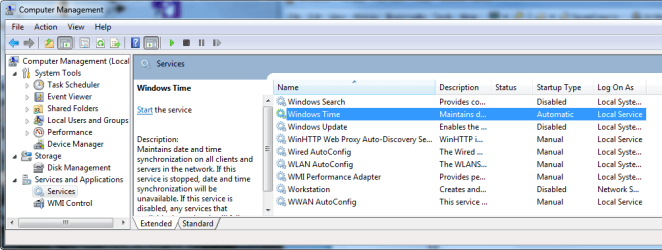
Does anyone else have this same problem?, w32time service does not start automatically, see pics for my settings. I can start it manually with no problems.
 

Attachments

  • time1.png
    time1.png
    12.8 KB · Views: 611
  • time2.png
    time2.png
    32.1 KB · Views: 2,901
Last edited:

My Computer

Computer Manufacturer/Model Number
Home built by the best!
OS
Windows 7 x64
CPU
Intel C2D E6600
Motherboard
Gigabyte EP45-DS3R
Memory
Patriot DDR2 2 x 2GB 4-4-4-12 timings
Graphics Card(s)
Sapphire 4830
Sound Card
Auzentech Meridian
Monitor(s) Displays
Dell Ultrasharp 2709W
Screen Resolution
1920 x 1200
Hard Drives
Western Digital VelociRaptor 150GB SATA 10000RPM 16MB Cache
Western Digital RE3 1TB SATAII 7200RPM 32M Buffer
PSU
PC Power & Cooling Silencer 750 Quad 750W ATX V2.2
Case
Antec Sonata II
Cooling
2 x Scythe S-Flex 120mm (1200rpm) FDB Bearing Chassis Fan
Keyboard
Logitech Cordless LX700
Mouse
Logitech MX Revolution
Internet Speed
8 mbps
That's weird, mine was also stopped and was set to manual in Services. I clicked to update it (didn't start it in Services) and it said there was an error in trying but it did update and then I looked in Services and it was set to Automatic. I set it to automatic/Delayed start and restarted the computer and all was good.

I don't know how long it was disabled/stopped but my time has always been accurate anyways. :confused:
 

My Computer

Computer type
PC/Desktop
Computer Manufacturer/Model Number
Airbot 2.0
OS
Windows 7 Ultimate x64 SP1
CPU
Core i7 920 (D0) @ 4Ghz, *26c idle *65c full load on air
Motherboard
Asus P6X58D Premium - Sata 6Gb/s - USB 3.0
Memory
12GB DDR3 Corsair Dominator -CMD12GX3M6A1600C8 at 1600MHz
Graphics Card(s)
Zotac Geforce GTX 770
Sound Card
ASUS Xonar D2X
Monitor(s) Displays
1 LG 24" Flatron W2453V-PF 1 Samsung 24" P2450H both 2ms RT
Screen Resolution
1920x1080@60hz
Hard Drives
1 Samsung 250GB 840 Evo SSD
1 OCZ Vertex2 180GB SSD
1 TB Samsung Spinpoint F1 7200RPM 32MB cache
2 500GB WD Caviar Blacks 7200RPM 32MB cache (WD5001AALS)

Pioneer DVD Burner DVR-S18M
PSU
Corsair HX1000W
Case
Cooler Master HAF 932
Cooling
Case Fans *3 230mm, *1 140mm/CPU - *Tuniq Tower 120 Extreme
Keyboard
Logitech Wireless MK700
Mouse
Logitech Wireless MK700
Internet Speed
DL 15 Mbps UL 0.98 Mbps
Antivirus
None
Browser
Firefox Nightly
Other Info
Processor-7.7 *RAM- 7.9 *Graphics-7.9 *Gaming Graphics- 7.9 *SSD- 7.8 W.E.I final score= 7.7
*Phone- LG Nexus 5
yea i have the same problem also...
 

My Computer

OS
Windows 7
CPU
AMD x2 4200+
Motherboard
DFI Lanparty NF4 Ultra
Memory
2GB
Graphics Card(s)
Nvidia 8600gt
Monitor(s) Displays
2 mons

My Computer

Computer type
PC/Desktop
Computer Manufacturer/Model Number
Airbot 2.0
OS
Windows 7 Ultimate x64 SP1
CPU
Core i7 920 (D0) @ 4Ghz, *26c idle *65c full load on air
Motherboard
Asus P6X58D Premium - Sata 6Gb/s - USB 3.0
Memory
12GB DDR3 Corsair Dominator -CMD12GX3M6A1600C8 at 1600MHz
Graphics Card(s)
Zotac Geforce GTX 770
Sound Card
ASUS Xonar D2X
Monitor(s) Displays
1 LG 24" Flatron W2453V-PF 1 Samsung 24" P2450H both 2ms RT
Screen Resolution
1920x1080@60hz
Hard Drives
1 Samsung 250GB 840 Evo SSD
1 OCZ Vertex2 180GB SSD
1 TB Samsung Spinpoint F1 7200RPM 32MB cache
2 500GB WD Caviar Blacks 7200RPM 32MB cache (WD5001AALS)

Pioneer DVD Burner DVR-S18M
PSU
Corsair HX1000W
Case
Cooler Master HAF 932
Cooling
Case Fans *3 230mm, *1 140mm/CPU - *Tuniq Tower 120 Extreme
Keyboard
Logitech Wireless MK700
Mouse
Logitech Wireless MK700
Internet Speed
DL 15 Mbps UL 0.98 Mbps
Antivirus
None
Browser
Firefox Nightly
Other Info
Processor-7.7 *RAM- 7.9 *Graphics-7.9 *Gaming Graphics- 7.9 *SSD- 7.8 W.E.I final score= 7.7
*Phone- LG Nexus 5
Solved...

It seems Windows 7 installs the time service set to start automatically, which in some cases it does not start automatically and windows won't update with a time server on the net. Just change the service to automatic/delayed start and reboot to test if service is actually running... remember to give it a minute to start.
 

My Computer

Computer Manufacturer/Model Number
Home built by the best!
OS
Windows 7 x64
CPU
Intel C2D E6600
Motherboard
Gigabyte EP45-DS3R
Memory
Patriot DDR2 2 x 2GB 4-4-4-12 timings
Graphics Card(s)
Sapphire 4830
Sound Card
Auzentech Meridian
Monitor(s) Displays
Dell Ultrasharp 2709W
Screen Resolution
1920 x 1200
Hard Drives
Western Digital VelociRaptor 150GB SATA 10000RPM 16MB Cache
Western Digital RE3 1TB SATAII 7200RPM 32M Buffer
PSU
PC Power & Cooling Silencer 750 Quad 750W ATX V2.2
Case
Antec Sonata II
Cooling
2 x Scythe S-Flex 120mm (1200rpm) FDB Bearing Chassis Fan
Keyboard
Logitech Cordless LX700
Mouse
Logitech MX Revolution
Internet Speed
8 mbps
Yeah, I set it to that yesterday and it seems fine now.
 

My Computer

Computer type
PC/Desktop
Computer Manufacturer/Model Number
Airbot 2.0
OS
Windows 7 Ultimate x64 SP1
CPU
Core i7 920 (D0) @ 4Ghz, *26c idle *65c full load on air
Motherboard
Asus P6X58D Premium - Sata 6Gb/s - USB 3.0
Memory
12GB DDR3 Corsair Dominator -CMD12GX3M6A1600C8 at 1600MHz
Graphics Card(s)
Zotac Geforce GTX 770
Sound Card
ASUS Xonar D2X
Monitor(s) Displays
1 LG 24" Flatron W2453V-PF 1 Samsung 24" P2450H both 2ms RT
Screen Resolution
1920x1080@60hz
Hard Drives
1 Samsung 250GB 840 Evo SSD
1 OCZ Vertex2 180GB SSD
1 TB Samsung Spinpoint F1 7200RPM 32MB cache
2 500GB WD Caviar Blacks 7200RPM 32MB cache (WD5001AALS)

Pioneer DVD Burner DVR-S18M
PSU
Corsair HX1000W
Case
Cooler Master HAF 932
Cooling
Case Fans *3 230mm, *1 140mm/CPU - *Tuniq Tower 120 Extreme
Keyboard
Logitech Wireless MK700
Mouse
Logitech Wireless MK700
Internet Speed
DL 15 Mbps UL 0.98 Mbps
Antivirus
None
Browser
Firefox Nightly
Other Info
Processor-7.7 *RAM- 7.9 *Graphics-7.9 *Gaming Graphics- 7.9 *SSD- 7.8 W.E.I final score= 7.7
*Phone- LG Nexus 5
It has to do with what they call triggers. All explained at link from here. http://www.sevenforums.com/news/3029-inside-windows-7-service-controller-background-processing.html

Kinda long (44 mins.) The way I understood it, basically the service won't be turned on until you or a task or a piece of hardware or network, start an event to turn it on. When you try to update the time, you call on the service and trigger the event 'Start xyz service'. It can also turn the service off when finished. That's very simplified. It is one reason why seven is faster, because many services are only running when needed instead of running all the time waiting for something to use them. In effect you don't have to try to decide which services you need or don't, they can take care of themselves.

He's talking about the new kernel in W7.

I found it interesting.

Gary

Edit: I just found another example. I have a wacom tablet. I picked it up to just play and I noticed that the tablet input panel was suddenly just beyound the left side of the screen. I touched it and it came out in the middle of the screen, all normal behavior. When I put the pen down and reached for the mouse, the tablet input panel dimmed until I started moving the mouse. I closed it and in Vista it would simply slide to the left side waiting for me to use it again. I Seven, it slid over to the left and completely disappeared. Put the mouse over there and nothing. Grab the pen and tablet and it instantly reappears.
 

My Computer

Computer Manufacturer/Model Number
Dell XPS420
OS
Vista Ult 64 bit Seven Ult RTM x64
CPU
Intel Core2 Quad Q6600 2.40 gigahertz
Memory
Crucial Ballistix 4x2GB PC2 6400
Graphics Card(s)
NVIDIA GeForce 8600 GTS 256 MB
Sound Card
Creative SB X-Fi audio
Monitor(s) Displays
HP w2207 + HPvs15
Screen Resolution
1680x1050 + 1024x768
Hard Drives
2-WD5000AAKS-500 GB
WD5000AAV-500 GB external
Keyboard
Microsoft Comfort Curve
Mouse
MX Revolution
Other Info
Wacom Intuos 2 Graphics Tablet
Experience Index=5.5
Possible solution?

Does anyone else have this same problem?, w32time service does not start automatically, see pics for my settings. I can start it manually with no problems.

I am not an expert and I had somewhat similar problem on w32time synchronization with Time Servers and none of the solutions offered on the net seemed to work. By logic I used a combination from different solutions and it worked for me. Try it and see if it works!

At the elevated command prompt (with administrator privileges), type the following command

1. Type "w32tm /debug /disable" and press 'Enter'

2. Type "w32tm /unregister" and press 'Enter' (without using the first command the second did not work!)

you should get the response " W32Time successfully unregistered"

3. Type "w32tm /register" and press 'Enter'

you should get the response "W32Time successfully registered"

4. Type "net start w32time" and press 'Enter'

you should get the response "The windows Time Service is starting. The windows time service was started successfully"

This ensured my Internet Time synchronization started working again. I suppose w32tm and w32time commands are interchangeable from the responses I got:D.
 
Last edited:

My Computer

OS
Windows 7 Home Premium 32bit
Does anyone else have this same problem?, w32time service does not start automatically, see pics for my settings. I can start it manually with no problems.

I am not an expert and I had somewhat similar problem on w32time synchronization with Time Servers and none of the solutions offered on the net seemed to work. By logic I used a combination from different solutions and it worked for me. Try it and see if it works!

At the elevated command prompt (with administrator privileges), type the following command

1. Type "w32tm /debug /disable" and press 'Enter'

2. Type "w32tm /unregister" and press 'Enter' (without using the first command the second did not work!)

you should get the response " W32Time successfully unregistered"

3. Type "w32tm /register" and press 'Enter'

you should get the response "W32Time successfully registered"

4. Type "net start w32time" and press 'Enter'

you should get the response "The windows Time Service is starting. The windows time service was started successfully"

This ensured my Internet Time synchronization started working again. I suppose w32tm and w32time commands are interchangeable from the responses I got:D.

Woohoo, necrobump!

I have the same issue, however when I try doing any of these steps in CMD (not really any, but I tried the first two so I'll assume it just won't work) I get "access denied" and an error code 0x80070005. I'll google that right now but this is such a pain in the butt...

UPDATE: I ran CMD as an administrator and was able to to /debug /disable, but not /unregister. I get the same error code. Then, when I try net start w32tm it tells me it can't start it because it's disabled, however when I look in my services it is there and it is started!
 

My Computer

Computer type
PC/Desktop
OS
Windows 7 Home Premium 64-bit
Back
Top