Solved Help with editing/deleting text in window

A small suggestion.
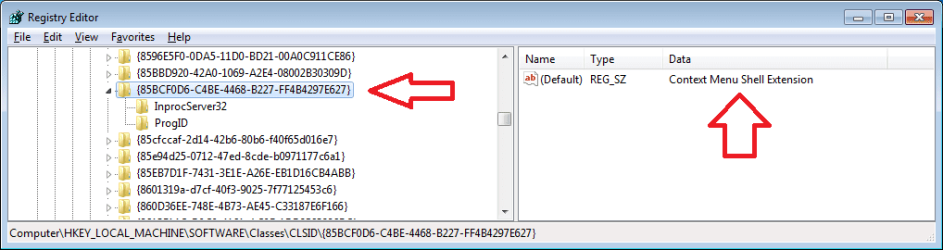
Using the picture above by derek.
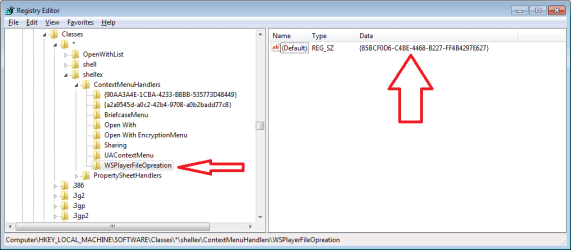
Right tick on WSplayer file operation and select disable. Then right tick and select Open regedit and then right tick on what it finds and delete.
When you work in the registry you do it at your own risk.
 

My Computer My Computer

Computer type
PC/Desktop
Computer Manufacturer/Model Number
Home made Desktop
OS
Windows 10 Pro. 64/ version 1709 Windows 7 Pro/64
CPU
Intel i7-6800K @ 4.3
Motherboard
ASUS X-99 Deluxe II
Memory
Corsair Platinum 16 gig @2400
Graphics Card(s)
EVGA GTX 1070 OC
Monitor(s) Displays
Asus 27" LED LCD/VE278Q
Screen Resolution
1920-1080 or 1280-720 HDMI
Hard Drives
INTEL SSD 730-240 Gb Sata 3.0/
PSU
EVGA Platium 1200W
Case
Phanteks Luxe Tempered Glass 8 fans/ one radiator
Cooling
XSPC/ Water Cooled CPU
Keyboard
Das 4 Professional
Mouse
Logitech M705/MX Anywhere 2-S
Internet Speed
100 mbits
Antivirus
Microsoft Security Essentials/ Malwarebytes Premium 3.0/ SAS
Browser
I.E. 11 default/Firefox/ ISP Time Warner Cable/Spectrum
Other Info
LG BluRay Burner/
Sound system-KLipsch-THX/
Icy Dock ssd Hot Swap bays.
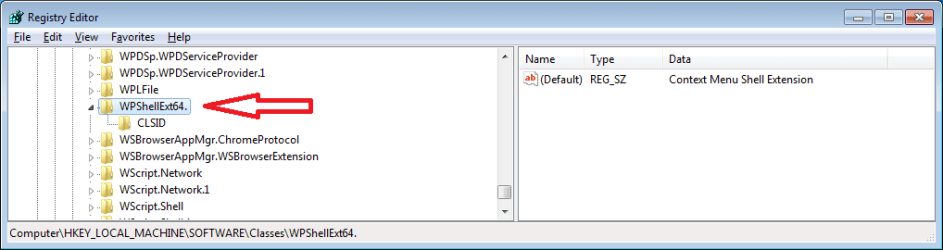
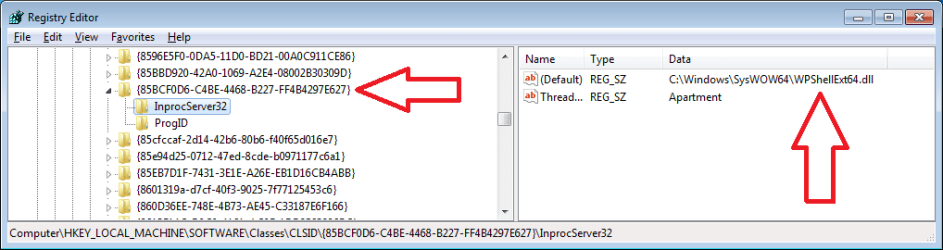
WPShellExt64.dll seems to be a suspicious entry, as in I cannot find much information about it. I would delete it. It will not harm anything. Strange that ccleaner did not list it under context menu....

As to the problem at hand, manually removing it in the registry seems to be the only option. It has to be somewhere on the pc.

Also please answer this:

I want to confirm you have tried ccleaner under the context menu tab option in tools-startup?

You are showing windows startup, not the context menu option.

This is from the OP's first attachment (Word)

Thanx derekimo, I thought I was in the correct location.
 

My Computer My Computer

Computer type
PC/Desktop
Computer Manufacturer/Model Number
Custom Build
OS
Windows 7 Ultimate x64
CPU
Intel i5-2500K
Motherboard
Gigabyte P67A-UD3-B3
Memory
16GB
Graphics Card(s)
NVIDIA GeForce GT 710
Sound Card
Microsoft HD Audio
Monitor(s) Displays
AOC 21"
Screen Resolution
1920 x 1080 x 60 hertz
Hard Drives
Seagate Barracuda 1000GB
PSU
Antec Neo ECO 620C
Case
Antec
Cooling
2 case fans, video card fan
Keyboard
Insignia wireless
Mouse
Insignia wireless
Internet Speed
COX 89Mbps v, 9Mbps ^
Antivirus
AVG Free
Browser
Chrome
Not sure if this belongs here, but what the heck. I downloaded the program 'Wondershare,' I needed to convert some videos to disk so I could play them on my home dvd player.

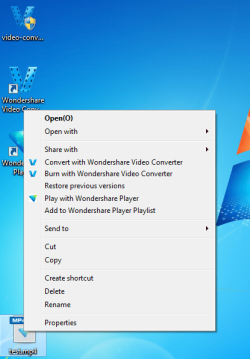
I decided I didn't like the program so I deleted it through the Programs and Features in the Control Panel. However, it still left the remnants of what you see in this screen shot. Any ideas on how to remove/edit/delete this text??

The text I'm referring to is:
"Play With Wondershare Player"
"Add to Wondershare Player Playlist"
When I first saw this post, I was in a computer where I could not safely open a MS Word document. In the future, please consider posting your screenshots using the info in this post. (There is a link to a forum tutorial at the bottom of that post.)

Also, please be specific about which product from Wondershare that you installed. They make several things. Assuming that you installed this Wondershare product, then the info below should help you out.

1) Manually create a system restore point.

2) Merge this reg file: remove.reg
Code:
Windows Registry Editor Version 5.00

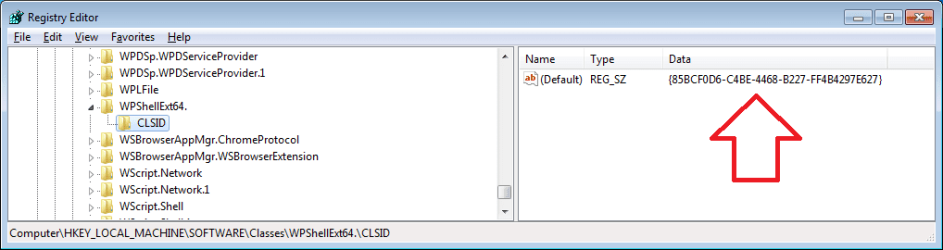
[-HKEY_LOCAL_MACHINE\SOFTWARE\Classes\CLSID\{85BCF0D6-C4BE-4468-B227-FF4B4297E627}]

[-HKEY_LOCAL_MACHINE\SOFTWARE\Classes\WPShellExt64.]

[-HKEY_LOCAL_MACHINE\SOFTWARE\Classes\*\shellex\ContextMenuHandlers\WSPlayerFileOpreation]

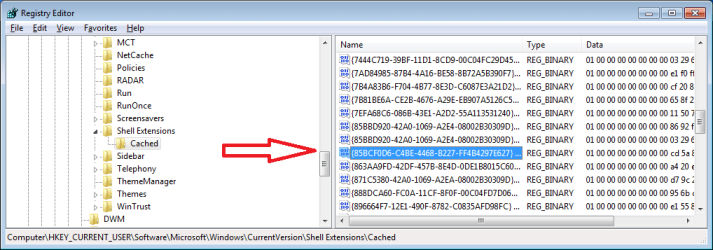
[HKEY_CURRENT_USER\Software\Microsoft\Windows\CurrentVersion\Shell Extensions\Cached]
"{85BCF0D6-C4BE-4468-B227-FF4B4297E627} {000214E4-0000-0000-C000-000000000046} 0xFFFF"=-

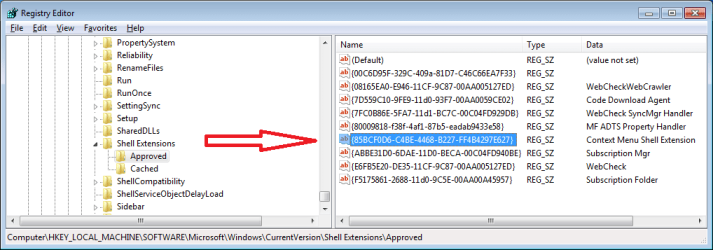
[HKEY_LOCAL_MACHINE\SOFTWARE\Microsoft\Windows\CurrentVersion\Shell Extensions\Approved]
"{85BCF0D6-C4BE-4468-B227-FF4B4297E627}"=-
3) Run this batch file: remove.bat
(run as admin)
Code:
regsvr32 /u "C:\Windows\SysWOW64\WPShellExt64.dll"
del "C:\Windows\SysWOW64\WPShellExt64.dll"
pause
If the DLL does not get deleted, restart the computer and run the batch file again.


If you would rather remove the registry entries manually...
...then manually create a system restore point first
...then use this info:

WP1.png

WP2.png

WP3.png

WP4.png

WP5.png

WP6.png

WP7.png

The attached zipped file named remove.zip contains remove.reg and remove.bat.

I would be concerned that re-installing and then uninstalling the product did not fix your context menu. I installed and uninstalled several of their products (while hunting for the one that made the context menus shown in your original screenshot/attachment) and they all uninstalled just fine. What anti-virus app are you using?
 

Attachments

My Computer My Computer

Computer type
Laptop
Computer Manufacturer/Model Number
Employer provided Dell Latitude
OS
W7 Pro SP1 64bit
CPU
i7
Memory
8GB
Graphics Card(s)
Intel HD Graphics
Hard Drives
crappy SSD
Antivirus
Employer mandated Symantec Endpoint Protection
Browser
Pale Moon 64bit, IE11 64bit & Chrome 64bit
WPShellExt64.dll seems to be a suspicious entry, as in I cannot find much information about it. I would delete it. It will not harm anything. Strange that ccleaner did not list it under context menu....

It did, at least that's what I'm seeing.
 

My Computer My Computer

Computer type
PC/Desktop
Computer Manufacturer/Model Number
Custom Build
OS
Windows 7 Ultimate x64
CPU
Intel i5-2500K
Motherboard
Gigabyte P67A-UD3-B3
Memory
16GB
Graphics Card(s)
NVIDIA GeForce GT 710
Sound Card
Microsoft HD Audio
Monitor(s) Displays
AOC 21"
Screen Resolution
1920 x 1080 x 60 hertz
Hard Drives
Seagate Barracuda 1000GB
PSU
Antec Neo ECO 620C
Case
Antec
Cooling
2 case fans, video card fan
Keyboard
Insignia wireless
Mouse
Insignia wireless
Internet Speed
COX 89Mbps v, 9Mbps ^
Antivirus
AVG Free
Browser
Chrome
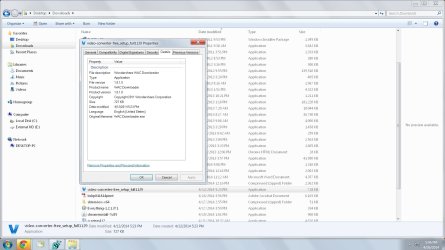
UsernameIssues- this is the one I installed: video-converter-free_setup_full1129 (Wondershare WAC Downloader)

BTW, thanks and I'm reading through yours and others' suggestions.
 

My Computer My Computer

Computer type
PC/Desktop
Computer Manufacturer/Model Number
Custom Build
OS
Windows 7 Ultimate x64
CPU
Intel i5-2500K
Motherboard
Gigabyte P67A-UD3-B3
Memory
16GB
Graphics Card(s)
NVIDIA GeForce GT 710
Sound Card
Microsoft HD Audio
Monitor(s) Displays
AOC 21"
Screen Resolution
1920 x 1080 x 60 hertz
Hard Drives
Seagate Barracuda 1000GB
PSU
Antec Neo ECO 620C
Case
Antec
Cooling
2 case fans, video card fan
Keyboard
Insignia wireless
Mouse
Insignia wireless
Internet Speed
COX 89Mbps v, 9Mbps ^
Antivirus
AVG Free
Browser
Chrome
UsernameIssues-

In the future, please consider posting your screenshots using the info in this post. Tried to, file too large for the upload process

Also, please be specific about which product from Wondershare that you installed. Already answered

What anti-virus app are you using? AVG
 

My Computer My Computer

Computer type
PC/Desktop
Computer Manufacturer/Model Number
Custom Build
OS
Windows 7 Ultimate x64
CPU
Intel i5-2500K
Motherboard
Gigabyte P67A-UD3-B3
Memory
16GB
Graphics Card(s)
NVIDIA GeForce GT 710
Sound Card
Microsoft HD Audio
Monitor(s) Displays
AOC 21"
Screen Resolution
1920 x 1080 x 60 hertz
Hard Drives
Seagate Barracuda 1000GB
PSU
Antec Neo ECO 620C
Case
Antec
Cooling
2 case fans, video card fan
Keyboard
Insignia wireless
Mouse
Insignia wireless
Internet Speed
COX 89Mbps v, 9Mbps ^
Antivirus
AVG Free
Browser
Chrome
I'm not finding that particular file on Wondershare's website. Got a link?
edit: I found it :-)
(First item here.)

Go ahead and merge that reg file and run that batch file...
...they won't harm anything
...and whatever you installed, also installed the player that I was working with.


What was the file format of the screenshot that was too big to upload? BMP? JPG? PNG?
What was the file size?
Just curious...
 

My Computer My Computer

Computer type
Laptop
Computer Manufacturer/Model Number
Employer provided Dell Latitude
OS
W7 Pro SP1 64bit
CPU
i7
Memory
8GB
Graphics Card(s)
Intel HD Graphics
Hard Drives
crappy SSD
Antivirus
Employer mandated Symantec Endpoint Protection
Browser
Pale Moon 64bit, IE11 64bit & Chrome 64bit
That converter installs the player too:

WS1.png

Can you uninstall the player via the normal control panel method?

WS2.png

If it is not listed, then I would suggest...
...installing just the player
...restarting the computer
...uninstalling the player.
 

My Computer My Computer

Computer type
Laptop
Computer Manufacturer/Model Number
Employer provided Dell Latitude
OS
W7 Pro SP1 64bit
CPU
i7
Memory
8GB
Graphics Card(s)
Intel HD Graphics
Hard Drives
crappy SSD
Antivirus
Employer mandated Symantec Endpoint Protection
Browser
Pale Moon 64bit, IE11 64bit & Chrome 64bit
I'm not finding that particular file on Wondershare's website. Got a link?
edit: I found it :-)
(First item here.)

Go ahead and merge that reg file and run that batch file...
...they won't harm anything
...and whatever you installed, also installed the player that I was working with.


What was the file format of the screenshot that was too big to upload? BMP? JPG? PNG?
What was the file size?
Just curious...

Does this help??

Paint1.jpg
 

My Computer My Computer

Computer type
PC/Desktop
Computer Manufacturer/Model Number
Custom Build
OS
Windows 7 Ultimate x64
CPU
Intel i5-2500K
Motherboard
Gigabyte P67A-UD3-B3
Memory
16GB
Graphics Card(s)
NVIDIA GeForce GT 710
Sound Card
Microsoft HD Audio
Monitor(s) Displays
AOC 21"
Screen Resolution
1920 x 1080 x 60 hertz
Hard Drives
Seagate Barracuda 1000GB
PSU
Antec Neo ECO 620C
Case
Antec
Cooling
2 case fans, video card fan
Keyboard
Insignia wireless
Mouse
Insignia wireless
Internet Speed
COX 89Mbps v, 9Mbps ^
Antivirus
AVG Free
Browser
Chrome

My Computer My Computer

Computer type
PC/Desktop
Computer Manufacturer/Model Number
Custom Build
OS
Windows 7 Ultimate x64
CPU
Intel i5-2500K
Motherboard
Gigabyte P67A-UD3-B3
Memory
16GB
Graphics Card(s)
NVIDIA GeForce GT 710
Sound Card
Microsoft HD Audio
Monitor(s) Displays
AOC 21"
Screen Resolution
1920 x 1080 x 60 hertz
Hard Drives
Seagate Barracuda 1000GB
PSU
Antec Neo ECO 620C
Case
Antec
Cooling
2 case fans, video card fan
Keyboard
Insignia wireless
Mouse
Insignia wireless
Internet Speed
COX 89Mbps v, 9Mbps ^
Antivirus
AVG Free
Browser
Chrome
Do you have the player listed in Programs and Features?

If yes, uninstall it.
 

My Computer My Computer

Computer type
Laptop
Computer Manufacturer/Model Number
Employer provided Dell Latitude
OS
W7 Pro SP1 64bit
CPU
i7
Memory
8GB
Graphics Card(s)
Intel HD Graphics
Hard Drives
crappy SSD
Antivirus
Employer mandated Symantec Endpoint Protection
Browser
Pale Moon 64bit, IE11 64bit & Chrome 64bit

My Computer My Computer

Computer type
PC/Desktop
Computer Manufacturer/Model Number
Home made Desktop
OS
Windows 10 Pro. 64/ version 1709 Windows 7 Pro/64
CPU
Intel i7-6800K @ 4.3
Motherboard
ASUS X-99 Deluxe II
Memory
Corsair Platinum 16 gig @2400
Graphics Card(s)
EVGA GTX 1070 OC
Monitor(s) Displays
Asus 27" LED LCD/VE278Q
Screen Resolution
1920-1080 or 1280-720 HDMI
Hard Drives
INTEL SSD 730-240 Gb Sata 3.0/
PSU
EVGA Platium 1200W
Case
Phanteks Luxe Tempered Glass 8 fans/ one radiator
Cooling
XSPC/ Water Cooled CPU
Keyboard
Das 4 Professional
Mouse
Logitech M705/MX Anywhere 2-S
Internet Speed
100 mbits
Antivirus
Microsoft Security Essentials/ Malwarebytes Premium 3.0/ SAS
Browser
I.E. 11 default/Firefox/ ISP Time Warner Cable/Spectrum
Other Info
LG BluRay Burner/
Sound system-KLipsch-THX/
Icy Dock ssd Hot Swap bays.
Does the problem persist on a new user account?
 

My Computer My Computer

Computer type
PC/Desktop
Computer Manufacturer/Model Number
Self assembled
OS
Windows 10 Home 64Bit
CPU
Intel Core i5 10400 @ 2.90GHz
Motherboard
Intel Corporation DG41WV (PROCESSOR)
Memory
8.00GB Single-Channel Unknown @ 1329MHz (16-20-20-38)
Sound Card
Realtek High Definition Audio
Monitor(s) Displays
DELL E170S
Screen Resolution
1280x1024 pixels
Hard Drives
931GB TOSHIBA DT01ACA100 (SATA)
238GB TEAM TM8PS7256G (SATA SSD)
Case
Nothing Fancy
Cooling
Fans
Keyboard
A4 Tech Co LTD
Mouse
A4 Tech Co Ltd/Logitech
Internet Speed
25 Mbps

My Computer My Computer

Computer type
PC/Desktop
Computer Manufacturer/Model Number
Custom Build
OS
Windows 7 Ultimate x64
CPU
Intel i5-2500K
Motherboard
Gigabyte P67A-UD3-B3
Memory
16GB
Graphics Card(s)
NVIDIA GeForce GT 710
Sound Card
Microsoft HD Audio
Monitor(s) Displays
AOC 21"
Screen Resolution
1920 x 1080 x 60 hertz
Hard Drives
Seagate Barracuda 1000GB
PSU
Antec Neo ECO 620C
Case
Antec
Cooling
2 case fans, video card fan
Keyboard
Insignia wireless
Mouse
Insignia wireless
Internet Speed
COX 89Mbps v, 9Mbps ^
Antivirus
AVG Free
Browser
Chrome

My Computer My Computer

Computer type
PC/Desktop
Computer Manufacturer/Model Number
Custom Build
OS
Windows 7 Ultimate x64
CPU
Intel i5-2500K
Motherboard
Gigabyte P67A-UD3-B3
Memory
16GB
Graphics Card(s)
NVIDIA GeForce GT 710
Sound Card
Microsoft HD Audio
Monitor(s) Displays
AOC 21"
Screen Resolution
1920 x 1080 x 60 hertz
Hard Drives
Seagate Barracuda 1000GB
PSU
Antec Neo ECO 620C
Case
Antec
Cooling
2 case fans, video card fan
Keyboard
Insignia wireless
Mouse
Insignia wireless
Internet Speed
COX 89Mbps v, 9Mbps ^
Antivirus
AVG Free
Browser
Chrome
Another thought.
Your problem might not be with the player but instead the downloader.
(WAC Downloader)

Malware scan of player_setup_full1374.exe (WAC Downloader) c6988c356ca98619e6db877160e823ca6d2d3976 - herdProtect

If it was my computer I would find/stop/remove the down loader.
I'm not sure what I'm seeing in that link. It looks to be completely clean.

Here is a VirusTotal scan that shows to be clean too.
(This is the file the OP used.)


Does the problem persist on a new user account?
It did in my testing and I would expect it to...
...given the HKLM keys shown here.


I'm still thinking that the OP just needs to uninstall the player. I think that the downloader has already been uninstalled - or it would have shown up in the context menu and CCleaner screenshots.
 
Last edited:

My Computer My Computer

Computer type
Laptop
Computer Manufacturer/Model Number
Employer provided Dell Latitude
OS
W7 Pro SP1 64bit
CPU
i7
Memory
8GB
Graphics Card(s)
Intel HD Graphics
Hard Drives
crappy SSD
Antivirus
Employer mandated Symantec Endpoint Protection
Browser
Pale Moon 64bit, IE11 64bit & Chrome 64bit

My Computer My Computer

Computer type
PC/Desktop
Computer Manufacturer/Model Number
Custom Build
OS
Windows 7 Ultimate x64
CPU
Intel i5-2500K
Motherboard
Gigabyte P67A-UD3-B3
Memory
16GB
Graphics Card(s)
NVIDIA GeForce GT 710
Sound Card
Microsoft HD Audio
Monitor(s) Displays
AOC 21"
Screen Resolution
1920 x 1080 x 60 hertz
Hard Drives
Seagate Barracuda 1000GB
PSU
Antec Neo ECO 620C
Case
Antec
Cooling
2 case fans, video card fan
Keyboard
Insignia wireless
Mouse
Insignia wireless
Internet Speed
COX 89Mbps v, 9Mbps ^
Antivirus
AVG Free
Browser
Chrome

My Computer My Computer

Computer type
PC/Desktop
Computer Manufacturer/Model Number
Self assembled
OS
Windows 10 Home 64Bit
CPU
Intel Core i5 10400 @ 2.90GHz
Motherboard
Intel Corporation DG41WV (PROCESSOR)
Memory
8.00GB Single-Channel Unknown @ 1329MHz (16-20-20-38)
Sound Card
Realtek High Definition Audio
Monitor(s) Displays
DELL E170S
Screen Resolution
1280x1024 pixels
Hard Drives
931GB TOSHIBA DT01ACA100 (SATA)
238GB TEAM TM8PS7256G (SATA SSD)
Case
Nothing Fancy
Cooling
Fans
Keyboard
A4 Tech Co LTD
Mouse
A4 Tech Co Ltd/Logitech
Internet Speed
25 Mbps

My Computer My Computer

Computer type
PC/Desktop
Computer Manufacturer/Model Number
Custom Build
OS
Windows 7 Ultimate x64
CPU
Intel i5-2500K
Motherboard
Gigabyte P67A-UD3-B3
Memory
16GB
Graphics Card(s)
NVIDIA GeForce GT 710
Sound Card
Microsoft HD Audio
Monitor(s) Displays
AOC 21"
Screen Resolution
1920 x 1080 x 60 hertz
Hard Drives
Seagate Barracuda 1000GB
PSU
Antec Neo ECO 620C
Case
Antec
Cooling
2 case fans, video card fan
Keyboard
Insignia wireless
Mouse
Insignia wireless
Internet Speed
COX 89Mbps v, 9Mbps ^
Antivirus
AVG Free
Browser
Chrome
I'm not saying Down loader is a infection. I'm saying it is probably not needed or wanted.

Post # 29

wac downloader today.PNG
 

My Computer My Computer

Computer type
PC/Desktop
Computer Manufacturer/Model Number
Home made Desktop
OS
Windows 10 Pro. 64/ version 1709 Windows 7 Pro/64
CPU
Intel i7-6800K @ 4.3
Motherboard
ASUS X-99 Deluxe II
Memory
Corsair Platinum 16 gig @2400
Graphics Card(s)
EVGA GTX 1070 OC
Monitor(s) Displays
Asus 27" LED LCD/VE278Q
Screen Resolution
1920-1080 or 1280-720 HDMI
Hard Drives
INTEL SSD 730-240 Gb Sata 3.0/
PSU
EVGA Platium 1200W
Case
Phanteks Luxe Tempered Glass 8 fans/ one radiator
Cooling
XSPC/ Water Cooled CPU
Keyboard
Das 4 Professional
Mouse
Logitech M705/MX Anywhere 2-S
Internet Speed
100 mbits
Antivirus
Microsoft Security Essentials/ Malwarebytes Premium 3.0/ SAS
Browser
I.E. 11 default/Firefox/ ISP Time Warner Cable/Spectrum
Other Info
LG BluRay Burner/
Sound system-KLipsch-THX/
Icy Dock ssd Hot Swap bays.
Back
Top