Solved Find the actual program path of a shortcut in Win 7 Pro

innkeeper9

New member
Local time
2:17 PM
Messages
19
Hello,

I am on Win 7 pro, and it is a totally new system for me [and I'm old] and it does nothing like XP or previous OS. Anyway, you used to be able to right click a shortcut icon and see the path to the actual program, now the only path the icon shows is the path to the shortcut, duh. I know where the shortcut is I want to find the path to the program, when you look at the Target it only has the name of the program. Can anyone tell me how to do that? It is important since this is my email program, it is part of a Microsoft office thing and I cannot find it so if I ever lose the shortcut I will never be able to again find the email program. I have tried doing a search for Outlook 2007, it finds it but when I do open containing folder it just gives me the search path saying that I am in user/whatever/ so on search. There must be some way to find the path to the programs to which shortcuts are linked. This is crazy. Thanks for any help.

Ruth
 

My Computer My Computer

At a glance

Window 7 Pro 64bitIntel Pentium G3320 @ 3.00 GHzRAM 4 GB? Intel HD Graphics
Computer type
PC/Desktop
Computer Manufacturer/Model Number
Dell
OS
Window 7 Pro 64bit
CPU
Intel Pentium G3320 @ 3.00 GHz
Motherboard
?
Memory
RAM 4 GB
Graphics Card(s)
? Intel HD Graphics
Hard Drives
dual boot
Antivirus
AVG
Browser
IE 11
Welcome to the forum.

Sounds like you're looking at the "General" tab under the shortcut properties. If you click on the Shortcut tab, the program location is displayed next to Start In.
 

Attachments

  • Shortcut.JPG
    Shortcut.JPG
    38.9 KB · Views: 45

My Computer My Computer

At a glance

Windows 7 Pro-x64i7-2600 3.4GHz - 3.8GHz Turbo8Gb - 2x4GB, Muskin 991770 PC3-1333Integrated Intel HD 2000
Computer type
PC/Desktop
Computer Manufacturer/Model Number
Built 2/11/2011
OS
Windows 7 Pro-x64
CPU
i7-2600 3.4GHz - 3.8GHz Turbo
Motherboard
Intel DH67BL-B3
Memory
8Gb - 2x4GB, Muskin 991770 PC3-1333
Graphics Card(s)
Integrated Intel HD 2000
Sound Card
Integrated Intel 10.1 HD, RealTek ALC892
Monitor(s) Displays
Asus LCD VH222H, Haier HL24XSL2a
Screen Resolution
1920x1080, 1920x1080
Hard Drives
Crucial SSD C300-128Gb,
Western Digital WD5002AALX - 500Gb,
Western Digital WD7501AALS - 750Gb
PSU
Seasonic 650W 80+ Gold Modular
Case
Rosewill Defender
Cooling
Stock CPU, Four 120mm case fans, PCH fan added
Keyboard
Logitech EX100 Y-RBH94 Wireless
Mouse
Logitech EX100 M-RCE95 Wireless
Internet Speed
3.0/1.5 Mbs
Antivirus
Microsoft Security Essentials
Browser
Microsoft Internet Explorer 11
Other Info
Antec Veris Premier-Multimedia IR Station,
Cyber Accoustics-3602 Speakers,
AFT XM-5U Card Reader,
Hauppauge TV-HVR-2250,
Sony LX300 USB Turntable
....It is important since this is my email program, it is part of a Microsoft office thing......

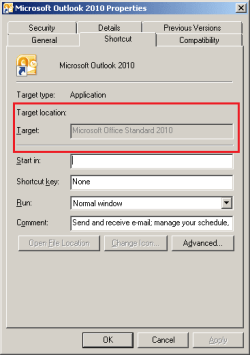
The Office shortcuts are weird:

office.png

edit: I don't have an easy solution for innkeeper9
I'm just attempting to help carwiz help innkeeper9.

One (not so easy way) would be to use:
Task Manager
Processes
tab
From the Menu Bar, select View > Select Columns...
Scroll down and put a check by Image Path Name
Click on OK.
Start the application of interest.
Then find that application within Task Manager.
The path to that application should now show in one of the columns on Task Manager's Processes tab.
 
Last edited:

My Computer My Computer

At a glance

W7 Pro SP1 64biti78GBIntel HD Graphics
Computer type
Laptop
Computer Manufacturer/Model Number
Employer provided Dell Latitude
OS
W7 Pro SP1 64bit
CPU
i7
Memory
8GB
Graphics Card(s)
Intel HD Graphics
Hard Drives
crappy SSD
Antivirus
Employer mandated Symantec Endpoint Protection
Browser
Pale Moon 64bit, IE11 64bit & Chrome 64bit
Thanks to both of you. Car, that is what I would expect, however, UNI's image is what I get and I do not know how to find the program. I went to All Programs and found Microsoft Office folder clicked it and it gave a list of a bunch of things, i.e. Microsoft Enterprise and so on, so I tried making a shortcut and seeing if it would give me a path, but all it does is make a shortcut to the start menu. I will keep trying and in the meantime keep using XP since I can actually use this OS :)
 

My Computer My Computer

At a glance

Window 7 Pro 64bitIntel Pentium G3320 @ 3.00 GHzRAM 4 GB? Intel HD Graphics
Computer type
PC/Desktop
Computer Manufacturer/Model Number
Dell
OS
Window 7 Pro 64bit
CPU
Intel Pentium G3320 @ 3.00 GHz
Motherboard
?
Memory
RAM 4 GB
Graphics Card(s)
? Intel HD Graphics
Hard Drives
dual boot
Antivirus
AVG
Browser
IE 11
Did you try the suggestion for Task Manager by UsernameIssues ?

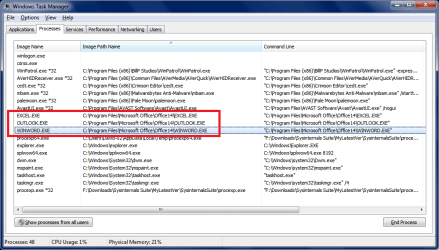
Here is what it shows for me with Office 2010 - Outlook, Word, and Excel open ...

TMSP02.PNG
 

My Computer My Computer

At a glance

Multi-Boot W7_Pro_x64 W8.1_Pro_x64 W10_Pro_x6...AMD Athlon II x4 6206GB GSkill DDR2 800AMD 4670 GPU + AMD 4200 IGP
Computer type
PC/Desktop
Computer Manufacturer/Model Number
home built
OS
Multi-Boot W7_Pro_x64 W8.1_Pro_x64 W10_Pro_x64 +Linux_VMs +Chromium_VM
CPU
AMD Athlon II x4 620
Motherboard
Gigabyte GA-MA785G-UD3H
Memory
6GB GSkill DDR2 800
Graphics Card(s)
AMD 4670 GPU + AMD 4200 IGP
Sound Card
on board Realtek ALC889A
Monitor(s) Displays
RCA 40" LCD TV, Insignia 32" LCD TV, HP 15" LCD monitor
Screen Resolution
1680 x 1050
Hard Drives
OCZ Vertex 3 120GB,
Samsung F3 1TB (3),
Several others - WD, Seagate, Hitachi, ...
PSU
Corsair 500 W
Case
Rosewill mid tower
Cooling
CM 90mm rifle
Keyboard
Gyration wireless, Logitech wireless, Dell USB wired
Mouse
Gyration wireless, Logitech wireless, V7 USB wired
Internet Speed
Spectrum - 100Mbps D / 10Mbps U
Antivirus
Avast, MBAM3, EMET, WinPatrol
Browser
Pale Moon, Firefox, IE
Other Info
2 multi-boot PC's
Mainly HTPC/Office/Gen purpose (no gaming).
Trendnet USB KVM.
LG DVD burner/Blue Ray Player.
Tray system for removable SATA backup drives.

Not currently OCd, under-volted.
I use Hybrid sleep, rarely re-boot or shutdown.

Hauppauge HD-PVR, Avermedia PCIe TV Tuner, Hauppauge PCI TV Tuner.
Oh my, well, that's embarrasing [I said I was old :) ] I seemed to have gone right past that and it is the one thing I do know how to use. Though I set it for those columns I get abbreviations, i.e. under Image Path Name I get C:\Program Files... There must be someplace to set the system to show me the full paths, but I don't know where to find that.

My apologies to UNI for not reading the post more carefully!

Ruth
 

My Computer My Computer

At a glance

Window 7 Pro 64bitIntel Pentium G3320 @ 3.00 GHzRAM 4 GB? Intel HD Graphics
Computer type
PC/Desktop
Computer Manufacturer/Model Number
Dell
OS
Window 7 Pro 64bit
CPU
Intel Pentium G3320 @ 3.00 GHz
Motherboard
?
Memory
RAM 4 GB
Graphics Card(s)
? Intel HD Graphics
Hard Drives
dual boot
Antivirus
AVG
Browser
IE 11
Wow, I found it, though I would still like to know about the full paths. If you highlight the program under the Processes tab and then right click someplace in the task manager you get an option to open the folder for the program and so I now have the path listed, though I'd prefer to have it actually listed fully in the task manager since I will probably need this again!

Thanks so much to every one of you. You are terrific!
 

My Computer My Computer

At a glance

Window 7 Pro 64bitIntel Pentium G3320 @ 3.00 GHzRAM 4 GB? Intel HD Graphics
Computer type
PC/Desktop
Computer Manufacturer/Model Number
Dell
OS
Window 7 Pro 64bit
CPU
Intel Pentium G3320 @ 3.00 GHz
Motherboard
?
Memory
RAM 4 GB
Graphics Card(s)
? Intel HD Graphics
Hard Drives
dual boot
Antivirus
AVG
Browser
IE 11
Oh my, well, that's embarrasing [I said I was old :) ] I seemed to have gone right past that and it is the one thing I do know how to use. Though I set it for those columns I get abbreviations, i.e. under Image Path Name I get C:\Program Files... There must be someplace to set the system to show me the full paths, but I don't know where to find that.

My apologies to UNI for not reading the post more carefully!

Ruth
No apologies needed. Notice the word edit in my post. That means that I added stuff after I made the original post. It is possible that you loaded the webpage/thread and my edits were not there yet. Or maybe you did not scroll down far enough - but pick the first story about the info not being there yet and stick to it :-)


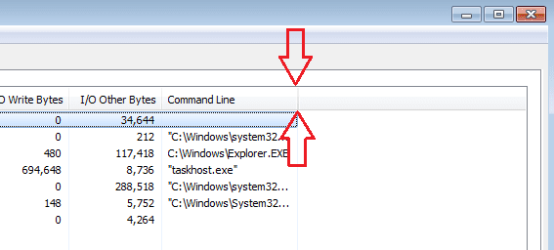
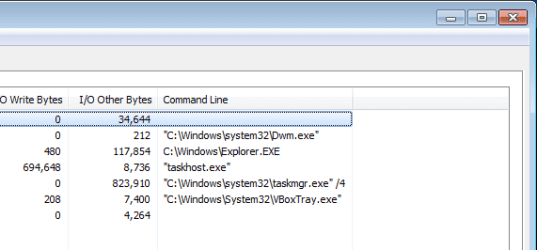
To see the entire path, you will need to adjust the column's width. Double click on the column divider on the right side of the column of interest to auto-size the column's width. (Or Click/Hold/Drag/Release).

tm1.png

TM2.png


As far as getting old, then you will fit right in here. Take a look at this thread: http://www.sevenforums.com/chillout-room/139563-age-category-do-you-fall.html where 747 forum members told the truth* about their age.

*maybe :-)
 

My Computer My Computer

At a glance

W7 Pro SP1 64biti78GBIntel HD Graphics
Computer type
Laptop
Computer Manufacturer/Model Number
Employer provided Dell Latitude
OS
W7 Pro SP1 64bit
CPU
i7
Memory
8GB
Graphics Card(s)
Intel HD Graphics
Hard Drives
crappy SSD
Antivirus
Employer mandated Symantec Endpoint Protection
Browser
Pale Moon 64bit, IE11 64bit & Chrome 64bit
Thank you so much, that worked a treat. I found the path, made a new shortcut and pasted the path in then tested it and it works, so now I know where the program is and I have a real world hard copy of the path.

As to getting old: well, I remember when seeing PC probably meant someone made a typo for District of Columbia, when personal computers were actually pretty 'big', when using one meant you had to at least know the basic dos commands, when a utility called Xtree had pc users ecstatic, and when floppy disks were actually 'floppy' :)

You guys are great, thanks so much to all for the help.

Ruth
 

My Computer My Computer

At a glance

Window 7 Pro 64bitIntel Pentium G3320 @ 3.00 GHzRAM 4 GB? Intel HD Graphics
Computer type
PC/Desktop
Computer Manufacturer/Model Number
Dell
OS
Window 7 Pro 64bit
CPU
Intel Pentium G3320 @ 3.00 GHz
Motherboard
?
Memory
RAM 4 GB
Graphics Card(s)
? Intel HD Graphics
Hard Drives
dual boot
Antivirus
AVG
Browser
IE 11
Back
Top