3TB external suddenly becomes 746GB unallocated

WhyAlwaysM3

New member
Local time
3:46 AM
Messages
19
Evening,

Seagate 3TB (ST3000DM001) in a Thermaltake BlacX (USB+E-Sata) docking station that had 5 partitions spread over the actual drive's capacity, now registers as 746.5GB unallocated.

I connected the dock to a Win 7 desktop through E-Sata and copied files off of the external successfully. Shortly after I plug it into a Vista x64 laptop (machine it has been used with predominately and problem free) and I get back to business. A few minutes later I notice the partitions aren't visible/746GB unallocated.

Disk Management, TestDisk, PhotoRec, Partition Guru, etc all display 746GB instead of 3TB. The Vista laptop is the only machine I have access to at the moment so the scans/tests are being done with that. If detecting the 3TB (so I can then recover all the partitions) necessitates a system/interface change, that can happen.
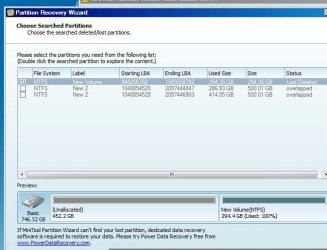
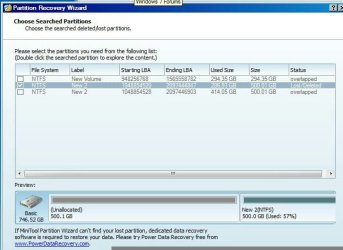
Partition Recovery Wizard Scan 1 of 3.jpg
Can see the files on this partition

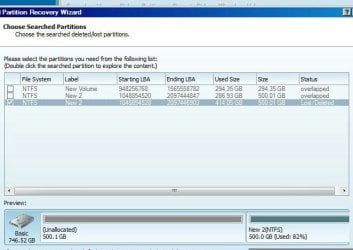
Partition Recovery Wizard Scan 2 of 3.jpg
No files on this one

Partition Recovery Wizard Scan 3 of 3.jpg
Can see the files on this partition


IMG_20140617_010252.jpg
 

My Computer My Computer

At a glance

Win 7 x64 and Vista x64Intel T58004GB
Computer type
Laptop
Computer Manufacturer/Model Number
HP dv5-1138nr
OS
Win 7 x64 and Vista x64
CPU
Intel T5800
Memory
4GB
Just to clarify, were you using this dock with that 3TB HDD on your Vista machine earlier and was it showing full 3TB with all five partitions?
 

My Computer My Computer

At a glance

Windows 7 Home Premium 32 bit
OS
Windows 7 Home Premium 32 bit
Just to clarify, were you using this dock with that 3TB HDD on your Vista machine earlier and was it showing full 3TB with all five partitions?
Correct.
 

My Computer My Computer

At a glance

Win 7 x64 and Vista x64Intel T58004GB
Computer type
Laptop
Computer Manufacturer/Model Number
HP dv5-1138nr
OS
Win 7 x64 and Vista x64
CPU
Intel T5800
Memory
4GB
OK. Will it be possible now to connect it back to that Windows 7 machine as before and check its status? If possible post a full screenshot of Windows 7 Disk Management after hiding the Console Tree and Action Pane by clicking on the buttons on the top tool bar.( Don't worry if you can't do it now. I know it is night time. You can do it tomorrow. I am not going to give any instant solution :).)

That will give us an idea whether the partitions have really been lost.
 

My Computer My Computer

At a glance

Windows 7 Home Premium 32 bit
OS
Windows 7 Home Premium 32 bit
Not for a few days. In the mean time is there any other information that would be useful to you?
 

My Computer My Computer

At a glance

Win 7 x64 and Vista x64Intel T58004GB
Computer type
Laptop
Computer Manufacturer/Model Number
HP dv5-1138nr
OS
Win 7 x64 and Vista x64
CPU
Intel T5800
Memory
4GB
OK, I would like to see the 1.Windows Disk Management on your Vista machine. ( Please plug out any other external drives connected to the machine and only the 3TB HDD on the Dock) 2. The first screen when you run Partition Wizard.
 

My Computer My Computer

At a glance

Windows 7 Home Premium 32 bit
OS
Windows 7 Home Premium 32 bit
From what i have heard, IRST version 10.1 or newer is required to support larger capacity drives. Since the drive worked before without issues, this may not be the case. However it will worth a try ( nothing to loose ).

First unplug the HDD and then install the last version of IRST which supports Vista. Unfortunately there is no direct download available so download and install version 10.1 from the below link.

Download Intel Rapid Storage Technology v.10.1.0.1008. Intel ICH10

(inside the archive there will be "iatacd.exe" ).

After rebooting, try reconnecting the drive.
 

My Computer My Computer

At a glance

Windows 7 Ultimate x64
Computer type
PC/Desktop
OS
Windows 7 Ultimate x64
Hi there.

There's a 2TB limitation on directory (folder) sizes on pre Win 7 OS'es.

To get full 3TB you need to format the HDD as a GPT drive. Note this won't then boot from VISTA. You can use it as a data drive though.

If you convert it to GPT you'll of course be able to use it on W7 / W8 etc.

Cheers
jimbo
 

My Computer My Computer

At a glance

Linux CENTOS 7 / various Windows OS'es and se...Intel i7 Intel i58GB, 16GBOn Motherboard
Computer type
PC/Desktop
Computer Manufacturer/Model Number
Custom built, several laptops HP/ASUS
OS
Linux CENTOS 7 / various Windows OS'es and servers
CPU
Intel i7 Intel i5
Memory
8GB, 16GB
Graphics Card(s)
On Motherboard
Sound Card
Realtek HD audio
Monitor(s) Displays
Apple Cinema display, Samsung LCD
Screen Resolution
1920 X 1080
Hard Drives
4 X 1TB SATA
Mouse
Toshiba wireless laser
Internet Speed
> 20MB up
^ He already had five partitions all of which were visible on his Vista laptop as confirmed by the OP in his post #3.

I have also seen OP's Test Disk screenshot in his post #1, where it shows that there is an MSR (Microsoft System Reserved) Partition. A 128MB MSR partition is always created when the drive is initialised and partitioned by Windows as a GPT Disk. So there is no doubt whatsoever that it is a GPT disk.

Notwithstanding I made a specific query in post#2 :)

And again were it not a GPT drive Windows 7 would not have seen full 3TB drive with five partitions.

Nevertheless, it is good to hear sermons so that we do not forget.:)
 
Last edited:

My Computer My Computer

At a glance

Windows 7 Home Premium 32 bit
OS
Windows 7 Home Premium 32 bit
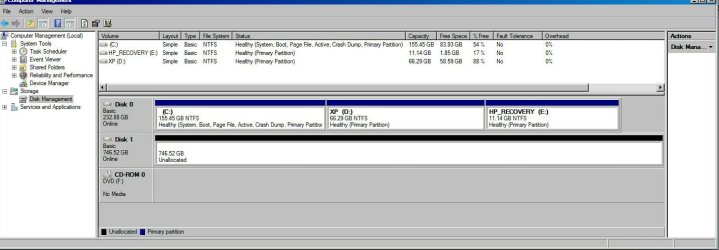
1.windows disk management on your vista machine.
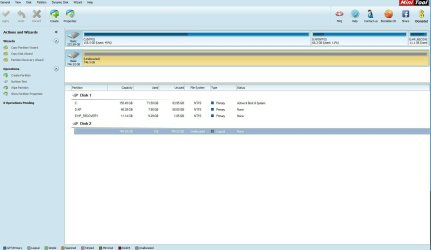
2.the first screen when you run partition wizard.
Disk Management1.jpg
Partition Wizard1.jpg

Since the drive worked before without issues, this may not be the case. However it will worth a try ( nothing to loose ).
I'm mid-backup (to Win 7 machine) right now so I'll give anything a go if there's no risk to the data.


Appreciate the help so far everyone.
 

My Computer My Computer

At a glance

Win 7 x64 and Vista x64Intel T58004GB
Computer type
Laptop
Computer Manufacturer/Model Number
HP dv5-1138nr
OS
Win 7 x64 and Vista x64
CPU
Intel T5800
Memory
4GB
Ok, the only thing I can glean and happy about is that the Partition Wizard does not show your external drive as Bad Disk. That is good.

Other than that there is not much to say about the two screenshots.

I think you only ran a quick scan with Partition Recovery Wizard. If so, run a deep scan and post the screenshot of partitions found. ( Do not select any partition/s in it and keep PW grinding till I see the screenshot. If you cancel, no harm but you may have to rerun again to get to that point.)

A deep scan may take a long time. So initiate the scan, and leave it to complete. Attend to other work instead of sitting in front of the computer. (I am hoping it will run for eight hours because I am retiring now and will be back after only eight hours of sleep.:) )
 

My Computer My Computer

At a glance

Windows 7 Home Premium 32 bit
OS
Windows 7 Home Premium 32 bit
The Partition Recovery Wizard screen shots in my first post were deep scan results. I'll be able to connect to the Win 7 machine later in the week.
 

My Computer My Computer

At a glance

Win 7 x64 and Vista x64Intel T58004GB
Computer type
Laptop
Computer Manufacturer/Model Number
HP dv5-1138nr
OS
Win 7 x64 and Vista x64
CPU
Intel T5800
Memory
4GB
Jumanji, I don't think a deep scan with "Partition Wizard" will help in this case. Whether quick or deep, "Partition Wizard" or "TestDisk" scan will be limited to the 746 GB space. As far as i understand the real issue is that OS/Disk Management only reports 746 GB total capacity which is only a quarter of the actual capacity. All recovery tools needs OS API to access disk subsystem so unless "Disk Management" reports 3 TB capacity, partition recovery won't work.

I am not sure whether updating IRST will work but there are more than one success reports across various support forums over net.

How to Fix the 746GB Available of a 3TB Hard Drive IssueServeTheHome ? Server and Workstation Reviews
 

My Computer My Computer

At a glance

Windows 7 Ultimate x64
Computer type
PC/Desktop
OS
Windows 7 Ultimate x64
OK, then PW did not find the correct partitions.

I see Anshad still there and I will solicit his opinion on further course of action.

Let me also think about it as I sleep. Good day till I am back.

EDIT: I didn't see Anshad's post. Thanks Anshad. So what do you propose ? If you think IRST update will help let the OP do it?

I shall see the reference you had given tom morning.
 

My Computer My Computer

At a glance

Windows 7 Home Premium 32 bit
OS
Windows 7 Home Premium 32 bit
Thanks Anshad. So what do you propose ?

Although i suggested installing version 10.1 of IRST, that is usually needed for internal hard drives which directly connected to the SATA port. USB interface usually don't need to access the SATA controller. However since the docking station is eSATA based, i still have hope for the driver update.
 

My Computer My Computer

At a glance

Windows 7 Ultimate x64
Computer type
PC/Desktop
OS
Windows 7 Ultimate x64
I just had a cursory glance of that article.

In case the existing driver got corrupted will it not be better he cleans it up first by uninstalling it and then installing the latest driver? Or should he go back to that Windows 7 PC and check before doing anything on the Vista PC?

I shall leave it to you Anshad to guide the Op on it.

My personal opinion is he should go back to the Windows 7 PC first and check. Whats the harm if he has to wait for a day or two?
 

My Computer My Computer

At a glance

Windows 7 Home Premium 32 bit
OS
Windows 7 Home Premium 32 bit
In case the existing driver got corrupted will it not be better he cleans it up first by uninstalling it and then installing the latest driver?

Uninstalling old driver and then updating is the best course of action. Usually the storage driver will be listed as either "Intel Matrix Storage Manager" or "Intel Rapid Storage Technology". Check whether either of them listed under "Control Panel --> Programs" and uninstall if any.

After installing 10.1 , check whether the driver updated correctly as per this guide : Intel Rapid Storage Technology (RST) drivers and Support for Disk Drives Beyond 2.2 TeraBytes (TB)

If updating IRST is not helping, install "Segate Disc Wizard" and check what capacity it detects ( don't partition the disk with "DiscWizard" ).

DiscWizard | Seagate

Or should he go back to that Windows 7 PC and check before doing anything on the Vista PC?


Definitely that should be the first step if the "Windows 7" machine is available for checking. Since he can't access that machine now, let us check for possible software issues in the meantime.
 

My Computer My Computer

At a glance

Windows 7 Ultimate x64
Computer type
PC/Desktop
OS
Windows 7 Ultimate x64
OP said in a week. Definitely heaven's will not come down.

While driver update of the Vista may be OK, I am against any probing the HDD much less with Acronis(Seagate DiscWizard) until it is hooked up to the Windows 7 PC and we know the status-whether it is the PC or the Dock+HDD we will know.

I am off now. One hour sleep cut. I cannot postpone my wakeup time 0600hrs. See you all. Its already today.
 

My Computer My Computer

At a glance

Windows 7 Home Premium 32 bit
OS
Windows 7 Home Premium 32 bit
My personal opinion is he should go back to the Windows 7 PC first and check. Whats the harm if he has to wait for a day or two?
Operating below 100% by not having access to the most recent data on the drive. Urgency is not to the point where I'd jeopardize the recovery though, but I'm willing to do what I can right now.

Anshad's suggestion (post #7) worked, IRST update now allows Disk Management to show 2794.52GB (2049GB and 746.52GB unallocated).

If detecting the 3TB (so I can then recover all the partitions)
So we seem to be here now. But should I fully uninstall the drivers and reinstall (to bulletproof that aspect)? Driver version shows 10.1.0.1008, 3TB (2794.5GB) shows as unallocated.

Get your rest jumanji.
 

My Computer My Computer

At a glance

Win 7 x64 and Vista x64Intel T58004GB
Computer type
Laptop
Computer Manufacturer/Model Number
HP dv5-1138nr
OS
Win 7 x64 and Vista x64
CPU
Intel T5800
Memory
4GB
That is both good and bad news. The good part is we got the full capacity back and the bad part is the disk is detected as unallocated/ MBR partitioned. To my understanding the disk was partitioned under GPT scheme. If the data stored in it is really important, i won't recommend trying any recovery tool before connecting and checking the HDD to a direct SATA port of a desktop machine.

Btw, you can do a quick scan with "Partition Wizard" now. Just don't write a new partition table without checking the disk on another system.

So we seem to be here now. But should I fully uninstall the drivers and reinstall (to bulletproof that aspect)? Driver version shows 10.1.0.1008, 3TB (2794.5GB) shows as unallocated.

No need to mess with the drivers. IRST seems to be updated successfully. Otherwise we won't see the full disk space.
 

My Computer My Computer

At a glance

Windows 7 Ultimate x64
Computer type
PC/Desktop
OS
Windows 7 Ultimate x64
Back
Top