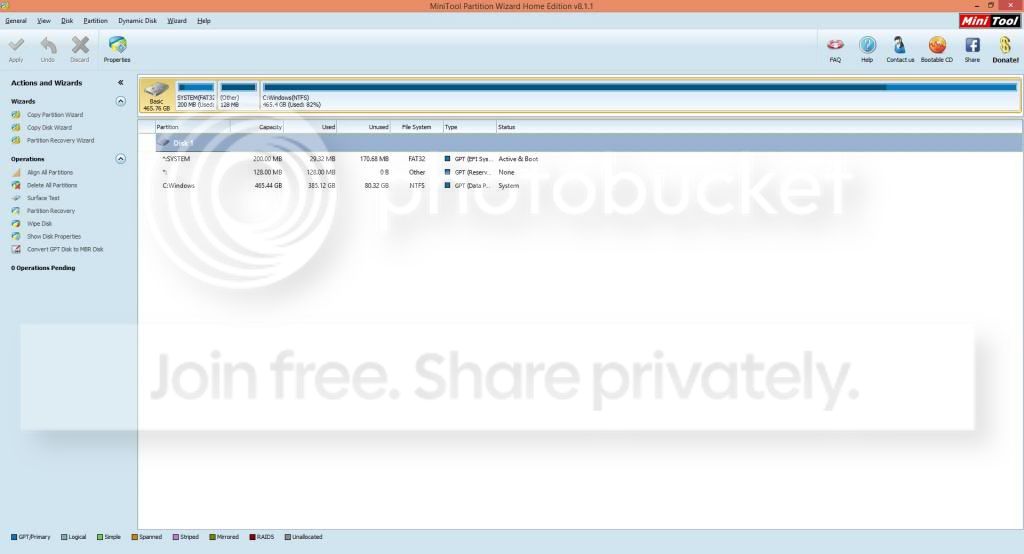
Okay, I saw that you deleted your posts, which I did saved onto my "7forums post" doc, so let me at least reply to everything you had, ending with the recent one.
Okay, here we go.
Was Super AntiSpyware uninstalled?
Yes it was, and still is until further notice.
Some updates: I did try safe mode, which didn't do any differences.
I also went along and tried disk savvy, followed by another app that can find duplicate files/folders. Savvy found alot of "found" data that was corrupted, and some of those were files(?) or memory datas(?) I tried but couldn't recovery from the old HD. I deleted them, as did the duplicate files, but it didn't make a dent, with only getting back 1GB.
I'd like you to try and shrink C: by 20 GB. This is my very last shot at trying to preserve HD2
There might no be enough space to shrink it percentage wise, but give it a shot
If Windows gives you any amount - take it.
Then create and format a new partition
Sadly, it can only give me 16MB (that's not a mistake: MB instead of GB). I know you said take whatever, but that's not going to make a difference, is it?
Grab as many folders from HD2 that will fit in the new partition and MOVE them to it Say for instance Windows allowed you to shrink C: by 20 GB, then the new partition would be 20 GB and the data you move to it would be 20GB
Moving the data will free up disk space on c: and you can repeat this 3 times until you have move all of the data in HD2 to the new partitions.
Okay, just recently, I had move all of the files from HD2 into their respected places: Documents, Music, and Pictures. After that, HD2 was deleted as there was no nothing there as I took everything from inside and moved them.
And as I mentioned, the new partition would only be 16MB.
Back to suggested options:
What about that refresh/reset(?) from that picture I posted from post #91?
http://www.sevenforums.com/hardware...i-need-my-hard-drive-back-10.html#post2793396
I can tell you that I would like to refresh my PC. But if that doesn't work, and reinstalling is the next option, then I want to take the files from the computer and temporary move them to my laptop, which has enough storage for the contents from both the new machine and the 80GB HD2 folder. Once that is all safe, then I can start; hopefully it won't lead to huge problems, because this computer is still new and I don't want to risk anything at this point, or if ever.
I don't know if you read the very last post I made before yours, but C: says 83GB, but inside it's 150GB. I'm starting to think that, because of the recovery, something messed up and it says one thing when it's another. That, and maybe the files I tried to recover are actually inside and need to be removed. I could be wrong, but those are still possible theories.
Think about doing this or tell me the near future for that ext drive is this week.
No, I don't think getting the ext. drive will be this week. In fact, I don't think it'll be that soon. Unless something were to happen, I would guess I would get the ext. drive by the end of the year. All because I cannot afford it now. Also, as I said above, there is my laptop.
Now...
The final solution!
1) Boot with Lucid Puppy and make sure that you can still read the old files.
2) Shut down the machine
3) Disconnect the external drive
4) Boot with the iBUYPOWER Windows Reinstall disc
5) Select Reset from the Recovery options
6) After the machine is Reset, run Windows Update manually until nothing more is offered
7) Shrink your C: drive by 200 GB
8) create a new partition in the 200 GB of free space, format as NTFS
9) Boot with Lucid Puppy
10) Copy your old files to the new 200 GB volume you created, NOT your C:\drive
11) Restart Windows
12) You should be good to go.
That's all I have on the issue, good luck
Bill
.
Okay, I have some concerns with this solution.
1) The original C: free space before I used Lucid Puppy that started this was 422GB, and after the changes it would around 345GB, and I would want that instead of 200GB. Now if that is the case here, okay but it just didn't sound like as such. Afterall, the whole plan (post-Lucid Puppy) is to undo the damage it did.
2) Given my idea I have above, wouldn't that be a better option instead of this?