Solved Desktop not working: I need my hard drive back!

Excellent news Nate!

I had to parachute into a client site and put out a fire ... on a Saturday ... with little sleep. They won't let me completely retire until I'm dead.

Please read the following and ask any questions that you might have. It's very rough and I think I have the correct information there, but still little sleep. If anything doesn't make sense to you, I'll see if it makes sense to me and rewrite it or explain it.

Did you refresh the Pmount window - I'm not sure if the window is dynamically updated. Probably a moot point now.

If you can see the data, there's a good chance that you can copy it, even if the source is read only.

You already know most of the instructions, but you might be doing things that don't have to be done, such as setting xxxxx or running the network wizrd when it pops up. These are things that someone might want to do under different circumstance - you're just using Lucid Puppy to copy data.


These instructions were created using jumanji's http://www.sevenforums.com/software/198909-lucid-puppy-way-recover-files-non-bootable-computer.html thread as the basis.
In jumanji's thread, the user is instructed on how to recover data on the internal disk partition by copying the data to an external disk partition.
These instructions reverse the direction and copy data on an external disk partition to a internal disk partition.


Recovering files on an external drive:

Connect the USB pendrive to a USB 2.0 port on the copy destination machine
Power-on, or restart, the machine to boot Lucid Puppy Linux.
Before Windows loads (black BIOS pre-load / startup screen)
Tap the Funtion key (Fkey) assigned to present the Boot Order menu. If Windows loads, you will have to restart the machine and try the Fkey again until you get the menu.
Once you see the boot devices, select the USB device that has Lucid Puppy Linux on it.
Lucid Puppy Linux begins it's load sequence and the loads the desktop.
Dismiss the Personalized Settings dialog without changes by pressing OK.
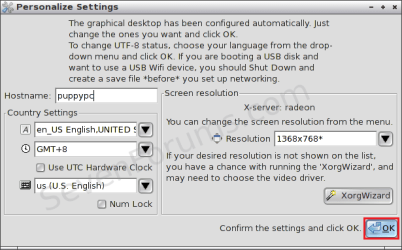
0_InitSettings.png
If a network dialog box is presented, dismiss that without changes by clicking on the X to close the window.

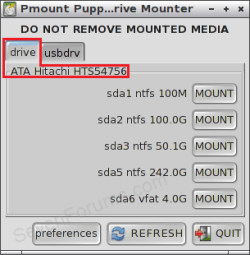
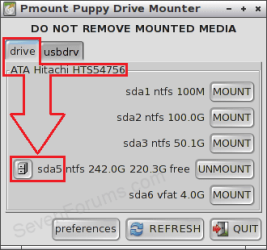
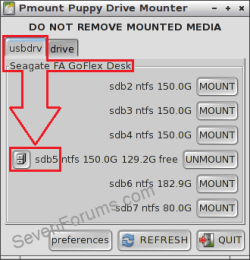
Disks that Lucid Puppy recognized are displayed in the lower left hand area of the desktop.
sda# are partitions on the internal drive
sdb# are partitions on the external drive
The letter is assigned to the drive or the port, the number is assigned to the partition
Your device list might include sdc, sdd, sde, sdf through sdz drives if they are connected to your machine and Lucid Puppy recognizes them.
:note: If your external drive isn't 'listed' make sure that it is connected to a USB 2.0 port. The USB 3.0 driver on some machines is not recognized without additional configuration changes. You do not have to reboot Lucid Puppy, just connect the external drive to 2.0 port. The system should recognize the drive and display the partitions on it in the list.

Desktop with partitions on the internal drive listed, but only the Lucid Puppy boot pendrive external drive listed.
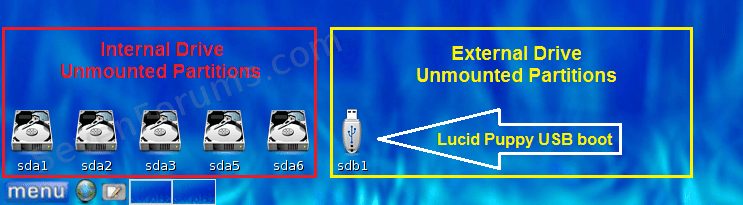
1a_MountNone.png

Desktop with partitions on the internal drive listed, and partitions on the external drive listed.
1b_MountNone.png

Determine the source partition and the destination partition for the copy data step.
1) The capacity of the partition is displayed when you hover over that device. You can use this information to decide which partitions to mount.
2) The internal drive partition you select will be the copy to destination
Left click on that device to mount and explore it
3) The external drive partition that you select will be the copy from source
Left click on that device to mount and explore it

Your desktop should show the two partitions you selected
as mounted (mounted partitions have a green 'on' light overlay on the icon)
3_MountedDrives.png

and file system explorer windows open
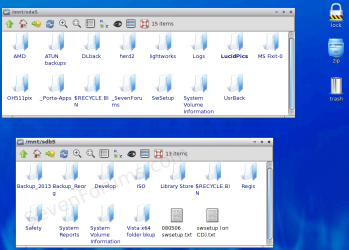
4_DirFolders.png

If you did not previously create a folder on the internal destination partition to recover the data, you can create it now
Right click in the empty space of the internal drive window and select New > Directory.
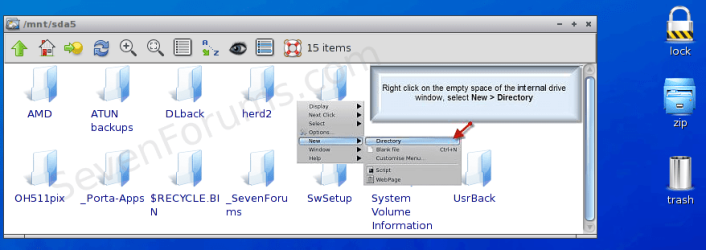
5a_DirCreate.png
Specify the name for the destination folder, such as RecoverData.
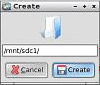
5b_DirCreate.png

You are now ready to copy the folders/files from the source partition on the external drive that you selected to the destination folder on the internal drive.

Ctrl + left mouse click to select the folders/files in the source partition on the external drive
Keep the left mouse button pressed and drag the data to the destination folder on the internal drive
Release the mouse button

Select Copy from the operations menu to begin the process.

The copy operations status box displays what is being copied.

When the copy has completed, you can recover other data if it is on a different partition by following the instructions for each partition you need to access.

If there is no additional data to recover or you have copied everything then you are finished.
The data you needed to recover is on your internal hard drive.

Right click any partition in the lower left hand corner and select
Unount all mounted drives

Power-off your PC.
Menu > Shutdown > Power-off.

The Lucid Puppy shutdown prompts you to save the session, press right arrow key to select No and press ENTER.
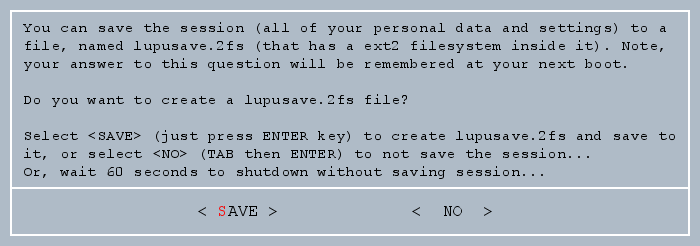
7_EndSession.png
 

Attachments

  • 2a_Mount_None.png
    2a_Mount_None.png
    9.2 KB · Views: 18
  • 2b_Mount_Intern.png
    2b_Mount_Intern.png
    10.8 KB · Views: 18
  • 2c_Mount_Extern.png
    2c_Mount_Extern.png
    11.2 KB · Views: 18

My Computer My Computer

At a glance

x64 (6.3.9600) Win8.1 Pro & soon dual boot x6...AMD A6-3420M APU with Radeon(tm) HD Graphics6.00 GBAMD Radeon(TM) HD 6520G
Computer type
Laptop
Computer Manufacturer/Model Number
HP Pavilion dv6-6c10us
OS
x64 (6.3.9600) Win8.1 Pro & soon dual boot x64 (6.1.7601) Win7_SP1 HomePrem
CPU
AMD A6-3420M APU with Radeon(tm) HD Graphics
Motherboard
Hewlett-Packard 1805
Memory
6.00 GB
Graphics Card(s)
AMD Radeon(TM) HD 6520G
Sound Card
(1) AMD High Definition Audio Device (2) IDT High Definiti
Monitor(s) Displays
HP W2072a 20" LCD (1600 x 900) @ 60 Hz
Screen Resolution
1366 x 768 x 32 bits (4294967296 colors) @ 60 Hz
Hard Drives
ST640LM0 00 HM641JI SATA Disk Device
Keyboard
Logitech k520 wireless KB
Mouse
Logitech m320 wireless mouse (bundled with KB)
Internet Speed
15/5 | 54 MB Wireless 'n'
Antivirus
Realtime: Defender or Avast | On-demand: Malwarebytes, ESET
Browser
IE 11 on Win8, IE 10 on win 7
Other Info
Media: [Gimp, Audacity, VLC] || Comm: [WEmail 2012, Skype] || Productivity: [OpenOffice,| Textpad] || Utils: [Sysinternals, cCleaner, Speccy, Defraggler]
Okay, it seems to have worked, but now I have another problem: I have no more memory on my computer! What I grab was only around 80GB, to which I had 424GB remaining before I started. Something seriously happened, and I'll be trying CCleaner after I posted this, but what the hell happened?!

EDIT: Okay, wait a minute. Before it was zero, then after a while it started going back up. As of now, it is 79.5GB. But now it is just there, saying that the rest if used. Again, 80GB was what I took from the old HD, though there is another 80GB in the other folder that I don't need and it won't go away. I think CCleaner will work, or safe mode, or a third option. I need help on this.

EDIT2: The memory is going up because it's taking a while for that other folder to be deleted. Still doesn't explain the loss of the rest of the GB. Is there a way to check what was put inside the computer?

EDIT3: One other tidbit, the recovery worked but I don't have alot of the files, which is fine because I can get them again. But, because they were copied (twice, again because I did this two times), and even though I don't see them, could they still be on my computer somewhere hidden? I'm saying this because my username under Users is only 102GB. With the total space, what it says now, and that folder which seems to be the real amount of used space, wouldn't that theory make sense?
 
Last edited:

My Computer My Computer

At a glance

Windows 7Intel Pentium E5300Intel(R) G45/G43 Express Chipset
Computer Manufacturer/Model Number
Gateway SX2802-07
OS
Windows 7
CPU
Intel Pentium E5300
Motherboard
WG43M
Graphics Card(s)
Intel(R) G45/G43 Express Chipset
Sound Card
Realtek High Definition Audio
Monitor(s) Displays
Acer S232HL
Keyboard
Standard PS/2
Mouse
HID-Compliant
Please explain.
Screen shots are great!

1st: Memory and disk space (I think that's what you mean) are two different things.

2nd: Disk space is changing on which drive? The internal (I think that's what you mean) or the external?

3rd: Did the copies complete or still in progress? Often there is a lag between what is presented and what is actually being used. When you work with 'faulty' drives, the copy might get quite large as the file is collected and reassembled. There might be temp space being used which would double the amount expected.

4th: DO NOT cClean anything!
4th: DO NOT delete, format, wipe anything!
4th: DO NOT attempt any maintenance until you are certain the data recovery operation was successful. This leads to repeating the process and each attempt might lessen the chance of recovery. I think I've given enough warnings on the subject.

Let me try to unravel this.

You have 80 GB of data to recover
You were copying to a disk with 424GB of free space?
During the copy process the free space dropped to zero, but climbed back up to 79.5GB ???
And dropped back to zero ????

Another 80GB in the other folder that won't go away ?????

Nope, can't wrap my head around it.

Please take your time and explain what you observe. Use real names of folders and drives.
For instance: I copied my old documents folder from sdc3 (external drive) to the folder I created (GatewayData) on sda3 (internal drive)

There was 424 GB of free space on sda3 before the copy.
<XYZ> shows the free space on sda3 at zero, but increases and decreases during the copy process.

Tell me what <XYZ> is. How are you checking this free space. What is telling you this information?

I thought the copy was completed, so I restarted the machine - booting Win8.

Something along those lines will help a lot.

Since I don't know the exact steps you took, and I don't know what OS you currently have booted, I'm deaf dumb and blind here.

When all of this is happening are you still in Lucid Puppy Linux or have you restarted and you're working in Win8 again?

Take your time, be as specific as you can - the disc is 'faulty' - if you recall, it took 6hours just to check the volume (before you killed it by shutting down the machine) - it might have taken another 6 hours to complete, I don't know. I know that faulty drives take a long time to read.

If you're still in Lucid Puppy, snapshots can be taken with a Psnaphot (I think that's the name - not the paint snaphot). Right click on the desktop and select the Grahpoics > PSnap (PupSnap?) from the menu

Press the window tab on the snapshot app and press the save button. This puts the image in a folder, but .... the folder is volatile because Puppy is in memory. The paint app should present the picture and then you can save it to a location on your internal hard drive. Ctrl-S and change the save location to /mnt/sda3/PupShots
I used sda3 and PShots as examples - you internal drive might be sda5 - I'm not certain.

There's no need to rush to post the images, just collect them as you think they represent the issue.

You have to help me if I'm going to help you - I can't see what you see unless you paint the picture for me.

Thanks,

Bill
.
 

My Computer My Computer

At a glance

x64 (6.3.9600) Win8.1 Pro & soon dual boot x6...AMD A6-3420M APU with Radeon(tm) HD Graphics6.00 GBAMD Radeon(TM) HD 6520G
Computer type
Laptop
Computer Manufacturer/Model Number
HP Pavilion dv6-6c10us
OS
x64 (6.3.9600) Win8.1 Pro & soon dual boot x64 (6.1.7601) Win7_SP1 HomePrem
CPU
AMD A6-3420M APU with Radeon(tm) HD Graphics
Motherboard
Hewlett-Packard 1805
Memory
6.00 GB
Graphics Card(s)
AMD Radeon(TM) HD 6520G
Sound Card
(1) AMD High Definition Audio Device (2) IDT High Definiti
Monitor(s) Displays
HP W2072a 20" LCD (1600 x 900) @ 60 Hz
Screen Resolution
1366 x 768 x 32 bits (4294967296 colors) @ 60 Hz
Hard Drives
ST640LM0 00 HM641JI SATA Disk Device
Keyboard
Logitech k520 wireless KB
Mouse
Logitech m320 wireless mouse (bundled with KB)
Internet Speed
15/5 | 54 MB Wireless 'n'
Antivirus
Realtime: Defender or Avast | On-demand: Malwarebytes, ESET
Browser
IE 11 on Win8, IE 10 on win 7
Other Info
Media: [Gimp, Audacity, VLC] || Comm: [WEmail 2012, Skype] || Productivity: [OpenOffice,| Textpad] || Utils: [Sysinternals, cCleaner, Speccy, Defraggler]
1st: Memory and disk space (I think that's what you mean) are two different things.
Disk space.

2nd: Disk space is changing on which drive? The internal (I think that's what you mean) or the external?
Internal.

3rd: Did the copies complete or still in progress? Often there is a lag between what is presented and what is actually being used. When you work with 'faulty' drives, the copy might get quite large as the file is collected and reassembled. There might be temp space being used which would double the amount expected.
The copying ended before I got out.

4th: DO NOT cClean anything!
4th: DO NOT delete, format, wipe anything!
4th: DO NOT attempt any maintenance until you are certain the data recovery operation was successful. This leads to repeating the process and each attempt might lessen the chance of recovery. I think I've given enough warnings on the subject.
Did not CClean yet. The original folder, Gateway HD, got its files deleted already. But like I said, the fodler is still there because it won't go away.

You have 80 GB of data to recover
From the old HD, right.

You were copying to a disk with 424GB of free space?
During the copy process the free space dropped to zero, but climbed back up to 79.5GB ???
And dropped back to zero ????

Another 80GB in the other folder that won't go away ?????

Nope, can't wrap my head around it.

Please take your time and explain what you observe. Use real names of folders and drives.

Alright, let me explain again in detail:
I did the Lupu twice. The first time, the files were being sent to Gateway HD located on my desktop. However, after going through 5 folders (Desktop, Documents, Downloads, Music, and Pictures), then rebooting, it only had very little compared to what I copied. So after a bit, I tried it again, this time with 3 folders (Pictures, Music, and Downloads). When I did this, I made a new destination folder on Lucid Puppy for my desktop called HD2. I did the recovery, but during one of the folders inside Downloads, the copying stopped and said there was no more disk space (though it said memory). I got out, rebooted, back to Win8 so you know, and checked and it said 0 out of 465GB. Now because some of the files inside Gateway HD were repeated in HD2, I decided to delete Gateway HD. However, the deleting was difficult because said it was either damaged or corrupt. I used SUPERAnti delete to...delete it, and got much out for the exception for the folder itself, the folders inside, and one file. That deletion made the total free space on my disk to go from 0 to 79GB. And with my theories and posts here and on Eight Forums, this is where I'am so far.

So just to make it clear: I'm out of Lucid Puppy, and running normally on Win8. So there's no need for images as I'm out of that.

And BTW, the old HD is off, and been off since I got out of Lucid and rebooted back to Win8. Again, the copying was done before I got out and did that.
 

My Computer My Computer

At a glance

Windows 7Intel Pentium E5300Intel(R) G45/G43 Express Chipset
Computer Manufacturer/Model Number
Gateway SX2802-07
OS
Windows 7
CPU
Intel Pentium E5300
Motherboard
WG43M
Graphics Card(s)
Intel(R) G45/G43 Express Chipset
Sound Card
Realtek High Definition Audio
Monitor(s) Displays
Acer S232HL
Keyboard
Standard PS/2
Mouse
HID-Compliant
Last edited:

My Computer My Computer

At a glance

x64 (6.3.9600) Win8.1 Pro & soon dual boot x6...AMD A6-3420M APU with Radeon(tm) HD Graphics6.00 GBAMD Radeon(TM) HD 6520G
Computer type
Laptop
Computer Manufacturer/Model Number
HP Pavilion dv6-6c10us
OS
x64 (6.3.9600) Win8.1 Pro & soon dual boot x64 (6.1.7601) Win7_SP1 HomePrem
CPU
AMD A6-3420M APU with Radeon(tm) HD Graphics
Motherboard
Hewlett-Packard 1805
Memory
6.00 GB
Graphics Card(s)
AMD Radeon(TM) HD 6520G
Sound Card
(1) AMD High Definition Audio Device (2) IDT High Definiti
Monitor(s) Displays
HP W2072a 20" LCD (1600 x 900) @ 60 Hz
Screen Resolution
1366 x 768 x 32 bits (4294967296 colors) @ 60 Hz
Hard Drives
ST640LM0 00 HM641JI SATA Disk Device
Keyboard
Logitech k520 wireless KB
Mouse
Logitech m320 wireless mouse (bundled with KB)
Internet Speed
15/5 | 54 MB Wireless 'n'
Antivirus
Realtime: Defender or Avast | On-demand: Malwarebytes, ESET
Browser
IE 11 on Win8, IE 10 on win 7
Other Info
Media: [Gimp, Audacity, VLC] || Comm: [WEmail 2012, Skype] || Productivity: [OpenOffice,| Textpad] || Utils: [Sysinternals, cCleaner, Speccy, Defraggler]
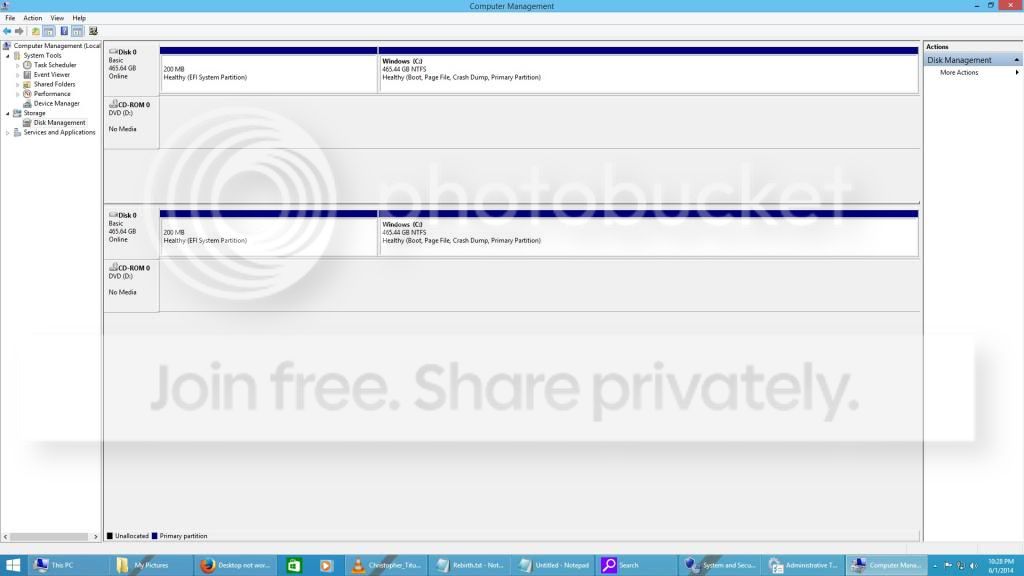
s.com/tutorials/274797-disk-management-post-screen-capture-image.html[/url]
Post# 12 provides additional information on how to provide the most useful screenshot.
Step #5 of tutorial now includes recommendations from post #12
 

My Computer My Computer

At a glance

Windows 10 Pro x64 ; Xubuntu x64Intel i7 860 @ 2.80 GHz O/C'ed to 4.0GHz16GB Corsair Vengance DDR3 @ 661 MHz Dual Cha...EVGA NVidia GTX 560 1024MB
Computer type
PC/Desktop
Computer Manufacturer/Model Number
Golden Mk. I.4
OS
Windows 10 Pro x64 ; Xubuntu x64
CPU
Intel i7 860 @ 2.80 GHz O/C'ed to 4.0GHz
Motherboard
Gigabyte P55A-UD3R Rev.1. Award BIOS F13
Memory
16GB Corsair Vengance DDR3 @ 661 MHz Dual Channel (9-9-9-24)
Graphics Card(s)
EVGA NVidia GTX 560 1024MB
Sound Card
Realtek Integrated
Monitor(s) Displays
Dual Samsung SyncMaster 2494HS
Screen Resolution
1920*1080 and 1920*1080
Hard Drives
1*Samsung 840 EVO 120GB SSD;
1*OCZ Vertex 2 60GB SSD;
2*Samsung F3 SpinPoint 1TB in RAID0;
1*Samsung F1 SpinPoint 1TB;
2*Western Digital 1TB External USB 3.0
1*Western Digital 500GB External USB 3.0
1*Seagate 500GB External USB 2.0
PSU
Thermaltake ToughPower QFan 750W
Case
Thermaltake Element S VK60001W2Z
Cooling
Corsair H60 Water Cooling, 2*230mm and 2*80mm case fans
Keyboard
Logitech G110
Mouse
Logitech MX518
Thanks Colin, need to update my template - I'll do that right now so I don't forget.
I edited my post above to strike the note re: #12.
 

My Computer My Computer

At a glance

x64 (6.3.9600) Win8.1 Pro & soon dual boot x6...AMD A6-3420M APU with Radeon(tm) HD Graphics6.00 GBAMD Radeon(TM) HD 6520G
Computer type
Laptop
Computer Manufacturer/Model Number
HP Pavilion dv6-6c10us
OS
x64 (6.3.9600) Win8.1 Pro & soon dual boot x64 (6.1.7601) Win7_SP1 HomePrem
CPU
AMD A6-3420M APU with Radeon(tm) HD Graphics
Motherboard
Hewlett-Packard 1805
Memory
6.00 GB
Graphics Card(s)
AMD Radeon(TM) HD 6520G
Sound Card
(1) AMD High Definition Audio Device (2) IDT High Definiti
Monitor(s) Displays
HP W2072a 20" LCD (1600 x 900) @ 60 Hz
Screen Resolution
1366 x 768 x 32 bits (4294967296 colors) @ 60 Hz
Hard Drives
ST640LM0 00 HM641JI SATA Disk Device
Keyboard
Logitech k520 wireless KB
Mouse
Logitech m320 wireless mouse (bundled with KB)
Internet Speed
15/5 | 54 MB Wireless 'n'
Antivirus
Realtime: Defender or Avast | On-demand: Malwarebytes, ESET
Browser
IE 11 on Win8, IE 10 on win 7
Other Info
Media: [Gimp, Audacity, VLC] || Comm: [WEmail 2012, Skype] || Productivity: [OpenOffice,| Textpad] || Utils: [Sysinternals, cCleaner, Speccy, Defraggler]
No worries....:D
 

My Computer My Computer

At a glance

Windows 10 Pro x64 ; Xubuntu x64Intel i7 860 @ 2.80 GHz O/C'ed to 4.0GHz16GB Corsair Vengance DDR3 @ 661 MHz Dual Cha...EVGA NVidia GTX 560 1024MB
Computer type
PC/Desktop
Computer Manufacturer/Model Number
Golden Mk. I.4
OS
Windows 10 Pro x64 ; Xubuntu x64
CPU
Intel i7 860 @ 2.80 GHz O/C'ed to 4.0GHz
Motherboard
Gigabyte P55A-UD3R Rev.1. Award BIOS F13
Memory
16GB Corsair Vengance DDR3 @ 661 MHz Dual Channel (9-9-9-24)
Graphics Card(s)
EVGA NVidia GTX 560 1024MB
Sound Card
Realtek Integrated
Monitor(s) Displays
Dual Samsung SyncMaster 2494HS
Screen Resolution
1920*1080 and 1920*1080
Hard Drives
1*Samsung 840 EVO 120GB SSD;
1*OCZ Vertex 2 60GB SSD;
2*Samsung F3 SpinPoint 1TB in RAID0;
1*Samsung F1 SpinPoint 1TB;
2*Western Digital 1TB External USB 3.0
1*Western Digital 500GB External USB 3.0
1*Seagate 500GB External USB 2.0
PSU
Thermaltake ToughPower QFan 750W
Case
Thermaltake Element S VK60001W2Z
Cooling
Corsair H60 Water Cooling, 2*230mm and 2*80mm case fans
Keyboard
Logitech G110
Mouse
Logitech MX518
I'm having trouble finding what you need. This is what it looks like, could you point out what to click and such to give you the right info.
DM_zps1a60a4d5.jpg


BTW, here is the Eight Forums link. No replies yet, so it's not useable currently;
Old HD Recovery lead to little to no Disk Space left
 

My Computer My Computer

At a glance

Windows 7Intel Pentium E5300Intel(R) G45/G43 Express Chipset
Computer Manufacturer/Model Number
Gateway SX2802-07
OS
Windows 7
CPU
Intel Pentium E5300
Motherboard
WG43M
Graphics Card(s)
Intel(R) G45/G43 Express Chipset
Sound Card
Realtek High Definition Audio
Monitor(s) Displays
Acer S232HL
Keyboard
Standard PS/2
Mouse
HID-Compliant
I'd like to see a screen shot of disk management as shown in step 5 of the tutorial I linked.

308911d1393893161-disk-management-post-screen-capture-image-capture.png

Your image doesn't seem to display the top and bottom sections correctly (two graphical views)

In disk management, click the view menu
select top > volume list
select bottom > Graphical view

That should do it.

If yours looks similar to the one above (top & bottom) then grab the screen shot and post it.

Thanks for the eightforums link - I'd prefer that you follow one path until it is exhausted. Getting advice from more than one person often derails the process.


Once I see how much space (used and free), I'd like you to re-run the Disk Check to completion - it will take a long time, so overnight might be best.

Connect the old Gateway HD to a USB port
Note the DriveLetter assigned

Open an elevated Command Prompt (follow Option One) Elevated Command Prompt - Open in Windows 8

Type the following command in the Cmd window
(DriveLetter is the old Gateway HD connected to a USB port. Use the actual drive letter assign to it,
not the word Driveletter)

chkdsk /scan DriveLetter:

If the old HD is assigned the drive letter E: (it might be different on your machine, this is an example)

chkdsk /scan E:​
Let this iteration run to completion
This is a read only scan of the old HD. It does not fix anything.
Please post the chkdsk log: http://www.sevenforums.com/tutorials/96938-check-disk-chkdsk-read-event-viewer-log.html

Let's see how far that gets, but I have a plan.
1st: cleanup the previous attempt to copy files over to your new machine
2nd: perform a single file copy to test the process and data integrity
3rd: perform a single folder copy to test the process and data integrity

Figure out the next step(s) based on the results of the above.
 

My Computer My Computer

At a glance

x64 (6.3.9600) Win8.1 Pro & soon dual boot x6...AMD A6-3420M APU with Radeon(tm) HD Graphics6.00 GBAMD Radeon(TM) HD 6520G
Computer type
Laptop
Computer Manufacturer/Model Number
HP Pavilion dv6-6c10us
OS
x64 (6.3.9600) Win8.1 Pro & soon dual boot x64 (6.1.7601) Win7_SP1 HomePrem
CPU
AMD A6-3420M APU with Radeon(tm) HD Graphics
Motherboard
Hewlett-Packard 1805
Memory
6.00 GB
Graphics Card(s)
AMD Radeon(TM) HD 6520G
Sound Card
(1) AMD High Definition Audio Device (2) IDT High Definiti
Monitor(s) Displays
HP W2072a 20" LCD (1600 x 900) @ 60 Hz
Screen Resolution
1366 x 768 x 32 bits (4294967296 colors) @ 60 Hz
Hard Drives
ST640LM0 00 HM641JI SATA Disk Device
Keyboard
Logitech k520 wireless KB
Mouse
Logitech m320 wireless mouse (bundled with KB)
Internet Speed
15/5 | 54 MB Wireless 'n'
Antivirus
Realtime: Defender or Avast | On-demand: Malwarebytes, ESET
Browser
IE 11 on Win8, IE 10 on win 7
Other Info
Media: [Gimp, Audacity, VLC] || Comm: [WEmail 2012, Skype] || Productivity: [OpenOffice,| Textpad] || Utils: [Sysinternals, cCleaner, Speccy, Defraggler]
This deals with your new system.

Install your bit version of WinRAR 5.01- English. ( If Windows 8 32 bit, 32bit version. If Windows 8 64bit 64 bit version of WinRAR)

WinRAR download and support: Download

Run WinRAR, navigate to the drive , select the folder you want to delete, Right click on it > delete ( Say OK and OK..... for any dialog box seeking your permission.)

Note 1: Make sure to delete only the unwanted folder.

02-06-2014 10-15-06.jpg

Note 2: I believe that you adopted some wrong procedure ( prior to Slartybart's detailed exposition on Lucid Puppy usage) that must have created that folder.

Close WinRAR and double check you have all the necessary recovered files on your second run.

The deleted folder will be in the Recycle Bin. You have to empty the recycle bin for the disk space to be released.

Hope this works. ( Back to my self-imposed exile.)
 

My Computer My Computer

At a glance

Windows 7 Home Premium 32 bit
OS
Windows 7 Home Premium 32 bit
@BikerNate: jumanji is referring to the Gateway HD folder on the Win8 machine. That's the original copyTo folder, right? And it is the folder that you cannot delete- right?

Thanks jumanji,

The copyTo folder, Gateway HD, was created under Win8 per my instructions (prior to writing a ext -> int HD version of your Lucid Puppy procedure).

I tested a similar scenario on Win7, one difference being Win7 and Win8 (newFS) and another difference was the destination folder did not contain a space. The Lucid Puppy copy from an external HD to a pre-allocated folder (created in Win7, not Lucid Puppy) on my internal drive went without any issues. Of course, that copy was from a working ext HD.

Not sure if any of that is relevant, but thought I should mention it.

Thanks for posting the WinRAR instructions and download link.

Bill
.
 

My Computer My Computer

At a glance

x64 (6.3.9600) Win8.1 Pro & soon dual boot x6...AMD A6-3420M APU with Radeon(tm) HD Graphics6.00 GBAMD Radeon(TM) HD 6520G
Computer type
Laptop
Computer Manufacturer/Model Number
HP Pavilion dv6-6c10us
OS
x64 (6.3.9600) Win8.1 Pro & soon dual boot x64 (6.1.7601) Win7_SP1 HomePrem
CPU
AMD A6-3420M APU with Radeon(tm) HD Graphics
Motherboard
Hewlett-Packard 1805
Memory
6.00 GB
Graphics Card(s)
AMD Radeon(TM) HD 6520G
Sound Card
(1) AMD High Definition Audio Device (2) IDT High Definiti
Monitor(s) Displays
HP W2072a 20" LCD (1600 x 900) @ 60 Hz
Screen Resolution
1366 x 768 x 32 bits (4294967296 colors) @ 60 Hz
Hard Drives
ST640LM0 00 HM641JI SATA Disk Device
Keyboard
Logitech k520 wireless KB
Mouse
Logitech m320 wireless mouse (bundled with KB)
Internet Speed
15/5 | 54 MB Wireless 'n'
Antivirus
Realtime: Defender or Avast | On-demand: Malwarebytes, ESET
Browser
IE 11 on Win8, IE 10 on win 7
Other Info
Media: [Gimp, Audacity, VLC] || Comm: [WEmail 2012, Skype] || Productivity: [OpenOffice,| Textpad] || Utils: [Sysinternals, cCleaner, Speccy, Defraggler]
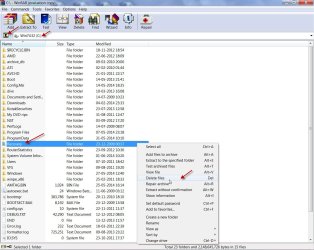
DM2_zps29b4e1c5.jpg


I just want to be sure; I won't do DiskLetter until after you give me the green light? And it's only DiskLetter, nothing else? BTW, it won't be until tomorrow night that'll do it, as I'll be busy.

This deals with your new system.

Install your bit version of WinRAR 5.01- English. ( If Windows 8 32 bit, 32bit version. If Windows 8 64bit 64 bit version of WinRAR)

WinRAR download and support: Download

Run WinRAR, navigate to the drive , select the folder you want to delete, Right click on it > delete ( Say OK and OK..... for any dialog box seeking your permission.)

Note 1: Make sure to delete only the unwanted folder.

View attachment 320124

Note 2: I believe that you adopted some wrong procedure ( prior to Slartybart's detailed exposition on Lucid Puppy usage) that must have created that folder.

Close WinRAR and double check you have all the necessary recovered files on your second run.

The deleted folder will be in the Recycle Bin. You have to empty the recycle bin for the disk space to be released.

Hope this works. ( Back to my self-imposed exile.)

Sadly, it did not. I hit delete and it just flashed and nothing else. Argh!
 

My Computer My Computer

At a glance

Windows 7Intel Pentium E5300Intel(R) G45/G43 Express Chipset
Computer Manufacturer/Model Number
Gateway SX2802-07
OS
Windows 7
CPU
Intel Pentium E5300
Motherboard
WG43M
Graphics Card(s)
Intel(R) G45/G43 Express Chipset
Sound Card
Realtek High Definition Audio
Monitor(s) Displays
Acer S232HL
Keyboard
Standard PS/2
Mouse
HID-Compliant
Thanks for the new image - looks better

You mean you won't do chkdsk until later, not driveletter, right?

There is
a space between chkdsk and scan
a slash / before scan (no space between /scan)
a space between /scan and DriveLetter:
a colon : after the DriveLetter:

chkdsk /scan E:

DiskLetter:
E:

It's a go!

We'll deal with the Gaetwy HD folder later - don't sweat it.
 

My Computer My Computer

At a glance

x64 (6.3.9600) Win8.1 Pro & soon dual boot x6...AMD A6-3420M APU with Radeon(tm) HD Graphics6.00 GBAMD Radeon(TM) HD 6520G
Computer type
Laptop
Computer Manufacturer/Model Number
HP Pavilion dv6-6c10us
OS
x64 (6.3.9600) Win8.1 Pro & soon dual boot x64 (6.1.7601) Win7_SP1 HomePrem
CPU
AMD A6-3420M APU with Radeon(tm) HD Graphics
Motherboard
Hewlett-Packard 1805
Memory
6.00 GB
Graphics Card(s)
AMD Radeon(TM) HD 6520G
Sound Card
(1) AMD High Definition Audio Device (2) IDT High Definiti
Monitor(s) Displays
HP W2072a 20" LCD (1600 x 900) @ 60 Hz
Screen Resolution
1366 x 768 x 32 bits (4294967296 colors) @ 60 Hz
Hard Drives
ST640LM0 00 HM641JI SATA Disk Device
Keyboard
Logitech k520 wireless KB
Mouse
Logitech m320 wireless mouse (bundled with KB)
Internet Speed
15/5 | 54 MB Wireless 'n'
Antivirus
Realtime: Defender or Avast | On-demand: Malwarebytes, ESET
Browser
IE 11 on Win8, IE 10 on win 7
Other Info
Media: [Gimp, Audacity, VLC] || Comm: [WEmail 2012, Skype] || Productivity: [OpenOffice,| Textpad] || Utils: [Sysinternals, cCleaner, Speccy, Defraggler]
Is chkdsk from PW? I know I stopped a scan from there, but it wasn't called chkds. Are you referring to the Windows version where I click properties and then check?

I'm sorry, its just that I'm sorta confused because chkdsk and DiskLetter seem to be the same thing, and now its not.
 

My Computer My Computer

At a glance

Windows 7Intel Pentium E5300Intel(R) G45/G43 Express Chipset
Computer Manufacturer/Model Number
Gateway SX2802-07
OS
Windows 7
CPU
Intel Pentium E5300
Motherboard
WG43M
Graphics Card(s)
Intel(R) G45/G43 Express Chipset
Sound Card
Realtek High Definition Audio
Monitor(s) Displays
Acer S232HL
Keyboard
Standard PS/2
Mouse
HID-Compliant
Nope, you'll be using native Win8 chkdsk this time.
 

My Computer My Computer

At a glance

x64 (6.3.9600) Win8.1 Pro & soon dual boot x6...AMD A6-3420M APU with Radeon(tm) HD Graphics6.00 GBAMD Radeon(TM) HD 6520G
Computer type
Laptop
Computer Manufacturer/Model Number
HP Pavilion dv6-6c10us
OS
x64 (6.3.9600) Win8.1 Pro & soon dual boot x64 (6.1.7601) Win7_SP1 HomePrem
CPU
AMD A6-3420M APU with Radeon(tm) HD Graphics
Motherboard
Hewlett-Packard 1805
Memory
6.00 GB
Graphics Card(s)
AMD Radeon(TM) HD 6520G
Sound Card
(1) AMD High Definition Audio Device (2) IDT High Definiti
Monitor(s) Displays
HP W2072a 20" LCD (1600 x 900) @ 60 Hz
Screen Resolution
1366 x 768 x 32 bits (4294967296 colors) @ 60 Hz
Hard Drives
ST640LM0 00 HM641JI SATA Disk Device
Keyboard
Logitech k520 wireless KB
Mouse
Logitech m320 wireless mouse (bundled with KB)
Internet Speed
15/5 | 54 MB Wireless 'n'
Antivirus
Realtime: Defender or Avast | On-demand: Malwarebytes, ESET
Browser
IE 11 on Win8, IE 10 on win 7
Other Info
Media: [Gimp, Audacity, VLC] || Comm: [WEmail 2012, Skype] || Productivity: [OpenOffice,| Textpad] || Utils: [Sysinternals, cCleaner, Speccy, Defraggler]
I'm out for tonight - why not run it overnight tonight? Other wise, I check the thread on Wednesday.

Bill
.
 

My Computer My Computer

At a glance

x64 (6.3.9600) Win8.1 Pro & soon dual boot x6...AMD A6-3420M APU with Radeon(tm) HD Graphics6.00 GBAMD Radeon(TM) HD 6520G
Computer type
Laptop
Computer Manufacturer/Model Number
HP Pavilion dv6-6c10us
OS
x64 (6.3.9600) Win8.1 Pro & soon dual boot x64 (6.1.7601) Win7_SP1 HomePrem
CPU
AMD A6-3420M APU with Radeon(tm) HD Graphics
Motherboard
Hewlett-Packard 1805
Memory
6.00 GB
Graphics Card(s)
AMD Radeon(TM) HD 6520G
Sound Card
(1) AMD High Definition Audio Device (2) IDT High Definiti
Monitor(s) Displays
HP W2072a 20" LCD (1600 x 900) @ 60 Hz
Screen Resolution
1366 x 768 x 32 bits (4294967296 colors) @ 60 Hz
Hard Drives
ST640LM0 00 HM641JI SATA Disk Device
Keyboard
Logitech k520 wireless KB
Mouse
Logitech m320 wireless mouse (bundled with KB)
Internet Speed
15/5 | 54 MB Wireless 'n'
Antivirus
Realtime: Defender or Avast | On-demand: Malwarebytes, ESET
Browser
IE 11 on Win8, IE 10 on win 7
Other Info
Media: [Gimp, Audacity, VLC] || Comm: [WEmail 2012, Skype] || Productivity: [OpenOffice,| Textpad] || Utils: [Sysinternals, cCleaner, Speccy, Defraggler]
I gave it a shot, and sadly cmd didn't do anything. If you remember, the old HD takes a while to load, and then you can't access it anyway. Same thing here; for a while I thought the scan wasn't working, but it turned out that it just couldn't access the old HD to do anything. It's the same problem I had until Lucid and PW did what I tried to do. I hope you didn't mean you won't be back until Wednesday, and instead you can continue to help me
 

My Computer My Computer

At a glance

Windows 7Intel Pentium E5300Intel(R) G45/G43 Express Chipset
Computer Manufacturer/Model Number
Gateway SX2802-07
OS
Windows 7
CPU
Intel Pentium E5300
Motherboard
WG43M
Graphics Card(s)
Intel(R) G45/G43 Express Chipset
Sound Card
Realtek High Definition Audio
Monitor(s) Displays
Acer S232HL
Keyboard
Standard PS/2
Mouse
HID-Compliant
Oh my....

The chkdsk was an attempt to see if Windows might repair the drive just by checking the volume. Let's scrap that idea for now and return to other issues. One at a time.

You'll need disk space for the copy, so let's see if you can't get rid of the troublesome Gatway HD folder. It might take a few attempts, please bear with me.

Gateway HD is on the C: drive, correct? Is there anything in the recycle bin - if there is, empty it. Still short on disk space?

Open a command prompt and do two directory lists and the ACL for Gateway HD. The parentheses are required on "c:\Gateway HD" since it has a space in the name.

dir c:\ > c:\cDriveList.txt
dir "c:\Gateway HD" /a /s > C:\GwHD_list.txt

icacls "c:\Gateway HD" > C:\cGwHD_acl.txt

exit

Then attach all three files to a new post (use the paperclip icon on the SF post menu)
 

My Computer My Computer

At a glance

x64 (6.3.9600) Win8.1 Pro & soon dual boot x6...AMD A6-3420M APU with Radeon(tm) HD Graphics6.00 GBAMD Radeon(TM) HD 6520G
Computer type
Laptop
Computer Manufacturer/Model Number
HP Pavilion dv6-6c10us
OS
x64 (6.3.9600) Win8.1 Pro & soon dual boot x64 (6.1.7601) Win7_SP1 HomePrem
CPU
AMD A6-3420M APU with Radeon(tm) HD Graphics
Motherboard
Hewlett-Packard 1805
Memory
6.00 GB
Graphics Card(s)
AMD Radeon(TM) HD 6520G
Sound Card
(1) AMD High Definition Audio Device (2) IDT High Definiti
Monitor(s) Displays
HP W2072a 20" LCD (1600 x 900) @ 60 Hz
Screen Resolution
1366 x 768 x 32 bits (4294967296 colors) @ 60 Hz
Hard Drives
ST640LM0 00 HM641JI SATA Disk Device
Keyboard
Logitech k520 wireless KB
Mouse
Logitech m320 wireless mouse (bundled with KB)
Internet Speed
15/5 | 54 MB Wireless 'n'
Antivirus
Realtime: Defender or Avast | On-demand: Malwarebytes, ESET
Browser
IE 11 on Win8, IE 10 on win 7
Other Info
Media: [Gimp, Audacity, VLC] || Comm: [WEmail 2012, Skype] || Productivity: [OpenOffice,| Textpad] || Utils: [Sysinternals, cCleaner, Speccy, Defraggler]
DriveList.txt:
Volume in drive C is Windows
Volume Serial Number is 22DE-25EE

Directory of c:\

06/02/2014 01:12 PM 0 cDriveList.txt
05/10/2014 01:50 PM <DIR> Intel
05/10/2014 01:51 PM <DIR> NVIDIA
08/22/2013 11:22 AM <DIR> PerfLogs
06/02/2014 01:56 AM <DIR> Program Files
05/31/2014 09:20 PM <DIR> Program Files (x86)
06/01/2014 07:21 PM <DIR> SUPERDelete
05/27/2014 01:28 PM <DIR> Users
05/30/2014 10:07 PM <DIR> Windows
1 File(s) 0 bytes
8 Dir(s) 88,758,304,768 bytes free

GwHD.txt.:
Volume in drive C is Windows
Volume Serial Number is 22DE-25EE

Directory of c:\Users\Binker028\Desktop

05/30/2014 01:17 PM <DIR> Gateway HD
0 File(s) 0 bytes

acl.txt:
Successfully processed 0 files; Failed processing 1 files

c:\Gateway HD returned with "not recognized as internal or external command, operatable program or batch file."

EDIT: Didn't know to bring this up or not, but the Solve PC Issues had a message "restart to repair drive errors (important)" but is it referring to the HD in the new machine, or the old HD from Gateway? I'm afraid to do it because it might get worse, either from itself or I might do it. Plus, if it is the old HD, I know exactly what will happen: it won't scan or access the drive, leading me to do anything to stop the process, which might lead to more problems.

You know, with the numbers of issues already for my new computer, I don't know whether to laugh or cry.

BTW, the HD2 folder, the one that isn't bad, should I got ahead and take those files out and splace them in my documents, downloads, etc. now?
 
Last edited:

My Computer My Computer

At a glance

Windows 7Intel Pentium E5300Intel(R) G45/G43 Express Chipset
Computer Manufacturer/Model Number
Gateway SX2802-07
OS
Windows 7
CPU
Intel Pentium E5300
Motherboard
WG43M
Graphics Card(s)
Intel(R) G45/G43 Express Chipset
Sound Card
Realtek High Definition Audio
Monitor(s) Displays
Acer S232HL
Keyboard
Standard PS/2
Mouse
HID-Compliant
Back
Top