3TB external suddenly becomes 746GB unallocated

Started the quick scan when the full capacity returned, will post results when done. I'll have access to the Win 7 desktop on Friday.
 

My Computer My Computer

At a glance

Win 7 x64 and Vista x64Intel T58004GB
Computer type
Laptop
Computer Manufacturer/Model Number
HP dv5-1138nr
OS
Win 7 x64 and Vista x64
CPU
Intel T5800
Memory
4GB
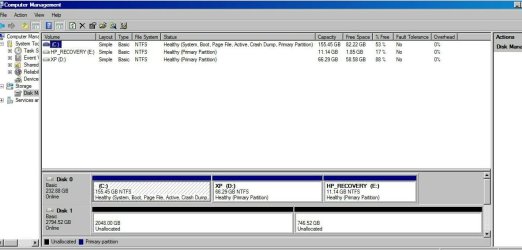
Disk Management
Disk Management Recent1.jpg

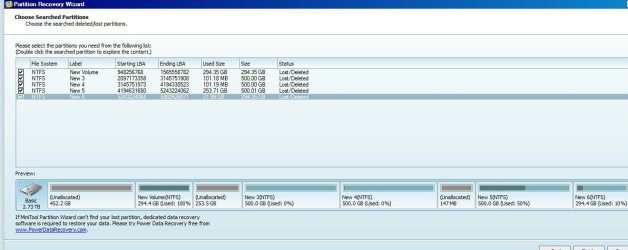
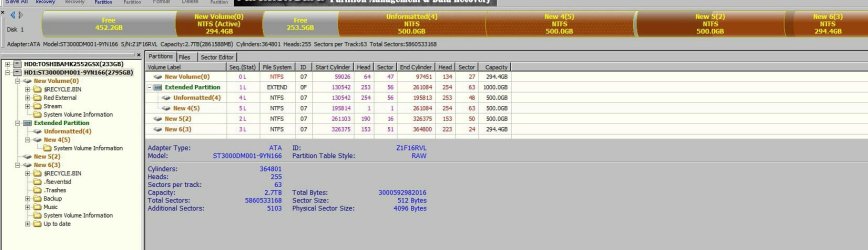
Partition Wizard quick scan
Partition Wizard Recent.jpg

'New Volume' and 'New 6' are browse-able.
'New 3' and 'New 4' show a single folder [System Volume Information] containing a file, MountPointManagerRemoteDatabase (0 bytes).
'New 5' shows no files.
 

My Computer My Computer

At a glance

Win 7 x64 and Vista x64Intel T58004GB
Computer type
Laptop
Computer Manufacturer/Model Number
HP dv5-1138nr
OS
Win 7 x64 and Vista x64
CPU
Intel T5800
Memory
4GB
Glad that Anshad's idea of updating the driver has brought in the full capacity of the drive. ( I instinctly had some faith in him and it didn't fail. :))

Still we are not out of the woods. There are unallocated gaps in the PW preview map. ( The fact is even if you order PW to write the partition table it would not, unless the disk map shows all partitions and there is no unallocated area - unless such unallocated area was present in the original partition configuration)

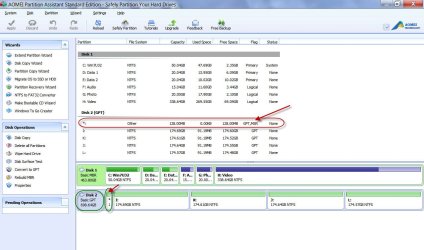
A deep scan may be in order now but before that I would like to see what AOMEI Partition Assistant shows as your drive. AOMEI Partition Assistant shows more relevant information of the drives.

In particular I would like to see whether it shows your drive as a GPT drive and in particular it shows the 128MB MSR partition which I saw in the TestDisk/Photorec screenshot.

18-06-2014 07-37-52.jpg

AOMEI Partition Assistant: Free Partition Manager - AOMEI Partition Assistant Standard

Whether a direct hookup of the drive through eSata port or a deep scan by Partition Wizard should take precedence, let Anshad decide. So let us wait. But go ahead with a AOMEI PA screenshot.
 

My Computer My Computer

At a glance

Windows 7 Home Premium 32 bit
OS
Windows 7 Home Premium 32 bit
"AOMEI Partition Assistant" is a very good tool and it is the one nowadays i am using for partitioning needs. It offers some advantages over "Partition Wizard" like the ability to create WinPE based boot disc etc. I would also recommend doing a 'Fast Search" with AOMEI.

Recover Partition with Build-in Partition Recovery Wizard - AOMEI Partition Assistant

If fast search of AOMEI fails to detect missing partitions, try "PartitionGuru". I had great success with it when other tools failed. Also the scanning speed is notably higher than others.

"PartitionGuru" download : http://www.eassos.com/partitionguru.php

http://www.eassos.com/how-to/recover-partitions-partitionguru.php

You should select "Whole Disk" for scanning as we need to search from the very first LBA ( Logical Block Address) to the last one. If a partition is found, press the "Reserve" button and "PartitionGuru" will continue to scan the remaining free space.

One of the great advantage of "PartitionGuru" is that it will allow you to copy files from the partitions it founds. Very helpful to recover important files before writing a new partition table.

http://www.partitionguru.com/manual/CopyFilesFromPartition.php
 

My Computer My Computer

At a glance

Windows 7 Ultimate x64
Computer type
PC/Desktop
OS
Windows 7 Ultimate x64
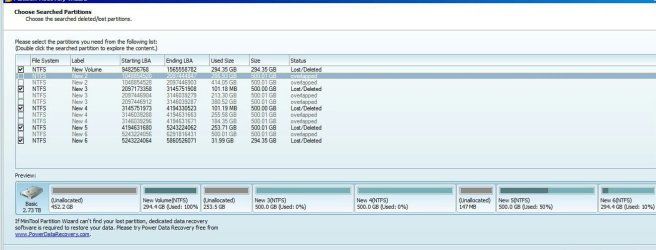
Partition Wizard Deep Scan 1.jpg
Partition Wizard Deep Scan result

Partition Assistant Info Screen.jpg
AOMEI PA

Currently doing a fast search wit AOMEI. Will do a scan with PartitionGuru then post both results.
 

My Computer My Computer

At a glance

Win 7 x64 and Vista x64Intel T58004GB
Computer type
Laptop
Computer Manufacturer/Model Number
HP dv5-1138nr
OS
Win 7 x64 and Vista x64
CPU
Intel T5800
Memory
4GB
Its a bit surprising that AOMEI shows your drive as MBR and full 3TB as unallocated. Baffling.

Let AOMEI complete the job and let us see what is in store.

But I have a few questions. Any info on the history of the drive is welcome. Who partitioned that drive into five and how? Do you remember each partition size? Was there any unallocated space in the drive before?

( When I ask for previous history I remember this. When I was working in KSA for a short period, I was advised " Don't ever ask for the previous history who used, and how used etc., etc. If you can find the fault and repair it, repair it ( hardware but not computers) - cost no bar. Or quietly say BER - Beyond Economical Repairs - and recommend total replacement." And the computer operator in my department flamboyantly sprayed WD40 into the HDD when the computer slowed down:). Needless to say the HDD had to be replaced. Fortunately all data had back-up and was rewritten. )
 
Last edited:

My Computer My Computer

At a glance

Windows 7 Home Premium 32 bit
OS
Windows 7 Home Premium 32 bit
AOMEI scan A.jpg
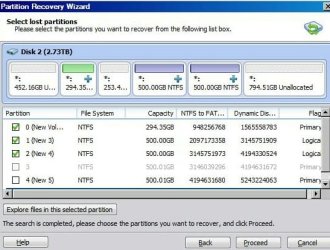
AOMEI recovery wizard scan

AOMEI scan B.jpg
AOMEI recovery wizard scan (scrolled)

Any boxes that I could select, were selected.
Partition '0', '3' and '5' are browse-able.
'1' and '2' show a single folder [System Volume Information].
No files are found on '4'

But i have a few questions. Any info on the history of the drive is welcome. Who partitioned that drive into five and how? Do you remember each partition size? Was there any unallocated space in the drive before?
Acquired the drive for storage in an Asus IP35 (ICH9R) based gaming machine (XP/Vista 32 bit dual boot). Bought the 3TB Nov 22nd 2012. Bought the dock a few days later. I think I got the enclosure because I was having difficulty formatting/accessing the full capacity in the 32 bit OS. Used the dock to connect it to another system to do the formatting.

3TB+Dock+Vista 64 bit+Norton Partition Magic is the likely origin.

The partition with the crucial information is a 500GB one, but I haven't been able to see the files with any of the wizard scans thus far.

Four 500GB, one 200GB and the rest left unallocated deliberately? - the 2.2TB situation.
Or maybe I partitioned the total capacity. Not sure/can't remember since I didn't actively interact with all partitions all the time.
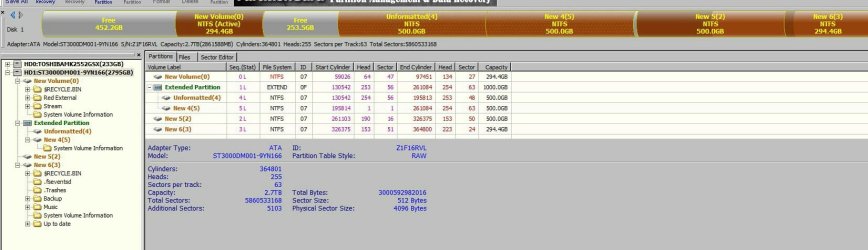

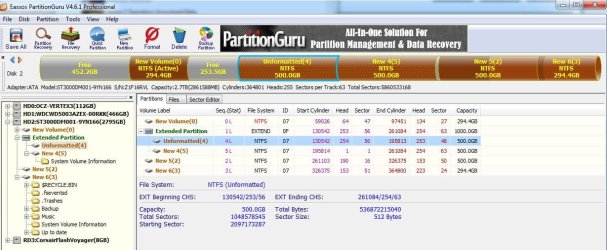
Partition Guru Result.jpg

Partition Guru
 

Attachments

  • Partition Guru Result.jpg
    Partition Guru Result.jpg
    95.8 KB · Views: 2
Last edited:

My Computer My Computer

At a glance

Win 7 x64 and Vista x64Intel T58004GB
Computer type
Laptop
Computer Manufacturer/Model Number
HP dv5-1138nr
OS
Win 7 x64 and Vista x64
CPU
Intel T5800
Memory
4GB
Norton Partition Magic, if I recall, played with some disk attribute so it could do it's magic.

This is a very old memory (early 90s?) - I'm sure I repressed it - must have been a really bad recovery effort.

This shadow might have no bearing on this case. I'm sorry I can't remember exactly what it did, but I do recall that the data was saved.
 

My Computer My Computer

At a glance

x64 (6.3.9600) Win8.1 Pro & soon dual boot x6...AMD A6-3420M APU with Radeon(tm) HD Graphics6.00 GBAMD Radeon(TM) HD 6520G
Computer type
Laptop
Computer Manufacturer/Model Number
HP Pavilion dv6-6c10us
OS
x64 (6.3.9600) Win8.1 Pro & soon dual boot x64 (6.1.7601) Win7_SP1 HomePrem
CPU
AMD A6-3420M APU with Radeon(tm) HD Graphics
Motherboard
Hewlett-Packard 1805
Memory
6.00 GB
Graphics Card(s)
AMD Radeon(TM) HD 6520G
Sound Card
(1) AMD High Definition Audio Device (2) IDT High Definiti
Monitor(s) Displays
HP W2072a 20" LCD (1600 x 900) @ 60 Hz
Screen Resolution
1366 x 768 x 32 bits (4294967296 colors) @ 60 Hz
Hard Drives
ST640LM0 00 HM641JI SATA Disk Device
Keyboard
Logitech k520 wireless KB
Mouse
Logitech m320 wireless mouse (bundled with KB)
Internet Speed
15/5 | 54 MB Wireless 'n'
Antivirus
Realtime: Defender or Avast | On-demand: Malwarebytes, ESET
Browser
IE 11 on Win8, IE 10 on win 7
Other Info
Media: [Gimp, Audacity, VLC] || Comm: [WEmail 2012, Skype] || Productivity: [OpenOffice,| Textpad] || Utils: [Sysinternals, cCleaner, Speccy, Defraggler]
I really have no ideas now - much less about Norton Partition Magic and how it could partition a 3TB drive as an MBR disk.

You may send a PM to Anshad Edavana requesting him to look into the AOMEI results.

The next best thing is to wait till you have access to the Windows 7 machine and see if you get back to what you saw earlier. If not definitely something has happened to the dock or the drive.

In such a case you may have to dispense with the dock temporarily, hook it up as a second drive in desktop and see what can be done.

Let us see if Anshad with his paractical on-hands experience can throw more light.
 

My Computer My Computer

At a glance

Windows 7 Home Premium 32 bit
OS
Windows 7 Home Premium 32 bit
I intended to use the drive's full capacity when I bought it, so GPT was the order of the day from the start.

TestDisk analyze also detects/suggests EFI/GPT.
 

My Computer My Computer

At a glance

Win 7 x64 and Vista x64Intel T58004GB
Computer type
Laptop
Computer Manufacturer/Model Number
HP dv5-1138nr
OS
Win 7 x64 and Vista x64
CPU
Intel T5800
Memory
4GB
Yep, I also saw the MSR partition in Test Disk/photoRec screenshot. But AOMEI shows it as an MBR disk that is why I am baffled.

Anyway, let us not hurry up.

Let us see how it goes when you hook the dock+HDD on the Windows 7 machine.
 

My Computer My Computer

At a glance

Windows 7 Home Premium 32 bit
OS
Windows 7 Home Premium 32 bit
Will do.

Once again I appreciate the assistance from everyone, hopefully it ends well.
 

My Computer My Computer

At a glance

Win 7 x64 and Vista x64Intel T58004GB
Computer type
Laptop
Computer Manufacturer/Model Number
HP dv5-1138nr
OS
Win 7 x64 and Vista x64
CPU
Intel T5800
Memory
4GB
Both AOMEI and PartitionGuru seems to detect the disk as MBR but if i assume correctly, both softwares detect lost partitions by looking for NTFS boot sector signature. So there is still a chance for the disk to be partitioned in GPT scheme. A deep scan with "TestDisk" or "PartitionGuru" may detect the missing partitions but before doing that we should check and confirm whether the partitions are actually lost or it is the Vista machine which is unable to read them.

I would like to know the result of :

1. Whether all partitions can be accessed if the HDD is connected to the Win7 machine via dock.

2. Whether all partitions can be accessed if the HDD is connected to the Win7 machine via a direct SATA port.
 
Last edited:

My Computer My Computer

At a glance

Windows 7 Ultimate x64
Computer type
PC/Desktop
OS
Windows 7 Ultimate x64
Connected drive to Win 7 machine, without the dock.

CaptureALL.JPG
Partition Guru results

Capture4.JPG
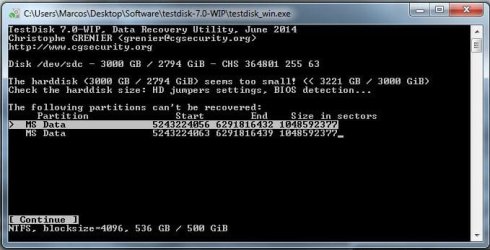
TeskDisk prompt
 
Last edited:

My Computer My Computer

At a glance

Win 7 x64 and Vista x64Intel T58004GB
Computer type
Laptop
Computer Manufacturer/Model Number
HP dv5-1138nr
OS
Win 7 x64 and Vista x64
CPU
Intel T5800
Memory
4GB
Anshad is pursuing the issue with you - please continue following the directions he gi

I am posting this as reference only, no action should be taken based on the information in this post at this point.

Norton Partition Magic manual:
ftp://ftp.symantec.com/public/engli...npmagic_8/manuals/norton_partitionmagic_8.pdf

There is a reference to a Rescue disk that might serve some purpose later.

There is also reference to Partition Magic being in a hidden partition on the drive. I don't know if this is a red herring or not.

For some reason I keep thinking Norton Partition magic lies to the OS and resolves the addressing itself. But I have no definitive information.

I am of little help on this thread, so I will stay on the side lines.
 

My Computer My Computer

At a glance

x64 (6.3.9600) Win8.1 Pro & soon dual boot x6...AMD A6-3420M APU with Radeon(tm) HD Graphics6.00 GBAMD Radeon(TM) HD 6520G
Computer type
Laptop
Computer Manufacturer/Model Number
HP Pavilion dv6-6c10us
OS
x64 (6.3.9600) Win8.1 Pro & soon dual boot x64 (6.1.7601) Win7_SP1 HomePrem
CPU
AMD A6-3420M APU with Radeon(tm) HD Graphics
Motherboard
Hewlett-Packard 1805
Memory
6.00 GB
Graphics Card(s)
AMD Radeon(TM) HD 6520G
Sound Card
(1) AMD High Definition Audio Device (2) IDT High Definiti
Monitor(s) Displays
HP W2072a 20" LCD (1600 x 900) @ 60 Hz
Screen Resolution
1366 x 768 x 32 bits (4294967296 colors) @ 60 Hz
Hard Drives
ST640LM0 00 HM641JI SATA Disk Device
Keyboard
Logitech k520 wireless KB
Mouse
Logitech m320 wireless mouse (bundled with KB)
Internet Speed
15/5 | 54 MB Wireless 'n'
Antivirus
Realtime: Defender or Avast | On-demand: Malwarebytes, ESET
Browser
IE 11 on Win8, IE 10 on win 7
Other Info
Media: [Gimp, Audacity, VLC] || Comm: [WEmail 2012, Skype] || Productivity: [OpenOffice,| Textpad] || Utils: [Sysinternals, cCleaner, Speccy, Defraggler]
Give me the bad news gently...
 

My Computer My Computer

At a glance

Win 7 x64 and Vista x64Intel T58004GB
Computer type
Laptop
Computer Manufacturer/Model Number
HP dv5-1138nr
OS
Win 7 x64 and Vista x64
CPU
Intel T5800
Memory
4GB
Sorry for the late reply. Is the "TestDisk" screen shot is after a deep scan ?.

There are two more tools ( commercial ) which might be able to detect the missing partitions so my hope is not ended yet. Please try "Active Partition Recovery" first. Trail version will let us know whether lost partitions can be recovered.

http://www.partition-recovery.com/

There are both normal scan and super scan options available. I would highly recommend reading the accompanying manual ( help file ) first before beginning the scan. First try "Quick Scan" and if it can't detect the missing partitions, try "Super Scan".

User guide : http://www.partition-recovery.com/downloads/partition-recovery.pdf

Official Video guide : http://www.youtube.com/watch?v=tl5XgWJ3xK8
 
Last edited:

My Computer My Computer

At a glance

Windows 7 Ultimate x64
Computer type
PC/Desktop
OS
Windows 7 Ultimate x64
"TestDisk" was 'Deeper Scan'. Should anything else be done in TestDisk? Continue?

I will give Active Partition Recovery a run and post results.
 

My Computer My Computer

At a glance

Win 7 x64 and Vista x64Intel T58004GB
Computer type
Laptop
Computer Manufacturer/Model Number
HP dv5-1138nr
OS
Win 7 x64 and Vista x64
CPU
Intel T5800
Memory
4GB
"TestDisk" was 'Deeper Scan'. Should anything else be done in TestDisk? Continue?

Let's first see how effective is " Active Partition Recovery". It helped me one time to recover a lost partition which is not detected by "TestDisk".

If "Active Partition Recovery" Quick scan and Super scan fails, try "TestDisk" again but this time manually select MBR partition scheme regardless of it's advise to search for EFI partitions.
 

My Computer My Computer

At a glance

Windows 7 Ultimate x64
Computer type
PC/Desktop
OS
Windows 7 Ultimate x64
Back
Top