Solved cannot install win7 64 on uefi system

Yes, rightclick it to Burn (or Send to) with Windows Image Burner to CD. Boot and make sure we see everything when you snap pics.

 
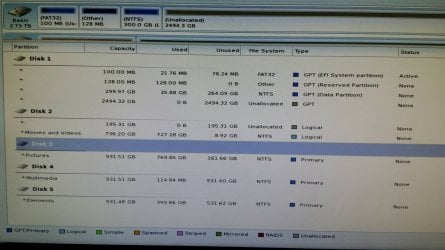
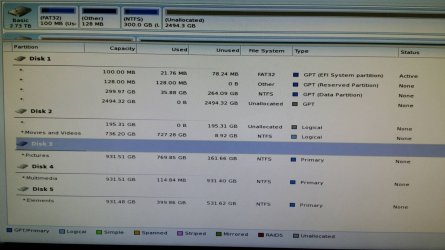
Ok here are shots with all drives connected. I don't see anything that would cause it to not boot. But that's why I'm here right? Would you like for me to disconnect all but the main drive and have a pic of it?
 

Attachments

  • Partwizard 1.jpg
    Partwizard 1.jpg
    187.4 KB · Views: 1
  • Partwizard 4.jpg
    Partwizard 4.jpg
    167.7 KB · Views: 1

My Computer My Computer

At a glance

win 7 Ultimate 64bitcore i5
Computer type
PC/Desktop
Computer Manufacturer/Model Number
asus
OS
win 7 Ultimate 64bit
CPU
core i5
Motherboard
asus z87-a
In BIOS try UEFI only.

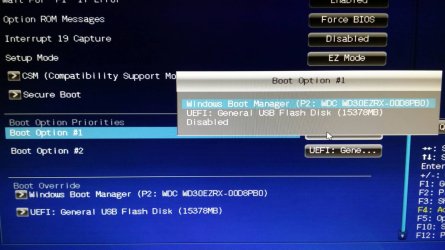
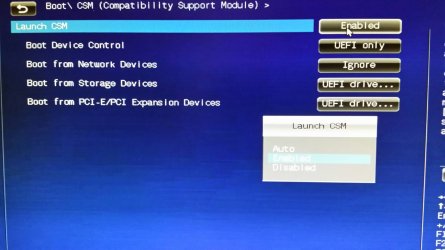
Post a pic if you Disable CSM. Some BIOS only need it to boot both Legacy/UEFI, others to even install Win7 at all.

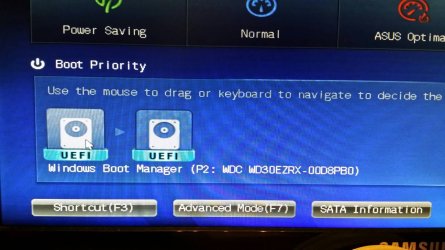
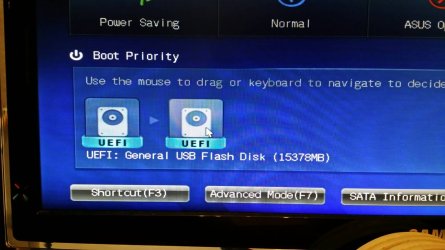
The boot order icon mess is not clear at All. Should be Windows Boot Manager. What is it?
 
Last edited:
In boot order it is windows boot manager uefi listed 1st. I have csm enabled and everything set to uefi. FYI Windows installed fine with it set that way with only the main 3tb os drive installed, everything goes to @#$@ when i try to add any additional drives. I updated to latest bios lastnight hoping that would help but it didnt. So what would you want me to try next? I am actually posting this from computer and not my phone so it is kind of nice!

This is a brand new MOBO could it be having a problem?
 

My Computer My Computer

At a glance

win 7 Ultimate 64bitcore i5
Computer type
PC/Desktop
Computer Manufacturer/Model Number
asus
OS
win 7 Ultimate 64bit
CPU
core i5
Motherboard
asus z87-a
Please disable CSM mode and try booting Windows. If the same error message appears, boot Windows setup DVD in UEFI mode and run "Startup Repair" up to three times.

http://www.sevenforums.com/tutorials/681-startup-repair.html

If "Startup repair" can't auto fix the problem, we can try recreating UEFI boot configuration files manually.
 

My Computer My Computer

At a glance

Windows 7 Ultimate x64
Computer type
PC/Desktop
OS
Windows 7 Ultimate x64
Ok i disabled csm in bios and tried to boot. The bios came up with warning that it cannot boot uefi with csm disabled and automatically enabled csm in the bios. So i tried to set it to auto instead of enabled, i got a windows could not start screen giving me either repair or start windows normally. I chose normally and it boots.
 

My Computer My Computer

At a glance

win 7 Ultimate 64bitcore i5
Computer type
PC/Desktop
Computer Manufacturer/Model Number
asus
OS
win 7 Ultimate 64bit
CPU
core i5
Motherboard
asus z87-a
i got a windows could not start screen giving me either repair or start windows normally. I chose normally and it boots.

So the system booted to the Desktop with all the slave disks plugged ?.
 

My Computer My Computer

At a glance

Windows 7 Ultimate x64
Computer type
PC/Desktop
OS
Windows 7 Ultimate x64
I specifically asked you to post a picture of the choices available if you disable CSM in BIOS setup. For some reason you thought you could just ignore that step as though I had not even typed it. Why?

Please do that now. I'm tired of giving you steps that you ignore. Even if you don't care, others will need to know what choices must be made to run Win7 successfully on this model.
 
i got a windows could not start screen giving me either repair or start windows normally. I chose normally and it boots.

So the system booted to the Desktop with all the slave disks plugged ?.

No that was after I disabled csm with only boot drive. Once windows started (with csm set auto) I tried with slave drives and no go.
 

My Computer My Computer

At a glance

win 7 Ultimate 64bitcore i5
Computer type
PC/Desktop
Computer Manufacturer/Model Number
asus
OS
win 7 Ultimate 64bit
CPU
core i5
Motherboard
asus z87-a
I specifically asked you to post a picture of the choices available if you disable CSM in BIOS setup. For some reason you thought you could just ignore that step as though I had not even typed it. Why?

Please do that now. I'm tired of giving you steps that you ignore. Even if you don't care, others will need to know what choices must be made to run Win7 successfully on this model.

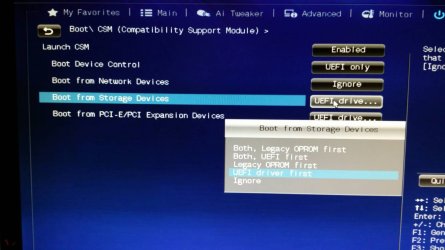
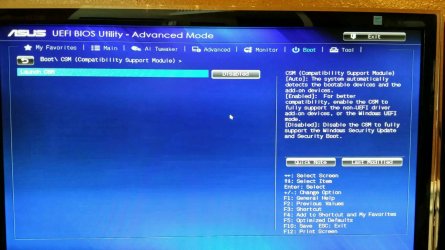
I am not ignoring what your asking. .if I disable csm bios forces itself to turn csm back on. If I set bios to disable csm there are NO choices. It says disabled and nothing else is listed. period. I had never tried csm auto (which also in auto I have no other choices listed) if you still want screen shot of that I will post it but it is a waste if time.
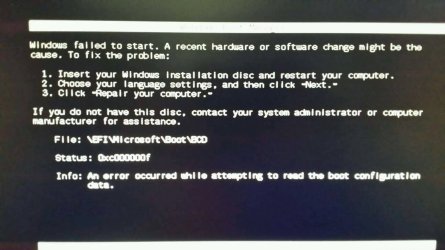
if I try to boot after adding slave drives I try and run repair 3 times and get this. I will upload pics of bios with csm disable.
 

Attachments

  • bcdbooterror.jpg
    bcdbooterror.jpg
    119.9 KB · Views: 1

My Computer My Computer

At a glance

win 7 Ultimate 64bitcore i5
Computer type
PC/Desktop
Computer Manufacturer/Model Number
asus
OS
win 7 Ultimate 64bit
CPU
core i5
Motherboard
asus z87-a
Are your RAM sticks in same color slots? They appear to not be in matching slots from the BIOS screenshot. This might pertain. Try changing them to either the A slots or the B slots. Consult your Manual on the Support Downloads webpage to see what it recommends.

Try also Fast Boot and Hardware Fast boot disabled.
 
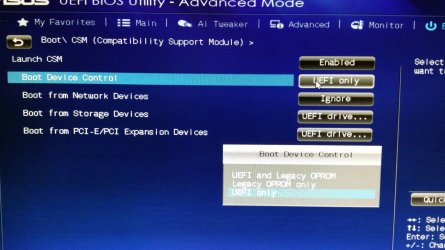
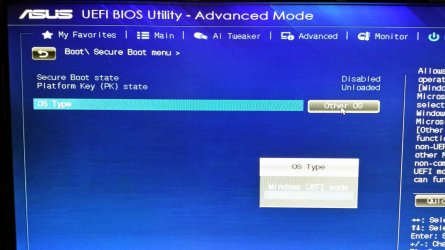
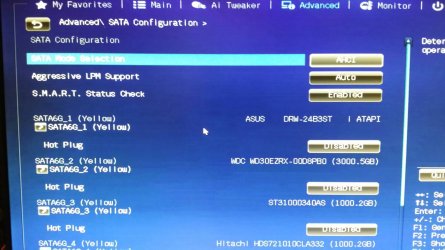
I have attached every shot I can think of concerning the bios, csm, boot order, sata settings, hopefully you can find what your needing. If you need something else I'll post it.
 

Attachments

  • Csm options 1_resize_20140618_104326.jpg
    Csm options 1_resize_20140618_104326.jpg
    113.3 KB · Views: 0
  • Csm options 2_resize_20140618_104326.jpg
    Csm options 2_resize_20140618_104326.jpg
    103.6 KB · Views: 0
  • Csm options 3_resize_20140618_104327.jpg
    Csm options 3_resize_20140618_104327.jpg
    114.6 KB · Views: 0
  • Csm options 4_resize_20140618_104327.jpg
    Csm options 4_resize_20140618_104327.jpg
    149.9 KB · Views: 1
  • csmdisabled.jpg
    csmdisabled.jpg
    174.4 KB · Views: 1
  • Secure boot options_resize_20140618_104325.jpg
    Secure boot options_resize_20140618_104325.jpg
    173 KB · Views: 0
  • Csm description_resize_20140618_104325.jpg
    Csm description_resize_20140618_104325.jpg
    211.6 KB · Views: 0
  • Sata cfg_resize_20140618_104324.jpg
    Sata cfg_resize_20140618_104324.jpg
    158.9 KB · Views: 0
  • Boot priorities_resize_20140618_104324.jpg
    Boot priorities_resize_20140618_104324.jpg
    135.9 KB · Views: 0
  • Boot menu_resize_20140618_104323.jpg
    Boot menu_resize_20140618_104323.jpg
    232.3 KB · Views: 0
  • Boot menu 2_resize_20140618_104322.jpg
    Boot menu 2_resize_20140618_104322.jpg
    182.1 KB · Views: 0

My Computer My Computer

At a glance

win 7 Ultimate 64bitcore i5
Computer type
PC/Desktop
Computer Manufacturer/Model Number
asus
OS
win 7 Ultimate 64bit
CPU
core i5
Motherboard
asus z87-a
Are your RAM sticks in same color slots? They appear to not be in matching slots from the BIOS screenshot. This might pertain. Try changing them to either the A slots or the B slots. Consult your Manual on the Support Downloads webpage to see what it recommends.

Try also Fast Boot and Hardware Fast boot disabled.

I am sure they are in same color slots, I will check. I will try fadt and hardware disabled.
 

My Computer My Computer

At a glance

win 7 Ultimate 64bitcore i5
Computer type
PC/Desktop
Computer Manufacturer/Model Number
asus
OS
win 7 Ultimate 64bit
CPU
core i5
Motherboard
asus z87-a
Ok ram is where it should be, tried fastboot disabled hardware disabled still no go.
So i tried something I tried before and that is plugging one drive at a time. Well it worked this time and I have found the drive that is keeping the box from booting. I have stuff on that drive I cannot loose. Home videos being main thing. (I will go thru the same process with bios back to defaults to be sure it is that single drive.) If it is how can I rescue that data?
 

My Computer My Computer

At a glance

win 7 Ultimate 64bitcore i5
Computer type
PC/Desktop
Computer Manufacturer/Model Number
asus
OS
win 7 Ultimate 64bit
CPU
core i5
Motherboard
asus z87-a
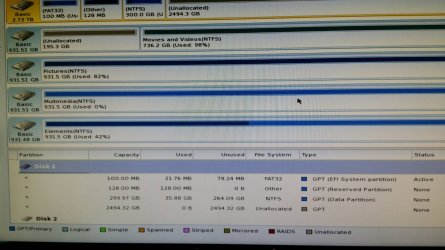
If you can find the exact disk which is messing with boot, i would suggest converting it to a logical partition non destructively. Unplug all other disks including the boot disk and connect only the suspected disk. Then boot from "Partition Wizard" bootable CD and convert the "Primary" partition to "Logical".

"Partition Wizard" boot disc download : Partition Wizard Bootable CD allows user to manage partition directly with partition manager bootable CD.

How to convert a "Primary" partition to "Logical" : How to set partition as Logical with partition manager? Partition Wizard help.
 

My Computer My Computer

At a glance

Windows 7 Ultimate x64
Computer type
PC/Desktop
OS
Windows 7 Ultimate x64
This will not delete any data?
 

My Computer My Computer

At a glance

win 7 Ultimate 64bitcore i5
Computer type
PC/Desktop
Computer Manufacturer/Model Number
asus
OS
win 7 Ultimate 64bit
CPU
core i5
Motherboard
asus z87-a
It is disk 3 that is giving the problem.
 

Attachments

  • Partwizard 4.jpg
    Partwizard 4.jpg
    167.7 KB · Views: 2

My Computer My Computer

At a glance

win 7 Ultimate 64bitcore i5
Computer type
PC/Desktop
Computer Manufacturer/Model Number
asus
OS
win 7 Ultimate 64bit
CPU
core i5
Motherboard
asus z87-a
I suggested in my first post to find the problem drive by process of elimination. So all this time has been wasted when we could have had it fixed after the first step.

Conversion to Logical would not destroy data but your data should always be backed up anyway against drive failure.

The strategy is to convert to a non-bootable format so the disk won't even be queried at boot which is itself brilliant. However in the past the disk required wiping with Diskpart Clean command to clear boot code which seemed to be interfering. This will help demonstrate if format or code is the culprit.
 
If you read my last post I said I did try this and it didn't work. We have tried alot of different things since then, I was out of options so I tried it again. I can't explain why, but it worked this time. VERY ODD. I read somewhere that win7 likes all same drives either logical or primary but not mixed. Being this drive is the only logical drive send causing the box to not boot may hold water.
 

My Computer My Computer

At a glance

win 7 Ultimate 64bitcore i5
Computer type
PC/Desktop
Computer Manufacturer/Model Number
asus
OS
win 7 Ultimate 64bit
CPU
core i5
Motherboard
asus z87-a
Well converted all logical to primary with partition wizard and boots fine, all data intact!. So I guess the solution to having additional HDD's with a win 7 uefi install is to make sure all drives have primary partitions not logical.
I reset bios back to defaults secure boot ON, CSM enabled with default settings fastboot on hardware fastboot on and Windows boots fine. I don't guess all those settings matter.

Wierd thing while doing all the reinstalls and using diskpart clean cmd, I accidentally wiped a storage drive..any free software out that will recover that data? If not I will pay for one that is proven to work. I have not written anything to this disk since the wipe.
 

My Computer My Computer

At a glance

win 7 Ultimate 64bitcore i5
Computer type
PC/Desktop
Computer Manufacturer/Model Number
asus
OS
win 7 Ultimate 64bit
CPU
core i5
Motherboard
asus z87-a
Back
Top