
Normal service is resumed as Windows 7's growth once again.....

...I have had great respect for you, your expertise and knowledge and your way to work with various issues of so many OPs. But maybe this virtual forums life really is a metaphor for real life in that sense that as idols sometimes do fall in real life, they seem to fall here, too. Your usage of the word crap or rather letters cr in front of every word you can possible use them is naive, stupid and really disrespectful towards all those users who think differently than you. You really should be ashamed of that and keep your crApps and cRaptures and such to yourself. If you had let it be a one time "cool" joke in one post, that had been OK, but to continue this post after post is just plain stupid...

If Greg was the only one who felt that way, I would agree with you but the fact is there are a lot of people who share that view who have actually have tried to use Win8.0 and 8.1, including me. In terms of capability, Win 8 is an improvement over Win 7 but in terms of usability, it falls short for most people. I had pretty much no trouble moving from XP to Win 7; when I tried using Win 8.0 and, later on 8.1, even with help, I found it awkward, even with help, due to changes from they way things had been done in Win 7 that were pointless and completely unnecessary. I'm glad you were able to adapt to Win 8 but not everyone has had that happy experience. It's because of the difficulty of making such a drastic transition and the awkward workflow Win 8 GUI creates, even with a start menu replacement, that businesses have been upgrading to Win 7 when moving from XP and others are staying with Win 7; training costs alone would have been killers; then there would have also been the reduction in productivity.

I evaluated Win 8 when it first came out, didn't like it (to put it mildly), and decided to stay with Win 7 when I built my current machine and needed to buy an OS. Even if Win 9 proves to better than Win 7 in all aspects, I'm staying with Win 7 until several months to a year before it reaches its EOL. Why change as long as it meets my needs without having to completely learn how to use a computer all over again?
 

My Computer My Computer

At a glance

Win 7 Ultimate 64 bitIntel i7-3930KKingston HyperX Genesis 32GB Kit (8x4GB Modul...MSI R7850 Twin Frozr 2GD5/OC Radeon HD 7850 2...
Computer type
PC/Desktop
Computer Manufacturer/Model Number
Custom Build
OS
Win 7 Ultimate 64 bit
CPU
Intel i7-3930K
Motherboard
ASUS P9X79 WS
Memory
Kingston HyperX Genesis 32GB Kit (8x4GB Modules) 1600MHz DDR
Graphics Card(s)
MSI R7850 Twin Frozr 2GD5/OC Radeon HD 7850 2GB 256-bit GDDR
Sound Card
Asus Xonar Essence STX
Monitor(s) Displays
3x Asus VG248QE 24", Vizio 32" TV
Screen Resolution
1920 x 1080, ?
Hard Drives
Samsung 128GB 840 Pro SSD (1),
Samsung 4TB 850 EVO SSDs (4)
Samsung 4TB 850 EVO SSDs (16) external backup drives used in 2.5" hot swap bays in the computer.
PSU
Corsair HX750w
Case
Antec Two Hundred v2 (modified)
Cooling
Cooler Master GeminII S524 120mm (fan replaced with a 140mm)
Keyboard
Logitech G510s
Mouse
Logitech M525 (two in use)
Internet Speed
=< 32Mbps down, 8Mbps up
Antivirus
AVAST!, MBAM, SAS, Spybot S&D (all but MBAM free) Glary Util
Browser
IE11
Other Info
LSI 9211-8i HBA card (8 SATA III ports), 2.5" & 3.5" Hot Swap Bays, HooToo HT-CR001 PCI-E to USB 3.0 Internal Hub + 6 Slot Card Reader, and LG Model CH12LS28 BD-ROM Optical Drive. Also, ScanSnap S1500 ADF duplexing scanner, Canon 9000F flat bed scanner, Corsair SP2500 2.1 speakers, Samsung CLP 415nw laser color printer, Cyberpower PP2200SW UPS
App's priced right I also don't have a problem with.
Look what it cost to get something from Microsoft just to read a pdf file.

PDF reader is native in W8 :confused:

So what? Free PDF readers abound. What M$ should have done is come up with a full fledged PDF creation and editing program, like Foxit and Adobe Acrobat, for M$ Office. If M$ will get its head out of the sand and forget about ramming subscription and cloud computing down our throats, they have a golden opportunity to pickup a boat load of business from people abandoning Adobe Acrobat after XI reaches EOL in 2017 and only a subscription program will be available. I know I will be abandoning Adobe come 2017 unless they come to their senses; Foxit is looking pretty good.
 

My Computer My Computer

At a glance

Win 7 Ultimate 64 bitIntel i7-3930KKingston HyperX Genesis 32GB Kit (8x4GB Modul...MSI R7850 Twin Frozr 2GD5/OC Radeon HD 7850 2...
Computer type
PC/Desktop
Computer Manufacturer/Model Number
Custom Build
OS
Win 7 Ultimate 64 bit
CPU
Intel i7-3930K
Motherboard
ASUS P9X79 WS
Memory
Kingston HyperX Genesis 32GB Kit (8x4GB Modules) 1600MHz DDR
Graphics Card(s)
MSI R7850 Twin Frozr 2GD5/OC Radeon HD 7850 2GB 256-bit GDDR
Sound Card
Asus Xonar Essence STX
Monitor(s) Displays
3x Asus VG248QE 24", Vizio 32" TV
Screen Resolution
1920 x 1080, ?
Hard Drives
Samsung 128GB 840 Pro SSD (1),
Samsung 4TB 850 EVO SSDs (4)
Samsung 4TB 850 EVO SSDs (16) external backup drives used in 2.5" hot swap bays in the computer.
PSU
Corsair HX750w
Case
Antec Two Hundred v2 (modified)
Cooling
Cooler Master GeminII S524 120mm (fan replaced with a 140mm)
Keyboard
Logitech G510s
Mouse
Logitech M525 (two in use)
Internet Speed
=< 32Mbps down, 8Mbps up
Antivirus
AVAST!, MBAM, SAS, Spybot S&D (all but MBAM free) Glary Util
Browser
IE11
Other Info
LSI 9211-8i HBA card (8 SATA III ports), 2.5" & 3.5" Hot Swap Bays, HooToo HT-CR001 PCI-E to USB 3.0 Internal Hub + 6 Slot Card Reader, and LG Model CH12LS28 BD-ROM Optical Drive. Also, ScanSnap S1500 ADF duplexing scanner, Canon 9000F flat bed scanner, Corsair SP2500 2.1 speakers, Samsung CLP 415nw laser color printer, Cyberpower PP2200SW UPS
I've only used the free Adobe Reader, formerly Acrobat, and dumped it about two years ago for Foxit. Of course all I need it for is to open PDF files
 

My Computer My Computer

At a glance

Windows 7 Ultimate X64 SP1Intel i5-2550K, Differing ~4.4-4.8GHz No buil...16GB G.Skill Sniper 1866MHz @ 2133MHz 2x8GBASUS GTX650TIB-DC2OC-2GD5, (650TI Boost)
Computer type
PC/Desktop
Computer Manufacturer/Model Number
Home Built Desktop By DataTech
OS
Windows 7 Ultimate X64 SP1
CPU
Intel i5-2550K, Differing ~4.4-4.8GHz No built in GPU
Motherboard
ASUS P8Z68-V PRO/GEN3
Memory
16GB G.Skill Sniper 1866MHz @ 2133MHz 2x8GB
Graphics Card(s)
ASUS GTX650TIB-DC2OC-2GD5, (650TI Boost)
Sound Card
Onboard Realtek 5-1
Monitor(s) Displays
Samsung P2570HD
Screen Resolution
1920x1080
Hard Drives
Samsung 840 Pro 256GB SSD for OS, 500GB Seagate Constellation (Enterprise drive) for Data
PSU
Corsair HX650W
Case
Inwin Dragon Rider
Cooling
Hyper 212 EVO w/two Noctua fans, push-pull, @1300 RPM
Keyboard
E-Z Eyes, bright yellow keys with large characters
Mouse
steelseries SENSEI Laser Pro Gaming
Internet Speed
48-51Mbs Mbs down, 11 Mbs up Xfinity Cable
Antivirus
Norton Internet Security 2013
Browser
IE 10, Opera, Pale Moon if needed
Other Info
4 case fans, LG BluRay-RE, ASUS DVD-RW, Mr. Fusion power supply, 1.21 gigawatts.
I've only used the free Adobe Reader, formerly Acrobat, and dumped it about two years ago for Foxit. Of course all I need it for is to open PDF files

I create and edit quite a few PDFs and need far more flexibility than what I could get from virtual printers. Also, my ADF scanner (Fujitsu ScanSnap 1500) uses Distiller in Adobe Acrobat for directly creating PDFs from scans; its successor, the iX500, does the same. If Fujitsu doesn't come up with a replacement for Adobe Acrobat in its ScanSnap drivers after 2017 or becomes Twain compliant, I'll be forced to scan to JPEG and use another program, probably Foxit, to create the PDFs.
 

My Computer My Computer

At a glance

Win 7 Ultimate 64 bitIntel i7-3930KKingston HyperX Genesis 32GB Kit (8x4GB Modul...MSI R7850 Twin Frozr 2GD5/OC Radeon HD 7850 2...
Computer type
PC/Desktop
Computer Manufacturer/Model Number
Custom Build
OS
Win 7 Ultimate 64 bit
CPU
Intel i7-3930K
Motherboard
ASUS P9X79 WS
Memory
Kingston HyperX Genesis 32GB Kit (8x4GB Modules) 1600MHz DDR
Graphics Card(s)
MSI R7850 Twin Frozr 2GD5/OC Radeon HD 7850 2GB 256-bit GDDR
Sound Card
Asus Xonar Essence STX
Monitor(s) Displays
3x Asus VG248QE 24", Vizio 32" TV
Screen Resolution
1920 x 1080, ?
Hard Drives
Samsung 128GB 840 Pro SSD (1),
Samsung 4TB 850 EVO SSDs (4)
Samsung 4TB 850 EVO SSDs (16) external backup drives used in 2.5" hot swap bays in the computer.
PSU
Corsair HX750w
Case
Antec Two Hundred v2 (modified)
Cooling
Cooler Master GeminII S524 120mm (fan replaced with a 140mm)
Keyboard
Logitech G510s
Mouse
Logitech M525 (two in use)
Internet Speed
=< 32Mbps down, 8Mbps up
Antivirus
AVAST!, MBAM, SAS, Spybot S&D (all but MBAM free) Glary Util
Browser
IE11
Other Info
LSI 9211-8i HBA card (8 SATA III ports), 2.5" & 3.5" Hot Swap Bays, HooToo HT-CR001 PCI-E to USB 3.0 Internal Hub + 6 Slot Card Reader, and LG Model CH12LS28 BD-ROM Optical Drive. Also, ScanSnap S1500 ADF duplexing scanner, Canon 9000F flat bed scanner, Corsair SP2500 2.1 speakers, Samsung CLP 415nw laser color printer, Cyberpower PP2200SW UPS
...I have had great respect for you, your expertise and knowledge and your way to work with various issues of so many OPs. But maybe this virtual forums life really is a metaphor for real life in that sense that as idols sometimes do fall in real life, they seem to fall here, too. Your usage of the word crap or rather letters cr in front of every word you can possible use them is naive, stupid and really disrespectful towards all those users who think differently than you. You really should be ashamed of that and keep your crApps and cRaptures and such to yourself. If you had let it be a one time "cool" joke in one post, that had been OK, but to continue this post after post is just plain stupid...

If Greg was the only one who felt that way, I would agree with you but the fact is there are a lot of people who share that view who have actually have tried to use Win8.0 and 8.1, including me. In terms of capability, Win 8 is an improvement over Win 7 but in terms of usability, it falls short for most people. I had pretty much no trouble moving from XP to Win 7; when I tried using Win 8.0 and, later on 8.1, even with help, I found it awkward, even with help, due to changes from they way things had been done in Win 7 that were pointless and completely unnecessary. I'm glad you were able to adapt to Win 8 but not everyone has had that happy experience. It's because of the difficulty of making such a drastic transition and the awkward workflow Win 8 GUI creates, even with a start menu replacement, that businesses have been upgrading to Win 7 when moving from XP and others are staying with Win 7; training costs alone would have been killers; then there would have also been the reduction in productivity.
It is each and every users right to call an application crap. What I find very offensive is when a senior member, an MVP uses his assumed influence and continues his childish "cool" wordplay adding extra letters to "crapifize" each and every Modern Windows App, using his alleged power to tell for those who have not even seen Windows 8 how crap the apps are. His opinion was clear after mentioning it first time, any further wordplay is only for the purpose of being "cool".

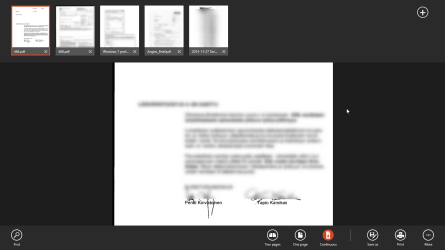
For your information, I use Windows Reader App (Windows 8 built-in PDF reader) almost exclusively because it is (as so many other Modern Apps) so flexible and easy to use:

2014-06-29_00h59_20.png

I do not believe I am the only one.

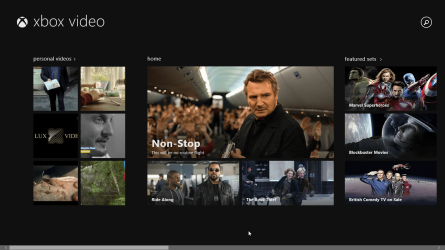
Another of these apps Greg would like everyone to think is crap is the Modern Video App, which I also use quite a lot, partly for same reasons than the Reader App: it's flexible and easy to use, doing very well what it is designed to do:

2014-06-29_01h01_43.png


I evaluated Win 8 when it first came out, didn't like it (to put it mildly), and decided to stay with Win 7 when I built my current machine and needed to buy an OS. Even if Win 9 proves to better than Win 7 in all aspects, I'm staying with Win 7 until several months to a year before it reaches its EOL. Why change as long as it meets my needs without having to completely learn how to use a computer all over again?
That's one thing I have been trying to understand, always failing: someone has tried very briefly the first versions of Windows 8, has never used Windows 8.1 Update 1 (current version) but still insists being qualified to judge this totally different OS than the one he / she has tried a few times long time ago.
 

My Computer My Computer

At a glance

Windows 10 Pro x64 EN-GB1.6 GHz Intel Core i7-720QM Processor6 GBATI Mobility Radeon HD 5850 Graphics
Computer type
Laptop
Computer Manufacturer/Model Number
HP ENVY 17-1150eg
OS
Windows 10 Pro x64 EN-GB
CPU
1.6 GHz Intel Core i7-720QM Processor
Memory
6 GB
Graphics Card(s)
ATI Mobility Radeon HD 5850 Graphics
Sound Card
Beats sound system with integrated subwoofer
Monitor(s) Displays
17" laptop display, 22" LED and 32" Full HD TV through HDMI
Screen Resolution
1600*900 (1), 1920*1080 (2&3)
Hard Drives
Internal: 2 x 500 GB SATA Hard Disk Drive 7200 rpm
External: 2TB for backups, 3TB USB3 network drive for media
Cooling
As Envy runs a bit warm, I have it on a Cooler Master pad
Keyboard
Logitech diNovo Media Desktop Laser (bluetooth)
Mouse
Logitech Performance Mouse MX
Internet Speed
50/10 Mbps VDSL
Antivirus
Windows Defender 4.3.9431.0
Browser
Maxthon 3.5.2., IE11
I appreciate your concern for my "assumed influence" which is nil except for Win7, but it isn't my reputation which is being ruined here by ill-tempered personal attacks.

My passion is as real and valid as yours, and if more colorful then that's just my style as its been all along. Like you I can be cranky but bear no ill-will and only go as low as disappointment.

I am saddened to see you go so mean and viscious, Kari. I had always thought of you as a friend.

Remember where you are.
 
OK, truce: You are The Authority to decide which apps are crap. I will no more criticize or question your authority in this subject, consulting you in the future when I want to know if an app belongs to Official Crap List.
 

My Computer My Computer

At a glance

Windows 10 Pro x64 EN-GB1.6 GHz Intel Core i7-720QM Processor6 GBATI Mobility Radeon HD 5850 Graphics
Computer type
Laptop
Computer Manufacturer/Model Number
HP ENVY 17-1150eg
OS
Windows 10 Pro x64 EN-GB
CPU
1.6 GHz Intel Core i7-720QM Processor
Memory
6 GB
Graphics Card(s)
ATI Mobility Radeon HD 5850 Graphics
Sound Card
Beats sound system with integrated subwoofer
Monitor(s) Displays
17" laptop display, 22" LED and 32" Full HD TV through HDMI
Screen Resolution
1600*900 (1), 1920*1080 (2&3)
Hard Drives
Internal: 2 x 500 GB SATA Hard Disk Drive 7200 rpm
External: 2TB for backups, 3TB USB3 network drive for media
Cooling
As Envy runs a bit warm, I have it on a Cooler Master pad
Keyboard
Logitech diNovo Media Desktop Laser (bluetooth)
Mouse
Logitech Performance Mouse MX
Internet Speed
50/10 Mbps VDSL
Antivirus
Windows Defender 4.3.9431.0
Browser
Maxthon 3.5.2., IE11
Put your sig back in the center Greg.
 

My Computer My Computer

At a glance

W7 Pro x64 SP1 | W10 Pro IP x64 | W8.1 Pro x6...i7-4790k @ 4GHz (4.4GHz Boost)16GB DDR3 Kingston HyperX Fury @ 1600MHz CL 9...EVGA GTX 980 Classified
Computer type
PC/Desktop
Computer Manufacturer/Model Number
Custom Build
OS
W7 Pro x64 SP1 | W10 Pro IP x64 | W8.1 Pro x64 VM | Linux Mint VM
CPU
i7-4790k @ 4GHz (4.4GHz Boost)
Motherboard
ASUS Sabertooth Z87 (BIOS Rev 2004)
Memory
16GB DDR3 Kingston HyperX Fury @ 1600MHz CL 9-9-9-27
Graphics Card(s)
EVGA GTX 980 Classified
Sound Card
Realtek Onboard
Monitor(s) Displays
Samsung S27D390
Screen Resolution
1920 x 1080
Hard Drives
240GB Intel 520 Series SSD |
Samsung 850 EVO 120GB SSD |
2TB WD Caviar Black |
2TB WD Caviar Green
PSU
Corsair HX850-80 Gold Modular
Case
Cooler Master Silencio 650
Cooling
Corsair H80i w/2 x Corsair SP120 | 2 x 120mm Noctua NF-S12B
Keyboard
Microsoft Sidewinder X4
Mouse
Gigabyte M6900 optical
Internet Speed
152mb
Antivirus
F-Secure
Browser
Firefox 38.0
Other Info
Backup Rig: Win 7 Pro 64-bit | AMD A10-5800k | ASUS F2A85-V Pro | 8GB Samsung DDR3 @1600MHz | 120GB Toshiba SDD | 2TB Seagate HDD | Cooler Master Silencio 550

Quite heavy, Greg. Not being a native English speaker I had to Google Basket Case: "a person or thing regarded as useless".

Thank you. Notice that all I have done is called you childish because of your wordplay. If you were a man you'd admit that.

Please notice that all possible future apologies are useless. I am not capable to forgive you calling me useless.


EDIT:I am quite sure that the reference to 8 was added to your post only after I started typing my response.
 

My Computer My Computer

At a glance

Windows 10 Pro x64 EN-GB1.6 GHz Intel Core i7-720QM Processor6 GBATI Mobility Radeon HD 5850 Graphics
Computer type
Laptop
Computer Manufacturer/Model Number
HP ENVY 17-1150eg
OS
Windows 10 Pro x64 EN-GB
CPU
1.6 GHz Intel Core i7-720QM Processor
Memory
6 GB
Graphics Card(s)
ATI Mobility Radeon HD 5850 Graphics
Sound Card
Beats sound system with integrated subwoofer
Monitor(s) Displays
17" laptop display, 22" LED and 32" Full HD TV through HDMI
Screen Resolution
1600*900 (1), 1920*1080 (2&3)
Hard Drives
Internal: 2 x 500 GB SATA Hard Disk Drive 7200 rpm
External: 2TB for backups, 3TB USB3 network drive for media
Cooling
As Envy runs a bit warm, I have it on a Cooler Master pad
Keyboard
Logitech diNovo Media Desktop Laser (bluetooth)
Mouse
Logitech Performance Mouse MX
Internet Speed
50/10 Mbps VDSL
Antivirus
Windows Defender 4.3.9431.0
Browser
Maxthon 3.5.2., IE11
All right, you two start behaving yourselves or I'm turning this thread around and driving back home! And just wait 'til your father gets home!
 

My Computer My Computer

At a glance

Win 7 Ultimate 64 bitIntel i7-3930KKingston HyperX Genesis 32GB Kit (8x4GB Modul...MSI R7850 Twin Frozr 2GD5/OC Radeon HD 7850 2...
Computer type
PC/Desktop
Computer Manufacturer/Model Number
Custom Build
OS
Win 7 Ultimate 64 bit
CPU
Intel i7-3930K
Motherboard
ASUS P9X79 WS
Memory
Kingston HyperX Genesis 32GB Kit (8x4GB Modules) 1600MHz DDR
Graphics Card(s)
MSI R7850 Twin Frozr 2GD5/OC Radeon HD 7850 2GB 256-bit GDDR
Sound Card
Asus Xonar Essence STX
Monitor(s) Displays
3x Asus VG248QE 24", Vizio 32" TV
Screen Resolution
1920 x 1080, ?
Hard Drives
Samsung 128GB 840 Pro SSD (1),
Samsung 4TB 850 EVO SSDs (4)
Samsung 4TB 850 EVO SSDs (16) external backup drives used in 2.5" hot swap bays in the computer.
PSU
Corsair HX750w
Case
Antec Two Hundred v2 (modified)
Cooling
Cooler Master GeminII S524 120mm (fan replaced with a 140mm)
Keyboard
Logitech G510s
Mouse
Logitech M525 (two in use)
Internet Speed
=< 32Mbps down, 8Mbps up
Antivirus
AVAST!, MBAM, SAS, Spybot S&D (all but MBAM free) Glary Util
Browser
IE11
Other Info
LSI 9211-8i HBA card (8 SATA III ports), 2.5" & 3.5" Hot Swap Bays, HooToo HT-CR001 PCI-E to USB 3.0 Internal Hub + 6 Slot Card Reader, and LG Model CH12LS28 BD-ROM Optical Drive. Also, ScanSnap S1500 ADF duplexing scanner, Canon 9000F flat bed scanner, Corsair SP2500 2.1 speakers, Samsung CLP 415nw laser color printer, Cyberpower PP2200SW UPS
I did go way out in left field there, huh? The graphics orderlies are chasing me down.

Needed some shock therapy.:shock:

Once you been in the arty farty place mate we're on your coat tails forever. :eek:
 

My Computer My Computer

At a glance

W7 Pro x64 SP1 | W10 Pro IP x64 | W8.1 Pro x6...i7-4790k @ 4GHz (4.4GHz Boost)16GB DDR3 Kingston HyperX Fury @ 1600MHz CL 9...EVGA GTX 980 Classified
Computer type
PC/Desktop
Computer Manufacturer/Model Number
Custom Build
OS
W7 Pro x64 SP1 | W10 Pro IP x64 | W8.1 Pro x64 VM | Linux Mint VM
CPU
i7-4790k @ 4GHz (4.4GHz Boost)
Motherboard
ASUS Sabertooth Z87 (BIOS Rev 2004)
Memory
16GB DDR3 Kingston HyperX Fury @ 1600MHz CL 9-9-9-27
Graphics Card(s)
EVGA GTX 980 Classified
Sound Card
Realtek Onboard
Monitor(s) Displays
Samsung S27D390
Screen Resolution
1920 x 1080
Hard Drives
240GB Intel 520 Series SSD |
Samsung 850 EVO 120GB SSD |
2TB WD Caviar Black |
2TB WD Caviar Green
PSU
Corsair HX850-80 Gold Modular
Case
Cooler Master Silencio 650
Cooling
Corsair H80i w/2 x Corsair SP120 | 2 x 120mm Noctua NF-S12B
Keyboard
Microsoft Sidewinder X4
Mouse
Gigabyte M6900 optical
Internet Speed
152mb
Antivirus
F-Secure
Browser
Firefox 38.0
Other Info
Backup Rig: Win 7 Pro 64-bit | AMD A10-5800k | ASUS F2A85-V Pro | 8GB Samsung DDR3 @1600MHz | 120GB Toshiba SDD | 2TB Seagate HDD | Cooler Master Silencio 550
Shall we agree 8 is a "polarizing" OS? I really can't comment on 8, as I have never used it in any form. I like 7, I will gladly stay with it until I cannot, or something better comes along. BUT, I can see people who's opinions I respect, who like 8.

They don't say everyone should too, but rather try to counter arguments that they see as false. No one ever said some things need to be changed, but that rather they can usually be easily done.

The counter argument is that these changes did not have to be done in 7. But 7 also required adding 3rd party programs, and that could be considered having to make changes as well.

I believe that the main issue is, making 8 work like 7. Much as people wanted/want to make 7 work like Vista/XP.

On the face of it, I don't like the idea of apps as they have been presented so far. Things as simple as exiting them, size on screen, and the idea that they (like the OS itself), will be subscription/pay. I'm not saying that there are not some great, free apps right now, just that the whole pay apps strategy MS seems to be taking does not bode well for the future.

I must say I don't like to see my friends fighting over it, but then, that's me.

A Guy
 

My Computer My Computer

At a glance

Windows 10 Home x64INTEL Core i5-750 Quad-Core 3.37GHzHyperX Fury Black Series 8GB (2 x 4GB) 1866MhzEVGA GeForce GTX 750 Superclocked 1GB 128-Bit...
Computer type
PC/Desktop
OS
Windows 10 Home x64
CPU
INTEL Core i5-750 Quad-Core 3.37GHz
Motherboard
ASUS P7P55D
Memory
HyperX Fury Black Series 8GB (2 x 4GB) 1866Mhz
Graphics Card(s)
EVGA GeForce GTX 750 Superclocked 1GB 128-Bit GDDR5
Monitor(s) Displays
LG 32MA68HY 32" IPS
Screen Resolution
1920 x 1080
Hard Drives
Samsung 840 Evo 120GB, SEAGATE 500GB Barracuda® 7200.12, SATA 3 Gb/s, 7200 RPM, 16MB cache
PSU
ANTEC TruePower New TP-550, 80 PLUS, 550W
Case
ANTEC Three Hundred Illusion
Cooling
COOLER MASTER Hyper 212 Plus, 4 x 120mm 1 x 140mm Noctua's
Internet Speed
85 + Mbps
Antivirus
Avast
Browser
Vivaldi
   Note
I got a few messages about this 4 step procedure, asking more information on how to make 8.1 behave more like 7. I have now edited this post to add information and tutorial links.


For the future readers of this thread:

Please use your own brain and see it yourself, do not believe the disinformation given to you without checking it yourself. The current version of Windows 8, the 8.1 Update 1, can be used almost exactly (additional features exist) as if it were Windows 7. You do not have to use any cloud services, at least nothing more you are already used to use in Windows 7, and you don’t have to use any Modern Apps a.k.a. Windows Store Apps.

Important to notice is that this will not take hours as you have read. Instead it only takes two or three minutes, that being a one time operation you don’t have to do ever again.

Here’s the 4 step check list, you can find more information at our sister site the Eight Forums for each of these steps:
  1. Set up Windows 8.1 using a local account. See tutorial, step 18 shows how to set up Windows 8.1 using a local account instead of a Microsoft Account: Clean Install - Windows 8
  2. When booted first time, set Windows to boot directly to desktop. See tutorial: Desktop or Start - When Sign in or Close apps in Windows 8 (time required: about 10 seconds)

    28232d1379989088-desktop-start-when-sign-close-apps-windows-8-windows_8_1_boot_directly_to_desktop-2.jpg


  3. Install Classic Shell or any other third party Start Menu replacement if you do not like the 8.1 default one. Free download: Classic Shell - Start menu and other Windows enhancements (time required: a minute or two)
  4. Images and media files: Launch Windows Media Player once accepting default settings. In doing this your media files will be played on desktop instead of the Modern Video App. Windows 8.1 Update 1 uses the Windows Picture Viewer (desktop) by default for viewing images so for image viewing you need to do nothing (time required: about 30 seconds)
Now your Windows 8.1 looks and behaves like Windows 7. Only things you need the modern UI for after this is to change lock screen background, add users and read PDF files (but then, Seven can't read PDF files by default). Windows 8 has a Modern built-in PDF reader app, but if you’d like to use a desktop reader as in Windows 7, the procedure is the same: you need to download and install a third party reader app.

Your PC will most probably also be faster and more reliable.

Kari
 
Last edited:

My Computer My Computer

At a glance

Windows 10 Pro x64 EN-GB1.6 GHz Intel Core i7-720QM Processor6 GBATI Mobility Radeon HD 5850 Graphics
Computer type
Laptop
Computer Manufacturer/Model Number
HP ENVY 17-1150eg
OS
Windows 10 Pro x64 EN-GB
CPU
1.6 GHz Intel Core i7-720QM Processor
Memory
6 GB
Graphics Card(s)
ATI Mobility Radeon HD 5850 Graphics
Sound Card
Beats sound system with integrated subwoofer
Monitor(s) Displays
17" laptop display, 22" LED and 32" Full HD TV through HDMI
Screen Resolution
1600*900 (1), 1920*1080 (2&3)
Hard Drives
Internal: 2 x 500 GB SATA Hard Disk Drive 7200 rpm
External: 2TB for backups, 3TB USB3 network drive for media
Cooling
As Envy runs a bit warm, I have it on a Cooler Master pad
Keyboard
Logitech diNovo Media Desktop Laser (bluetooth)
Mouse
Logitech Performance Mouse MX
Internet Speed
50/10 Mbps VDSL
Antivirus
Windows Defender 4.3.9431.0
Browser
Maxthon 3.5.2., IE11
OK Kari.
About 3 weeks ago I read what you had written in the start of this thread and thought I have 2 Windows 8.1 Pro licences lets put at least one to use as something other than a VM and let me set it up on the bare metal and use my skill set to tweak it to look and feel like Windows 7 ie Desktop mode no Metro.
So I set it up first on a spare partition on a regular HD and set it to boot to desktop, installing classic shell, disabling the built in apps and setting files to open in my own programs, Foxit, Word, Winamp, Irfanview, ACDSee et al. The only thing that I miss is the eye candy of Aero. Windows 8.1 works very well and I am using it on my 2 main machines. I have since added it to a dual booting SSD with Windows 7 and I am about to put the other Windows 8.1 on another SSD recently purchased. Yes for the average Joe it is a PIA but with some work it is very nice. I can see the image is slightly better on 7 on the same hardware and I suspect that is due to Aero being in the mix. If they put that back in as an option in 8.2 or 9 that would be a winner. I don't care about fast boot times I just want it to work and do as its told.
So if you still have 7 don't bother but if you have 8.1 preferably with an ISO you should try it and set it to desktop if you want Windows 7 mode.
Note to MS
On next version of Windows (9?) include a Windows 7 Desktop mode either via an emulator or in the initial set up for power users. Add touch to touch devices and allow Metro stuff to be an option we can not only turn off but un-install, likewise should the user have a lower power device enable the new experience and allow the desktop to be un-installed should they wish. Try not to be master of all and end up master of none.
 

My Computer My Computer

At a glance

Windows 7 x64 Ultimate and numerous virtual m...AMD FX-8350 Vishera 32nm Technology @ 4.2 GHz...G Skill 32.0GB Dual-Channel DDR3 @ 1204MHz (1...EVGA GeForce GTX 960 4GB Super SC ACX 2.0+ wi...
Computer type
PC/Desktop
Computer Manufacturer/Model Number
Bluethunder II
OS
Windows 7 x64 Ultimate and numerous virtual machines
CPU
AMD FX-8350 Vishera 32nm Technology @ 4.2 GHz default
Motherboard
ASUSTeK COMPUTER INC. SABERTOOTH 990FX R2.0 (Socket 942)
Memory
G Skill 32.0GB Dual-Channel DDR3 @ 1204MHz (11-13-13-31)
Graphics Card(s)
EVGA GeForce GTX 960 4GB Super SC ACX 2.0+ with Back Plate
Sound Card
Creative X-Fi Titanium HD Audiophile PCIe
Monitor(s) Displays
LG L227WTG x 3
Screen Resolution
1680 x 1050 16:10
Hard Drives
238GB Samsung850 PRO SATA Disk Device (SSD)
1863GB Seagate ST2000DM 001-1CH164 (SATA)
1397GB Seagate ST1500DL 003-9VT16L(SATA)
466GB Western Digital WDC WD50 03AZEX-00K1GA0 (SATA) x 2
932GB Seagate ST310005 28AS SATA Disk Device (SATA)
PSU
Enermax Revolution87+ 1000 Watts Gold Certified Power Supply
Case
Rocketfish Full Tower
Cooling
Cooler Master Hyper 212 EVO Push Pull 120mm Fans
Keyboard
Logitech K740
Mouse
Logitech G100S Laser LED + Logitech Gamepad F310
Internet Speed
500 mbs down and 30mbs up
Antivirus
Malwarebytes Pro & Avast and MSE on certain Virtual Machines
Browser
Firefox (Main) Chrome, Internet Explorer (Back Up)
Other Info
Logitech X 230 2.1 Stereo System and 5.1 Yamaha RX V2090
B&W DM6 Monitor Speakers + Center and Surround Speakers
Using Mouse Without Borders (Google it)
For the future readers of this thread:

Please use your own brain and see it yourself, do not believe the disinformation given to you without checking it yourself. The current version of Windows 8, the 8.1 Update 1, can be used almost exactly (additional features exist) as if it were Windows 7. You do not have to use any cloud services, at least nothing more you are already used to use in Windows 7, and you don’t have to use any Modern Apps a.k.a. Windows Store Apps.

Important to notice is that this will not take hours as you have read. Instead it only takes two or three minutes, that being a one time operation you don’t have to do ever again.

Here’s the 4 step check list, you can find more information at our sister site the Eight Forums for each of these steps:
  1. Set up Windows 8.1 using a local account
  2. When booted first time, set Windows to boot directly to desktop (time required: about 10 seconds)
  3. Install Classic Shell or any other third party Start Menu replacement if you do not like the 8.1 default one (time required: a minute or two)
  4. Launch Windows Media Player once accepting default settings. In doing this your videos will be played on desktop instead of the Modern Video App (time required: about 30 seconds)
Now your Windows 8.1 looks and behaves like Windows 7. Only things you need the modern UI for after this is to change lock screen background, add users and read PDF files (but then, Seven can't read PDF files by default). Windows 8 has a Modern built-in PDF reader app, but if you’d like to use a desktop reader as in Windows 7, the procedure is the same: you need to download and install a third party reader app.

Your PC will most probably also be faster and more reliable.

Kari
This is the finest reply I have read to make working with Windows 8 easy - kudos for one of the few truly intellectual posts on this topic Kari :thumbsup:
 

My Computer My Computer

At a glance

Windows 10 Pro x64 ; Xubuntu x64Intel i7 860 @ 2.80 GHz O/C'ed to 4.0GHz16GB Corsair Vengance DDR3 @ 661 MHz Dual Cha...EVGA NVidia GTX 560 1024MB
Computer type
PC/Desktop
Computer Manufacturer/Model Number
Golden Mk. I.4
OS
Windows 10 Pro x64 ; Xubuntu x64
CPU
Intel i7 860 @ 2.80 GHz O/C'ed to 4.0GHz
Motherboard
Gigabyte P55A-UD3R Rev.1. Award BIOS F13
Memory
16GB Corsair Vengance DDR3 @ 661 MHz Dual Channel (9-9-9-24)
Graphics Card(s)
EVGA NVidia GTX 560 1024MB
Sound Card
Realtek Integrated
Monitor(s) Displays
Dual Samsung SyncMaster 2494HS
Screen Resolution
1920*1080 and 1920*1080
Hard Drives
1*Samsung 840 EVO 120GB SSD;
1*OCZ Vertex 2 60GB SSD;
2*Samsung F3 SpinPoint 1TB in RAID0;
1*Samsung F1 SpinPoint 1TB;
2*Western Digital 1TB External USB 3.0
1*Western Digital 500GB External USB 3.0
1*Seagate 500GB External USB 2.0
PSU
Thermaltake ToughPower QFan 750W
Case
Thermaltake Element S VK60001W2Z
Cooling
Corsair H60 Water Cooling, 2*230mm and 2*80mm case fans
Keyboard
Logitech G110
Mouse
Logitech MX518
323527d1403995250-latest-version-malwarebytes-popcorn-smiley-emoticon-1.gif
 

My Computer My Computer

At a glance

Windows 10 ProAMD Ryzen 5 2400G Processor with Radeon RX Ve...G.SKILL Ripjaws V Series 16GB (2 x 8GB) 288-P...2047MB NVIDIA GeForce GTX 1060 6GB (EVGA)
Computer type
PC/Desktop
Computer Manufacturer/Model Number
Custom Built
OS
Windows 10 Pro
CPU
AMD Ryzen 5 2400G Processor with Radeon RX Vega 11 Graphics
Motherboard
ASRock X470 Master SLI/AC AM4 AMD Promontory X470 SATA 6Gb/s
Memory
G.SKILL Ripjaws V Series 16GB (2 x 8GB) 288-Pin DDR4 SDRAM D
Graphics Card(s)
2047MB NVIDIA GeForce GTX 1060 6GB (EVGA)
Sound Card
Motherboard Built in
Monitor(s) Displays
Acer R240HY bidx 23.8-Inch IPS HDMI DVI VGA (1920 x 1080) Wi
Screen Resolution
1920 x 1080
Hard Drives
1TB Sandisk SSD PLUS (Main drive)
500 GB Seagate 7200 RPM (Games)
500 GB Western Digital 7200 RPM (Virtual Machines)
PSU
CORSAIR TX Series TX650M 650W 80+ Gold Modular Power Supply
Case
CORSAIR CARBIDE SPEC-02 Mid-Tower Gaming Case, Red LED Fan
Cooling
220mm, two 120mm, and four 60mm fans
Keyboard
Wired Dell keyboard
Mouse
Wireless Logitech mouse
Internet Speed
250mb down, 30mb up
Antivirus
Panda Cloud Antivirus
Browser
Chrome-ish x64
Other Info
Your awesome for reading this.
While I don't want to appear intellectual I will say I don't like Win 8. No matter if it can be kinda/sorta made to look like a real OS like w7, it looks like crap with the flat, squared off, uninteresting windows and menus.

Yeah I did give it a try out for about a month and I still didn't like it. I needed no more time "to get used" to it. If it doesn't appeal to me after 4 weeks, it ain't gonna happen after 8 weeks. Or 15 weeks.

I don't try to tell anyone that Win 8 sucks, but what it is I don't like about it, not that it makes a difference why I don't like Win 8, Fords, Bleu Cheese, long walks on the beach, or anything else, my choice.

I'm not the type who will blindly follow anyone's recommendations without my own research/testing.

The preceding has been the opinion of the writer and does not represent the position of the management of Seven Forums or its sponsors. :D
 

My Computer My Computer

At a glance

Windows 7 Ultimate X64 SP1Intel i5-2550K, Differing ~4.4-4.8GHz No buil...16GB G.Skill Sniper 1866MHz @ 2133MHz 2x8GBASUS GTX650TIB-DC2OC-2GD5, (650TI Boost)
Computer type
PC/Desktop
Computer Manufacturer/Model Number
Home Built Desktop By DataTech
OS
Windows 7 Ultimate X64 SP1
CPU
Intel i5-2550K, Differing ~4.4-4.8GHz No built in GPU
Motherboard
ASUS P8Z68-V PRO/GEN3
Memory
16GB G.Skill Sniper 1866MHz @ 2133MHz 2x8GB
Graphics Card(s)
ASUS GTX650TIB-DC2OC-2GD5, (650TI Boost)
Sound Card
Onboard Realtek 5-1
Monitor(s) Displays
Samsung P2570HD
Screen Resolution
1920x1080
Hard Drives
Samsung 840 Pro 256GB SSD for OS, 500GB Seagate Constellation (Enterprise drive) for Data
PSU
Corsair HX650W
Case
Inwin Dragon Rider
Cooling
Hyper 212 EVO w/two Noctua fans, push-pull, @1300 RPM
Keyboard
E-Z Eyes, bright yellow keys with large characters
Mouse
steelseries SENSEI Laser Pro Gaming
Internet Speed
48-51Mbs Mbs down, 11 Mbs up Xfinity Cable
Antivirus
Norton Internet Security 2013
Browser
IE 10, Opera, Pale Moon if needed
Other Info
4 case fans, LG BluRay-RE, ASUS DVD-RW, Mr. Fusion power supply, 1.21 gigawatts.
While I don't want to appear intellectual I will say I don't like Win 8. No matter if it can be kinda/sorta made to look like a real OS like w7, it looks like crap with the flat, squared off, uninteresting windows and menus.

Yeah I did give it a try out for about a month and I still didn't like it. I needed no more time "to get used" to it. If it doesn't appeal to me after 4 weeks, it ain't gonna happen after 8 weeks. Or 15 weeks.

I don't try to tell anyone that Win 8 sucks, but what it is I don't like about it, not that it makes a difference why I don't like Win 8, Fords, Bleu Cheese, long walks on the beach, or anything else, my choice.

I'm not the type who will blindly follow anyone's recommendations without my own research/testing.

The preceding has been the opinion of the writer and does not represent the position of the management of Seven Forums or its sponsors. :D

You don't like Fords?! What's wrong with you, man?! ;)
 

My Computer My Computer

At a glance

Win 7 Ultimate 64 bitIntel i7-3930KKingston HyperX Genesis 32GB Kit (8x4GB Modul...MSI R7850 Twin Frozr 2GD5/OC Radeon HD 7850 2...
Computer type
PC/Desktop
Computer Manufacturer/Model Number
Custom Build
OS
Win 7 Ultimate 64 bit
CPU
Intel i7-3930K
Motherboard
ASUS P9X79 WS
Memory
Kingston HyperX Genesis 32GB Kit (8x4GB Modules) 1600MHz DDR
Graphics Card(s)
MSI R7850 Twin Frozr 2GD5/OC Radeon HD 7850 2GB 256-bit GDDR
Sound Card
Asus Xonar Essence STX
Monitor(s) Displays
3x Asus VG248QE 24", Vizio 32" TV
Screen Resolution
1920 x 1080, ?
Hard Drives
Samsung 128GB 840 Pro SSD (1),
Samsung 4TB 850 EVO SSDs (4)
Samsung 4TB 850 EVO SSDs (16) external backup drives used in 2.5" hot swap bays in the computer.
PSU
Corsair HX750w
Case
Antec Two Hundred v2 (modified)
Cooling
Cooler Master GeminII S524 120mm (fan replaced with a 140mm)
Keyboard
Logitech G510s
Mouse
Logitech M525 (two in use)
Internet Speed
=< 32Mbps down, 8Mbps up
Antivirus
AVAST!, MBAM, SAS, Spybot S&D (all but MBAM free) Glary Util
Browser
IE11
Other Info
LSI 9211-8i HBA card (8 SATA III ports), 2.5" & 3.5" Hot Swap Bays, HooToo HT-CR001 PCI-E to USB 3.0 Internal Hub + 6 Slot Card Reader, and LG Model CH12LS28 BD-ROM Optical Drive. Also, ScanSnap S1500 ADF duplexing scanner, Canon 9000F flat bed scanner, Corsair SP2500 2.1 speakers, Samsung CLP 415nw laser color printer, Cyberpower PP2200SW UPS
Back
Top