
Solved Default HD no longer bootable after adding a SSD

Installing from the Recovery discs may be the cause of it, not positive on that.

But you are carrying over any problems from the HD.

Disconnect the Hard Drive, just run windows off the ssd to see.

I would always recommend doing a clean install.

Have your network (ethernet) drivers on hand before you start.

If your computer came with a driver cd it will be on that.

If not, go to the motherboard manufacturers website to download them.

You say you`ve been living with this since 2011 ?

Not acceptable :(
 
Last edited:

My Computer My Computer

Computer type
PC/Desktop
Computer Manufacturer/Model Number
Skylake Special #666
OS
Windows 10 Pro x64
CPU
Intel Core i7 6700K
Motherboard
Asus Sabertooth Z170 Mark 1
Memory
GSkill TridentZ RGB 16GB 3600 16-16-16-36
Graphics Card(s)
EVGA GTX 980 Ti SC x2
Sound Card
Realtek High Definition
Monitor(s) Displays
AOC G2460PG
Screen Resolution
1920 x 1080 144Hz
Hard Drives
Samsung 860 Pro 256GB, Seagate Barracuda 4TB x2
PSU
EVGA 1000 P2, EVGA White Custom Braided Cables
Case
Corsair Vengeance C70 Gunmetal Black
Cooling
Corsair H100i v2, Corsair ML120 x2, Thermal Grizzly Kryonaut
Keyboard
Logitech G910 Orion Spectrum
Mouse
Logitech G700s
Internet Speed
Verizon Fios Quantum Gateway 75/75
Antivirus
Windows Defender, Malwarebytes Free 3.8.3
Browser
Chrome
Other Info
Corsair SP120 x4, LG Blu-ray Drive, Durabrand HT-395 100 Watt Dolby Digital Amp, Corsair H2100 Wireless 7.1 Headset
Yeah :(
I will follow the instructions in BSOD Support Forum and gather logs and will make a new post about help with BSOD.

The SSD hasn't asked me for windows activation since 2011 :)
Maybe because it is installed on the same MB?
I just booted from SSD with HD disconnected and it came up fine :)

Next I powered up with both SSD and HD connected and booted from SSD and everything was fine too :)
Next I powered up with both SSD and HD connected and booted from HD and everything was fine too :)

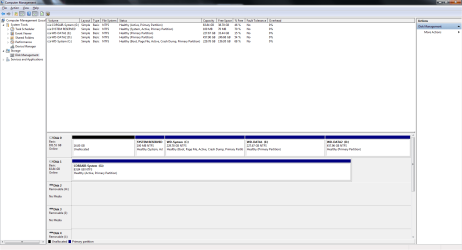
Here is the disk mgmt screenshot with both SSD and HD connected and booted from HD:


Edit: The only inconvenience currently is that I have to go to the boot menu every time after powering up, otherwise I get the message
“Reboot and Select proper Boot device or Insert Boot Media in selected Boot device and press a key”
 

Attachments

  • Untitled.png
    Untitled.png
    40 KB · Views: 9
Last edited:

My Computer My Computer

Computer type
PC/Desktop
Computer Manufacturer/Model Number
Acer Aspire Predator G3610
OS
Windows 7 Home Premium 64bit
Memory
16 GB
Graphics Card(s)
GeForce GT520, GeForce GT630
Monitor(s) Displays
ASUS 24" x4
You shouldn`t be getting that message, set a default operating system to start and set the timeout to like 5 seconds.

Using EasyBCD.

EasyBCD - NeoSmart Technologies

Do you get this message with just the ssd installed or just the hd installed ?
 

My Computer My Computer

Computer type
PC/Desktop
Computer Manufacturer/Model Number
Skylake Special #666
OS
Windows 10 Pro x64
CPU
Intel Core i7 6700K
Motherboard
Asus Sabertooth Z170 Mark 1
Memory
GSkill TridentZ RGB 16GB 3600 16-16-16-36
Graphics Card(s)
EVGA GTX 980 Ti SC x2
Sound Card
Realtek High Definition
Monitor(s) Displays
AOC G2460PG
Screen Resolution
1920 x 1080 144Hz
Hard Drives
Samsung 860 Pro 256GB, Seagate Barracuda 4TB x2
PSU
EVGA 1000 P2, EVGA White Custom Braided Cables
Case
Corsair Vengeance C70 Gunmetal Black
Cooling
Corsair H100i v2, Corsair ML120 x2, Thermal Grizzly Kryonaut
Keyboard
Logitech G910 Orion Spectrum
Mouse
Logitech G700s
Internet Speed
Verizon Fios Quantum Gateway 75/75
Antivirus
Windows Defender, Malwarebytes Free 3.8.3
Browser
Chrome
Other Info
Corsair SP120 x4, LG Blu-ray Drive, Durabrand HT-395 100 Watt Dolby Digital Amp, Corsair H2100 Wireless 7.1 Headset
No, I get it only when both drives are connected.
I already have EasyBCD installed on SSD. I will try configuring it now.
 

My Computer My Computer

Computer type
PC/Desktop
Computer Manufacturer/Model Number
Acer Aspire Predator G3610
OS
Windows 7 Home Premium 64bit
Memory
16 GB
Graphics Card(s)
GeForce GT520, GeForce GT630
Monitor(s) Displays
ASUS 24" x4
Only the actual partition booting Win7 and labeled System should be marked Active. If the System Reserved is booting both OS's then it alone should be marked Active. Check now if SSD is independently bootable by unplugging System HD.

If not with other drive unplugged Mark SSD Win7 Partition Active , then run Startup Repair - Run 3 Separate Times until it boots to make the SSD independently bootable. Then you can plug other drive back in, set preferred first HD to boot in BIOS setup, trigger other drive to boot using one-time BIOS Boot Menu key.

If you don't like this arrangement, install EasyBCD to primary Win7, add the other to Dual Boot menu as Brian suggested. This also keeps both independently bootable since each has a System drive.
 
Greg,

I verified yesterday - both drives - SSD and HD are independently bootable.
I am worried about running Startup Repair - if something will get messed up and the drive will become unbootable.

SSD was the primary boot device in BIOS Boot Menu-->Hard Disk Drive Priority
I changed it to HD. Now I am no longer getting the "Reboot and select proper boot device...." message.
It is now booting from HD by default. I am able to boot from SSD by going to boot menu (F12) after powering up the machine.

Thanks for your advice.
 

My Computer My Computer

Computer type
PC/Desktop
Computer Manufacturer/Model Number
Acer Aspire Predator G3610
OS
Windows 7 Home Premium 64bit
Memory
16 GB
Graphics Card(s)
GeForce GT520, GeForce GT630
Monitor(s) Displays
ASUS 24" x4
Startup Repair will not mess up anything, only check that everything is in order.

But if each drive is independently bootable then you don't need it. Just use the BIOS to boot your choice of OS's, or install EasyBCD to your Primary Win7 to add the other one, giving them unique names in the Easy Add OS Entry tab.

If you already have Easy and it doesn't work correctly as you want, delete the old listings to create new. This has worked countless times.
 
Thanks, Greg. I will do that.
 

My Computer My Computer

Computer type
PC/Desktop
Computer Manufacturer/Model Number
Acer Aspire Predator G3610
OS
Windows 7 Home Premium 64bit
Memory
16 GB
Graphics Card(s)
GeForce GT520, GeForce GT630
Monitor(s) Displays
ASUS 24" x4
Greg,

I verified yesterday - both drives - SSD and HD are independently bootable.
I am worried about running Startup Repair - if something will get messed up and the drive will become unbootable.

SSD was the primary boot device in BIOS Boot Menu-->Hard Disk Drive Priority
I changed it to HD. Now I am no longer getting the "Reboot and select proper boot device...." message.
It is now booting from HD by default. I am able to boot from SSD by going to boot menu (F12) after powering up the machine.

Thanks for your advice.

Excellent news ;)
 

My Computer My Computer

Computer type
PC/Desktop
Computer Manufacturer/Model Number
Skylake Special #666
OS
Windows 10 Pro x64
CPU
Intel Core i7 6700K
Motherboard
Asus Sabertooth Z170 Mark 1
Memory
GSkill TridentZ RGB 16GB 3600 16-16-16-36
Graphics Card(s)
EVGA GTX 980 Ti SC x2
Sound Card
Realtek High Definition
Monitor(s) Displays
AOC G2460PG
Screen Resolution
1920 x 1080 144Hz
Hard Drives
Samsung 860 Pro 256GB, Seagate Barracuda 4TB x2
PSU
EVGA 1000 P2, EVGA White Custom Braided Cables
Case
Corsair Vengeance C70 Gunmetal Black
Cooling
Corsair H100i v2, Corsair ML120 x2, Thermal Grizzly Kryonaut
Keyboard
Logitech G910 Orion Spectrum
Mouse
Logitech G700s
Internet Speed
Verizon Fios Quantum Gateway 75/75
Antivirus
Windows Defender, Malwarebytes Free 3.8.3
Browser
Chrome
Other Info
Corsair SP120 x4, LG Blu-ray Drive, Durabrand HT-395 100 Watt Dolby Digital Amp, Corsair H2100 Wireless 7.1 Headset
Back
Top