
You are using an out of date browser. It may not display this or other websites correctly.
You should upgrade or use an alternative browser.
You should upgrade or use an alternative browser.
Solved Number of processes in system tray
- Thread starter Yaron
- Start date

System Monitor
Hi,
I don't know of any software that does exactly what you ask. That doesn't mean that it doesn't exist though!
However you might consider: Moo0 System Monitor - CPU / GPU / Disk Temperature. +40 others (Windows, Free, Download)
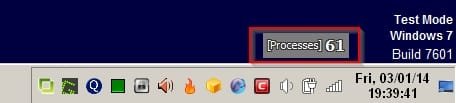
It can be configured to only show the number of running processes and you can keep the display on top so that it's always shown. You can drag it near your system tray.
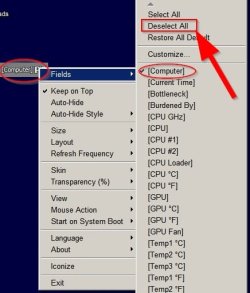
Basically - deselect all fields (deselect "Computer" too)and then choose to display only the "processes" field and drag it where you need it. You can set the program to run on startup or if you use the portable version you can also add a shortcut to the program's executable into your startup folder.
%USERPROFILE%\AppData\Roaming\Microsoft\Windows\Start Menu\Programs\Startup
Copy and paste the above into the address bar in explorer.
Okay so it's not exactly what you asked for but it does manage to show the number of running process at all times!
Screenshots:
Hi,
I don't know of any software that does exactly what you ask. That doesn't mean that it doesn't exist though!
However you might consider: Moo0 System Monitor - CPU / GPU / Disk Temperature. +40 others (Windows, Free, Download)
It can be configured to only show the number of running processes and you can keep the display on top so that it's always shown. You can drag it near your system tray.
Basically - deselect all fields (deselect "Computer" too)and then choose to display only the "processes" field and drag it where you need it. You can set the program to run on startup or if you use the portable version you can also add a shortcut to the program's executable into your startup folder.
%USERPROFILE%\AppData\Roaming\Microsoft\Windows\Start Menu\Programs\Startup
Copy and paste the above into the address bar in explorer.
Okay so it's not exactly what you asked for but it does manage to show the number of running process at all times!
Screenshots:
Attachments
My Computer
At a glance
Microsoft Windows 7 Home Premium 64-bit 7601 ...AMD C-60 APU with Radeon(tm) HD Graphics4.00 GBAMD Radeon HD 6290 Graphics
- Computer type
- Laptop
- Computer Manufacturer/Model Number
- ASUS
- OS
- Microsoft Windows 7 Home Premium 64-bit 7601 Multiprocessor Free Service Pack 1
- CPU
- AMD C-60 APU with Radeon(tm) HD Graphics
- Motherboard
- ASUSTeK COMPUTER INC. X501U
- Memory
- 4.00 GB
- Graphics Card(s)
- AMD Radeon HD 6290 Graphics
- Sound Card
- (1) AMD High Definition Audio Device (2) Realtek High Defi
- Screen Resolution
- 1366 x 768 x 32 bits (4294967296 colors) @ 60 Hz
- Hard Drives
- Hitachi HTS545050A7E380 SATA Disk Device
- Antivirus
- Comodo CIS & FW, SecureAplus App Whitelisting, Threatfire
- Browser
- Cyberfox 64bit, Opera 64bit, Airfox
- Other Info
- Spy-The-Spy, HitmanPro.Alert, Norton Connect Safe, MJRegWatcher, BitDefender TrafficLight, Voodoo Shield, Zemana AntiMalware
Hi Callender,
Thank you for the detailed explanation. I really appreciate it.
Moo0 System Monitor looks like a great tool. It would have been better if it had a tray icon option.
I've written to the developers.
Thank you for the detailed explanation. I really appreciate it.
Moo0 System Monitor looks like a great tool. It would have been better if it had a tray icon option.
I've written to the developers.
My Computer
At a glance
Windows 7 Ultimate x32
- OS
- Windows 7 Ultimate x32
I have quickly made such a little app for my own use. If you're still interested (and are watching this thread), I'll be glad to release it as freeware.

My Computer
At a glance
Win 7 Enterprise x64
- Computer type
- PC/Desktop
- OS
- Win 7 Enterprise x64
- Antivirus
- McAfee
Hi, I haven't made a web page for this, but you can already get it from my web space (look for 'tcount.exe'):
Index of /files/release/
I hope you'll find it useful, but keep in mind it's just a quick'n'dirty hack and does not have any fancy features.
Index of /files/release/
I hope you'll find it useful, but keep in mind it's just a quick'n'dirty hack and does not have any fancy features.
My Computer
At a glance
Win 7 Enterprise x64
- Computer type
- PC/Desktop
- OS
- Win 7 Enterprise x64
- Antivirus
- McAfee
Hi drakefu,
Thanks again. It's kind of you.
I find the tool very useful, and I'm grateful.
I've noticed that while 'tcount' is running, 3 or 4 processes are constantly added and removed.
If you plan to continue developing it, may this behavior be avoided?
Best wishes.
Thanks again. It's kind of you.
I find the tool very useful, and I'm grateful.
I've noticed that while 'tcount' is running, 3 or 4 processes are constantly added and removed.
If you plan to continue developing it, may this behavior be avoided?
Best wishes.
My Computer
At a glance
Windows 7 Ultimate x32
- OS
- Windows 7 Ultimate x32
Hi drakefu,
Thanks again. It's kind of you.
I find the tool very useful, and I'm grateful.
I've noticed that while 'tcount' is running, 3 or 4 processes are constantly added and removed.
If you plan to continue developing it, may this behavior be avoided?
Best wishes.
Glad you like it! It's simply running the tasklist.exe windows command in a loop, which is why you see those processes being created and closed constantly. Although I don't really plan to further develop the tool, I also find this behavior inelegant and will see if I can find another way.
My Computer
At a glance
Win 7 Enterprise x64
- Computer type
- PC/Desktop
- OS
- Win 7 Enterprise x64
- Antivirus
- McAfee
Thank you. I appreciate it.
Could you please update in this post?
Here you go... The updated version is tcount105.exe.
It should now poll the running process list in a much cleaner way.
http://trax.x10.mx/files/release/
My Computer
At a glance
Win 7 Enterprise x64
- Computer type
- PC/Desktop
- OS
- Win 7 Enterprise x64
- Antivirus
- McAfee
Hi drakefu,
Thank you so much. It's really great now.
How about adding the app to sites like Softpedia? I think lots of people may find it useful.
Best wishes.
Thank you so much. It's really great now.
How about adding the app to sites like Softpedia? I think lots of people may find it useful.
Best wishes.
My Computer
At a glance
Windows 7 Ultimate x32
- OS
- Windows 7 Ultimate x32
Hi drakefu,
Thank you so much. It's really great now.
How about adding the app to sites like Softpedia? I think lots of people may find it useful.
Best wishes.
Thanks for the nice feedback. I might add it at some point (some ZZZ's to catch up first...)
Also note that the display is currently capped at 99 due to system tray space constraints. I didn't spend much time thinking about this so far, though I might come up with something in the future.
My Computer
At a glance
Win 7 Enterprise x64
- Computer type
- PC/Desktop
- OS
- Win 7 Enterprise x64
- Antivirus
- McAfee
Complimenting a good job is a pleasure.
You might want to try SysTrayMeter (up to 4 digits).
SysTrayMeter - Download
I'm attaching my INI file (used on Win 7 Classic Look).
Thanks again.
You might want to try SysTrayMeter (up to 4 digits).
SysTrayMeter - Download
I'm attaching my INI file (used on Win 7 Classic Look).
Thanks again.
Attachments
My Computer
At a glance
Windows 7 Ultimate x32
- OS
- Windows 7 Ultimate x32
Complimenting a good job is a pleasure.
You might want to try SysTrayMeter (up to 4 digits).
SysTrayMeter - Download
I'm attaching my INI file (used on Win 7 Classic Look).
Thanks again.
That's some tight coding! But I guess it must have taken more than an afternoon to optimize it that much
By the way, the installer you linked to has some extra adware bundled in. I've found the untainted, tiny download at: http://freewaregenius.com/wp-content/downloads/SysTrayMeter.zip
Too bad it seems to be abandoned.
My Computer
At a glance
Win 7 Enterprise x64
- Computer type
- PC/Desktop
- OS
- Win 7 Enterprise x64
- Antivirus
- McAfee

Thank you. I appreciate it.
Could you please update in this post?
Here you go... The updated version is tcount105.exe.
It should now poll the running process list in a much cleaner way.
Index of /files/release/
Nice little program. I also use it to see if processes remain running after closing/terminating an application.
Thanks drakefu.
My Computer
At a glance
Windows 7 Home Premium 64Bits SP1Intel i7-92012 Gb (6x2GB Corsair XMS TR3X3G1600C9 G) Tri ...ASUS GTX-970 Turbo
- Computer type
- PC/Desktop
- Computer Manufacturer/Model Number
- DIY Re-built.
- OS
- Windows 7 Home Premium 64Bits SP1
- CPU
- Intel i7-920
- Motherboard
- ASUS P6TD Deluxe
- Memory
- 12 Gb (6x2GB Corsair XMS TR3X3G1600C9 G) Tri Channels
- Graphics Card(s)
- ASUS GTX-970 Turbo
- Sound Card
- ASUS On Board SoundMax
- Monitor(s) Displays
- Samsung UN46D6500 46" TV
- Screen Resolution
- 1920x1080
- Hard Drives
- 1 OCZ SSD Agility Sata III 120Gb
1 Samsung 1Tb
1 Samsung 750Gb
1 Western Digital 500Gb(Mounted in ext eSata case)
- PSU
- Enermax CUG-950W
- Case
- Full ATX (Generic)
- Cooling
- Fans (6) 80mm
- Keyboard
- Saitek Eclipse II
- Mouse
- Cyborg R.A.T-5
- Internet Speed
- Comcast 105.0 MBPS
- Antivirus
- AVG
- Browser
- Waterfox v40.02(x64)
- Other Info
- - Logitech X-530 5.1 Sound speakers.
- APC ES-1300.
- Arris TG862G/CT Modem/Router.
- Samsung BD-083A Blue Ray Player
- Lite On iHBS212 Blue Ray Burner
- Nippon Labs All-In-One Card Reader/Writer W/USB & eSata
Hi, I have released a new version (tcount116.exe) that includes the following:
- support for 3-digit figures (new rendering method)
- lower CPU load
- smaller filesize
- white text option: if the read-only attribute is set
(I didn't want to implement a full-fledged prefs file just for this setting)
Index of /files/release/
- support for 3-digit figures (new rendering method)
- lower CPU load
- smaller filesize
- white text option: if the read-only attribute is set
(I didn't want to implement a full-fledged prefs file just for this setting)
Index of /files/release/
Last edited:
My Computer
At a glance
Win 7 Enterprise x64
- Computer type
- PC/Desktop
- OS
- Win 7 Enterprise x64
- Antivirus
- McAfee
Hi drakefu,
Thanks again. Keep up the good work.
I can't access Index of /files/release/ now. I'll try again later.
Thanks again. Keep up the good work.
I can't access Index of /files/release/ now. I'll try again later.
My Computer
At a glance
Windows 7 Ultimate x32
- OS
- Windows 7 Ultimate x32
Hello again,
I've just downloaded 'tcount116'. Thank you so much.
I do believe that your app may gain popularity if publicised in the right places.
Please don't consider the following suggestions ungrateful. My intention is good.
1) If possible, reduce also the RAM usage. tcount116 and Process Hacker use around 9MB; - tcount should use much less.
2) If possible, use larger font for 2 digits and smaller font for 3 digits.
3) IMO, a small INI file for background and foreground colors could be a good idea.
4) How about changing the name to 'Process Counter' or 'Task Counter'?
Best wishes.
I've just downloaded 'tcount116'. Thank you so much.
I do believe that your app may gain popularity if publicised in the right places.
Please don't consider the following suggestions ungrateful. My intention is good.
1) If possible, reduce also the RAM usage. tcount116 and Process Hacker use around 9MB; - tcount should use much less.
2) If possible, use larger font for 2 digits and smaller font for 3 digits.
3) IMO, a small INI file for background and foreground colors could be a good idea.
4) How about changing the name to 'Process Counter' or 'Task Counter'?
Best wishes.
My Computer
At a glance
Windows 7 Ultimate x32
- OS
- Windows 7 Ultimate x32
Hello again,
I've just downloaded 'tcount116'. Thank you so much.
I do believe that your app may gain popularity if publicised in the right places.
Please don't consider the following suggestions ungrateful. My intention is good.
1) If possible, reduce also the RAM usage. tcount116 and Process Hacker use around 9MB; - tcount should use much less.
2) If possible, use larger font for 2 digits and smaller font for 3 digits.
3) IMO, a small INI file for background and foreground colors could be a good idea.
4) How about changing the name to 'Process Counter' or 'Task Counter'?
Best wishes.
Thanks for your suggestions. I'll see what I can do.
My Computer
At a glance
Win 7 Enterprise x64
- Computer type
- PC/Desktop
- OS
- Win 7 Enterprise x64
- Antivirus
- McAfee
Similar threads
- Replies
- 14
- Views
- 5K

- Replies
- 8
- Views
- 3K

- Replies
- 11
- Views
- 2K

- Replies
- 8
- Views
- 2K