
TheJoeFletch
New member
- Local time
- 11:21 AM
- Messages
- 4
My system information.
This past Friday, my Windows 7 machine locked up. I waited for it to respond for about 15 minutes. It didn't! So I held the power button down to give it a fresh boot. The machine blinked a blue screen of death and rebooted to a standard Windows diagnostic screen. The machine automatically ran the diagnostic with no solution. This was in an endless loop. I ran CHKDSK from a DOS prompt without any success.
I then pulled the hard drive to hook up to another system to see what I could find. It asked me to reformat, which I did NOT do. I did some Google research and it appears that the MBR or partition was potentially damaged. So I downloaded TestDisk and tried to scan the partition (Intel - without logging); quick scan and deep scan did not return anything to recover (but was able to completely scan the drive). So at this point I logged a help desk ticket with my company.
I brought the machine in Monday morning and they told me that the hard drive is encrypted with McAfee. They tried to run some software on my machine from a USB drive (I did not catch the name of it) but it locked up and they did not try it again. They pulled the hard drive from the machine to test it via a diagnostic machine and got an I/O error. At this point they told me that they could not do anything because the hard drive crashed. But I didn't believe it since I did not get any errors from connecting through my personal USB hard drive adapter. So I was able to get the hard drive in order to continue testing on my own (which may or may not be a good idea since they didn't want to give it up).
So here are my screen shots and log from TestDisk.
Quick Analysis shows the following; the first partition appears to be listed twice.
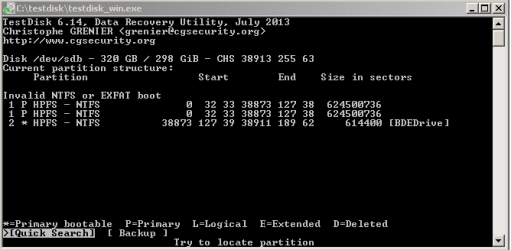
Results of Quick Scan does not show the first partition...
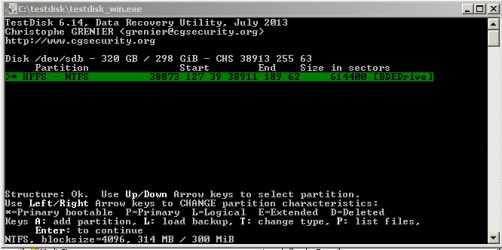
Looking at the files (they all appear to be from the BDEDrive partition)...
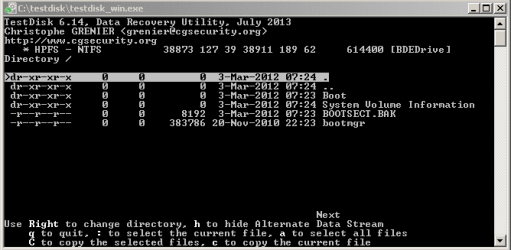
There appears to be some logs listed with the date of my initial problem.
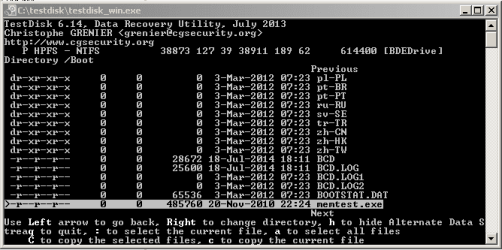
Could the BCD or BCD.log files be used to troubleshoot this problem?
I also did a deep scan. Below are the results.
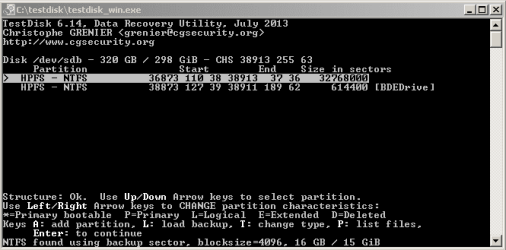
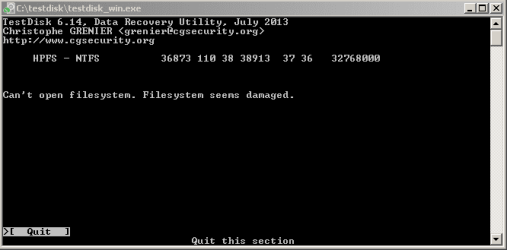
Looks like TestDisk found the first partition, but when I go and look at the files...I get this! Which I guess I would expect since the hard drive is encrypted.
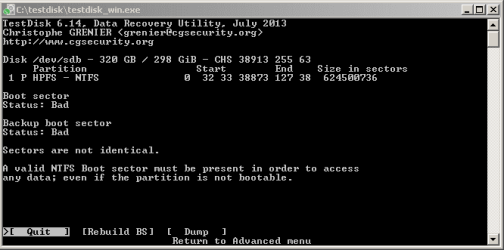
Looking at the Advanced -> Boot option in TestDisk, I see the following. Is this expected with an encrypted drive?
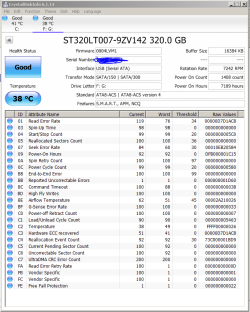
And I ran a scan with Crystal Disk Info. Results here look good.
Should I create an image of this drive before doing anything else?
Not sure what else to do here.
Any help with this would be much appreciated!
- IMB Thinkpad Lenovo T420
- Windows 7 64 bit
- Hard drive is encrypted with McAfee Endpoint Encryption v6
320GB hard drive - 2 partitions; 1 main partition, the other partition is labeled BDEDrive (which I think is a standard Windows 7 partition)
This past Friday, my Windows 7 machine locked up. I waited for it to respond for about 15 minutes. It didn't! So I held the power button down to give it a fresh boot. The machine blinked a blue screen of death and rebooted to a standard Windows diagnostic screen. The machine automatically ran the diagnostic with no solution. This was in an endless loop. I ran CHKDSK from a DOS prompt without any success.
I then pulled the hard drive to hook up to another system to see what I could find. It asked me to reformat, which I did NOT do. I did some Google research and it appears that the MBR or partition was potentially damaged. So I downloaded TestDisk and tried to scan the partition (Intel - without logging); quick scan and deep scan did not return anything to recover (but was able to completely scan the drive). So at this point I logged a help desk ticket with my company.
I brought the machine in Monday morning and they told me that the hard drive is encrypted with McAfee. They tried to run some software on my machine from a USB drive (I did not catch the name of it) but it locked up and they did not try it again. They pulled the hard drive from the machine to test it via a diagnostic machine and got an I/O error. At this point they told me that they could not do anything because the hard drive crashed. But I didn't believe it since I did not get any errors from connecting through my personal USB hard drive adapter. So I was able to get the hard drive in order to continue testing on my own (which may or may not be a good idea since they didn't want to give it up).
So here are my screen shots and log from TestDisk.
Quick Analysis shows the following; the first partition appears to be listed twice.
Results of Quick Scan does not show the first partition...
Looking at the files (they all appear to be from the BDEDrive partition)...
There appears to be some logs listed with the date of my initial problem.
Could the BCD or BCD.log files be used to troubleshoot this problem?
I also did a deep scan. Below are the results.
Looks like TestDisk found the first partition, but when I go and look at the files...I get this! Which I guess I would expect since the hard drive is encrypted.
Looking at the Advanced -> Boot option in TestDisk, I see the following. Is this expected with an encrypted drive?
And I ran a scan with Crystal Disk Info. Results here look good.
Should I create an image of this drive before doing anything else?
Not sure what else to do here.
Any help with this would be much appreciated!
My Computer
At a glance
Windows 7 64
- Computer type
- Laptop
- Computer Manufacturer/Model Number
- IBM Thinkpad T420
- OS
- Windows 7 64

