Help please! W7 DVD Player Won't open

Well okay thanks, but that info is all I could give. I can't either put some DVD on the player. It's all messed up! :confused:
 

My Computer My Computer

At a glance

32 bit Windows 7Pentium(R) Dual-Core CPU E5400 @ 2.70GHzIntel(R) G41 Express Chipset
Computer type
PC/Desktop
Computer Manufacturer/Model Number
LG
OS
32 bit Windows 7
CPU
Pentium(R) Dual-Core CPU E5400 @ 2.70GHz
Motherboard
FOXCONN G41MD
Graphics Card(s)
Intel(R) G41 Express Chipset
Sound Card
High Definition Audio Device

My Computer My Computer

At a glance

32 bit Windows 7Pentium(R) Dual-Core CPU E5400 @ 2.70GHzIntel(R) G41 Express Chipset
Computer type
PC/Desktop
Computer Manufacturer/Model Number
LG
OS
32 bit Windows 7
CPU
Pentium(R) Dual-Core CPU E5400 @ 2.70GHz
Motherboard
FOXCONN G41MD
Graphics Card(s)
Intel(R) G41 Express Chipset
Sound Card
High Definition Audio Device
That means the drive is dead....see if the cables attaching it to the motherboard are still connected properly. If that doesn't help, replace it with a new one.
 

My Computer My Computer

At a glance

Windows 10 Pro x64 ; Xubuntu x64Intel i7 860 @ 2.80 GHz O/C'ed to 4.0GHz16GB Corsair Vengance DDR3 @ 661 MHz Dual Cha...EVGA NVidia GTX 560 1024MB
Computer type
PC/Desktop
Computer Manufacturer/Model Number
Golden Mk. I.4
OS
Windows 10 Pro x64 ; Xubuntu x64
CPU
Intel i7 860 @ 2.80 GHz O/C'ed to 4.0GHz
Motherboard
Gigabyte P55A-UD3R Rev.1. Award BIOS F13
Memory
16GB Corsair Vengance DDR3 @ 661 MHz Dual Channel (9-9-9-24)
Graphics Card(s)
EVGA NVidia GTX 560 1024MB
Sound Card
Realtek Integrated
Monitor(s) Displays
Dual Samsung SyncMaster 2494HS
Screen Resolution
1920*1080 and 1920*1080
Hard Drives
1*Samsung 840 EVO 120GB SSD;
1*OCZ Vertex 2 60GB SSD;
2*Samsung F3 SpinPoint 1TB in RAID0;
1*Samsung F1 SpinPoint 1TB;
2*Western Digital 1TB External USB 3.0
1*Western Digital 500GB External USB 3.0
1*Seagate 500GB External USB 2.0
PSU
Thermaltake ToughPower QFan 750W
Case
Thermaltake Element S VK60001W2Z
Cooling
Corsair H60 Water Cooling, 2*230mm and 2*80mm case fans
Keyboard
Logitech G110
Mouse
Logitech MX518
Watashi I said a while ago to replace the thing it is easy and if you are not confident we can walk you through doing that.

All it is removing the computer side panel/s and after unplugging the cables at the back (-there are two - one for power and one for data) - undoing two to four screws or release the tool less fittings that hold the drive in the drive bay (if they are screws there will be probably two screws one each side of the machine holding bay - if sliding tool less fittings usually only one side is used) .

You just pull the drive out through the front of the drive opening and then slide the new drive in.
It is just a matter of replacing the holding screws or flick over or slide the tool less fitting to hold the drive in place - making sure it is level with the front of the machine when you secure the drive in place. Re attach the power and data cables and then replace the side panels - done!!

If you want me to do with pictures then I will try for you.
 

My Computer My Computer

At a glance

Desk1 7 Home Prem / Desk2 10 Pro / Main lap A...Desk1 i5 3750K / Laptop i7 GTX 860M / Desk2 i...Desk1 8GB (1866) / Desk2 16GB (1333) / Laptop...Desk 1& 2NVidia GTX 650 & Laptops on board Intel
Computer type
PC/Desktop
Computer Manufacturer/Model Number
Own build (new) Desk1 / Asus ROG Win 7 / Desk2 1st build
OS
Desk1 7 Home Prem / Desk2 10 Pro / Main lap Asus ROG 10 Pro 2 laptop Toshiba 7 Pro Asus P2520 7 & 10
CPU
Desk1 i5 3750K / Laptop i7 GTX 860M / Desk2 i5 2500
Motherboard
Desk1 Asus P877-V / Desk2 Gigabyte H67 UD3H / Laptop ?
Memory
Desk1 8GB (1866) / Desk2 16GB (1333) / Laptop 8Gb DDR3
Graphics Card(s)
Desk 1& 2NVidia GTX 650 & Laptops on board Intel
Sound Card
Desk 1 & 2 -XONAR DG Realtek High Def audio Laptop
Monitor(s) Displays
Desk 1 Benq HD 2450 / Desk2 Philips 24" / Laptop 17.5"
Screen Resolution
1920x1080 D1 & D2 & Laptop 1
Hard Drives
Desk1 Samsung 120GB 830 SSD
Asus ROG 256GB 850 Pro SSD
Desk2 Samsung 840 256 SSD
Toshiba 120GB EVO
PSU
Desk 1 Corsair HX 1050/ Laptop ? / Desk 2 Corsair HX 650
Case
Desk 1 Cooler HAF XM ? Toshiba laptop / Desk2 Coolermaster
Cooling
Fans on all Desk1 -2 Desk2 - all Coolermasters 5 Laptop ?
Keyboard
Desk 1 MS Sidewinder X6 Desk 2 MS Sidewinder X 4
Mouse
Desk 1&2 - Gigabyte MS 900 gamer - laptop - Logitec wireless
Internet Speed
ADSL2+
Other Info
One other Desktop (tester) and spare Toshba laptop both with SSD's
Running Kaspersky 2016 ISS on all machines config'd identically
Logitec audio stereo systems on each machine (x3)
Canon MG5250MFC
Router/modem TP-Link running WPA2SK
just to chime in for it not opening it up it should open up with or without power since it will force the physical motor to unlock it and push out the tray, you must pull the tray the rest of the way out like this https://www.youtube.com/watch?v=kscn5_XG2oE (I tried to embed the video but it just created astricks everywhere wtf?) If the disk is stuck it may just not respond to anything.
 

My Computer My Computer

At a glance

10 Pro x64Ryzen 9 3900X64GB(4x16GB) DDR4EVGA 1080ti FTW3
Computer type
PC/Desktop
Computer Manufacturer/Model Number
Custom
OS
10 Pro x64
CPU
Ryzen 9 3900X
Motherboard
Asrock x370 Tachi
Memory
64GB(4x16GB) DDR4
Graphics Card(s)
EVGA 1080ti FTW3
Sound Card
ASUS Xonar Essence STX (V4 Bursons), ODAC rev B, NFB-11, O2
Monitor(s) Displays
3xASUS PB278Q/R, Optoma HD142X
Screen Resolution
3x1440p, 1080p
Hard Drives
512GB 850 EVO(OS, Programs)
4TB (Movies)
3TB (Downloads)
3TB (Programs)
1TB HDD (Games)
2x6TB R1 (videos)
PSU
AX760
Case
Fractal Define R5
Cooling
NH-D15S
Keyboard
Massdrop Ctrl with Box Navy's
Mouse
G903, Alioth XXL Mat
Internet Speed
280/40
Antivirus
MBAM, ESET
Browser
Canary 64 Bit
Other Info
I also own a Thinkpad P50 Xeon 4K, X220T, X1C5
Now you can as RVC says do that and if you do get the disk out most likely something will get broken.
If you take out the drive as I described you can open it up but forget about repairing it as a) it is cheaper to replace it and you will only achieve disk removal b) the mechanics of the device are very easily distorted or broken should you attempt anything in repairing it - been there done that and a waste of time unless you possess extra sensory perception or some other unnatural skills.

Anyway about time I am out now as we seem to have covered all possible fixes.
 

My Computer My Computer

At a glance

Desk1 7 Home Prem / Desk2 10 Pro / Main lap A...Desk1 i5 3750K / Laptop i7 GTX 860M / Desk2 i...Desk1 8GB (1866) / Desk2 16GB (1333) / Laptop...Desk 1& 2NVidia GTX 650 & Laptops on board Intel
Computer type
PC/Desktop
Computer Manufacturer/Model Number
Own build (new) Desk1 / Asus ROG Win 7 / Desk2 1st build
OS
Desk1 7 Home Prem / Desk2 10 Pro / Main lap Asus ROG 10 Pro 2 laptop Toshiba 7 Pro Asus P2520 7 & 10
CPU
Desk1 i5 3750K / Laptop i7 GTX 860M / Desk2 i5 2500
Motherboard
Desk1 Asus P877-V / Desk2 Gigabyte H67 UD3H / Laptop ?
Memory
Desk1 8GB (1866) / Desk2 16GB (1333) / Laptop 8Gb DDR3
Graphics Card(s)
Desk 1& 2NVidia GTX 650 & Laptops on board Intel
Sound Card
Desk 1 & 2 -XONAR DG Realtek High Def audio Laptop
Monitor(s) Displays
Desk 1 Benq HD 2450 / Desk2 Philips 24" / Laptop 17.5"
Screen Resolution
1920x1080 D1 & D2 & Laptop 1
Hard Drives
Desk1 Samsung 120GB 830 SSD
Asus ROG 256GB 850 Pro SSD
Desk2 Samsung 840 256 SSD
Toshiba 120GB EVO
PSU
Desk 1 Corsair HX 1050/ Laptop ? / Desk 2 Corsair HX 650
Case
Desk 1 Cooler HAF XM ? Toshiba laptop / Desk2 Coolermaster
Cooling
Fans on all Desk1 -2 Desk2 - all Coolermasters 5 Laptop ?
Keyboard
Desk 1 MS Sidewinder X6 Desk 2 MS Sidewinder X 4
Mouse
Desk 1&2 - Gigabyte MS 900 gamer - laptop - Logitec wireless
Internet Speed
ADSL2+
Other Info
One other Desktop (tester) and spare Toshba laptop both with SSD's
Running Kaspersky 2016 ISS on all machines config'd identically
Logitec audio stereo systems on each machine (x3)
Canon MG5250MFC
Router/modem TP-Link running WPA2SK
Now you can as RVC says do that and if you do get the disk out most likely something will get broken.
If you take out the drive as I described you can open it up but forget about repairing it as a) it is cheaper to replace it and you will only achieve disk removal b) the mechanics of the device are very easily distorted or broken should you attempt anything in repairing it - been there done that and a waste of time unless you possess extra sensory perception or some other unnatural skills.

Anyway about time I am out now as we seem to have covered all possible fixes.

If he/she has no power (pc off) then it should not break the motor unless its already broken. He might get the disk out and the drive may just function like normal afterwords iv seen it happen.
 

My Computer My Computer

At a glance

10 Pro x64Ryzen 9 3900X64GB(4x16GB) DDR4EVGA 1080ti FTW3
Computer type
PC/Desktop
Computer Manufacturer/Model Number
Custom
OS
10 Pro x64
CPU
Ryzen 9 3900X
Motherboard
Asrock x370 Tachi
Memory
64GB(4x16GB) DDR4
Graphics Card(s)
EVGA 1080ti FTW3
Sound Card
ASUS Xonar Essence STX (V4 Bursons), ODAC rev B, NFB-11, O2
Monitor(s) Displays
3xASUS PB278Q/R, Optoma HD142X
Screen Resolution
3x1440p, 1080p
Hard Drives
512GB 850 EVO(OS, Programs)
4TB (Movies)
3TB (Downloads)
3TB (Programs)
1TB HDD (Games)
2x6TB R1 (videos)
PSU
AX760
Case
Fractal Define R5
Cooling
NH-D15S
Keyboard
Massdrop Ctrl with Box Navy's
Mouse
G903, Alioth XXL Mat
Internet Speed
280/40
Antivirus
MBAM, ESET
Browser
Canary 64 Bit
Other Info
I also own a Thinkpad P50 Xeon 4K, X220T, X1C5
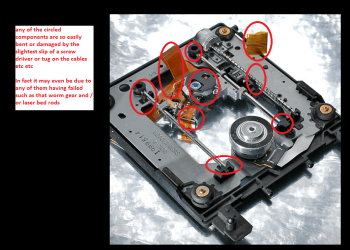
Well RVC if you have ever had one of these things opened up you would know what is actually in them - in all honesty not much at all and while we can go over and over trying to get this old one going for the cost of a new one and just slotting it in as it is so easy to do, and I did offer to show the OP how to do that in picture form, it is dragging this whole issue out to biblical proportions.

The motors (if you have opened one) are very small and the mechanics really quite flimsily made that makes any work inside has to be done very precisely for example getting the laser carrying rods out of alignment is just the slightest slip or heavy handedness.
See pic for a fairly average drive - myself for the sake of replacing the drive unscrewing the casing and trying to align or repair anything in there that has been put together with precision machines is just not worth it. Just taking the flimsy cover off is enough to cause damage.
 

Attachments

  • OPTICAL.PNG
    OPTICAL.PNG
    218.5 KB · Views: 0

My Computer My Computer

At a glance

Desk1 7 Home Prem / Desk2 10 Pro / Main lap A...Desk1 i5 3750K / Laptop i7 GTX 860M / Desk2 i...Desk1 8GB (1866) / Desk2 16GB (1333) / Laptop...Desk 1& 2NVidia GTX 650 & Laptops on board Intel
Computer type
PC/Desktop
Computer Manufacturer/Model Number
Own build (new) Desk1 / Asus ROG Win 7 / Desk2 1st build
OS
Desk1 7 Home Prem / Desk2 10 Pro / Main lap Asus ROG 10 Pro 2 laptop Toshiba 7 Pro Asus P2520 7 & 10
CPU
Desk1 i5 3750K / Laptop i7 GTX 860M / Desk2 i5 2500
Motherboard
Desk1 Asus P877-V / Desk2 Gigabyte H67 UD3H / Laptop ?
Memory
Desk1 8GB (1866) / Desk2 16GB (1333) / Laptop 8Gb DDR3
Graphics Card(s)
Desk 1& 2NVidia GTX 650 & Laptops on board Intel
Sound Card
Desk 1 & 2 -XONAR DG Realtek High Def audio Laptop
Monitor(s) Displays
Desk 1 Benq HD 2450 / Desk2 Philips 24" / Laptop 17.5"
Screen Resolution
1920x1080 D1 & D2 & Laptop 1
Hard Drives
Desk1 Samsung 120GB 830 SSD
Asus ROG 256GB 850 Pro SSD
Desk2 Samsung 840 256 SSD
Toshiba 120GB EVO
PSU
Desk 1 Corsair HX 1050/ Laptop ? / Desk 2 Corsair HX 650
Case
Desk 1 Cooler HAF XM ? Toshiba laptop / Desk2 Coolermaster
Cooling
Fans on all Desk1 -2 Desk2 - all Coolermasters 5 Laptop ?
Keyboard
Desk 1 MS Sidewinder X6 Desk 2 MS Sidewinder X 4
Mouse
Desk 1&2 - Gigabyte MS 900 gamer - laptop - Logitec wireless
Internet Speed
ADSL2+
Other Info
One other Desktop (tester) and spare Toshba laptop both with SSD's
Running Kaspersky 2016 ISS on all machines config'd identically
Logitec audio stereo systems on each machine (x3)
Canon MG5250MFC
Router/modem TP-Link running WPA2SK
Well RVC if you have ever had one of these things opened up you would know what is actually in them - in all honesty not much at all and while we can go over and over trying to get this old one going for the cost of a new one and just slotting it in as it is so easy to do, and I did offer to show the OP how to do that in picture form, it is dragging this whole issue out to biblical proportions.

The motors (if you have opened one) are very small and the mechanics really quite flimsily made that makes any work inside has to be done very precisely for example getting the laser carrying rods out of alignment is just the slightest slip or heavy handedness.
See pic for a fairly average drive - myself for the sake of replacing the drive unscrewing the casing and trying to align or repair anything in there that has been put together with precision machines is just not worth it. Just taking the flimsy cover off is enough to cause damage.

yeah sorry, im not saying he should fix it im just saying that if his disk is stuck it could be other things besides the motor like say it has dust in it. iv just had dead ones come back to life in a pinch and i have re-soldered parts back into ones iv had that at the time were expensive (blu-ray burners). now times have changed and its not worth it.
 

My Computer My Computer

At a glance

10 Pro x64Ryzen 9 3900X64GB(4x16GB) DDR4EVGA 1080ti FTW3
Computer type
PC/Desktop
Computer Manufacturer/Model Number
Custom
OS
10 Pro x64
CPU
Ryzen 9 3900X
Motherboard
Asrock x370 Tachi
Memory
64GB(4x16GB) DDR4
Graphics Card(s)
EVGA 1080ti FTW3
Sound Card
ASUS Xonar Essence STX (V4 Bursons), ODAC rev B, NFB-11, O2
Monitor(s) Displays
3xASUS PB278Q/R, Optoma HD142X
Screen Resolution
3x1440p, 1080p
Hard Drives
512GB 850 EVO(OS, Programs)
4TB (Movies)
3TB (Downloads)
3TB (Programs)
1TB HDD (Games)
2x6TB R1 (videos)
PSU
AX760
Case
Fractal Define R5
Cooling
NH-D15S
Keyboard
Massdrop Ctrl with Box Navy's
Mouse
G903, Alioth XXL Mat
Internet Speed
280/40
Antivirus
MBAM, ESET
Browser
Canary 64 Bit
Other Info
I also own a Thinkpad P50 Xeon 4K, X220T, X1C5
I'll try all your solutions mates, thanks for all the help. ;)
 

My Computer My Computer

At a glance

32 bit Windows 7Pentium(R) Dual-Core CPU E5400 @ 2.70GHzIntel(R) G41 Express Chipset
Computer type
PC/Desktop
Computer Manufacturer/Model Number
LG
OS
32 bit Windows 7
CPU
Pentium(R) Dual-Core CPU E5400 @ 2.70GHz
Motherboard
FOXCONN G41MD
Graphics Card(s)
Intel(R) G41 Express Chipset
Sound Card
High Definition Audio Device
Well RVC if you have ever had one of these things opened up you would know what is actually in them - in all honesty not much at all and while we can go over and over trying to get this old one going for the cost of a new one and just slotting it in as it is so easy to do, and I did offer to show the OP how to do that in picture form, it is dragging this whole issue out to biblical proportions.

The motors (if you have opened one) are very small and the mechanics really quite flimsily made that makes any work inside has to be done very precisely for example getting the laser carrying rods out of alignment is just the slightest slip or heavy handedness.
See pic for a fairly average drive - myself for the sake of replacing the drive unscrewing the casing and trying to align or repair anything in there that has been put together with precision machines is just not worth it. Just taking the flimsy cover off is enough to cause damage.

yeah sorry, im not saying he should fix it im just saying that if his disk is stuck it could be other things besides the motor like say it has dust in it. iv just had dead ones come back to life in a pinch and i have re-soldered parts back into ones iv had that at the time were expensive (blu-ray burners). now times have changed and its not worth it.
No probs mate I was thinking more along the lines that a disk may have self destructed in some way and wrecked some of those components and also that can be done by someone attempting to fix the drive who is not real sure of the inner fitments;)
 

My Computer My Computer

At a glance

Desk1 7 Home Prem / Desk2 10 Pro / Main lap A...Desk1 i5 3750K / Laptop i7 GTX 860M / Desk2 i...Desk1 8GB (1866) / Desk2 16GB (1333) / Laptop...Desk 1& 2NVidia GTX 650 & Laptops on board Intel
Computer type
PC/Desktop
Computer Manufacturer/Model Number
Own build (new) Desk1 / Asus ROG Win 7 / Desk2 1st build
OS
Desk1 7 Home Prem / Desk2 10 Pro / Main lap Asus ROG 10 Pro 2 laptop Toshiba 7 Pro Asus P2520 7 & 10
CPU
Desk1 i5 3750K / Laptop i7 GTX 860M / Desk2 i5 2500
Motherboard
Desk1 Asus P877-V / Desk2 Gigabyte H67 UD3H / Laptop ?
Memory
Desk1 8GB (1866) / Desk2 16GB (1333) / Laptop 8Gb DDR3
Graphics Card(s)
Desk 1& 2NVidia GTX 650 & Laptops on board Intel
Sound Card
Desk 1 & 2 -XONAR DG Realtek High Def audio Laptop
Monitor(s) Displays
Desk 1 Benq HD 2450 / Desk2 Philips 24" / Laptop 17.5"
Screen Resolution
1920x1080 D1 & D2 & Laptop 1
Hard Drives
Desk1 Samsung 120GB 830 SSD
Asus ROG 256GB 850 Pro SSD
Desk2 Samsung 840 256 SSD
Toshiba 120GB EVO
PSU
Desk 1 Corsair HX 1050/ Laptop ? / Desk 2 Corsair HX 650
Case
Desk 1 Cooler HAF XM ? Toshiba laptop / Desk2 Coolermaster
Cooling
Fans on all Desk1 -2 Desk2 - all Coolermasters 5 Laptop ?
Keyboard
Desk 1 MS Sidewinder X6 Desk 2 MS Sidewinder X 4
Mouse
Desk 1&2 - Gigabyte MS 900 gamer - laptop - Logitec wireless
Internet Speed
ADSL2+
Other Info
One other Desktop (tester) and spare Toshba laptop both with SSD's
Running Kaspersky 2016 ISS on all machines config'd identically
Logitec audio stereo systems on each machine (x3)
Canon MG5250MFC
Router/modem TP-Link running WPA2SK
Back
Top