
System Restore isn't creating (or saving?) restore points properly

BetsyRogers

New member
Local time
11:56 PM
Messages
10
Location
North Carolina, USA
For some reason my System Restore function isn't automatically creating (or isn't showing) System Restore points as it should be doing for "major" system events (e.g., isn't automatically creating restore points before/after Windows Updates and software/driver updates). I'm not sure if it isn't creating the restore points at all, or if it's just not displaying them as available restore points.

Another piece of the puzzle - I've manually created restore points at various times, and they have initially shown up on the list of available restore points as expected. However, when I looked at the list today, the restore points I created manually have Disappearead! I'm certain that I didn't delete them. I've selected every option I can think of to show me a complete list of available restore points, but no luck getting them to show up on the list. Also, my "Current Usage" is listed as "0 bytes", even though a few restore points are showing on the list. All of this makes me wonder if the system is creating the restore points, but just saving them in a way that makes them "invisible" to the System Restore utility.

Here's what I've done so far:
- Double checked my System Restore/Protection settings, and my system drive (C: ) is definitely set to "ON".
- Checked the System Restore configuration, and it's set to "Restore system settings and previous versions of files"
- Checked the "Disk Space Usage" for storing system restore points. By default it was already set to 1% (~7.5 GB), but just for good measure I increased it to 10% (~75 GB).

I have another laptop, also with Windows 7, and it creates the automatic restore points perfectly, and it shows all the manual restore points I've created. I have both laptops configured with the same restore/protection settings. So I'm at a loss as to what's going on.

Any suggestions would be appreciated. I really hope it's just that I've overlooked something simple...
 

My Computer My Computer

Computer type
Laptop
Computer Manufacturer/Model Number
Toshiba Satellite P775-S5120
OS
Windows 7 Home Premium 64-bit (+SP1)
CPU
Intel Core i7-2670QM CPU, @2.2GHz (Turbo Boost up to 3.1GHz)
Memory
8.00 GB DDR3
Graphics Card(s)
Intel HD Graphics integrated GPU
Hard Drives
750GB Serial ATA hard drive (5400 rpm) (Toshiba MK757GSX)
Antivirus
AVG
Browser
Firefox 10.0.1 (sometimes Internet Explorer 11.0.9)
How often do you defrag and what program do you use for defragging?
 

My Computer My Computer

Computer type
PC/Desktop
Computer Manufacturer/Model Number
Home made Desktop
OS
Windows 10 Pro. 64/ version 1709 Windows 7 Pro/64
CPU
Intel i7-6800K @ 4.3
Motherboard
ASUS X-99 Deluxe II
Memory
Corsair Platinum 16 gig @2400
Graphics Card(s)
EVGA GTX 1070 OC
Monitor(s) Displays
Asus 27" LED LCD/VE278Q
Screen Resolution
1920-1080 or 1280-720 HDMI
Hard Drives
INTEL SSD 730-240 Gb Sata 3.0/
PSU
EVGA Platium 1200W
Case
Phanteks Luxe Tempered Glass 8 fans/ one radiator
Cooling
XSPC/ Water Cooled CPU
Keyboard
Das 4 Professional
Mouse
Logitech M705/MX Anywhere 2-S
Internet Speed
100 mbits
Antivirus
Microsoft Security Essentials/ Malwarebytes Premium 3.0/ SAS
Browser
I.E. 11 default/Firefox/ ISP Time Warner Cable/Spectrum
Other Info
LG BluRay Burner/
Sound system-KLipsch-THX/
Icy Dock ssd Hot Swap bays.
This will be interesting to see, as I have the same problem, even without defragging with any program for a full month.
Even with 9.8GB set aside for restore points, I'm lucky to have the two latest ones available, and they're never more than 48 hours old.
 

My Computer My Computer

Computer type
PC/Desktop
Computer Manufacturer/Model Number
Self-Built
OS
Win10 Pro 64-bit
CPU
AMD Ryzen 7 3800X
Motherboard
Gigabyte X570 UD
Memory
32 GB Kingston DDR4-2666
Graphics Card(s)
MSI nVidia GT 710 (2GB)
Sound Card
Creative Audigy FX 5.1
Monitor(s) Displays
ViewSonic VG2439Smh 24"
Screen Resolution
1920x1080
Hard Drives
3xWD1TB; 1xSeagate 1TB... all spinning rust
PSU
EVGA 100-W1-0500-KR (500w)
Case
SilverStone PS10 (modified)
Cooling
CPU:AMD Wraith Prism. Case:3x Noctua 120mm
Keyboard
Compaq Professional PS/2
Mouse
Microsoft Basic Optical Mouse 2.0
Internet Speed
Fiber 1Gbit/sec down/up
Antivirus
Avast Free
Browser
FF, Chrome
Other Info
2x LG GH24NSC0 DVD burners, Mackie CR3 monitor speakers
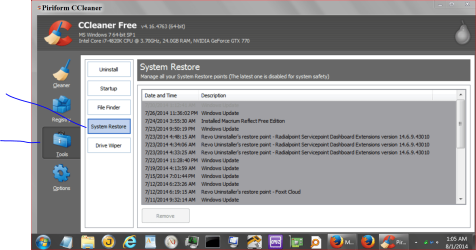
Some 3rd party defrag programs move things around on the hard drive where Windows can't find the restore points.

Ccleaner will also show you restore points.


CCleaner restore points.PNG
 

My Computer My Computer

Computer type
PC/Desktop
Computer Manufacturer/Model Number
Home made Desktop
OS
Windows 10 Pro. 64/ version 1709 Windows 7 Pro/64
CPU
Intel i7-6800K @ 4.3
Motherboard
ASUS X-99 Deluxe II
Memory
Corsair Platinum 16 gig @2400
Graphics Card(s)
EVGA GTX 1070 OC
Monitor(s) Displays
Asus 27" LED LCD/VE278Q
Screen Resolution
1920-1080 or 1280-720 HDMI
Hard Drives
INTEL SSD 730-240 Gb Sata 3.0/
PSU
EVGA Platium 1200W
Case
Phanteks Luxe Tempered Glass 8 fans/ one radiator
Cooling
XSPC/ Water Cooled CPU
Keyboard
Das 4 Professional
Mouse
Logitech M705/MX Anywhere 2-S
Internet Speed
100 mbits
Antivirus
Microsoft Security Essentials/ Malwarebytes Premium 3.0/ SAS
Browser
I.E. 11 default/Firefox/ ISP Time Warner Cable/Spectrum
Other Info
LG BluRay Burner/
Sound system-KLipsch-THX/
Icy Dock ssd Hot Swap bays.
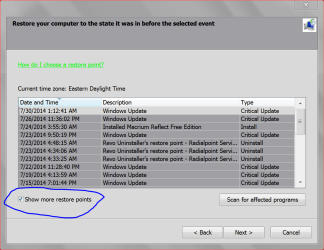
Something else to check so you can see more restore points and use them when selected.

Show restore points in Windows.PNG
 

My Computer My Computer

Computer type
PC/Desktop
Computer Manufacturer/Model Number
Home made Desktop
OS
Windows 10 Pro. 64/ version 1709 Windows 7 Pro/64
CPU
Intel i7-6800K @ 4.3
Motherboard
ASUS X-99 Deluxe II
Memory
Corsair Platinum 16 gig @2400
Graphics Card(s)
EVGA GTX 1070 OC
Monitor(s) Displays
Asus 27" LED LCD/VE278Q
Screen Resolution
1920-1080 or 1280-720 HDMI
Hard Drives
INTEL SSD 730-240 Gb Sata 3.0/
PSU
EVGA Platium 1200W
Case
Phanteks Luxe Tempered Glass 8 fans/ one radiator
Cooling
XSPC/ Water Cooled CPU
Keyboard
Das 4 Professional
Mouse
Logitech M705/MX Anywhere 2-S
Internet Speed
100 mbits
Antivirus
Microsoft Security Essentials/ Malwarebytes Premium 3.0/ SAS
Browser
I.E. 11 default/Firefox/ ISP Time Warner Cable/Spectrum
Other Info
LG BluRay Burner/
Sound system-KLipsch-THX/
Icy Dock ssd Hot Swap bays.
How often do you defrag and what program do you use for defragging?

Thanks for the response!
I defrag'd my hard drive a couple of months ago. I usually do it a couple of times a year.
I also ran CheckDisk recently because my system was very slow starting and was freezing up occasionally. (CHKDSK; a.k.a the option that's now called "Check for disk errors" in the Windows7 maintenance tools). CheckDisk found & fIxed several files and several Sectors as well. -- I know that's not a good sign and could indicate a failing hard drive, but I'd like to avoid reinstalling Windows and/or replacing my hard drive if at all possible).

I guess should have mentioned that part earlier, about CheckDisk finding/fixing errors in my files and sectors. I'm concerned that this might be related to the problems with the System Restore utility. Ironically (or sadly), if my operating system is having problems, and if one of the problems is the restore utilities, that puts me in a more "dangerous" situation. I've already backed up everything on an external hard drive (system image as well as my individual files separately). I also have a system image from several months ago, and a system recovery disk from the manufacturer.

This might end up being more of a discussion about whether my OS and/or hard drive are failing...
 
Last edited:

My Computer My Computer

Computer type
Laptop
Computer Manufacturer/Model Number
Toshiba Satellite P775-S5120
OS
Windows 7 Home Premium 64-bit (+SP1)
CPU
Intel Core i7-2670QM CPU, @2.2GHz (Turbo Boost up to 3.1GHz)
Memory
8.00 GB DDR3
Graphics Card(s)
Intel HD Graphics integrated GPU
Hard Drives
750GB Serial ATA hard drive (5400 rpm) (Toshiba MK757GSX)
Antivirus
AVG
Browser
Firefox 10.0.1 (sometimes Internet Explorer 11.0.9)
Something else to check so you can see more restore points and use them when selected.

...(see image above)

Thanks for the suggestion. I should have added that the "show all restore points" checkbox is no longer appearing in the System Restore module (as shown in your image above). I know I've seen that option in the past, but I'm not sure why it's not available now. Do you think this option depends on the admin privileges set for my user profile? (I'm the only user, and for other tasks it still gives me the option to chose whether to run/perform things as an administrator).

The only items currently showing in my list of restore points are the instances where I performed a complete backup (listed as "System Image Restore Point", and the type of event is called "Backup"). In these cases the backups were always to an external hard drive, as a complete system image.
 

My Computer My Computer

Computer type
Laptop
Computer Manufacturer/Model Number
Toshiba Satellite P775-S5120
OS
Windows 7 Home Premium 64-bit (+SP1)
CPU
Intel Core i7-2670QM CPU, @2.2GHz (Turbo Boost up to 3.1GHz)
Memory
8.00 GB DDR3
Graphics Card(s)
Intel HD Graphics integrated GPU
Hard Drives
750GB Serial ATA hard drive (5400 rpm) (Toshiba MK757GSX)
Antivirus
AVG
Browser
Firefox 10.0.1 (sometimes Internet Explorer 11.0.9)
This will be interesting to see, as I have the same problem, even without defragging with any program for a full month.
Even with 9.8GB set aside for restore points, I'm lucky to have the two latest ones available, and they're never more than 48 hours old.

@OvenMaster: Well, at least I'm not the only one who's having this problem. So I'm not a complete idiot for not being able to figure it out. Or else we're both complete idiots... in which case welcome to the complete idiot club! ;)

One more thing that might be relevant. I just went into my Task Scheduler, and looked at System Restore (in the Task Scheduler Library). Many of the options are grayed-out so I'm not able to change them. The only "triggers" listed for the system restore task are "Daily" and "At startup", which seems a bit odd. I have the option to add a new trigger, beginning "on an event", and there's a long list of options for what types of events to choose for the trigger. Also, in the "History" tab, it says "(disabled)", and I don't see a way to adjust that setting.

I wonder if the System Restore application is corrupted? And if there's a way to re-install just the System Restore application and see if that helps?

I guess I could also run CheckDisk again, just on the folders w/ the operating system files (if I run it on the entire hard drive it takes quite a while). And perhaps have it only "find" but not "fix" anything?
 

My Computer My Computer

Computer type
Laptop
Computer Manufacturer/Model Number
Toshiba Satellite P775-S5120
OS
Windows 7 Home Premium 64-bit (+SP1)
CPU
Intel Core i7-2670QM CPU, @2.2GHz (Turbo Boost up to 3.1GHz)
Memory
8.00 GB DDR3
Graphics Card(s)
Intel HD Graphics integrated GPU
Hard Drives
750GB Serial ATA hard drive (5400 rpm) (Toshiba MK757GSX)
Antivirus
AVG
Browser
Firefox 10.0.1 (sometimes Internet Explorer 11.0.9)
Some 3rd party defrag programs move things around on the hard drive where Windows can't find the restore points.

Ccleaner will also show you restore points.

Thanks for the feedback. I don't use any 3rd party defrag programs, just the Windows pre-installed utility. I'm very hesitant to install/run any 3rd party program that does anything with my operating system. Also, I really, really don't want to mess around with my registry, bios, etc... (If it comes to the point where that seems to be the only way to solve the problem, I'd rather just re-install Windows and/or get a new hard drive and re-install, even though it'd be a hella huge pain and time-consuming.)
 

My Computer My Computer

Computer type
Laptop
Computer Manufacturer/Model Number
Toshiba Satellite P775-S5120
OS
Windows 7 Home Premium 64-bit (+SP1)
CPU
Intel Core i7-2670QM CPU, @2.2GHz (Turbo Boost up to 3.1GHz)
Memory
8.00 GB DDR3
Graphics Card(s)
Intel HD Graphics integrated GPU
Hard Drives
750GB Serial ATA hard drive (5400 rpm) (Toshiba MK757GSX)
Antivirus
AVG
Browser
Firefox 10.0.1 (sometimes Internet Explorer 11.0.9)
Also, in the "History" tab, it says "(disabled)", and I don't see a way to adjust that setting.

In the Actions on the right side of the Task Scheduler window you should have an Enable All Tasks History option.
Click that and it should turn on History.
 

My Computer My Computer

Computer type
PC/Desktop
Computer Manufacturer/Model Number
home built
OS
Multi-Boot W7_Pro_x64 W8.1_Pro_x64 W10_Pro_x64 +Linux_VMs +Chromium_VM
CPU
AMD Athlon II x4 620
Motherboard
Gigabyte GA-MA785G-UD3H
Memory
6GB GSkill DDR2 800
Graphics Card(s)
AMD 4670 GPU + AMD 4200 IGP
Sound Card
on board Realtek ALC889A
Monitor(s) Displays
RCA 40" LCD TV, Insignia 32" LCD TV, HP 15" LCD monitor
Screen Resolution
1680 x 1050
Hard Drives
OCZ Vertex 3 120GB,
Samsung F3 1TB (3),
Several others - WD, Seagate, Hitachi, ...
PSU
Corsair 500 W
Case
Rosewill mid tower
Cooling
CM 90mm rifle
Keyboard
Gyration wireless, Logitech wireless, Dell USB wired
Mouse
Gyration wireless, Logitech wireless, V7 USB wired
Internet Speed
Spectrum - 100Mbps D / 10Mbps U
Antivirus
Avast, MBAM3, EMET, WinPatrol
Browser
Pale Moon, Firefox, IE
Other Info
2 multi-boot PC's
Mainly HTPC/Office/Gen purpose (no gaming).
Trendnet USB KVM.
LG DVD burner/Blue Ray Player.
Tray system for removable SATA backup drives.

Not currently OCd, under-volted.
I use Hybrid sleep, rarely re-boot or shutdown.

Hauppauge HD-PVR, Avermedia PCIe TV Tuner, Hauppauge PCI TV Tuner.
Also, in the "History" tab, it says "(disabled)", and I don't see a way to adjust that setting.

In the Actions on the right side of the Task Scheduler window you should have an Enable All Tasks History option.
Click that and it should turn on History.


@DavidW7ncus -- Thanks!!! :) :)
I completely missed seeing that option (I didn't have the right-side panel set wide enough to read all the options... duh). That's a Huge help. Now I've at least got the History enabled, and I'll see if that keeps a record of when/if the "set restore point" task was completed (or attempted). I'm hoping that might shed some light on whether the restore points are/aren't being set, even though they don't show up in the System Restore utility.

Unfortunately, I'm still confused as to why the System Restore utility doesn't show me the checkbox that would allow me to select/deselect the option to "show all available restore points". So far I haven't had any luck with that, even though I know it should be there... Any thoughts? Thanks again...
 

My Computer My Computer

Computer type
Laptop
Computer Manufacturer/Model Number
Toshiba Satellite P775-S5120
OS
Windows 7 Home Premium 64-bit (+SP1)
CPU
Intel Core i7-2670QM CPU, @2.2GHz (Turbo Boost up to 3.1GHz)
Memory
8.00 GB DDR3
Graphics Card(s)
Intel HD Graphics integrated GPU
Hard Drives
750GB Serial ATA hard drive (5400 rpm) (Toshiba MK757GSX)
Antivirus
AVG
Browser
Firefox 10.0.1 (sometimes Internet Explorer 11.0.9)

My Computer My Computer

Computer type
PC/Desktop
Computer Manufacturer/Model Number
home built
OS
Multi-Boot W7_Pro_x64 W8.1_Pro_x64 W10_Pro_x64 +Linux_VMs +Chromium_VM
CPU
AMD Athlon II x4 620
Motherboard
Gigabyte GA-MA785G-UD3H
Memory
6GB GSkill DDR2 800
Graphics Card(s)
AMD 4670 GPU + AMD 4200 IGP
Sound Card
on board Realtek ALC889A
Monitor(s) Displays
RCA 40" LCD TV, Insignia 32" LCD TV, HP 15" LCD monitor
Screen Resolution
1680 x 1050
Hard Drives
OCZ Vertex 3 120GB,
Samsung F3 1TB (3),
Several others - WD, Seagate, Hitachi, ...
PSU
Corsair 500 W
Case
Rosewill mid tower
Cooling
CM 90mm rifle
Keyboard
Gyration wireless, Logitech wireless, Dell USB wired
Mouse
Gyration wireless, Logitech wireless, V7 USB wired
Internet Speed
Spectrum - 100Mbps D / 10Mbps U
Antivirus
Avast, MBAM3, EMET, WinPatrol
Browser
Pale Moon, Firefox, IE
Other Info
2 multi-boot PC's
Mainly HTPC/Office/Gen purpose (no gaming).
Trendnet USB KVM.
LG DVD burner/Blue Ray Player.
Tray system for removable SATA backup drives.

Not currently OCd, under-volted.
I use Hybrid sleep, rarely re-boot or shutdown.

Hauppauge HD-PVR, Avermedia PCIe TV Tuner, Hauppauge PCI TV Tuner.
Back
Top