
Pc only recognizes 8gb of 16 gb of ram

Good find David. That information should shine some light.

@bigboi972
Because I know you are going to keep your motherboard manual as long as you have that motherboard. A little one of my rules of the thumb.
Always write down the bios # down inside the front cover of the manual and the # of all bios you have used on that system. Just might come in handy.

How you know im going to keep the manual. haha kidding i found that funny the way you said it so I write down the bios number? Where do I get that ? And write down how many bios updates was done on this motherboard?
 

My Computer My Computer

At a glance

Microsoft Windows 7 Professional 64-bitIntel Xeon E3 @ 3.30GHzIntel(R) Xeon(R) CPU E...16.00GB Single-Channel DDR3 @ 666MHz (9-9-9-24)ATI Radeon HD 7950
Computer type
PC/Desktop
OS
Microsoft Windows 7 Professional 64-bit
CPU
Intel Xeon E3 @ 3.30GHzIntel(R) Xeon(R) CPU E3-1230 v3 @ 3.3
Motherboard
MSI Z97 GAMING 5 (MS-7917)
Memory
16.00GB Single-Channel DDR3 @ 666MHz (9-9-9-24)
Graphics Card(s)
ATI Radeon HD 7950
Sound Card
(1) AMD High Definition Audio Device (2) USB Audio Device
Hard Drives
(1) Samsung SSD 840 EVO 120GB ATA Device
(2) TOSHIBA MK7559GSM ATA Device
Other Info
TRENDnet Wireless AC1200 Dual Band USB 3.0 Adapter, TEW-805UB
Check what version of BIOS you have on the CPU-Z Mainboard tab.

This page lists all the BIOS versions for your MB: ASRock > H81M-HDS
 

My Computer My Computer

At a glance

Multi-Boot W7_Pro_x64 W8.1_Pro_x64 W10_Pro_x6...AMD Athlon II x4 6206GB GSkill DDR2 800AMD 4670 GPU + AMD 4200 IGP
Computer type
PC/Desktop
Computer Manufacturer/Model Number
home built
OS
Multi-Boot W7_Pro_x64 W8.1_Pro_x64 W10_Pro_x64 +Linux_VMs +Chromium_VM
CPU
AMD Athlon II x4 620
Motherboard
Gigabyte GA-MA785G-UD3H
Memory
6GB GSkill DDR2 800
Graphics Card(s)
AMD 4670 GPU + AMD 4200 IGP
Sound Card
on board Realtek ALC889A
Monitor(s) Displays
RCA 40" LCD TV, Insignia 32" LCD TV, HP 15" LCD monitor
Screen Resolution
1680 x 1050
Hard Drives
OCZ Vertex 3 120GB,
Samsung F3 1TB (3),
Several others - WD, Seagate, Hitachi, ...
PSU
Corsair 500 W
Case
Rosewill mid tower
Cooling
CM 90mm rifle
Keyboard
Gyration wireless, Logitech wireless, Dell USB wired
Mouse
Gyration wireless, Logitech wireless, V7 USB wired
Internet Speed
Spectrum - 100Mbps D / 10Mbps U
Antivirus
Avast, MBAM3, EMET, WinPatrol
Browser
Pale Moon, Firefox, IE
Other Info
2 multi-boot PC's
Mainly HTPC/Office/Gen purpose (no gaming).
Trendnet USB KVM.
LG DVD burner/Blue Ray Player.
Tray system for removable SATA backup drives.

Not currently OCd, under-volted.
I use Hybrid sleep, rarely re-boot or shutdown.

Hauppauge HD-PVR, Avermedia PCIe TV Tuner, Hauppauge PCI TV Tuner.
Thank you I will look into the bios update later today I may do some research and watch some youtube videos on doing a bios update. I know the website you gave for the support page tells you how to do it I just wanna make sure I do it right considering I may not be able to boot up my system if it goes wrong.
 

My Computer My Computer

At a glance

Microsoft Windows 7 Professional 64-bitIntel Xeon E3 @ 3.30GHzIntel(R) Xeon(R) CPU E...16.00GB Single-Channel DDR3 @ 666MHz (9-9-9-24)ATI Radeon HD 7950
Computer type
PC/Desktop
OS
Microsoft Windows 7 Professional 64-bit
CPU
Intel Xeon E3 @ 3.30GHzIntel(R) Xeon(R) CPU E3-1230 v3 @ 3.3
Motherboard
MSI Z97 GAMING 5 (MS-7917)
Memory
16.00GB Single-Channel DDR3 @ 666MHz (9-9-9-24)
Graphics Card(s)
ATI Radeon HD 7950
Sound Card
(1) AMD High Definition Audio Device (2) USB Audio Device
Hard Drives
(1) Samsung SSD 840 EVO 120GB ATA Device
(2) TOSHIBA MK7559GSM ATA Device
Other Info
TRENDnet Wireless AC1200 Dual Band USB 3.0 Adapter, TEW-805UB
Now don't be a loose cannon on deck.
The first thing you need to be sure of is what BIOS you now have.

You can go into the bios to get the bios number and version or you can use a little program like Speccy.

https://www.piriform.com/speccy


The motherboard came with bios from the factory. If no one has changed them they are still the same. If and when you change the bios then make a note in your motherboard manual.

No I'm not kidding about the motherboard manual. It is the bible of your system and should always be kept, read and understood. If you would of read your motherboard manual and researched Windows operating system you would of never used the combination of ram in your system specs. You must do your homework.

You never change bios just to be changing them. It is one of the last things I do when having a problem.

You have to know what you got so you can investigate if a newer one is need for the problem you are having.

I do not update drivers or bios just because their is a new one. New is not always better. I do those updates only when they state that they are designed to fix the exact problem I have and nothing else tried worked.
 

My Computer My Computer

At a glance

Windows 10 Pro. 64/ version 1709 Windows 7 Pr...Intel i7-6800K @ 4.3Corsair Platinum 16 gig @2400EVGA GTX 1070 OC
Computer type
PC/Desktop
Computer Manufacturer/Model Number
Home made Desktop
OS
Windows 10 Pro. 64/ version 1709 Windows 7 Pro/64
CPU
Intel i7-6800K @ 4.3
Motherboard
ASUS X-99 Deluxe II
Memory
Corsair Platinum 16 gig @2400
Graphics Card(s)
EVGA GTX 1070 OC
Monitor(s) Displays
Asus 27" LED LCD/VE278Q
Screen Resolution
1920-1080 or 1280-720 HDMI
Hard Drives
INTEL SSD 730-240 Gb Sata 3.0/
PSU
EVGA Platium 1200W
Case
Phanteks Luxe Tempered Glass 8 fans/ one radiator
Cooling
XSPC/ Water Cooled CPU
Keyboard
Das 4 Professional
Mouse
Logitech M705/MX Anywhere 2-S
Internet Speed
100 mbits
Antivirus
Microsoft Security Essentials/ Malwarebytes Premium 3.0/ SAS
Browser
I.E. 11 default/Firefox/ ISP Time Warner Cable/Spectrum
Other Info
LG BluRay Burner/
Sound system-KLipsch-THX/
Icy Dock ssd Hot Swap bays.
A BIOS flash is a relatively safe procedure. But failures do occur, and this can happen even if you do everything right. A failed BIOS flash is a very serious matter, in some cases requiring physical replacement of the BIOS chip by a trained technician. Newer motherboards tend to offer better recovery facilities but you need to confirm this ahead of time.

Considering the very serious nature of a failure, a BIOS flash should not be taken lightly. It should only be done when the update explicitly addresses a problem you are having, not just because a newer version is available.
 

My Computer My Computer

At a glance

Windows 7 Pro 64 bitXeon W35208 GBNvidia Geforce 210
Computer type
PC/Desktop
Computer Manufacturer/Model Number
HP
OS
Windows 7 Pro 64 bit
CPU
Xeon W3520
Memory
8 GB
Graphics Card(s)
Nvidia Geforce 210
A BIOS flash is a relatively safe procedure. But failures do occur, and this can happen even if you do everything right. A failed BIOS flash is a very serious matter, in some cases requiring physical replacement of the BIOS chip by a trained technician. Newer motherboards tend to offer better recovery facilities but you need to confirm this ahead of time.

Considering the very serious nature of a failure, a BIOS flash should not be taken lightly. It should only be done when the update explicitly addresses a problem you are having, not just because a newer version is available.

I understand well if the update could solve my ram issue I would really like that it sucks only having 8gb of ram
 

My Computer My Computer

At a glance

Microsoft Windows 7 Professional 64-bitIntel Xeon E3 @ 3.30GHzIntel(R) Xeon(R) CPU E...16.00GB Single-Channel DDR3 @ 666MHz (9-9-9-24)ATI Radeon HD 7950
Computer type
PC/Desktop
OS
Microsoft Windows 7 Professional 64-bit
CPU
Intel Xeon E3 @ 3.30GHzIntel(R) Xeon(R) CPU E3-1230 v3 @ 3.3
Motherboard
MSI Z97 GAMING 5 (MS-7917)
Memory
16.00GB Single-Channel DDR3 @ 666MHz (9-9-9-24)
Graphics Card(s)
ATI Radeon HD 7950
Sound Card
(1) AMD High Definition Audio Device (2) USB Audio Device
Hard Drives
(1) Samsung SSD 840 EVO 120GB ATA Device
(2) TOSHIBA MK7559GSM ATA Device
Other Info
TRENDnet Wireless AC1200 Dual Band USB 3.0 Adapter, TEW-805UB
Unless the description of the update says it addresses a RAM problem, then it probably doesn't.
 

My Computer My Computer

At a glance

Win 7 Ultimate 64 bitIntel i7-3930KKingston HyperX Genesis 32GB Kit (8x4GB Modul...MSI R7850 Twin Frozr 2GD5/OC Radeon HD 7850 2...
Computer type
PC/Desktop
Computer Manufacturer/Model Number
Custom Build
OS
Win 7 Ultimate 64 bit
CPU
Intel i7-3930K
Motherboard
ASUS P9X79 WS
Memory
Kingston HyperX Genesis 32GB Kit (8x4GB Modules) 1600MHz DDR
Graphics Card(s)
MSI R7850 Twin Frozr 2GD5/OC Radeon HD 7850 2GB 256-bit GDDR
Sound Card
Asus Xonar Essence STX
Monitor(s) Displays
3x Asus VG248QE 24", Vizio 32" TV
Screen Resolution
1920 x 1080, ?
Hard Drives
Samsung 128GB 840 Pro SSD (1),
Samsung 4TB 850 EVO SSDs (4)
Samsung 4TB 850 EVO SSDs (16) external backup drives used in 2.5" hot swap bays in the computer.
PSU
Corsair HX750w
Case
Antec Two Hundred v2 (modified)
Cooling
Cooler Master GeminII S524 120mm (fan replaced with a 140mm)
Keyboard
Logitech G510s
Mouse
Logitech M525 (two in use)
Internet Speed
=< 32Mbps down, 8Mbps up
Antivirus
AVAST!, MBAM, SAS, Spybot S&D (all but MBAM free) Glary Util
Browser
IE11
Other Info
LSI 9211-8i HBA card (8 SATA III ports), 2.5" & 3.5" Hot Swap Bays, HooToo HT-CR001 PCI-E to USB 3.0 Internal Hub + 6 Slot Card Reader, and LG Model CH12LS28 BD-ROM Optical Drive. Also, ScanSnap S1500 ADF duplexing scanner, Canon 9000F flat bed scanner, Corsair SP2500 2.1 speakers, Samsung CLP 415nw laser color printer, Cyberpower PP2200SW UPS
Unless the description of the update says it addresses a RAM problem, then it probably doesn't.

This is the description of the update
1. Improve system compatibility.
2. Patch Crucial DDR3-4G-1600 and APACER DDR3-1G-1333 memory.
3. BIOS [Case open] option default set to disabled.
4. Improve Windows compatibility.


ASRock > H81M-HDS

another thing will this update work for me? My ram is G.Skill Ares Low Profile F3-1600C9D-16GAR DDR3-1600. But the patch is for Crucial DDR3-4G-1600 and APACER DDR3-1G-1333 memory.
 

My Computer My Computer

At a glance

Microsoft Windows 7 Professional 64-bitIntel Xeon E3 @ 3.30GHzIntel(R) Xeon(R) CPU E...16.00GB Single-Channel DDR3 @ 666MHz (9-9-9-24)ATI Radeon HD 7950
Computer type
PC/Desktop
OS
Microsoft Windows 7 Professional 64-bit
CPU
Intel Xeon E3 @ 3.30GHzIntel(R) Xeon(R) CPU E3-1230 v3 @ 3.3
Motherboard
MSI Z97 GAMING 5 (MS-7917)
Memory
16.00GB Single-Channel DDR3 @ 666MHz (9-9-9-24)
Graphics Card(s)
ATI Radeon HD 7950
Sound Card
(1) AMD High Definition Audio Device (2) USB Audio Device
Hard Drives
(1) Samsung SSD 840 EVO 120GB ATA Device
(2) TOSHIBA MK7559GSM ATA Device
Other Info
TRENDnet Wireless AC1200 Dual Band USB 3.0 Adapter, TEW-805UB
The patch probably won't do anything for your RAM, since it's for different brands. Your RAM isn't on the manufacturer's supported RAM list, so it's unlikely that they offer any kind of support for it. That usually means nothing though. I frequently use RAM which is not "supported" by my motherboard manufacturer and it works fine. What's on the manufacturer's QVL list is just the RAM that they've tested to work, and they can say does work for sure. That doesn't mean that every type of RAM will work on a given mobo model though. Some RAM that isn't on the list may not work correctly on your model, and that might not be the problem that you're seeing here.
 
Last edited:

My Computer My Computer

At a glance

Win 7 Pro x64/Win 10 Pro x64 dual bootAMD FX 8350 Vishera @ 420016 GB Mushkin Blackline DDR3-2400 @ 1866 (9-1...XFX Radeon R9 280 Double D Black Edition
Computer type
PC/Desktop
Computer Manufacturer/Model Number
Mellon Labs (custom build)
OS
Win 7 Pro x64/Win 10 Pro x64 dual boot
CPU
AMD FX 8350 Vishera @ 4200
Motherboard
ASUS M5A97 R2.0
Memory
16 GB Mushkin Blackline DDR3-2400 @ 1866 (9-10-10-10-31)
Graphics Card(s)
XFX Radeon R9 280 Double D Black Edition
Sound Card
Realtek HD Audio on MB. Sounds great.
Monitor(s) Displays
Acer 24", Acer 22"
Screen Resolution
3840 x 1080
Hard Drives
1 x Mushkin Chronos 120 GB SSD (Win 10)
1 x Samsung 850 EVO 250 GB SSD (Win 7)
1 x WD 1TB SATA Blue
1 x WD 1TB SATA Green
PSU
Corsair TX-750
Case
CoolerMaster HAF 912+
Cooling
Coolermaster Seidon 240M Liquid AIO. 6 case fans
Keyboard
Logitech G710+
Mouse
Logitech G500s
Internet Speed
Much better since I got fiber, but still way overpriced.
Antivirus
MSE, Malware Bytes for scanning
Browser
Firefox
Other Info
Corsair VOID USB headphones.

A Mellon Labs X-1 - LCD Smartie driven system status display.

Brought to you by the letter E
The patch probably won't do anything for your RAM, since it's for different brands. Your RAM isn't on the manufacturer's supported RAM list, so it's unlikely that they offer any kind of support for it. That usually means nothing though. I frequently use RAM which is not "supported" by my motherboard manufacturer and it works fine. What's on the manufacturer's QVL list is just the RAM that they've tested to work, and they can say does work for sure. That doesn't mean that every type of RAM will work on a given mobo model though. Some RAM that isn't on the list may not work correctly on your model, and that might be the problem that you're seeing here.

so basically there is no point in doing the update because it wont effect my ram considering my ram is not on the list of ram models that the bios update was tested on and its possible my ram is just incompatible with the motherboard itself instead of what I am assuming which is slot 2 on my motherboard being defective.
 

My Computer My Computer

At a glance

Microsoft Windows 7 Professional 64-bitIntel Xeon E3 @ 3.30GHzIntel(R) Xeon(R) CPU E...16.00GB Single-Channel DDR3 @ 666MHz (9-9-9-24)ATI Radeon HD 7950
Computer type
PC/Desktop
OS
Microsoft Windows 7 Professional 64-bit
CPU
Intel Xeon E3 @ 3.30GHzIntel(R) Xeon(R) CPU E3-1230 v3 @ 3.3
Motherboard
MSI Z97 GAMING 5 (MS-7917)
Memory
16.00GB Single-Channel DDR3 @ 666MHz (9-9-9-24)
Graphics Card(s)
ATI Radeon HD 7950
Sound Card
(1) AMD High Definition Audio Device (2) USB Audio Device
Hard Drives
(1) Samsung SSD 840 EVO 120GB ATA Device
(2) TOSHIBA MK7559GSM ATA Device
Other Info
TRENDnet Wireless AC1200 Dual Band USB 3.0 Adapter, TEW-805UB
so basically there is no point in doing the update because it wont effect my ram considering my ram is not on the list of ram models that the bios update was tested on and its possible my ram is just incompatible with the motherboard itself instead of what I am assuming which is slot 2 on my motherboard being defective.

If the RAM were incompatible, none of it would work. You are getting 8 GB to work so the RAM seems OK. It seems to me that slot 2 is the problem. Give slot 2 a squirt of compressed air to see if any dirt is in the slot.
 

My Computer My Computer

At a glance

Windows 7 Home Premium 32-Bit - Build 7600 SP1Intel Core i3-2120 3.30GhzKingston 4 GB DDR3 1333 mhzAMD Radeon HD6670
Computer type
PC/Desktop
Computer Manufacturer/Model Number
Custom Build
OS
Windows 7 Home Premium 32-Bit - Build 7600 SP1
CPU
Intel Core i3-2120 3.30Ghz
Motherboard
Asus P8Z68-V LX Intel Z68 Socket H2 ATX
Memory
Kingston 4 GB DDR3 1333 mhz
Graphics Card(s)
AMD Radeon HD6670
Sound Card
Sound Blaster Audigy SE 24-Bit
Monitor(s) Displays
Asus VE228
Screen Resolution
1440 X 900
Hard Drives
OCZ Vertex 3 120 GB Sata 3 SSD ==
Kingston SH103/S3 120 G Hyper X 120 GB SSD ==
Western Digital 500 GB Caviar Green 7200 RPM ==
PSU
Corsair CX600M == 600 Watt
Case
NZXT Apollo - Silver with Clear Side Panel
Cooling
Three 120 mm Fans
Keyboard
Microsoft Natural 4000
Mouse
Microsoft Custom Optical 3000
Internet Speed
AT&T Fiber Optic Wireless Network
Antivirus
Microsoft Security Essentials
Browser
Chrome
Other Info
120 mm Blue LED Fan -- Three Blue LED Lazer Light Sticks
so basically there is no point in doing the update because it wont effect my ram considering my ram is not on the list of ram models that the bios update was tested on and its possible my ram is just incompatible with the motherboard itself instead of what I am assuming which is slot 2 on my motherboard being defective.
No, I didn't type right. I think your problem is with slot #2 being faulty, or dirty.

What I meant in my post is that the mobo may have issues running two of the sticks in the mobo at a time, though one runs just fine. That seems a little far fetched to me, so I suspect that your problem is the second slot.
 

My Computer My Computer

At a glance

Win 7 Pro x64/Win 10 Pro x64 dual bootAMD FX 8350 Vishera @ 420016 GB Mushkin Blackline DDR3-2400 @ 1866 (9-1...XFX Radeon R9 280 Double D Black Edition
Computer type
PC/Desktop
Computer Manufacturer/Model Number
Mellon Labs (custom build)
OS
Win 7 Pro x64/Win 10 Pro x64 dual boot
CPU
AMD FX 8350 Vishera @ 4200
Motherboard
ASUS M5A97 R2.0
Memory
16 GB Mushkin Blackline DDR3-2400 @ 1866 (9-10-10-10-31)
Graphics Card(s)
XFX Radeon R9 280 Double D Black Edition
Sound Card
Realtek HD Audio on MB. Sounds great.
Monitor(s) Displays
Acer 24", Acer 22"
Screen Resolution
3840 x 1080
Hard Drives
1 x Mushkin Chronos 120 GB SSD (Win 10)
1 x Samsung 850 EVO 250 GB SSD (Win 7)
1 x WD 1TB SATA Blue
1 x WD 1TB SATA Green
PSU
Corsair TX-750
Case
CoolerMaster HAF 912+
Cooling
Coolermaster Seidon 240M Liquid AIO. 6 case fans
Keyboard
Logitech G710+
Mouse
Logitech G500s
Internet Speed
Much better since I got fiber, but still way overpriced.
Antivirus
MSE, Malware Bytes for scanning
Browser
Firefox
Other Info
Corsair VOID USB headphones.

A Mellon Labs X-1 - LCD Smartie driven system status display.

Brought to you by the letter E
What version of the BIOS do you have now ?

Did you ever connect the speaker?
There may be a beep code when slot 2 is used that could help identify a problem.

Is the motherboard still under warranty?
If it is and slot 2 is defective you may be able to get it repaired/replaced by the manufacturer?
If it's brand new you may be able to return/exchange it where you purchased it.

You could contact ASRock describing your problem.
They might tell you if updating your BIOS might fix your issue.

Can you "borrow" other DDR3 RAM to test in slot 2, preferably a 4GB stick ?
 

My Computer My Computer

At a glance

Multi-Boot W7_Pro_x64 W8.1_Pro_x64 W10_Pro_x6...AMD Athlon II x4 6206GB GSkill DDR2 800AMD 4670 GPU + AMD 4200 IGP
Computer type
PC/Desktop
Computer Manufacturer/Model Number
home built
OS
Multi-Boot W7_Pro_x64 W8.1_Pro_x64 W10_Pro_x64 +Linux_VMs +Chromium_VM
CPU
AMD Athlon II x4 620
Motherboard
Gigabyte GA-MA785G-UD3H
Memory
6GB GSkill DDR2 800
Graphics Card(s)
AMD 4670 GPU + AMD 4200 IGP
Sound Card
on board Realtek ALC889A
Monitor(s) Displays
RCA 40" LCD TV, Insignia 32" LCD TV, HP 15" LCD monitor
Screen Resolution
1680 x 1050
Hard Drives
OCZ Vertex 3 120GB,
Samsung F3 1TB (3),
Several others - WD, Seagate, Hitachi, ...
PSU
Corsair 500 W
Case
Rosewill mid tower
Cooling
CM 90mm rifle
Keyboard
Gyration wireless, Logitech wireless, Dell USB wired
Mouse
Gyration wireless, Logitech wireless, V7 USB wired
Internet Speed
Spectrum - 100Mbps D / 10Mbps U
Antivirus
Avast, MBAM3, EMET, WinPatrol
Browser
Pale Moon, Firefox, IE
Other Info
2 multi-boot PC's
Mainly HTPC/Office/Gen purpose (no gaming).
Trendnet USB KVM.
LG DVD burner/Blue Ray Player.
Tray system for removable SATA backup drives.

Not currently OCd, under-volted.
I use Hybrid sleep, rarely re-boot or shutdown.

Hauppauge HD-PVR, Avermedia PCIe TV Tuner, Hauppauge PCI TV Tuner.
What version of the BIOS do you have now ?

Did you ever connect the speaker?
There may be a beep code when slot 2 is used that could help identify a problem.

Is the motherboard still under warranty?
If it is and slot 2 is defective you may be able to get it repaired/replaced by the manufacturer?
If it's brand new you may be able to return/exchange it where you purchased it.

You could contact ASRock describing your problem.
They might tell you if updating your BIOS might fix your issue.

Can you "borrow" other DDR3 RAM to test in slot 2, preferably a 4GB stick ?

no i did not connect the speaker I am going to do it right now. and will come back with my results it is under warranty I purchased it last week from amazon
 

My Computer My Computer

At a glance

Microsoft Windows 7 Professional 64-bitIntel Xeon E3 @ 3.30GHzIntel(R) Xeon(R) CPU E...16.00GB Single-Channel DDR3 @ 666MHz (9-9-9-24)ATI Radeon HD 7950
Computer type
PC/Desktop
OS
Microsoft Windows 7 Professional 64-bit
CPU
Intel Xeon E3 @ 3.30GHzIntel(R) Xeon(R) CPU E3-1230 v3 @ 3.3
Motherboard
MSI Z97 GAMING 5 (MS-7917)
Memory
16.00GB Single-Channel DDR3 @ 666MHz (9-9-9-24)
Graphics Card(s)
ATI Radeon HD 7950
Sound Card
(1) AMD High Definition Audio Device (2) USB Audio Device
Hard Drives
(1) Samsung SSD 840 EVO 120GB ATA Device
(2) TOSHIBA MK7559GSM ATA Device
Other Info
TRENDnet Wireless AC1200 Dual Band USB 3.0 Adapter, TEW-805UB
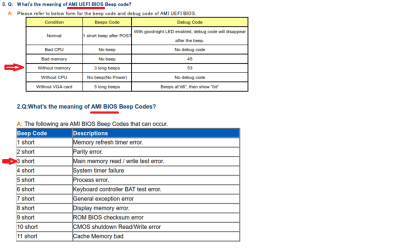
so when I plugged up the speaker and only used one motherboard ram slot which was slot 2 the pc beeped 3 times and paused for 1 second a repeated the three beep pattern
 

My Computer My Computer

At a glance

Microsoft Windows 7 Professional 64-bitIntel Xeon E3 @ 3.30GHzIntel(R) Xeon(R) CPU E...16.00GB Single-Channel DDR3 @ 666MHz (9-9-9-24)ATI Radeon HD 7950
Computer type
PC/Desktop
OS
Microsoft Windows 7 Professional 64-bit
CPU
Intel Xeon E3 @ 3.30GHzIntel(R) Xeon(R) CPU E3-1230 v3 @ 3.3
Motherboard
MSI Z97 GAMING 5 (MS-7917)
Memory
16.00GB Single-Channel DDR3 @ 666MHz (9-9-9-24)
Graphics Card(s)
ATI Radeon HD 7950
Sound Card
(1) AMD High Definition Audio Device (2) USB Audio Device
Hard Drives
(1) Samsung SSD 840 EVO 120GB ATA Device
(2) TOSHIBA MK7559GSM ATA Device
Other Info
TRENDnet Wireless AC1200 Dual Band USB 3.0 Adapter, TEW-805UB
I couldn't find beep codes for your specific motherboard, but I found these tables on the ASRock site.
The 1st table is for AMI UEFI BIOS.
The 2nd table is for AMI BIOS (Legacy).

ASBSP01.PNG

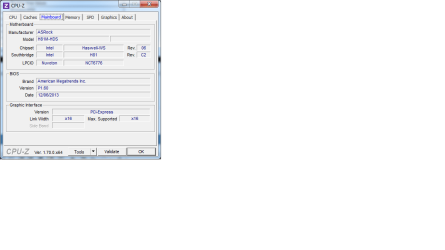
Check what version of BIOS you have on the CPU-Z Mainboard tab, or use SPECCY.
 

My Computer My Computer

At a glance

Multi-Boot W7_Pro_x64 W8.1_Pro_x64 W10_Pro_x6...AMD Athlon II x4 6206GB GSkill DDR2 800AMD 4670 GPU + AMD 4200 IGP
Computer type
PC/Desktop
Computer Manufacturer/Model Number
home built
OS
Multi-Boot W7_Pro_x64 W8.1_Pro_x64 W10_Pro_x64 +Linux_VMs +Chromium_VM
CPU
AMD Athlon II x4 620
Motherboard
Gigabyte GA-MA785G-UD3H
Memory
6GB GSkill DDR2 800
Graphics Card(s)
AMD 4670 GPU + AMD 4200 IGP
Sound Card
on board Realtek ALC889A
Monitor(s) Displays
RCA 40" LCD TV, Insignia 32" LCD TV, HP 15" LCD monitor
Screen Resolution
1680 x 1050
Hard Drives
OCZ Vertex 3 120GB,
Samsung F3 1TB (3),
Several others - WD, Seagate, Hitachi, ...
PSU
Corsair 500 W
Case
Rosewill mid tower
Cooling
CM 90mm rifle
Keyboard
Gyration wireless, Logitech wireless, Dell USB wired
Mouse
Gyration wireless, Logitech wireless, V7 USB wired
Internet Speed
Spectrum - 100Mbps D / 10Mbps U
Antivirus
Avast, MBAM3, EMET, WinPatrol
Browser
Pale Moon, Firefox, IE
Other Info
2 multi-boot PC's
Mainly HTPC/Office/Gen purpose (no gaming).
Trendnet USB KVM.
LG DVD burner/Blue Ray Player.
Tray system for removable SATA backup drives.

Not currently OCd, under-volted.
I use Hybrid sleep, rarely re-boot or shutdown.

Hauppauge HD-PVR, Avermedia PCIe TV Tuner, Hauppauge PCI TV Tuner.
ok the version number is p1.60 Untitled.png
 

My Computer My Computer

At a glance

Microsoft Windows 7 Professional 64-bitIntel Xeon E3 @ 3.30GHzIntel(R) Xeon(R) CPU E...16.00GB Single-Channel DDR3 @ 666MHz (9-9-9-24)ATI Radeon HD 7950
Computer type
PC/Desktop
OS
Microsoft Windows 7 Professional 64-bit
CPU
Intel Xeon E3 @ 3.30GHzIntel(R) Xeon(R) CPU E3-1230 v3 @ 3.3
Motherboard
MSI Z97 GAMING 5 (MS-7917)
Memory
16.00GB Single-Channel DDR3 @ 666MHz (9-9-9-24)
Graphics Card(s)
ATI Radeon HD 7950
Sound Card
(1) AMD High Definition Audio Device (2) USB Audio Device
Hard Drives
(1) Samsung SSD 840 EVO 120GB ATA Device
(2) TOSHIBA MK7559GSM ATA Device
Other Info
TRENDnet Wireless AC1200 Dual Band USB 3.0 Adapter, TEW-805UB
It sounds like the MB RAM slot 2 is defective.
You can try blowing air in the slot to clean it, but with as many times as you've inserted and removed RAM in the slot it seems unlikely to me blowing air will fix it.
I would look into returning the motherboard for a replacement.
I wouldn't want a new MB with such a defect, but it's your choice.

fwiw, when I build a new PC I always update to the latest BIOS, if the latest is not already installed.
That way I get the latest updates/fixes for the BIOS, and if anything does go wrong I can return the MB.
If you are going to return the MB as defective, you could update the BIOS to the latest version.
That way you gain knowledge and experience updating BIOS, and if anything goes wrong, no big deal, you are returning it anyway.

Also, did you do a BIOS reset when you built the PC ?
You should always do a BIOS reset with a new MB.
 

My Computer My Computer

At a glance

Multi-Boot W7_Pro_x64 W8.1_Pro_x64 W10_Pro_x6...AMD Athlon II x4 6206GB GSkill DDR2 800AMD 4670 GPU + AMD 4200 IGP
Computer type
PC/Desktop
Computer Manufacturer/Model Number
home built
OS
Multi-Boot W7_Pro_x64 W8.1_Pro_x64 W10_Pro_x64 +Linux_VMs +Chromium_VM
CPU
AMD Athlon II x4 620
Motherboard
Gigabyte GA-MA785G-UD3H
Memory
6GB GSkill DDR2 800
Graphics Card(s)
AMD 4670 GPU + AMD 4200 IGP
Sound Card
on board Realtek ALC889A
Monitor(s) Displays
RCA 40" LCD TV, Insignia 32" LCD TV, HP 15" LCD monitor
Screen Resolution
1680 x 1050
Hard Drives
OCZ Vertex 3 120GB,
Samsung F3 1TB (3),
Several others - WD, Seagate, Hitachi, ...
PSU
Corsair 500 W
Case
Rosewill mid tower
Cooling
CM 90mm rifle
Keyboard
Gyration wireless, Logitech wireless, Dell USB wired
Mouse
Gyration wireless, Logitech wireless, V7 USB wired
Internet Speed
Spectrum - 100Mbps D / 10Mbps U
Antivirus
Avast, MBAM3, EMET, WinPatrol
Browser
Pale Moon, Firefox, IE
Other Info
2 multi-boot PC's
Mainly HTPC/Office/Gen purpose (no gaming).
Trendnet USB KVM.
LG DVD burner/Blue Ray Player.
Tray system for removable SATA backup drives.

Not currently OCd, under-volted.
I use Hybrid sleep, rarely re-boot or shutdown.

Hauppauge HD-PVR, Avermedia PCIe TV Tuner, Hauppauge PCI TV Tuner.
It sounds like the MB RAM slot 2 is defective.
You can try blowing air in the slot to clean it, but with as many times as you've inserted and removed RAM in the slot it seems unlikely to me blowing air will fix it.
I would look into returning the motherboard for a replacement.
I wouldn't want a new MB with such a defect, but it's your choice.

fwiw, when I build a new PC I always update to the latest BIOS, if the latest is not already installed.
That way I get the latest updates/fixes for the BIOS, and if anything does go wrong I can return the MB.
If you are going to return the MB as defective, you could update the BIOS to the latest version.
That way you gain knowledge and experience updating BIOS, and if anything goes wrong, no big deal, you are returning it anyway.

Also, did you do a BIOS reset when you built the PC ?
You should always do a BIOS reset with a new MB.
I agree with you I am going to try and flash it just to gain knoiwledge of flashing also I will be buying a new motherboard and a new brand. Like they say you get what you pay for and I purchased a cheap board sense it was my first build and look what happened. Here is a link to my parts https://pcpartpicker.com/user/stephon972/saved/Y6M48d here is my case ULTRA Etorque™ H4 Mid-Tower ATX Gaming Case - USB 2.0/3.0, Up To 6 x SSD Trays, Top Hard Drive Dock and Fan Controller, Black - U12-42517 at TigerDirect.com Could you suggest a motherboard that will be compatible with what I have now?


I was thinking about these not sure if they are compatible

Amazon.com: Gigabyte H97 SATA Express M.2 SSD UEFI DualBIOS DDR3 1600 LGA 1150 Motherboard GA-H97-D3H: Computers & Accessories
 

My Computer My Computer

At a glance

Microsoft Windows 7 Professional 64-bitIntel Xeon E3 @ 3.30GHzIntel(R) Xeon(R) CPU E...16.00GB Single-Channel DDR3 @ 666MHz (9-9-9-24)ATI Radeon HD 7950
Computer type
PC/Desktop
OS
Microsoft Windows 7 Professional 64-bit
CPU
Intel Xeon E3 @ 3.30GHzIntel(R) Xeon(R) CPU E3-1230 v3 @ 3.3
Motherboard
MSI Z97 GAMING 5 (MS-7917)
Memory
16.00GB Single-Channel DDR3 @ 666MHz (9-9-9-24)
Graphics Card(s)
ATI Radeon HD 7950
Sound Card
(1) AMD High Definition Audio Device (2) USB Audio Device
Hard Drives
(1) Samsung SSD 840 EVO 120GB ATA Device
(2) TOSHIBA MK7559GSM ATA Device
Other Info
TRENDnet Wireless AC1200 Dual Band USB 3.0 Adapter, TEW-805UB
I would not recommend G.Skill ram.
Kingston and Corsair has always worked the best for me.
 

My Computer My Computer

At a glance

Windows 10 Pro. 64/ version 1709 Windows 7 Pr...Intel i7-6800K @ 4.3Corsair Platinum 16 gig @2400EVGA GTX 1070 OC
Computer type
PC/Desktop
Computer Manufacturer/Model Number
Home made Desktop
OS
Windows 10 Pro. 64/ version 1709 Windows 7 Pro/64
CPU
Intel i7-6800K @ 4.3
Motherboard
ASUS X-99 Deluxe II
Memory
Corsair Platinum 16 gig @2400
Graphics Card(s)
EVGA GTX 1070 OC
Monitor(s) Displays
Asus 27" LED LCD/VE278Q
Screen Resolution
1920-1080 or 1280-720 HDMI
Hard Drives
INTEL SSD 730-240 Gb Sata 3.0/
PSU
EVGA Platium 1200W
Case
Phanteks Luxe Tempered Glass 8 fans/ one radiator
Cooling
XSPC/ Water Cooled CPU
Keyboard
Das 4 Professional
Mouse
Logitech M705/MX Anywhere 2-S
Internet Speed
100 mbits
Antivirus
Microsoft Security Essentials/ Malwarebytes Premium 3.0/ SAS
Browser
I.E. 11 default/Firefox/ ISP Time Warner Cable/Spectrum
Other Info
LG BluRay Burner/
Sound system-KLipsch-THX/
Icy Dock ssd Hot Swap bays.
Back
Top