Solved Speakers not working, despite headphones being unplugged.

hbenthow

New member
Local time
7:40 AM
Messages
19
Whenever I turn on my computer speakers (an ordinary pair of cheap speakers that that connects to a regular audio jack in the back on my computer and is powered via a USB port) and play any media containing audio on my computer, no sound comes out of them. It doesn't matter whether or not the headphones (which plug into a speaker jack in the front of my computer) are unplugged or not. This is a new problem that I noticed for the first time yesterday.

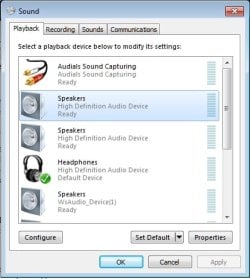
I went to the Sound settings in my Control Panel, and selected the "Test" option for my speakers several times. The speakers clearly worked each and every time. But they still wouldn't work when I played media. I then set the speakers as my default audio device, and then they started working perfectly when I played media. But then my headphones wouldn't work, even when I turned the speakers off. They worked when I used the Test option, but no other audio would play through them.

So apparently, either my headphones or my speakers will work, depending on which one I set as my default audio device. But whichever one is not set as default will not work (except for the sounds generated by the Test option).

Does anyone know what causes this problem and how to fix it?
 

My Computer My Computer

At a glance

Windows 7 Professional 64-bitAMD Athlon II X28.00GB Dual-Channel DDR3 @ 537MHzATI Radeon HD 4200
Computer type
PC/Desktop
Computer Manufacturer/Model Number
HP
OS
Windows 7 Professional 64-bit
CPU
AMD Athlon II X2
Motherboard
Hewlett-Packard 3047h (XU1 PROCESSOR)
Memory
8.00GB Dual-Channel DDR3 @ 537MHz
Graphics Card(s)
ATI Radeon HD 4200
Hard Drives
931GB Hitachi HDS721010KLA330 SATA Disk Device (SATA) 42 °C

931GB Western Digital WD Ext HDD 1021 USB Device (USB (SATA))
Antivirus
AVG Antivirus

My Computer My Computer

At a glance

Windows 10 64 bitIntel i7 6700K16GB Corsair DominatorIntel CPU Graphics
Computer type
PC/Desktop
Computer Manufacturer/Model Number
My Own Build
OS
Windows 10 64 bit
CPU
Intel i7 6700K
Motherboard
ASUS ROG Maximus VIII Hero
Memory
16GB Corsair Dominator
Graphics Card(s)
Intel CPU Graphics
Sound Card
RealTek
Monitor(s) Displays
27" Dell S2719dgf
Screen Resolution
2560X1440
Hard Drives
1 TB Samsung 850 EVO SSD for Win 10 Pro
500GB Samsung 850 EVO SSD for Win 10 Insider
2 TB drive for backup
PSU
EVGA Supernova 750G2
Case
BeQuiet Silent Base 600
Cooling
Deepcool Captain 120EX
Keyboard
Microsoft Wireless 2000
Mouse
Microsoft wireless
Internet Speed
100 MB/sec (Cable)
Antivirus
Microsoft Defender and Malwarebytes
Browser
Edge/Firefox
Other Info
Cakewalk (Sonar) by BandLab and Studio One 4.1 Pro recording studio software. MOTU 896Mk3 Hybrid recording interface, Frontier Tranzport wireless control unit, Behringer X-Touch Control Surface.
Five USB connected optical drives for CD Audio production using Nero BurningROM
Hum firebird am wondering if the phones cut out switch is stuck??
 

My Computer My Computer

At a glance

Desk1 7 Home Prem / Desk2 10 Pro / Main lap A...Desk1 i5 3750K / Laptop i7 GTX 860M / Desk2 i...Desk1 8GB (1866) / Desk2 16GB (1333) / Laptop...Desk 1& 2NVidia GTX 650 & Laptops on board Intel
Computer type
PC/Desktop
Computer Manufacturer/Model Number
Own build (new) Desk1 / Asus ROG Win 7 / Desk2 1st build
OS
Desk1 7 Home Prem / Desk2 10 Pro / Main lap Asus ROG 10 Pro 2 laptop Toshiba 7 Pro Asus P2520 7 & 10
CPU
Desk1 i5 3750K / Laptop i7 GTX 860M / Desk2 i5 2500
Motherboard
Desk1 Asus P877-V / Desk2 Gigabyte H67 UD3H / Laptop ?
Memory
Desk1 8GB (1866) / Desk2 16GB (1333) / Laptop 8Gb DDR3
Graphics Card(s)
Desk 1& 2NVidia GTX 650 & Laptops on board Intel
Sound Card
Desk 1 & 2 -XONAR DG Realtek High Def audio Laptop
Monitor(s) Displays
Desk 1 Benq HD 2450 / Desk2 Philips 24" / Laptop 17.5"
Screen Resolution
1920x1080 D1 & D2 & Laptop 1
Hard Drives
Desk1 Samsung 120GB 830 SSD
Asus ROG 256GB 850 Pro SSD
Desk2 Samsung 840 256 SSD
Toshiba 120GB EVO
PSU
Desk 1 Corsair HX 1050/ Laptop ? / Desk 2 Corsair HX 650
Case
Desk 1 Cooler HAF XM ? Toshiba laptop / Desk2 Coolermaster
Cooling
Fans on all Desk1 -2 Desk2 - all Coolermasters 5 Laptop ?
Keyboard
Desk 1 MS Sidewinder X6 Desk 2 MS Sidewinder X 4
Mouse
Desk 1&2 - Gigabyte MS 900 gamer - laptop - Logitec wireless
Internet Speed
ADSL2+
Other Info
One other Desktop (tester) and spare Toshba laptop both with SSD's
Running Kaspersky 2016 ISS on all machines config'd identically
Logitec audio stereo systems on each machine (x3)
Canon MG5250MFC
Router/modem TP-Link running WPA2SK
Has this ever worked properly? or is this a problem that recently happened.
I specified in my original post that it is a new problem that I first noticed the day before I made the post. I'm not sure exactly how long I've had this problem, but everything worked correctly at least up until a few weeks ago (the last time I had previously used the speakers).
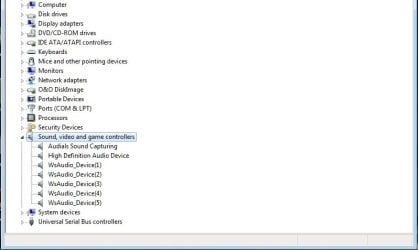
Please post a screen shot of the Sound Playback Panel and the Device Manager, Sound section.
In the second screenshot I am posting, the item that I have highlighted is the icon for the speakers in question.
Hum firebird am wondering if the phones cut out switch is stuck??
Interesting idea. I have been wondering if it might be a problem with the headhone jack. Every now and then, I accidentally jerk the headhone cord (I have a long extension cord connected to my headhones, and sometimes one of my feet gets tangled in it), and I have wondered if that might have damaged the earphone jack in some way.
 

Attachments

  • Untitled.jpg
    Untitled.jpg
    34.8 KB · Views: 17
  • Untitled 2.jpg
    Untitled 2.jpg
    33 KB · Views: 3

My Computer My Computer

At a glance

Windows 7 Professional 64-bitAMD Athlon II X28.00GB Dual-Channel DDR3 @ 537MHzATI Radeon HD 4200
Computer type
PC/Desktop
Computer Manufacturer/Model Number
HP
OS
Windows 7 Professional 64-bit
CPU
AMD Athlon II X2
Motherboard
Hewlett-Packard 3047h (XU1 PROCESSOR)
Memory
8.00GB Dual-Channel DDR3 @ 537MHz
Graphics Card(s)
ATI Radeon HD 4200
Hard Drives
931GB Hitachi HDS721010KLA330 SATA Disk Device (SATA) 42 °C

931GB Western Digital WD Ext HDD 1021 USB Device (USB (SATA))
Antivirus
AVG Antivirus
The first thing that sticks out is you only have "High Definition Audio Device" which in most cases (actually all that I've seen) is only the generic, basic function, Windows installed Sound Driver. It is not the correct sound driver for the sound chip you have, which could be RealTek, Conexent, etc. You haven't listed the actual HP model number so I can't check to see what the device actually is. But, go to HP and download the correct sound driver, as the first step. The correct sound driver may even fix the problem.

What is the "WsAudio Devices"?
 

My Computer My Computer

At a glance

Windows 10 64 bitIntel i7 6700K16GB Corsair DominatorIntel CPU Graphics
Computer type
PC/Desktop
Computer Manufacturer/Model Number
My Own Build
OS
Windows 10 64 bit
CPU
Intel i7 6700K
Motherboard
ASUS ROG Maximus VIII Hero
Memory
16GB Corsair Dominator
Graphics Card(s)
Intel CPU Graphics
Sound Card
RealTek
Monitor(s) Displays
27" Dell S2719dgf
Screen Resolution
2560X1440
Hard Drives
1 TB Samsung 850 EVO SSD for Win 10 Pro
500GB Samsung 850 EVO SSD for Win 10 Insider
2 TB drive for backup
PSU
EVGA Supernova 750G2
Case
BeQuiet Silent Base 600
Cooling
Deepcool Captain 120EX
Keyboard
Microsoft Wireless 2000
Mouse
Microsoft wireless
Internet Speed
100 MB/sec (Cable)
Antivirus
Microsoft Defender and Malwarebytes
Browser
Edge/Firefox
Other Info
Cakewalk (Sonar) by BandLab and Studio One 4.1 Pro recording studio software. MOTU 896Mk3 Hybrid recording interface, Frontier Tranzport wireless control unit, Behringer X-Touch Control Surface.
Five USB connected optical drives for CD Audio production using Nero BurningROM
The first thing that sticks out is you only have "High Definition Audio Device" which in most cases (actually all that I've seen) is only the generic, basic function, Windows installed Sound Driver. It is not the correct sound driver for the sound chip you have, which could be RealTek, Conexent, etc. You haven't listed the actual HP model number so I can't check to see what the device actually is. But, go to HP and download the correct sound driver, as the first step. The correct sound driver may even fix the problem.
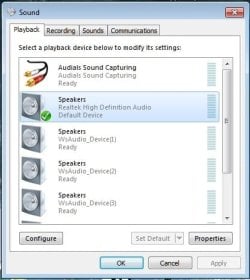
I found the page for my computer's drivers* and downloaded and installed the audio drivers (Realtek). Now, everything works correctly, although my headphones are now listed as generic "speakers". Whenever I unplug the headphones, the same "Speakers" icon switches to representing the speakers. This is to say, if I run the test option on that particular "Speakers" icon while my headphones are plugged in, the test sound plays through my headphones. If I unplug my headphone and turn on my speakers, then run the test option on the same icon, the test sound plays through the speakers. I have included a photo in this post with the icon in question highlighted.

Whether this is normal or not, I don't know. But at least now both the speakers and the headphones work correctly, both with the test option and when playing media.

* Drivers and Software forHP Compaq 6005 Pro Microtower PC
What is the "WsAudio Devices"?
I have no idea. The only audio devices I have connected to my computer are the headphones and the speakers.
 

Attachments

  • Untitled 3.jpg
    Untitled 3.jpg
    33.8 KB · Views: 16

My Computer My Computer

At a glance

Windows 7 Professional 64-bitAMD Athlon II X28.00GB Dual-Channel DDR3 @ 537MHzATI Radeon HD 4200
Computer type
PC/Desktop
Computer Manufacturer/Model Number
HP
OS
Windows 7 Professional 64-bit
CPU
AMD Athlon II X2
Motherboard
Hewlett-Packard 3047h (XU1 PROCESSOR)
Memory
8.00GB Dual-Channel DDR3 @ 537MHz
Graphics Card(s)
ATI Radeon HD 4200
Hard Drives
931GB Hitachi HDS721010KLA330 SATA Disk Device (SATA) 42 °C

931GB Western Digital WD Ext HDD 1021 USB Device (USB (SATA))
Antivirus
AVG Antivirus
I found out what the WSAudio is, "Wondershare" streaming audio audio recorder. You apparently have that software installed. That is probably not needed since you now have the RealTek installed. You should have the "Stereo Mix" available (the Wondershare is used if no Stereo Mix).

Go to the Control Panel/Hardware and Sound and finally the Sound Panel, Recording Tab. If Stereo Mix is listed, enable it and make it the default recording device. If it is not listed, RIGHT click in a blank area in that Panel and then click to show "Disabled" and "Disconnected" devices. Stereo Mix should now be shown and you can enable it and make it the default recording device.

If the Stereo Mix was successful, uninstall the Wondershare as it is not needed.

The same way with the "Audials Sound Capturing", it is not needed with the Stereo Mix.

Those two programs could be causing some of your problems.

With the Stereo Mix, you can record streaming audio from the internet or from any device (e.g. line in or mic) that is connected and used. You don't need the extra software.
 

My Computer My Computer

At a glance

Windows 10 64 bitIntel i7 6700K16GB Corsair DominatorIntel CPU Graphics
Computer type
PC/Desktop
Computer Manufacturer/Model Number
My Own Build
OS
Windows 10 64 bit
CPU
Intel i7 6700K
Motherboard
ASUS ROG Maximus VIII Hero
Memory
16GB Corsair Dominator
Graphics Card(s)
Intel CPU Graphics
Sound Card
RealTek
Monitor(s) Displays
27" Dell S2719dgf
Screen Resolution
2560X1440
Hard Drives
1 TB Samsung 850 EVO SSD for Win 10 Pro
500GB Samsung 850 EVO SSD for Win 10 Insider
2 TB drive for backup
PSU
EVGA Supernova 750G2
Case
BeQuiet Silent Base 600
Cooling
Deepcool Captain 120EX
Keyboard
Microsoft Wireless 2000
Mouse
Microsoft wireless
Internet Speed
100 MB/sec (Cable)
Antivirus
Microsoft Defender and Malwarebytes
Browser
Edge/Firefox
Other Info
Cakewalk (Sonar) by BandLab and Studio One 4.1 Pro recording studio software. MOTU 896Mk3 Hybrid recording interface, Frontier Tranzport wireless control unit, Behringer X-Touch Control Surface.
Five USB connected optical drives for CD Audio production using Nero BurningROM
I found out what the WSAudio is, "Wondershare" streaming audio audio recorder. You apparently have that software installed. That is probably not needed since you now have the RealTek installed. You should have the "Stereo Mix" available (the Wondershare is used if no Stereo Mix).
That's peculiar. The only Wondershare software that I installed (intentionally, anyhow) is Wondershare DVD Creator. I searched my installed programs list, program folders, etc, and can't find any other Wondershare software on my computer.
Go to the Control Panel/Hardware and Sound and finally the Sound Panel, Recording Tab. If Stereo Mix is listed, enable it and make it the default recording device. If it is not listed, RIGHT click in a blank area in that Panel and then click to show "Disabled" and "Disconnected" devices. Stereo Mix should now be shown and you can enable it and make it the default recording device.
I have now set Stereo Mix as the default recording device.
If the Stereo Mix was successful, uninstall the Wondershare as it is not needed.
I can't uninstall the Wondershare streaming audio recorder, as I can't find it installed anywhere. Should I disable all of the "WsAudio_Device" instances in the Sound Panel?
The same way with the "Audials Sound Capturing", it is not needed with the Stereo Mix.
Is it necessary to disable it? It's there so I can record audio directly through Audials (an audio program I installed), which is an option I like to have.
With the Stereo Mix, you can record streaming audio from the internet or from any device (e.g. line in or mic) that is connected and used. You don't need the extra software.
How? I can't find a recording option anywhere in the Realtek HD Audio Manager.
 

My Computer My Computer

At a glance

Windows 7 Professional 64-bitAMD Athlon II X28.00GB Dual-Channel DDR3 @ 537MHzATI Radeon HD 4200
Computer type
PC/Desktop
Computer Manufacturer/Model Number
HP
OS
Windows 7 Professional 64-bit
CPU
AMD Athlon II X2
Motherboard
Hewlett-Packard 3047h (XU1 PROCESSOR)
Memory
8.00GB Dual-Channel DDR3 @ 537MHz
Graphics Card(s)
ATI Radeon HD 4200
Hard Drives
931GB Hitachi HDS721010KLA330 SATA Disk Device (SATA) 42 °C

931GB Western Digital WD Ext HDD 1021 USB Device (USB (SATA))
Antivirus
AVG Antivirus
If you would have had RealTek and the Stereo Mix at the beginning, except for a recording program (many use the free Audacity) there was no need for anything else.

RealTek does not have a recording program, as its not a recording program. Its the driver and support software for the sound chip.

There are many DVD recording programs, some free, that do not add extra "bloatware". CDBurnerXP and Imgburn are two that come to mind.

I have a recording studio, but I use commercial recording software (Sonar X3) and a recording interface unit, not the PC's sound card.
 

My Computer My Computer

At a glance

Windows 10 64 bitIntel i7 6700K16GB Corsair DominatorIntel CPU Graphics
Computer type
PC/Desktop
Computer Manufacturer/Model Number
My Own Build
OS
Windows 10 64 bit
CPU
Intel i7 6700K
Motherboard
ASUS ROG Maximus VIII Hero
Memory
16GB Corsair Dominator
Graphics Card(s)
Intel CPU Graphics
Sound Card
RealTek
Monitor(s) Displays
27" Dell S2719dgf
Screen Resolution
2560X1440
Hard Drives
1 TB Samsung 850 EVO SSD for Win 10 Pro
500GB Samsung 850 EVO SSD for Win 10 Insider
2 TB drive for backup
PSU
EVGA Supernova 750G2
Case
BeQuiet Silent Base 600
Cooling
Deepcool Captain 120EX
Keyboard
Microsoft Wireless 2000
Mouse
Microsoft wireless
Internet Speed
100 MB/sec (Cable)
Antivirus
Microsoft Defender and Malwarebytes
Browser
Edge/Firefox
Other Info
Cakewalk (Sonar) by BandLab and Studio One 4.1 Pro recording studio software. MOTU 896Mk3 Hybrid recording interface, Frontier Tranzport wireless control unit, Behringer X-Touch Control Surface.
Five USB connected optical drives for CD Audio production using Nero BurningROM
If you would have had RealTek and the Stereo Mix at the beginning, except for a recording program (many use the free Audacity) there was no need for anything else.

RealTek does not have a recording program, as its not a recording program. Its the driver and support software for the sound chip.
Ah, I see. Your wording had me confused. I thought that you were saying that I could record with Realtek alone. I have used Audacity in the past, but not recently.
There are many DVD recording programs, some free, that do not add extra "bloatware". CDBurnerXP and Imgburn are two that come to mind.
Imgburn is the only program that I've used for burning DVDs for years. I've also used only CDBurnerXP for burning CDs for almost as long.

I installed Wondershare DVD Creator because Wondershare gave away the program for free through Giveaway Of The Day a while back, and I thought it might come in handy some day. I've never used it, though. I'm not sure if it is what caused my problem, as I've had it installed for quite a while and the problem only popped up recently.
 

My Computer My Computer

At a glance

Windows 7 Professional 64-bitAMD Athlon II X28.00GB Dual-Channel DDR3 @ 537MHzATI Radeon HD 4200
Computer type
PC/Desktop
Computer Manufacturer/Model Number
HP
OS
Windows 7 Professional 64-bit
CPU
AMD Athlon II X2
Motherboard
Hewlett-Packard 3047h (XU1 PROCESSOR)
Memory
8.00GB Dual-Channel DDR3 @ 537MHz
Graphics Card(s)
ATI Radeon HD 4200
Hard Drives
931GB Hitachi HDS721010KLA330 SATA Disk Device (SATA) 42 °C

931GB Western Digital WD Ext HDD 1021 USB Device (USB (SATA))
Antivirus
AVG Antivirus
I get the "Giveaway of the day" e-mails. I've tried some of the programs and have deleted everyone as they either did not work well or I didn't like them. I have Nero (and it works well for my recording studio uses) so I don't need another CD/DVD burning program.
 

My Computer My Computer

At a glance

Windows 10 64 bitIntel i7 6700K16GB Corsair DominatorIntel CPU Graphics
Computer type
PC/Desktop
Computer Manufacturer/Model Number
My Own Build
OS
Windows 10 64 bit
CPU
Intel i7 6700K
Motherboard
ASUS ROG Maximus VIII Hero
Memory
16GB Corsair Dominator
Graphics Card(s)
Intel CPU Graphics
Sound Card
RealTek
Monitor(s) Displays
27" Dell S2719dgf
Screen Resolution
2560X1440
Hard Drives
1 TB Samsung 850 EVO SSD for Win 10 Pro
500GB Samsung 850 EVO SSD for Win 10 Insider
2 TB drive for backup
PSU
EVGA Supernova 750G2
Case
BeQuiet Silent Base 600
Cooling
Deepcool Captain 120EX
Keyboard
Microsoft Wireless 2000
Mouse
Microsoft wireless
Internet Speed
100 MB/sec (Cable)
Antivirus
Microsoft Defender and Malwarebytes
Browser
Edge/Firefox
Other Info
Cakewalk (Sonar) by BandLab and Studio One 4.1 Pro recording studio software. MOTU 896Mk3 Hybrid recording interface, Frontier Tranzport wireless control unit, Behringer X-Touch Control Surface.
Five USB connected optical drives for CD Audio production using Nero BurningROM
Everything is still working correctly, so I'm considering the problem solved. Thank you, fireberd, for the advice regarding drivers. That wound up solving the problem.
 

My Computer My Computer

At a glance

Windows 7 Professional 64-bitAMD Athlon II X28.00GB Dual-Channel DDR3 @ 537MHzATI Radeon HD 4200
Computer type
PC/Desktop
Computer Manufacturer/Model Number
HP
OS
Windows 7 Professional 64-bit
CPU
AMD Athlon II X2
Motherboard
Hewlett-Packard 3047h (XU1 PROCESSOR)
Memory
8.00GB Dual-Channel DDR3 @ 537MHz
Graphics Card(s)
ATI Radeon HD 4200
Hard Drives
931GB Hitachi HDS721010KLA330 SATA Disk Device (SATA) 42 °C

931GB Western Digital WD Ext HDD 1021 USB Device (USB (SATA))
Antivirus
AVG Antivirus
Glad I could help. Now you can fully use the PC.
 

My Computer My Computer

At a glance

Windows 10 64 bitIntel i7 6700K16GB Corsair DominatorIntel CPU Graphics
Computer type
PC/Desktop
Computer Manufacturer/Model Number
My Own Build
OS
Windows 10 64 bit
CPU
Intel i7 6700K
Motherboard
ASUS ROG Maximus VIII Hero
Memory
16GB Corsair Dominator
Graphics Card(s)
Intel CPU Graphics
Sound Card
RealTek
Monitor(s) Displays
27" Dell S2719dgf
Screen Resolution
2560X1440
Hard Drives
1 TB Samsung 850 EVO SSD for Win 10 Pro
500GB Samsung 850 EVO SSD for Win 10 Insider
2 TB drive for backup
PSU
EVGA Supernova 750G2
Case
BeQuiet Silent Base 600
Cooling
Deepcool Captain 120EX
Keyboard
Microsoft Wireless 2000
Mouse
Microsoft wireless
Internet Speed
100 MB/sec (Cable)
Antivirus
Microsoft Defender and Malwarebytes
Browser
Edge/Firefox
Other Info
Cakewalk (Sonar) by BandLab and Studio One 4.1 Pro recording studio software. MOTU 896Mk3 Hybrid recording interface, Frontier Tranzport wireless control unit, Behringer X-Touch Control Surface.
Five USB connected optical drives for CD Audio production using Nero BurningROM
Back
Top