
You are using an out of date browser. It may not display this or other websites correctly.
You should upgrade or use an alternative browser.
You should upgrade or use an alternative browser.
Is it possible to change default OS at boot?
- Thread starter Poolemahu
- Start date

- Local time
- 3:25 AM
- Messages
- 12,011
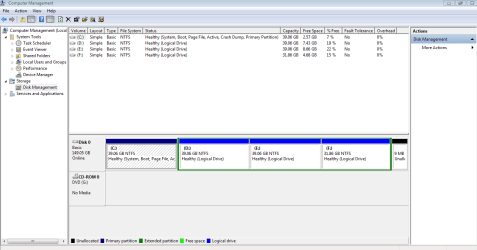
That looks good.
What, if anything, is on D, E, or F that you need?
Which of them has your data?
You need to enlarge C, but not this minute.
What, if anything, is on D, E, or F that you need?
Which of them has your data?
You need to enlarge C, but not this minute.
My Computer
At a glance
Windows 7 Home Premium SP1, 64-bitIntel Skylake i5-6600K, not overclocked8 GB HyperX DDR4-2666 (2 x 4 GB)none; graphics are integrated on CPU
- Computer type
- PC/Desktop
- Computer Manufacturer/Model Number
- Ignatz Special; 4 speed manual gearbox; factory air conditioning; one of one
- OS
- Windows 7 Home Premium SP1, 64-bit
- CPU
- Intel Skylake i5-6600K, not overclocked
- Motherboard
- AsRock Z170M Extreme 4, micro ATX
- Memory
- 8 GB HyperX DDR4-2666 (2 x 4 GB)
- Graphics Card(s)
- none; graphics are integrated on CPU
- Sound Card
- onboard: Realtek ALC1150; external: USB Behringer UF0-202
- Monitor(s) Displays
- Dell S2340M 23 inch IPS
- Screen Resolution
- 1600 x 900
- Hard Drives
- System: Crucial MX100 series SSD, 128 GB;
Data: Samsung Spinpoint 103SJ, 1 TB;
Backup: WD Caviar Green WD30EZRX-00D8PB0, 3 TB
- PSU
- Rosewill SilentNight 500 watt fanless, semi-modular
- Case
- Antec Solo II
- Cooling
- Noctua NH-U12S; Noctua F12 intake, Noctua S12A exhaust
- Keyboard
- Microsoft 200 6JH-00001 USB
- Mouse
- Dell or Microsoft optical wired; USB
- Antivirus
- Microsoft Security Essentials and Malwarebytes Premium
- Browser
- Pale Moon
- Other Info
- All fans PWM; speeds at idle: CPU circa 500 rpm; intake circa 600 rpm; exhaust circa 600 rpm; CPU temps 27 idle and 47 C load in a warm room (27 C/81 F) when running Intel Extreme Tuning Utility stress test.
D, E and F have the data I need. Some of it is work related and some of it is pictures and movies which are anyway in an external drive and can be deleted.
My C drive however has less space so I am wondering what all I could delete esp from my windows.old folder for now..
My C drive however has less space so I am wondering what all I could delete esp from my windows.old folder for now..
My Computer
At a glance
Win 7 Ultimate 32 bit
- Computer type
- PC/Desktop
- Computer Manufacturer/Model Number
- Custom built
- OS
- Win 7 Ultimate 32 bit
Thank you all for your patience, kind help and advice. It was very helpful and guided me through this problem.
My Computer
At a glance
Win 7 Ultimate 32 bit
- Computer type
- PC/Desktop
- Computer Manufacturer/Model Number
- Custom built
- OS
- Win 7 Ultimate 32 bit
- Local time
- 3:25 AM
- Messages
- 12,011
Good that you mentioned windows.old.
How big is that folder? A normal clean install of Windows should take up no more than 20 GB. Your C now has about 36 used out of 39. I assume windows old is most or all of the difference, but it's peculiar to me that you have a windows old if you did a clean install.
At any rate: how much space does ALL of your data take up? I don't mean backups. Just one original copy of everything. Excluding installed programs and Windows per se.
I assume you want to end up with C for Windows and D for data and nothing else?
You can delete partitions, but we need to get all of your data on one partition if possible first. So we need to know the size of it.
How big is that folder? A normal clean install of Windows should take up no more than 20 GB. Your C now has about 36 used out of 39. I assume windows old is most or all of the difference, but it's peculiar to me that you have a windows old if you did a clean install.
At any rate: how much space does ALL of your data take up? I don't mean backups. Just one original copy of everything. Excluding installed programs and Windows per se.
I assume you want to end up with C for Windows and D for data and nothing else?
You can delete partitions, but we need to get all of your data on one partition if possible first. So we need to know the size of it.
My Computer
At a glance
Windows 7 Home Premium SP1, 64-bitIntel Skylake i5-6600K, not overclocked8 GB HyperX DDR4-2666 (2 x 4 GB)none; graphics are integrated on CPU
- Computer type
- PC/Desktop
- Computer Manufacturer/Model Number
- Ignatz Special; 4 speed manual gearbox; factory air conditioning; one of one
- OS
- Windows 7 Home Premium SP1, 64-bit
- CPU
- Intel Skylake i5-6600K, not overclocked
- Motherboard
- AsRock Z170M Extreme 4, micro ATX
- Memory
- 8 GB HyperX DDR4-2666 (2 x 4 GB)
- Graphics Card(s)
- none; graphics are integrated on CPU
- Sound Card
- onboard: Realtek ALC1150; external: USB Behringer UF0-202
- Monitor(s) Displays
- Dell S2340M 23 inch IPS
- Screen Resolution
- 1600 x 900
- Hard Drives
- System: Crucial MX100 series SSD, 128 GB;
Data: Samsung Spinpoint 103SJ, 1 TB;
Backup: WD Caviar Green WD30EZRX-00D8PB0, 3 TB
- PSU
- Rosewill SilentNight 500 watt fanless, semi-modular
- Case
- Antec Solo II
- Cooling
- Noctua NH-U12S; Noctua F12 intake, Noctua S12A exhaust
- Keyboard
- Microsoft 200 6JH-00001 USB
- Mouse
- Dell or Microsoft optical wired; USB
- Antivirus
- Microsoft Security Essentials and Malwarebytes Premium
- Browser
- Pale Moon
- Other Info
- All fans PWM; speeds at idle: CPU circa 500 rpm; intake circa 600 rpm; exhaust circa 600 rpm; CPU temps 27 idle and 47 C load in a warm room (27 C/81 F) when running Intel Extreme Tuning Utility stress test.
There is one windows.old and another windows.old.000.
the windows.old is 19.8GB and the windows.old.000 is 8.21GB.
The windows.old has all the program files and the exe which i used with win xp. but there is no program per se in windows.old.000
I am sure the windows.old.000 was not there when i did the first win 7 installation and i presume it has now written it when i reinstalled win7 again.
can i simply shift+del the windows.old.000 folder ? i dont see anything useful in it except for lot of default windows application like media player,games and internet explorer.
I see there is no clean install happening here.. it looks to me it is taking a back up of existing os and installing the win7 OS. is that normal?
the windows.old is 19.8GB and the windows.old.000 is 8.21GB.
The windows.old has all the program files and the exe which i used with win xp. but there is no program per se in windows.old.000
I am sure the windows.old.000 was not there when i did the first win 7 installation and i presume it has now written it when i reinstalled win7 again.
can i simply shift+del the windows.old.000 folder ? i dont see anything useful in it except for lot of default windows application like media player,games and internet explorer.
I see there is no clean install happening here.. it looks to me it is taking a back up of existing os and installing the win7 OS. is that normal?
My Computer
At a glance
Win 7 Ultimate 32 bit
- Computer type
- PC/Desktop
- Computer Manufacturer/Model Number
- Custom built
- OS
- Win 7 Ultimate 32 bit
- Local time
- 3:25 AM
- Messages
- 12,011
Answer the questions about your data size.
Like this:
3 GB on F, 14 GB on E; 10 GB on D.
If worse comes to worse you do yet another Windows install. As you found out, it takes only 20 minutes.
Do you acknowledge having to reinstall all programs?
Like this:
3 GB on F, 14 GB on E; 10 GB on D.
If worse comes to worse you do yet another Windows install. As you found out, it takes only 20 minutes.
Do you acknowledge having to reinstall all programs?
My Computer
At a glance
Windows 7 Home Premium SP1, 64-bitIntel Skylake i5-6600K, not overclocked8 GB HyperX DDR4-2666 (2 x 4 GB)none; graphics are integrated on CPU
- Computer type
- PC/Desktop
- Computer Manufacturer/Model Number
- Ignatz Special; 4 speed manual gearbox; factory air conditioning; one of one
- OS
- Windows 7 Home Premium SP1, 64-bit
- CPU
- Intel Skylake i5-6600K, not overclocked
- Motherboard
- AsRock Z170M Extreme 4, micro ATX
- Memory
- 8 GB HyperX DDR4-2666 (2 x 4 GB)
- Graphics Card(s)
- none; graphics are integrated on CPU
- Sound Card
- onboard: Realtek ALC1150; external: USB Behringer UF0-202
- Monitor(s) Displays
- Dell S2340M 23 inch IPS
- Screen Resolution
- 1600 x 900
- Hard Drives
- System: Crucial MX100 series SSD, 128 GB;
Data: Samsung Spinpoint 103SJ, 1 TB;
Backup: WD Caviar Green WD30EZRX-00D8PB0, 3 TB
- PSU
- Rosewill SilentNight 500 watt fanless, semi-modular
- Case
- Antec Solo II
- Cooling
- Noctua NH-U12S; Noctua F12 intake, Noctua S12A exhaust
- Keyboard
- Microsoft 200 6JH-00001 USB
- Mouse
- Dell or Microsoft optical wired; USB
- Antivirus
- Microsoft Security Essentials and Malwarebytes Premium
- Browser
- Pale Moon
- Other Info
- All fans PWM; speeds at idle: CPU circa 500 rpm; intake circa 600 rpm; exhaust circa 600 rpm; CPU temps 27 idle and 47 C load in a warm room (27 C/81 F) when running Intel Extreme Tuning Utility stress test.
Hi,
well each drive is about 40GB in size. All of which have been saved to an external drive. The data I use day to day would be 5-8 GB on each drive and hence remaining space can be utilized for anything else.. or kept free.
well each drive is about 40GB in size. All of which have been saved to an external drive. The data I use day to day would be 5-8 GB on each drive and hence remaining space can be utilized for anything else.. or kept free.
My Computer
At a glance
Win 7 Ultimate 32 bit
- Computer type
- PC/Desktop
- Computer Manufacturer/Model Number
- Custom built
- OS
- Win 7 Ultimate 32 bit
- Local time
- 3:25 AM
- Messages
- 12,011
Hi,
well each drive is about 40GB in size. All of which have been saved to an external drive. The data I use day to day would be 5-8 GB on each drive and hence remaining space can be utilized for anything else.. or kept free.
I'd delete that windows old that you think was made in the last hour or two when you reinstalled Win 7 tonight.
Confirm the PC will re-boot and that you then have a bunch of freed up space on C.
Then post another screen shot.
What do you want to end up with??
C only? C and D? C, D, E, and F?
I'm wondering why you have split the drive up so much?
My Computer
At a glance
Windows 7 Home Premium SP1, 64-bitIntel Skylake i5-6600K, not overclocked8 GB HyperX DDR4-2666 (2 x 4 GB)none; graphics are integrated on CPU
- Computer type
- PC/Desktop
- Computer Manufacturer/Model Number
- Ignatz Special; 4 speed manual gearbox; factory air conditioning; one of one
- OS
- Windows 7 Home Premium SP1, 64-bit
- CPU
- Intel Skylake i5-6600K, not overclocked
- Motherboard
- AsRock Z170M Extreme 4, micro ATX
- Memory
- 8 GB HyperX DDR4-2666 (2 x 4 GB)
- Graphics Card(s)
- none; graphics are integrated on CPU
- Sound Card
- onboard: Realtek ALC1150; external: USB Behringer UF0-202
- Monitor(s) Displays
- Dell S2340M 23 inch IPS
- Screen Resolution
- 1600 x 900
- Hard Drives
- System: Crucial MX100 series SSD, 128 GB;
Data: Samsung Spinpoint 103SJ, 1 TB;
Backup: WD Caviar Green WD30EZRX-00D8PB0, 3 TB
- PSU
- Rosewill SilentNight 500 watt fanless, semi-modular
- Case
- Antec Solo II
- Cooling
- Noctua NH-U12S; Noctua F12 intake, Noctua S12A exhaust
- Keyboard
- Microsoft 200 6JH-00001 USB
- Mouse
- Dell or Microsoft optical wired; USB
- Antivirus
- Microsoft Security Essentials and Malwarebytes Premium
- Browser
- Pale Moon
- Other Info
- All fans PWM; speeds at idle: CPU circa 500 rpm; intake circa 600 rpm; exhaust circa 600 rpm; CPU temps 27 idle and 47 C load in a warm room (27 C/81 F) when running Intel Extreme Tuning Utility stress test.
Well, i didnt split it by myself. Many years ago, when it was first bought or assembled, it was being shared by three of us. so the person putting the system together came up with this idea that each have a drive of his own and thus we ended up having 3 partitions. the C drive was always the OS drive.this machine later ended up being with me and not knowing so much about disk partition I left the stuff be as it is..
personally I can be happy with just C and D. In my earlier machine I had just C and I lost everything during an OS crash. So now I have an OS drive and anything else is stored on other drive(s).
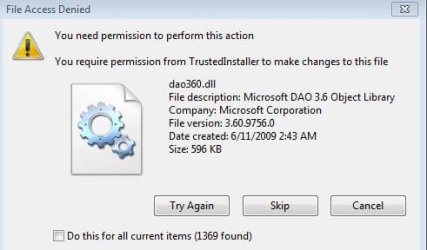
i tried deleting the windows.old.000 and it doesnt allow me to do that.. it says the files are a system file or says that I need permission from "TrustedInstaller" to make changes to dll files.
I am the administrator for the machine and there are no other accounts.
personally I can be happy with just C and D. In my earlier machine I had just C and I lost everything during an OS crash. So now I have an OS drive and anything else is stored on other drive(s).
i tried deleting the windows.old.000 and it doesnt allow me to do that.. it says the files are a system file or says that I need permission from "TrustedInstaller" to make changes to dll files.
I am the administrator for the machine and there are no other accounts.
Attachments
My Computer
At a glance
Win 7 Ultimate 32 bit
- Computer type
- PC/Desktop
- Computer Manufacturer/Model Number
- Custom built
- OS
- Win 7 Ultimate 32 bit
- Local time
- 3:25 AM
- Messages
- 12,011
Can you delete the other Windows old folder?
My Computer
At a glance
Windows 7 Home Premium SP1, 64-bitIntel Skylake i5-6600K, not overclocked8 GB HyperX DDR4-2666 (2 x 4 GB)none; graphics are integrated on CPU
- Computer type
- PC/Desktop
- Computer Manufacturer/Model Number
- Ignatz Special; 4 speed manual gearbox; factory air conditioning; one of one
- OS
- Windows 7 Home Premium SP1, 64-bit
- CPU
- Intel Skylake i5-6600K, not overclocked
- Motherboard
- AsRock Z170M Extreme 4, micro ATX
- Memory
- 8 GB HyperX DDR4-2666 (2 x 4 GB)
- Graphics Card(s)
- none; graphics are integrated on CPU
- Sound Card
- onboard: Realtek ALC1150; external: USB Behringer UF0-202
- Monitor(s) Displays
- Dell S2340M 23 inch IPS
- Screen Resolution
- 1600 x 900
- Hard Drives
- System: Crucial MX100 series SSD, 128 GB;
Data: Samsung Spinpoint 103SJ, 1 TB;
Backup: WD Caviar Green WD30EZRX-00D8PB0, 3 TB
- PSU
- Rosewill SilentNight 500 watt fanless, semi-modular
- Case
- Antec Solo II
- Cooling
- Noctua NH-U12S; Noctua F12 intake, Noctua S12A exhaust
- Keyboard
- Microsoft 200 6JH-00001 USB
- Mouse
- Dell or Microsoft optical wired; USB
- Antivirus
- Microsoft Security Essentials and Malwarebytes Premium
- Browser
- Pale Moon
- Other Info
- All fans PWM; speeds at idle: CPU circa 500 rpm; intake circa 600 rpm; exhaust circa 600 rpm; CPU temps 27 idle and 47 C load in a warm room (27 C/81 F) when running Intel Extreme Tuning Utility stress test.
I really wouldnt want to do that because that houses all my previously installed software that I am now using for my work. what I have done however is to remove some data which was earlier in my desktop or my documents so that i get some breathing space...
My Computer
At a glance
Win 7 Ultimate 32 bit
- Computer type
- PC/Desktop
- Computer Manufacturer/Model Number
- Custom built
- OS
- Win 7 Ultimate 32 bit
- Local time
- 3:25 AM
- Messages
- 12,011
I really wouldnt want to do that because that houses all my previously installed software that I am now using for my work. what I have done however is to remove some data which was earlier in my desktop or my documents so that i get some breathing space...
And this software works in spite of the fact that you think you've done a clean install?
I'm beginning to wonder if you did in fact do a clean install? Particularly because your supposedly clean C installation has 2 Windows old folders on it.
The goal is to get at least one partition empty so you can delete it. Which frees up space you can then add to C. Preferably emptying D, but any will work.
My Computer
At a glance
Windows 7 Home Premium SP1, 64-bitIntel Skylake i5-6600K, not overclocked8 GB HyperX DDR4-2666 (2 x 4 GB)none; graphics are integrated on CPU
- Computer type
- PC/Desktop
- Computer Manufacturer/Model Number
- Ignatz Special; 4 speed manual gearbox; factory air conditioning; one of one
- OS
- Windows 7 Home Premium SP1, 64-bit
- CPU
- Intel Skylake i5-6600K, not overclocked
- Motherboard
- AsRock Z170M Extreme 4, micro ATX
- Memory
- 8 GB HyperX DDR4-2666 (2 x 4 GB)
- Graphics Card(s)
- none; graphics are integrated on CPU
- Sound Card
- onboard: Realtek ALC1150; external: USB Behringer UF0-202
- Monitor(s) Displays
- Dell S2340M 23 inch IPS
- Screen Resolution
- 1600 x 900
- Hard Drives
- System: Crucial MX100 series SSD, 128 GB;
Data: Samsung Spinpoint 103SJ, 1 TB;
Backup: WD Caviar Green WD30EZRX-00D8PB0, 3 TB
- PSU
- Rosewill SilentNight 500 watt fanless, semi-modular
- Case
- Antec Solo II
- Cooling
- Noctua NH-U12S; Noctua F12 intake, Noctua S12A exhaust
- Keyboard
- Microsoft 200 6JH-00001 USB
- Mouse
- Dell or Microsoft optical wired; USB
- Antivirus
- Microsoft Security Essentials and Malwarebytes Premium
- Browser
- Pale Moon
- Other Info
- All fans PWM; speeds at idle: CPU circa 500 rpm; intake circa 600 rpm; exhaust circa 600 rpm; CPU temps 27 idle and 47 C load in a warm room (27 C/81 F) when running Intel Extreme Tuning Utility stress test.
Yes, like I mentioned earlier, I doubt this was a clean install of Win7 which is what surprises me.
As it now has 2 windows old folders and one of those folders has all relevant software that i use on a daily basis.
if i did a clean install I should have had none of those and only win7 installed.. ideally i dont think just a win7 should take around 40GB space which is the size of the C drive.
In any case I can move the data from D drive to the other drives and then club C&D to make one single C drive. That should work shouldn't it ?
As it now has 2 windows old folders and one of those folders has all relevant software that i use on a daily basis.
if i did a clean install I should have had none of those and only win7 installed.. ideally i dont think just a win7 should take around 40GB space which is the size of the C drive.
In any case I can move the data from D drive to the other drives and then club C&D to make one single C drive. That should work shouldn't it ?
My Computer
At a glance
Win 7 Ultimate 32 bit
- Computer type
- PC/Desktop
- Computer Manufacturer/Model Number
- Custom built
- OS
- Win 7 Ultimate 32 bit
If you see the image i uploaded on page 5 of this thread, you will see the screen i got when i installed win7.
I just selected partition1 and clicked next. I am not sure if this did a clean install but i guess it didnt.
if I need to do a clean install do I need to click "format" in the options there? and if i do so does it format just C drive (so that all old installs are gone including my windows.old folder) or does it format the entire hard disk ?
I just selected partition1 and clicked next. I am not sure if this did a clean install but i guess it didnt.
if I need to do a clean install do I need to click "format" in the options there? and if i do so does it format just C drive (so that all old installs are gone including my windows.old folder) or does it format the entire hard disk ?
My Computer
At a glance
Win 7 Ultimate 32 bit
- Computer type
- PC/Desktop
- Computer Manufacturer/Model Number
- Custom built
- OS
- Win 7 Ultimate 32 bit
- Local time
- 3:25 AM
- Messages
- 12,011
I'm guessing you did not in fact boot from the installation DVD and instead ran the installer while already booted.
Yeah, you could combine C with an empty D.
But----what's the answer to the first question in post 73? Or the last question in post 67.
Do you want to do a clean install? Yes or no?
Or do you want to get what you have right now working, with no further re-installation of Windows and no re-installation of your programs. I don't even know if your programs now work as you didn't answer the question.
Yeah, you could combine C with an empty D.
But----what's the answer to the first question in post 73? Or the last question in post 67.
Do you want to do a clean install? Yes or no?
Or do you want to get what you have right now working, with no further re-installation of Windows and no re-installation of your programs. I don't even know if your programs now work as you didn't answer the question.
My Computer
At a glance
Windows 7 Home Premium SP1, 64-bitIntel Skylake i5-6600K, not overclocked8 GB HyperX DDR4-2666 (2 x 4 GB)none; graphics are integrated on CPU
- Computer type
- PC/Desktop
- Computer Manufacturer/Model Number
- Ignatz Special; 4 speed manual gearbox; factory air conditioning; one of one
- OS
- Windows 7 Home Premium SP1, 64-bit
- CPU
- Intel Skylake i5-6600K, not overclocked
- Motherboard
- AsRock Z170M Extreme 4, micro ATX
- Memory
- 8 GB HyperX DDR4-2666 (2 x 4 GB)
- Graphics Card(s)
- none; graphics are integrated on CPU
- Sound Card
- onboard: Realtek ALC1150; external: USB Behringer UF0-202
- Monitor(s) Displays
- Dell S2340M 23 inch IPS
- Screen Resolution
- 1600 x 900
- Hard Drives
- System: Crucial MX100 series SSD, 128 GB;
Data: Samsung Spinpoint 103SJ, 1 TB;
Backup: WD Caviar Green WD30EZRX-00D8PB0, 3 TB
- PSU
- Rosewill SilentNight 500 watt fanless, semi-modular
- Case
- Antec Solo II
- Cooling
- Noctua NH-U12S; Noctua F12 intake, Noctua S12A exhaust
- Keyboard
- Microsoft 200 6JH-00001 USB
- Mouse
- Dell or Microsoft optical wired; USB
- Antivirus
- Microsoft Security Essentials and Malwarebytes Premium
- Browser
- Pale Moon
- Other Info
- All fans PWM; speeds at idle: CPU circa 500 rpm; intake circa 600 rpm; exhaust circa 600 rpm; CPU temps 27 idle and 47 C load in a warm room (27 C/81 F) when running Intel Extreme Tuning Utility stress test.
- Local time
- 3:25 AM
- Messages
- 12,011
If you see the image i uploaded on page 5 of this thread, you will see the screen i got when i installed win7.
I just selected partition1 and clicked next. I am not sure if this did a clean install but i guess it didnt.
if I need to do a clean install do I need to click "format" in the options there? and if i do so does it format just C drive (so that all old installs are gone including my windows.old folder) or does it format the entire hard disk ?
Refer to the post number, not the page number. I don't know what you mean as I have this thread on only 2 pages.
Either you booted from the installation DVD or you didn't. I'm guessing you didn't.
My Computer
At a glance
Windows 7 Home Premium SP1, 64-bitIntel Skylake i5-6600K, not overclocked8 GB HyperX DDR4-2666 (2 x 4 GB)none; graphics are integrated on CPU
- Computer type
- PC/Desktop
- Computer Manufacturer/Model Number
- Ignatz Special; 4 speed manual gearbox; factory air conditioning; one of one
- OS
- Windows 7 Home Premium SP1, 64-bit
- CPU
- Intel Skylake i5-6600K, not overclocked
- Motherboard
- AsRock Z170M Extreme 4, micro ATX
- Memory
- 8 GB HyperX DDR4-2666 (2 x 4 GB)
- Graphics Card(s)
- none; graphics are integrated on CPU
- Sound Card
- onboard: Realtek ALC1150; external: USB Behringer UF0-202
- Monitor(s) Displays
- Dell S2340M 23 inch IPS
- Screen Resolution
- 1600 x 900
- Hard Drives
- System: Crucial MX100 series SSD, 128 GB;
Data: Samsung Spinpoint 103SJ, 1 TB;
Backup: WD Caviar Green WD30EZRX-00D8PB0, 3 TB
- PSU
- Rosewill SilentNight 500 watt fanless, semi-modular
- Case
- Antec Solo II
- Cooling
- Noctua NH-U12S; Noctua F12 intake, Noctua S12A exhaust
- Keyboard
- Microsoft 200 6JH-00001 USB
- Mouse
- Dell or Microsoft optical wired; USB
- Antivirus
- Microsoft Security Essentials and Malwarebytes Premium
- Browser
- Pale Moon
- Other Info
- All fans PWM; speeds at idle: CPU circa 500 rpm; intake circa 600 rpm; exhaust circa 600 rpm; CPU temps 27 idle and 47 C load in a warm room (27 C/81 F) when running Intel Extreme Tuning Utility stress test.
I opened the DVD tray, kept the Windows DVD and restarted the machine. when it restarted it asked me "click any key to boot from DVD" and then I got to the installation screen which has the "Install Now" option.
Sorry for missing out answering.
No I didnt not install any software. What I did was to go to windows.old folder (which I guess is from XP) and open the program files there, browse to the necessary exe and then do a send to desktop shortcut. some of the exe still continues to work normally while others dont but this was the case earlier. software like adobe reader and itunes dont work whereas my work related software all work fine.
Sorry for missing out answering.
No I didnt not install any software. What I did was to go to windows.old folder (which I guess is from XP) and open the program files there, browse to the necessary exe and then do a send to desktop shortcut. some of the exe still continues to work normally while others dont but this was the case earlier. software like adobe reader and itunes dont work whereas my work related software all work fine.
My Computer
At a glance
Win 7 Ultimate 32 bit
- Computer type
- PC/Desktop
- Computer Manufacturer/Model Number
- Custom built
- OS
- Win 7 Ultimate 32 bit
For the moment I will continue working as is. In future maybe I will do a clean install again and sort out the data from D drive and combine C & D. I do hope clicking the "Format" enables me to do a clean install with no windows.old folder lying around..
My Computer
At a glance
Win 7 Ultimate 32 bit
- Computer type
- PC/Desktop
- Computer Manufacturer/Model Number
- Custom built
- OS
- Win 7 Ultimate 32 bit
Similar threads
- Replies
- 2
- Views
- 501

- Replies
- 5
- Views
- 2K
- Replies
- 8
- Views
- 3K
- Replies
- 5
- Views
- 8K
- Replies
- 2
- Views
- 5K
