Innaccurate resolution displays on my computer

Its No Use

New member
Local time
5:05 AM
Messages
21
I'm trying to get my computer screen to fit correctly on my Phillips TV using an HDMI cord that is connected to the HDMI1 port. When I went to the Control Panel to adjust my screen's resolution, I see that there are not screen resolution that correctly fits my computer, even the "reccommended" one. They are either too small or too big, and that's really annoying. I assume my computer's resolution is 1786 x 1024, but that dosen't really show up at all.

Please help me!
 

My Computer My Computer

Computer type
PC/Desktop
Computer Manufacturer/Model Number
Jupiter
OS
Windows 7 Professional x64
CPU
Intel Core i7 6700K
Motherboard
Gigabyte Z170X-Gaming 5
Memory
DDR4 16GB
Graphics Card(s)
NVIDIA GeForce GTX 1070
Screen Resolution
1920 x 1080
Hard Drives
1.5 TB HDD
250 GB SSD (This is where my Windows files are in)
PSU
???
Antivirus
ESET Security & Malwarebytes
Browser
Google Chrome
Help.
 

My Computer My Computer

Computer type
PC/Desktop
Computer Manufacturer/Model Number
Jupiter
OS
Windows 7 Professional x64
CPU
Intel Core i7 6700K
Motherboard
Gigabyte Z170X-Gaming 5
Memory
DDR4 16GB
Graphics Card(s)
NVIDIA GeForce GTX 1070
Screen Resolution
1920 x 1080
Hard Drives
1.5 TB HDD
250 GB SSD (This is where my Windows files are in)
PSU
???
Antivirus
ESET Security & Malwarebytes
Browser
Google Chrome
On the back of the TV, or in the manual, it should say what is the native screen resolution, check there.
To use different resolutions on both screens, press and hold the windows button and "P" (assuming you're on Win7) and select "Extend"
 

My Computer My Computer

OS
Windows 7 x64
I actually went through ALL the resolutions and none of them fit my computer correctly. Also, I only have 1 screen. And what do you mean by "windows button"?

Edit: Never mind, but that didn't seem to change anything.
 
Last edited:

My Computer My Computer

Computer type
PC/Desktop
Computer Manufacturer/Model Number
Jupiter
OS
Windows 7 Professional x64
CPU
Intel Core i7 6700K
Motherboard
Gigabyte Z170X-Gaming 5
Memory
DDR4 16GB
Graphics Card(s)
NVIDIA GeForce GTX 1070
Screen Resolution
1920 x 1080
Hard Drives
1.5 TB HDD
250 GB SSD (This is where my Windows files are in)
PSU
???
Antivirus
ESET Security & Malwarebytes
Browser
Google Chrome
Yep. This is the most helpful forum base in the world.
 

My Computer My Computer

Computer type
PC/Desktop
Computer Manufacturer/Model Number
Jupiter
OS
Windows 7 Professional x64
CPU
Intel Core i7 6700K
Motherboard
Gigabyte Z170X-Gaming 5
Memory
DDR4 16GB
Graphics Card(s)
NVIDIA GeForce GTX 1070
Screen Resolution
1920 x 1080
Hard Drives
1.5 TB HDD
250 GB SSD (This is where my Windows files are in)
PSU
???
Antivirus
ESET Security & Malwarebytes
Browser
Google Chrome
What you need to know is which resolutions does your computer's graphics adapter support, and which resolutions does your Phillips TV support. Since you did not like any of the resolutions that matched between the two devices, your next choice is to replace either the TV or the graphics adapter.

You didn't give us any details about the TV, and your system specs have no graphics adapter details (the memory is not likely correct), so I cannot give you any further recommendations.
 

My Computer My Computer

OS
Windows 7 Home 32bit
What you need to know is which resolutions does your computer's graphics adapter support, and which resolutions does your Phillips TV support. Since you did not like any of the resolutions that matched between the two devices, your next choice is to replace either the TV or the graphics adapter.

You didn't give us any details about the TV, and your system specs have no graphics adapter details (the memory is not likely correct), so I cannot give you any further recommendations.
It was able to fit on the TV screen before. I don't know why it's not working now.
 

My Computer My Computer

Computer type
PC/Desktop
Computer Manufacturer/Model Number
Jupiter
OS
Windows 7 Professional x64
CPU
Intel Core i7 6700K
Motherboard
Gigabyte Z170X-Gaming 5
Memory
DDR4 16GB
Graphics Card(s)
NVIDIA GeForce GTX 1070
Screen Resolution
1920 x 1080
Hard Drives
1.5 TB HDD
250 GB SSD (This is where my Windows files are in)
PSU
???
Antivirus
ESET Security & Malwarebytes
Browser
Google Chrome
The use of HDTV's is now common due to their common availability - The native resolution of the TV is fixed and is the one you need to match in the PC graphics card.

if you are dealing with a FULL HD tv the resolution with an aspect ratio of 16:9 would be 1920 x 1080 pixels

If you have a HD READY tv this could be the "default" of 1280 × 720 or it could be one of the variations used for older smaller screens 1366x768, 1360x768 or 1280x800.

As the screen resolution of digital devices is fixed this has to be the deciding factor in setting resolution

If you need assistance in working out your actual TV's resolution from the manual or documentation feel free to post the specific model number here and we can investigate.

unlike older CRT Monitor Screens that could be adjusted to provide different resolutions this is not now possible, and there is no benefit in setting your resolution in the PC graphic card to anything other than the "native" option.

the 1786 x 1024 resolution you mention is not one I recognise and so if entered in the graphics adaptor would cause issues.

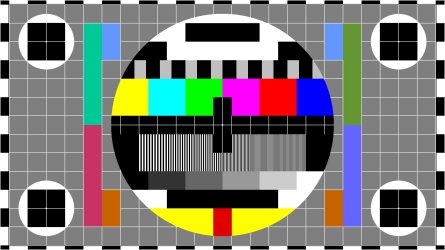
Assuming you have a FULL HD 1920 this image set as your wallpaper set to do not scale will allow you to fine tune things ... Circles should be round and all edges should be visible - I can create a version to match whatever your actual resolution turns out to be, but I need the information from you ;)

Test Chart -1920x1080.jpg
 
Last edited:

My Computers My Computers

System One System Two

  • Computer type
    PC/Desktop
    Computer Manufacturer/Model Number
    ChillBlast - Custom to my design
    OS
    Windows 11 Pro x64 [Latest Release and Release Preview]
    CPU
    Ryzen 9 5950X, 3.8 - 5.2 MHz
    Motherboard
    Asus Prime X570-Pro
    Memory
    64GB [2 x 32GB] DDR4 3200MHz
    Graphics Card(s)
    4GB NVIDIA GEFORCE GTX 1650 Ti
    Sound Card
    On-board SPDIF to 5.1 System + HDMI [5.1 system]
    Monitor(s) Displays
    32" UHD 32 Bit HDR Monitor + 43" UHD 4K 32Bit HDR TV
    Screen Resolution
    2 x 3840 x 2160 @60Hz
    Hard Drives
    1TB M2 SSD OS, 500GB Fast Access SSD, 2 x 8TB Data + Various Externals from 1TB to 4TB, 10TB NAS
    PSU
    NZXT C750 80 PLUS Gold 750W Modular PSU
    Case
    Workstation Case [Matt Black]
    Cooling
    NZXT Kraken X63 280mm CPU Cooler +2x Quiet Case fans
    Keyboard
    Logitech Wireless MX Keys & K400 + others
    Mouse
    Logitech Wireless MX Master 3S
    Internet Speed
    920 MB Down 50 MB Up
    Antivirus
    BitDefender Total Security Pro
    Browser
    Chrome (always run latest Non-Beta)
    Other Info
    Also run ...
    Laptop - Quad 8GB - Windows 10 Pro x64
    Nexus 7 Android tablet x2
    Samsung 10.2" tablet
    Blackview TAB 8 4G Android Tablet c/w Keyboard
    Wacom Intuos Pro Medium Pen Pad
    Wacom Intuos Pro Small Pen Pad
    Wacom Expresskeys Remote
    Loopdeck+ Graphics Controller
    Shuttle Pro v2 Control
  • Computer type
    Laptop
    System Manufacturer/Model Number
    Dell XPS 17 10750H
    OS
    Windows 11 Pro x64 Latest RP
    CPU
    Intel I7 10750H 5.0GHz
    Motherboard
    Dell XPS
    Memory
    32GB [2x16GB] DDR4 2933 MHz
    Graphics Card(s)
    nVidia GTX1650Ti 4 GB GDDR6
    Sound Card
    Stock [Realtek] 4 Speaker
    Monitor(s) Displays
    17" IPS UHD+ Infinity Edge Touchscreen
    Screen Resolution
    3840 x 2400
    Hard Drives
    2TB M2 NVMe, 4TB External + various 500GB & 1TB External NVMe (also have access to spinner HDD from
    PSU
    Stock
    Case
    Stock XPS Aluminium & Carbon Fibre
    Cooling
    Stock - Active Fan Control
    Keyboard
    Backlit + Various Logitech
    Mouse
    Stock Track Pad + Logitech MX Trackball
    Internet Speed
    72 MB Down 18MB Up
    Browser
    Chrome
    Other Info
    Also run ...
    Laptop - Quad 8GB - Windows 10 Pro x64
    Nexus 7 Android tablet x2
    10.2" tablet
    Sony Z3 Android Smartphone
    Wacom Intuos Pro Medium Pen Pad
    Wacom Intuos Pro Small Pen Pad
    Wacom Expresskeys Remote
    Loopdeck+ Graphics Controller
    Shuttle Pro v2 Control Pad
    10TB NAS
Do you have your PC monitor connected at the same time? That can also cause issues if the graphics card is not powerful enough to run 2 displays. Plug the HDMI in to TV turn on TV, turn on PC. See what happens. The TV should tell the PC what it is capable of and the PC should sort out and display the correct resolution. You may need to reboot again if it tells you too
 

My Computer My Computer

Computer type
PC/Desktop
Computer Manufacturer/Model Number
Bluethunder II
OS
Windows 7 x64 Ultimate and numerous virtual machines
CPU
AMD FX-8350 Vishera 32nm Technology @ 4.2 GHz default
Motherboard
ASUSTeK COMPUTER INC. SABERTOOTH 990FX R2.0 (Socket 942)
Memory
G Skill 32.0GB Dual-Channel DDR3 @ 1204MHz (11-13-13-31)
Graphics Card(s)
EVGA GeForce GTX 960 4GB Super SC ACX 2.0+ with Back Plate
Sound Card
Creative X-Fi Titanium HD Audiophile PCIe
Monitor(s) Displays
LG L227WTG x 3
Screen Resolution
1680 x 1050 16:10
Hard Drives
238GB Samsung850 PRO SATA Disk Device (SSD)
1863GB Seagate ST2000DM 001-1CH164 (SATA)
1397GB Seagate ST1500DL 003-9VT16L(SATA)
466GB Western Digital WDC WD50 03AZEX-00K1GA0 (SATA) x 2
932GB Seagate ST310005 28AS SATA Disk Device (SATA)
PSU
Enermax Revolution87+ 1000 Watts Gold Certified Power Supply
Case
Rocketfish Full Tower
Cooling
Cooler Master Hyper 212 EVO Push Pull 120mm Fans
Keyboard
Logitech K740
Mouse
Logitech G100S Laser LED + Logitech Gamepad F310
Internet Speed
500 mbs down and 30mbs up
Antivirus
Malwarebytes Pro & Avast and MSE on certain Virtual Machines
Browser
Firefox (Main) Chrome, Internet Explorer (Back Up)
Other Info
Logitech X 230 2.1 Stereo System and 5.1 Yamaha RX V2090
B&W DM6 Monitor Speakers + Center and Surround Speakers
Using Mouse Without Borders (Google it)
Back
Top