Solved System Reserved Drive ... How to get rid of it safely ???

kufr

New member
Member
Local time
1:30 AM
Messages
42
Hello all I am a noob at diskpart, rebuilding MBR and such other stuff.

I have read the forums but I find the other guides a bit technical can someone please help me out as I want to delete the system reserved drive being shown in the computer (see screenshot below)
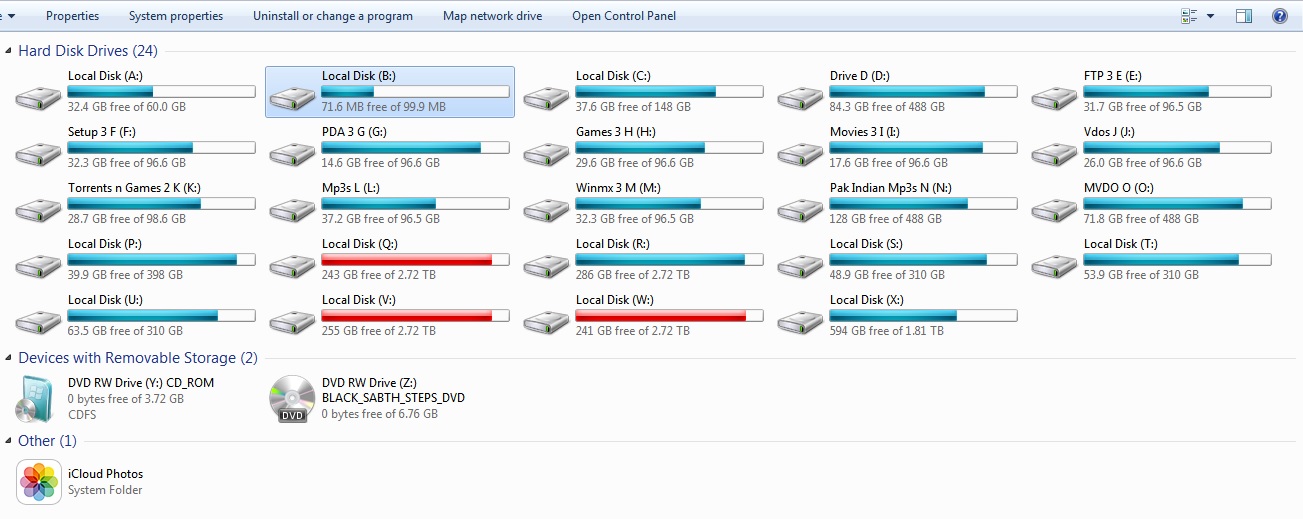
2M1wF8H.jpg


The second screenshot shows the contents of the drive
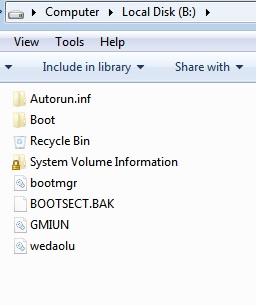
GdZ0Efy.jpg


Can someone please tell me how can I get rid of this safely without formatting my C drive as I want to hook u p a new drive and want to assign the Drive B to it ... please I would like someone to explain it to me in non technical language not do this to MBR or open Diskpart etc etc as the other thread say.

Thank you in advance.
 

My Computer My Computer

At a glance

Windows 7 Ultimate x64Intel(R) Xeon(R) E5450 (Quad Core @ 3.00GHZ)FB-DDR2 Total: 16 Gb1) ATI Radeon HD 2400 2) Nvidia GeForce GT 420
Computer type
PC/Desktop
Computer Manufacturer/Model Number
HP
OS
Windows 7 Ultimate x64
CPU
Intel(R) Xeon(R) E5450 (Quad Core @ 3.00GHZ)
Motherboard
HP - Chipset Intel 0A98h Model No 5400B (XU1 PROCESSOR)
Memory
FB-DDR2 Total: 16 Gb
Graphics Card(s)
1) ATI Radeon HD 2400 2) Nvidia GeForce GT 420
Sound Card
Creative X-Fi Audio Processor (WDM)
Monitor(s) Displays
Acer Monitor
Screen Resolution
1024x768@29Hz
Hard Drives
1 X 931GB SATA
1 X 148GB Device ATA
1 x 3725GB USB Device SATA
2 X 1863GB SATA
6 X 2794GB USB Device SATA
PSU
800 Watt Power Supply
Case
Hewlett-Packard HP XW8600 Workstation Case
Cooling
2 fans at back, 1 on top of memory, CPU & PSU Fans
Keyboard
Logitech Illuminated Keyboard K740
Mouse
Logitech Trackman Marble
Internet Speed
30 Mbps
Antivirus
Emsisoft Anti-Malware, Eset Smart Security, MSE
Browser
Chrome
Just remove the drive letter using Disk Management. System reserved partitions normally do not have a drive letter assigned.

Then you can use B for the new drive.
 

My Computer My Computer

At a glance

Windows 10 Pro x64, Windows 8.1 Pro x64, Wind...INTEL i9-7920X LGA 206664 GB (4 X 16 GB) G-Skill V Series DDR4 3200 ...EVGA GTX 1060 SC 3 GB
Computer type
PC/Desktop
Computer Manufacturer/Model Number
Custom Built
OS
Windows 10 Pro x64, Windows 8.1 Pro x64, Windows 7 Ultimate x64 SP1,
CPU
INTEL i9-7920X LGA 2066
Motherboard
Gigabyte X299-WU8 F3
Memory
64 GB (4 X 16 GB) G-Skill V Series DDR4 3200 Quad Channel
Graphics Card(s)
EVGA GTX 1060 SC 3 GB
Sound Card
Realtek Onboard ALC1220
Monitor(s) Displays
2 x Samsung S27E310
Screen Resolution
1920x1080
Hard Drives
Samsung 2 x 970 EVO Plus 500 GB NVMe
1 x 6TB WD 6003FZBX SATA
1 x 6TB WD 60EFRX SATA
12 x 3TB WD 30EFRX SATA
PSU
Seasonic X-1050
Case
Thermaltake Armor+
Cooling
Corsair H80i V2 Liquid AOI Cooler
Keyboard
Logitech G510s
Mouse
Logitech MX Master 2S
Internet Speed
200 Mb/s
Antivirus
ESET NOD32 13.1
Browser
EDGE (Dev, Canary, Beta), Chrome
Other Info
ASUS RT-AC68U router
Malwarebytes 4.0.4
Holy storage batman!
 

My Computer My Computer

At a glance

Dual Boot: Windows 8.1 & Server 2012r2 VMs: K...A10 7700 Kavari SteamRoller8GB DDR3 SDRAM PC3-85001024MB ATI AMD Radeon R7 Graphics
Computer type
PC/Desktop
Computer Manufacturer/Model Number
Custom
OS
Dual Boot: Windows 8.1 & Server 2012r2 VMs: Kali Linux, Backbox, Matriux, Windows 8.1
CPU
A10 7700 Kavari SteamRoller
Motherboard
ASUS A88XM-PLUS (FM2+ )
Memory
8GB DDR3 SDRAM PC3-8500
Graphics Card(s)
1024MB ATI AMD Radeon R7 Graphics
Sound Card
Realtek High Definition Audio
Monitor(s) Displays
Samsung
Hard Drives
SSD Crucial 120gb
WD VelociRaptor 1tb
PSU
Rosewill Gaming 650w
Case
Rosewill Galaxy 2
Internet Speed
55/12
Antivirus
Malwarebytes, MSE, SAS
Browser
FireFox, Chrome
Don`t mess with it, it`s only 100 MBs, remove the letter and leave it alone.

I`d concentrate on organizing your hard drives, what a mess, how do you know what`s what with all the unlabeled partitions/drives :confused:
 

My Computer My Computer

At a glance

Windows 10 Pro x64Intel Core i7 6700KGSkill TridentZ RGB 16GB 3600 16-16-16-36EVGA GTX 980 Ti SC x2
Computer type
PC/Desktop
Computer Manufacturer/Model Number
Skylake Special #666
OS
Windows 10 Pro x64
CPU
Intel Core i7 6700K
Motherboard
Asus Sabertooth Z170 Mark 1
Memory
GSkill TridentZ RGB 16GB 3600 16-16-16-36
Graphics Card(s)
EVGA GTX 980 Ti SC x2
Sound Card
Realtek High Definition
Monitor(s) Displays
AOC G2460PG
Screen Resolution
1920 x 1080 144Hz
Hard Drives
Samsung 860 Pro 256GB, Seagate Barracuda 4TB x2
PSU
EVGA 1000 P2, EVGA White Custom Braided Cables
Case
Corsair Vengeance C70 Gunmetal Black
Cooling
Corsair H100i v2, Corsair ML120 x2, Thermal Grizzly Kryonaut
Keyboard
Logitech G910 Orion Spectrum
Mouse
Logitech G700s
Internet Speed
Verizon Fios Quantum Gateway 75/75
Antivirus
Windows Defender, Malwarebytes Free 3.8.3
Browser
Chrome
Other Info
Corsair SP120 x4, LG Blu-ray Drive, Durabrand HT-395 100 Watt Dolby Digital Amp, Corsair H2100 Wireless 7.1 Headset
Just remove the drive letter using Disk Management. System reserved partitions normally do not have a drive letter assigned.

Then you can use B for the new drive.

Are you sure if I remove the Drive letter would my computer boot normally

I am just being careful and don't want to face any problem with my computer not booting as I removed the System reserved partition.
 

My Computer My Computer

At a glance

Windows 7 Ultimate x64Intel(R) Xeon(R) E5450 (Quad Core @ 3.00GHZ)FB-DDR2 Total: 16 Gb1) ATI Radeon HD 2400 2) Nvidia GeForce GT 420
Computer type
PC/Desktop
Computer Manufacturer/Model Number
HP
OS
Windows 7 Ultimate x64
CPU
Intel(R) Xeon(R) E5450 (Quad Core @ 3.00GHZ)
Motherboard
HP - Chipset Intel 0A98h Model No 5400B (XU1 PROCESSOR)
Memory
FB-DDR2 Total: 16 Gb
Graphics Card(s)
1) ATI Radeon HD 2400 2) Nvidia GeForce GT 420
Sound Card
Creative X-Fi Audio Processor (WDM)
Monitor(s) Displays
Acer Monitor
Screen Resolution
1024x768@29Hz
Hard Drives
1 X 931GB SATA
1 X 148GB Device ATA
1 x 3725GB USB Device SATA
2 X 1863GB SATA
6 X 2794GB USB Device SATA
PSU
800 Watt Power Supply
Case
Hewlett-Packard HP XW8600 Workstation Case
Cooling
2 fans at back, 1 on top of memory, CPU & PSU Fans
Keyboard
Logitech Illuminated Keyboard K740
Mouse
Logitech Trackman Marble
Internet Speed
30 Mbps
Antivirus
Emsisoft Anti-Malware, Eset Smart Security, MSE
Browser
Chrome
Don`t mess with it, it`s only 100 MBs, remove the letter and leave it alone.

I`d concentrate on organizing your hard drives, what a mess, how do you know what`s what with all the unlabeled partitions/drives :confused:

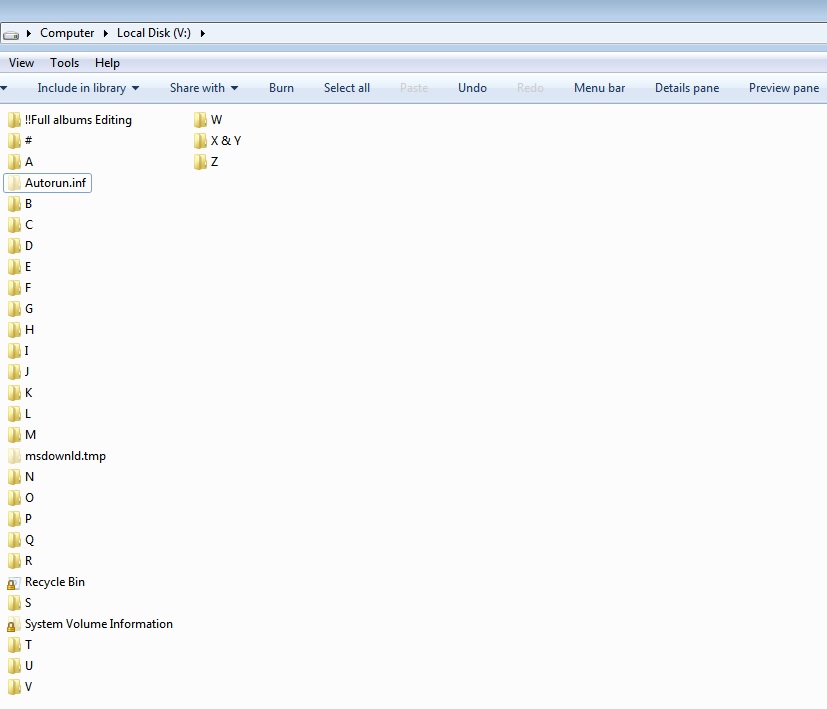
It a mess for you not for me I know whats what and where is what chk the screenshot below

FrhCHSD.jpg


This drive only has music all are properly labelled and in alphabetic order this is a 3 TB Drive BTW :p

Hence same is for the other drives that I have plus i use a kickass software called supercat for cataloguing all my drives and it finds the file i want in seconds
 

My Computer My Computer

At a glance

Windows 7 Ultimate x64Intel(R) Xeon(R) E5450 (Quad Core @ 3.00GHZ)FB-DDR2 Total: 16 Gb1) ATI Radeon HD 2400 2) Nvidia GeForce GT 420
Computer type
PC/Desktop
Computer Manufacturer/Model Number
HP
OS
Windows 7 Ultimate x64
CPU
Intel(R) Xeon(R) E5450 (Quad Core @ 3.00GHZ)
Motherboard
HP - Chipset Intel 0A98h Model No 5400B (XU1 PROCESSOR)
Memory
FB-DDR2 Total: 16 Gb
Graphics Card(s)
1) ATI Radeon HD 2400 2) Nvidia GeForce GT 420
Sound Card
Creative X-Fi Audio Processor (WDM)
Monitor(s) Displays
Acer Monitor
Screen Resolution
1024x768@29Hz
Hard Drives
1 X 931GB SATA
1 X 148GB Device ATA
1 x 3725GB USB Device SATA
2 X 1863GB SATA
6 X 2794GB USB Device SATA
PSU
800 Watt Power Supply
Case
Hewlett-Packard HP XW8600 Workstation Case
Cooling
2 fans at back, 1 on top of memory, CPU & PSU Fans
Keyboard
Logitech Illuminated Keyboard K740
Mouse
Logitech Trackman Marble
Internet Speed
30 Mbps
Antivirus
Emsisoft Anti-Malware, Eset Smart Security, MSE
Browser
Chrome
Drive letter or no drive letter does not make any difference regarding the boot capability. The MBR does not point to it by letter. It uses the physical address.

But you cannot remove the partition itself. Then it will not boot.
 

My Computer My Computer

At a glance

Vista, Windows7, Mint Mate, Zorin, Windows 8from 1.6GHz Duo to i7
Computer Manufacturer/Model Number
HP, Dell, Gateway, Toshiba - 4 laptops and 2 desktops
OS
Vista, Windows7, Mint Mate, Zorin, Windows 8
CPU
from 1.6GHz Duo to i7
Monitor(s) Displays
2x HP w2207
Hard Drives
5x HDD, 7x SSD, 12x Externals
Keyboard
with trackball - no mices
Mouse
Trackball mice
Internet Speed
DSL 6000
Just remove the drive letter using Disk Management. System reserved partitions normally do not have a drive letter assigned.

Then you can use B for the new drive.

Drive letter or no drive letter does not make any difference regarding the boot capability. The MBR does not point to it by letter. It uses the physical address.

But you cannot remove the partition itself. Then it will not boot.

I just wanted to be sure that I could remove the drive letter assignment without causing any problems.... I don't need to remove the partition... just the drive letter so will it be safe if i use Disk Management and only unassign the drive letter. The 100 Mb's can stay the way they are I will not touch em. :sarc:
 

My Computer My Computer

At a glance

Windows 7 Ultimate x64Intel(R) Xeon(R) E5450 (Quad Core @ 3.00GHZ)FB-DDR2 Total: 16 Gb1) ATI Radeon HD 2400 2) Nvidia GeForce GT 420
Computer type
PC/Desktop
Computer Manufacturer/Model Number
HP
OS
Windows 7 Ultimate x64
CPU
Intel(R) Xeon(R) E5450 (Quad Core @ 3.00GHZ)
Motherboard
HP - Chipset Intel 0A98h Model No 5400B (XU1 PROCESSOR)
Memory
FB-DDR2 Total: 16 Gb
Graphics Card(s)
1) ATI Radeon HD 2400 2) Nvidia GeForce GT 420
Sound Card
Creative X-Fi Audio Processor (WDM)
Monitor(s) Displays
Acer Monitor
Screen Resolution
1024x768@29Hz
Hard Drives
1 X 931GB SATA
1 X 148GB Device ATA
1 x 3725GB USB Device SATA
2 X 1863GB SATA
6 X 2794GB USB Device SATA
PSU
800 Watt Power Supply
Case
Hewlett-Packard HP XW8600 Workstation Case
Cooling
2 fans at back, 1 on top of memory, CPU & PSU Fans
Keyboard
Logitech Illuminated Keyboard K740
Mouse
Logitech Trackman Marble
Internet Speed
30 Mbps
Antivirus
Emsisoft Anti-Malware, Eset Smart Security, MSE
Browser
Chrome
Just remove the drive letter using Disk Management. System reserved partitions normally do not have a drive letter assigned.

Then you can use B for the new drive.

Drive letter or no drive letter does not make any difference regarding the boot capability. The MBR does not point to it by letter. It uses the physical address.

But you cannot remove the partition itself. Then it will not boot.

I just wanted to be sure that I could remove the drive letter assignment without causing any problems.... I don't need to remove the partition... just the drive letter so will it be safe if i use Disk Management and only unassign the drive letter. The 100 Mb's can stay the way they are I will not touch em. :sarc:

Yes it is okay to remove the drive letter.
 

My Computer My Computer

At a glance

Windows 10 Pro x64, Windows 8.1 Pro x64, Wind...INTEL i9-7920X LGA 206664 GB (4 X 16 GB) G-Skill V Series DDR4 3200 ...EVGA GTX 1060 SC 3 GB
Computer type
PC/Desktop
Computer Manufacturer/Model Number
Custom Built
OS
Windows 10 Pro x64, Windows 8.1 Pro x64, Windows 7 Ultimate x64 SP1,
CPU
INTEL i9-7920X LGA 2066
Motherboard
Gigabyte X299-WU8 F3
Memory
64 GB (4 X 16 GB) G-Skill V Series DDR4 3200 Quad Channel
Graphics Card(s)
EVGA GTX 1060 SC 3 GB
Sound Card
Realtek Onboard ALC1220
Monitor(s) Displays
2 x Samsung S27E310
Screen Resolution
1920x1080
Hard Drives
Samsung 2 x 970 EVO Plus 500 GB NVMe
1 x 6TB WD 6003FZBX SATA
1 x 6TB WD 60EFRX SATA
12 x 3TB WD 30EFRX SATA
PSU
Seasonic X-1050
Case
Thermaltake Armor+
Cooling
Corsair H80i V2 Liquid AOI Cooler
Keyboard
Logitech G510s
Mouse
Logitech MX Master 2S
Internet Speed
200 Mb/s
Antivirus
ESET NOD32 13.1
Browser
EDGE (Dev, Canary, Beta), Chrome
Other Info
ASUS RT-AC68U router
Malwarebytes 4.0.4
Just remove the drive letter using Disk Management. System reserved partitions normally do not have a drive letter assigned.

Then you can use B for the new drive.

Drive letter or no drive letter does not make any difference regarding the boot capability. The MBR does not point to it by letter. It uses the physical address.

But you cannot remove the partition itself. Then it will not boot.

I just wanted to be sure that I could remove the drive letter assignment without causing any problems.... I don't need to remove the partition... just the drive letter so will it be safe if i use Disk Management and only unassign the drive letter. The 100 Mb's can stay the way they are I will not touch em. :sarc:

Yes it is okay to remove the drive letter.

Thank you thank you thank you ... u r the best :D
 

My Computer My Computer

At a glance

Windows 7 Ultimate x64Intel(R) Xeon(R) E5450 (Quad Core @ 3.00GHZ)FB-DDR2 Total: 16 Gb1) ATI Radeon HD 2400 2) Nvidia GeForce GT 420
Computer type
PC/Desktop
Computer Manufacturer/Model Number
HP
OS
Windows 7 Ultimate x64
CPU
Intel(R) Xeon(R) E5450 (Quad Core @ 3.00GHZ)
Motherboard
HP - Chipset Intel 0A98h Model No 5400B (XU1 PROCESSOR)
Memory
FB-DDR2 Total: 16 Gb
Graphics Card(s)
1) ATI Radeon HD 2400 2) Nvidia GeForce GT 420
Sound Card
Creative X-Fi Audio Processor (WDM)
Monitor(s) Displays
Acer Monitor
Screen Resolution
1024x768@29Hz
Hard Drives
1 X 931GB SATA
1 X 148GB Device ATA
1 x 3725GB USB Device SATA
2 X 1863GB SATA
6 X 2794GB USB Device SATA
PSU
800 Watt Power Supply
Case
Hewlett-Packard HP XW8600 Workstation Case
Cooling
2 fans at back, 1 on top of memory, CPU & PSU Fans
Keyboard
Logitech Illuminated Keyboard K740
Mouse
Logitech Trackman Marble
Internet Speed
30 Mbps
Antivirus
Emsisoft Anti-Malware, Eset Smart Security, MSE
Browser
Chrome
Have I been unclear in post #8 ??
 

My Computer My Computer

At a glance

Vista, Windows7, Mint Mate, Zorin, Windows 8from 1.6GHz Duo to i7
Computer Manufacturer/Model Number
HP, Dell, Gateway, Toshiba - 4 laptops and 2 desktops
OS
Vista, Windows7, Mint Mate, Zorin, Windows 8
CPU
from 1.6GHz Duo to i7
Monitor(s) Displays
2x HP w2207
Hard Drives
5x HDD, 7x SSD, 12x Externals
Keyboard
with trackball - no mices
Mouse
Trackball mice
Internet Speed
DSL 6000
Drive letter or no drive letter does not make any difference regarding the boot capability. The MBR does not point to it by letter. It uses the physical address.

But you cannot remove the partition itself. Then it will not boot.

Yep this got me confused plus I wrote I do not know what MBR and physical address is at all sorry :o:o
 

My Computer My Computer

At a glance

Windows 7 Ultimate x64Intel(R) Xeon(R) E5450 (Quad Core @ 3.00GHZ)FB-DDR2 Total: 16 Gb1) ATI Radeon HD 2400 2) Nvidia GeForce GT 420
Computer type
PC/Desktop
Computer Manufacturer/Model Number
HP
OS
Windows 7 Ultimate x64
CPU
Intel(R) Xeon(R) E5450 (Quad Core @ 3.00GHZ)
Motherboard
HP - Chipset Intel 0A98h Model No 5400B (XU1 PROCESSOR)
Memory
FB-DDR2 Total: 16 Gb
Graphics Card(s)
1) ATI Radeon HD 2400 2) Nvidia GeForce GT 420
Sound Card
Creative X-Fi Audio Processor (WDM)
Monitor(s) Displays
Acer Monitor
Screen Resolution
1024x768@29Hz
Hard Drives
1 X 931GB SATA
1 X 148GB Device ATA
1 x 3725GB USB Device SATA
2 X 1863GB SATA
6 X 2794GB USB Device SATA
PSU
800 Watt Power Supply
Case
Hewlett-Packard HP XW8600 Workstation Case
Cooling
2 fans at back, 1 on top of memory, CPU & PSU Fans
Keyboard
Logitech Illuminated Keyboard K740
Mouse
Logitech Trackman Marble
Internet Speed
30 Mbps
Antivirus
Emsisoft Anti-Malware, Eset Smart Security, MSE
Browser
Chrome

My Computer My Computer

At a glance

Windows 10 Pro x64Intel Core i7 6700KGSkill TridentZ RGB 16GB 3600 16-16-16-36EVGA GTX 980 Ti SC x2
Computer type
PC/Desktop
Computer Manufacturer/Model Number
Skylake Special #666
OS
Windows 10 Pro x64
CPU
Intel Core i7 6700K
Motherboard
Asus Sabertooth Z170 Mark 1
Memory
GSkill TridentZ RGB 16GB 3600 16-16-16-36
Graphics Card(s)
EVGA GTX 980 Ti SC x2
Sound Card
Realtek High Definition
Monitor(s) Displays
AOC G2460PG
Screen Resolution
1920 x 1080 144Hz
Hard Drives
Samsung 860 Pro 256GB, Seagate Barracuda 4TB x2
PSU
EVGA 1000 P2, EVGA White Custom Braided Cables
Case
Corsair Vengeance C70 Gunmetal Black
Cooling
Corsair H100i v2, Corsair ML120 x2, Thermal Grizzly Kryonaut
Keyboard
Logitech G910 Orion Spectrum
Mouse
Logitech G700s
Internet Speed
Verizon Fios Quantum Gateway 75/75
Antivirus
Windows Defender, Malwarebytes Free 3.8.3
Browser
Chrome
Other Info
Corsair SP120 x4, LG Blu-ray Drive, Durabrand HT-395 100 Watt Dolby Digital Amp, Corsair H2100 Wireless 7.1 Headset
Drive letter or no drive letter does not make any difference regarding the boot capability. The MBR does not point to it by letter. It uses the physical address.

But you cannot remove the partition itself. Then it will not boot.

Yep this got me confused plus I wrote I do not know what MBR and physical address is at all sorry :o:o
MBR is Mater Boot Record which is located on the first 512 bytes of each disk

Physical Address is tha address in tracks and sectors as opposed to a logical address which is a partition letter - e.g. C:\
 

My Computer My Computer

At a glance

Vista, Windows7, Mint Mate, Zorin, Windows 8from 1.6GHz Duo to i7
Computer Manufacturer/Model Number
HP, Dell, Gateway, Toshiba - 4 laptops and 2 desktops
OS
Vista, Windows7, Mint Mate, Zorin, Windows 8
CPU
from 1.6GHz Duo to i7
Monitor(s) Displays
2x HP w2207
Hard Drives
5x HDD, 7x SSD, 12x Externals
Keyboard
with trackball - no mices
Mouse
Trackball mice
Internet Speed
DSL 6000
Back
Top